
ITIL CMDB Best Practices: How to Build a Configuration Database That Stays Accurate

ITIL recommends a CMDB. It doesn’t tell you how to keep it accurate.
That’s the gap where most ITIL CMDB implementations struggle. The framework gives you the rationale — configuration management as a practice, CI lifecycle stages, audit requirements — but the operational question of how to maintain accuracy under daily change pressure is left to you.
Most teams that start with ITIL guidance end up with a CMDB that’s accurate at go-live and degraded within six months. The practices that prevent that degradation are the ones this post focuses on.
If you’re new to CMDBs, start with our Complete CMDB Guide → before focusing on ITIL-specific practices.
This post covers the ITIL CMDB best practices that actually produce a configuration database teams trust — from CI scope decisions and data ownership to automated discovery as the foundation of sustained accuracy.
ITIL CMDB best practices that prevent six-month decay
ITIL explains why configuration management matters. These practices keep CI data usable after go-live, when change volume and multi-source drift usually break trust.
1. Freeze service-critical CI scope first
Start with CI classes required for top business services, not every device on the network. Expand only after owners and reconciliation work for the first set. Scope freezes stop the inventory project from outrunning governance.
2. Define CI classes and mandatory attributes
Each class needs a minimum attribute set: unique ID, owner, status, environment, and allowed relationship types. Incomplete class models produce records people cannot use in change tickets.
3. Assign data owners with a simple RACI
Name a configuration manager for the model, CI owners for class quality, and a discovery admin for scan exceptions. Without names, accuracy work has no queue owner.
4. Reconcile discovery on a fixed cadence
Treat discovery as the system that feeds CI truth, then match, update, and exception-queue drift on a published schedule. High-frequency discovery cycles beat one-time imports that age out in weeks.
5. Gate change close on CI updates
Require CI and relationship updates before change close when the change alters topology, software, or ownership. Change enablement without CI integrity recreates stale graphs.
6. Build minimum service models for top services
For each priority service, maintain an application-to-infrastructure path sufficient for impact analysis. Full-estate maps can wait; decision-grade maps for critical services cannot.
7. Audit drift with sampling and KPIs
Sample CI classes on a cadence. Track match rate, stale CI age, and orphan relationships. Audit findings feed the exception queue, not a once-a-year cleanup project.
TL;DR
- What is ITIL CMDB: A Configuration Management Database (CMDB) stores critical information about IT components (CIs) and their relationships. In ITIL, it’s essential for managing services and reducing risk.
- Why does it matter? A well-managed ITIL CMDB makes your IT work more smoothly. It improves change control, speeds up issue resolution, and also helps you pass audits.
- Common challenges: It’s easy to run into problems if you don’t plan well. These include bad data, unclear scope, system gaps, and delayed returns. But with good planning, IT automation, and strong governance, you can further avoid these issues.
- How accuracy holds: Scope service-critical CIs, assign owners, reconcile discovery on a fixed cadence, and gate change close on CI updates. Automation only helps after those controls exist.
What is an ITIL CMDB?
An ITIL CMDB is a central place to store information about your IT environment. It holds details about all your IT components, known as Configuration Items (CIs). These items include servers, software, databases, and network devices. The ITIL CMDB also shows how these items connect and work together.
You can think of it as both an inventory and a map. It tells you what you have and how it all links.
For example, it might show which app runs on which server. Or which devices are on a specific network? It also shows which systems rely on a certain application.
Importantly, the term “CMDB” comes from ITIL (Information Technology Infrastructure Library), a popular IT service management ITSM framework.
According to Axelos, this practice aims to “ensure that accurate and reliable information about the configuration of services, and the CIs that support them, is available when and where needed”.
In ITIL, a Configuration Item (CI) is anything you manage to deliver a service. This could be hardware, software, or cloud tools. It can even be documents or workflows. Basically, anything in your IT setup that you want to track.
Each CI has its own record in the ITIL CMDB. That record also includes its name, version, owner, and status. It also shows how that item connects to other parts of your system. Overall, these links give you a full view of your IT environment.
So, picture a CMDB as both a catalog and a blueprint. It lists every key item and shows how they fit together. With this clear view, IT managers, support teams, and auditors can all make better decisions.
Which organizations should pursue an ITIL CMDB?
You might think CMDBs are only for large enterprises. But that’s no longer the case. Many businesses today can benefit from implementing an ITIL CMDB. Let’s look at who should consider it.
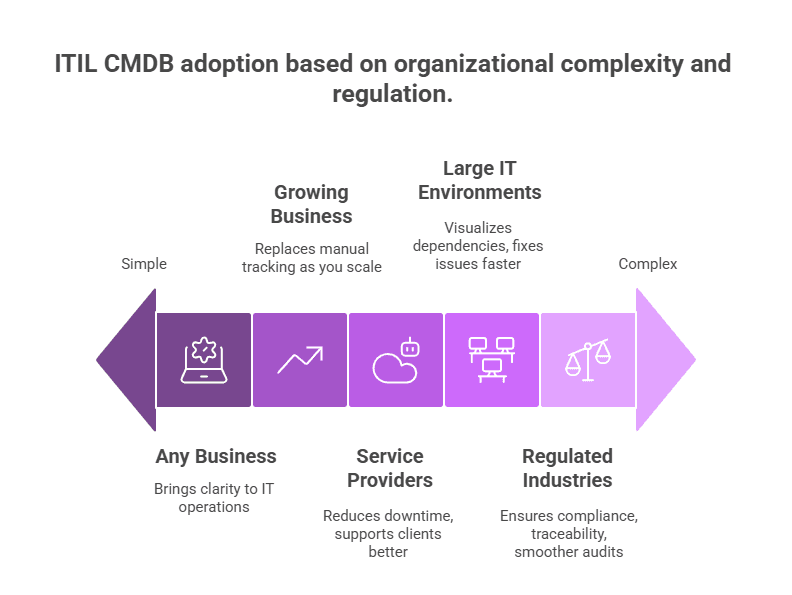
Organizations that should adopt an ITIL CMDB
- Highly regulated industries
If you’re in healthcare, finance, or government, an ITIL CMDB can help you stay compliant. It also gives you better control and traceability. That means fewer surprises during audits and smoother reporting. - Large and complex IT environments
Running a big IT setup? Then an ITIL CMDB can make your life easier. It shows how systems connect and depend on each other. This further helps you fix issues faster and plan changes better. - Growing mid-sized businesses
As your company grows, tracking IT manually gets tough. Spreadsheets and tribal knowledge won’t cut it anymore. ITIL CMDB also gives you a single source of truth. So, you stay organized while scaling up. - Service providers and tech companies
If you deliver digital services, downtime hurts your reputation. An ITIL CMDB helps reduce service interruptions. It also makes it easier to support your clients and manage your systems. - Any business relying on technology
Let’s be honest — most businesses depend on tech today. Whether you’re large or small, ITIL CMDB brings clarity and control. It further helps you stay on top of IT and support your core operations.
How an ITIL CMDB is designed
When you design an ITIL CMDB, you organize information about your IT assets in a clear and useful way. Each asset, known as a Configuration Item (CI), gets its own record. These records list important details and also show how each CI connects with others.
This setup helps you understand the links between systems, apps, and services. A strong CMDB design usually includes:
Configuration item records
Each Configuration Item (CI) has its own record. This is sometimes called a configuration record. It explains what the CI is and what it does.
For example, a server’s record might list the hostname, IP address, owner, and location. Now, depending on the type of CI, these details can change.
Hardware, software, network gear, documents, and even people can all be CIs. ITIL CMDB usually stores many types of CIs—like servers, routers, PCs, apps, databases, and even users or services. Each CI has a unique ID and gets sorted by type, so it’s easy to find.
Relationships between CIs
What sets an ITIL CMDB apart from a basic asset list is that it shows how CIs are connected. For example, one application might run on a server.
A database could support that app. These links matter. You might label them as “depends on,” “hosts,” or “connected to.”
So, if Application A uses Database B, which runs on Server C, the ITIL CMDB shows all those links. This also helps you understand how one change can affect everything else. That way, you can avoid surprises when systems go down or need updates.
Integration with other systems
A CMDB and ITIL rarely work alone. You usually connect it with other IT tools to keep data fresh and helpful. For example, automated discovery tools can update it with the latest details about your hardware and software. Network scanners may also add device information directly to the CMDB solutions.
When you log an incident in your service desk system, it can link to the affected item in the CMDB and ITIL. If someone approves a change, the system can further update the CMDB with the new setup. Many teams rely on automation here, since doing this manually can be slow and full of errors.
Federated data and multiple sources
In real life, your ITIL CMDB might not be one big database. Instead, it could be part of a larger setup called a Configuration Management System (CMS). This system pulls in data from different tools to give you one clear view.
For example, your asset tool may store finance info, while another tool tracks network details. The ITIL CMDB often links these tools or pulls in the data, so you don’t jump between systems. This way, you avoid data silos and see everything in one place.
User Interface and Reporting
CMDB solutions usually come with a simple dashboard or interface. You can use it to search and view data easily. For example, you might see a map of an application and its connected components. Or you may pull a report showing which servers a planned network outage could impact.
You can also filter views by environment or team. This also helps different users see only what matters to them. For instance, an application owner can view just their app and the connected items. You can also run reports or simulate the impact of changes with just a few clicks.
The main goal is to make the data easy to access and understand. This helps not just IT teams, but others who need clear insight into the tech environment.
Top 10 benefits of an ITIL CMDB solution
Let’s explore the top 10 benefits of using CMDB and ITIL.
1. Event and incident impact assessment
When an issue happens, the ITIL CMDB shows which services or items are affected. So, you can fix problems faster and with less guesswork.
2. Availability planning
You can use the ITIL CMDB to check service availability. That means you’re better prepared to keep critical services running when needed most.
3. Change impact analysis
Before making a change, the ITIL CMDB helps you see what might break. This further reduces risk and prevents surprises during change impact analysis.
4. Architecture definition
The CMDB shows how all your systems connect. With this view, it’s easier to plan and shape your IT setup.
5. Resource forecasting
Need to plan for future demands? The ITIL CMDB also helps you guess what resources you’ll need before it’s too late.
6. Asset relationship management
Every asset connects to another. The ITIL CMDB shows these links, so you can manage your assets better and avoid confusion.
7. Root cause analysis
When something goes wrong in root cause analysis, you can dig deeper using the CMDB solutions. It further helps you find and fix the real cause quickly.
8. Risk analysis
Thinking of changing something? The ITIL CMDB helps you spot related risks and prepare before they turn into issues.
9. Cost allocation
You can track where your money goes. The ITIL CMDB links assets to services, so your budgets make more sense.
10. Contract management
Managing vendors is easier when you know which contracts are tied to which systems. Overall, the ITIL CMDB helps keep track of and improve vendor relations.
Why companies choose to build an ITIL-aligned CMDB
Many companies decide to build their CMDB solutions using ITIL best practices. They call this an “ITIL-aligned CMDB.” You can manage configuration data without ITIL. But aligning with it offers many clear CMDB benefits.
Let’s look at why businesses often choose this path.
Meeting compliance and regulatory requirements
In some industries, following frameworks like ITIL isn’t optional—it’s expected. Financial services, healthcare, and government agencies often face strict rules from auditors and regulators. That’s where an ITIL-aligned CMDB can help.
It also gives you a clear and organized system to manage IT configuration data. This setup makes it easier to pass audits and meet legal requirements.
By aligning with ITIL, you show your organization follows trusted IT practices. This can further act like a quality stamp, proving your commitment to standards. It also lowers the risk of CMDB compliance problems. If your company follows ISO/IEC 20000 or other governance models, an ITIL CMDB helps meet key controls for configuration management strategy.
Strategic process standardization and service improvement
Many companies adopt an ITIL CMDB to improve how they manage IT services. ITIL offers tested steps for handling changes, incidents, and service asset & configuration management. By using this framework, you can create a shared way to handle data and business processes.
This makes it easier to track systems, understand dependencies, and plan changes. As a result, services run more smoothly and outages become less common. An ITIL CMDB also improves documentation. The system records each change and keeps the relationships updated.
When your team uses the same reference point—the CMDB capabilities—they work together better. Silos break down, and communication improves across departments. This kind of structure becomes even more valuable as your company grows.
Stronger audits and better risk management
When you align your CMDB and ITIL, you set the stage for better control and oversight. ITIL encourages clear roles, such as a configuration manager, and sets rules for keeping your data clean. It also includes regular audit processes to keep everything in check.
This setup helps you quickly audit your IT environment and spot risks before they become problems. For example, ITIL suggests frequent checks to make sure your ITIL CMDB reflects real-world setups. If something doesn’t match, you can subsequently fix it early and avoid risky decisions.
In regulated industries, this matters even more. Showing you follow ITIL practices proves you manage your IT assets properly. This not only helps with risk reduction but also makes compliance easier.
Also, having accurate data from your CMDB and ITIL makes risk planning much simpler. You can see which services will experience an impact if a server goes down. So, with ITIL, your data becomes a trusted base for continuity and risk planning.
Another soft reason- trust
There’s another good reason to follow ITIL—it builds trust. Across industries, people recognize ITIL as a solid framework for managing IT. So, using it shows your team works to high standards.
This can reassure your executives, partners, and even customers. Additionally, it’s a bit like showing you have an ISO certification. It proves you take your IT work seriously.
It also makes life easier when you bring in new team members or consultants. Since many people already know ITIL, they can start faster without a long learning curve.
Beyond the buzzwords: CMDB vs. CMDB in ITIL, SACM vs. ITAM, and CMS vs. CMDB solutions
CMDB vs. ITIL CMDB
| Feature | Generic CMDB | ITIL CMDB |
| Definition | Any configuration database used to store IT component data | A database built according to ITIL best practices |
| Scope | May include only basic asset details | Includes lifecycle tracking, CI relationships, and integration with ITIL processes |
| Process integration | Usually standalone or minimally linked to service processes | Integrated with change, incident, and problem management per the ITIL framework |
| Data structure | Often flat or loosely structured | Highly structured and governed by CI types, attributes, and defined relationship models |
| purpose | Inventory tracking | Service configuration and governance |
| Example use case | A homegrown spreadsheet tracking software | A CMDB that supports impact analysis and change control for enterprise systems |
SACM vs. ITAM
| Feature | SACM (Service Asset & Configuration Management) | ITAM (IT Asset Management) |
| Framework origin | Part of ITIL | Independent, complementary discipline often associated with ISO 19770 |
| Focus | Tracking CIs and their relationships within IT services | Tracking financial, contractual, and inventory details of IT assets |
| Lifecycle emphasis | Manages the full lifecycle of configuration items | Manages the procurement-to-retirement lifecycle of assets |
| Key attributes | Function, relationships, dependencies | Cost, ownership, software license, warranty |
| Primary users | IT Operations, Service Management | Finance, Procurement, and IT Asset teams |
CMS vs. CMDB
| Feature | CMDB (Configuration Management Database) | CMS (Configuration Management System) |
| Definition | A structured database that stores CIs and their relationships | A broader system of tools and databases used to manage and further present configuration information |
| Scope | Limited to one database or central repository | May include multiple CMDBs, discovery tools, documentation platforms, as well as dashboards |
| Data federation | Typically centralized | Often federated across sources like cloud inventory tools, network configs, and ITSM practices |
| Purpose | Serves as the core repository for IT configuration | Provides a holistic, integrated view across all configuration data sources |
| Use in ITIL | Core to the ITIL Service Configuration Management process | Serves as the implementation architecture supporting configuration management |
| Example | A database with all servers and applications | A platform combining CMDB + ServiceNow + Azure inventory + Git documentation |
ITIL CMDB excellence: Critical practices for IT optimization
Achieving IT optimization with a strong ITIL CMDB starts with the right habits. You need accurate data and active management to keep things running smoothly. When done right, these practices can further reduce errors, improve service, and help you make smarter decisions.
Let’s explore the key steps that will boost your CMDB solutions and bring better results to your IT operations.
1. Service configuration management
In ITIL 4, the service configuration management process helps you turn a large amount of data into useful information. It does this through the ITIL CMDB, which collects configuration data from different sources. Then, it organizes and shares this data in a way your IT team can easily use.
You’ll often hear the term Configuration Items (CIs). These include things like hardware, software, and network components. Each CI holds details such as how it connects to other items. The CMDB and ITIL capture these connections, helping you build service models that show how everything fits together.
To keep this system working well, your CI data must stay accurate and updated. That’s why regular checks and audits matter. Although automation helps keep things consistent, you still need to verify the results.
In many cases, automated checks compare your discovery data with what’s already in the CMDB and ITIL. This also helps spot missing items or unauthorized changes.
ITIL CMDB outlines the key uses of configuration information, such as:
- Impact analysis
- Risk analysis
- Cause and effect analysis
- Cost allocation
- Availability planning
Real-world example: How ITIL CMDB implementation reduces MTTR
Let’s take an example from the real world. When service dependency maps feed the incident process, responders spend less time guessing blast radius. MTTR improves when CI relationships are current at ticket open, not rebuilt during the outage.
2. ITIL change enablement
Change enablement in ITIL 4 helps you make changes to IT services without causing disruption. It makes sure every change meets your organization’s goals. This practice further adds the right checks and brings in the right people for approval.
The ITIL CMDB helps by providing key configuration data for:
- Impact analysis of changes on resources, services, and users
- Cause and effect analysis of failed or unplanned changes
- Risk analysis during change planning
- Cost allocation for changes
- Availability analysis during planned changes
Let’s say you plan to update a database. That update may affect many apps linked to it. With the CMDB solutions, you can spot these connections early and prepare better. This further helps reduce problems and avoid surprises.
Also, accurate data from the CMDB and ITIL supports smoother changes. It keeps things on track and limits risks. Other practices, like IT risk management and deployment, also get better with support from the CMDB.
3. IT asset management
In ITIL v3, IT asset and configuration management were grouped together. But ITIL 4 treats them as separate practices. IT asset management (ITAM) focuses on the full asset lifecycle.
It also ensures all asset data stays accurate and complete. You can think of it as the foundation for making better IT decisions.
The ITIL CMDB builds on ITAM by tracking asset status and how assets connect to each other. You can use it to manage IT service tasks. It also helps track assets for financial reporting. Because of its discovery features, the CMDB becomes your single source of truth.
Let’s say you plan to retire an old IT asset. With the ITIL CMDB, you can clearly see its impact. It shows how that asset links to services and other devices. You also get reliable data to decide whether to reuse or dispose of it.
That supports both license management and sustainability goals.
Accurate tracking also helps with IT budgeting. The ITIL CMDB supports better planning by giving you reliable asset data. As a result, your financial reports become more trustworthy.
4. Problem management
The goal of IT problem management in ITIL 4 is to find and understand issues that lead to incidents. To do this well, you need accurate data. That’s where the ITIL CMDB helps. It gives you detailed information about your IT environment.
During problem identification, you rely on the ITIL CMDB to track affected components. Both reactive and proactive problem management use it to identify the involved items. This makes it easier to see patterns and spot recurring issues.
When moving to problem control, the CMDB helps you dig deeper. It shows how different CMDB components connect. So, if a server patch fails, you can see how it affects apps and services right away.
In error control, the focus is on fixing known issues. This could mean replacing bad hardware or applying a new patch. The CMDB often shows you exactly which components the fix will affect.
By using the ITIL CMDB, you stay ahead of problems. You can also respond faster and keep your IT services running smoothly.
5. Infrastructure and platform management
You need the right IT setup to support your current and future needs. That’s where this ITIL 4 practice comes in. Most businesses now use more than one cloud provider. So, having clear visibility into your infrastructure matters more than ever.
The ITIL CMDB makes this easier. It helps you find both physical and virtual systems across on-prem and cloud environments. It also records key details and how different parts connect. Subsequently, these links support the full lifecycle of your IT infrastructure.
Availability management depends on the ITIL CMDB to study how resources are affected. It helps plan for steady service. Other ITIL 4 practices, like capacity management, also use the CMDB. Together, they help you manage your infrastructure smoothly.
Common pitfalls and challenges in ITIL CMDB implementation
Many CMDB programs stall before teams trust the data in change and incident work. The failure pattern is familiar across industries.
- Data quality issues: Outdated or incorrect data makes the ITIL CMDB unreliable. So, it’s important to use automation and set clear rules for managing data.
- Scope creep: Trying to track every single configuration item right away is overwhelming. Instead, start small. Then expand step by step as the system matures.
- Integration gaps: If your CMDB doesn’t integrate with tools like discovery systems or service desks, it creates silos. That means more manual work and duplicate efforts.
- Lack of stakeholder buy-in: Without buy-in from other teams, your ITIL CMDB might get ignored. Clear roles and shared goals can help fix that.
- Difficulty proving ROI: A CMDB takes time to show results. But when you set clear goals and highlight early wins, the value becomes easier to see.
Overcoming ITIL CMDB challenges with the right solution
Managing an ITIL CMDB can feel overwhelming, especially when data keeps changing and teams work in silos. But with the right approach—and the right tool—you can avoid common mistakes and see real value. That’s where Virima steps in.
Virima was built to solve these exact problems. It uses automated discovery to keep your data up to date. It also maps relationships visually, so you always understand how things connect. Since it works with both ITSM and ITAM, you don’t need to jump between tools.
Even better, Virima’s smart visuals make impact analysis easy. You won’t have to guess what depends on what. Plus, its flexible design lets you start small and scale as needed.
So, if you want to cut down the confusion and make the most of your ITIL CMDB, choose Virima. It’s a simple, scalable solution that works.
Virima CMDB: The single source of truth for effective management
Virima CMDB helps you boost IT efficiency by simplifying how you manage and understand your systems.
Understand complex CI relationships better with Virima Visual Impact Display
With Virima Visual Impact Display, you can easily see how your configuration items (CIs) connect and interact. These dynamic visuals let you filter and explore relationships, so you get a clearer picture. As a result, it becomes easier to manage even complex systems.
Also, Virima Discovery automates the process of finding CI dependencies. So, you can quickly spot how applications and services link together. This full view of your network helps you make better decisions and avoid disruptions.
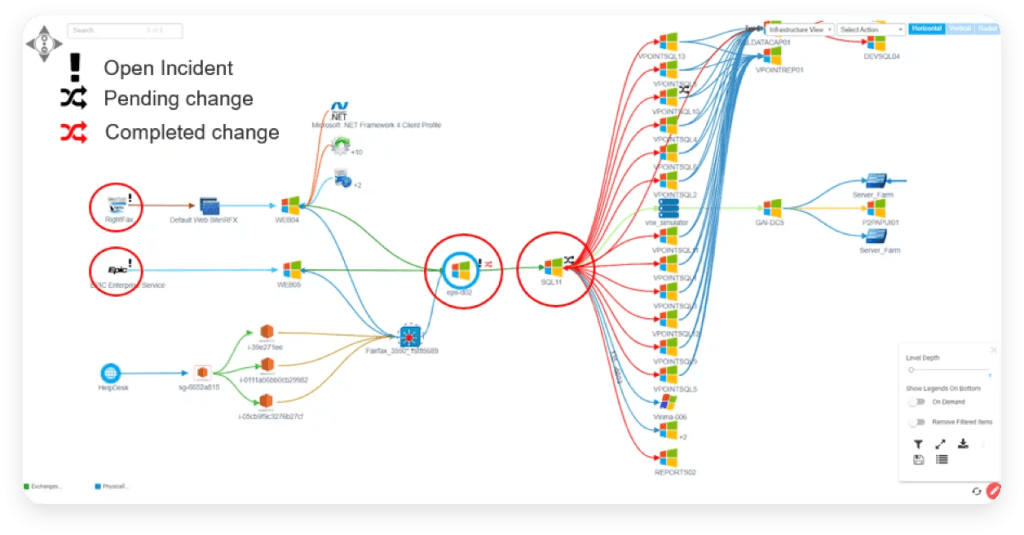
Gain a deeper insight into complex CI relationships with ViVID service maps.
Reduce manual intervention with ITIL CMDB automation
Virima CMDB helps you save time by reducing manual tasks. It uses smart CMDB automation to keep everything running smoothly. With Virima IT discovery, your CMDB stays accurate and up to date without much effort. You don’t have to worry about missing updates or outdated records.
Clear business rules handle updates and maintenance for your configuration items (CIs). Moreover, this keeps your ITIL CMDB reliable and useful every day. You can trust the system to manage changes without constant checks.
Also, two-way sync makes sure data flows easily between Virima CMDB and popular ITSM tools. This lowers the risk of mistakes and keeps data clean. You can even use ready-made templates to upload CSV data without hassle.
Relationship maps that support ITIL configuration decisions
Virima CMDB follows ITIL compliance standards and supports your SACM (Service Asset and Configuration Management) needs. It helps you track configuration items across various environments, including cloud, data centers, and IoT systems. So, whether your assets are physical or virtual, you always know what’s where.
What’s more, the audit history keeps a full record of every change made to your configuration items. This clear version tracking helps you stay transparent and accountable in your ITIL configuration management process.
Identify and prioritize vulnerabilities
Virima CMDB gives you free access to the NIST National Vulnerability Database (NVD). It also runs automatic vulnerability checks using real-time discovery data. As a result, you can quickly find known risks like CPEs and CVEs.
ViVID helps you fix issues faster by showing which assets matter most. So, you can focus on the most critical problems first and avoid delays. Clear reports also make it easier to share updates with stakeholders and auditors.
With all these tools, you can improve your decisions and protect your IT environment more effectively.
Consumable ITIL CMDB data for better decisions
With Virima’s CMDB, you get easy-to-understand dashboards that show clear ITIL visuals. These dashboards help your team make smarter, faster decisions. Also, ViVID Service Maps show how everything in your IT setup connects. This makes it easier to plan changes and fix issues quickly.
Since Virima pulls data from many sources, you always see the full picture. As a result, your team can plan better and work more efficiently. All of this supports ITIL’s goal of ongoing improvement in your IT services.
You may also like our case study on ITIL Configuration Management Software
How discovery-backed configuration data supports ITIL practices
ITIL defines the practice. Sustained CI accuracy is an operations problem.
→ See trusted runtime truth
→ Explore CMDB capabilities
FAQs on ITIL CMDB
1. Do I need a CMDB if I use ITAM?
Yes, you do. IT Asset Management (ITAM) tracks costs, ownership, and asset lifecycles. But a Configuration Management Database (CMDB) goes a step further. It maps how your devices, apps, and systems work together.
If you rely on ITIL processes like incident or change management, an ITIL CMDB gives you the full picture. It links assets to services, teams, and infrastructure, helping you stay in control.
2. How does a CMDB help in improving IT service delivery in an enterprise?
An ITIL CMDB improves service delivery by showing how everything connects. It gives IT teams a single, reliable source of data. With this, they can spot problems faster and plan changes with fewer risks.
That means less downtime and better service for users. Your team can often move faster and avoid guesswork.
3. How does a CMDB help in tracking hardware and assets?
An ITIL CMDB tracks hardware by storing key details like setup, location, and connections. It’s not just a list of devices. It shows how each item links to apps, users, and services.
Moreover, this helps your team fix problems quickly and plan upgrades better. You also get easier audits and clear reports.
4. How can a CMDB simplify complex management processes in hybrid environments?
Hybrid environments can get messy. You may have systems in the cloud and others on-site. An ITIL CMDB brings all of it together. It also maps dependencies and keeps records current through scheduled discovery and reconciliation cycles
With this, your team can manage change, find problems, and solve issues faster—no matter where the system lives.
5. How do I maintain an accurate CMDB with limited resources?
Start small and smart. Focus on the most important items that affect service delivery. Use automation to collect and update data whenever you can. Connect your ITIL CMDB with tools you already use to avoid extra work.
Assign clear roles so someone is always responsible for keeping things updated. Also, try simple audits to spot any gaps and keep your data correct.





