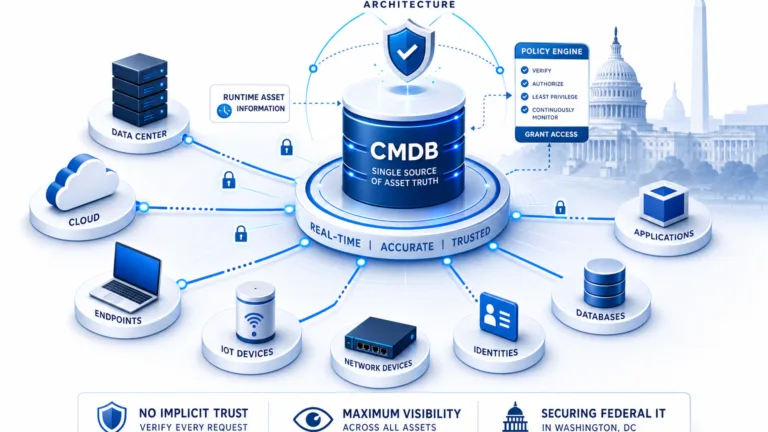
What Is a Configuration Item (CI)? Definition, Types, and CMDB Best Practices 2026

Configuration items (CIs) are the individual components your IT team tracks to keep services running: the servers, applications, databases, cloud instances, and the people and documentation behind them. Get them right and your team can trace a problem to its source in minutes. Get them wrong and every incident, change, and audit turns into guesswork.
The stakes are not abstract. IBM’s Cost of a Data Breach Report 2025 puts the global average cost of a breach at $4.44 million, and credits faster identification and containment as the main reason that figure fell for the first time in five years. You cannot contain what you cannot see, and accurate CI records are what let teams trace impact quickly when something breaks. A change review that runs impact analysis against a server decommissioned nine months ago, because the CI was never retired, is the most common way stale records turn a routine change into a major incident.
What is a configuration item (CI)?
A configuration item is any component tracked in a CMDB because it affects how an IT service runs, servers, applications, cloud instances, databases, documentation, and the people accountable for them. CIs are tracked not just for their existence but for their dependencies and operational impact when they fail or change.
This guide covers what configuration items are, the types you will manage, how they differ from IT assets, the lifecycle they move through, and the practices that keep them accurate enough to trust.
What are configuration items?
A configuration item is any component or resource in your IT environment that you need to control and manage to deliver a service. In ITIL terms, configuration items are tracked not just for their existence but for their relationships, dependencies, and effect on the services that rely on them.
A CI usually shares three traits: it exists in your environment, it changes over time, and it has an operational effect when it fails or is modified. Not everything in IT qualifies. That distinction matters, because it decides what belongs in your CMDB and what just adds noise.
What a CI record contains
Every CI record holds a standard set of fields that make it useful across incident, change, and audit workflows. At a minimum, a CI record should include a unique CI identifier, CI type and classification, current lifecycle status (active, in maintenance, retired), the owner or accountable team, relationship links to dependent CIs and services, and a change history log.
Optional fields add operational depth: hardware specs or software version, last discovery date, open incident count, pending change records, and known vulnerability flags. The right field set depends on the CI type. A server CI needs host and OS detail that a documentation CI does not. Agree on a standard schema per CI class before populating records at scale, or normalization problems compound over time.
Stored in a configuration management database (CMDB), CI records let teams see how services are built, weigh the effect of a change before they make it, and resolve incidents faster.
The types of configuration items
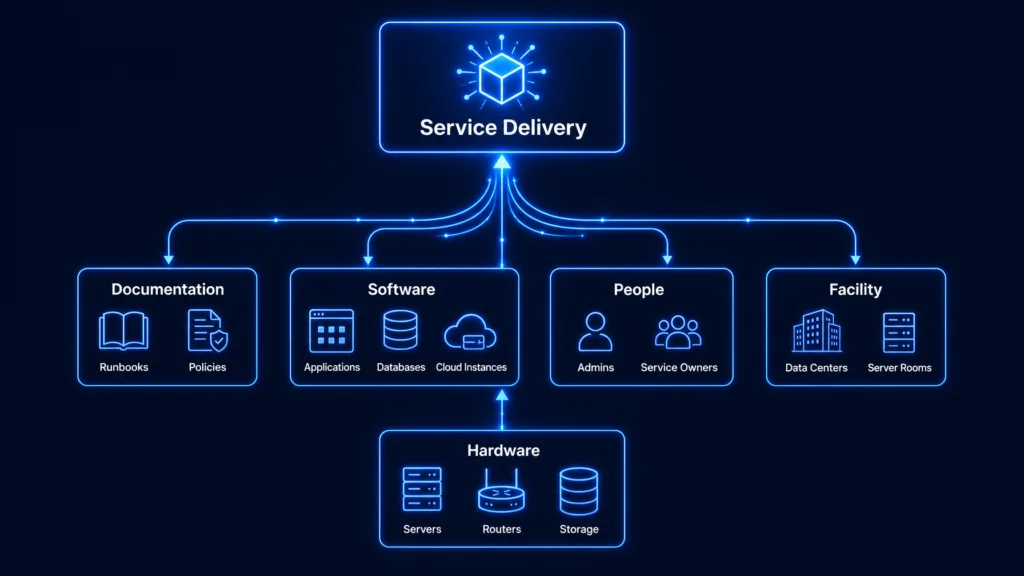
Configuration items fall into a few clear categories. Grouping them this way gives you a structured view of your environment, which makes dependencies and service impact far easier to manage.
| CI Type | Examples | Why It Matters |
|---|---|---|
| Hardware | Servers, laptops, routers, storage arrays, network switches | The physical layer services run on; failure propagates to everything above it |
| Software | Applications, operating systems, databases, middleware, virtual machines, cloud instances | Tracks what runs where; critical for change impact and vulnerability assessment |
| Documentation | Runbooks, configuration diagrams, policies, process documents | Intangible but essential for troubleshooting, audits, and service continuity |
| People | System administrators, service owners, support team leads | Maps accountability to a service; answers “who owns this?” during an incident |
| Facility | Data centers, server rooms, disaster recovery sites | Anchors physical location context for hardware CIs and DR planning |
Configuration items vs IT assets
It is easy to confuse a CI with an IT asset, but they answer different questions. An IT asset is anything with financial value: something you bought or pay for, tracked for cost, contracts, and lifecycle value. A CI is about service delivery: it can be an asset, or something with no direct financial value (a database connection, a configuration file, a documented dependency) that still affects a service.
| Aspect | Configuration Item (CI) | IT Asset |
|---|---|---|
| Purpose | Service delivery and operational impact | Financial value and lifecycle management |
| Scope | Can include assets and non-asset items | Focuses on owned or purchased items |
| Tracks | Dependencies and service impact | Cost, contracts, and ownership |
| Examples | Servers, firewalls, configs, documentation | Laptops, software licenses, cloud spend |
Some items are both. A laptop can be an asset for finance and a CI because it supports a user or an application. Both records matter; they serve different purposes.
What is the difference between a configuration item and an IT asset?
An IT asset is tracked for financial value, cost, contracts, and ownership. A configuration item is tracked for operational impact, dependencies, change history, and service effect. Many items, like a server, are both. The distinction matters because CMDB and asset management answer different questions for different teams.
Why configuration items matter in day-to-day operations
CIs sit at the center of incident triage, root cause analysis, problem investigation, dependency analysis, and change impact analysis. When CI data is accurate, teams move faster and with more confidence. When it is not, they fall back on spreadsheets, screenshots, and tribal knowledge.
In ITIL terms, the process that governs all of this is Service Asset and Configuration Management (SACM). SACM defines how CI records are created, verified, updated, and retired, and it sets the accountability structure (who owns CI accuracy, who audits it, and at what cadence). When teams skip SACM governance, CI discipline depends on individual effort instead of repeatable process, and data quality decays as team composition changes.
Analyst research consistently shows that CMDBs with poor data quality go underused in incident and change processes. If teams stop trusting the data, they stop using it. That is why defining and managing CIs well through a disciplined configuration management practice is foundational rather than optional.
The configuration item lifecycle
Unlike assets, which follow a financial lifecycle, CIs follow an operational one. Most move through a handful of stages:
- Identify: the CI is discovered or added, classified, and given a unique record.
- Deploy: it goes live and starts supporting one or more services.
- Operate: it runs in production, with incidents and changes recorded against it.
- Change: it is patched, upgraded, or reconfigured, and its record is updated.
- Retire: it is decommissioned and removed so it stops showing up as a live dependency.
When lifecycle states are unclear, CI data goes stale fast. A server decommissioned months ago still shows as active. A change review runs impact analysis against components that no longer exist. Tracking each CI from creation to retirement is what prevents that drift and keeps audit preparation manageable.
What are the stages of a configuration item lifecycle?
A CI moves through five stages: Identify (discovered and classified), Deploy (placed in production), Operate (incidents and changes recorded against it), Change (record updated after modifications), and Retire (decommissioned and removed). Tracking each stage prevents stale records from creating false impact analysis during change reviews.
How configuration items connect
If CIs are the building blocks, relationships and dependencies are what give the CMDB its value. An application runs on a server. A database supports that application. A business service depends on all of them. Model those links based on how failures actually propagate, not just how systems are wired together.
Missing or incorrect relationships are one of the most common reasons a CMDB fails during a change or incident review. When a switch goes down at 2 a.m., the team needs to know immediately which services sit downstream. If that relationship data is not there, they are guessing.
ViVID™ Service Mapping builds dynamic dependency maps and overlays operational context (open incidents, pending changes, and known vulnerabilities) directly on the map. When an incident fires, the team sees the affected CI and everything upstream and downstream of it, instead of a static diagram.
CI accuracy: the line between a CMDB team’s trust and one they abandon
Most CMDBs do not fail at launch. They fail around month six, when the records drift out of step with reality. The usual causes are familiar: duplicate CIs created under slightly different names, stale records for things that no longer exist, misclassified CI types, and missing relationships that turn impact analysis into guesswork.
Accuracy is what separates a CMDB people rely on from one they quietly abandon, and the source of your CI data is what drives accuracy. Records typed in by hand start decaying the moment they are saved. Records built from discovery stay closer to reality because they refresh as the environment changes.
What causes CMDB configuration item data to become inaccurate?
Three patterns account for most CMDB data decay: duplicate CI records created from uncoordinated sources, stale records for decommissioned items never retired, and missing relationship data that breaks impact analysis. All three trace back to weak ownership and over-reliance on manual data entry.
This is where a discovery-driven approach matters. Virima builds CI records from IT discovery across your on-prem and cloud environment (AWS and Azure included), then keeps them current with recurring scheduled scans rather than one-time imports. Instead of scanning everything indiscriminately, Virima uses CMDB health scoring to track accuracy, completeness, and staleness across CI records, and runs scheduled discovery scans to keep them current before a stale record sends a person (or an AI agent) toward a bad decision. The result is a CMDB whose records you can defend on a sales call, in a change review, or in an audit.
How Virima keeps configuration items accurate
For teams standardizing on a CMDB, keeping CI data accurate is the difference between a database that drives decisions and one that gathers dust. Virima connects to your environment and populates CI records through discovery across hybrid infrastructure. As assets appear, change, or retire, Virima updates the matching CI records, following your CI class standards and normalization rules so discovered data improves quality instead of adding duplicates.
Virima also fits the tools you already run, with bidirectional sync to popular ITSM platforms including ServiceNow, Ivanti, Halo, Jira Service Management, and Xurrent. You keep your existing service desk; Virima keeps the CI data underneath it accurate, mapped, and ready for configuration management.
See how Virima delivers trusted runtime truth across your CI records and dependency maps. Explore Trusted Runtime Truth →
Best practices for managing configuration items
- Decide what to track. Focus on the systems and services that carry operational risk, not every minor component.
- Standardize CI data. Agree on naming, type, owner, and relationship fields so data from different sources lands consistently.
- Use a CI lifecycle. Add new CIs, update them after changes, and retire the ones that are gone.
- Build records from discovery. Discovery-driven records reduce manual error and stay closer to reality than hand entry.
- Map relationships. Prioritize relationship depth over raw CI count; that is what powers impact analysis.
- Assign ownership. Name a configuration manager and service owners so accuracy has an accountable home.
- Audit on a cadence. Lightweight weekly and monthly reviews beat occasional large cleanups. For a deeper checklist, see how to keep an ITIL CMDB accurate.
Turn your CMDB into a system your team actually trusts
Your CMDB is only as useful as the records inside it are accurate. Get the definitions, types, and relationships right, keep the records current with discovery, and the CMDB stops being a stale inventory and starts driving faster incidents, safer changes, and cleaner audits.
Instead of scanning everything indiscriminately, Virima uses CMDB health scoring to track accuracy, completeness, and staleness across CI records, and runs scheduled discovery scans to keep them current before a stale record sends a person (or an AI agent) toward a bad decision.Instead of scanning everything indiscriminately, Virima uses CMDB health scoring to track accuracy, completeness, and staleness across CI records, and runs scheduled discovery scans to keep them current before a stale record sends a person (or an AI agent) toward a bad decision.
Accurate CI records also matter for AI agents operating in IT environments. An AI agent executing a change, running a diagnostic, or generating an incident response relies on CI data the same way a human engineer does. If the record is stale, the agent acts on bad context. A CMDB maintained through high-frequency discovery cycles gives AI agents the same trusted runtime truth that teams need to move faster and act safely.
If your CI data has drifted, the fastest way to see the gap is to look at it on a live map.
See discovery-driven CI records and live dependency maps on your own environment. Schedule a Virima demo →
Frequently Asked Questions
What is a configuration item in simple terms?
It is any component you need to track and manage to deliver an IT service: hardware, software, cloud resources, documentation, or the people tied to a service. If it can change and its failure would affect a service, it usually belongs in the CMDB.
How is a configuration item different from an IT asset?
An asset is tracked for financial value (cost, contracts, ownership). A CI is tracked for operational impact (dependencies, changes, outages). Many items are both, but they answer different questions.
How often should CI data be updated?
As close to the pace of change as you can manage. Recurring scheduled discovery keeps infrastructure and cloud records current, with manual updates reserved for components discovery cannot reach.
What causes CMDB data to become inaccurate?
Three patterns account for most of it: duplicate records from uncoordinated sources, stale records that are never retired, and missing relationships. All three trace back to weak ownership and too much reliance on manual entry.
How does Virima keep configuration item data accurate across hybrid environments?
Virima populates CI records through discovery across on-prem and cloud infrastructure (including AWS and Azure) and updates them automatically as assets appear, change, or retire. CMDB health scoring lets Virima track accuracy, completeness, and staleness so teams and AI agents always act on current data.