
The CMDB capabilities your ITSM team can’t operate without

The systems we build to simplify operations often need simplifying themselves. Tasks once tracked with pen and paper now depend on connected systems to run, manage, and secure.
IT teams have built complex infrastructures that keep modern organizations running. As these environments grow, though, the tools and processes that manage them fall behind. That gap is where a Configuration Management Database (CMDB) earns its place. It gives IT teams the visibility they need to deliver services without guesswork.
This post covers the CMDB capabilities that matter most for IT service delivery, and how to tell whether your CMDB is pulling its weight.
What CMDB capabilities matter most for ITSM?
Must-have CMDB capabilities include multi-source CI discovery on a reliable schedule, multi-tier dependency mapping, bi-directional ITSM integration, access and audit controls, configuration drift and data-quality governance, and change risk or blast-radius insight. Together they keep configuration records complete, fresh, and usable in incident, problem, and change workflows.
What does a CMDB include?
A CMDB stores data about your organisation’s networks, hardware, and software. It maps how configuration items (CIs) relate to and depend on each other, including people, teams, and vendors. CIs are the assets and resources needed to deliver IT services.
The goal of a CMDB is to give clear visibility into critical CIs. That visibility feeds directly into change management, impact analysis, incident resolution, and compliance. It also supports better decision-making across ITSM workflows.
Why strong CMDB capabilities change how IT ops teams work
A CMDB delivers trusted runtime truth for IT operations, giving enterprise teams the visibility, dependency mapping, and control needed to meet strict SLAs and reduce firefighting. Here are the key CMDB features and benefits in practice:
- Visibility and control. A CMDB shows every IT asset (hardware, software, networks) and the relationships between them. When a server goes down at 2 AM, your team knows which services are affected without guessing. That clarity cuts downtime because you’re not wasting the first 30 minutes of an incident figuring out what’s connected to what.
- Faster incident and change management. During incidents, a CMDB points teams to affected assets immediately. During changes, it shows what’s at risk before you push the update, not after.
- Data-driven decisions. CMDB data reveals patterns: recurring failures tied to specific CIs, underused assets consuming budget, bottlenecks slowing service delivery. Those patterns fuel smarter resource planning.
- Less manual work. Automation within a CMDB cuts repetitive tasks like manual CI updates, asset reconciliation, and configuration audits. That frees your team for work that actually requires judgment.
- Cost management and compliance. Tracking licenses, costs, and asset lifecycles in one place simplifies budgeting and keeps you audit-ready.
- ITIL alignment. A strong CMDB supports ITIL processes (incident, problem, change, and configuration management) so IT services stay aligned with business goals.
- Scalability. As your IT environment grows, a well-built CMDB scales with it, handling more CIs, more relationships, and more complexity without breaking.
Must-have CMDB capabilities for ITSM success
Here are the CMDB capabilities your team needs to actually drive ITSM results:
1. Centralized data storage
A CMDB is the single place where all CIs live: hardware, software, and the connections between them. When every team pulls from the same source, you stop wasting time reconciling spreadsheets and conflicting data.
2. Full IT visibility
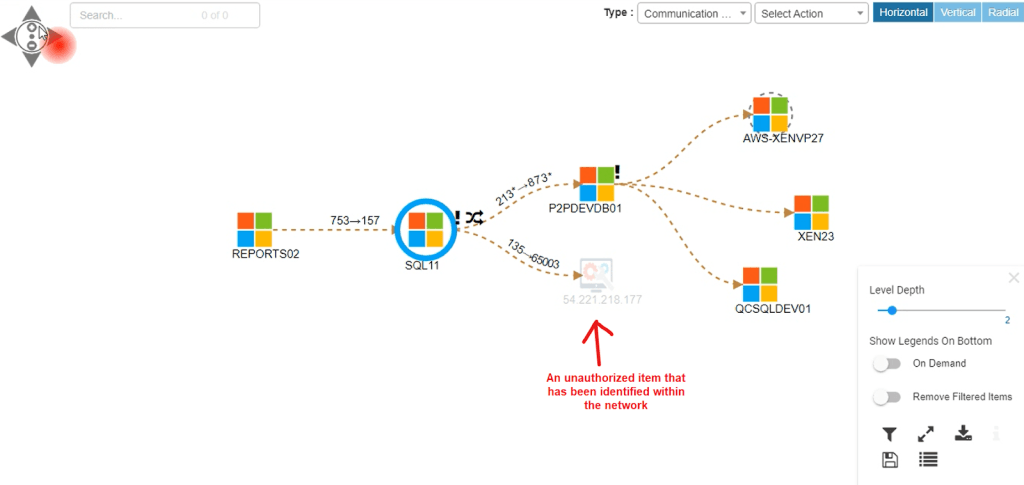
The CMDB maps relationships and dependencies between IT assets, showing how systems connect and interact. That visibility lets ops teams manage infrastructure proactively, catching issues before they cascade into outages.
3. Automated CI discovery
An effective CMDB uses IT discovery tools to identify and record CIs on a recurring schedule. This keeps the database accurate without relying on manual updates that go stale within weeks. Automation also means faster response times when incidents hit, because your data is already current.
4. Integration with ITSM processes
The CMDB connects directly to ITSM workflows: incident, change, and problem management. These CMDB integrations give teams current CI data when they need it most, during triage, during change approval, and during root cause analysis.
5. Risk and change management
A CMDB shows how proposed changes ripple through your infrastructure. Before approving a change, your change advisory board can see exactly which services depend on the affected CIs, making change windows less risky and more predictable.
6. Support for incident resolution
During incidents, the CMDB provides historical data on CIs: past incidents, configuration changes, known issues. That context speeds up and root cause analysis so your team isn’t starting from scratch every time something breaks.
7. Security and compliance
Strong access controls within the CMDB protect sensitive configuration data. Role-based permissions ensure only authorized users can modify CIs, which matters for compliance audits and reduces the risk of unauthorized changes.
8. Reporting and audit readiness
A modern CMDB includes reporting features that track CI status, configuration drift, and data completeness. Regular audits using these reports keep your CMDB trustworthy, because a CMDB with stale data is worse than no CMDB at all.
9. Governance and data quality controls
Clear governance policies define who can update CIs, what approval workflows apply, and how data quality is measured. Without governance, your CMDB becomes a dumping ground. With it, the data stays reliable enough to base decisions on.
10. Scalable and flexible
A scalable CMDB grows with your IT environment. It handles new asset types, new cloud platforms, and new integrations without requiring a rebuild. Flexibility also means it works alongside your existing tools rather than replacing them.
11. Hybrid multi-source discovery and reconciliation
Most ITSM teams no longer run a single data center with one scanner. Configuration truth has to span on-premises hardware, virtualization, and cloud accounts without turning the CMDB into three conflicting inventories of the same CI. A capable CMDB accepts discovery and inventory feeds from multiple methods, then reconciles identity, attributes, and relationships so one authoritative record survives.
Reconciliation rules matter as much as scan coverage. Teams need clear source priority for fields such as owner, environment, and criticality, plus a way to flag conflicts instead of silently overwriting good data. When hybrid multi-source reconciliation works, change and incident processes stop arguing about which spreadsheet is current and start using one operational record.
Treat this capability as a first-class requirement in RFPs and architecture reviews. Ask how duplicate CIs are merged, how cloud-native resources are modeled, and how often reconciliation runs relative to discovery schedules. Weak answers here usually show up later as drift, audit findings, and ticket context that does not match the live estate.
CMDB Capability Evaluation Matrix for IT Ops Leads
| Capability Tier | Basic CMDB Requirement | Advanced / Runtime Truth Benchmark | Operational Impact |
|---|---|---|---|
| Discovery | Manual entry or static CSV imports | Scheduled agentless + agent discovery across hybrid/cloud | Eliminates configuration drift and stale CI records |
| Dependency Mapping | Flat single-level asset listing | Multi-tier dependency visualization with change and alert overlays | Instant blast radius analysis during major incidents |
| ITSM Integration | One-way manual asset push | Bi-directional sync with ServiceNow, Jira SM, Ivanti, HaloITSM | Automates CI context enrichment directly inside ticket workflows |
| Security Context | None (isolated asset list) | Vulnerability context overlays (e.g. NIST NVD signals on applicable Windows Server CIs), weighted by service criticality | Prioritizes vulnerability patching based on business service criticality |
| Data quality | Ad hoc spot checks | Scored completeness, accuracy, freshness, and relationship integrity on a defined cadence | Stops change and incident work from running on silent bad data |
| Multi-source reconciliation | Single import path; duplicates unresolved | Identity match across discovery and system-of-record feeds with field-level source priority | One CI record instead of three conflicting views of the same asset |
How do you measure CMDB data quality?
CMDB data quality comes down to four metrics: completeness (are all CIs recorded?), accuracy (do CI attributes match reality?), freshness (when was the data last validated?), and relationship integrity (are dependencies mapped correctly?).
How do you measure CMDB data quality?
CMDB data quality is measured on four metrics: completeness of active CIs, accuracy of attributes against the live estate, freshness since the last discovery or validation cycle, and relationship integrity for upstream and downstream dependencies. Weak scores on any metric mean incident and change decisions rest on incomplete or stale records.
If your CMDB scores poorly on any of these, your incident and change processes are running on bad data, and your team is making decisions blind. Tools that provide high attribute authority (deep, verified CI attributes from multiple discovery methods) score better across all four metrics because the source data is richer and more trustworthy.
What’s the difference between a CMDB and an asset management tool?
A CMDB and an IT Asset Management (ITAM) tool overlap but serve different purposes. ITAM tracks the lifecycle of assets: procurement, deployment, maintenance, and retirement. It answers “what do we own, and what did we pay for it?” A CMDB tracks configuration items and their relationships. It answers “what do we have, how is it configured, and what depends on what?”
What is the difference between a CMDB and an ITAM tool?
IT Asset Management tracks financial, contractual, and physical lifecycles from procurement to disposal. A CMDB tracks configuration state, relationships, and service dependencies used in incident, problem, and change work. Mature programs connect both so ownership and cost decisions include service impact, not inventory lists alone.
In practice, you need both. ITAM tells you a server’s warranty expires next quarter. The CMDB tells you that the server runs a database that three business-critical applications depend on. The best setups connect ITAM and CMDB data so lifecycle decisions account for service impact, which is why programs that connect ITAM and CMDB under shared identifiers reduce the gap between asset tracking and operational awareness.
What are the signs your CMDB is failing?
If your incident team spends the first 15 minutes of every outage asking “what’s connected to this?”, your CMDB isn’t doing its job. Other warning signs: change requests getting approved without accurate impact analysis, audit findings citing incomplete asset records, and discovery data that hasn’t been refreshed in months.
A failing CMDB doesn’t announce itself. It just makes every ITSM process slower, riskier, and more manual than it needs to be. The fix usually starts with automated discovery and stricter governance, not a full rip-and-replace.
Minimum operating model for CMDB capabilities that stay trustworthy
Capabilities on a checklist do not survive contact with real operations unless ownership and cadence are explicit. Name a configuration owner for each major CI class, define which source is authoritative for each critical attribute, and publish a simple RACI for creates, updates, and retires. Without that, discovery fills the database and humans still trust chat threads more than the CMDB.
Set a quality review cadence that matches change velocity in your estate. Many teams review completeness, accuracy, freshness, and relationship integrity monthly for business-critical services and quarterly for lower tiers. Tie exceptions to change and incident process: if a priority service cannot show a current map and owner, treat that as a process defect, not a documentation nice-to-have.
Keep the scope honest. Track CIs that matter for service delivery and regulated change first, then expand. A smaller CMDB with reliable relationships outperforms a giant inventory nobody uses. Revisit scope when you add cloud accounts, new ITSM workflows, or major application portfolios so capability investment tracks real blast-radius risk.
How Virima’s CMDB delivers value for ITSM teams
The capabilities above only matter if discovery stays current, relationships stay mapped, and ITSM tickets receive usable CI context. Virima is built so those pieces work together: scheduled agentless and agent discovery across on-prem and hybrid estates (AWS and Azure among them), dependency and service maps once service definitions are provided, interactive impact views for incident and change review, and bi-directional sync with common ITSM platforms so CI context shows up inside the ticket workflow.
Multi-source reconciliation joins what scans can see with ownership and criticality context so records hold up in audits and major incidents. For teams that also run ITOM-style monitoring handoffs, the same discovery and CMDB layer can feed operational workflows without standing up a separate inventory stack for every process.
If you want the capability set above grounded in discovery-sourced runtime truth, start with how Trusted Runtime Truth is defined for ITSM and agentic workflows, then request a demo when you are ready to validate fit in your environment.
A strong CMDB is the foundation your ITSM processes depend on
A CMDB only delivers value when discovery, dependency mapping, governance, and ITSM integration stay accurate enough for real incident and change work. Use the capability list and evaluation matrix above to score your current stack before you buy more modules or restart a failed rebuild.
Request a demo when you want to validate discovery-sourced CMDB capabilities against your hybrid estate and ITSM workflows.
CMDB capabilities FAQ
Which CMDB capabilities should we prioritize first?
Start with scheduled multi-source discovery, dependency mapping for critical services, and ITSM ticket context. Those three reduce blind incident triage and uninformed change approval faster than reporting polish alone. Add governance and quality scoring so the new data does not decay within a quarter.
How often should discovery refresh CMDB data?
Match discovery cadence to how fast your estate changes. Many hybrid environments need recurring discovery cycles measured in hours or days for volatile tiers, with explicit validation after major changes. What matters is that freshness is defined, measured, and trusted in the change process.
Can a CMDB succeed without automated discovery?
Manual or CSV-fed CMDBs can start small, but they usually fail under hybrid scale because records go stale between imports. Automated discovery does not remove the need for governance, yet it is the practical way to keep completeness and freshness high enough for ITSM use.
How does Virima map to these CMDB capabilities?
Virima combines scheduled discovery, dependency and service mapping, impact visualization, and ITSM integration so configuration context is available inside operational workflows. The goal is trusted, discovery-sourced runtime truth for ITSM teams evaluating the capability set in this guide, not a static spreadsheet inventory.





