IT Discovery Across Your Full Estate — Agent-Based, Agentless, and API-Based
Trusted runtime truth starts with authoritative discovery. Change approvals, incident response, vulnerability prioritization, AI agent actions — all depend on knowing what actually exists in your environment. Stale inventories and outdated configuration records don’t just create noise. They create risk.
Virima IT Discovery addresses that risk through multi-source, multi-protocol scanning across on-premises, cloud, and virtual environments. Every discovered CI carries an attribute-level source record and a last-verified timestamp. When two discovery sources disagree, Virima resolves the conflict by rule — not by whoever scanned last. The result: a verified, explainable CMDB record your ITSM workflows can trust.
Simplify IT Asset and Service Management with Virima
Simplify IT Asset Management
Top Two Ways Virima Visual Impact Display Benefits IT Operations
Vivid for IT Ops
Top Two Ways Virima Visual Impact Display Benefits Cybersecurity
Vivid for Cybersecurity
What Virima Discovers
Virima IT Discovery covers your full IT environment —
physical, virtual, on-premises, cloud, and edge.


Physical servers and workstations
(on-premises, edge, data center)


Virtual machines and containers
(VMware vCenter, Hyper-V, Kubernetes)


Cloud resources
(AWS EC2, Azure VMs, VPCs, App Gateways, and more)


Network devices
(routers, switches, firewalls, load balancers)


Storage systems
(SANs, NAS, storage controllers)


Databases and applications
(installed software, running services, open ports)


Software and license footprint
(installed versions, usage data, license counts)


OT and IoT devices
(where network-accessible and protocol-compatible)
For each discovered asset, Virima captures hundreds of hardware and software attributes: OS version, patch level, CPU, RAM, and disk configuration, serial numbers, network adapters, running processes, installed certificates, and the relationships between assets. Every captured attribute carries a source tag and a timestamp — so you can trace exactly which discovery method produced it and when it was last verified.
Three Discovery Methods
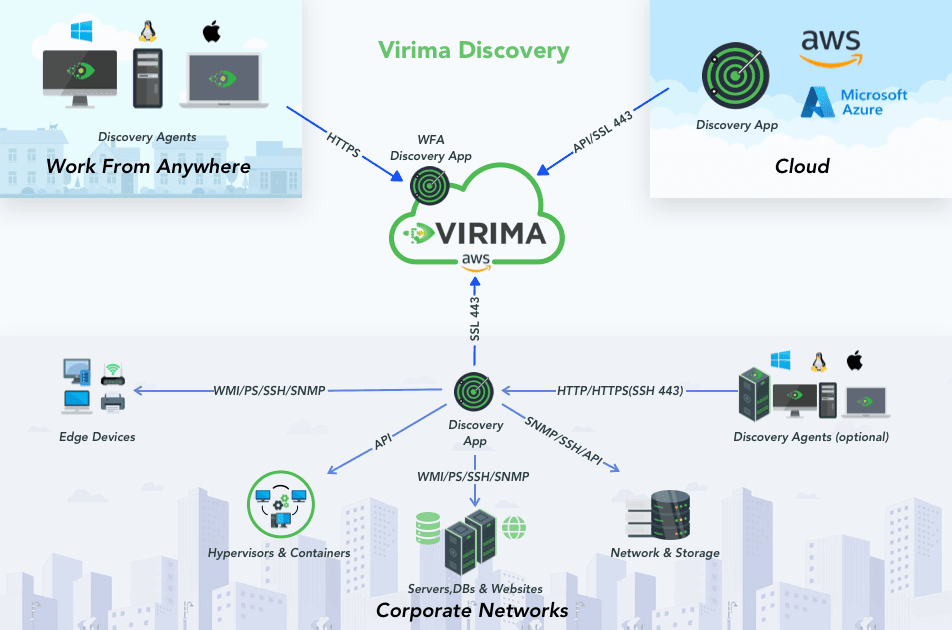
Complete coverage requires all three


Agent-Based Discovery
A lightweight agent on Windows, macOS, and Linux captures configuration state, software usage, and hardware attributes regardless of network connectivity. Designed for remote workers, roaming endpoints, and environments where agentless credential access is restricted.


Agentless Discovery
Over 140 extendable probes across SNMP, WMI, SSH, and other protocols scan devices without installing anything on endpoints. Covers on-premises servers, network devices, storage, and hypervisors. Credentials stay on-premises — encrypted on the Discovery App server, never transmitted externally.


API-Based Discovery
Direct API connectors pull asset and configuration data from cloud platforms (AWS, Azure), virtualization platforms (VMware vCenter, Hyper-V), and third-party event management tools. CI records carry the same source tracking and conflict resolution rules as everything else in the CMDB.

conflicts resolved by authority rule, every CI traceable to its source.
See your environment like never before
Act faster, reduce risk, and operate with confidence.
Multi-Source Reconciliation
Conflict resolution by rule, not by timestamp
Most tools overwrite on last scan. Virima decides by authority — not recency.
Virima
Authority rules determine which source wins for each attribute
Every CI traces back to its source, protocol, and timestamp
Conflicts resolved by rule — never silently overwritten
Explainable: you can see why any attribute has its current value
Other tools


Last scan wins — regardless of which source is more authoritative


No audit trail: no way to know where a CI value came from


Conflicting sources produce unpredictable records over time


Stale or wrong values accumulate with no way to surface them
The result: a record you can explain on a sales call, defend in an audit, and rely on during an incident.
CMDB Auto-Population
Your CMDB, kept current by discovery
Every discovered CI flows automatically into the Virima CMDB — source tag, last-verified timestamp, and ownership data
included. No manual entry. No import scripts.
- •Hardware and software inventory
- •Relationship data — what connects to what, and how
- • Change history — which attributes changed between scans
- • Ownership assignments based on discovery scope
- • Vulnerability flags from NIST NVD — included at no charge, prioritized by asset criticality via ViVID™
Security and Compliance
Security built into every discovery run


Credentials stay local
The Discovery App runs on a server you own. Credentials are encrypted on-device and never transmitted externally.


Encrypted in transit
All discovery data transmits to Virima’s platform over encrypted channels. Nothing moves in plaintext.


RBAC + full audit trail
Role-based access controls who can configure and run discovery. Every CI change is logged.
Downstream Integrations
One discovery run, every platform updated
Discovery data feeds the Virima platform and syncs to every connected ITSM tool — automatically, on every scan.


Virima Discovery


Virima
CMDB


ViVID™ Service maps


Virima
ITAM
ITSM INTEGRATIONS
All integrations included in both plans. See full pricing →
IT Discovery Best Practices
Step 1 — Find the right IT discovery tool for your needs
Step 2 — Start simple, then expand coverage
Begin with the environments that are easiest to discover and provide the fastest value — typically on-network Windows servers and desktops. This creates a baseline for your IT estate. Then expand to Linux/Unix servers, hypervisors, network infrastructure, storage, edge components, remote sites, cloud environments, and work-from-home endpoints. Discovery maturity happens over time. Align stakeholders early so asset visibility becomes a shared operational discipline, not a one-time project.
Step 3 — Scan often and vary the timing
For best results, run frequent and time-varied scans. Varying the schedules helps you discover devices that only appear at certain times — without disrupting operations. Run scans on a recurring cadence (not one-time sweeps), vary scan windows to improve coverage, and use discovery data to support workflows. To maximize value, your discovery tool must integrate with IT Asset Management (ITAM), IT Service Management (ITSM), IT Operations Management (ITOM), security tools, and finance/ERP systems.
Step 4 — Address exceptions and close the gaps
Frequently Asked Questions
01. What is IT discovery?
02. What is the difference between agentless and agent-based IT discovery?
Agentless discovery scans devices remotely using network protocols such as SNMP, WMI, and SSH, without installing software on endpoints. It covers broad infrastructure quickly and is ideal for on-premises servers, network devices, storage, and hypervisors, but it requires network connectivity and admin credentials. Agent-based discovery installs a lightweight program on each endpoint that collects and reports configuration data, software usage, and hardware state, including when the device is off-network. Enterprise environments benefit from combining both: agentless for infrastructure breadth, and agents for endpoint depth and off-network coverage.
03. What protocols does agentless IT discovery use?
04. What is the difference between IT discovery and IT asset management (ITAM)?
05. How does IT discovery help with change management?
IT discovery supports change management by providing the configuration item (CI) records and relationship data that change-impact analysis depends on. Accurate change management requires knowing what exists, how it’s connected, and what will break if something changes. When a change request is submitted, teams can identify which assets are in scope, which dependent services and infrastructure are at risk, and who owns each affected component. Virima IT Discovery feeds discovered dependency data into ViVID™ Service Maps, giving change managers a visual view of every change’s potential blast radius.
06. What is multi-source conflict resolution in CMDB discovery?
07. Does IT discovery include virtual machine and hypervisor discovery?
Yes. Virima IT Discovery covers virtual machines and container environments including VMware vCenter, Microsoft Hyper-V, Nutanix, and Kubernetes. VMware and Hyper-V are discovered via API connectors that pull VM configuration, hypervisor relationships, and resource data. Kubernetes discovery covers pods and namespaces, the non-ephemeral components suited for CMDB records. Each virtual asset carries the same source tracking and timestamp verification as physical assets.
08. Does Virima IT Discovery cover cloud resources like AWS and Azure?
09. How does IT discovery support vulnerability management?
Virima IT Discovery includes an integration with the NIST National Vulnerability Database (NVD) at no additional charge. Virima cross-references discovered asset data — OS version, patch level, installed software — against known CVEs (Common Vulnerabilities and Exposures) as it is collected. Identified vulnerabilities are flagged against relevant CI records and prioritized by asset criticality via ViVID™ Service Maps. Remediation effort can then be focused on vulnerabilities that affect services with the highest business impact.
10. How does Virima IT Discovery complement the Virima CMDB?
Virima IT Discovery is the data source for the Virima CMDB. Every CI discovered by Virima — with its source tag, last-verified timestamp, relationship data, and ownership information — flows directly into the CMDB without manual entry or import scripts. When discovery detects a configuration change on a previously recorded CI, the CMDB updates and logs the change in the CI’s change history. This creates a continuously refreshed CMDB that reflects the actual state of the environment.
11. How can IT discovery help optimize IT costs?
IT discovery surfaces several cost-optimization categories:
- Underused software licenses, identified via software metering data from agents;
- Shadow IT resources consuming budget without oversight;
- Cloud assets running without an active workload assignment; and
- Hardware nearing the end of its service life, which can be planned for replacement proactively.
Virima ITAM uses discovery data to support license reconciliation, lifecycle planning, and financial reporting across the discovered estate.
12. How do I choose an IT discovery tool for my infrastructure?
13. How is the Virima Discovery Agent installed?
The Virima Discovery Agent deploys directly from the Virima Discovery App to Windows, macOS, and Linux endpoints. For managed endpoint environments, the agent can also be distributed via software deployment tools such as Microsoft SCCM or Intune. Agent versions update automatically, so no manual maintenance is required on individual endpoints after initial deployment.
14. Does Virima IT Discovery work with ServiceNow?
15. Why does accurate IT discovery matter for AI-driven IT operations?
Testimonials
What our customers are saying


EMA Research
Finally, a CMDB that Delivers on its Promise
“We use VIRIMA as our CMDB software to gather information from all our network devices such as servers, desktops, and laptops. The Discovery part of the software is very intuitive and works perfectly. We use it to manage and track assets.”
Christopher Rodriguez
IT Asset Manager in Healthcare and Biotech
Visibility Auditors Trust
“Auditors demand clear evidence of data flow and system communications. With ViVID™, we have complete visibility into every connection, helping us strengthen business continuity, prioritize critical services, and deliver the transparency auditors value.”
Robert Hanson
IT Manager and Director
at a US-based Bank
Move faster. Act safely.
Virima IT Discovery delivers the verified, multi-source record that every team connected to the Virima platform
depends on — from change management to incident response to AI-driven automation.