
Discovery-Sourced CMDB: Live, Governed, and Built for Agentic IT
Most CMDBs start strong and degrade fast. Manual maintenance can’t keep pace with how quickly environments change — records fall behind, teams start compensating with their own spreadsheets, and change decisions get made on data that no longer reflects reality.
Virima solves this at the source. We populate your CMDB from multi-source discovery — every CI has a verified source, a freshness timestamp, and an ownership tag. The result is Trusted Runtime Truth: live, explainable, and governed. Designed under the ITIL® framework.
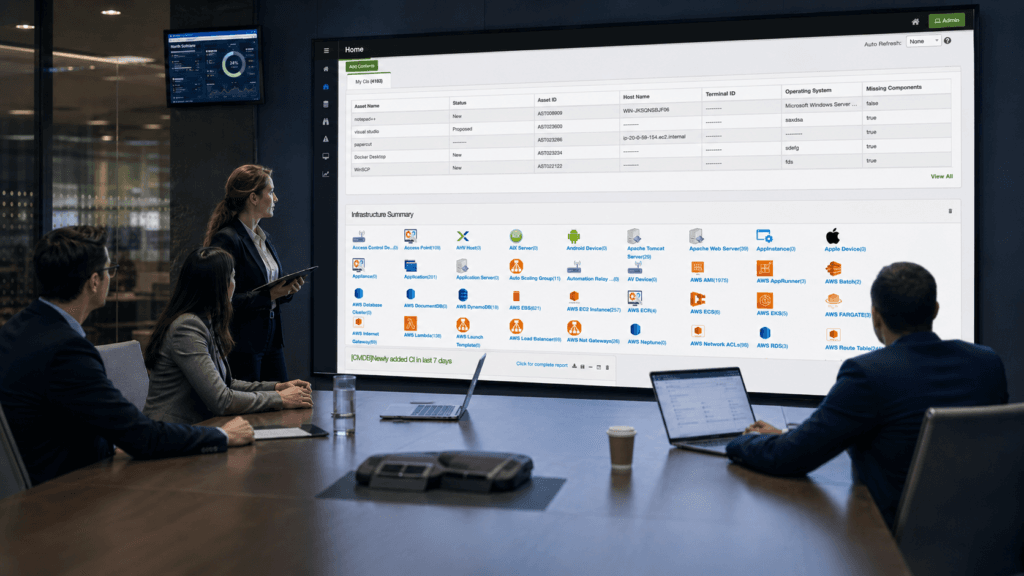
— CMDB Readiness for AI Agents
Four Questions That Must Be Answered
Before an AI agent acts on a CI — remediating an alert, executing a runbook, approving a change — the CMDB must answer four
questions with certainty. Virima’s Trusted Runtime Truth layer delivers all four.
01
What exists?
A complete, verified inventory of every CI in scope, so the agent knows what it is acting on is real and current.
02
How is it connected?
Service dependencies, infrastructure relationships, and blast radius context from ViVID™ service maps , so the agent knows what a given action will affect downstream.
03
What is governed?
Approved change boundaries, ownership assignments, SLA constraints, and audit records — so the agent knows what it can and cannot do.
04
Who owns it?
Team and individual ownership at the CI level, surfaced alongside every record so the agent can route approvals, notifications, and escalations correctly.
Virima delivers live, explainable, policy-aware context behind every CI — so agents act on verified state, and humans always have the
governed record.
— How it works
How the Virima CMDB Stays Accurate
01
High-frequency multi-source discovery
Agent-based, agentless, and API scanning runs on the cadence you configure, covering on-premises, cloud, and hybrid environments.
02
Multi-source reconciliation
When two discovery sources disagree on a CI attribute, Virima applies configured authority rules to resolve the conflict. The full reconciliation history is retained for audit.
03
CMDB auto-population
Every discovered CI flows into the CMDB with its verified discovery source, freshness timestamp, and relationship data attached. No manual entry required for discovery-reachable CIs.
04
Ownership assignment
CIs receive owner tags based on configured rules and data from connected ITSM platforms.
05
Health score computation
Virima evaluates CI-level data quality with each discovery cycle: completeness, freshness, and consistency — and surfaces health scores so teams see where data quality degrades.
06
Lifecycle tracking
CIs move through states from deployment to decommission. Decommissioned assets receive a flag rather than silent deletion, and their history stays available for audit.
This pipeline runs on high-frequency cycles — as your IT estate changes, the next scan captures it and the CMDB record updates. For a step-by-step
implementation guide, see our Build a CMDB use case.
Blast radius analysis: know what breaks before you change it.
- Change managers
- CAB reviewers
- AI agents
CMDB Health Scoring
CMDB quality degrades silently. An asset gets decommissioned but the record stays live. A server gets upgraded but no one updates the OS version. Without visibility into where data quality erodes, teams discover the problem at the worst possible moment — during an incident or a change approval where someone acts on a false record.
Virima surfaces CI-level health scores so teams see data quality degradation before it causes a failure — and act on it automatically, through rescans, human review flags, and blocking changes on low-confidence records. Each health score reflects:

Completeness
Are the key attributes for this CI type populated?

Freshness
When did discovery last verify this CI, and is that recency acceptable for its criticality tier?

Consistency
Does this CI’s data align across sources, or do unresolved conflicts remain?
— Virima · See what you're missing
See your environment
like never before.
— CI Lifecycle
CI Lifecycle Tracking

Active CIs
Currently in discovery scope, within their expected operational state.

Drifted CIs
CIs where recent discovery detected configuration changes that deviate from the last known state.

Aged CIs
CIs absent from recent discovery cycles, which may indicate decommission, network change, or a discovery coverage gap.

Decommissioned CIs
Assets flagged as decommissioned based on configured decommission rules; records are retained for audit, not deleted.
— Integrations
Bi-Directional Sync Across Your ITSM Stack
Cloud connectors: AWS and Azure connectors bring cloud assets into the same discovery pipeline and CMDB records. See the Integrations page for
the full connector list. All integrations included in both plans. See full pricing →
— CMDB best practices
CMDB Best Practices for Trusted Runtime Truth
The CMDBs that stay accurate treat it as an actively maintained operational record — not a static inventory. These six practices
separate high-performing programs from ones that stagnate.
STEP 01
Run multi-source IT discovery as the primary data feed.
Manual entry is the leading cause of CMDB degradation. Automated discovery from agents, agentless scanners, and network protocols fills gaps that no human process can sustain.
STEP 02
Apply attribute authority rules to resolve data conflicts before they enter the CMDB.
When discovery sources disagree — agent reports one OS version, network scan reports another — a clear authority hierarchy resolves the conflict without manual intervention. Virima applies configured authority rules to resolve the conflict and retains the full reconciliation history.
STEP 03
Keep your CMDB and ITSM platform in sync — bidirectionally.
CI data flows into ServiceNow, Ivanti, or Halo ITSM. Ticket, incident, and change data flows back to enrich the CMDB. The result is one governed layer of Trusted Runtime Truth that every action, human or agentic, runs on.
STEP 04
Use ownership and service context to route every action correctly.
Every CI needs a verified owner, an associated service, and a known blast radius. Without that context, incidents, changes, and AI agent actions all run on incomplete data.
STEP 05
Audit every CI change with a full trail.
Regulators and auditors expect a clear record of what changed, when, and why. Each CI carries a timestamped change log that remains available even after decommissioning.
STEP 06
Map each CI to its service context.
A CI record in isolation is an asset. A CI mapped to the services it supports is the foundation for service-aware operations, AI agent governance, and accurate blast-radius analysis.
Why Virima?
What does poor CMDB accuracy cost enterprises in practice?
According to the Flexera 2025 State of ITAM Report, 45% of organizations spent more than $1 million on software audit remediation over the past three years — with 23% spending more than $5 million. Configuration data gaps sit at the root of most audit exposure and failed change windows. A CMDB kept current by high-frequency discovery reduces that risk at the source. Flexera, 2025
How Virima’s CMDB Approach Differs
Most CMDB platforms rely on manual entry or single-source imports. Records go stale within weeks, and teams spend hours reconciling conflicting data before every audit or change window.
Virima populates the CMDB from multi-source discovery instead. Every CI carries a freshness timestamp, a verified source, and an ownership tag, so change managers and AI agents work from the same governed record.
This is the difference between a CMDB that requires constant babysitting and one that maintains itself. Teams get service dependency mapping (ViVID™), CI health scoring, and bi-directional ITSM sync in every plan, not as a paid add-on.
— Testimonials
What our customers are saying
It Just Works
“Virima’s integration with ServiceNow has allowed us to enhance and fully integrate our CMDB into all of our ITIL processes. The seamless integration gives us the ability to leverage the best of both Virima and ServiceNow.”

Keith Lee
VP Disaster Recovery and IT Risk · The Bancorp
Finally, a CMDB that Delivers on its Promise
“We use VIRIMA as our CMDB software to gather information from all our network devices such as servers, desktops, and laptops. The Discovery part of the software is very intuitive and works perfectly. We use it to manage and track assets.”

Christopher Rodriguez
IT Asset Manager · Healthcare and Biotech
Visibility Auditors Trust

Robert Hanson
IT Manager and Director · a US-based Bank
— Frequently asked questions
CMDB, answered.
A demo answers the rest in 20 minutes.
What is a CMDB?
What is a configuration item (CI)?
What is the purpose or objective of a CMDB?
How does a CMDB help with change management?
How does a CMDB work?
Setting up a CMDB generally follows these steps:
- Define the benefits you expect from a CMDB and source the right CMDB software for the job.
- Build a logical data model of the Service Asset and Configuration Management process, including relationships.
- Define configuration item (CI) types.
- Assign an owner to each CI type.
- Define attributes for each CI type.
- Identify sources of information for your CIs (discovery, import, manual entry).
- Map relationships between assets (hardware to software, system to system, system to business service).
- Focus on one CI type at a time — usually those that provide the most value and are easiest to capture, such as servers.
What is IT discovery and how does it help a CMDB?
My team spends too much time populating and reconciling CMDB data. How do I reduce that effort?
How difficult is it to connect external CMDBs and sync the data?
What independent security audits has Virima completed?
How does Virima keep the CMDB accurate?
What is the difference between a CMDB and IT asset management?
IT asset management (ITAM) tracks individual assets — hardware, software licenses, contracts, and financial data — through their lifecycle. A CMDB maps the relationships and dependencies between those assets and the business services they support. The CMDB answers impact questions: if this server changes, what breaks? Which teams are affected? Which service-level agreements (SLAs) are at risk? Virima combines both: the ITAM module tracks the full asset lifecycle, and the CMDB maps those assets into the dependency context that supports change management, incident response, and the trusted data foundation AI agents need to make sound decisions. Both share the same discovery-sourced data foundation.
— Get started
Move faster. Act safely.
live runtime truth they need to act with confidence.