A Guide to ITIL 4 Incident and Problem Management

Updated August 6, 2026
The email service is back in forty minutes. Users stop calling. The major-incident bridge closes. Three weeks later, the same mailbox cluster fails again after a routine patch window. No problem record was opened the first time, so the permanent fix never entered the change queue.
That loop is why IT leaders separate ITIL incident work from IT problem management. One restores service under the clock. The other removes the cause so the outage does not return.
This guide is for ITSM professionals and managers ready to cut downtime, reduce stress, and stop issues. You’ll get clear answers to questions like:
- “What’s the difference between an incident and a problem in ITIL 4?”
- “How do we move from constant firefighting to proactive prevention?”
Later sections cover the data and mapping inputs that make root-cause work practical once the process is clear.
What is IT problem management in ITIL 4?
IT problem management finds and removes the cause, or potential cause, of one or more incidents. Incident management restores service fast. Problem management records the underlying fault, investigates it, publishes a known error when needed, and drives a permanent fix so the same outage does not return.
Understanding ITIL problem vs incident
One of the biggest challenges in IT service management is telling the difference between an “incident” and a “problem.” Many IT teams have used these terms, problems and incidents, interchangeably, which often causes confusion.
Thankfully, ITIL 4 gives clear definitions that make it easier to understand the difference.
What is an incident in ITIL 4?
ITIL 4 defines an incident as an unplanned interruption—simply, an outage or disruption affecting users. In simple terms, it’s an outage or disruption that impacts users.
The main goal of the IT incident management process is to restore service operating conditions as quickly as possible.. This often means applying a quick fix or workaround to get things running again.
Example: If your company’s email server suddenly crashes, that downtime is an incident. Incident management focuses on quickly restoring email by rebooting servers or using backups to minimize user disruption.
What is a problem in ITIL 4?
ITIL 4 framework defines a problem as “the cause, or potential cause, of one or more incidents.” In layman’s terms, a problem is the root cause behind one or more service interruptions.
Problem management focuses on diagnosing and removing these root causes so incidents don’t happen again. While incident management is about quick relief, IT problem management is about long-term cures.
PeopleCert’s ITIL 4 Practitioner: Problem Management guidance frames the practice around preventing incidents and reducing impact through structured investigation across the service value chain.
Example: If an email server crashes from a software bug or configuration error, that flaw is the problem. Fixing it—by applying a patch or correcting the configuration—prevents future crashes. In ITIL, you’d record this issue as a problem and perform root cause analysis to eliminate it.
Why does the distinction matter? An incident is the effect—the visible outage—while a problem is the cause, such as the flaw behind that outage. Both need attention, but in different ways. If teams treat them the same, they may only focus on quick fixes without addressing root causes.
| Attribute | Incident | Problem |
|---|---|---|
| ITIL 4 Definition | Unplanned interruption to a service or reduction in quality | Cause, or potential cause, of one or more incidents |
| Primary Goal | Restore service as fast as possible | Eliminate root causes to prevent recurrence |
| Time Horizon | Immediate (minutes to hours) | Medium to long term (days to weeks) |
| Trigger | User report, monitoring alert, or automated detection | Recurring incidents, trend analysis, or proactive review |
| Output | Workaround or fix, incident record closed | Root cause analysis, known error record, permanent fix |
| Owner | Service desk/incident manager | Problem manager / IT problem management team |
| ITIL Practice | Incident Management | Problem Management |
What is the difference between an incident and a problem in ITIL 4?
An incident is an unplanned interruption or quality drop that users feel now. A problem is the cause or potential cause behind one or more incidents. Teams restore service on the incident record, then open or link a problem record when recurrence, risk, or major-incident review shows the root fault still exists.
The goal of ITIL-aligned service management is not just to resolve incidents, but to learn from them. Every major incident should raise the question: “What caused this, and how do we stop it from happening again?”
Altogether, this mindset reduces repeat outages and steadily improves service quality.
When to open an IT problem record
Not every ticket needs a problem record. Opening too many creates backlog noise. Opening too few leaves the same outage in the queue forever. Use the signals below as a default gate. Adjust thresholds to your SLA and risk model.
| Signal | Example threshold | Owner | Next action |
|---|---|---|---|
| Recurring same symptom or CI | Same service or CI appears in incidents more than twice in 30 days | Problem manager | Open problem; link prior incidents |
| Major incident closed | Any Priority 1 with business impact | Major-incident lead → problem manager | Post-incident review hands off root-cause work |
| High residual risk after restore | Workaround in place; root cause still present | Incident manager + problem manager | Log known error path; plan permanent fix |
| Supplier or code defect suspected | Vendor patch or config error indicated | Problem manager + vendor owner | Track external fix; document workaround |
| Capacity or trend alert | Rising errors before user impact | Problem manager + ops | Proactive problem; no incident required yet |
| Single incident, low risk, one-off | No recurrence pattern; permanent fix already applied | Service desk | Close incident; skip problem record |
Hand off clean data when a problem opens: timeline, CI or service ID, workaround used, changes in the window, and linked incident IDs. Missing fields force the problem team to re-investigate from zero.
Phases of ITIL 4 incident management
When an incident happens, ITIL 4 suggests using a structured process—called an ITIL practice—to handle it efficiently. The incident management process follows a series of clear steps that guide the response from start to finish.
Below are the main stages in the ITIL problem vs incident lifecycle, along with what each step involves.
1. Preparation (readiness planning)
Preparation happens before any incident occurs. It establishes the conditions for a fast, coordinated response when something goes wrong.
Practical outputs include incident response playbooks, runbooks for common failure scenarios, and pre-approved escalation contacts for critical services. Teams that skip preparation consistently take longer to contain incidents when they occur.
2. Detection and reporting
This stage begins when an incident comes to light, whether through an automated alert, a monitoring tool, or a user report. Speed here matters. The faster a team detects an incident, the faster they can contain its impact.
Once detected, the incident is logged in the ITSM system with full context: timestamp, affected service, symptoms, detection source, and initial severity estimate. Thorough logging at this stage is not administrative overhead. It becomes the data foundation for IT problem management later, when analysts look for patterns across multiple incidents.
ITIL 4 distinguishes between detection sources: event management tools (automated), service desk calls (user-reported), and self-detection by technical teams. Each source has different speed and accuracy characteristics and should feed into the same logging process.
3. Classification and prioritization
Not all incidents carry equal weight. ITIL 4 uses a priority matrix based on two factors:
- Impact: how many users or business functions are affected
- Urgency: how quickly the business needs resolution
Priority 1 (Critical): major outage, wide business impact, immediate response required.
Priority 2 (High): significant disruption to key services, fast response required.
Priority 3 (Medium): moderate impact, standard response timeline.
Priority 4 (Low): minor issue, resolved in normal queue.
Correct prioritization directs resources to what matters most and prevents low-severity tickets from consuming time that belongs to high-severity incidents.
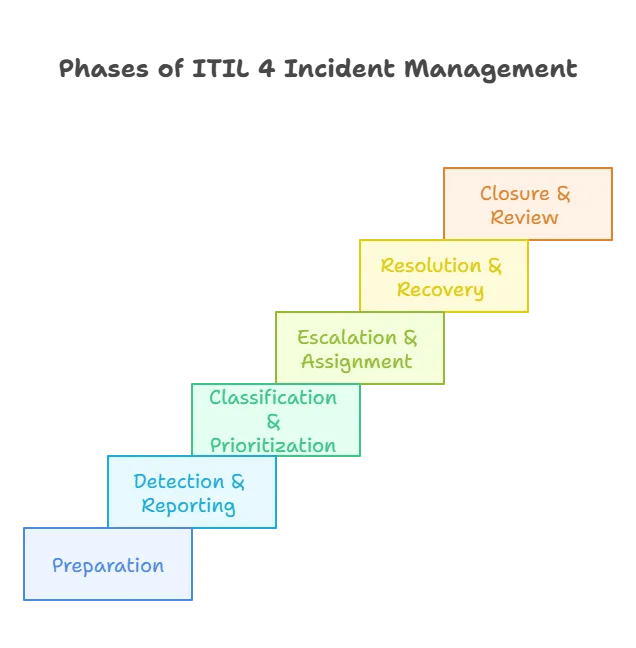
4. Escalation and assignment
After initial triage, first-line support determines whether they can resolve the incident with available tools and knowledge. If not, the incident is escalated.
ITIL 4 defines two escalation types:
- Functional escalation: the incident is transferred to a specialist team (for example, database administrators, network engineers, or security teams).
- Hierarchical escalation: management is notified for incidents with significant business impact or when resolution is taking longer than the agreed service level.
Clear escalation paths reduce time lost to handoff confusion. Complete incident context, communicated at each transfer point, prevents the assigned team from restarting their investigation from scratch.
5. Resolution and recovery
In this phase, the assigned team resolves the incident and restores normal service. Resolution may involve applying a fix, restarting systems, rolling back a failed change, or activating a workaround.
ITIL 4 draws an important distinction: a workaround provides temporary relief while the root cause remains present. A fix addresses the root cause permanently. Both close the incident. Only a fix closes the underlying problem.
Once service is confirmed restored, through testing or user feedback, the team documents the resolution in the incident record. For critical incidents, stakeholders receive a resolution notification. This documentation feeds the knowledge base and reduces resolution time for similar incidents in the future.
6. Closure and post-incident review
After resolution, the service desk formally closes the incident ticket, confirming with users or monitoring systems that service has fully returned to normal.
Closure captures the resolution method, timeline, and any configuration changes made. This record becomes source material for the problem management process.
For major incidents, ITIL 4 recommends a post-incident review. The team examines the full timeline, identifies what worked and what did not, and determines whether a problem record should be opened. If a root cause surfaces during the review, it is handed to IT problem management for deeper analysis and a permanent fix.
This final step is where incident management and IT problem management connect directly. Without it, teams resolve the same incidents repeatedly without ever addressing what drives them.
IT problem management lifecycle in ITIL 4
Incident phases restore service. The problem practice owns what happens next. Keep the lifecycle short and owned, or known errors age in the queue while users hit the same failure.
1. Problem identification
Open a problem from recurring incidents, major-incident review, monitoring trends, or supplier notice. Record the hypothesis in plain language. Link every related incident ID on day one.
2. Logging and prioritization
Prioritize by business impact and likelihood of repeat harm, not by who shouted loudest. A problem that drives dozens of low-noise tickets can outrank a single noisy event that already has a stable workaround.
3. Investigation and diagnosis
Use a method the team can finish: timeline rebuild, five whys on the failing change, or fault isolation across CI dependencies. Pull CMDB and service relationship data so you test the right component first. Document failed hypotheses; they stop the next shift from repeating dead ends.
4. Known error and workaround
When the cause is understood enough to act, publish a known error with the workaround the service desk can apply. Incident MTTR drops even while the permanent fix waits on change windows.
What is a known error in ITIL problem management?
A known error is a problem with a documented root cause and a workaround or fix path, even if the permanent change is not live yet. Storing it in a known error record lets the service desk apply a proven workaround on the next matching incident without waiting for CAB completion.
5. Resolution through change
Most permanent fixes are changes: patch, config, capacity, or design. Tie the RFC to the problem ID. Assess risk with dependency context before the window, not during the bridge call.
6. Closure and review
Close the problem only when the fix is verified in production and linked incidents stop recurring. Capture the lesson in the knowledge base. Feed metrics (recurring rate, known-error age) into the weekly problem review.
For a deeper look at barriers after you design the lifecycle, see the challenges of implementing ITIL problem management.
Why proactive problem management is so challenging (Yet crucial)
Every IT team wants to stop incidents before they happen—that’s the goal of proactive problem management processes. In ITIL terms, this means studying incident trends and data to spot and fix issues before they turn into outages.
It’s like fireproofing your IT environment instead of constantly putting out fires. Of course, reaching this proactive stage is easier said than done.
The elusive goal of proactivity: Many IT teams find proactive problem management difficult, sometimes even impossible. Why is that? Here are some common obstacles that make proactive problem-solving such a challenge:

1. “Firefighting” culture and time pressure
Many teams are so busy reacting to daily incidents that they have little time to investigate deeper causes. When constantly fixing outages, tickets, and passwords, it’s also hard to step back and focus on prevention.
Ironically, the teams that need proactive measures the most are often too overloaded to put them in place.
2. Resource and skill gaps
Proactive IT problem management depends on skilled people who can analyze data, spot patterns, and push long-term fixes. Many organizations often struggle with a shortage of these experts.
The challenge increases when organizations haven’t defined ITIL problem management or when teams lack root cause analysis training. On top of that, when no one owns ITIL problem vs. incident, progress often stalls.
3. Inadequate tools or data
Without proper monitoring, analytics, and a strong CMDB, spotting trends is like finding a needle in a haystack. Some teams collect plenty of incident data but lack a way to analyze it for patterns.
Broken processes or siloed data—like inconsistent logging or no knowledge base of known errors—make the problem worse.
Proactive management works best when supported by automation and analytics. For example, systems that flag recurring incidents or unusual error patterns automatically.
Process and organizational hurdles
Proactive problem management usually requires teamwork across different groups, since root causes can involve infrastructure or even vendors. It may also involve change management software to put fixes in place. But rigid silos and a “don’t touch it if it’s working” mindset often slow progress.
Leadership often favors quick, visible wins like restoring uptime over behind-the-scenes upgrades preventing future outages. This also makes it harder to justify the time needed for proactive work.
Why it’s worth striving for
Despite the challenges, proactive problem management delivers huge value. The harder it feels to achieve, the more your team needs it—constant reaction signals deeper systemic issues. When done well, proactive problem management cuts downtime and improves overall service quality.
By addressing issues at the root, you face fewer incidents in the long run. This also means less unplanned work for IT staff and a reliable experience for both users and customers.
How to start moving from reactive to proactive
So how can your team begin moving toward proactive problem management, despite the challenges?
The key is to start small and build momentum over time.
Here are some best practices to help you get closer to that goal—even if you can’t achieve it overnight:
How do IT teams move from reactive to proactive problem management?
Start with clean incident logging and consistent linking to problem records. Assign a problem owner who is not trapped in the ticket queue. Review top recurring incidents weekly, open problems for clusters, track known error age, and route permanent fixes through change management with clear risk and service context.
Establish a dedicated problem management role
Start by designating a Problem Manager or forming a small IT problem management team. Their focus should be root cause analysis and long-term fixes, not day-to-day incident firefighting.
A dedicated role further ensures someone owns the task of investigating recurring issues without constant ticket distractions.
Make sure this role has the time, authority, and tools to dig deep into problems.
For example, many organizations hold a weekly Problem Review meeting to discuss top recurring incidents and assign actions. That keeps problem-solving visible, structured, and accountable.
Accurately log and correlate incidents
You can’t spot trends if incidents aren’t logged consistently. Document every incident in your ITSM tool, including details such as time, affected service, symptoms, and resolution. Over time, this data becomes a goldmine for IT problem management.
Additionally, use tags or linking features to group related incidents. With a reliable incident history, you can run trend analysis to uncover patterns.
Correlation improves when each incident carries a service or CI reference from a maintained CMDB. Without that link, trend reports stay ticket-text guesses. With it, problem managers group failures by the same failing node, not by similar free-text titles.
For example, do multiple incidents trace back to the same system or error? Do outages spike at certain times or after specific changes? Modern ITIL tools and analytics platforms can help highlight clusters of incidents that deserve deeper investigation.
Leverage monitoring and automation
Proactive IT problem management relies on strong monitoring of your infrastructure and applications. Use tools that send alerts for anomalies such as spikes in latency, error rates, or memory usage. Some advanced platforms use machine learning to predict incidents, such as forecasting capacity issues that may cause outages.
Automation also plays a big role. Routine checks, automatic responses to known issues, and event correlation can all reduce risks.
AIOps platforms (AI for IT operations) take this further by detecting patterns and surfacing problems before they impact users. By acting on early warning signs, you can often prevent a full-blown incident.
Integrate problem management with change management
Fixing a root cause often requires change—like deploying a patch, updating a configuration, or redesigning a process.
That’s why your change management practices must work closely with IT problem management.
Plan changes carefully and use risk assessments or Change Advisory Boards to minimize disruption.
Cultivate a “continuous improvement” culture
- Learning from incidents: Encourage your IT team to treat every incident as a learning opportunity. Hold blameless post-mortems to uncover what failed, why it failed, and how to prevent it in the future. Moreover, recognize and reward team members who identify risks or suggest preventive measures.
- Proactive time investment: Spend a few hours weekly reviewing logs, updating documentation, training, or enhancing monitoring. Steady investments reduce emergencies over time, and leadership should support them.
- Start small, build momentum: Becoming proactive doesn’t happen overnight. So, begin with small wins, such as tackling one recurring incident with a mini root-cause project. Each success builds momentum and strengthens management support for broader IT problem management.
- Making it a habit: ITIL experts stress that the best IT organizations make proactive problem management a habit. Altogether, the payoff is clear—greater stability, fewer disruptions, and happier users.
Every problem solved before it becomes an incident saves time, cost, and future headaches for both your team and your customers.
Key metrics for IT problem management
Tracking the right numbers is how problem management teams demonstrate value and justify time spent on proactive work. Without metrics, the practice stays invisible to leadership. Below are the most useful KPIs to monitor:
Mean Time to Detect (MTTD). How long it takes to identify that a problem exists after incidents begin clustering. A declining MTTD signals that your monitoring and correlation are improving.
Mean Time to Resolve (MTTR), problem-level. Distinct from incident response MTTR, this measures how long it takes to close a problem record with a permanent fix in place. Long problem MTTR often points to resource or approval bottlenecks, not technical difficulty.
Recurring incident rate. The percentage of incidents linked to a known problem or a problem with an open root cause investigation. If this number stays high, your problem management process needs more resources or better tooling.
Known error backlog size and age. The number of open known error records and how long each has been open. A growing backlog with aging entries usually means fixes are stalling in the change management queue.
Problem-to-incident ratio. One problem driving dozens of incidents is a strong signal to escalate priority. Tracking this ratio helps you rank which problems to tackle first.
Problems resolved before user impact. The share of problems closed before they produced a customer-facing incident. This is the clearest measure of how proactive your team has become — and the most persuasive metric for leadership.
Review these numbers in your weekly Problem Review meeting and share trends with service delivery and change management teams. Metrics without an audience don’t drive action.
Leveraging tools and partners for better incident & problem management
Achieving strong incident and problem management takes more than process knowledge—you also need the right tools. Modern IT management software provides visibility, connects incident, change, and asset data, and automates parts of analysis.
Virima offers one such integrated solution. It combines IT asset management (ITAM), IT service management (ITSM), and IT operations management (ITOM) into a single platform. This unified approach makes it easier to manage incidents, uncover root causes, and keep services stable.
How a platform like Virima helps:
- Unified IT visibility: Virima’s solutions break down silos and provide a single view of your IT environment. The platform runs discovery across the estate and builds dependency maps once services are defined. Teams see how applications, servers, and databases relate when they investigate a fault.
- Smarter incident & problem management: During outages, dependency mapping shows which components are affected and helps trace potential root causes. For IT problem management, recurring issues are easier to fix as maps reveal hidden common causes.
- Actionable reporting & analytics: Virima generates reports showing key trends, repeated incidents, or anomalies signaling emerging problems. This data-driven insight further makes it easier to prioritize fixes before they escalate.
- Proactive problem management: By combining incident records with configuration data—an ITIL-recommended practice—Virima helps identify major issues early. Incident history next to configuration data helps teams spot repeat CI and service patterns that deserve a problem record.
- Seamless ITAM, ITSM & ITOM integration: Virima links asset information with service desk tickets and monitoring tools. Software versions, locations, and ownership link to incident and problem records, creating a holistic view for faster resolution.
| Example: If a server repeatedly causes incidents, Virima shows its hardware, software, and dependencies in one place. That speeds diagnosis. Through ITSM integrations, CI and service context can attach to the related ticket or issue, and alert correlation links signals to affected configuration items so triage starts with structure, not free-text guesswork. Documented errors and workarounds stay available for the next matching incident. |
Next steps
Adopting ITIL 4 incident communication and IT problem management transforms IT operations and service management —you don’t have to do it alone. The right tools and partners can accelerate your progress and make the shift from reactive to proactive much easier.
If your organization is ready to move beyond firefighting, consider ITIL-driven solutions like Virima. Virima discovers assets and maps dependencies so problem owners can test root-cause ideas against live structure, not static spreadsheets.
By leveraging such a platform, your team can reduce outages and deliver more reliable, higher-quality IT services while aligning with core ITIL CMDB processes.
When incident history, CI relationships, and change risk sit in one view, problem owners spend less time guessing and more time closing root causes. For how discovery-sourced maps support that work, start with Trusted Runtime Truth.
To go deeper on the practice itself, read proactive IT problem management and the guide to implementing ITIL problem management.
Frequently Asked Questions
What is the difference between an incident and a problem in ITIL 4?
An incident is an unexpected service interruption (like a system outage). A problem is the underlying cause of one or more incidents. Incidents need fast restore. Problems need investigation and a lasting fix.
Why separate incident management from IT problem management?
They have different goals. Incident management restores service fast. Problem management prevents the same issue from returning. Mixing them keeps teams in firefighting mode.
Why is proactive problem management hard?
Teams are often busy fixing daily issues, short on analysis skills, or missing correlation tools. That makes it hard to step back, read trends, and stop faults before outages.
What is a known error in ITIL problem management?
A known error is a problem with a documented root cause and a workaround or fix path, even if the permanent change is not deployed. A known error record lets the service desk apply a proven workaround on the next match without waiting for full change completion.
How can we start moving from reactive to proactive problem management?
Begin small. Log every incident, look for patterns, and assign someone to root causes. Use monitoring, link fixes to change management, and protect weekly review time.
How can Virima support incident and problem management?
Virima ties discovery-sourced CI and dependency maps to service work so teams can see which components sit under a failing service. That context speeds triage and helps problem owners test root-cause ideas against structure, not ticket text alone.