Choosing Between Autotask and Modern ITSM Tools for Mid-Sized Enterprises

Last year, an IT Ops team believed their service desk was running smoothly. Tickets flowed efficiently. SLAs appeared green across the board. Reporting seemed clean and reliable.
Then a security review exposed the real issue: they couldn’t confidently answer what systems were affected by incidents, what changes touched critical services, or whether their asset inventory software was actually complete, even though 78% of organizations globally have adopted at least one ITSM solution by 2024.
That’s why searches like “Autotask and related IT service management platforms” are so common right now. Many teams are also evaluating Autotask asset management and Autotask inventory management.
Teams aren’t just comparing ticketing tools; they’re trying to avoid compliance risk, audit stress, and long-term operational blind spots. That urgency is growing, especially when about 11% of organizations still don’t use any ITSM tool at all, which leaves them exposed to manual processes and reporting gaps.
This blog breaks down where Autotask fits compared to platforms like ServiceNow, Freshservice, and Jira Service Management, and why asset intelligence (not just ticket workflows) is often the deciding factor, especially in regulated environments.
A quick shortlist: What most mid-sized enterprises evaluate
Most IT leaders compare only a few platforms. They choose them based on how their IT team works and how mature their processes are.
A typical shortlist looks like this:
| Virima — IT asset intelligence, automated discovery, and CMDB accuracy for regulated environments. Virima isn’t an ITSM platform; it’s the foundation layer that makes every other platform on this list work the way it’s supposed to. When your asset and configuration data is incomplete or stale, every ITSM workflow built on top of it becomes slower, riskier, and harder to audit. That’s the problem Virima solves. ServiceNow for enterprise-grade governance, ITIL maturity, and deep workflow orchestration Autotask PSA for service-provider operations and MSP-style delivery models Freshservice for fast deployment and clean, modern ITSM for internal IT teams Jira Service Management for IT + DevOps alignment and teams already invested in Atlassian |
This list matters because it shows what most organizations learn over time. ITSM success is not only about the service desk. It also depends on the quality of your asset and configuration data. That data is what powers the service desk.
What is Autotask PSA, and is it really an ITSM platform?
Autotask PSA is a cloud-based tool for service teams. You can use it to manage support tickets in one place. You can also track time, manage projects, and handle contracts. Because of this, it helps you match your work with billing.
In plain terms, Autotask helps you run IT work like a real business. That is why many MSPs and IT service providers use it.
It helps you manage tickets in one place. It also links your work to contracts and billing. This way, you can track how busy your technicians are. As a result, your service work stays connected to your revenue.
So, is Autotask an ITSM platform?
It depends on what you mean by ITSM.
It’s worth noting that cloud-based ITSM adoption has risen by 62% between 2021 and 2024, which highlights why modern platform capabilities matter
Autotask does support service management tasks like incident handling, service requests, and SLAs. It also supports Autotask inventory management at a basic level. However, it is not built mainly for enterprise IT governance.
Instead, it helps service teams work faster and stay organized. It works best when you support many clients as a service provider.
This difference is small, but it matters a lot. Because of it, many enterprise IT teams feel almost satisfied with Autotask. However, they still run into limits over time. As a result, many of them start looking for other options.
Autotask vs other IT service management platforms: What people are actually comparing
Most online comparisons act like all ITSM platforms compete in the same way. In reality, they don’t.
People often compare Autotask with tools built for very different teams, reflecting that ITSM vendors hold about 55% of the market share in a diverse landscape. Because of that, simple feature checklists don’t help much. Instead, they hide the real question.
Does this platform match how your IT organization actually works?
To make this easier, here’s how IT leaders see the ITSM landscape in the real world.
The ITSM platform landscape: Three categories that matter
- First, there are PSA-led platforms. Autotask fits in this group, along with ConnectWise Manage. HaloPSA is also moving into this group, especially if you want a modern UI and flexible setup.
These platforms work best when you deliver IT like a service business, especially in markets where adoption is deep; for example, over 40% of the global ITSM market was in North America in 2024. They focus heavily on contracts, time tracking, and project delivery. They also support a multi-client way of working.
- Second, there are enterprise ITSM platforms. ServiceNow is the best-known example.
These platforms often follow ITIL practices and offer very deep customization. They are also built for strong governance and control. Because of this, large organizations often choose them. This is especially true when they have strict compliance rules and complex workflows.
- Third, there are modern mid-market ITSM platforms. Freshservice and Jira Service Management are common examples.
These tools help internal IT teams follow ITSM in a simple way. They give you structure without the heavy setup of enterprise platforms. Many teams choose them because they are easier to roll out. They are also easier to use and manage with a small IT team.
When Autotask Enters Enterprise IT Conversations
At this stage, the question is no longer what Autotask is.
The real question is how it performs when placed next to platforms built for different levels of IT maturity.
Up to this point, we’ve looked at Autotask in the context of PSA tools and broader ITSM categories. However, in real buying cycles, those boundaries blur.
Mid-sized enterprises often begin with Autotask because it feels operationally efficient. Over time, though, governance requirements, audit pressure, and process maturity bring enterprise platforms into the same conversation.
This is where comparisons become less about features and more about operating philosophy.
Autotask focuses on service delivery efficiency. Enterprise ITSM platforms focus on control, structure, and long-term governance.
That tension is exactly what shapes the next comparison.
Autotask vs ServiceNow: Which ITSM tool is better for a mid-size enterprise?
Autotask and ServiceNow are built for different worlds.
- Autotask is built for service providers. It’s best for delivering work, tracking time, managing projects, and tying services to contracts.
- ServiceNow is designed for enterprise IT governance. It’s best for controlling processes, enforcing workflows, and running IT as a platform.
For a mid-sized enterprise, the real question isn’t “Autotask vs ServiceNow.” It’s this: Do you need enterprise-level governance, and can you handle the complexity?
ServiceNow suits teams with mature IT operations, strong compliance needs, and enough staff or partner budget to manage a complex platform.
Autotask fits teams running IT like a service provider, especially when time-based work, project tracking, and contract services matter.
If you’re audit-driven, ask: Will Autotask asset management dashboard meet governance needs, or will you need add-ons later?
Autotask vs Freshservice: What’s the best ITSM platform for mid-sized companies?
Freshservice is often chosen because it offers a strong balance, and it aligns with broader trends showing that cloud-based deployments held ~64.2% of the ITSM market share in 2025, demonstrating the continued shift away from legacy models. It gives you a modern UI and quick results. It also includes solid ITSM basics.
For many mid-market internal IT teams, Freshservice feels like what a service desk should be. It is clean, fast, and easy to use.
However, teams in regulated environments often hit a limit in one key area. That area is asset intelligence.
Freshservice can track assets. However, many organizations need more than just “assets in a list,” which is also a common issue in Autotask inventory management. You may need accurate discovery and lifecycle tracking.
You may also need to see dependencies between systems. On top of that, you may need audit-ready reports tied to each asset.
This is where the focus starts to change. You stop asking, “Which ITSM tool is best?” Instead, you start asking a better question.
How do you make sure your ITSM workflows run on accurate asset data? That is exactly where Virima becomes the key difference.
Autotask vs Jira Service Management: When DevOps alignment matters
Jira Service Management is a popular choice if you already use Jira and Confluence. It works especially well when you need close ties between IT, engineering, and DevOps.
If your environment has frequent app changes and fast software releases, Jira can feel like the best fit. It also supports strong cross-team automated incident response. However, some teams struggle when they try to use Jira as the main source of truth for assets and governance.
Jira can connect to other tools and support add-ons. But in regulated environments, asset and compliance needs often require more structure. In those cases, Jira Service Management becomes your workflow hub. Then, an IT asset intelligence platform becomes the foundation underneath.
Do we need a PSA like Autotask if we already have an internal IT service desk?
This is one of the most practical questions in the whole category.
If you already have an internal IT service desk, you don’t automatically need Autotask.
Autotask is most valuable when you need PSA features. These include time entry, contract tracking, and billing. They also include multi-client setup and service-provider style delivery.
Internal IT teams sometimes choose Autotask when they support many groups. This can include departments, subsidiaries, or even external clients. However, if you support only one organization, many PSA features can feel like extra noise.
That is why many internal IT teams choose Freshservice, Jira Service Management, or ServiceNow. Then, they strengthen asset management and governance with a separate solution.
This leads to the part that most Autotask comparisons barely mention.
The real difference-maker in ITSM success: Asset intelligence
Here’s the uncomfortable truth about ITSM platforms.
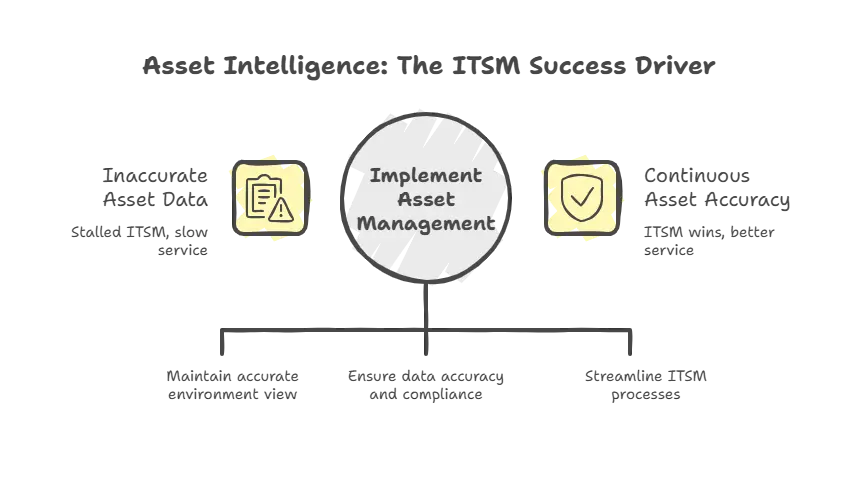
Most of them handle tickets well. However, very few can keep a continuously accurate view of their environment through Autotask asset management alone.
In regulated industries, this accuracy is not a “nice to have.” It is the foundation of audit readiness and security. It also supports safer changes and better incident impact analysis. On top of that, it helps you manage asset lifecycles and control costs.
If your asset inventory is incomplete, your service desk will always be slower than it should be, even if you use Autotask inventory management.
Your incident response will always include guesswork. Your compliance reporting will always turn into a scramble. And that pain adds up fast when office workers interact with the service desk about three times per month, and 47% still contact support by phone.
That is why many ITSM projects feel successful at first. Then, six months later, they quietly stall.
The workflows exist. The dashboards exist. The SLAs exist. However, the underlying data is not trustworthy.
Does Autotask have asset management or a CMDB?
This is one of the most common questions people ask today. It also deserves a clear answer.
Autotask does support configuration tracking and basic asset inventory. That’s where Autotask asset management usually starts, especially for tracking key configuration items tied to customer environments. Many MSPs use it for customer device records. This works especially well when you pair it with an RMM tool.
However, Autotask is not usually seen as a full enterprise IT asset management system. Many teams outgrow Autotask inventory management in regulated environments. If you need deep discovery and lifecycle tracking, you may need more.
You may also need dependency mapping and audit-ready configuration data. In many cases, you need an ITAM software and CMDB tool beyond what a PSA platform provides.
That does not mean Autotask is a bad tool. It simply means it was built for a different main goal.
And that is exactly why Virima exists.
Virima’s role in the Autotask and ITSM platform conversation
This is where Virima’s position is genuinely different from most vendors in this conversation. Virima isn’t an ITSM platform; it’s the asset intelligence layer that makes ITSM platforms work. The hardest problem in ITSM isn’t choosing the right ticketing tool. It’s making sure that the tool runs on accurate, continuously updated asset and configuration data.
An incomplete inventory means slower incident response, riskier changes, and compliance reports that require manual reconciliation before every audit. That’s the gap Virima is built to close.

Virima builds a trusted system of record for IT assets and configurations, combining continuous discovery, CMDB software accuracy, and ViVID™, Virima’s visual dependency mapping engine that shows how assets connect to business services and each other in real time.
Instead of relying on manual workarounds like scattered spreadsheets or inconsistent user-defined fields, you get a living map of your environment that stays current automatically.
When asset intelligence connects to ITSM workflows, the operational difference is concrete. Tickets resolve faster because technicians can immediately see the affected asset, its owner, and every system it connects to, without hunting through separate tools.
Changes become safer because impact analysis runs against real dependency data, not assumptions. And compliance reporting stops being a pre-audit scramble because the evidence stays current automatically.
This is why many teams use Virima with tools like ServiceNow, Jira Service Management, Ivanti, and HaloITSM. Virima strengthens the asset and CMDB (CMDB components) layer. Then, your ITSM platform can focus on workflows and service delivery.
How Virima complements Autotask specifically
If you’re evaluating Autotask in a regulated environment, your biggest risk is not ticket handling. It’s assuming Autotask asset management is audit-ready. Your biggest risk is whether the platform gives you enough asset truth for compliance and audits.

Virima works well with Autotask by adding the asset intelligence and CMDB accuracy that Autotask’s inventory management wasn’t built to provide. That includes ViVID™, Virima’s visual service mapping engine, which gives your team clear, real-time answers to the questions that matter most during incidents and audits:
- Which systems were affected by this outage, and what do they connect to?
- What dependencies exist between this server and critical business services?
- Which devices are missing from our environment entirely?
- Can you prove your asset inventory is accurate for an audit – right now, not after a manual reconciliation?
Autotask can run service workflows. Virima strengthens the data behind those workflows. As a result, your workflows become smarter and safer.
This combination is especially useful if you want Autotask’s operational benefits. At the same time, you avoid giving up strong asset governance.
How Virima complements ServiceNow, Freshservice, and Jira Service Management
| ITSM Platform | What it does well | Where asset intelligence gaps appear | What Virima adds |
| Service delivery, time tracking, contracts, and multi-client billing | Service delivery, time tracking, contracts, multi-client billing | Basic asset tracking; not built for enterprise ITAM or CMDB in regulated environments | Continuous discovery, CMDB accuracy, ViVID™ dependency mapping, audit-ready reporting |
| ServiceNow | Enterprise governance, deep workflow orchestration, and ITIL maturity | CMDB accuracy depends on strong discovery and ongoing data hygiene; many teams struggle here post-implementation | Automated CMDB population, relationship mapping, and clean data that keeps ServiceNow’s workflows reliable over time |
| Freshservice | Modern UI, fast deployment, solid ITSM basics for internal IT | Asset tracking exists but lacks deep discovery, lifecycle management, and dependency visibility for regulated use | Hybrid discovery across on-prem and cloud, structured compliance reporting, ViVID™ service maps |
| Jira Service Management | DevOps + IT alignment, incident workflows, strong for Atlassian-invested teams | Asset and compliance needs in regulated environments often exceed what JSM provides natively | Asset intelligence foundation, CMDB accuracy, and governance reporting without turning JSM into a heavyweight platform |
Even when you choose a true ITSM platform, asset intelligence is still the hardest part.
ServiceNow is very powerful. However, CMDB management success depends on strong discovery and clean data over time. Many teams buy the platform but still struggle with CMDB (CMDB baseline) accuracy. When that happens, incident impact analysis and change risk assessment suffer.
Freshservice and Jira Service Management (download JSM) are great for workflows and fast adoption. However, regulated organizations often need stronger asset intelligence than these tools can provide alone. That is where Virima fits in.
Virima acts as the asset and CMDB (CMDB benefits) foundation that keeps your data accurate and updated. As a result, your ITSM tool can deliver better outcomes. At the same time, you avoid turning ITSM into a huge and complex platform program.
Autotask pricing and features compared to other ITSM solutions: What matters for ROI
Pricing is one of the most searched topics in this space. However, it is also one of the least helpful topics. That is because the true cost is not the license. The true cost is ownership.
Autotask is usually priced per user and based on a quote. ServiceNow is usually a much bigger investment. You pay more for licensing, setup, and ongoing administration.
Freshservice and Jira Service Management often look cheaper at first. They can be, especially for smaller teams.
However, many IT leaders in regulated environments miss one key point. The cost of poor asset visibility can be higher than the ITSM tool itself. If you cannot trust your inventory, you waste time on every incident. You also increase the risk with every change.
You also spend more time and money on audits, and you may even overbuy hardware and software. This happens because you cannot prove what is already deployed.
That is why Virima often becomes part of the ROI discussion when Autotask asset management creates gaps over time. Virima reduces the hidden cost of weak asset intelligence. It also makes any ITSM platform you choose more effective.
How to choose the right IT service management platform for your organization
If you’re in the consideration-to-decision stage, you don’t need another generic comparison list. You need a simple way to match tools to how your IT team really works.
Here is the simplest way to think about it.
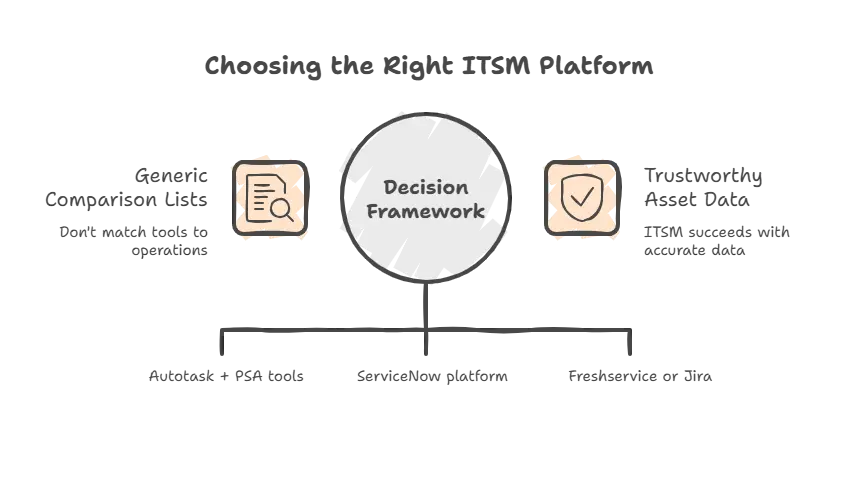
If you deliver IT services like a business, you should consider Autotask and similar PSA tools. This is especially true if you need contracts, time tracking, and a multi-client setup.
If you run internal IT at enterprise scale, you should evaluate ServiceNow. This is a strong fit when you need deep governance. It also works best when you have the staff to run a complex platform.
If you are mid-market internal IT, you should consider Freshservice or Jira Service Management. These tools work well when you want speed, usability, and fast adoption. However, you should also plan how you will keep your asset data accurate.
No matter which platform you choose, regulated environments need strong asset intelligence. You should treat it as non-negotiable. That is the Virima lens.
The best ITSM tool is the one that fits your workflows and has the asset truth to back it up
Autotask and other ITSM platforms aren’t better or worse; they’re built for different ways of working. Autotask fits service-provider workflows, ServiceNow supports enterprise governance, and Freshservice or Jira Service Management wins with speed and adoption.
But the real deciding factor is simple: Can your ITSM workflows run on accurate, continuously updated asset and configuration data? If not, even the best platform will fall short.
Virima strengthens asset intelligence, CMDB asset management accuracy, and service visibility, so ITSM delivers faster resolution, safer changes, stronger compliance, and better control of IT risk.
Book a free demo to see how Virima helps your ITSM decisions actually last.
FAQs
1) Is Autotask an ITSM tool or a PSA tool?
Autotask is primarily a PSA (Professional Services Automation) platform. It includes ticketing and SLAs, but it is mainly designed for service-provider operations, including time tracking, contracts, and billing.
2) Does Autotask have an asset management tool or a CMDB?
Autotask supports basic configuration and asset tracking, especially when paired with an RMM tool.
However, it is not typically used as a full enterprise ITAM or CMDB system for regulated environments.
3) What role does Virima play in ITSM decisions?
Virima strengthens the foundation underneath ITSM workflows by providing:
- Discovery and inventory accuracy
- IT asset intelligence
- CMDB build quality and relationship mapping
- Audit-ready reporting tied to assets and services
This makes ITSM tools more reliable in regulated environments.