Automated Incident Response and Management with Virima

It’s 2:13 a.m., and an alert wakes you up. Then many more alerts follow quickly. Soon, your cloud, devices, and services show critical warnings.
So, you know something is wrong. And time starts to feel very short.
First, someone asks you what changed. Next, compliance asks you for the audit trail. Meanwhile, you jump between tools to find answers.
You also search for owners and key contacts. Then you track which systems depend on each other.
However, the clock keeps ticking while you connect the dots. Still, you pull details from many places. As a result, stress grows because every second matters. So, you feel pressure with each new alert, and the work becomes time-consuming.
That’s why you need automated incident response now, especially automated incident triage that can act fast under pressure and help you resolve incidents faster.
In finance, healthcare, and insurance, you must move fast. Also, you must keep every step easy to review, and incident management automation helps make that repeatable and audit-friendly. So, you stay accurate and follow your rules.
Virima brings IT assets, live system data, service maps, and automated workflows into one place. Therefore, you stop guessing and start acting faster. Also, you see what connects to what right away. As a result, you respond with more confidence and less risk.
Why automation is critical for modern enterprises
You face too many alerts every day. In fact, large SOC and IT service desk teams can receive over 10,000 alerts per day, making it harder to separate real incidents from noise. So, you feel tired and overloaded, especially in modern security operations
Also, repeated triage work drains your focus, which is why automated incident triage matters so much at scale. In fact, about 69% of analysts report alert fatigue. Meanwhile, manual steps slow your response and reduce responsiveness, causing MTTR to rise and compliance risk to grow, often due to excessive human intervention.
Automation changes the way you handle incidents by strengthening the overall incident management process, and incident management automation is how you standardize that change across teams.
You connect detection, extra details, routing, and fixes with set workflows. So, you respond nonstop, even when your team sleeps. Also, you keep each step clear and easy to review.
IBM’s 2023 Cost of a Data Breach Report shows why this matters. When you use security AI and automation extensively, you can reduce the breach lifecycle by 108 days, which directly improves containment speed and audit readiness. You also lower breach costs by about $1.76 million on average.
What automated incident response and management means
Automated incident response uses software to help you spot and fix problems fast. Specifically, it uses shared data and continuous data collection to detect issues, analyze them, and take action.
So, you need less manual effort during stressful moments because automated incident triage reduces the time spent sorting noise from true risk.
Also, this approach fits trusted guides like NIST and ITIL, which show you how to handle incidents the right way.
Typical automation stages include:
| Detection – Monitoring tools flag anomalies or alerts. Enrichment – Data from threat intel and CMDB adds context. But that’s not always easy: 61%of security leaders say there are too many threat intelligence feeds to manage effectively. Prioritization – Business impact determines severity, which is a core outcome of automated incident triage. Response – Pre-approved playbooks trigger containment or remediation. Notification & Escalation – Stakeholders, ticketing systems, and response teams update automatically. Documentation – All actions are logged for compliance and audit trails. |
Automation does not replace you or your team. Instead, it handles repeat tasks so your team members can focus on higher-value investigation and prevention. So, you spend more time investigating real issues. And you focus more on prevention, not constant triage.
The enterprise benefits of automated incident management
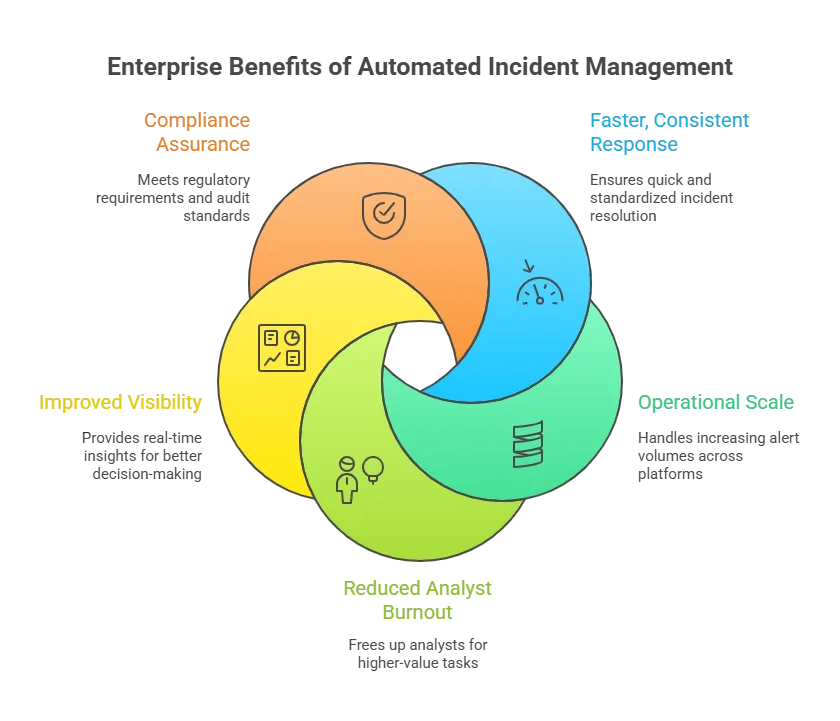
1. Faster, consistent response
Automation acts within seconds and removes manual delays to reduce response times across all incident scenarios.
With incident management automation, each incident follows the same approved path.
Each incident follows clear playbooks every time. So, you make fewer mistakes and stay consistent. As a result, you always follow the policy.
2. Operational scale
Whether you handle 500 alerts or 50,000, automation stays consistent—and incident management automation keeps routing and actions uniform. It applies the same logic every time.
So, you manage on-prem systems, cloud apps, and SaaS tools with ease. As a result, your whole environment stays under control.
3. Reduced analyst burnout
Routine triage, assignment, and data checks run on their own. So, you save time on repetitive work. As a result, you focus on higher-value tasks. You can hunt threats and find root causes faster.
4. Improved visibility
Automated processes update dashboards and reports all the time. So, you see incident trends as they happen. Also, you track SLA performance in real time. As a result, you make better decisions faster.
5. Compliance assurance
Every automated action gets a clear timestamp. So, you can track who did what and when. As a result, you give auditors the proof they expect. This helps you meet rules like HIPAA, GDPR, ISO 27001, and SOX with confidence.
The tools powering automated incident triage
The right platform depends on your setup and goals, as different automated incident response tools serve different enterprise needs.
However, most leading tools fit into four main groups. These groups help you choose what works best for you. Next, let’s look at each category in simple terms.
| Category | Examples | Best For | Key Capability |
| SOAR (Security Orchestration, Automation & Response) | Palo Alto Cortex XSOAR, Splunk SOAR, IBM QRadar, Swimlane | Dedicated SOCs handling thousands of security alerts | Threat-intel integration and playbook automation |
| ITSM & AIOps Platforms | ServiceNow, Jira Service Management, BigPanda, Dynatrace | Enterprise IT incident management and continuity | Event correlation and AI-driven root-cause detection |
| Integrated ITAM + Automation Platforms | Virima | Regulated enterprises needing asset-aware automation | Real-time CMDB, service mapping (ViVID™), risk alignment |
| Monitoring & Response Add-Ons | Microsoft Sentinel, PagerDuty, Datadog | Hybrid environments seeking alert-to-action linkage | Built-in response rules and notification automation |
Most large teams use a mix of tools. For example, a SOAR tool can open ServiceNow tickets. Then, Virima’s CMDB (CMDB components) can add the right system details. So, you get faster and clearer action.
However, good links between tools matter most. Automation only works well with good data. So, the smarter your data, the smarter your response.
How Virima enhances automated incident response and management
Many teams want better automated incident response. However, you often use many tools that do not work well together. So, you waste time jumping between systems. As a result, you miss key context when incidents happen.
Virima solves this by giving you one connected automation system that unifies assets, context, and workflows, functioning as an incident management system for enterprise environments.
It combines asset discovery, a CMDB (CMDB benefits), service mapping, and workflow automation. So, you see what matters most in real time. Also, you act faster while staying aligned with risk and compliance.
In practice, Virima strengthens automated incident response and supports incident management automation by enabling
- Faster triage with accurate asset and dependency context
- Smarter prioritization based on business risk
- Better coordination across ITSM, monitoring, and cloud tools
- Strong audit trails for governance and compliance
Automated CMDB discovery and synchronization
Virima keeps track of your IT assets all the time. It finds assets across on-prem and cloud systems. Then it keeps their details up to date in one central CMDB management. So, you always work with current and trusted data, which is essential for reliable automated incident triage
This matters because the data accuracy of most CMDBs is around 60% when left unmanaged, which can slow triage and misroute response.
What this improves
- Eliminates manual CMDB upkeep and outdated asset records
- Ensures incident workflows use accurate configuration context
- Reduces time spent correlating data across systems
Integration benefit
- Two-way sync with ITSM platforms (e.g., ServiceNow, Jira) so tickets can be created/updated in real time with asset details
- Updates made in ITSM flow back to the CMDB, preserving a single source of truth
ViVID™ Service Mapping for real-time impact analysis
Virima’s Visual Impact Display, called ViVID™, builds service maps for you. It also shows clear dependency diagrams. So, you see how systems connect in real time, making automated incident triage smarter because the impact is visible immediately. As a result, you understand the impact faster.
During an incident, responders can quickly
- Visualize upstream/downstream service impacts
- Identify which applications or services are affected
- See incident, change, and vulnerability data overlaid on the map
- Trace likely root causes by reviewing recent changes on impacted components
Outcome
- Faster pinpointing of where to focus
- Reduced time to resolution mttr through clearer dependency context
- Better prioritization based on business impact (not just technical symptoms)
Risk-based prioritization and intelligent automation
Virima adds risk insight right into your incident workflows, enabling incident management automation that prioritizes what truly matters.
It pulls data from trusted sources like the NIST Vulnerability Database. So, you see real risk while you respond. As a result, you fix the most important issues first.
This enables automation to:
- Correlate assets with known vulnerabilities and risk indicators
- Escalate incidents tied to high-risk vulnerabilities or critical systems
- Auto-assign severity and categorization based on asset criticality and rules
- Differentiate low-impact issues from high-impact production threats
Context-aware remediation support:
- If an incident is tied to a recent change, Virima can flag the relevant change record. As a result, teams can quickly investigate the root cause and respond faster.
- Recommended actions (like rollback guidance) reduce trial-and-error
Audit-ready logging and compliance support
Virima records every automated action you take, and incident management automation becomes audit-ready because every step is logged.
It also keeps a full history for each configuration item and incident record. So, you can trace changes step by step. As a result, you stay ready for reviews and audits.
Compliance and governance advantages:
- Full audit trails for configuration updates and workflow actions
- Easier post-incident review with readable, accessible logs
- Better alignment with governance frameworks like ISO 20000 and NIST CSF
- Integrations with ITSM/GRC tools to push incident evidence into compliance workflows
Key point: Automation remains transparent and accountable, not a black box.
Ecosystem integration across ITSM, monitoring, and cloud platforms
Virima fits easily into your existing enterprise tools. As a result, it connects systems and runs incident workflows across them.
So, you avoid tool sprawl and manual handoffs. As a result, your response stays smooth and fast.
It can
- Ingest alerts/ events from monitoring and security systems
- Create and enrich incidents automatically
- Trigger remediation actions through workflows (e.g., scripts, device actions)
Common integration areas
- ITSM/service desks (ServiceNow, Ivanti, Jira)
- Cloud platforms (AWS, Azure)
- Configuration and operational toolchains used across hybrid environments
Result: Organizations improve automation without needing a disruptive tool replacement.
A context-driven approach to automated incident response
Virima makes automated incident response stronger. As a result, it pairs smart automation with deep system context.
So, you understand what is happening and why. As a result, you stay in control with enterprise-grade safeguards.
Organizations benefit from
- Faster, more precise incident response
- More reliable decisions powered by CMDB + service mapping
- Risk-aligned prioritization
- Audit-ready processes that support continuous improvement
Key considerations before implementing automation
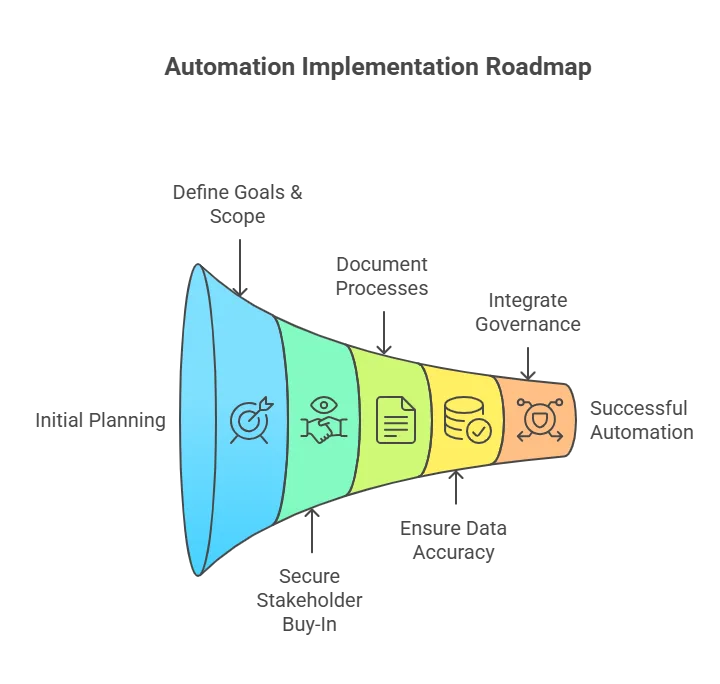
Successful automation starts with clear planning, and incident management automation works best when scope and rules are defined early.
So, you set the right goals before you buy tools. Also, you check what your team truly needs. Here’s what you should evaluate next as an IT Security Manager.
Define goals and scope
Start with tasks you repeat every day, especially those tied to high-volume alerts and critical incidents.
These often include alert triage, ticket routing, and simple fixes. So, you save time fast with little risk. Then your team can focus on harder problems.
Secure stakeholder buy-in
Bring security, IT ops, and compliance teams in early. This builds trust from the start. So, everyone agrees on rules and goals. As a result, automation works better for you.
Document processes
Standardize your incident runbooks first, so your incident response plan is consistent, repeatable, and automation-ready. This ensures your incident response process is clear and easy to turn into automation playbooks.
So, each response stays clear and repeatable. As a result, you reduce errors and confusion.
Ensure data accuracy
Make sure your CMDB tools and monitoring data stay clean and current. Bad data breaks automation fast. So, fix this first or use Virima to automate the foundation. As a result, every response becomes more reliable.
Integrate governance
Build change controls and approval steps for sensitive actions. This keeps automation safe and predictable. So, you stay aligned with internal rules and standards. Also, you follow trusted frameworks like ITIL and COBIT with confidence.
Tip: Treat automation as an ongoing program. Do not see it as a one-time project. So, start small and test your results. Then scale step by step with confidence.
Staying compliant and managing risk automatically
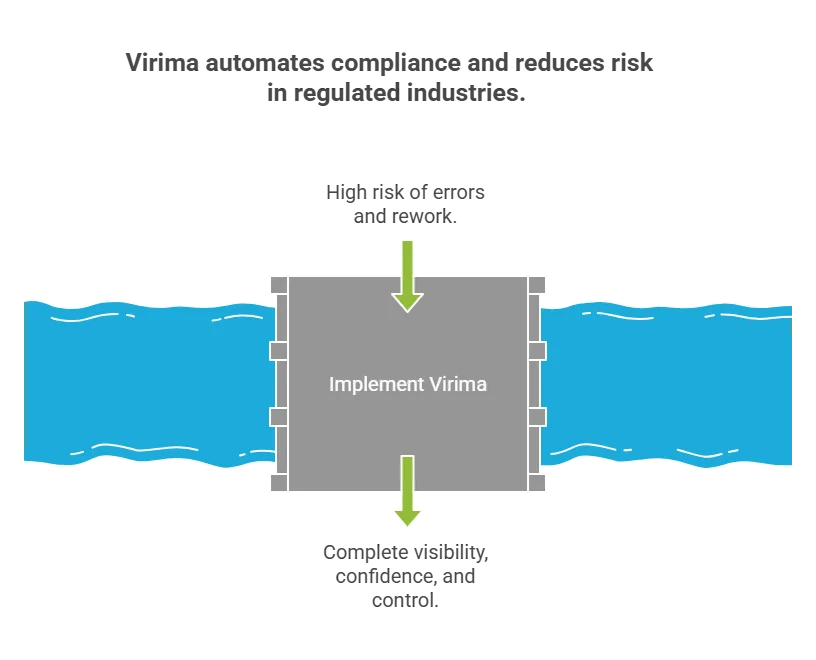
In regulated industries, automation must not only be efficient it must withstand audits.
Comprehensive audit trails
Every automated task should log clear details. You should record who started the action and what happened. Also, log the system affected and the exact time. So, you keep full visibility and trust in every step.
Access controls & segregation of duties
Limit who can change playbooks or run high-impact actions. This reduces risk and mistakes. So, only trusted users control critical responses. As a result, you keep automation safe and reliable.
Embedded policy checks
Automate compliance checks during incident response; this is where incident management automation proves its value by preventing missed steps.
For example, confirm encryption or patch status before closing issues. So, you avoid missed steps and rework. As a result, you stay compliant every time.
Change management alignment
Treat automation scripts and workflows as controlled items. Manage them through your ITIL change process. So, you track changes and approvals clearly. As a result, you keep control and reduce risk.
Virima strengthens all these areas for you. It links every automated action to trusted asset data. Also, it keeps audit logs that no one can change.
So, CISOs and auditors see everything clearly. As a result, you gain trust and full visibility.
A real-world example: From chaos to control
Scenario
At 2 a.m., a ransomware alert fires from endpoint monitoring.
Traditional response
An analyst discovers it hours later, looks up device ownership, contacts the user, isolates the system manually but not before five more devices are infected.
With Virima-enabled automation
- Alert enters the automation engine.
- The system enriches it using Virima’s CMDB software, confirming the asset’s owner, criticality, and connected systems, so automated incident triage happens with full context.
- It isolates the endpoint automatically via EDR integration.
- A ServiceNow ticket opens with all context attached.
- Compliance logs update in real time through Virima’s workflow history.
By sunrise, the threat is contained, evidence logged, and the team focuses on prevention instead of damage control.
That’s speed with certainty, the essence of intelligent automation.
Sustaining success: Best practices for continuous improvement
- Regularly review playbooks: Update workflows as environments and threats evolve.
- Maintain CMDB health: Continuous discovery keeps automation reliable.
- Retain human oversight: Keep the incident response team “in the loop” for ambiguous or high-impact actions.
- Run periodic simulations: Test automated responses under realistic conditions.
- Report and refine: Use analytics to track MTTR, false positives, and compliance adherence.
Automation is not something you set and forget. It grows as your processes and data improve. So, you must care for it over time. Virima helps keep this foundation strong and reliable.
Confident, compliant, continuous response with Virima
When every second counts, automation helps you turn chaos into control. It also helps you respond in a compliant way. So, you avoid panic and act with clarity. As a result, you protect your business faster.
However, you get real value only with trusted data and clear context. You also need workflows that follow your rules. So, automation stays accurate and safe. That is the Virima difference. Book a demo now!
Virima brings asset management in IT, ViVID™ service mapping, and workflow automation into one platform, powering incident management automation without sacrificing governance. So, you respond faster and still stay accountable. As a result, you reduce downtime and lower risk.
And that speed matters because downtime costs an average of $5,600 per minute, so even small delays can become expensive fast. You also improve incident response in compliance-driven teams.
Ready to cut your MTTR with context-aware automation? See how Virima helps enterprise teams resolve incidents faster using CMDB-driven triage, ViVID™ service maps, and risk-aligned workflows. Explore the Incident Response & MTTR use case →
FAQs
1) What is automated incident response?
Automated incident response uses workflows and playbooks to detect, enrich, prioritize, and respond to incidents with minimal manual effort. At the same time, it maintains a clear audit trail.
2) How is automated incident response different from traditional incident management?
Traditional response relies on people to gather context, assign owners, and run steps manually. Automation connects tools and data so those steps happen automatically and consistently.
3) Will automation replace my SOC or IT teams?
No. Automation handles repetitive tasks (triage, routing, enrichment, notifications). Your team stays focused on investigation, decisions, and complex remediation.
4) What types of incidents are best to automate first?
Start with high-volume, repeatable scenarios like automated incident triage, ticket creation, enrichment with CMDB data, routing to the right team, and simple containment actions.