
Complete guide to enterprise IT asset management

Managing IT assets at a large company is not just about tracking serial numbers. You also need to manage how you buy, use, and retire each device. This includes assets, including servers, laptops, cloud systems, IoT devices, and software. Each one adds cost and risk. So, you must keep track of all of them clearly.
If you lose track of even one asset, you may make poor decisions. In fact, 53% of IT teams say they lack full visibility into their assets. This happens because your data is incomplete. As a result, your costs can increase, and risks can grow. Therefore, you should always keep full visibility. This helps you stay in control and make better choices.
This guide shows you how IT asset management works in real life and how to build a strong IT asset management strategy.It explains what a strong system looks like beyond simple spreadsheets. You will learn the key features that make ITAM actually useful. Also, you will see how these features help you stay organized and in control.
Next, the guide helps you build a clear and simple IT asset management strategy. You will learn how to track all your IT assets with a clear management strategy. As a result, you can keep your systems visible and well managed. In the end, you will feel more confident handling your IT environment.
What is enterprise IT asset management?
Enterprise IT asset management, or ITAM, helps you track and manage all your IT assets. It also helps you get more value from them over time. You handle both physical and digital items in your system. So, you stay aware of what you own and use.
For example, you manage hardware like servers, computers, and network devices. You also track software licenses and cloud services. In addition, you include virtual systems that run online. As a result, you keep everything organized and easy to control.
ITAM covers the full life of each asset from start to end. First, you buy it, then you set it up and use it. Next, you maintain it, and finally, you remove it safely. So, you stay in control at every stage.
The goal is simple and clear. You keep every asset tracked, safe, and properly licensed. When you do this well, you reduce waste and avoid compliance issues. Also, you get clear data to plan your budget better.
However, things change if ITAM does not work well. You may buy the same asset more than once. You may also face audit problems and miss security risks. As a result, you lose control and make poor decisions.
How does IT asset management differ from enterprise asset management?
IT asset management focuses only on your technology assets. You manage hardware, software, cloud services, and network systems. So, you keep track of everything related to IT. This helps you stay organized and avoid confusion.
However, enterprise asset management covers much more than IT. You also manage physical items like buildings, machines, and vehicles. In addition, you include factory equipment and other tools. As a result, you handle all assets in one bigger system.
This difference matters when you choose your asset management tools. You need the right management tool for the right job. ITAM asset management tools help you track software licenses and find devices on your network. They also help you manage settings and connect with your IT service system.
On the other hand, EAM tools focus on physical assets. You use them to plan maintenance and track work tasks. They also help you keep machines running without issues. So, you manage buildings and equipment more easily.
Sometimes, you may need both types of asset management tools. However, one tool rarely does both jobs well. The needs and rules for each are quite different. Therefore, you should choose tools based on your exact needs. Reviewing specific IT asset management tools side by side can help you identify gaps before committing to a platform.
Virima empowers organizations to manage enterprise assets comprehensively, from IT systems to operational tools. Asset-intensive sectors have specific needs; see how asset management in manufacturing environments handles converged IT and operational technology.
Key features of an enterprise ITAM strategy
A strong IT asset management strategy covers the full life of your assets. It also makes your daily work easier and clearer. So, you can manage everything without confusion. Here are the parts that matter most.
- First, you keep a full and updated list of all your IT assets. You use IT discovery tools to find assets automatically, not spreadsheets. Next, you track software licenses and match them with real usage. This helps you avoid extra costs and audit issues.
- Then, you plan the full life of each asset through proper asset lifecycle management. You manage buying, setup, upgrades, and safe removal. At the same time, you track how each asset is set up and changed. This helps you stay organized and avoid mistakes.
- Also, you follow rules and policies at all times. You check licenses, laws, and your own security rules. In addition, you watch how assets perform each day. This helps you fix slow or unused systems early.
- Finally, you manage vendors and contracts in one place. You track warranties, service terms, and renewal dates. So, nothing gets missed or delayed. As a result, you stay in control and avoid surprises.
How modern ITAM systems work
Modern ITAM platforms work as an asset management platform and use automated discovery to find your assets. They scan your network often and collect fresh data. So, you always see what devices you have in your asset inventory. This keeps your records accurate and up to date.
You can use two main methods for this. First, agent-based methods install small software on each device. This helps you collect data directly from those devices. Next, agentless methods scan devices from a distance.
Agentless methods use tools like SNMP, WMI, and SSH. These tools help you scan devices without installing anything on them. So, you can check assets without touching each one. As a result, you save time and effort.
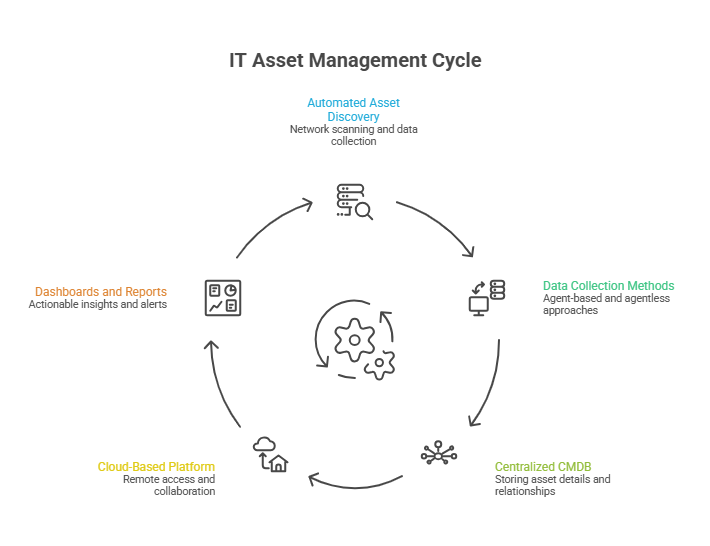
That data goes into a central CMDB where you store all asset details. You keep each item, its settings, and its links to other items. So, you can see how everything connects. This makes your system easier to understand.
Next, cloud-based platforms let your team access this data from anywhere. You do not need heavy on-site systems to run them. As a result, your team can work faster and stay connected. This also makes sharing data simple.
On top of that, you use dashboards, reports, and alerts. These tools turn raw data into clear insights. So, you can take action quickly and fix issues early. In the end, you make smarter and faster decisions.
Steps to build an enterprise IT asset management strategy
- First, start with automated discovery. Manual lists become outdated very quickly. So, you should use agent-based and agentless scans. This helps you see what really exists on your network.
- Next, you store all data in a CMDB. You keep asset details, settings, and relationships in one place. This removes the need for many spreadsheets. As a result, every team sees the same clear data.
- Then, you set simple lifecycle rules. You define clear asset management processes for how you buy, use, and remove assets.
- Also, you connect these steps to your CMDB. So, updates happen automatically without extra work.
- After that, you connect ITAM with your IT service system. When someone fixes an issue, they see full asset details. This includes history, setup, and links to other assets. So, you save time and avoid switching tools.
- Finally, you keep checking and improving your system. You use dashboards to track usage, age, and warranty status. Then, you find unused software and reuse licenses. As a result, you reduce costs and avoid waste
What role does a CMDB play in enterprise IT asset management?
A CMDB sits at the center of your ITAM system. It stores all your important asset details in one place. You include servers, virtual machines, and software systems. So, you always know what you have.You also store details about each asset. This includes its settings and how it connects to other assets. As a result, you can see the full picture of your IT setup. This helps you manage everything with more clarity and control.
Without a CMDB, your asset data gets scattered in many places. You may use different spreadsheets and ticket systems. So, your teams cannot see a clear and full picture. This often leads to confusion.
As a result, you may buy the same assets again by mistake. Also, change management becomes risky because you do not see dependencies. You may not know which systems rely on others. Therefore, even small changes can cause bigger problems.
However, a well-managed CMDB solves these issues. It gives you one trusted place for all your data. So, you can support discovery, reporting, and incident handling easily. In the end, you stay in control and make better decisions.
Why enterprise IT asset management matters
- First, ITAM helps you control costs. You can see your existing assets and what you do not use much. You also track assets that are getting old. So, you avoid buying things you do not need.
- Next, you stay ready for audits and follow rules easily. You match software licenses with actual usage. As a result, you pass audits without stress. Also, rules like SOX, HIPAA, and GDPR require clear asset records.
- Then, you improve your security. Untracked assets can create risks for your system. ITAM helps you find outdated or unsafe devices. So, your team can fix issues before problems happen.
- After that, you improve daily work. When you track every asset, you solve issues faster. Also, change management becomes safer with clear data. So, you plan better using real information.
- Finally, you support better planning. You track asset age, usage, and total cost. This helps you plan budgets and future upgrades. As a result, you make smarter long-term decisions.
What are common challenges in enterprise IT asset management?
- Data accuracy is the most important part. If your asset list is not complete or updated, problems will start. So, you must always keep your data correct and fresh. This helps everything run smoothly.
- If your data is wrong, many things can fail. Your compliance reports may show incorrect details. Also, security scans may miss some devices. As a result, you may plan budgets based on guesses instead of real data.
- Shadow IT is another big challenge you may face. These are assets used without your IT team knowing. So, they create risks that you cannot control. As a result, your system becomes less secure.
- You may also face other common problems. You manage assets across cloud and on-site systems at the same time. Also, software licenses can become hard to track. In addition, your data can quickly become outdated as systems change daily.
- However, you can handle most of these issues with the right approach. You use automated discovery to find all assets. You also keep a well-managed CMDB for clear data. Still, you must maintain this regularly, not just once.
How do you choose the right asset management tools for your enterprise?
- First, check the discovery coverage of your tool. You need to scan your full environment with ease. This includes on-site systems, cloud platforms like AWS and Azure, and remote devices. So, you can see all your assets in one place.
- Next, check how well it connects with your IT service system. Your ITAM tool should sync data both ways with your service desk. As a result, asset details move into incident, change, and problem tasks automatically. This helps you avoid manual work and saves time.
- Next, check how the tool manages software licenses. You should track how much people actually use the software. This matters more than just counting installs. So, you can avoid wasting money.
- Also, look for dependency mapping in the tool. This shows how your assets connect to business services. As a result, you understand how changes affect your systems. This helps you make safer decisions. For teams evaluating this capability, understanding application dependency mapping vs. service mapping can help clarify which approach fits your IT operations model.
- Finally, check for compliance certifications. Look for standards like SOC 2 Type II and PinkVERIFY ITIL 4. These show that the vendor follows good practices. So, you can trust the tool more.
How does Virima support enterprise IT asset management?
Virima helps you meet your ITAM needs as a complete asset management solution. It uses automated discovery to find and track your assets. It also gives you a well-managed CMDB to store all your data. So, you always have a clear and complete view.
In addition, Virima connects with the IT service tools your team already uses. This makes your daily work smoother and faster. As a result, your data flows easily across systems. Now, let’s see how its features match the needs we discussed above.
Automated discovery across your full environment
Virima uses both agent-based and agentless discovery to scan your systems. It checks on-site setups, AWS, and Azure environments. So, you can see all your assets in one place. This gives you a clear and complete view.
The Discovery Agent runs on devices like Windows, Linux, and macOS. It tracks changes and software usage every day. As a result, you always have updated data. This helps you stay accurate and in control.
Also, Virima supports remote workers through its Work from Anywhere feature. It tracks changes on remote PCs and Macs over the internet. It uses a secure cloud-based Discovery App for this. So, you can manage devices even outside your network.
Agentless scans use many built-in probes to collect asset data. You can also extend these probes based on your needs. They gather data using SNMP, WMI, SSH, and cloud APIs. So, you can scan different types of systems with ease.
As a result, your asset list stays fresh and updated at all times. You can see your on-site and cloud assets in one place. Also, you do not depend on anyone to update spreadsheets. This saves time and reduces errors.
CMDB-driven asset intelligence
Every asset you find goes into Virima’s CMDB. You store each item, its details, all related asset information, and how it connects to others. So, you get a clear and complete view of your system. This helps you stay organized.
As a result, your IT team has one place to check everything. You can see asset records, past changes, and service links. Also, you can understand how systems depend on each other. This makes your work easier and faster.
Autonomic Social Discovery™ (ASD) helps you fill in missing asset details. Sometimes, automated scans cannot find all the information. So, ASD asks the right people for the missing data. This includes details like owner, usage, and importance.
Next, the system sends requests only to the right users. You get updates on lifecycle status, policies, and service terms. As a result, your data becomes more complete and accurate. This helps you trust your CMDB more.
Over time, ASD learns from past responses. So, it sends future requests faster and to the right people. You do not need manual audits or spreadsheet checks. In the end, your CMDB stays updated with less effort.
Software license management and usage metering
Virima helps you track software licenses in a clear way. You act as a software asset manager and match what you own with what is installed on each device. You also see who owns each license. So, you stay organized and avoid confusion.
Next, usage tracking shows how people actually use the software. You can see which licenses are active and which are not used. As a result, you find unused licenses easily. Then, you can reuse them instead of buying new ones. In fact, 45% of teams save money this way.
Service mapping and dependency visualization with ViVID™
Virima Visual Impact Display (ViVID™) helps you see how your systems connect. It shows service links in a clear and interactive way. So, you can understand your setup without confusion. This makes your work easier.
Before you make any change, you can check the full impact. You can see which services, apps, and users depend on that system. As a result, you avoid unexpected issues. This helps you make safer and smarter decisions.
ViVID™ also uses data from the National Vulnerability Database at no extra cost. So, you can see security issues directly on your service maps. This helps you understand where risks exist. As a result, you stay more aware.
Next, you can decide what to fix first. You look at how serious the issue is and which asset it affects. You also check how important that asset is to your business. So, you focus on the most critical problems first.
ITSM integration across seven platforms
Virima integrates with ServiceNow, Jira Service Management, Ivanti, HaloITSM, Cherwell, Xurrent, and Hornbill. So, you can link your asset data with your service desk easily. This keeps everything connected.
Next, the system syncs data in both directions. You see full asset details during incident, change, and problem tasks. Also, any updates you make in your service tool go back to the CMDB. As a result, your data stays accurate without extra work.
For example, when you update asset status during an issue, it syncs automatically. You do not need to update multiple systems again. So, you save time and avoid mistakes. This makes your workflow smoother.
In addition, Virima supports IT operations management features. It combines discovery, service mapping, CMDB, and ITSM in one view. So, you can manage your IT environment more easily. This works well if you want more features without added complexity.
Compliance and audit readiness
Virima meets strong industry standards for compliance and supports your service management ITSM needs. It holds SOC 2 Type II and PinkVERIFY ITIL 4 certifications. These support key business processes like asset tracking, change, and incident handling. As a result, your service desk and team members can follow best practices and improve service delivery.
Next, Virima helps you prepare for audits with less effort. It creates reports automatically, so you do not rely on manual work. You can clearly track asset changes, license status, and configuration history. This improves performance metrics, supports informed decisions, and strengthens your management system.
In addition, you stay ready for audits at any time. This helps you meet every service level agreement (SLA) and manage multiple service level agreements (SLAs) with confidence. It also improves customer experience, helps you resolve issues faster, and supports smooth business operations. At the same time, it aligns with your business objectives and improves overall ITOM operations management.
Vendor and contract management
Virima stores all your vendor contracts in one place. You can keep SLA terms and purchase details with your asset records. So, you do not need to search in many systems. This makes your work easier.
Next, you can track your service agreements clearly. You can see if you meet the terms or not. Also, you can check coverage status, work orders, reduce risk, and renewal dates. As a result, you plan renewals on time and avoid missing deadlines.
Virima includes built-in warranty tracking for brands like HP, Dell, and Lenovo. You can link warranty and support details to each asset. You can also track them for bulk purchases. So, you keep everything in one place.
Next, you can see the warranty status at any time. You know which assets it asset management systems are close to expiry. As a result, you act early and avoid last-minute issues. This helps you stay prepared and in control.
Why accurate data, automated discovery, and ITSM integration define ITAM success
Enterprise IT asset management works well when three things come together. You need accurate data, automated processes, and connected tools. So, you can manage your IT assets without confusion. This helps you stay in control.
Virima supports all three areas clearly. It uses automated discovery to keep your data updated it asset management software in the CMDB. Also, usage inventory management tracking and service mapping give you better insights. As a result, you understand your assets more deeply.
In addition, Virima connects with multiple IT service tools. So, your asset data stays where your team needs it. This helps technicians work faster and smarter. In the end, with enterprise asset management tools, you get better results with less effort.
management and optimization, cost-saving asset maintenance, ITAM process, maintenance scheduling, enterprise asset management (EAM), and real-time data. If you want better control over software licenses, Virima can help.
You can also use it to prepare for audits with ease. In addition, with mobile devices, you can get clear visibility into your hybrid systems. So you understand your IT environment better.
Next, you can request a demo to see how it works for you. You can explore its features in your own setup. As a result, you can decide with more confidence. This helps you choose the right solution for your needs.





