Top 5 Budget-Friendly ITAM Software for Enterprises

Last reviewed and updated: July 2026. Pricing and feature data verified against vendor documentation and the Flexera 2025 State of ITAM Report.
What are the top budget-friendly ITAM software solutions for enterprises in 2026?
The top budget-friendly ITAM software solutions for enterprises in 2026 are Virima (best for automated hybrid discovery, service mapping, and ITSM integration), Lansweeper (best for agentless network scanning and hardware inventory), Asset Panda (best for physical asset and facilities tracking), Jira Service Management (best for Atlassian-native teams extending into ITAM), and Ivanti (best for large enterprises needing unified ITSM, endpoint security, and license compliance). Selection depends on your priority: hardware inventory, SaaS license optimization, or full dependency mapping.
Why IT asset sprawl silently drains enterprise budgets
Picture this: you’re the CIO of a fast-growing company. Each week, new laptops arrive for fresh hires. SaaS subscriptions auto-renew silently while servers continue running in the data center and cloud environment.
On paper, everything seems fine. In reality, though, your IT setup is a maze. Unused licenses pile up, forgotten contracts drain money, and no one knows exactly how many assets the company owns. According to the Flexera 2025 State of ITAM Report, 35% of IT teams report SaaS waste is increasing, and complete IT asset visibility has dropped to 43% of organizations, down from 47% year-over-year. That’s where ITAM software and modern IT asset management software come in. These solutions act as your control tower, guiding you toward informed decisions about spend, renewals, and risks.
With ITAM training, you know what you own, how you use it, and where improvements are needed. Instead of struggling with spreadsheets, an asset tracking system gives you centralized oversight of both hardware and digital assets.
When done right, ITAM helps you reduce costs, boost regulatory compliance, strengthen data security, and free you from the endless game of asset hide-and-seek. It can even track license expiration dates, ensuring renewals don’t slip through the cracks. Instead of relying on spreadsheets that are slow and time-consuming, ITAM solutions automate updates, saving valuable IT hours.
The good news? You don’t need to spend a fortune to get these benefits. With that in mind, this guide will walk you through the top five budget-friendly ITAM software solutions built for growing companies.
How we selected these tools
This list was researched and published by Virima. We evaluated tools against six criteria: automated discovery scope (cloud and on-premises), software license tracking depth, ITSM integration availability, audit readiness features, TCO at enterprise scale, and whether pricing is publicly available or requires a sales call. Virima is included because it meets each criterion, with Business Pro as the right-sized entry path. Where competitors outperform Virima (e.g., entry-level cost, physical asset simplicity, or Atlassian-native workflows), we say so explicitly.
Why budget-friendly ITAM solutions matter
1) Cost control in a SaaS-first world. Decentralized SaaS purchasing creates costly overlap and waste. As a result, many organizations now manage 100+ apps.
Without automation, this is nearly impossible. That’s why budget-friendly ITAM software and affordable asset tracking software or asset management tools help quantify usage, right-size contracts, and control renewals. It also reduces auto-renewal waste.
2) Audit readiness without the enterprise price tag. Software audit frequency and penalties have been rising. In 2025, 62% faced audits, and one-third paid $1M+ in penalties—aligned entitlements and documentation are essential parts of any asset management process.
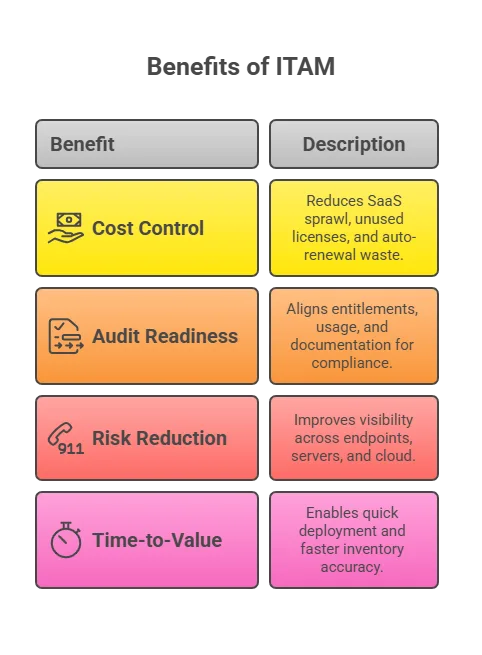
3) Visibility to reduce risk. Incomplete inventories obscure vulnerable, unpatched, or misconfigured assets. 67% of IT leaders lack full device visibility; 48% suffered breaches from unmanaged mobile devices last year. ITAM improves visibility across endpoints, servers, and cloud so security and operations can prioritize remediation.
4) Faster time-to-value. Mid-market ITAM tools deploy quickly. They deliver inventory accuracy and savings in weeks, not months. By contrast, many organizations rely on eight tools and need over two weeks for inventory—automation reduces this cycle dramatically.
How to evaluate ITAM software on a budget
Use the checklist below to compare asset management ITAM tools beyond sticker price.
- Total cost of ownership (TCO)
Consider licensing, implementation, admin time, integrations, and ongoing operations. Gartner popularized TCO analysis for IT decisions.
- Scalability
Ask: Can it handle your asset growth, hybrid cloud, and new device types without re-platforming?
- Discovery & data quality
How complete and accurate are inventories? Consider agent-based and agentless options, SaaS discovery, and cloud connectors.
- License optimization (SAM)
Can it reconcile entitlements vs. installs and usage, flag under- or over-licensing, and support true-up audits?
- Workflow & ITSM integration
Does it plug into existing service desk and change processes to enforce asset lifecycle management?
- Security alignment
Look for vulnerability and patch insights tied to assets, or native integrations with security tooling.
- Reporting & analytics
Prioritize out-of-the-box dashboards covering spend, compliance, lifecycle, and executive reporting.
- ROI proof
Request vendor studies and references showing savings from license reclamation, contract optimization, and audit avoidance. Some ITAM tools also include a built-in contract manager to handle renewals and vendor agreements.
Before shortlisting tools, review how Virima defines Trusted Runtime Truth. The accuracy standard your ITAM data needs to meet before AI agents and automation can act on it safely.
1. Virima: Automated discovery, service mapping, and ITSM integration
Virima is a powerful IT asset management software solution with rich features and strong automation.
Among enterprise-grade asset management tools, it stands out for automation and integration. As a result, it provides enterprises with a comprehensive solution.
With Virima, you can discover every IT asset on-premises and in the cloud. You’ll see how they connect. This creates a clear, end-to-end view of your infrastructure.
What makes Virima a strong ITAM software choice for enterprises?
Virima is an enterprise ITAM platform that combines automated asset discovery across cloud and on-premises environments with ViVID™ dynamic service mapping for full dependency context. It delivers software license metering, ITSM integration, and vulnerability management. Business Pro brings that full capability to growing IT estates without an enterprise-scale contract.
Key features
1. Automated asset discovery and inventory
Virima automatically discovers and tracks IT assets, including servers, PCs, and network devices. It also extends coverage to software and cloud resources. This gives you complete inventories without tedious manual work. As a result, you avoid tedious manual work. Continuous discovery keeps inventories accurate and current. This eliminates reliance on messy, error-prone spreadsheets.
2. Service mapping with visualization (ViVID™)
Virima includes advanced service mapping that builds clear, visual diagrams of your IT ecosystem. ViVID™ maps asset dependencies interactively, overlaying insights such as vulnerabilities and service desk links to create a single source of truth for IT teams. As a result, you can view system connections, identify critical dependencies, and make smarter improvement decisions.

3. Near-real-time monitoring and alerts
Virima gives you actively refreshed visibility into the health of all your assets. It also sends alerts when issues or changes appear. This way, you stay informed about performance and can fix problems proactively — before they disrupt your users.
4. ITSM integration
Virima connects directly with leading ITSM tools such as ServiceNow and Jira Service Management. Through these integrations, asset data and CMDB details sync directly with your service desk. As a result, you get one unified view of incidents, changes, and assets in a single place.
5. Software license metering
Virima helps you track both software installations and actual usage. With software metering reports, Virima not only tracks usage but also manages software licenses so you can optimize spend. These insights let you reclaim or reassign them, so you only pay for the software your team truly needs.
6. Vulnerability management
Virima integrates security. In fact, it detects known vulnerabilities in hardware and software assets. By flagging outdated devices, it enables early fixes. This approach greatly reduces security risks across assets.
Pros
- Rich automation & discovery: Virima’s automated discovery reduces the manual work of maintaining asset records. The system automatically detects new devices and applications. As a result, you save time and avoid missing critical assets.
- Improved compliance and cost savings: With accurate license tracking and usage data, Virima makes compliance simple. As a result, you avoid over-purchasing. You also cut costs by removing unused licenses. By comparing deployed versus purchased assets, you reduce the risk of audit penalties.
- Change management support: Virima includes built-in change tracking and impact analysis. Virima reveals which services and users IT changes may impact. This makes it easier to spot risks, avoid downtime, and prevent non-compliant or unauthorized changes before they happen.
- Cloud-based and scalable: Virima is delivered as a cloud-based SaaS, so you don’t need to maintain your own servers. This gives you flexibility and scalability as your organization grows while lowering infrastructure costs. You can also manage thousands of assets across multiple locations from one simple web interface.
Cons
- Higher upfront investment: Virima offers enterprise-grade features packaged for leaner teams through Business Pro. Its full platform depth takes more setup than a lightweight tracker.
- Complexity for very small environments: Virima focuses on ease of use and quick time-to-value. Its wide range of features may be more than a very small organization needs.
Still, the value often outweighs the cost. Virima’s rich features help prevent expensive incidents and optimize spend, delivering a strong return over time.
Very small, simple setups may prefer a lighter tool. But for growing and large enterprises, Virima’s advanced capabilities are often well worth the learning curve.
Pricing
Virima pricing is contact-led and sized to your environment. Business Pro packages the full platform for growing IT estates, and Enterprise covers larger, more distributed deployments. A Virima specialist can scope the right fit and give a clear quote, so there are no surprises at renewal.
While it’s a serious investment, it’s competitive for an enterprise-grade ITAM solution. Many organizations find the cost worthwhile because Virima delivers real savings and reduces risk. ROI is clear—eliminating software waste, audit fines, or single-day downtime can offset the subscription cost.
2. Lansweeper: Affordable all-in-one ITAM with network discovery
Lansweeper is a leading IT asset management software choice, known for powerful network discovery and inventory. Among mid-market asset management tools, it’s one of the most budget-friendly. It’s a budget-friendly option that provides broad visibility into your IT environment.
Lansweeper auto-scans networks to identify devices and software. It then creates a centralized hardware and software inventory. Additionally, agentless scanning discovers assets without installations. This makes it ideal for diverse, mixed-system environments.
What is Lansweeper best used for in enterprise ITAM?
Lansweeper is an ITAM platform specializing in agentless network discovery and hardware/software inventory. It automatically scans IP ranges to track device specs, installed software, and missing patches across mixed environments. Its limitation is that it offers basic license key tracking without advanced usage metering or native change management workflows.
Key features
1. Automated asset discovery
Lansweeper shines when it comes to network scanning. It automatically discovers PCs, servers, network devices, printers, IoT devices, and more by scanning IP ranges. For each device, it retrieves detailed hardware specifications and a complete list of installed software.
2. Centralized asset inventory
All discovered items are stored in a structured inventory database. From there, you can track details such as model, OS, serial number, and location. You may also record user assignments, purchase dates, and warranty information.
3. Software license management
Lansweeper automatically detects installed software on every machine and tracks software licenses. It helps you monitor usage. Plus, Virima’s software license management ensures you maintain the right number of licenses.

4. Patch management insights
Lansweeper isn’t a full patch management tool on its own, but it does detect missing patches and outdated software. It can also integrate with patching systems to give you an overview of patch compliance.
5. Reporting and analytics
Lansweeper comes with a wide range of built-in reports and also supports custom reporting through SQL queries. You can generate detailed reports on asset counts, software installations, license compliance, and more. In fact, these reports are useful for audits and can reveal patterns, such as rarely used software or duplicate tools.
6. Third-party integrations
Lansweeper offers integrations and APIs to connect with other IT management tools. For example, you can link its data with your helpdesk, procurement system, or dashboards. As a result, this flexibility allows Lansweeper to fit smoothly into your existing IT operations workflow.
Pros
- Comprehensive feature set: Lansweeper unifies ITAM functions—discovery, inventory, license tracking, and basic patch monitoring—into one solution. This all-in-one approach eliminates the need for multiple tools and is especially convenient for IT generalists.
- Agentless and automated: Lansweeper’s network discovery is automatic and agentless, replacing outdated manual tracking with accurate, always-up-to-date inventories. In fact, there’s no need to install software on each device.
- Scalable for various sizes: Lansweeper scales easily, supporting small businesses and large enterprises with thousands of assets. You can adjust scan frequency and scope as your asset count grows.
- User-friendly interface: Lansweeper’s interface is web-based and easy to navigate. Assets are well organized, and you can usually find what you need in just a few clicks or with the search bar.
Cons
- Learning curve for advanced features: Lansweeper’s basic inventory is straightforward, though advanced features demand additional learning. Writing custom reports or scripts and tailoring scans for complex networks may require more effort.
- Limited customization of processes: Lansweeper excels at discovery and inventory but offers less workflow customization than full ITSM suites. For example, it doesn’t natively handle lifecycle processes like procurement approvals or detailed depreciation tracking.
- No built-in helpdesk or change management: Lansweeper emphasizes asset data, not full all-in-one ITSM platform capabilities. If you need features like a built-in service desk or change management software tied directly to assets, Lansweeper by itself won’t be enough.
- Basic license tracking only: Lansweeper tracks installed software and license keys. However, it offers limited advanced software asset management features. For example, it doesn’t track usage over time, suggest optimizations, or manage complex enterprise agreements.
Pricing
Lansweeper stands out for its affordable, asset-based pricing with three main plans.
- Starter: Up to 2,000 assets with core features and basic support—best for small teams.
- Pro: 2,000–9,000 assets, enhanced features, and priority support. Pricing scales in 1,000-asset increments, suiting mid-sized or growing companies.
- Enterprise: 10,000+ assets, full features, advanced support, and custom deployment for large environments.
3. Asset Panda: Easy-to-use asset tracking (Great for physical assets)
Asset Panda is a flexible IT asset management software platform built for ease of use. It’s also one of the few asset management tools that works equally well for IT and non-IT assets, making it especially useful for hardware asset management.
Unlike ITAM-only tools, it tracks IT and non-IT assets—servers to office furniture—in one system. As a result, this unified approach is ideal if your organization needs one register for all assets.
The platform is cloud-based and mobile-friendly. It also includes a robust mobile app with barcode scanning. Technicians can scan tags with smartphones to instantly view or update asset details in the field.
When should enterprises choose Asset Panda for IT asset tracking?
Asset Panda suits organizations tracking physical hardware and facilities alongside IT assets in one system. Technicians use smartphone barcode and QR scanning to audit equipment across distributed offices. Its limitation: no automated network discovery means software inventory relies on manual data entry or third-party integrations.
Key features
1. Flexible asset tracking
Asset Panda lets you track almost any type of asset by customizing fields and categories. Build a central inventory with item details—purchase date, cost, serials, warranties, custodians, locations, and documents.
2. Barcode & QR code scanning
The platform lets you use your device’s camera to scan barcodes or QR codes on asset tags. As a result, audits and asset lookups become much faster.
A technician can scan an unassigned laptop’s barcode to instantly see ownership and asset history. Asset Panda can also generate barcode labels for assets that don’t already have one.
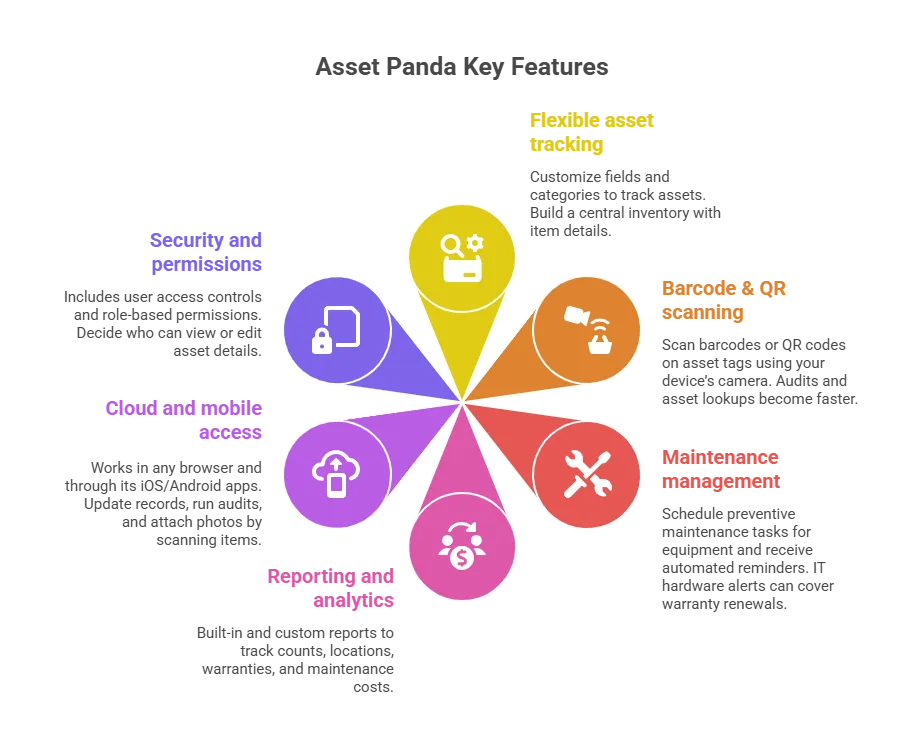
3. Maintenance and lifecycle management
You can schedule preventive maintenance or calibration tasks for equipment and receive automated reminders. For example, IT hardware alerts can cover warranty renewals or replacement cycles.
4. Reporting and analytics
Asset Panda provides built-in and custom reports to track counts, locations, warranties, and maintenance costs.
5. Cloud and mobile app access
As a cloud solution, Asset Panda works in any browser and through its iOS/Android apps. The mobile app boosts usability. You can update records, run audits, and attach photos by scanning items.
6. Security and permissions
The platform includes user access controls and role-based permissions. As a result, you decide who can view or edit asset details.
Pros
- User-friendly interface: Asset Panda is often praised for its clean, intuitive interface. Even non-technical users — like finance or facilities staff — can navigate it with ease.
- Highly customizable: You can tailor Asset Panda to your needs without writing any code. The system enables custom fields, configurable forms, and workflows such as approvals for check-outs or disposals.
- Scalable and multi-purpose: Asset Panda works for businesses of any size. Since it’s cloud-based, adding more assets or users is simple, with no steep infrastructure costs as you grow.
- Affordable tiers: Asset Panda fits different needs with budget-friendly design and tiered pricing. Smaller organizations can start with a low-cost plan covering a few hundred assets and then upgrade as they grow.
- Strong mobile capability: The mobile app and cloud access make Asset Panda convenient for distributed teams. If your company has multiple offices or remote workers, everyone can interact with the system in real time.
Cons
- Lacks advanced ITAM features: Asset Panda’s focus on simplicity means it lacks some advanced features found in dedicated ITAM tools. Users must enter or import most assets manually since the system lacks automatic network discovery.
- Primarily for inventory (less analytics): Asset Panda includes reporting but lacks advanced analytics and optimization found in comprehensive ITAM suites.
- Customization needed for IT processes: Out of the box, Asset Panda works as a general asset tracking tool. However, full ITAM use—such as lifecycle tracking or helpdesk links—often requires configuration. It may also need API integrations with other tools.
- Focus on physical assets: Asset Panda can track software licenses in a basic way. However, it truly shines with physical assets. If your priority is hardware tracking, inventory audits, and maintenance management, Asset Panda is an excellent fit.
Pricing
Asset Panda uses a tiered pricing model based on how many assets you manage. As a result, you can choose a plan that matches your inventory size. Common tiers include:
- 250 assets (Starter tier – good for very small businesses or pilot projects)
- 1,000 assets
- 2,000 assets
- 3,000 assets
- 4,000 assets
- 5,000 assets (and above, with enterprise custom quotes available)
Asset Panda uses an annual subscription model. Even lower tiers allow unlimited users, which is a big advantage. For example, a mid-tier plan covering about 2,000 assets often costs only a few thousand dollars annually. That makes it affordable on a per-asset basis, especially compared to large enterprise ITAM suites.
4. Jira (Atlassian): Basic IT asset tracking via an existing platform
Jira by Atlassian is best known as a project and issue tracking tool, but with its Assets module, it doubles as a basic ITAM software add-on — making it one of the most versatile asset management tools for ITSM teams. With its Assets module (formerly Insight), Jira Service Management also supports basic IT asset management. For Jira users, extending into asset tracking reduces the number of tools to manage, appealing to ITSM or software teams.
Jira is not a dedicated ITAM tool. As a result, features such as automatic discovery or license metering are limited. They may also require additional apps or plugins.
How does Jira Service Management handle IT asset tracking for enterprises?
Jira Service Management’s Assets module links hardware and software objects directly to service desk tickets and change workflows for teams already on Atlassian. Full ITAM capability requires the JSM Premium or Enterprise tier. Automated network scanning needs the Jira Discovery add-on, as it is not included by default.
Key features (Jira with Assets module)
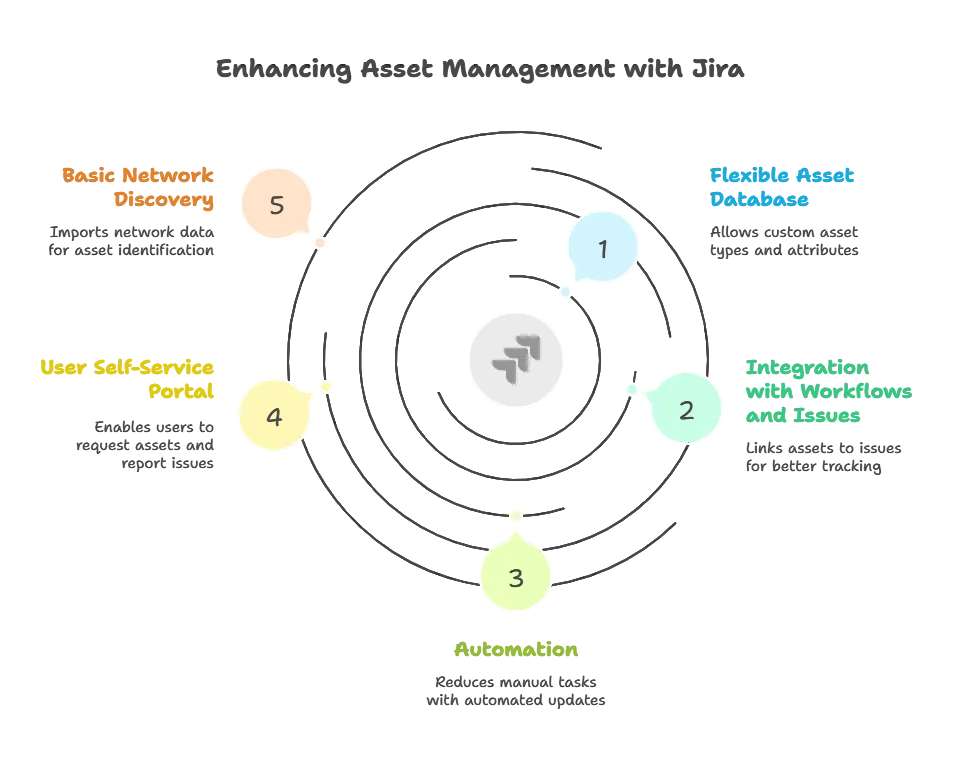
1. Flexible asset database
Jira’s Assets (formerly Insight) lets you define custom asset types and attributes. For example, you might create an “IT Assets” schema with object types for laptops, servers, phones, or software. Each type can include custom fields like CPU, RAM, owner, status, or license key.
2. Integration with workflows and issues
A key Jira advantage is linking assets directly to issues like incidents, problems, or changes. For example, if an employee reports a broken laptop, agents can link its asset record to the ticket.
3. Automation
Jira supports powerful automation rules that reduce repetitive asset management work. With the right setup, asset statuses update automatically. You can also send timely notifications without manual effort.
4. User self-service portal
With Jira Service Management, set up a self-service portal for employees to request assets or report issues. They can browse a catalog of assets and services — for example, requesting a new software license or a monitor.
5. Basic network discovery (with add-ons)
Out of the box, Jira’s asset module isn’t an active network scanner. Instead, it lets you import data from sources like CSV files, databases, or integrations. Atlassian’s free Jira Discovery add-on scans networks for IP devices and imports them as assets.
Pros
- Unified platform: If your team uses Jira for ticketing or projects, adding asset management centralizes everything. This centralization boosts efficiency by letting the service desk view assets and issues together.
- Highly customizable schemas: Jira doesn’t lock you into a fixed asset structure. You can track exactly what matters to your organization. For example, a media company might track cameras by lens type, while a software firm tracks server configurations.
- Powerful workflow and automation: A big advantage of Jira is its robust workflow engine. Standardize asset processes—require tickets and approvals for hardware, or auto-retire assets when disposal issues close.
- Integration ecosystem: Atlassian’s Marketplace offers many apps and integrations. If you need more advanced features — like deeper reporting or discovery — there’s often a plugin available.
Cons
- Manual data entry (without integrations): A lot of asset information in Jira must be entered and maintained manually, especially for off-network items. For example, if an employee installs new software, Jira won’t know unless someone updates the asset record.
- Limited auto-discovery: Jira’s built-in discovery (through Jira Discovery) is mostly limited to finding devices on the network by IP. It captures basics like OS or hostname, but needs extra tools for full software and configuration visibility.
- Scaling and performance: Jira scales well for issue tracking, but using it for asset management is an extension of its core purpose. Managing tens of thousands of assets is feasible, but performance depends on hosting and schema design.
- Cost at higher tiers: Jira’s free/low-cost plans suit small teams, but full asset management needs Service Management Premium or Enterprise. This means a higher per-user cost.
Pricing
Atlassian’s Jira Service Management (JSM) integration offers four tiers with different asset management options.
- Free plan
The Free tier supports three agents or 10 Software users. However, it excludes the Assets module, so it’s mainly for trials or simple setups. - Standard plan
The Standard tier supports up to 5,000 users with 250 GB storage. It includes core service desk features but not asset management. Pricing is about $20 per agent/month. - Premium plan
The Premium tier unlocks asset management (Insight). It supports up to 50,000 users, includes unlimited storage, and adds advanced automation and incident management. Pricing is roughly $40 per agent/month, though actual rates vary. - Enterprise plan
The Enterprise tier has no user limit and includes the asset module. The provider tailors it for large organizations with custom pricing and advanced governance.
Jira Software alone lacks asset management. Therefore, Jira ITAM usually requires JSM Premium or higher. For mid-sized users, adding the built-in module is often cost-effective compared to dedicated ITAM tools.
5. Ivanti ITAM: Enterprise-grade ITAM as part of a full ITSM suite
Ivanti ITAM: Ivanti IT asset management software integrates into Ivanti’s broader management platform, commonly bundled with ITSM or Unified Endpoint Management. It’s one of the most complete enterprise asset management tools available today. As a result, it’s a powerful, full-featured tool best suited for large organizations with complex IT environments.
For asset tracking plus service, configuration, and security management, Ivanti serves as a one-stop solution. Ivanti ITAM manages both hardware and software, emphasizing license optimization, compliance, and lifecycle automation. It auto-discovers assets via scans or agents. It also tracks software usage and manages approvals or procurement workflows.
Is Ivanti ITAM a cost-effective option for enterprise IT asset management?
Ivanti ITAM delivers unified asset lifecycle management, endpoint security, and software license compliance for large enterprises. It correlates asset inventories with vulnerability data to support audit readiness across complex hybrid estates. Custom pricing and deployment complexity make it best suited to organizations replacing multiple point solutions with one platform.
Key features
1. Automated discovery & inventory
Ivanti provides discovery tools that automatically scan and identify all hardware and software assets in your environment. This includes network devices, PCs, servers, installed applications, and even cloud instances when the right connectors are in place.
2. Software license management
Ivanti ITAM includes robust Software Asset Management (SAM) capabilities. It tracks software installations, usage frequency, and license entitlements in one system.
3. Vulnerability & patch management
A unique strength of Ivanti ITAM is its tight integration with security modules. As a result, it identifies vulnerabilities by correlating asset inventory with vulnerability databases.
4. Configuration management and control
With Ivanti, you can enforce standard configurations across all assets. The platform maintains approved device states. It flags or auto-remediates unauthorized software or hardware changes.
5. Lifecycle workflow automation
Ivanti supports workflows across the entire asset lifecycle, from procurement to retirement. For example, you can automate purchase requests, approvals, and inventory updates. It also manages assignments, maintenance scheduling, and end-of-life asset disposal.
6. Integration with ITSM and beyond
Ivanti Neurons provides a full suite — including incident management, network change management, ITAM, and endpoint management — with all components natively integrated. Asset data flows directly into the service desk, so support agents can see details while assisting users. Likewise, changes made in the service management tool automatically update asset records.
Pros
- Comprehensive and security-focused: Ivanti ITAM is part of Ivanti’s larger vision for unified IT management. Its biggest advantage is the tight integration of asset management with security and service management.
- Facilitates compliance and audit readiness: Ivanti simplifies compliance with strong license management and detailed change tracking. It maintains complete audit trails, showing asset holders, recorded changes, and applied patch timelines.
- Process standardization: Ivanti automates lifecycle workflows to ensure consistent adherence to best practices. For example, when an employee departs, it can trigger offboarding to reclaim devices and revoke software access.
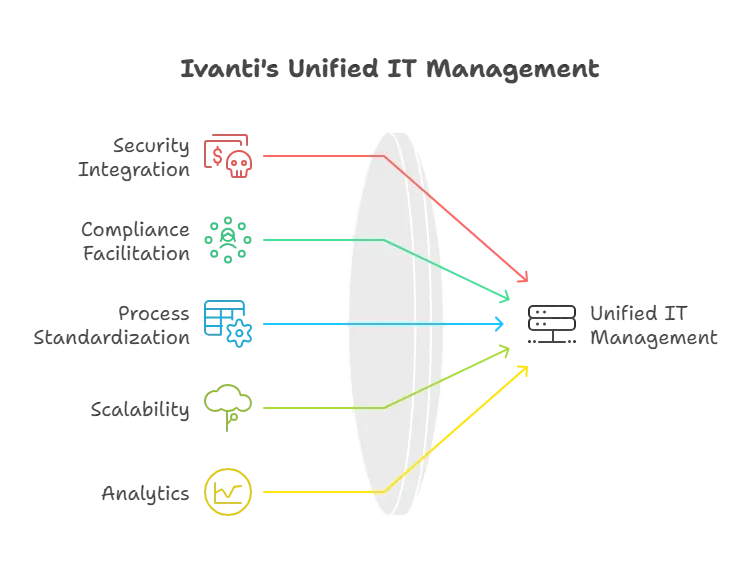
- Scalability for large enterprises: Ivanti supports large-scale deployments. It can handle tens of thousands of endpoints and assets spread across multiple locations and complex organizational structures.
- Insightful analytics and dashboarding: Ivanti comes with rich dashboards and reporting out of the box. For example, you can track software usage trends and generate depreciation reports. It also highlights risk scores for unpatched or incident-prone assets.
Cons
- High complexity and learning curve: Because Ivanti is such a broad and powerful system, setting it up and mastering it can be challenging. Many organizations rely on professional services or experienced admins to deploy it properly.
- Higher cost: For organizations with tight budgets, this bundled approach can feel like overkill if you don’t need the full suite. Extra costs may apply for modules like patch management, with pricing differing between cloud and on-premises versions.
- Not ideal for small organizations: If you’re a small or mid-sized company with a straightforward IT environment, Ivanti may be too feature-heavy. You could end up paying for and managing capabilities you’ll never fully use.
- Vendor engagement for pricing and support: Ivanti doesn’t publish fixed prices publicly. Instead, you must request a quote from their sales team. They tailor pricing to your organization’s size and specific needs.
Pricing
For pricing, contact Ivanti with details; expect it to be the most expensive option covered here. But for that price, you’re getting a very capable and unified system. Many large enterprises find the cost justified because they can replace multiple point solutions with Ivanti’s single platform.
Choosing the right cost-effective ITAM solution
Choosing budget-friendly ITAM software or enterprise-ready IT asset management software means aligning each platform’s strengths with your organization’s needs and limits.
The right asset management tools provide real-time visibility, compliance support, and measurable ROI. All five options can help you optimize IT operations and cut waste, but each has its own focus:
| Software | Primary Use Case | Discovery Method | SAM / License Depth | Starting Price / TCO |
|---|---|---|---|---|
| Virima | Automated discovery, service mapping, ITSM integration | Agentless and agent-based (cloud and on-premises) | Advanced metering and license reallocation | Business Pro, contact-led |
| Lansweeper | Network scanning and hardware/software inventory | Agentless IP range scanning | Basic key and installation tracking | Tiered by asset count (Starter / Pro / Enterprise) |
| Asset Panda | Physical hardware and facilities tracking | Manual entry and barcode/QR mobile scan | Basic record-keeping only | Tiered by asset count (~$2k. $5k/yr for mid-tier) |
| Jira JSM (Assets) | Atlassian-native ITSM with asset context | Import or add-on (Jira Discovery) | Custom schema object tracking | JSM Premium ~$40/agent/month |
| Ivanti ITAM | Full-suite enterprise ITSM, SAM, and endpoint security | Multi-scanner and endpoint agents | Enterprise audit and entitlement SAM | Custom enterprise quote |
How to choose the right ITAM software for your enterprise in 2026
Managing IT assets doesn’t have to break the budget—affordable tools can deliver visibility, compliance, and control. Simply shortlist tools, run quick trials, and measure wins in license reclamation, audit readiness, and risk reduction.
Virima delivers enterprise discovery, service mapping, and automation, with Business Pro as the right-sized path for growing estates. As a result, you gain visibility, prove ROI, and standardize quickly. Instead of letting renewals and shadow IT decide your spend, take control of your asset landscape today. To find the best fit, consider testing demos or free trials of one or two tools. Bring in stakeholders from IT operations, finance, and security, since ITAM decisions affect all of these areas and directly support smarter resource planning.
Get expert help: If Virima seems right, request more information or schedule a personalized demo. Our team can show how Virima’s asset management system addresses your challenges, strengthens regulatory compliance, and estimates the potential savings for your organization.