

The ultimate guide to IT hardware asset management

Managing your IT assets well isn’t optional anymore—it’s a must. Still, many companies struggle with hidden gaps in IT hardware asset management.
Devices often get deployed without proper tracking. Some are used without IT approval. Others get lost once they leave an employee’s hands.
Picture this:
A company found that 20% of its hardware wasn’t tracked. This led to high costs from duplicate purchases and extra support.
The issue? Departments had bought laptops and other gear on their own. They never told IT. When it was time for an audit, the missing pieces stood out.
Situations like this are common. Without full lifecycle tracking, IT teams lose control. Unused devices further keep collecting support costs.
Lost items skip decommissioning steps. Plus, security risks go unnoticed. And your IT budget suffers.
That’s why IT hardware asset management matters. It starts by creating a complete and accurate inventory. You need to know what devices you own, where they are, who’s using them, and how much they cost.
With that visibility, you can easily manage assets better and cut wasteful spending.
- Tools like Virima help simplify this work. Virima uses automation to discover and track assets. It also removes guesswork, improves audit readiness, and gives your IT team faster, clearer insight.
In this guide, you’ll learn the basics of IT hardware asset management. We’ll also cover why manual tracking creates risks.
And we’ll show how using a platform like Virima can shift your approach from reactive to proactive.
What is IT hardware asset management?
In simple terms, an asset is anything that adds value to your organization. According to ISO, it can be something that has value now or in the future. In IT, hardware asset management (HAM) means tracking all your physical devices, like laptops, servers, routers, and more.
HAM helps you know where your hardware is, who’s using it, and how well it’s working. It follows the device through its entire journey—from the time you buy it to when you safely dispose of it.
But IT hardware asset management lifecycle doesn’t stand alone. It’s a key part of the broader IT asset management (ITAM) strategy. Also, it connects closely with ITIL processes to support your IT goals.
When you manage hardware well, it’s easier to order, install, fix, and retire devices. As a result, your IT team works faster and faces fewer problems.
Why is IT hardware asset management important to organizations?
The IT hardware asset management lifecycle isn’t just about listing devices. It’s about making smart use of what you own. When done right, it brings many benefits that help your IT team and budget.
- Minimize costs: You can cut expenses by managing your devices well. This is especially true during the service and monitoring phase. You also avoid unnecessary repairs and catch issues early. That means fewer surprises and better planning.
- Increase asset use: With clear inventory tracking, you’ll spot devices sitting idle. You can then move or reuse them. This further reduces waste and delays buying new hardware. So, you save money and get more value from each asset.
- Boost security and lower risks: Good asset management helps you find outdated devices. These old devices often miss updates and patches. By replacing or fixing them in time, you lower your risk of cyberattacks.
- Improve inventory control: You’ll always know what hardware you have and where it is. This further makes it easier to plan maintenance. It also helps your team work faster and avoid downtime.
- Prevent loss: When you tag and track every device, you reduce the chances of theft or loss. Keeping good records also helps when managing warranties or handling replacements.
Asset management vs IT hardware asset management
IT asset management systems look at the big picture. It covers everything—hardware, software, cloud services, and even data. You can think of it as managing all the moving parts in your tech environment.
On the other hand, IT hardware asset management (HAM) focuses only on physical devices. That includes laptops, servers, routers, and other equipment.
Both systems help track inventory. But while IT hardware asset management tracks devices, ITAM makes sure every IT asset adds value.
In short, the IT hardware asset management lifecycle is a key part of ITAM. It simplifies hardware tracking and helps you improve your IT workflows.
IT hardware asset management vs software asset management
Hardware and software asset management are both parts of the IT Asset Management service. However, they focus on different things. IT hardware asset management (HAM) tracks physical devices like laptops, routers, and servers.
On the flip side, software asset management (SAM) handles your software, both on-premise and cloud-based tools. SAM also keeps track of licenses and makes sure your software stays updated and in use correctly.
You may be interested in this: The 7 best software asset management solutions in 2024
5 stages of the IT hardware asset management lifecycle
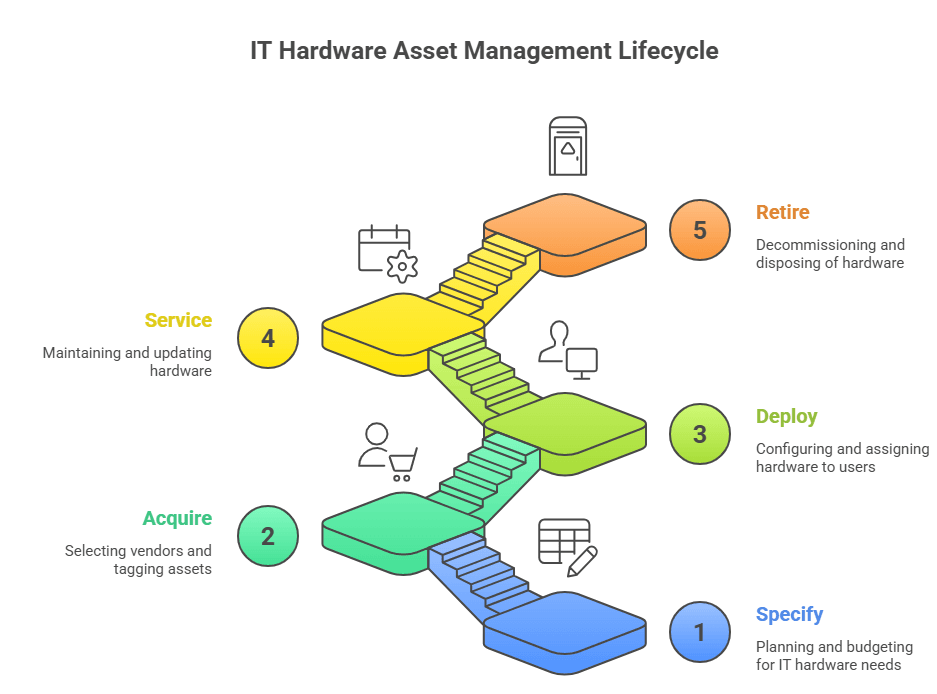
IT hardware asset management lifecycle
Stage 1. Specify
Hardware planning usually starts with two main perspectives.
- First, you look at business or customer data. This helps you understand future demand and strategy.
- Then, you consider technical factors like new technology, past issues, and continuity needs.
You need a plan that brings both sides together. A strong IT hardware asset management lifecycle plan combines business needs with technical goals. It also gives you a clear path to follow that fits your organization’s priorities.
Once you know the priorities, it’s time to look at the budget. Here, the business side often takes the lead. That’s because available funding directly shapes your choices.
Your budget also depends on how you plan to get the hardware. For example, leasing or upgrading is usually cheaper than buying new equipment outright. This helps you stay within budget while still meeting your needs.
Stage 2. Acquire
The IT hardware asset management lifecycle usually starts with two main points of view.
- One comes from the business side and includes customer needs, strategy, and demand.
- The other comes from IT and covers things like upgrades, issues, and system changes.
Together, these views shape what type of hardware you need and how much of it.
Next, you need to turn these insights into a clear hardware asset plan. This plan helps you stay focused on what matters most for your organization. It further brings together both business goals and technical needs in one place.
After setting priorities, your next step is budgeting. This is where business leaders usually take the lead. They decide how much money can go toward buying or upgrading hardware.
Your budget also depends on how you plan to get the equipment. Leasing and upgrading often cost less than buying new hardware outright. So, it’s important to weigh your options carefully.
Stage 3. Deploy
The next step, before giving out the asset, is to record it as a configuration item. You can do this in your IT service management system or asset register.
This step helps when the device needs service or support. It also ensures that IT teams and vendors have the right information for monitoring and maintenance.
For end-user hardware, deployment usually means two things.
- One option is to set up the asset, then send and assign it to the user’s workspace. This could be an office or home, especially for remote work.
- Another option is to have users pick up the device from IT themselves.
To protect your assets, you might take extra steps. You can issue asset passes to control where devices go. You may also ask users to sign an acceptable use IT asset lifecycle management policy before giving them the device.
When it comes to corporate hardware, deployment involves moving assets out of storage. Then, using the change management process, you configure, install, and add the devices to your live systems.
IT staff or vendors usually manage these tasks. After that, internal teams like security and audit take care of validation.
Stage 4. Service
At this stage, you focus on keeping your IT assets in good working condition.
- Maintenance can be planned in advance or triggered by an issue. Planned maintenance often follows service contracts and is handled by IT teams or vendors.
- On the other hand, unplanned maintenance happens when something breaks or malfunctions.
In both cases, it’s important to have spare parts ready so repairs don’t take too long.
You’ll also handle upgrades and patches as part of routine servicing. These changes should follow your organization’s change management process to avoid disruptions.
At the same time, your finance team will track how the IT asset is used and calculate its depreciation. Subsequently, this helps meet yearly financial reporting needs and gives a clear picture of IT asset value.
Stage 5. Retire
When a hardware asset is no longer useful or cannot be repaired, it’s time to decommission it. This is the first step before you proceed with asset disposition. Decommissioning may also happen when an employee leaves, especially in a BYOD setup. It can also occur if there’s a security risk or audit concern.
Decommissioning needs care, especially for corporate hardware. So, always follow your change management process. Make sure to update the asset’s status in your ITSM system or hardware asset register.
Before disposal, check that all company data has been erased from the device. You may need special tools to make sure the data can’t be recovered.
There are several ways to dispose of old hardware.
- You might return leased assets.
- You could also sell assets that still hold value.
- Some companies even donate IT assets to schools or charities.
Finally, don’t forget to update the asset records. This confirms the asset has officially left your organization.
Challenges in implementing a successful IT hardware asset management lifecycle
Effective IT hardware asset management helps improve operations, control costs, and deliver better service. But many organizations still struggle with several key challenges.
1. Lack of visibility & fragmented inventory
You may be using separate tools or spreadsheets to track thousands of devices. These include laptops, servers, cloud subscriptions, and mobile devices. This split setup creates blind spots and opens the door to “shadow IT.” As a result, you waste money and face higher security risks.
2. Inaccurate or outdated asset data
Manual updates and disconnected systems often lead to old or missing information. This makes it hard to make smart decisions. You might buy too early, miss replacement dates, or lose track of what you already own.
3. Complex lifecycle management
Following a device from purchase to disposal takes time and effort. Without automation, this process becomes slow and messy. It can also lead to delays, surprise failures, and shorter asset lifespans.
4. Software licensing & compliance risks
Licensing rules can be tricky—some are based on users, others on cores or subscriptions. If you don’t track licenses well, you might buy too many or too few. That can also cost extra money or lead to audit fines. You further risk breaking data laws like GDPR or HIPAA.
5. Integration issues with ITSM/Procurement systems
Your IT asset system must connect with tools like CMDB, ServiceNow, Jira, or finance platforms. If they don’t talk to each other, you’ll end up with duplicate data and broken workflows. Consequently, that wastes time and reduces efficiency.
6. Security & risk exposure
Devices not tracked or updated on time can create weak spots. These become easy targets for attacks. “Shadow IT” adds even more risk. This not only increases the chances of a data breach but also makes ITIL compliance harder.
7. Scalability & tool inefficiency
As your company grows, basic asset tools might not keep up. Many don’t offer real-time tracking or automation. That limits their reach and value. Poor performance also slows your teams down and reduces return on investment.
8. Budgetary constraints & ROI challenges
Starting an ITAM program requires time, tools, and training. But tight budgets can make it hard to get started. Even though the long-term benefits are clear, many teams often struggle to get support for upfront costs.
| Impact area | Consequence |
| Costs | Overspending on unused assets; penalties from audits |
| Security & compliance | Higher vulnerability to breaches, financial and reputational damage |
| Efficiency | IT delays from locating assets or resolving incidents |
| Strategic control | Poor visibility hinders resource planning and digital transformation |
How the right asset management tools can solve IT hardware asset management challenges
Consider this scenario:
A former employee’s laptop stayed connected to your network for months after they left. No one noticed because the device wasn’t listed in your asset inventory.
Over time, that laptop became the entry point for a ransomware attack. As a result, your company lost data and spent more than $80,000 fixing the damage and handling legal issues.
Clearly, situations like this show why strong IT asset visibility really matters. Without it, you can’t track devices, enforce security rules, or respond to risks quickly.
That’s why using the right tools is so important. With automated discovery, lifecycle tracking, and centralized control, modern asset management solutions help you stay updated and protected.
You’ll always know what’s connected and who’s using it—every step of the way.
Before you get started, take a look at the top 11 asset management tools worth exploring.
Lack of organization
Without a clear IT hardware asset management process, your IT environment can become messy fast. You won’t know what devices you own or who’s using them. Spreadsheets might work early on, but they often break as your needs grow.
This causes missed updates, lost time, and wasted money. Instead, use IT asset management tools that track everything for you and keep things organized.
Managing change and obsolescence
IT hardware wears out. Software needs updates. When you rely on automated tools, upgrades and replacements become easier.
These tools also help your team manage support requests without missing important tasks. As a result, your IT environment stays up to date and runs smoothly.
Poor budget planning
Budgeting gets tricky without accurate records. If you don’t know what’s being used, you might overspend.
Asset management tools solve this problem by linking usage to reduced costs. You’ll know where your money goes and how to spend it wisely. That means fewer surprises and less waste.
Manual inventory
Tracking IT assets by hand takes time and often leads to mistakes. It’s hard to stay accurate, especially across remote locations.
Automated tools can discover and monitor devices on their own. This also saves time and reduces the chance of costly errors. Plus, you get real-time updates with little effort.
Service and support
Missing asset details can slow down support calls. Technicians may spend extra time hunting for information. With asset management tools, they can see everything right away—settings, history, and past issues.
This also speeds up troubleshooting and keeps your team more productive. Everyone wins when problems get solved faster.
You might find our ITAM use case helpful—feel free to take a look when you have a moment.
Best practices for managing hardware assets end-to-end
Below are key best practices that can help enterprises manage hardware assets more effectively:
1. Establish a comprehensive asset inventory
You can’t manage what you don’t know exists. That’s why accurate IT asset tracking is the first step in the IT hardware asset management lifecycle. You need to know what assets you own, where they are, and how they’re used.
To make this easier, try using automated discovery tools. These tools further help you track assets in real time. They also cut down manual errors and save your team a lot of time.
It’s also important to run regular audits. Audits help you find any missing items, check asset conditions, and keep your inventory list current.
Still, many businesses fall behind. For example, Gartner research shows roughly 30% of IT assets are “lost” (never entered into any management system) and about 24% of organizations haven’t verified their asset inventory in the last five years, underscoring that many lack even basic ITAM process controls.
By making asset inventory management a top priority, you improve control, lower costs, and reduce risk.
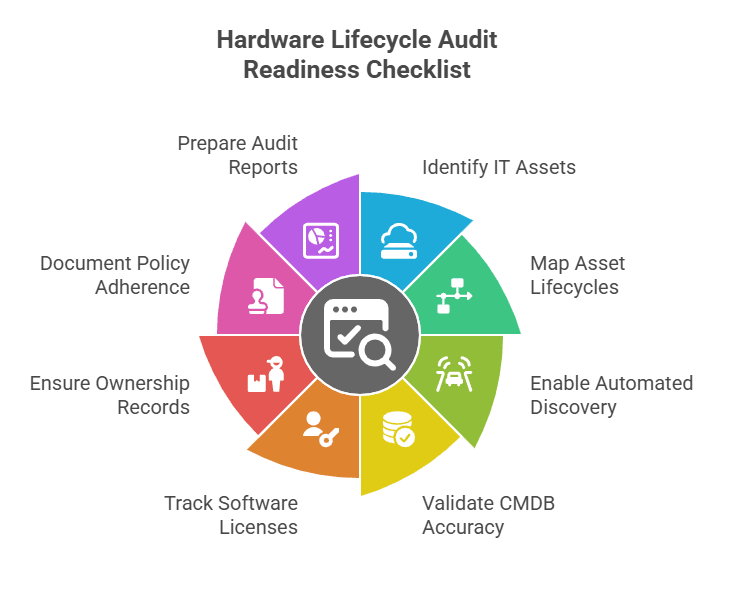
IT hardware asset management lifecycle- Audit checklist
2. Implement a centralized asset management system
Once you build a strong inventory, the next step is setting up a centralized asset management system. This system further helps you break down silos that happen when each department tracks hardware separately. It also brings everything together in one place, making work easier for everyone.
You can use tools like Virima to manage this step smoothly. Virima connects with popular IT service tools such as ServiceNow, Jira, Ivanti, and HaloITSM. It gives you a single platform to view and manage all your asset details.
With everything in one system, reporting also becomes easier. You can quickly see how assets are used and where they are. Ultimately, this helps you make faster, smarter decisions and keep your operations running smoothly.
3. Optimize procurement processes
Strategic procurement plays a big role in managing your hardware asset management lifecycle. You need to align purchases with your business goals. This also helps you avoid buying too much or too little.
To get this right, start by evaluating your vendors. Choose suppliers who offer good-quality hardware at fair prices. This way, you build strong partnerships and avoid poor investments. Also, plan ahead to scale easily and use bulk discounts to save money.
When you streamline procurement, you cut down costs year after year. You can then use those savings for other key areas, like maintenance and upgrades. This smarter approach boosts your operational efficiency and gets more value from your hardware.
4. Streamline deployment and installation
The deployment and installation phase plays a key role in how fast you see returns on your investment. When you streamline this step, you can save both time and money. Automating setup tasks also helps maintain consistency and speeds up the entire process.
At the same time, tagging and tracking your newly installed assets adds more clarity. You can easily check the status of your assets in real time and plan for maintenance or replacements. This further keeps your system running smoothly.
Tools like Virima make this process even easier. Virima’s automation features help assign assets instantly during deployment. As a result, your team can get up and running faster and stay focused on business goals.
5. Proactive maintenance and monitoring
Taking care of your assets before they break down helps them last longer and avoids sudden problems. This kind of proactive and predictive maintenance reduces IT downtime and keeps your systems running smoothly. It also saves you from rushing to fix things after they go wrong.
Still, many businesses wait until something breaks to take action. This reactive approach often causes expensive delays and unexpected service disruptions. Over time, these issues can seriously hurt your productivity and bottom line.
That’s why Virima offers tools that make asset care easier. With automated asset discovery and quick discrepancy reporting, you can catch problems early. When you run regular health checks and fix small issues early, your hardware lasts longer and works more reliably.
6. Implement robust security measures
Hardware asset management lifecycle management isn’t only about keeping devices running. It’s also about keeping your data safe. So, hardware asset management must include strong security steps to protect against threats and block unauthorized access.
This becomes even more important if your business handles private or sensitive information. You also need to secure your devices at every stage—when you buy them, install them, maintain them, and even when you retire them.
To reduce risk, use methods like encryption, physical locks, and limiting access only to the right people. These simple steps further help you stay ahead of security problems before they happen.
Virima makes this easier. It uses automated workflows to keep sensitive data safe and out of reach from the wrong hands. This also protects your business and helps build trust with your customers.
7. Efficient support and upgrade management
Keeping your IT assets in good shape is key to smooth business operations. But sometimes, support and upgrade efforts lack proper coordination. This can lead to repair delays and long downtime. As a result, your team’s productivity may suffer.
To avoid this, start by tracking how your devices perform. This helps you spot which assets need an upgrade first. That way, you can plan smarter and get better results from your upgrade efforts.
8. Optimize asset utilization
Are you getting the most out of your IT assets? This simple question is key to using your assets wisely. When you track how devices are used, you’ll quickly spot which ones sit idle.
Then, you can move them where they’re actually needed. That means fewer wasted resources and smarter spending.
Virima makes this easy for you. Its real-time tools help you see how each device performs. With clear data, you can adjust usage before waste becomes a problem. As a result, you avoid buying more than you need.
Even better, you can lower total ownership costs by 5–30% over time. That’s a big win for your IT budget. In the end, you’ll boost productivity, save money, and get more value from every asset.
9. Responsible decommissioning and disposal
The final stage of the hardware asset management lifecycle—end-of-life management—is just as important as asset purchase. You need to retire old IT assets carefully to follow the rules and protect the environment.
Moreover, start by wiping all data from devices using safe and secure methods. Then, use eco-friendly disposal options or choose certified e-waste recycling services. These steps help you avoid fines, reduce environmental harm, and show your commitment to responsible practices.
They also boost your image with customers and stakeholders. That builds trust and reflects your values as a business.
From best practices to real results: Why Virima is the smart choice for IT hardware asset management
When you follow the best practices above, managing hardware assets becomes much easier. You’ll gain better visibility, improve usage, and keep costs under control. It also helps you stay compliant without added stress.
But to see real success, you need the right platform. One that brings everything together and works across all teams.
That’s where Virima makes a difference. It gives you a complete solution to manage your assets a smart way. You can also automate tasks, cut down on manual work, and keep everyone in sync.
Here’s why Virima should be your top choice for automated IT asset management:
1. Simplified IT asset discovery, inventory, and optimization
Virima’s ITAM solutions help you automatically find all your hardware, software, and network devices. It further keeps your hardware inventory current using both agent-based and agentless discovery methods.
You can choose the method that works best for your setup.
The discovery engine collects detailed data about your hardware, software, and network components. As a result, you gain full IT visibility into your entire IT environment. It also sends near-real-time updates, so your inventory always stays accurate.
With this clear view, you can make smarter decisions and use your IT assets more efficiently.
2. Centralized inventory for streamlined operations
Virima brings all your asset data—hardware, software, and configurations—into one easy-to-use system. This setup helps you quickly find and manage important hardware details without hassle.
You can also customize what you track based on your needs. This means you only see the data that matters most to you. As a result, you stay focused and avoid wasting time on the wrong details.
Virima also includes smart reports and clear dashboards. These tools help you understand patterns and make better choices. Because everything runs smoother, you get fewer errors and higher productivity.
3. Flexible discovery for multi-cloud and hybrid environments
Virima’s IT discovery tool helps you manage hardware assets with ease. It gives you clear visibility into all your assets—whether they’re on-premises or in the cloud, including AWS, Azure, or VMware. You can also connect it with tools like ServiceNow, Jira Service Management, or HaloITSM.
These connections make hardware asset discovery more accurate. As a result, your inventory stays up to date and your CMDB remains reliable. With Virima, you save time and avoid guesswork in hardware asset management.
4. Optimized software license management and cost savings
Virima helps you spot unused software licenses in your organization. You can then either reassign them or remove them. This reduces waste and saves money.
Also, Virima alerts you about possible compliance issues before they become a problem. That way, you avoid penalties and stay in control of your license management.
5. Enhanced IT security with vulnerability management
Virima’s ITAM software helps you improve security by spotting risks in your hardware devices. It also uses a feature that connects to the NIST National Vulnerability Database. This helps you find known issues quickly and assess how serious they are.
As a result, you can mitigate risks like data breaches, system crashes, and unwanted access.
The software also helps you stay compliant with rules like GDPR, HIPAA, and PCI DSS. You get tools that reduce security risks and keep your IT systems safe. By using Virima, you take control of your IT security in a smart and simple way.
Additional benefits of Virima
Track remote assets with ease
Virima helps you keep an eye on all IT assets used by remote workers. With the Windows discovery agent, you can see devices no matter where they are. This gives you constant visibility without extra effort. So, you stay in control even when your team is spread out.
See connections clearly with ViVID
Virima’s service mapping and Virima Visual Impact Display’s features show how your IT assets connect and depend on each other. You get a clear view of the entire setup. As a result, you can manage your infrastructure better and make smarter decisions. This reduces confusion and keeps things running smoothly.
Make smarter choices with clear reports
Virima’s dashboards show you how each asset performs and how it’s being used. They also help you track each stage in the asset lifecycle. With these insights, you can make better hardware choices. So, you waste less and get more value from your IT.
Simplify your next audit
Virima takes the stress out of audit prep. It automates compliance reports for all your IT assets. This not only saves time but also improves accuracy. So, you can feel ready and confident during IT compliance audits.
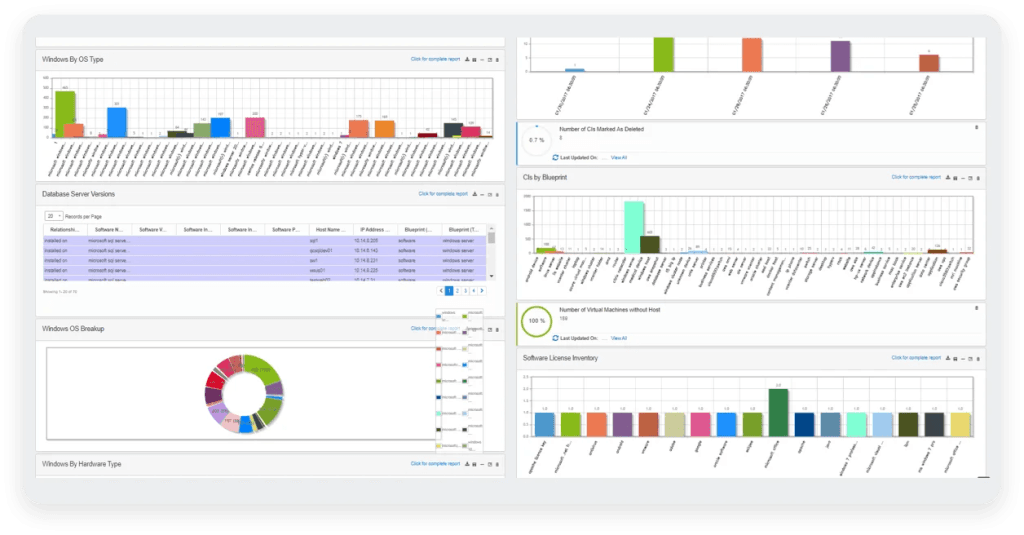
Virima ITAM platform features an intelligent reporting engine that creates KPI dashboards and metrics.
Software usage metering
Virima tracks how often each software is used. This helps you find underused tools in your environment. You can then decide whether to remove, upgrade, or reassign them. As a result, you make better use of your resources and save costs.
Improved decision-making for ITSM and security
Virima shows how your assets are set up and how they connect with each other. This information gives your ITSM and security teams what they need to act faster. They can improve workflows, spot issues early, and tighten security with confidence.
Simplify IT hardware management and drive efficiency with Virima
Virima ITAM provides comprehensive management for data center, edge, cloud, stockroom, software, and non-IT assets.
Managing hardware assets plays a key role in your IT asset management process. It helps you track, control, and get the most out of your IT hardware. With a clear strategy in place, you can cut costs and avoid waste. You’ll also keep your daily IT operations running smoothly.
An effective hardware asset management plan covers every stage—from purchase to final disposal. When you manage the full asset lifecycle, you reduce errors and also stay organized. Working as a team makes this process even stronger. Moreover, it helps close gaps and prevent costly mistakes.
Using the right tools also makes a big difference. Good IT hardware asset management software simplifies every step and boosts your results.
Want to see how Virima can help improve your hardware asset management? See Virima’s hardware asset lifecycle management in action by requesting a demo today!
FAQ
1. How do I dispose of hardware securely?
Secure hardware disposal involves several steps:
- Back up and wipe data using certified data-erasure tools.
- Physically destroy drives if sensitive data was stored.
- Remove all asset tags and company identifiers.
- Follow environmental compliance by working with certified e-waste recyclers.
- Document the disposal in your asset lifecycle management software to maintain audit trails.
2. What are the risks of skipping lifecycle tracking?
Skipping lifecycle tracking can lead to:
- Security gaps, like unpatched or forgotten devices.
- License non-compliance may cause fines or legal issues.
- Wasted spending on unused or duplicate assets.
- Audit failures are due to a lack of documentation.
- Reduced visibility, impacting IT planning and risk management.
3. How do you implement a hardware asset management plan?
To implement a hardware asset management (HAM) plan:
- Define policies for procurement, usage, and disposal.
- Use a HAM tool like Virima to automate discovery and tracking.
- Create a CMDB to store asset data and link dependencies.
- Assign ownership for accountability.
- Monitor performance, compliance, and lifecycle stages.
- Regularly update records to maintain accuracy and audit readiness.
4. IT asset lifecycle vs hardware asset lifecycle differences
- IT asset lifecycle covers all technology assets—hardware, software, cloud services—through stages like planning, acquisition, deployment, support, and disposal.
- Hardware asset lifecycle focuses only on physical devices, such as laptops and servers, with steps like procurement, installation, maintenance, upgrades, and secure disposal.
In short, hardware lifecycle is a subset of the broader IT asset lifecycle.





