IT Visibility Business Service Maps: 9 Best Practices for Accuracy

What Makes IT Visibility Business Service Maps So Important?
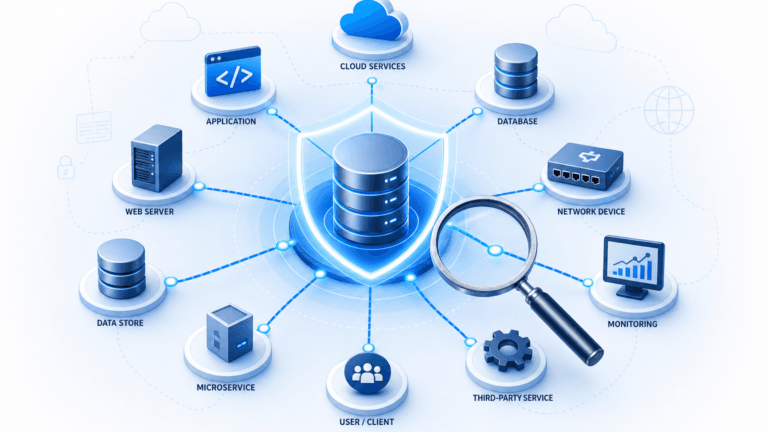
Modern IT environments run on relationships. Applications depend on servers. Servers depend on network infrastructure. Services depend on all of the above. A business service map makes those relationships visible, so IT teams can manage them rather than react to failures caused by them.
When a map is accurate, it supports change management, incident resolution, risk assessment, and service availability reporting. When it drifts out of sync with reality, it creates false confidence and leads to decisions based on bad data. Maintaining IT visibility in those maps is what keeps their value intact.
What is IT visibility?
IT visibility is the ability to accurately identify, track, and understand all hardware, software, cloud resources, and network dependencies across an enterprise. It connects raw infrastructure components to the business services they support, enabling IT teams to assess change risk, resolve incidents quickly, and maintain continuous security governance.
9 Best Practices for Accurate IT Visibility Business Service Maps
1. Establish a Governance Framework
The first step in maintaining accurate IT visibility business service maps is a governance framework. Governance defines who owns each part of the map, how changes get documented, and how updates get communicated across teams. It turns map maintenance from an informal task into a structured, repeatable process.
Without clear governance, maps drift quickly. With it, your teams have a defined process for infrastructure changes and a reliable record to consult during incidents or audits. A solid IT governance framework also helps you stay ahead of compliance obligations.
2. Define Standardized Naming Conventions
Business service mapping involves defining hierarchical relationships between services and their configuration items (CIs). For those relationships to hold up, naming conventions must be consistent across teams and tools. Inconsistent naming leads to mapping errors and makes it harder to trace the impact of changes.
Automated discovery platforms support consistent naming by detecting and organizing CI data through high-frequency discovery cycles. Even with tooling in place, enterprise teams require defined data ownership and configuration roles to maintain taxonomy accuracy across multi-cloud environments.
3. Use Discovery-Driven Dependency Mapping
Manual dependency mapping is slow, error-prone, and hard to scale. Discovery-driven dependency mapping replaces that effort with high-frequency discovery cycles that keep CI data current without relying on manual input. This is what keeps your CMDB aligned with your actual infrastructure.
When Virima Discovery feeds your service maps directly, you can see the potential impact of changes before they go in, understand the cause of reported incidents faster, and give service desk analysts the context they need to resolve issues without unnecessary escalations. Discovery-driven maps also feed more reliable data into your ITSM workflows, which reduces ticket noise.
4. Validate and Update Data on a Regular Schedule
Discovery-driven data collection keeps maps current between updates, but validation still matters. IT environments change constantly: hardware gets decommissioned, software gets upgraded, and configurations shift. A regular validation schedule ensures that your records match the actual infrastructure rather than the infrastructure from months ago. Research from Enterprise Management Associates indicates that organizations relying on manual audits or unverified data feeds experience up to a 40 percent decay in configuration data accuracy within 60 days of audit completion.
Build periodic audits and reconciliation exercises into your process. When you find discrepancies, trace them back to a root cause and document what changed. For enterprise teams maintaining an enterprise configuration management database, automated CI enrichment reduces duplicates, flags decommissioned assets, and bridges gaps that manual processes overlook.
5. Build Cross-Team Collaboration Into the Process
No single team has the full picture. Each team manages a portion of the infrastructure and sees dependencies that the others miss. Keeping service maps accurate requires those teams to communicate regularly, share what they know, and flag changes that affect the map.
Schedule cross-functional reviews and build knowledge sharing into your normal operating rhythm. When a team makes an infrastructure adjustment that impacts an upstream dependency, clear protocols must ensure the map is updated immediately. Unified asset and configuration repositories give infrastructure, security, and application teams a shared, accurate record of assets and dependencies to coordinate from.
6. Use Visualization Tools to Make Maps Actionable
Raw CI data is not a service map. A service map shows topology, dependencies, and service impact in a way that teams can act on quickly. Visualization tools close the gap between data and decision-making.
Platforms supporting dynamic business service mapping convert raw CI records into intuitive dependency topologies. These visualizations display infrastructure layers, application dependencies, Windows Server NIST NVD vulnerability overlays, and linked ITSM records in a single pane. When something breaks, you see what it affects before you start troubleshooting, which shortens both mean time to detect and mean time to repair.
Understanding the distinction between MTBF and service availability also matters here. Accurate service maps should be backed by measurable performance data, not assumptions about uptime. Update your visualizations whenever the environment changes because a visualization built on stale data gives you false confidence.
What is the difference between IT visibility and IT observability?
IT visibility establishes structural truth by discovering what assets exist, their configurations, and their operational relationships. IT observability analyzes telemetry outputs such as metrics, logs, and traces to assess runtime state. True operational resilience requires visibility to understand topology and observability to evaluate telemetry.
7. Document Every Change and Incident
Every change to your infrastructure is a potential gap in your service map. A structured change management process closes that gap by requiring teams to record what changed, what was added, and what was removed. Tracking incidents alongside changes helps you see patterns that point to systemic problems before they cause a larger outage.
When a specific type of infrastructure change keeps triggering service disruptions, documentation makes that pattern visible. That visibility is what separates a learning organization from one that keeps repeating the same failures.
8. Provide Training and Build Awareness
The best governance framework and tooling will not hold up if the people maintaining maps do not understand what is at stake. Training should cover the tools, the validation process, and the downstream cost of working from inaccurate maps. Update training regularly as technology and business requirements change.
Build awareness, not just skills. When teams understand that an inaccurate map slows incident resolution and causes failed changes, they treat map maintenance as a priority rather than an afterthought.
9. Build in a Cycle of Continuous Improvement
IT visibility business service maps are never finished. Environments change, processes evolve, and new tools create new dependencies. Treating map maintenance as an ongoing improvement cycle rather than a completed project is what keeps those maps reliable over time.
After each major incident or audit, run a short retrospective on where the maps fell short. Use that feedback to refine your governance framework, improve your data collection processes, or update your visualization tools. The maps improve as your understanding of the environment deepens.
Keep IT Visibility Business Service Maps Working for Your Team
These nine practices give IT teams a repeatable, defensible approach to maintaining accurate business service maps that hold up under real-world pressure. Together, they help you make better decisions, reduce change risk, and run IT operations that your teams and leadership can rely on.
To see how discovery-sourced runtime context transforms service operations, explore Virima’s Trusted Runtime Truth platform. When you are ready to put accurate, dependency-aware service maps to work across your infrastructure, schedule a demo today.
Frequently Asked Questions About IT Visibility
What are the core levels of enterprise IT visibility?
Enterprise IT visibility encompasses four interconnected tiers: asset visibility (hardware, software, and cloud resources), network topology visibility (connectivity and port configurations), application dependency visibility (process-to-process interactions), and business service visibility (mapping technical components directly to business outcomes).
How does IT visibility differ from network monitoring?
Network monitoring evaluates device performance, interface bandwidth, and uptime through telemetry and ping polls. IT visibility provides relational configuration context, documenting what each component is, who owns it, which applications rely on it, and what business services break if it fails.
How often should business service maps be updated?
Underlying configuration data should be refreshed via automated high-frequency discovery cycles daily or weekly. Service relationship definitions should be audited monthly or after major infrastructure changes, cloud migrations, and critical incident retrospectives.
How does IT visibility support cybersecurity and vulnerability management?
IT visibility illuminates unmanaged and shadow assets that evade security scans. When combined with vulnerability overlays such as Windows Server NIST NVD CVE tracking, service maps enable security teams to prioritize patches based on business service criticality rather than raw severity scores alone.