ITIL asset management best practices: Your top 10 guide

As an IT asset manager, you already have a lot going on. You’re expected to track devices, licenses, and systems. At the same time, you must stay compliant and avoid wasteful spending. One small mistake can lead to big issues.
Sound familiar?
IT assets play a major role in how your organization runs every day. From laptops to servers, every asset matters. But without a clear process, things get messy fast. Untracked devices, expired licenses, and security gaps can cause real trouble.
That’s where ITIL asset management best practices come in. These proven steps help you stay in control. They reduce risk, improve accuracy, and give you more time to focus on what matters. If you operate under SOX, PCI DSS, or DORA, our financial services compliance guide shows how to apply them. With the right process, you can manage assets with confidence.
In this post, we’ll show you why ITIL asset management best practices are so valuable. Then we’ll share ten simple tips to get more from your ITAM solutions.
What is ITIL IT asset management (ITAM)?
IT asset management (ITAM) means keeping a complete list of all your IT assets. These assets include hardware, software, and digital tools your organization uses every day.
You manage each asset from the moment you get it until you stop using it. This includes setting it up, keeping it working, and safely removing it when it’s no longer needed.
With a solid ITAM process, you can track every asset easily. You stay in control, avoid waste, and use resources better. As a result, you cut down on costs, boost security, and meet all ITIL compliance needs without stress.
“IT Asset Management is a set of business practices that incorporates IT assets across the business units within the organization. It joins the financial, inventory, contractual and risk management responsibilities to manage the overall life cycle of these assets including tactical and strategic decision making.” – International Association of IT Asset Managers (IAITAM)
Check this out: Reader’s manual: Information Technology Infrastructure Library ITIL 4 Practice Guide
Why are ITIL asset management best practices important?
You need to follow ITIL asset management best practices because they help your process run smoothly and effectively.
- Cost reduction
When you know exactly what IT assets you have and what they’re worth, you can plan smarter. This helps you avoid buying things you don’t need. As a result, you save money and use your IT budget more wisely.
- Improved security
Keeping track of your IT assets helps you spot security gaps early. You can quickly fix these issues by patching or updating systems. This lowers the risk of cyber threats.
- Enhanced compliance
Many rules and laws require you to keep an accurate list of your IT assets. By following asset management best practices ITIL, you can stay on the right side of those rules. This also helps you avoid penalties during audits.
- Better decision-making
With the right ITAM tools, you get clear, updated data about your assets. That makes it easier to choose where to spend, upgrade, or cut back. In turn, your IT strategy becomes stronger.
- Increased efficiency
Strong ITIL asset management best practices can save your team a lot of time. You can automate everyday tasks and get a better view of your IT environment. This leads to faster service and smoother operations.
Top 10 ITIL asset management best practices 2025
Many organizations overlook the true value of their IT assets. But managing these assets well can bring major benefits. IT Asset Management practice (ITAM) isn’t just about tracking what you own. Instead, it covers the entire lifecycle of each asset—from purchase to retirement.
By using ITAM, you can reduce waste, cut costs, and stay in line with legal rules. You also avoid buying more than you need and remove unused equipment on time. Most importantly, you lower risks like lost software licenses and data breaches.
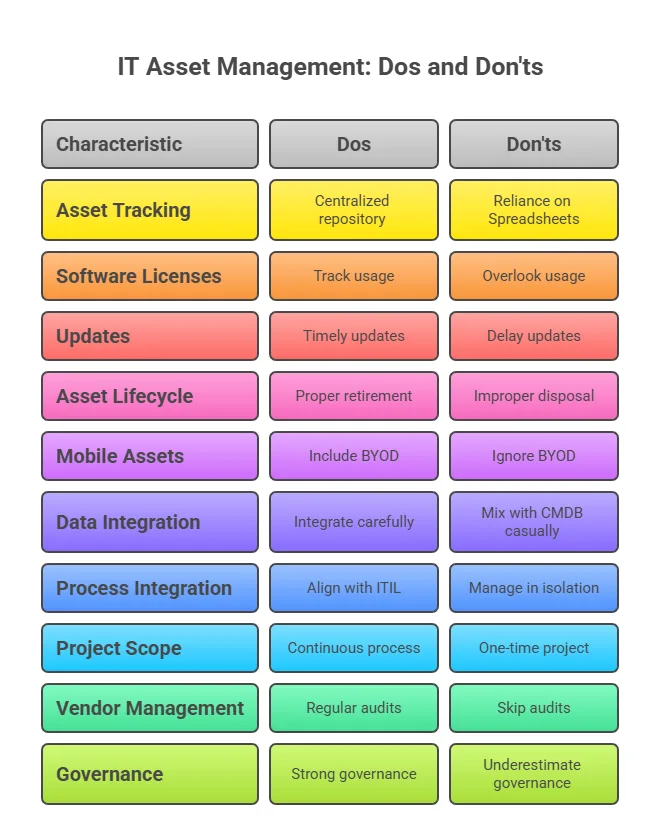
Starting early gives you an advantage. When you take a proactive approach, you stay ahead of problems. It’s much better than reacting after a crisis. With that in mind, let’s explore 10 asset management best practices ITIL to build a strong ITAM program.
1. Enlist an executive sponsor
Start by getting support from top executives. You can’t build a strong ITAM program on your own. Without visible backing from leadership, your efforts may stall or even fail. As one expert puts it, “An ITAM program cannot be successful in isolation.”
Look for a C-level champion to lead the way. This person can remove blockers, secure your budget, and promote ITAM across departments. Support at the top makes a big difference. In fact, 46% of ITAM teams now report directly to C-level leaders—up from just 22% two years ago.
2. Include your ITAM team from day 1
Build your ITAM process with the people who will actually use it. Don’t just hand down rules from the top. Instead, include IT staff, finance, and operations teams early in the planning.
Plus, this cross-team approach builds trust and support. When people help shape a process, they usually stick to it and even improve it.
Many ITAM leaders say forming a steering group leads to better teamwork and success. These groups often spot issues early, like what field technicians or auditors might face.
As a result, your process becomes more practical and easier to follow. Everyone feels heard, and that helps drive full adoption.
3. Start with a pilot (“Don’t boil the ocean”)
Don’t try to do everything at once. Instead, roll out your ITAM program in smaller, manageable steps. Start with a pilot project.
You could focus on just one asset type, like servers or laptops. Or pick a single department to begin with.
This small start helps you test your tools and processes. You can spot issues early and fix them quickly. These early steps give you quick wins. That momentum makes it easier to keep going.
Also, each phase can support specific goals. For example, you might target cost savings or lower risks. Aligning with leadership priorities keeps everyone on board.
Once your pilot works well, expand your reach. Apply what you’ve learned to the rest of the organization. This way, your ITAM rollout stays smooth, focused, and effective.
4. Define critical assets
Not every asset needs the same level of attention. From the start, decide what makes an asset critical to your business. These could include servers that run key apps, must-have SaaS tools, or important control systems.
According to Flexera’s 2024 report, 47% of organizations track Software Asset Management success by audit readiness. So, focusing on the right assets helps you stay prepared and efficient.
When you prioritize assets that affect IT service delivery, you can manage your time and resources better. Tag and closely watch high-value or high-risk items. This might include tracking license usage or keeping up with warranty dates.
At the same time, you can take a simpler approach with less important assets. This smart split keeps your team from feeling overwhelmed. It also makes sure critical assets get extra care, which helps avoid downtime.
5. Follow the asset lifecycle
Take a lifecycle approach to every asset—from request to retirement. Don’t treat ITIL asset management best practices as a one-time task. Instead, track each asset from purchase to disposal. This method follows best practices and helps you stay organized.
Start by logging the asset at the time of purchase. Then track it during setup, active use, and finally when you retire or recycle it. This way, you avoid missing important steps like wiping data or decommissioning old devices.
When you manage assets from start to finish, you get more value from them. You also waste less and avoid surprises. You can plan for replacements before things break, and only pay for what you need.
6. Evaluate a CMDB (Configuration Management Database)
Decide if a CMDB makes sense for your setup. A CMDB helps you organize IT asset records in one place. It also shows how each asset supports your services.
For example, you can link a server to the app it runs. This helps you better manage changes and fix issues faster.
But don’t put too much into your CMDB. Experts say overloading it with all your IT asset data can cause problems. You may end up with a huge, expensive database that’s tough to manage. Instead, store only setup and dependency data in the CMDB.
Keep financial and license info in your IT asset management (ITAM) system.
This setup works better. Each system does what it’s best at. When you connect them the right way, you get a clear and reliable source of truth, without needing one tool to do everything.
7. Automate repetitive tasks
Use automation wherever you can to improve accuracy and save time. Manual spreadsheets and tracking don’t work well as your IT asset inventory grows. In fact, industry experts warn that manual license tracking needs special skills and doesn’t scale.
According to Gartner, 70% of companies see up to 30% gaps between what they record and what they actually have. This usually happens when they rely on manual audits alone. That’s where modern ITAM tools like Virima make a big difference.
Check this out: Virima’s IT asset management software features
These tools can automatically find devices on your network and connect with your purchase systems. They can also label assets and create reports without you having to enter data by hand.
You can even automate everyday tasks like software requests or device handovers. Just set up self-service portals where users can handle things on their own. The system will take care of enforcing the rules in the background.
In short, if you’re still doing a task by hand, try to automate it. Over time, IT automation reduces mistakes and gives your IT team more time for meaningful work. Most importantly, it helps you keep your asset data accurate and up to date.
8. Exploit your ITAM data
Make your ITAM data easy to use across all IT teams. When systems connect, your asset data becomes more useful. For example, link your ITAM tool with your service desk. That way, every support ticket includes full asset details—like purchase date, warranty, and past issues.
This helps technicians solve problems faster. They can pull up the right asset record in seconds. Change managers also benefit.
They can check which assets or software a planned update might affect. This also helps avoid unexpected IT downtime.
So, give your team the access they need. You can send automatic reports to finance, or use dashboards that they can check anytime. For security tools, use APIs to share real-time updates. When you reuse the asset data you already have, you avoid silos and save time.
Even better, you can turn routine requests into self-service. If your ITAM system knows who is eligible, it can approve installs automatically. Overall, that means faster service for everyone.
9. Maintain accurate license entitlements
Track not just what software is installed but also what licenses you actually own. According to Deloitte, 60% of organizations try to reduce audit risks through better IT asset management.
One big risk is over-deployment—running more software copies than you’re licensed for. That mistake can lead to large fines or forced vendor audits.
To avoid this, keep your license documents organized. Check them regularly against the software you’ve installed. Doing this helps you stay in control and avoid surprises. Industry experts suggest running internal license checks often.
Start by listing all installed software. Then compare that list with your purchase records. This process helps you find any unlicensed or extra copies before a vendor does. If you find any, remove or fix them right away.
Licensing terms can be tricky. One small mistake can lead to big costs. Even if the base license is cheap, the penalties for violations can be expensive. So don’t guess your license status—prove it.
Use your ITAM records to show exactly how many licenses you have and how many are in use.
10. Iterate and improve
Build a feedback loop into your ITAM program. No process starts out perfect. Your ITAM efforts must grow as your environment changes. So, keep listening, adjusting, and improving.
After each audit or rollout phase, ask for feedback.
Talk to IT staff, end users, and auditors. What’s working well? What needs to change? This also helps you learn and act quickly.
ITIL 4 says, “progress iteratively with feedback.” That means don’t wait to perfect everything. Make small changes based on real results. Treat ITIL asset management best practices like a living system, not a one-time task.
Let’s say you find a new type of asset or someone misses their IT asset management service duties. Update your process or documentation right away. It’s also better to act fast than to let problems grow.
You should also track key metrics. Then, share wins with your team and sponsors. This builds support and keeps everyone motivated.
Make time for regular reviews. You could do this every quarter or after each rollout. Look at data quality, how people follow processes, and how tools perform.
Keep refining your policies and tools with real user input. That way, your ITAM program stays strong, no matter how your business or tech changes.
Check our guide on the IT asset management process document
What effective ITAM looks like: Two success stories that say it all
When done right, IT asset management best practices ITIL delivers real results. Here are a few examples that show just how powerful it can be.
Use case 1: Reducing audit penalties with accurate software asset Management
A large insurance company with offices in 20 countries faced a surprise software audit. At first, they found it hard to prove they followed software rules. The main issue was the lack of a central IT asset management software.
To fix this, they set up a smart software license tracking tool. As a result, they could spot unused licenses and assign them where needed. They also removed duplicate or unapproved software.
The new system made it easy to create accurate reports. With this clear data, they avoided a $1.5 million fine. Even better, they cut their yearly software costs by 12%.
Use case 2: Accelerating remote work transition during a crisis
During the COVID-19 pandemic, a global financial firm faced an urgent challenge. They had to shift over 15,000 employees to remote work in just two weeks. Their IT asset management solutions became the key to making this happen quickly and safely.
First, it showed in real time which employees had laptops, VPN access, and approved software. Then, it helped the team find unassigned or surplus assets that could be used right away.
Before sending any device, the ITAM platform also checked if security settings were turned on. As a result, the company avoided major disruptions. They stayed secure and kept their services running smoothly.
Stories like this show how much ITIL asset management best practices can help. It’s not just about IT asset tracking. ITAM can stop audit risks, support remote work, and make cloud migrations easier. When done right, ITAM saves time and money.
That’s where Virima comes in. Virima gives you a complete view of all your IT assets. It uses automated discovery and software license tracking to keep everything up to date. With CMDB integration and clear reports, IT teams can further act fast and stay compliant.
No matter your setup—hardware, cloud, or a mix of both—Virima keeps you in control. It’s a smart way to manage your assets and prepare for whatever comes next.
Check this out: Virima is no ordinary IT Asset Management tool, and it will cover your assets
Why Virima for ITAM under ITIL? A comprehensive solution for your IT asset management needs
Virima ITAM software works as a single place to store all your IT asset data. You can track every asset without switching between tools. It also lets you change asset details to match your organization’s needs.
That way, you always have the right information to make smart decisions.
At the same time, Virima gives you clear reports and useful insights. You can easily see how your assets are being used. This helps you spot waste, cut costs, and improve how you manage IT resources.
Streamline license management and software compliance
Managing software licenses isn’t always easy. You might end up paying for tools no one uses. Virima ITAM helps you track software licenses and stay compliant.
As a result, you can avoid extra costs and cut down on waste. Over time, this can save your organization a lot of money.
Maximize efficiency with automated workflows
Virima ITAM handles many of your IT asset management tasks automatically. So, your IT team gets more time to focus on key projects. You don’t need to track assets by hand anymore. This reduces mistakes and saves time.
On top of that, Virima gives you automated service and dependency mapping. These features show how all your systems connect. As a result, you can quickly spot how one change may impact others. This makes planning upgrades or fixes much easier and safer.
Seamless integration for a unified approach
Virima ITAM works well with the tools you already use. It connects smoothly with top ITSM platforms like ServiceNow, Ivanti, and Jira. These integrations let you share data easily across systems.
As a result, you get a single view of your IT environment. This helps you manage everything without switching between platforms.
Enhance security and reduce risk
With Virima ITAM, you can quickly spot and fix security issues linked to your IT assets. It connects easily with security tools, giving you a clear picture of your entire security setup.
Moreover, this helps you stay ahead of cyber security threats and avoid risky gaps in protection. You can act faster and make smarter decisions with this complete view. So, your assets stay safe and your team stays in control.
You may also like: Top asset management tools you need to know about
Reap the rewards of a streamlined IT asset management process
Setting up a strong IT asset management (ITAM) process isn’t just a good idea—it’s a must. With the right steps, you can build a system that’s both effective and easy to manage. When done well, ITAM gives you several important benefits.
- You gain full control over your IT assets.
- You can also cut costs by using resources better and managing software licenses the smart way.
- At the same time, it becomes easier to spot and fix security risks.
- You also stay on top of rules and compliance needs.
Accurate asset data helps you make better choices. You’ll know when it’s time to buy, upgrade, or retire IT assets. This way, you get the most out of every investment. A well-organized IT asset inventory keeps your data current and reliable.
To make things easier, you can use tools like Virima ITAM. These tools automate many daily tasks. That means your team can focus on bigger priorities while still keeping things running smoothly.
Taking a proactive approach to ITAM pays off. You improve your IT operations, save time, and reduce stress. Ready to simplify your IT asset management?
Reach out to Virima today and see how our ITAM solution can help you get there.
FAQ
How is ITAM different from CMDB?
IT Asset Management (ITAM) helps you track and manage your IT assets from purchase to disposal. These assets include hardware, software, and related data. In contrast, a Configuration Management Database (CMDB) stores details about your IT systems and how they connect.
While ITAM focuses on things like cost, ownership, and license compliance, a CMDB looks at how systems work together to deliver services. So, ITAM is all about the assets themselves, but CMDB focuses on how those assets support your services. For a closer look at how these two disciplines work together in practice, explore how CMDB strengthens IT asset management through the Virima-Ivanti partnership.
How to implement ITIL asset management best practices?
- Start by defining clear goals and aligning them with business needs.
- Build a centralized asset inventory and integrate it with your ITSM practices.
- Use automated asset discovery tools to ensure accuracy.
- Then, assign roles for ownership and accountability.
- Monitor asset usage, enforce policies, and conduct regular audits.
- Lastly, measure KPIs and continuously improve the process using feedback and insights.
How does ITIL 4 asset management differ from older ITIL versions?
ITIL recommends keeping a single, updated CMDB to track your hardware assets from start to finish. This database stores details like asset type, who owns it, where it is, and its asset status. You can also see how each asset connects with other parts of your IT setup.
To keep this data correct, ITIL suggests using automated IT discovery tools. These tools find changes quickly and help you stay on track. Also, regular audits play a key role in keeping your records clean and useful.
By following this approach, you can make smarter decisions and avoid surprises in your IT environment.
What does ITIL recommend for hardware tracking?
ITIL suggests using a central CMDB to track your hardware assets from start to finish. You should record basic details like the type of asset, who owns it, where it is, and its current status. You should also track how it connects to other parts of your IT setup.
To keep this data reliable, ITIL strongly recommends using automated discovery tools. It also advises running regular audits. This way, you always have accurate information and can make smarter choices.
How can I improve software license audits?
To improve your software license audits, start by setting up a Software Asset Management (SAM) process. Make sure it follows ITIL guidelines. This helps you track and manage software more effectively.
- Next, use tools that can check how often software is used. These tools should also track license usage and generate simple compliance reports. They make your job easier and reduce errors.
- Keep all your software purchase records in one place. Include license entitlements and renewal dates. When everything is stored clearly, you avoid confusion during audits.
- Always match your actual software use with the number of licenses you own. This helps you stop overuse and reduce waste. It also protects your organization from legal or financial risks.
- Use automation wherever you can. Clear documentation and up-to-date records make audits much smoother. This way, you stay ready for audits at any time.
How to align asset management with CMDB?
To align asset management with the CMDB, you need to keep both systems accurate and in sync. Start by discovering all IT assets and linking them to the right configuration items (CIs). Use automated tools to update both systems in real time. This helps you avoid mistakes and saves time.
Next, make sure you use the same names and data formats across both asset and configuration records. When your data looks the same everywhere, it’s easier to track and manage. As a result, you get better visibility, smoother change management, and fewer risks from bad data.