SolarWinds CMDB Features, Benefits, and Alternative

For organizations managing complex IT environments, a reliable CMDB can streamline operations and improve visibility across assets, services, and changes. SolarWinds is a trusted name in IT management, and its CMDB helps businesses track configuration items (CIs), dependencies, and changes across the network.
But a CMDB’s value goes beyond storing data. Reducing IT downtime and improving service delivery are equally important, and that’s where implementation challenges often surface. Manual updates, incomplete data, limited automation, and weak governance can all erode accuracy over time.
Virima addresses these gaps directly. It offers a discovery-driven CMDB built for teams that need reliable, governed configuration data at scale. This article covers what SolarWinds CMDB offers, where it falls short, and why Virima is a stronger long-term alternative.
Overview of SolarWinds Service Desk CMDB
The SolarWinds service desk CMDB stores details about CIs across your IT environment. These include hardware, software, applications, and services, along with their relationships and dependencies. This centralized view supports change, problem, and release management by showing how assets interact.
Teams comparing CMDB platforms should evaluate how well each handles CI depth, relationship mapping, and ITSM integration. Monitoring-first tools like SolarWinds CMDB tend to prioritize alert-driven workflows over the attribute granularity and relationship context that incident, change, and configuration management actually require.
Key Features and Benefits of SolarWinds CMDB
Comprehensive IT Asset Lifecycle Management
SolarWinds CMDB centralizes asset data across your entire IT estate, from servers and network devices to software licenses and office equipment. With everything in one place, each team member can monitor and manage the full lifecycle of every asset without switching between tools.
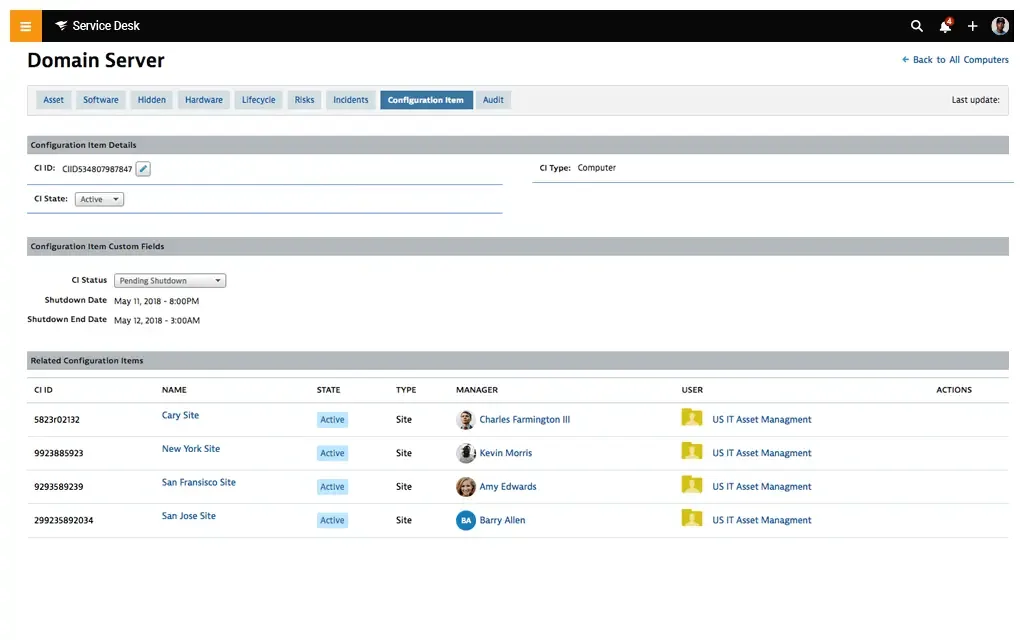
Enhance IT decisions with improved asset discovery, knowledge, and management.
Mapping System Dependencies
Understanding how assets connect is as important as knowing they exist. SolarWinds CMDB lets teams map asset dependencies and track each CI alongside its connections. This gives IT teams the context they need for more effective troubleshooting and change impact analysis.
Problem Resolution via the Service Desk CMDB
SolarWinds CMDB links assets to incidents, helping IT teams spot patterns and recurring issues. Integration with SolarWinds Observability (formerly Hybrid Cloud Observability) automates incident creation for critical alerts, keeping incidents updated and in sync.
Change and Risk Impact Assessment
Before making changes in any IT environment, knowing which systems could be affected matters. SolarWinds CMDB provides visibility into asset dependencies to support impact assessments. IT teams can identify at-risk systems quickly, improving communication with stakeholders during outages or updates.
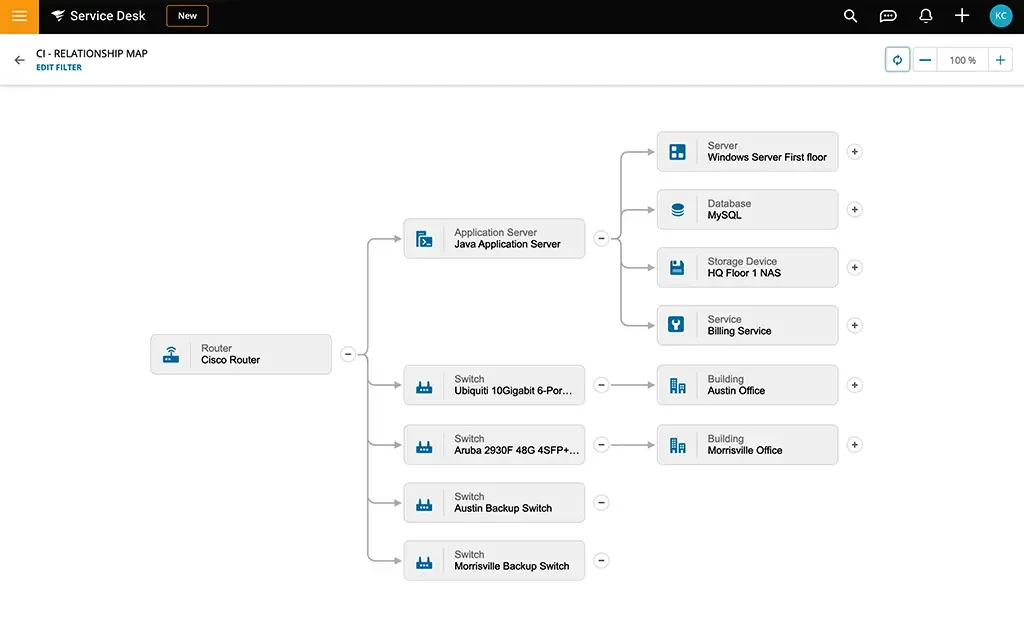
View asset impacts through visible dependencies in a configuration management database.
Root Cause Identification
Finding the root cause of a failure often means looking beyond the immediate symptom. SolarWinds service desk CMDB lets IT teams view both upstream and downstream dependencies to pinpoint the true source of a problem. This accelerates resolution by addressing underlying causes rather than surface-level alerts.
Integration with ITSM Processes
SolarWinds CMDB integrates with ITSM workflows including incident, problem, and change management. Integration with platforms like ServiceNow helps IT teams make better decisions and streamline resolution workflows.
Limitations of SolarWinds Service Desk CMDB
User feedback on platforms like G2 highlights several areas where SolarWinds CMDB falls short:
- Automation gaps: Teams want more automation, such as auto-attaching related assets to tickets, to reduce manual work for each team member handling incidents.
- Knowledge base flexibility: Customizable layouts, images, and branding would improve the knowledge base experience.
- Workflow customization: More flexible service request workflows would help teams tailor processes to their needs.
- Analytics consolidation: A unified integration for incidents, service requests, and changes would improve data insights across IT asset management (ITAM) functions.
- Third-party consulting support: Guidance for setting up custom integrations is limited.
- Custom forms: Teams want the ability to build custom forms for targeted data collection.
Considering Affordable Alternatives
As organizations evaluate their configuration management solutions, it may be beneficial to consider alternatives like Virima. Virima also offers robust features for IT asset management, including enhanced automation capabilities and comprehensive analytics. Organizations evaluating monitoring-centric platforms like SolarWinds CMDB should verify whether the discovery engine populates CIs with sufficient attribute depth and relationship context to support proactive operations, or whether it primarily feeds alert-driven workflows.
Virima’s scalable CMDB solutions effectively address the limitations found in SolarWinds service desk CMDB. Organizations seeking streamlined, integrated service management may find that exploring options like Virima better supports their goals.
Why Virima Is a Stronger Alternative
Virima offers a powerful Configuration Management Database software (CMDB) that outperforms Solarwinds integration with ServiceNow. Let’s explore why Virima stands out:
Reliable Discovery
Virima’s automated IT discovery identifies and catalogs CIs across your entire IT environment, both on-premises and cloud. Using agentless, IP-based scanning, it reduces manual effort and keeps asset data current without requiring agents on every device.
The discovery process dynamically catalogs hardware, software licenses, and interdependencies. Every team member working in the CMDB benefits from data that reflects the actual state of the environment.
Advanced Service Mapping with ViVID™
Virima’s ViVID™ (Virima Visual Impact Display) turns complex infrastructure data into clear visual maps. IT teams use these maps to understand how services and CIs interact, which supports better change management decisions and faster incident response.
ViVID™ integrates CI relationship data with ITSM platforms, so service management workflows are grounded in accurate, visual dependency context.
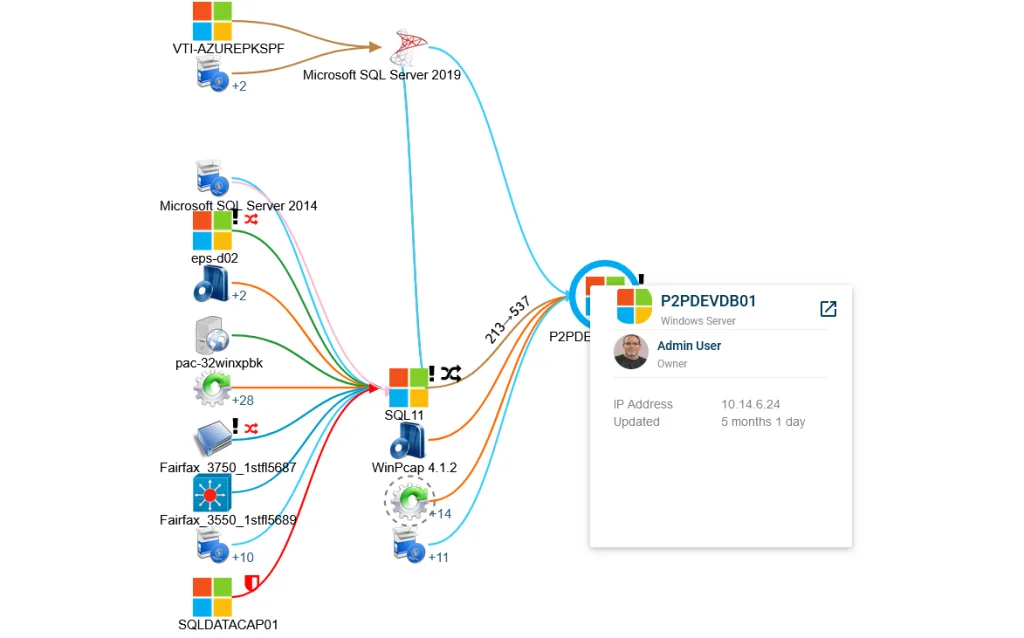
ViVID offers a detailed visual depiction of IT processes and CI relationships
Automated CMDB Maintenance
Virima automates CMDB maintenance through intelligent workflows that sync with major ITSM platforms. Automated business rules manage configuration updates, reducing the administrative burden that often falls on individual team members in traditional CMDB implementations.
Bi-Directional ITSM Integration
Virima integrates bi-directionally with ITSM tools including ServiceNow, Halo, Jira Service Management, and others. This layers ITSM data directly onto CIs in the CMDB, giving teams actionable context for managing incidents, changes, problems, and vulnerabilities.
Self-service options are also supported, reducing support team load by making essential configuration and asset management (ITAM) data accessible to the right people at the right time.
Choosing the Right CMDB for Your IT Environment
SolarWinds CMDB offers useful features for organizations already running SolarWinds for network monitoring. Lifecycle management, dependency mapping, and ITSM integration are all present. But for teams that need deeper CI attribute coverage, stronger automation, and true IT asset management (ITAM) capabilities, the monitoring-first architecture shows its limits.
Virima is built for exactly this use case, with automated discovery, governed configuration data, visual service mapping, and bi-directional ITSM integration in a single platform.
If you are also comparing SolarWinds as a service desk rather than just a CMDB platform, the Virima vs SolarWinds Service Desk breakdown covers discovery depth, service mapping, ITSM integration breadth, and pricing side by side.
Explore what Virima’s CMDB can do →
Frequently Asked Questions
What are the main limitations of using a monitoring-first tool as a CMDB?
Monitoring tools are built to surface alerts, not to maintain accurate CI records. They often lack the attribute depth, relationship context, and governance workflows that configuration management requires. Teams relying on them for CMDB functions typically end up with incomplete dependency maps and data that only updates when an alert fires, not when the environment changes.
How do I know if my CMDB data is accurate enough to support change management decisions?
A reliable test is to pick any planned change and ask whether your CMDB can tell you which services depend on the affected CI, who owns them, and what will break if the change goes wrong. If your team has to manually verify that information before every change, the data is not accurate enough to support governed change management.
What should IT teams evaluate when choosing a CMDB platform?
Focus on three areas: discovery depth (does it populate CIs with enough attribute detail to be actionable?), relationship mapping (does it show how assets connect across services and teams?), and ITSM integration (does it sync bidirectionally with your incident, change, and problem workflows, or only push data one way?).
How does Virima differ from SolarWinds CMDB?
SolarWinds CMDB is primarily a monitoring platform extended with configuration management features. Virima is purpose-built for CMDB, with agentless discovery, automated CI maintenance, visual service mapping via ViVID™, and bidirectional integration with ITSM platforms. The result is configuration data that stays accurate between incidents, not just during them.
Does Virima integrate with existing SolarWinds environments?
Yes. Virima integrates with ITSM platforms including ServiceNow, Halo, Jira Service Management, and others, and can operate alongside existing monitoring tools like SolarWinds. Teams often use Virima to fill the CI accuracy and relationship mapping gaps that monitoring-first tools leave behind.