

CMDB data manager: How it simplifies managing your configuration items (CIs)

Keeping your CMDB database healthy and up-to-date is crucial for smooth IT operations. As it grows, your CMDB can gather outdated, duplicate, or unnecessary configuration items (CIs). This can cause an inaccurate picture of your IT environment and disrupt essential systems. The CMDB data manager helps solve this problem.
The CMDB data manager lets you easily create and apply data policies to match your organization’s needs. Automating CI life cycle tasks like deletion and archiving ensures your CMDB stays accurate and efficient.
In this blog, we’ll show how the CMDB data manager can make CMDB data management task easier.
What is a CMDB data manager?
A Configuration Management Database (CMDB) is a key concept in ITIL (Information Technology Infrastructure Library). It acts as a central storage for information about an organization’s IT assets, including hardware and software. Further, the main goal of a CMDB is to serve as a reliable source for managing these assets and helping with ITSM processes.
A CMDB data manager is a tool designed to manage the data within this database. It also ensures that configuration items (CIs) are accurate, consistent, and properly managed throughout their lifecycle.
Overview of ServiceNow CMDB data manager
ServiceNow CMDB data manager is a powerful tool for managing Configuration Items (CIs) in an organization’s CMDB. Released with the Rome version, it uses the Common Service Data Model (CSDM) to simplify CI lifecycle management. Altogether, it helps to maintain accurate data.
Key features of ServiceNow CMDB data manager
ServiceNow CMDB data manager helps organizations manage configuration items (CIs) in their IT systems. Here are its main features:
Lifecycle management
The ServiceNow CMDB data manager helps manage CIs throughout their lifecycle—ideation, purchase, deployment, operation, and end-of-life. Further, it allows businesses to easily track assets as they move through these stages.
Policy creation
Users can set policies to automate the CMDB data management task like retiring, archiving, and deleting CIs. This automation also reduces manual work and ensures the CMDB stays clean by handling outdated data properly.
Comprehensive data visibility
The ServiceNow CMDB data manager provides a clear view of policies, excluded CIs, and open tasks in data management. Moreover, this visibility helps maintain data quality by identifying outdated or unnecessary configuration items.
Customizable roles and scheduled jobs
Users can also customize roles to meet their organization’s needs, such as forming groups like “Server Administrators.” The ServiceNow CMDB data manager also automates tasks, like cleaning up old data and applying archival policies.
Advanced filtering and reporting
The ServiceNow CMDB data manager lets users apply detailed filters when setting policies. Additionally, this capability allows for precise record targeting, improving data management efficiency. It also offers in-depth reports on various aspects of IT, such as asset management and compliance status.
Integration with discovery tools
The ServiceNow CMDB data manager connects with multiple discovery tools. This integration ensures all IT assets—whether on-premise or cloud-based—are accurately represented in the CMDB. As a result, it maintains an updated inventory of configuration items.
Visualization capabilities
CMDB data manager features visualization tools that help organizations graphically display their IT infrastructure and relationships between CIs. This also helps teams understand the dependencies and potential impacts of changes or incidents in the IT environment.
User-friendly interface
The dashboard provides an easy-to-use view of active policies, excluded CIs, and open tasks. Consequently, the CMDB data manager helps users manage CI data effortlessly.
Advantages of ServiceNow CMDB data manager
ServiceNow CMDB data manager offers several key benefits that improve how you manage Configuration Items in the CMDB. Below are the main advantages:
- Better data quality and performance
Managing many CIs can cause data quality issues and impact performance. The CMDB data manager solves this by using a policy-driven framework based on CSDM lifecycle standards. This method also ensures accurate, up-to-date records and boosts the database’s overall performance.
The reconciliation layer underneath data management determines whether the CMDB’s values are actually correct — our guide on multi-source CMDB reconciliation explains how attribute-level authority rules replace last-scan-wins
- Pre-configured policies
This ServiceNow CMDB data manager comes with pre-built policies that automate the retirement and archiving of CIs. Automation also reduces manual tasks and prevents errors. For example, it ensures CIs don’t move from operational status to end-of-life without proper steps.
- Customizable roles and scheduled tasks
The CMDB data manager allows you to customize roles based on your company’s needs. It also runs scheduled tasks, such as clearing stale tasks and processing policies. Hence, this keeps the database efficient without requiring ongoing manual input.
- Comprehensive action management
The CMDB data manager lets users define actions and offers insight into how policies will affect the system. Before executing any policy, it shows the number of affected CIs, thus, helping you make informed decisions.
- Archiving and deletion options
The ServiceNow CMDB data manager offers options for archiving or deleting records. You can also apply retention policies, thus, ensuring important data is retrievable while managing storage effectively.
A simple and cost-effective way to manage CIs with Virima
Managing configuration items (CIs) is essential for keeping IT infrastructure running smoothly. ServiceNow CMDB data manager offers a complete solution for handling this process. It also helps users manage CI data accurately and consistently. But as companies grow, managing CIs can become complicated and expensive.
Virima offers a smart and affordable alternative to streamline CI management. With features like asset discovery and relationship mapping, Virima makes managing IT environments simpler. Further, it reduces manual work, lowers errors, and boosts efficiency.
Key features of Virima’s CMDB
- Automated IT discovery and mapping
Virima automates the discovery of all CIs across your IT infrastructure. This process also ensures that someone catalogs hardware, software, and their relationships accurately without manual work. Further, the service mapping tool provides near real-time updates on CI relationships. This is significantly essential for managing complex IT systems.
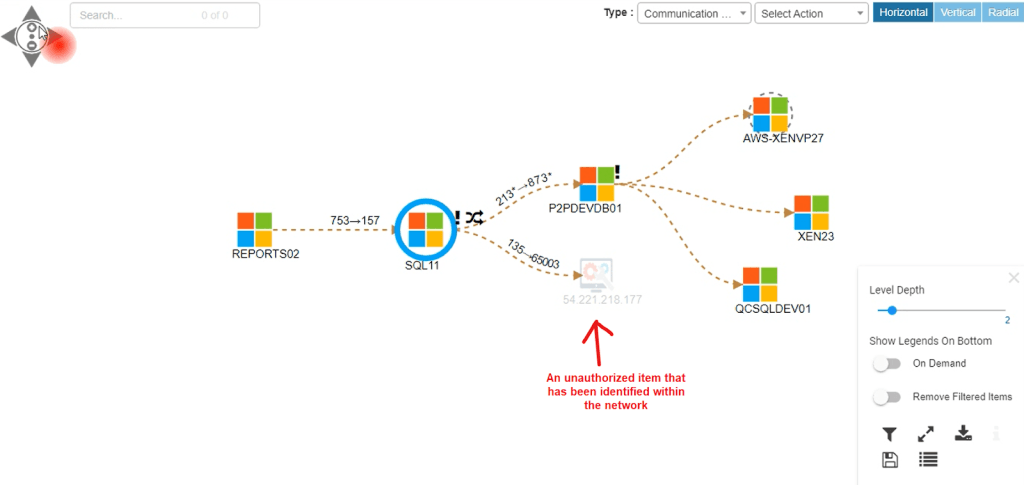
One instance of an unauthorized device was detected during a discovery scan performed by Virima.
- Dynamic updates
The system automatically refreshes the CMDB whenever changes occur in configuration items (CIs). This also ensures the data shows the current state of the IT environment. Such capability is vital for organizations facing frequent changes from new deployments, updates, or asset decommissioning.
- Granular business rules
Users can set specific business rules for processing updates of any CMDB data management task. This flexibility also helps organizations customize their CMDB maintenance to meet their operational needs. As a result, only relevant changes trigger updates.
- Dynamic visualizations
The CMDB features advanced visualization tools like ViVID™ services maps. These tools also create easy-to-understand dashboards that show asset relationships, service dependencies, and overall availability. Consequently, such visual aids help teams make informed decisions quickly.
- Bi-directional ITSM integration
Virima also integrates with ITSM platforms like ServiceNow, Jira Service Management, HaloITSM, etc. The integration allows for near real-time syncing of data with the CMDB. This means that changes in one system will show up in the other. As a result, this reduces the chances of errors and discrepancies.
- Security and compliance
Virima CMDB integrates with the National Vulnerability Database to identify security risks in near real time. This also improves the overall IT security of your IT environment.
Take control of your configuration data with Virima’s CMDB solutions
Managing configuration data can be difficult, especially as IT environments grow and change. Virima’s CMDB makes this easier by using intelligent automation to keep configuration items (CIs) and their relationships updated. With machine learning, Virima discovers new assets and tracks dependencies, reducing the risk of errors from manual updates. This also keeps your CMDB accurate with less effort.
Virima’s ViVID (Virima Visual Impact Display) takes this a step further. It turns raw configuration data into useful insights. ViVID also connects dynamic relationships and service mapping with IT Service Management (ITSM) processes. Altogether, this integration improves incident response and change planning.
Moreover, it helps IT teams see complex links among configuration items (CIs). This visibility allows for quick root cause analysis and impact assessments during incidents or changes. Additionally, the tool automates CMDB updates through agentless IP-based scans and API integrations. This IT automation also ensures data accuracy and reduces the need for manual work.
However, consider the limits of traditional CMDB solutions like ServiceNow CMDB data manager. Their price can be a major hurdle for many organizations. Plus, they often lack advanced features like Virima’s ViVID. ViVID pulls in ITSM records and overlays them onto service maps, providing deeper insights and better efficiency.
Still, Virima CMDB offers many of the same functions as the ServiceNow CMDB data manager. This makes it a great choice for organizations seeking cost-effective solutions without losing key capabilities.
To enhance your configuration management process and improve your IT operations, explore Virima. Discover how our smarter, automated solutions can empower your team today!





