ServiceNow Discovery Tool: Is It Right for You?

The ServiceNow Discovery tool may not give your team everything it needs to keep a CMDB accurate. That gap matters more than ever. IBM has reported that 40% of breaches involved data spread across multiple environments, which shows how fast visibility erodes across hybrid infrastructure.
You cannot manage what you cannot see. So choosing the right discovery approach is a decision worth getting right. Strong IT asset discovery helps you find infrastructure components quickly, support compliance, and audit device changes.
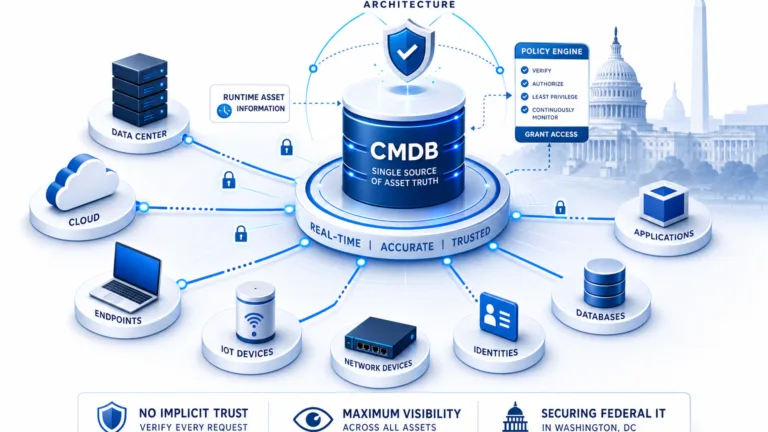
That data also feeds your Configuration Management Database (CMDB). In short, discovery identifies your devices, software, and changes, both approved and unapproved.
Why do you need the ServiceNow Discovery tool?
Typically, teams rely on the ServiceNow Discovery tool to:
- Document hardware, software, and operating system components.
- Confirm that changes pass through the change control process.
- Keep a clear, shared view of infrastructure across the enterprise.
- Support request, incident, change, problem, configuration, and asset management.
ServiceNow is a recognized leader in IT Service Management (ITSM). That strength can lead buyers to assume its discovery fits every environment equally well. As we explained in ServiceNow Competitors, Are There Any?, existing ServiceNow ITSM customers benefit from comparing several discovery options on their own merits.
An existing ServiceNow investment does not mean you should skip a best-of-breed evaluation. The two can work together. So it helps to weigh fit, not just brand.
That is why the ServiceNow Discovery tool deserves a close look before purchase. Understand how it deploys, how much tuning it needs, and what value it returns for the cost.
IT asset discovery fundamentals
Deploying discovery technology can be slow, especially when a tool offers limited options. Agentless discovery deploys fast and reaches a broad range of devices, such as servers and network gear.
Installable agents suit desktops and laptops that power down or roam off the network. Not every device accepts an agent, though.
So any strong ServiceNow Discovery tool alternative should include both methods, because one size rarely fits all. To ease your comparison, look for these capabilities:
- Scanner type: agent-based and agentless.
- Scan coverage: servers, desktops, virtual, network, application, database, VPN, mobile, printers, medical devices, and cloud.
- Discover: configurations, software, OS patches, certificates, relationships, custom attributes, and cloud assets.
- Supported OS: Windows, Mac, Linux, UNIX, and mobile.
- Scan scheduling: manual or high-frequency discovery cycles, with redundancy if a scan is not delivered.
Deployment and support ease
- SaaS or on-premises options.
- Web interface and quick out-of-box deployment.
- Self-install or vendor-led implementation services.
- Whether a mid-server is required.
- Online help, knowledge base, and direct customer support.
Service management capabilities to look for
- Service catalog and request management.
- Change, incident, and problem management.
- Configuration management.
Integration breadth matters too. Look for two-way sync with the ITSM platforms you already run, including ServiceNow, Ivanti, Halo, Jira Service Management, and Xurrent.
Discovered attributes for IT change management
- Device name, description, type, and status.
- Manufacturer, model, model number, and serial number.
- Department, location, created date, and last modified date.
- TCP/IP address, MAC address, and last user.
The ServiceNow Discovery tool can rely on several supporting servers, such as a mid-server, a management server, and a discovery server. Virima takes a different path. Our web-based design keeps deployment simple.
A virtual relay server sits on-premises and connects to a secure AWS cloud. This protects your data inside your enterprise and in the cloud. Virima also offers an installable IT Discovery agent for flexibility, plus dependency mapping out of the box.
Virima strengthens change management as well, since it maps how components connect before you act. As a result, you plan changes with the full picture in view.
Choose the right discovery tool
As you weigh the ServiceNow Discovery tool against other options, consider these points:
- The cost of deployment, including extra servers and middleware.
- Support for both agent-based and agentless discovery.
- How data is transferred and secured outside your enterprise.
- The breadth and depth of the data collected.
- Cloud versus on-premises deployment needs.
- Capabilities beyond discovery, such as CMDB and service mapping.
- Ease of integration, ease of use, and training or support costs.
Any tool succeeds or struggles based on how well it captures the whole enterprise. That includes moving data across network firewalls and VPN connections, DMZ environments, and isolated networks. Strong coverage cuts manual work.
Finally, compare solutions before you buy. Features, capability, and price all matter. For a starting shortlist, see our roundup of CMDB discovery tools.
Evaluate your requirements
First, capture requirements from your stakeholders. Then validate them, find gaps, and rank immediate versus long-term needs. After that, weigh purchase and deployment costs and review ease of use.
Bring these requirements to every ServiceNow Discovery tool conversation. Evaluate three products. Why three? It gives you a balanced view without sliding into analysis paralysis.
If cost is your main concern, our breakdown of ServiceNow CMDB discovery costs and alternatives digs into the numbers. And if you are sorting out the difference between finding assets and mapping services, see ServiceNow Discovery versus Service Mapping.
Next, review your results with stakeholders and gather their feedback. Their input keeps support strong, because they had a seat at the table.
ServiceNow earns its reputation, and its discovery performs well for many teams. Still, ask whether its features fit your day-to-day operational needs and your budget.
Choose discovery that keeps your CMDB accurate
The best choice often comes down to value, deployment ease, and total cost of ownership. So ask the hard questions early. Which tool fits your team? Which keeps your CMDB accurate as your environment changes?
These questions show stakeholders that real thought went into the decision. Leadership values that. Here is a side-by-side view to frame the conversation:
| Consideration | ServiceNow Discovery | Virima |
|---|---|---|
| Supporting server footprint | Typically uses a mid-server plus management and discovery servers. | Web-based design, with one virtual relay server that connects to the cloud. |
| Installable discovery agent | Focused on agentless and mid-server collection. | Offers an installable IT Discovery agent for added flexibility. |
| Cloud connection | Runs within the ServiceNow platform and your network. | Connects directly to a secure AWS cloud, with data segregation. |
| Built-in dependency mapping | Available through the separately licensed Service Mapping module. | Included with ViVID Service Mapping, which builds dynamic dependency maps. |
Virima discovers and maps your critical IT resources, the links between them, and the services and users that depend on them. It turns your CMDB into an operational, trustworthy, and actionable source of truth. Its ViVID Service Mapping then builds dynamic dependency maps you can act on.
Virima also connects with the ITSM platforms you already run, including ServiceNow, Ivanti, Halo, Jira Service Management, and Xurrent. Want to see how it stacks up? Read our Virima, Device42, and ServiceNow comparison.
Ready to see it in action? Schedule a demo today and explore what fuller visibility looks like for your team.
The right ServiceNow Discovery tool fits your team, your environment, and your budget. Match the tool to how your team actually works, and your CMDB stays accurate where it counts.
Schedule a demo today to get started.