A CMDB Without Discovery Is Just a Database

Discovery gives CMDB database users two things that matter most: trustworthy data and faster time to value. Without it, your CMDB database depends on manual feeds and data entry. Errors creep in. Confidence drops. Teams stop trusting the data.
In fact, research shows that the average CMDB is only about 60% accurate when maintained manually, which explains why trust erodes so quickly. When you pair IT discovery with service mapping, the CMDB database starts delivering value fast. Organizations using modern ITSM and discovery capabilities report up to a 50% reduction in MTTR for major incidents, highlighting how critical accurate data is to faster resolution.
Instead of months of manual data gathering, your team gets accurate, mapped infrastructure data that supports service management processes within weeks.
What is CMDB discovery?
CMDB discovery is the automated process of scanning your network to identify every device, application, and configuration, then feeding that data directly into the CMDB database. Rather than relying on spreadsheets or manual entry, discovery tools use agentless scanning protocols to detect assets, map their attributes, and keep records current through recurring scheduled scans.
Why does this matter? Manual CMDB builds go stale almost immediately. A CI record that was accurate in January could be wrong by March if nobody catches the configuration change. Discovery keeps the data accurate without piling more work onto your team.
Trustworthy CMDB database data starts with discovery
IT discovery keeps your CMDB database accurate by identifying every device on your network and capturing its technical attributes: OS version, installed software, patch levels, and hardware specs.
Using a key attribute like the device’s serial number or license key, discovery matches each asset to its record in your IT Asset Management database. That match kicks off the process of turning an asset into a Configuration Item (CI) with complete, verified data.
How discovery builds reliable CI records
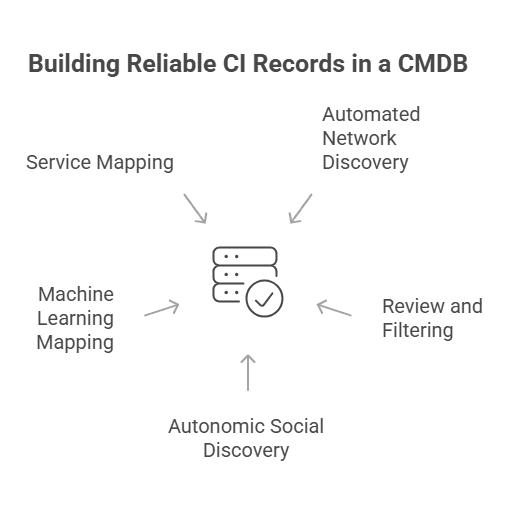
Network monitoring tools or dedicated discovery applications handle the initial scan. Virima’s review processes let your team filter discovered assets, resolve duplicates using asset-specific correlators, and choose which updates to promote to the CMDB database. Business rules can automate this for a hands-free approach to keeping configuration data current.
Network gear deserves the same rigor. Capabilities like juniper snmp stack discovery, along with parallel coverage for Cisco stacked switches, ensure that stacked members, master roles, and port-level configurations are accurately represented in the CMDB rather than collapsed into a single ambiguous record.
Autonomic Social Discovery goes further by automating the collection of non-discoverable CI attributes like ownership, lifecycle status, business criticality, and SLA assignments. These are the fields that typically require someone to chase down answers from people, and ASD handles that legwork.
Discovery also uses machine learning techniques to automatically map infrastructure relationships and application dependencies. Service mapping builds on those auto-generated maps to document service-level dependencies, typically up to the technical service or application level.
Accurate database CMDB relationships are particularly important here. Discovery of Oracle and MySQL instances, along with their hosted databases and application dependencies, ensures that the data tier is mapped with the same depth as the infrastructure that supports it.
From there, your team only needs to enter logical CIs like business services and map applications to the business services they support.
The result: a CMDB database your ops team trusts when they’re making calls during incidents, changes, or capacity planning.
What is the difference between manual CMDB and automated discovery?
The gap between a manually maintained CMDB database and one fed by automated discovery comes down to accuracy, speed, and sustainability. Manual entry depends on humans remembering to update records after every change.
That breaks down fast in environments with hundreds or thousands of CIs. Automated discovery runs recurring scans on a schedule you define, catching changes whether or not someone filed a change request. The CMDB stays current because discovery doesn’t forget, get busy, or take PTO.
CMDB database attribute validation
Discovery doesn’t just find assets. It validates them. During onboarding, discovery performs a deep analysis of each device’s hardware configuration, installed software, and firmware versions — capturing what’s actually deployed rather than what procurement records say should be there. This step catches problems early:
- Configuration mismatches at delivery. Discovery flags under-configured or incorrectly configured hardware, so your team can follow up with the vendor before the asset goes into production.
- Accurate troubleshooting data. Relying on purchase records alone leads to wrong assumptions during incident response. Discovery captures what’s actually installed, not what was ordered.
- Better root cause analysis. Documenting exact software versions, OS builds, and patch levels helps your team trace intermittent issues to specific version mismatches.
Catching unauthorized devices and applications
Once your CMDB database is accurate and discovery runs on a recurring schedule, it becomes your early warning system for unauthorized changes. Combined with monitoring, discovery detects devices and configuration changes that don’t have an approved change request behind them.
Here’s what that looks like in practice:
- A remote office employee plugs in an unauthorized wireless access point. Discovery flags the new device before it exposes your network.
- A vendor installs hardware or software without going through your change process. Discovery catches it.
- Shadow cloud services show up in traffic patterns, especially when service mapping is tracking application dependencies.
- Someone changes a server’s configuration outside the change window. Discovery detects the drift, and your team can assess the risk.
How can change enablement benefit from CMDB discovery
Change enablement has evolved from a gatekeeper role to a practice that makes sure changes to any CI get properly approved and documented.
Before discovery, the change process was often the only mechanism keeping configuration data updated. That meant unauthorized changes left the CMDB with stale, untrustworthy records. With recurring discovery scans, unauthorized changes get flagged automatically. Your change advisory board can assess the risk and take action instead of discovering the problem months later during an IT audit.
Discovery populates the CMDB, but reconciliation determines whether what gets written is actually true — see how multi-source CMDB reconciliation breaks the last-scan-wins cycle that quietly corrupts CMDB data quality.
How does CMDB discovery help with change impact analysis?
Accurate CMDB data transforms change management from guesswork into informed decision-making. When your team submits a change request, they need to know what depends on the CI they’re changing. Virima Visual Impact Display (ViVID™) overlays ITSM incidents, change records, event management alerts, and NIST NVD vulnerability data onto service maps built by discovery and service mapping. Your change advisory board sees the full blast radius of a proposed change before approving it.
Without that visibility, changes get approved based on incomplete data. With it, your team avoids downstream outages and reduces failed change rates.
Proactive operations powered by CMDB database data
When your CMDB has accurate, discovery-verified data, it supports proactive operations rather than just reactive firefighting.
Hardware failure prevention
If a specific hardware model has a known defect, a reliable CMDB lets your team find every instance of that model across the environment. You can replace them proactively instead of waiting for failures. This is a strong reason to extend discovery down to workstations and local equipment.
Patch and version management
Intermittent issues tied to a specific OS patch or software version become traceable. Discovery data tells you exactly which CIs run the affected version, so your team can target upgrades precisely.
Security vulnerability prioritization
When a new vulnerability drops, Virima cross-references your CMDB data against the NIST National Vulnerability Database to show which CIs are affected. Your security team can focus mitigation on actual exposure rather than guesswork.
End-of-life planning
CI repair history combined with asset management data helps your team plan proactive refresh cycles instead of waiting for equipment to fail in production.
All of this depends on data quality. If a bad component ships in a hardware model, finding every instance of that model gets time-consuming or impossible without the data discovery provided to the CMDB.
What is the ROI of CMDB discovery?
Ops leaders often ask whether the cost of discovery tools justifies the investment. The short answer: manual CMDB database builds cost more in labor, errors, and delayed time-to-value than automated discovery costs in licensing.
Discovery pays back in three areas. First, it eliminates the labor cost of manual asset documentation, a process that ties up senior engineers for weeks or months. Second, it cuts incident resolution time by giving your team accurate dependency and configuration data when they need it. Third, it prevents the downstream costs of stale data: failed changes, misdiagnosed incidents, and audit findings from incomplete records.
Organizations that move from manual CMDB database maintenance to automated discovery typically see faster MTTR, fewer failed changes, and reduced audit preparation time. The ROI compounds as the CMDB covers more of the environment.
Faster time to value with CMDB discovery
Building a CMDB database manually is slow and error-prone. Discovery changes the math entirely.
Critical services in weeks, not months
Services that would take months to document manually can be discovered and mapped in a few weeks. Your team starts getting value from accurate CMDB data for the most critical services almost immediately.
Complete data center inventory
Automated discovery captures all infrastructure and software in each data center, including assets nobody knew about. That gives your IT Asset Management team a more accurate inventory while also surfacing equipment that may pose a risk.
Extending beyond the data center
With discovery handling the heavy lifting, your organization can expand CMDB coverage to personal computing devices and edge equipment. Virima’s optional Discovery Agent keeps tabs on remote PCs, Macs, and servers that roam off-network, tracking daily configuration changes and software usage even without a direct connection to the corporate network.
- Retail environments get faster, more cost-effective management of point-of-sale systems and location-based equipment.
- Manufacturing and logistics gain visibility into warehouse equipment and personnel workstations that might otherwise go unmanaged.
- End-user devices affected by known hardware defects or intermittent issues become manageable at scale, something that’s nearly impossible without discovery data.
Can CMDB discovery work in hybrid cloud environments?
Yes. Modern discovery tools scan on-premises infrastructure, AWS, and Azure environments from a single platform. Virima’s IT discovery runs scheduled agentless scans across hybrid infrastructure, with optional agents for Windows, macOS, and Linux devices that need persistent monitoring or roam off-network. Cloud-hosted assets are captured alongside physical and virtual data center equipment.
This matters because cloud sprawl creates the same visibility gaps that shadow IT creates on-premises. If your team spins up cloud instances outside the change process, discovery finds them. Virima integrates with AWS and Azure for cloud asset discovery and dependency mapping, ensuring your CMDB database reflects the full environment, not just what’s in the data center.
Build a CMDB database that works: discovery makes the difference
Before discovery, extending the CMDB beyond core infrastructure was impractical. With automated, scheduled discovery scans, these capabilities require scaling, not rebuilding.
Virima’s IT discovery automatically identifies your IT resources and their configurations through scheduled agentless scans, complemented by optional agents for Windows, macOS, and Linux. Service mapping then documents the dependencies that link those assets to your applications, services, and users.
With ViVID™ layered on top, your team gets a CMDB database that stays current and supports every service management process, from incident response to change management to proactive operations. Virima is delivered as a SaaS platform with multi-region AWS hosting and SOC2 Type II certification, so deployment is fast, and your data stays secure.
Virima integrates with ServiceNow, Jira Service Management, Ivanti, HaloITSM, and Cherwell with bi-directional CMDB sync, so discovered CIs flow directly into the tools your team already uses. Additional ITSM integrations include Xurrent and Hornbill.
Ready to see the difference? Schedule a demo to see how Virima turns your CMDB database from a manual liability into an automated, trustworthy asset.