Best Practices for IT Infrastructure and Operations Management in 2026

Picture this: It’s 2026, and your IT world runs like a busy airport. Legacy on-prem servers still hum, public cloud services scale at lightning speed, and private cloud demands constant care. You’re in the control tower — keeping everything on schedule and avoiding collisions.
The big questions remain:
- How do we manage hybrid cloud without drowning in complexity?
- How can IT better align with business goals?
This guide helps CIOs, CTOs, IT managers, and consultants modernize operations, simplify complexity, and advance strategy in the context of IT infrastructure and operations management. Therefore, it serves as a practical resource for leaders shaping the future of IT.
In 2026 and beyond, hybrid and multi-cloud are the new norm, blending on-prem, private, and public tools. Already, 81% of businesses use multiple providers. The payoff includes agility, scale, and innovation. However, the risks involve complexity, skills gaps, and security challenges.
Success depends on proven practices. IT leaders must manage every asset while keeping business alignment front and center. This guide highlights six IT infrastructure monitoring best practices that leading organizations rely on today.
Specifically, simplify IT environments, automate routine tasks, monitor continuously, and foster a culture of improvement. Picking the right server monitoring software is a practical first step toward monitoring that you can actually rely on.
The stakes are real — downtime can cost thousands per minute, and it reduces human mistakes and saves time. With the right ITOM platform, like Virima, leaders gain the visibility and control needed to thrive in complex environments by applying IT monitoring best practices
By the end, you’ll gain clarity, confidence, and tools to help IT operations lead into 2026 and beyond.
Quick Wins: 5 Things Any IT Ops Team Can Do This Month
Before we walk through the full best practices framework, here are five high-impact actions your team can take immediately. Each one delivers measurable operational value within weeks, not quarters, and each one builds the data foundation that every practice below depends on.
- Run a discovery scan to find untracked assets and cloud resources. Most enterprise environments carry a 15-30% shadow asset problem: VMs, cloud instances, and devices that procurement never recorded and operations has never touched. A single scheduled discovery scan surfaces these gaps before they become an incident or a compliance audit finding. Run one today, compare the delta against your current CI inventory, and open remediation tickets for every unrecognized asset.
- Map your top three revenue-critical services in your CMDB with full dependency context using ViVID™ service mapping. Service dependency maps convert a list of CIs into a picture of what actually breaks when something fails. Identify the three services that cost the business the most if disrupted, define their service composition, build the dependency map, and document the result in your CMDB. Every on-call engineer then has accurate blast-radius context at incident time, without Slack threads or spreadsheet hunts.
- Assign a CI class owner to every major CI category. Without named ownership, CMDB data decays predictably. Assign a person or team as the authoritative owner for each CI class: servers, networking, applications, cloud, endpoints. CI class owners set data quality standards, review health scores, and approve attribute changes for their class. This single governance step raises CMDB trust faster than any tooling change.
- Connect your CMDB to your change management workflow. A CMDB that is not wired into your change advisory board process cannot prevent change-related outages. Connect your CMDB to your ITSM change workflow so that every change request auto-populates the affected CIs, their downstream dependencies, and the potential blast radius. Teams that implement this typically see a significant reduction in change-related incidents within the first quarter.
- Set a monthly CMDB health review with three measurable KPIs. Pick three metrics: CI completeness, relationship accuracy, and staleness rate, and put them on a monthly standing agenda. A CMDB health review does not need to be long; 30 minutes with the right data surfaces actionable gaps and builds the data ownership culture that sustains itself over time. Without a formal review cadence, CMDB quality degrades silently until an incident reveals the gap.
These five actions deliver immediate results. The six best practices below provide the strategic framework to sustain and scale them across your full IT infrastructure environment.
What is IT infrastructure and operations management?
IT infrastructure and operations are about running the technology that keeps a business alive. It covers data centers, servers, networks, apps, and even end-user devices. The main goal is simple: keep systems reliable, efficient, and safe so the business runs smoothly.
In 2026, IT infrastructure includes both old and new environments. You may deal with on-site data centers, public cloud platforms, edge devices, and IoT systems. It also covers tasks like capacity planning, performance tuning, backups, disaster recovery, patching, updates, security, and incident response.
Put simply, if it keeps the IT “lights on” and the business optimized, it’s part of I&O. That’s why it matters so much. Every business process now depends on IT.
As a result, good I&O means more uptime, faster response, and stronger security, which are outcomes of following IT monitoring best practices. Conversely, poor I&O can lead to outages, slow systems, breaches, and rising costs.
Keeping IT operations running smoothly is no small feat. Systems must remain online, assets need tracking, and security risks are ever-present. Without the right tools, even small issues can often lead to expensive downtime and unhappy teams. Understanding the full scope of IT operations management functions, from event management and monitoring through capacity planning and security operations, provides the foundation for applying these best practices systematically across every operational domain.
A unified IT operations management approach consolidates discovery, CMDB, service mapping, and ITAM into a single platform, eliminating the tool sprawl that makes these challenges harder to manage.
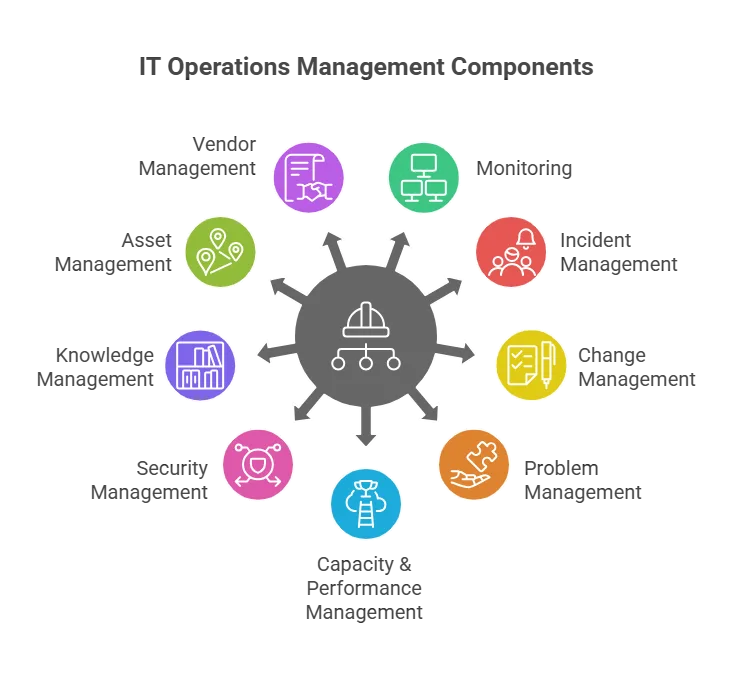
Key components of IT operations management
Strong IT infrastructure management rests on nine operational disciplines. Each plays a distinct role in maintaining availability, security, and business alignment, and each depends on accurate, discovery-sourced CI data to function at its best.
| Component | What It Covers | Why It Matters in 2026 |
| Monitoring | Continuous visibility into servers, networks, cloud services, and applications | Early anomaly detection before issues escalate to service-impacting incidents |
| Incident Management | Structured process for diagnosing and resolving disruptions | Speed of resolution directly impacts revenue, customer trust, and SLA compliance |
| Change Management | Oversight and risk assessment for all configuration and infrastructure changes | Change-related failures account for 70-80% of unplanned downtime |
| Problem Management | Root cause analysis and permanent fix implementation | Reduces recurring incidents and accumulated operational debt over time |
| Capacity & Performance | Resource demand forecasting and performance tuning for current systems | Prevents both over-provisioning waste and under-provisioning failures |
| Security Management | Access controls, patch governance, and threat detection across the estate | Attack surface grows with every untracked asset and misconfigured CI |
| Knowledge Management | Documented runbooks, procedures, and resolution patterns in a shared repository | Reduces mean time to resolution and dependency on institutional memory |
| Asset Management | Full lifecycle tracking from procurement through disposal | Untracked assets create compliance gaps, license risk, and security blind spots |
| Vendor Management | Third-party contracts, SLAs, and escalation paths | Vendor dependency risks compound when contracts and EOL dates go untracked |
These nine disciplines do not operate in isolation. Each depends on accurate, current data about what exists in the environment, how it is connected, and who owns it. A well-maintained CMDB, populated from scheduled discovery scans rather than manual entry, sits at the center of every mature IT operations function.
Six Best Practices for IT Infrastructure Management in 2026
The six practices below reflect proven ITIL and DevOps principles, updated for 2026 hybrid cloud environments, agentic IT workflows, and the data quality requirements that autonomous operations demand. Each practice builds on the one before it, and all six share a common dependency: discovery-sourced CMDB data that teams can trust.
1. Build a Centralized CMDB as Your Operational Foundation
The problem: poor visibility drives slow decisions and high-risk changes. In hybrid and multi-cloud environments, CI data scatters across discovery tools, spreadsheets, ticketing systems, and team silos. Without a single authoritative record, impact analysis becomes guesswork, change risk goes unquantified, and incident resolution takes far longer than it should. The problem compounds every time someone makes a change without knowing the downstream dependencies.
The practice: A centralized CMDB provides the single source of truth for all configuration items, their attributes, relationships, and ownership. It gives every team, from operations and security to change management and AI agents, access to the same authoritative picture of the environment. Discovery-sourced CMDB data carries accuracy that manually maintained records cannot match, because the source of truth is the network itself, not a spreadsheet.
Implementation example: When an application owner needs to assess the impact of a database server upgrade, they open the CMDB, pull the dependency graph for that CI, and see every application, service, and downstream system that the change affects. No Slack threads, no cross-team meetings to find the answer. The context is already there from the last scheduled discovery scan, attributed to a known source and timestamp.
How to implement it: Start by populating your CMDB from automated discovery rather than manual entry. Define CI classes and relationship types before ingesting data. Assign CI class owners early, because data without ownership decays. Wire the CMDB into your change management workflow, so every change request automatically surfaces affected CIs and blast radius before the CAB approves anything.
2. Automate Repetitive Tasks to Boost Efficiency and Accuracy
The problem: manual operations create compounding risk. IT teams that handle routine tasks manually face two compounding problems: those tasks consume engineering hours that should go to higher-value work, and they introduce human error at exactly the moments when consistency matters most, including provisioning, patching, and incident response. In 2026, manual processes also create a third problem: they cannot keep pace with the operational speed that agentic workflows demand.
The practice: Automation handles routine, rule-based tasks so IT engineers focus on decisions that require judgment. The goal is not to remove human oversight but to move humans up the decision stack, from executing steps to reviewing outcomes and handling exceptions. Automation that runs consistently and produces auditable output is also a prerequisite for safe agentic operations.
Implementation example: A financial services IT team automates server provisioning using a standard build template. When a new project request arrives, the system creates the VM, applies the approved security baseline, registers the CI in the CMDB, and opens a change ticket, all before an engineer touches a keyboard. Provisioning time drops from two days to under an hour, and every CI enters the CMDB with correct attributes from day one.
How to implement it: Identify the highest-volume, lowest-variance tasks first: user provisioning, patch deployment, backup verification, and service request routing. Automate these before moving to complex or exception-heavy workflows. Validate each automation in a test environment and monitor results for 60 days before expanding scope. Most ITSM and ITOM platforms support automation through built-in workflow engines, APIs, or RPA connectors.
3. Create a Comprehensive IT Operations Plan and Keep It Updated
The problem: reactive IT teams consistently underperform on both technical and business metrics. Organizations that fight fires instead of planning ahead produce misaligned priorities, untracked vulnerabilities, and budget overruns as predictable symptoms. Without a documented operational strategy, teams pull in different directions, maintenance backlogs build invisibly, and business leaders lose confidence in IT’s ability to support growth.
The practice: An IT operations plan connects every technology investment and operational process to a named business outcome. It covers service process definitions, infrastructure lifecycle planning, staffing and skills roadmaps, budget allocation, governance structures, and disaster recovery criteria. The plan must be a working document reviewed quarterly, not an annual exercise that gets shelved after the first presentation. Before drafting the plan, it helps to understand the core components of a sound IT operations management framework so nothing structural gets left out.
Implementation example: A mid-size logistics company builds an IT operations plan with eight sections: current state assessment, business requirements, service process definitions, technology roadmap, risk and DR criteria, capacity plan, governance and KPIs, and a stakeholder communication schedule. When an acquisition happens, they use the plan to scope the integration effort in days rather than weeks, because the baseline data and decision criteria already exist.
How to implement it: Start with a current-state assessment using real operational metrics: uptime percentage, MTTR, change failure rate, and helpdesk satisfaction. Translate each major business objective into a concrete IT requirement. Define KPIs before execution begins, because metrics chosen after the fact rarely reflect what actually matters. Build in quarterly reviews with at least one business-side stakeholder present and require plan updates when the business strategy changes.
4. Align IT Operations with Business Objectives and Stakeholder Needs
The problem: technical metrics and business outcomes diverge silently. IT organizations that track only technical metrics, such as server uptime, tickets closed, and patch compliance, frequently deliver technically correct outcomes that the business does not value. This disconnect drives shadow IT adoption, budget friction, and a perception gap where IT sees itself as essential while business leaders see a cost center that speaks a different language.
The practice: Every IT initiative should trace directly to a named business objective. IT leaders who participate in business planning, understand revenue drivers, and translate business goals into IT requirements close this gap faster than any organizational restructuring. The shift in 2026 is that business alignment is no longer optional: 73% of business managers want technologists embedded in their teams, and they are already making IT purchasing decisions without IT input when alignment breaks down.
Implementation example: A retailer’s IT director attends monthly commercial planning sessions. When the business announces a push into same-day delivery, the IT director arrives at the next meeting with an order management system capacity analysis, a service dependency map showing current throughput constraints, and a gap assessment against the new SLA requirements. IT has the answer before the business asks the question.
How to implement it: Set up a joint IT-business governance committee that reviews major change requests, project prioritization, and incident post-mortems together. Translate at least three core IT KPIs into business language: MTTR becomes “average hours of application unavailability per month,” and patch compliance becomes “percentage of systems protected against critical vulnerabilities.” Report both metric sets to leadership and let the business side define which IT outcomes matter most to them.
5. Invest in the Right ITOM Tools and Platforms
The problem: tool sprawl creates the visibility gaps it was purchased to solve. Most organizations accumulate IT operations tools organically: one for monitoring, another for ticketing, a third for asset tracking. These tools rarely share data natively, producing multiple partial pictures of the environment rather than one complete one. The result is data silos, context switching, and blind spots that slow incident response and raise change risk.
The practice: Select ITOM tools that integrate natively, scale with your environment, and provide a unified data layer rather than separate dashboards that require manual reconciliation. In 2026, the added requirement is that tools must support agentic IT workflows: the data they produce must be accurate, governed, and explainable enough for automated systems to act on safely.
Implementation example: A healthcare system evaluates ITOM platforms using a weighted scorecard: discovery coverage, CMDB integration depth, ServiceNow connector quality, automation capabilities, and audit trail completeness. The winning platform scores highest on data authority: how confident can the team be that the CI records it produces are accurate enough to trust during a change window or an autonomous incident response workflow?
How to implement it: Prioritize platforms that unify discovery, CMDB, service mapping, and ITAM in a single data layer rather than requiring custom integrations between separate tools. Run a proof-of-concept scan against a defined network segment and compare the results against your current CI inventory: the gap reveals real discovery coverage, not the vendor’s marketing summary. See how Virima compares to Device42 and ServiceNow on discovery authority, CMDB accuracy, and integration depth.
6. Continuously Monitor, Measure, and Improve Your ITOM Processes
The problem: IT operations that improve once and stop evolving quietly become liabilities. Tools get updated, architectures change, and business requirements shift, but processes designed for last year’s environment degrade silently. Without regular measurement, early warning signs go unnoticed: incidents take longer to resolve, change failure rates creep up, and CMDB staleness accumulates until an outage exposes the gap.
The practice: A structured continuous improvement cycle for IT operations processes works the same way as a well-run change management program: define KPIs before you start, measure on a fixed cadence, analyze trends, and run time-boxed improvement sprints against the biggest gaps. Use ITIL’s Continual Improvement model or the Plan-Do-Check-Act (PDCA) cycle as your operating rhythm.
Implementation example: A technology company tracks five ITOM KPIs monthly: MTTR, change failure rate, CMDB health score, patch compliance, and first-contact resolution rate. In Q1, their change failure rate spikes from 4% to 11%. The team traces it to three changes that bypassed impact analysis because the CI relationships in their CMDB had grown stale. A targeted discovery scan updates the affected records, and a CI completeness gate gets added to the change approval workflow. By Q2, the change failure rate returns to 3%.
How to implement it: Define KPIs before the first measurement period, not after results arrive. Assign KPI ownership to a named person; metrics without owners do not improve. Use CMDB health scoring as a leading indicator: CMDB staleness predicts both change failure rate increases and MTTR degradation before either shows up in operational data. Review KPIs monthly at the team level and quarterly at the leadership level, connecting every improvement project to a specific KPI target.
2026 Update: Agentic IT and Infrastructure Operations
The 2026 IT infrastructure management landscape includes a new operational layer that most teams did not plan for when they built their current CMDB and discovery programs: agentic AI. Gartner named Agentic AI its top strategic technology trend for 2025, and enterprise adoption accelerated sharply into 2026. IT operations teams now face a question that goes beyond tooling: is our infrastructure data accurate enough for automated systems to act on safely?
Agentic IT systems, AI-driven agents that autonomously execute incident response, change approvals, provisioning workflows, and security remediations, depend entirely on the quality of the data they consume. When an agent decides to restart a service, reroute traffic, or approve a change window, it acts based on what it can see in the CMDB, the service map, and the CI ownership records. Stale, fragmented, or unverified data does not cause the agent to pause and ask a human for help. It causes the agent to act confidently on a lie, and the blast radius from that action can cascade across dependencies the agent never knew existed.
Why Trusted Runtime Truth Is Now a Prerequisite for Agentic Operations
Safe agentic IT operations require what we call Trusted Runtime Truth: a discovery-sourced, authoritative, and policy-aware record of what exists in the environment, how everything connects, what has changed, and who owns each component. Trusted Runtime Truth gives AI agents the governed guardrails they need to act at machine speed without creating machine-scale failures. It is not a nice-to-have data quality initiative; it is the foundational requirement for any team considering autonomous IT operations.
Stale CMDB data compounds blast radius risk at agentic speed in a way that manual operations never could. A human engineer who acts on a stale CI record might cause one outage. An AI agent acting on the same stale record across 50 related incidents in a four-minute window can cause infrastructure failures that take hours to untangle. The difference between a trusted CMDB and an unverified one is not marginal in an agentic environment; it is the difference between safe automation and autonomous chaos.
IT teams that enter 2026 with CMDB completeness below 80%, undefined CI ownership, or service maps last updated six months ago face a compounding problem: every agentic capability their business adopts reduces their margin for data quality error. The time to close these gaps is before the agents are running, not after the first agentic incident.
What IT Ops Teams Need to Do Now
Three concrete actions prepare IT infrastructure for safe agentic operations, and all three can begin with the same CMDB and discovery tooling your team already has.
Establish CI ownership across every major CI class
Agentic systems need to know not just what a CI is but who is accountable for changes to it. Without CI ownership records, agents cannot route approvals, validate policies, or trigger the right escalation path. Assign a named owner or team to every CI class and capture that ownership as a formal CI attribute. Ownership should be recorded in the CMDB as structured data, not as a comment in a ticket or a name on a whiteboard.
Embed policies in CI records
Policy-aware infrastructure means the rules governing a CI, approved change windows, security baseline requirements, dependency chain constraints, exist as structured attributes in the CMDB rather than tribal knowledge in someone’s head. Agents read and act on structured policy data. They cannot navigate an unwritten convention. Teams that document CI policies as formal attributes before deploying agentic workflows give their agents the boundaries they need to act within safe operational parameters.
Document discovery provenance for every CI
When an agent queries your CMDB, it needs to know how fresh the data is and what discovery source produced it. Discovery provenance records, which scanner found this CI, when, and with what protocol, let agents and human reviewers apply appropriate confidence levels before acting. A CI discovered by an authenticated agent-based scan carries more authority than one imported from a spreadsheet three years ago. Provenance turns a CMDB from a static record into a trust-rated evidence layer.
Our discovery-sourced CMDB, CI ownership model, and scheduled discovery scans provide the data foundation that agentic IT operations require. Virima delivers Trusted Runtime Truth, live, explainable, and governed, so your AI agents have the authoritative context they need to act safely. Learn more about why IT teams choose Virima as their trusted runtime truth layer for agentic IT.
How Virima Supports IT Infrastructure Management
Virima delivers Trusted Runtime Truth for agentic IT: a unified platform that combines automated discovery, CMDB, ViVID™ service mapping, and ITAM into a single authoritative context layer. Our platform gives IT operations teams accurate, up-to-date CI records from scheduled discovery scans, not stale data from manual entry or disconnected tool outputs. Every CI record carries attribute-level authority and discovery provenance, so teams can act on the data with confidence.
| Best Practice | How Virima Delivers It |
| Centralized CMDB | Automated CI population from agent-based and agentless discovery scans; multi-source data reconciliation into a single authoritative record; CMDB health scoring to track completeness, accuracy, and staleness continuously |
| Automation | REST API and native integrations with ServiceNow, Jira, Ivanti, HaloITSM, and others enable automated CI updates, change ticket creation, and workflow triggers based on discovery events and CI state changes |
| IT Ops Planning | Role-based operational dashboards, infrastructure health views, and custom reporting give IT leaders the accurate current-state data they need for roadmap planning, capacity assessment, and executive reporting |
| Business Alignment | ViVID™ service maps tie technical CIs to named business services, enabling IT teams to report in business terms, not just technical metrics |
| Right ITOM Tools | Virima’s modular platform covers discovery, CMDB, service mapping, and ITAM in one integrated data layer, eliminating the tool sprawl that creates data silos and slows IT operations teams |
| Continuous Improvement | CMDB health scoring, CI completeness tracking, change impact analysis, and audit trail logging give teams measurable leading indicators to drive sustained improvement cycles and identify gaps before they become incidents |
Virima works across the ITSM ecosystem: ServiceNow, Jira, Ivanti, HaloITSM, Xurrent, Hornbill, and TeamDynamix, so teams get Trusted Runtime Truth inside the workflows they already use. Our platform complements your existing ITSM investments rather than replacing them. Visit virima.com to see how we fit into your current environment, and see how we compare to alternatives at Virima vs. Device42 vs. ServiceNow.
Start Building the IT Infrastructure Foundation Your Operations Require
The six practices in this guide give IT operations teams a clear framework for 2026: a discovery-sourced CMDB at the center, automation reducing manual load, business alignment driving investment decisions, and a continuous improvement culture sustaining the gains over time. In 2026, these practices carry an additional urgency: the agentic IT systems your business will adopt in the next 12-24 months need the Trusted Runtime Truth your infrastructure data provides. A stale CMDB and undefined CI ownership are not just operational liabilities. They are agentic safety risks.
Move faster. Act safely.
Schedule a Demo and see how Virima delivers discovery-sourced Trusted Runtime Truth across your IT infrastructure environment.
Frequently Asked Questions
What are the biggest challenges in IT infrastructure management in 2026?
The four most significant challenges are hybrid cloud visibility gaps, CMDB data quality degradation, the governance requirements that agentic AI introduces, and the persistent difficulty of aligning IT operations metrics to business outcomes. These challenges compound each other: poor CMDB quality makes agentic AI unsafe, which undermines the business case for IT modernization investment, which reduces the budget available to fix the underlying data quality problem.
How do IT teams manage hybrid and multi-cloud complexity?
The most effective approach combines centralized discovery across on-premises and cloud environments, a unified CMDB that reconciles CI data from multiple sources into a single authoritative record, and service maps that tie cloud assets to the business services they support. Teams that treat cloud discovery as a separate program from on-premises discovery consistently end up with two partial pictures of their environment rather than one complete one. A single discovery platform covering both removes this fragmentation.
What role does the CMDB play in IT infrastructure management best practices?
The CMDB functions as the foundational data layer for every IT infrastructure management discipline. It provides the authoritative record that incident response, change management, capacity planning, security management, and agentic AI systems all depend on. A CMDB populated from discovery-sourced data and maintained with formal CI class ownership is not a documentation exercise; it is the operational backbone of a mature IT function and the primary prerequisite for safe autonomous operations.
How does agentic AI change IT infrastructure management requirements?
Agentic AI raises the accuracy bar for infrastructure data from “good enough for human decision-making” to “accurate enough for automated action at machine speed.” AI agents that act on stale CI records can cause cascading failures across dependent systems in minutes, with no human in the loop to catch the error. IT teams preparing for agentic operations must prioritize CMDB completeness, CI ownership documentation, service dependency mapping, and discovery provenance records before deploying autonomous workflows.
What is the difference between ITOM and ITSM?
ITSM (IT Service Management) covers the processes for designing, delivering, managing, and improving IT services: incident management, change management, request fulfillment, and problem management. ITOM (IT Operations Management) focuses on the underlying infrastructure and technology that those services run on: monitoring, discovery, CMDB, capacity management, and infrastructure health. ITSM and ITOM work best when they share data: ITOM provides the accurate CI context that ITSM processes need to make fast, safe decisions.
How does Virima support IT infrastructure and operations management?
Virima provides unified IT discovery, CMDB, ViVID™ service mapping, and ITAM to deliver Trusted Runtime Truth for agentic IT. Our platform populates CMDB records from scheduled discovery scans across on-premises and cloud environments, builds service dependency maps from defined service compositions, and integrates with ITSM tools to keep CI data accurate through the change lifecycle.