ServiceNow CMDB Discovery vs Third-Party Feed: Owner Guide

ServiceNow Discovery populates the CMDB natively, so many teams stop there. Others add a third-party discovery feed that reaches ServiceNow through its Identification and Reconciliation Engine (IRE). Native discovery, an added feed, or both change how many CIs reach the CMDB. They also change who maintains each source and how much reconciliation lands on the owner.
The owner of a configuration management database (CMDB) signs for the accuracy of every configuration item (CI), including records they did not choose to create. When a change fails, the first question goes to the person who owns the CMDB. That person needs to know where each record came from and who maintains the source.
What ServiceNow-only population gives a CMDB owner
ServiceNow Discovery scans from MID Servers, classifies devices with credential-based patterns, and writes CIs into the CMDB. Horizontal discovery finds reachable devices, and vertical probing collects detailed attributes. The Identification and Reconciliation Engine processes each record, then creates or updates the CI and applies deduplication rules.
These strengths matter to a CMDB owner:
- One platform holds the scheduler, the credentials, the data model, and the CMDB.
- One support path covers a failed scan and the record it should have produced.
- Precedence rules start simple when a single primary source feeds the CMDB.
- Estates built on AWS, Azure, Windows Server, and common hardware vendors often fit the native patterns.
For an estate like that, ServiceNow-only gives the owner the fewest moving parts. A second source adds work, so it needs a reason.
Where ServiceNow-only population needs testing
Some segments deserve a closer look. Typical examples are air-gapped network segments, legacy network and storage hardware, and remote sites without a MID Server path. Hybrid estates also stretch a single source, because cloud, virtualization, and on-premises records arrive with different attributes.
These gaps surface in ServiceNow’s own tooling before they surface anywhere else: the CMDB Coverage dashboard and the CMDB 360 view in CMDB Workspace exist specifically to flag unmatched IP addresses and unscheduled discovery ranges, because native scans alone routinely miss them. A CMDB owner should check these built-in views first, then sample CIs manually in any class the dashboard flags — the native tooling catches scheduling blind spots a manual sample can miss.
Any scheduled discovery, native or external, leaves a gap between scans. The owner sets the schedule for each CI class and accepts the gap that remains.
A product-level look at coverage differences sits in the native ServiceNow Discovery comparison. A CMDB owner also decides whether one source can carry accountability for the CI classes the business depends on.
How can a CMDB owner test a configuration item (CI) class for discovery gaps?
Sample CIs from one class in the configuration management database (CMDB) and compare them with an independent source such as a hypervisor or cloud console. Check the last discovered date and key attributes like serial number. A class with missing or stale samples shows a coverage gap. Matching samples need no second source.
What a trusted external feed changes inside the CMDB
The coverage gap above is a persistent industry problem, not a one-off complaint: Flexera’s research on IT asset visibility points to incomplete visibility as common across IT estates, which is the gap a second discovery source exists to close. A trusted external, third-party feed adds a second discovery source that typically arrives through ServiceNow Service Graph Connectors (built on IntegrationHub) or direct IRE REST API calls, writing into ServiceNow through the same IRE path. The CMDB stays the system of record, and ServiceNow keeps its workflows, ITSM processes, and reconciliation logic. The added source contributes records for CI classes where the owner wants a second, cross-checked view.
Virima runs high-frequency discovery cycles using agentless probes, an optional Windows discovery agent, and API integrations. It includes connectors for AWS and Azure and VM inventory for VMware and Hyper-V. It sends enriched CIs to ServiceNow over REST, and the ServiceNow IRE reconciliation step matches them against records from other sources. Supported ITSM partners include ServiceNow, Jira Service Management, Ivanti, Cherwell, Hornbill, Xurrent, HaloITSM, and TeamDynamix, listed on the integrations hub.
Within Virima, ViVID™ service maps build automatically once the organization supplies its service definitions through manual entry, spreadsheet import, or an integration such as LeanIX. The service definitions come from the customer.
Reduce CMDB data decay with Virima’s discovery-sourced Trusted Runtime Truth.
Criteria table for CMDB owners
Each row below names a decision a CMDB owner makes when choosing a population model — the goal in every row is better CMDB data quality, not just more CI records.
| Criterion | ServiceNow-only | ServiceNow plus a trusted external feed | Question to ask |
|---|---|---|---|
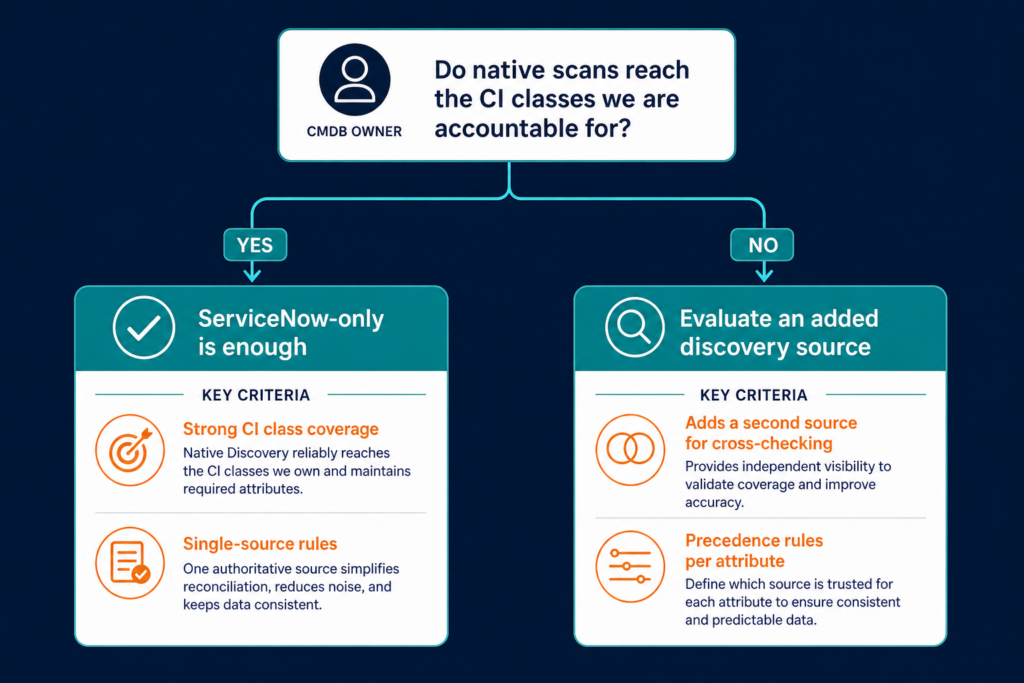
| CI class coverage | Strong where MID Servers and patterns reach | Adds a second source for classes the owner wants cross-checked | Which CI classes need a second view? |
| Source count | One primary source | Two or more sources | Can the team maintain each source? |
| Reconciliation rules | Single-source rules | Precedence rules per attribute | Who defines precedence per attribute? |
| Join key | Identification rules on serial number or cloud instance ID | Identification rules on serial number or cloud instance ID | Does each CI class have a durable identifier? |
| Attribute depth | Pattern-dependent | Source-dependent | Does depth support change impact analysis? |
| Accountability | One vendor path | Shared across two vendors | Who owns a record when sources disagree? |
Hostnames change, repeat across environments, and collide after migrations, so they make weak matching keys. Serial numbers and cloud instance IDs give IRE a stable basis for matching records from one source or two.
Setting data source precedence before adding a feed
Precedence decides which source wins when two sources report different values for the same attribute. IRE evaluates data source precedence when a CI is inserted or updated, so the owner configures it before the second feed goes live. In practice, precedence is only consulted when two sources’ reconciliation rules both claim the same attribute: a rule with an empty Attributes field authorizes that source to update every field on the CI except the ones another source’s rule explicitly claims. An owner who leaves the Attributes field empty on every source is relying on claim order, not precedence, to settle conflicts — which is why the ranking step below matters before a second feed goes live.
A workable starting point looks like this:
- List each attribute the business relies on, such as operating system, location, owner, and warranty date.
- Assign one authoritative source to each attribute.
- Keep manual edits out of attributes that a discovery source maintains.
- Document who reviews conflicts and how often.
Ranking sources per attribute gives IRE a defined winner when values differ. For a fuller precedence and ownership framework, see Virima’s guide to ServiceNow CMDB governance best practices.
What happens when two discovery sources disagree about one CI attribute?
An owner who ranked the sources for that attribute in advance resolves the conflict through reconciliation rules in the Identification and Reconciliation Engine (IRE). Without a ranking, each conflict can become a manual review item. The owner then decides record by record, and that workload grows with every added source.
When ServiceNow-only is enough
ServiceNow-only fits an organization that meets these conditions:
- Native scans reach the CI classes the business depends on.
- Attribute depth supports change impact decisions without extra enrichment.
- The CMDB already passes its own completeness and accuracy checks.
- The team has no capacity to maintain a second source.
An owner in that position can skip a second feed. It raises the reconciliation workload, and that cost pays off only when it closes a visible gap.
Where does a CMDB coverage gap show up first?
A coverage gap usually surfaces at change approval. Impact analysis misses configuration items (CIs) absent from the configuration management database (CMDB), and the omission appears after the change. The owner then answers for records that never existed, so gaps are cheaper to find in a bounded test than in an incident review.
How to run a bounded evaluation
A bounded evaluation answers the question with data from the owner’s own estate. It uses one segment and a short window.
- Choose a segment where the CMDB is already questioned, such as a data center, a remote site, or a cloud account.
- Record how many CIs ServiceNow holds for that segment and how complete their attributes are, as a baseline.
- Feed the same segment through an added discovery source on a fixed schedule.
- Match records on serial number or cloud instance ID, and apply the precedence rules from the previous section.
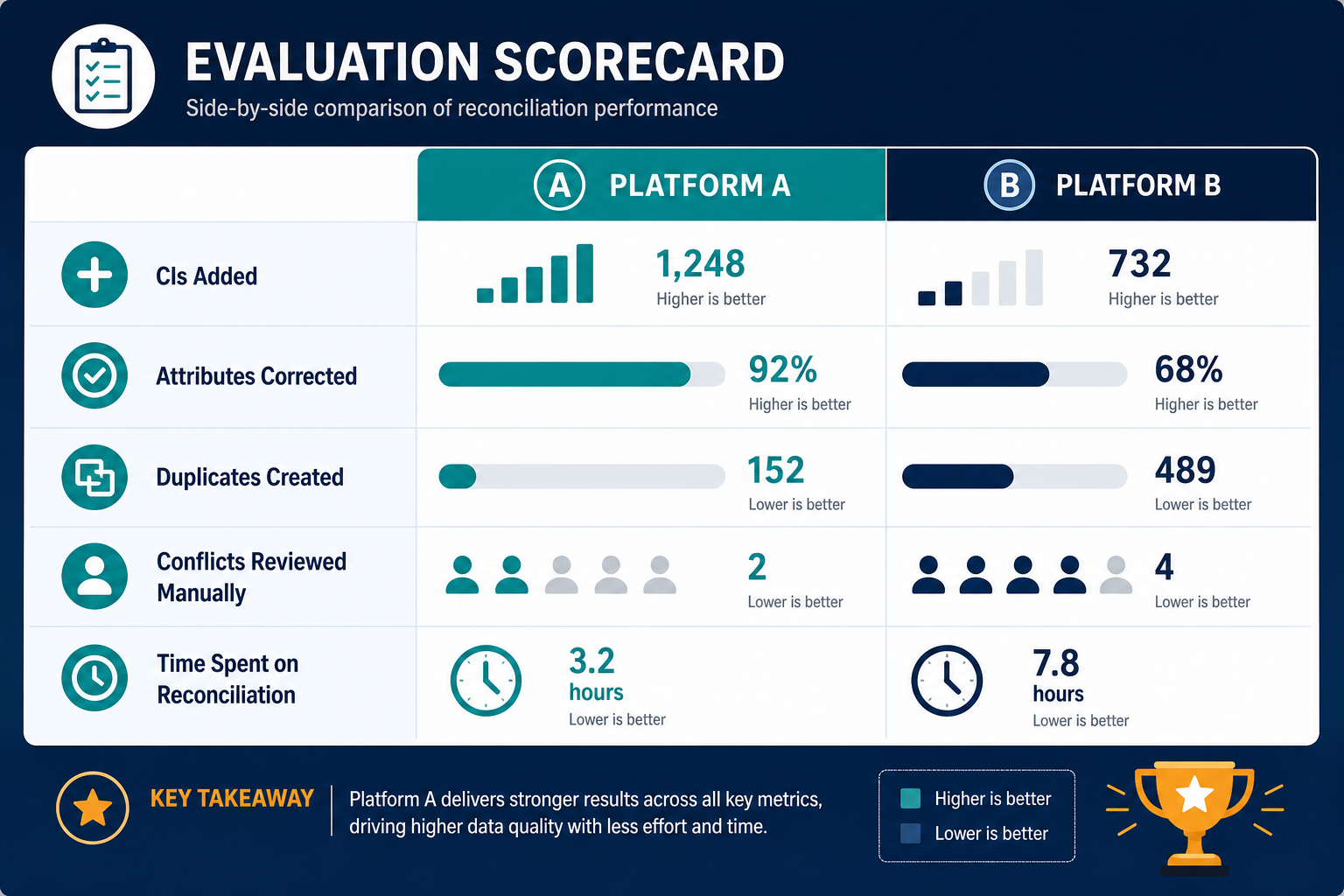
- Count new CIs, corrected attributes, duplicates created, and conflicts that needed manual review.
The comparison shows whether the added source closed a gap or only created work. The causes of inaccuracy differ by estate, and the guide on why ServiceNow CMDB data drifts helps the owner separate reconciliation problems from coverage problems.
Making the call as the CMDB owner
Start with one segment where the CMDB is already questioned. Run the bounded evaluation above, read the scorecard, and decide for each CI class whether native discovery is enough.
CMDB owners can run this same bounded evaluation directly against their own estate before deciding whether a second source is worth the reconciliation overhead it adds.
Frequently Asked Questions
Is ServiceNow Discovery enough to populate a CMDB?
It is often enough when native scans reach the CI classes the business depends on and attribute depth supports change decisions. Estates with air-gapped segments, legacy hardware, or heavy hybrid footprints deserve a test. A sample comparison on one segment shows which case applies.
How do you check whether a ServiceNow CMDB has coverage gaps?
Sample CIs from one class and compare them with an independent source such as a hypervisor or cloud console. Review the last discovered date and key attributes like serial number for each sampled record.
How do you avoid duplicate CIs when two sources feed one CMDB?
Use durable identifiers such as serial numbers and cloud instance IDs in identification rules. Hostnames change and repeat, so they make weak matching keys. Register each source as a data source and set attribute precedence before the second feed goes live.
Does Virima replace ServiceNow Discovery?
No. Virima runs high-frequency discovery cycles and sends enriched CIs into ServiceNow, which stays the system of record. Many teams use both, with ServiceNow managing ITSM processes and IRE reconciling records from each source.
Which cloud and virtualization platforms does Virima discover?
Virima includes connectors for AWS and Azure. For virtual machine inventory it supports VMware and Hyper-V.