Jira Service Management CMDB Discovery Integration | Virima

Change approvals rely on the CMDB record attached to the ticket. That record is only as current as the last import or discovery cycle that touched it. When an approved change breaks a dependency nobody mapped, the CMDB owner answers for it, not the approver who signed off on a record that looked complete. A Jira Service Management CMDB discovery integration and a point asset plugin can both populate that record, but they reach it through different mechanisms. One imports what someone fed it; the other scans the network and APIs on its own schedule. That difference decides whether the ticket shows last week’s change or last quarter’s import.
What a Jira Service Management admin needs from CMDB data
Admins decide which configuration item is affected, who owns it, and what else breaks if it changes. An asset plugin answers the first two when the data loads correctly. The third decision needs relationships between items. Those relationships need a source other than a spreadsheet.
Atlassian’s documentation on importing objects into Assets describes import structures, data source fields, and import history. That import-based object store is distinct from Assets Discovery, Atlassian’s own native scanning add-on that populates configuration items by scanning the network directly rather than from a file a person uploads. Data Manager then reconciles records from whichever sources — imports, Assets Discovery, or both — a team connects. Assets Discovery and Data Manager sit behind JSM’s Premium and Enterprise plans, so confirm your tier before assuming native discovery is already available. The evaluation question is which source feeds a given configuration item and how often that source refreshes, not whether Atlassian offers discovery at all.
CMDB owners field three kinds of requests:
- Audit teams ask for evidence that inventory matches reality.
- Incident managers ask for the blast radius of a failing server.
- Change managers ask for impact analysis before approving a window.
A plugin loaded from a single source can support the first request when the source is complete. The second and third depend on relationship data.
Where point asset plugins fit and where gaps open
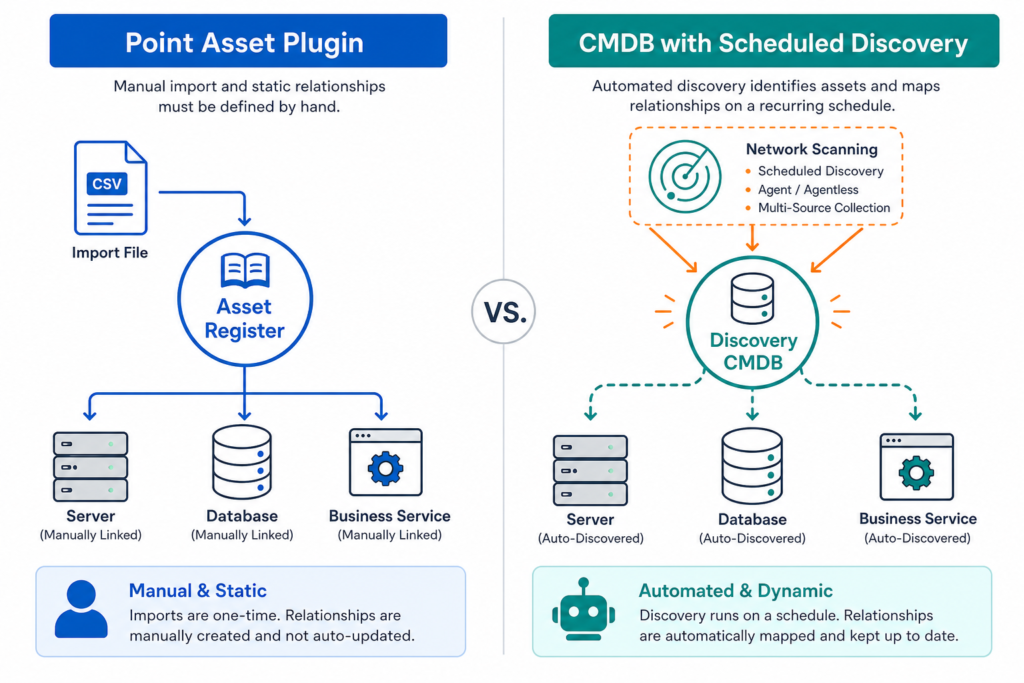
Point asset plugins hold objects inside Jira Service Management. They suit teams that want a structured register of laptops, licenses, or contracts, with custom attributes and schemas. For a small estate with stable inventory, that register may be all the team needs.
Four gaps can open in plugin-based setups:
- Source dependence. The register is as complete as the import that fed it. If the source misses a segment, the register misses it too.
- Refresh gaps. Imports run on a schedule the admin sets. Anything created or retired between runs stays invisible until the next one.
- Flat relationships. Objects can reference each other, but someone defines each reference. Dependencies across application, database, and network tiers take significant effort to enter by hand. Virima’s review of why IT metrics lie when the CMDB underneath them is wrong covers this pattern. A flat, hand-built relationship set quietly understates blast radius until an incident exposes the gap.
- Reconciliation load. Two sources describing the same server produce two records unless a stable join key ties them together.
The six criteria for evaluating a Jira Service Management CMDB discovery integration
Score each criterion for your current setup and for any candidate.
| Criterion | Question to ask | Point asset plugin (typical) | Discovery-sourced CMDB integration |
|---|---|---|---|
| Data source | Where does each object originate? | Import file, connector, or manual entry | Network scanning, optional agents, cloud and hypervisor APIs |
| Refresh | How long can an object be wrong? | Until the next import run | Until the next scheduled discovery cycle |
| Relationships | Who defines dependencies? | Admin defines references | Built from discovered data and service definitions |
| Service context | Can you trace a CI to a business service? | Possible with manual modeling | Dependency maps built once service definitions exist |
| Reconciliation | What stops duplicate records? | Rules the admin maintains | Multi-source reconciliation into one record |
| Admin effort | What does upkeep cost each week? | Import maintenance and attribute cleanup | Discovery scheduling and credential upkeep |
Score your current setup against each row above, then Your CMDB: Your ITSM-ITOM Connection to track the results and compare them against a discovery-sourced option.
Data source and refresh
Ask each tool to show you one object that changed last week, and the time its record updated. A register that refreshes by import shows the import date. A discovery-sourced CMDB shows the discovery cycle that found the change.
Virima’s IT discovery runs scheduled discovery cycles, so record age follows the schedule you set. You can shorten the schedule for critical segments.
Relationships and service context
Relationships carry the most weight at change approval. The approver needs to see which named business service a database server supports before choosing a window. Jira Service Management itself has no native dependency-mapping feature; ViVID™ is a connected integration that builds the map from discovered configuration item data, not a built-in JSM capability. Virima builds application-to-infrastructure dependency maps through ViVID™ service maps once you supply the service definitions.
IT and networking issues accounted for 23% of impactful outages in 2024, according to Uptime Institute’s 2025 Annual Outage Analysis. A missed dependency is often the reason a routine change ends up on that list instead of closing without incident.
Definitions come from manual entry, a spreadsheet import, or an integration such as LeanIX. Services are not inferred automatically, so a short definition exercise comes first. Once definitions exist, ViVID™ builds the dependency map from discovered CI data.
For Jira Service Management users, open incidents and planned changes appear as overlays on the map. An approver sees the affected server, its service, and scheduled changes in one view. Virima’s analysis of change management statistics breaks down how change outcomes connect back to CMDB completeness in more depth.
Configuration item reconciliation
Two sources can describe one asset. A laptop appears in the endpoint tool and in the discovery scan. A cloud instance appears in the provider API and in a spreadsheet.
Hostname is a poor join key because names change and repeat. Serial number or cloud instance ID gives a durable match. Ask each tool which key it uses to merge records.
Virima merges data from several discovery sources into one authoritative record per configuration item. Atlassian’s Data Manager reconciles records from the sources it connects. In either tool, the merge key decides whether duplicate records persist.
How a discovery-sourced integration feeds Jira Service Management
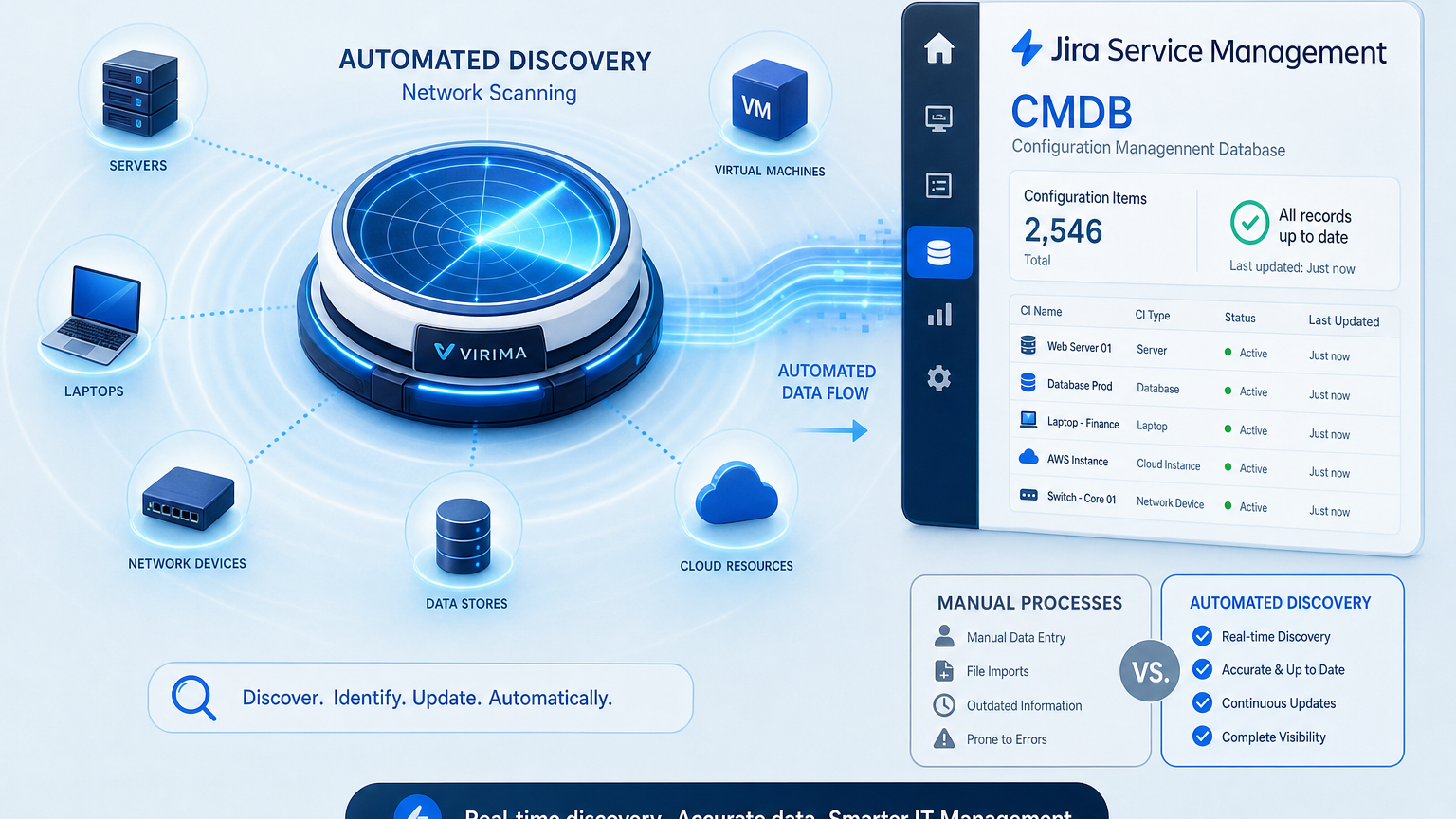
Virima connects to Jira Service Management through a no-code integration configured in the user interface. Discovery populates configuration items and their relationships in Virima’s CMDB. This CMDB discovery integration then links those items to Jira Service Management so tickets carry asset and CI context. For more on how this plays out for Jira Service Management teams specifically, see Virima’s walkthrough of extending Jira’s CMDB.
Atlassian’s Assets Discovery add-on and third-party tools such as Virima both scan infrastructure directly, but they differ in where the resulting CMDB record lives: Assets Discovery writes into Jira’s own object schema, while Virima maintains CI records and ViVID™ service maps outside Jira and links them in — so the map and relationships persist even if a team later changes ITSM platforms.
Virima also integrates with ServiceNow, Ivanti, HaloITSM, Xurrent, Hornbill, and TeamDynamix. The current list of integrations sits on one page. A team that later changes ITSM platforms keeps the same discovery layer and the same service maps.
Discovery covers these infrastructure types:
- Servers, desktops, laptops, and network devices through agentless scanning, with optional agents for deeper inventory
- Virtual machines across VMware and Hyper-V
- Cloud assets in AWS and Azure
- Installed software, plus OS and hardware details such as serial numbers
What is the setup sequence for a discovery-sourced CMDB integration with Jira Service Management?
Teams set the discovery scope and credentials, run a first scheduled cycle, and review the discovered configuration items. They then supply service definitions by manual entry, spreadsheet, or integration, and enable the Jira Service Management integration. The dependency map updates automatically after that — service definitions are the one input that needs a person; every CI relationship behind the map comes from discovery and needs no further manual entry.
Where each approach fits
A register built in Jira Service Management fits small estates, stable inventory, and asset types that discovery cannot reach. Contracts, warranties, and facilities equipment belong to that group.
A discovery-sourced integration fits estates that span on-premises servers, virtual machines, and cloud workloads. It also fits teams whose change approvals depend on knowing what a configuration item supports. Regulated teams gain evidence for auditors that inventory reflects what exists.
Ownership data needs a decision either way. Discovery reports what a machine can see, such as serial number, OS, and network address. Business owner and cost center come from people, so someone must enter them or import them from HR or finance sources.
Some teams run both, with the plugin holding curated records and discovery supplying machine-reported ones. Reconciliation rules decide which source wins for each attribute.
To see how CMDB owners remove data decay without manual reconciliation, review Virima’s discovery-sourced Trusted Runtime Truth.
A practical checklist before you commit
Run these checks on your current Jira Service Management CMDB discovery integration setup first, then on any candidate:
- Pick ten servers at random and compare their records with the machines themselves.
- Pick one business service and trace every configuration item it depends on.
- Find the last import or discovery run date for each source.
- Check which key merges duplicate records across sources.
- Ask who owns each CI record and how ownership updates after a team change.
- Open one planned change and see whether the approver can view affected services.
Failures in the dependency trace and the change view point to missing relationship data. Repeat the sample after each major infrastructure change to see whether accuracy holds.

What evidence should a CMDB owner keep from an accuracy test?
Keep the list of sampled configuration items, the live values found, and the mismatches. Add the source and last refresh date for each record, plus the owner who corrected it. Auditors can then trace each correction to a dated record.
Test your Jira Service Management CMDB discovery integration against the six criteria
The six criteria give a repeatable test for any CMDB behind Jira Service Management. When the dependency trace or the change view exposes gaps, a discovery source is the next layer to evaluate.
Score your current setup against the six criteria above, then Your CMDB: Your ITSM-ITOM Connection to compare your results side by side. If you’re ready to see a discovery-sourced CMDB working against your own data, request a demo to see ViVID™ service maps and the Jira Service Management integration in your own environment. Bring your configuration manager or ITSM admin to the session.
Frequently Asked Questions
Why does my Jira Service Management asset data go stale between imports?
Imported objects reflect the source file on the day it ran. Anything added, changed, or retired afterward stays unrecorded until the next run. Shortening the import schedule helps, but the source must also cover every segment of the estate. A discovery source with its own scheduled cycles narrows the gap further.
How do I stop duplicate CI records when two tools describe the same server?
Merge on a stable identifier such as a serial number or cloud instance ID. Hostnames change and repeat across environments, so they produce false matches. Write the merge key into your reconciliation rules, and review unmatched records on a regular schedule.
What data does a change approver need to see before approving a change?
The approver needs the affected configuration items, their business services, and their owners. Open incidents and changes already scheduled against the same items complete the picture. A flat asset list covers the first need at best, and relationship data covers the rest.
How does Virima’s Jira Service Management integration work?
Virima connects through a no-code integration configured in the user interface. Discovered configuration items and their relationships link to Jira Service Management tickets. Open incidents and planned changes appear as overlays on ViVID™ service maps.
Does ViVID™ discover which applications make up a business service?
Service composition comes from you. You supply the service definitions manually, by spreadsheet import, or through an integration such as LeanIX. After that, ViVID™ builds the dependency map from the discovered configuration items automatically.