Virima ServiceNow Sync Configuration Gotchas: 3 That Break the Integration

Why the Same Sync Configuration Can Behave Differently Across ServiceNow Instances
ServiceNow instances accumulate years of configuration layering:
- IRE rules adjusted by a previous CMDB team
- CI class hierarchies built during a platform migration
- Encryption policies applied by a security team that did not coordinate with the CMDB team
The three configurations below appear in enough production ServiceNow instances that the Virima integration team encounters them regularly during setup. None returns a visible error that points directly to the problem.
According to the HDI 2025 State of CMDB report, 62% of IT organizations report difficulty keeping their CMDB synchronized with their actual IT environment. Most attribute the problem to configuration conflicts that surface only after integration go-live. Diagnosing these conflicts in production costs time and delays visibility for your IT operations team.
| An IRE policy set to “manual override always wins” prevents Virima’s discovery data from updating CI records, even when that data is more recent and accurate. The fix is attribute-class-specific confidence tiering: Virima wins on network and OS attributes; manual entries win on ownership and contractual fields. |
Configuration 1: IRE Set to “Manual Override Always Wins”
What Breaks
Virima’s discovery data cannot update CI records even when it holds higher-confidence, more recently collected data. A hostname last manually entered 14 months ago beats a hostname Virima discovered this morning, because the Identification and Reconciliation Engine prioritizes manual entries globally.
Why It Happens
ServiceNow’s IRE is often configured to protect manual entries on the assumption that manual data is intentional and authoritative. That assumption holds for ownership fields, cost center assignments, and contractual data. It breaks down for network and OS attributes, where manual entries go stale within weeks and discovery is the only reliable source of current data.
The setting often dates to an earlier CMDB project where the team was concerned about a discovery tool overwriting carefully maintained manual data. The intent was reasonable. The scope was too broad.
How to Resolve It
Create a Virima-specific data source record in ServiceNow’s IRE configuration with a defined confidence tier. Name the data source record to match the Virima REST API service account and position it at tier 2 — above other automated tools but below manual entries for ownership and contractual fields. Then define attribute-level override rules:
- Virima wins on hostname, IP address, OS version, OS edition, and installed software
- Manual entries win on ownership, cost center, business service assignment, and contractual lifecycle fields
This approach, called attribute-class-specific confidence tiering, ensures discovery data updates the attributes it is most reliable for while preserving intentional manual data in governance fields. ServiceNow’s IRE documentation details the steps for creating and ordering data sources. The key is to avoid a global “manual always wins” policy.
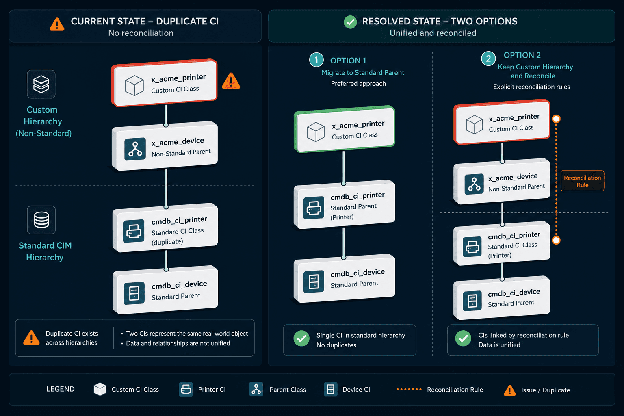
Custom CI class hierarchies outside ServiceNow’s Common Information Model cause Virima to create a new CI in the nearest standard class rather than updating the existing custom-class record. This produces duplicate inventory and conflicting dependency data. Run a CI class audit before go-live and either migrate to standard CIM classes or create explicit reconciliation rules.
Configuration 2: Custom CI Class Hierarchy Outside ServiceNow’s Common Information Model
What Breaks
Virima’s discovery engine maps discovered assets to standard Common Information Model (CIM) CI classes. When a ServiceNow instance contains custom CI classes that inherit from non-standard parent classes, Virima creates a new CI in the nearest standard class on sync — and the custom-class CI remains unchanged. Two records then exist for the same physical asset with no reconciliation rule linking them, creating duplicate inventory and conflicting dependency data in service mapping.
Why It Happens
Long-running ServiceNow instances frequently contain custom CI classes added during platform migrations or bespoke integrations. A financial services firm that built a custom cmdb_ci_regulated_server class to track PCI-scoped assets for compliance workflows is a typical example. Healthcare organizations add custom classes to track HIPAA-regulated infrastructure. These classes served a real business need but sit outside ServiceNow’s standard CI model hierarchy.
Non-standard CI class hierarchies are particularly common in enterprises that underwent platform migrations or built compliance-specific classes for industries whose infrastructure classification needs predate the current maturity of ServiceNow’s CIM standards.
How to Resolve It
Before Virima integration go-live, run a CI class audit in ServiceNow. Export the CI class hierarchy and identify every class whose parent chain does not trace back to cmdb_ci through a standard CIM path. For each non-standard class, choose one of two resolutions.
The cleaner path is to migrate the custom class to its nearest standard CIM parent class and migrate existing CIs (Option A). This aligns the CMDB with ServiceNow’s Common Information Model architecture, which benefits service mapping accuracy downstream and improves consistency with ServiceNow’s own tooling and updates.
If the custom class must stay in place, create explicit reconciliation rules linking it to Virima’s CIM-mapped output by serial number or hostname (Option B). Plan for manual rule maintenance as Virima’s discovery output evolves.
Field-level encryption on ServiceNow CI attributes silently blocks Virima’s REST API writes. The sync log reports success but encrypted fields contain stale values. The resolution is a service account with decrypt and re-encrypt permissions, or a staging table approach. Both options require security team alignment before go-live.
Configuration 3: Field-Level Encryption on CI Attributes
What Breaks
Virima’s REST API sync cannot write to encrypted fields. ServiceNow’s encryption plugin silently rejects write attempts from external integrations when it covers CI attributes such as IP address, hostname, or MAC address. No error appears in the sync log. The sync reports as successful. The encrypted fields are not updated. CI records contain stale values in exactly those attributes most critical for discovery accuracy.
This is one of the hardest configurations to diagnose because the integration appears healthy in the log while the most critical attributes diverge from the source of truth.
Why It Happens
Security and compliance teams apply field-level encryption to CI attributes in environments subject to HIPAA, PCI-DSS, SOC 2, or internal data governance policies. NIST SP 800-111 and PCI-DSS both recommend encryption of data at rest for sensitive identifiers — a standard that extends to network and system attributes stored in a CMDB. The encryption configuration is applied by a team that is not coordinating with the CMDB integration team. The security team’s mandate is data protection; the integration team’s mandate is data accuracy. Without pre-integration alignment, the two mandates conflict.
How to Resolve It
Audit CI attribute encryption settings before the Virima integration goes live. Query the ServiceNow encryption context configuration to identify which fields on which CI classes have field-level encryption applied. In Virima’s default write scope, the fields most likely to be affected are hostname, IP address, OS version, and installed software — the same attributes that IRE tiering protects in Configuration 1. Field-level encryption on any of these silently blocks Virima’s REST API writes.
For each field that Virima must write to, coordinate with your security team on one of two resolutions.
The preferred path is to create an integration-specific service account with field-level decrypt and re-encrypt permissions for Virima’s write operations (Option A). This preserves encryption at rest while allowing Virima’s integration user to decrypt, validate, and re-encrypt CI data during sync.
If a service account with decrypt permissions is not achievable in your environment, establish a separate CMDB staging table for discovery-sourced attributes that are exempt from field-level encryption (Option B). Virima writes to the staging table; a trusted internal ServiceNow transform populates the encrypted production fields from the staging table on a scheduled basis.
Both approaches require security team involvement. Start this conversation early in your integration planning — field-level encryption is a critical control and should be preserved, but it must be transparent to the integration architecture to avoid silent data staleness.
Planning a ServiceNow integration and want to catch these before go-live?
Virima’s integration team can run a pre-integration configuration audit against your ServiceNow instance before any deployment work begins.
Request a configuration review
Build Your Pre-Integration Checklist Around These Three Checks
These three configuration issues share a common characteristic: each was put in place for a legitimate reason in a context that predated the Virima integration. A pre-integration configuration audit — specifically targeting IRE settings, CI class hierarchy, and field encryption — takes less time than investigating a silent sync failure three weeks after go-live.
Run these three checks before building your integration mappings:
| Check | What to audit | Expected outcome |
|---|---|---|
| IRE configuration | Confirm no global “manual override always wins” rule. Verify Virima data source record exists with tier-2 confidence and attribute-level overrides defined. | Virima’s discovery data updates hostname, IP, OS, and software fields; manual entries retain ownership and contractual fields. |
| CI class hierarchy | Export class hierarchy. Identify every class whose parent chain does not trace back to cmdb_ci via a standard CIM path. | All asset classes in Virima’s discovery scope trace to standard CIM parents, or explicit reconciliation rules exist for non-standard classes. |
| Field-level encryption | Query encryption context configuration. List every CI attribute with encryption applied. Cross-reference against Virima’s write scope. | No field in Virima’s write scope has encryption applied, or integration service account has decrypt/re-encrypt permissions. |
ServiceNow admins and configuration managers should also validate:
- Whether any CI attributes are subject to workflow modifications that might restrict external writes
- Whether integration service accounts have sufficient permissions on all CI classes in your hierarchy
- Whether any data quality rules or duplicate detection rules might interfere with upsert operations
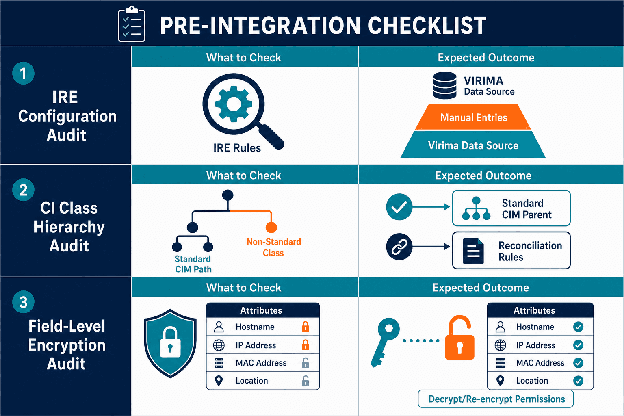
A pre-integration checklist table showing the three configuration checks with what to audit and the expected clean-state outcome for each.
Frequently Asked Questions
Why is Virima’s ServiceNow sync completing successfully but CI records are not being updated?
Three configurations cause this: IRE set to “manual override always wins,” field-level encryption on CI attributes, and custom CI class hierarchies outside the Common Information Model. All three appear as a successful sync with no visible error. Run a ServiceNow report that joins discovered asset data against corresponding CI records and compare attribute values for a sample of assets. This field-level comparison is the fastest way to diagnose which configuration is causing the issue.
How do you configure ServiceNow IRE to allow a discovery integration to update CI records without overriding intentional manual data?
Create a discovery-specific data source record in IRE with a confidence tier above other automated sources but below manual entries. Then define attribute-level override rules: the discovery source wins on hostname, IP, OS version, and software; manual entries win on ownership, cost center, business service assignment, and contractual fields. This attribute-class-specific approach is more defensible than a global “manual always wins” policy. Servicenow, Ivanti, Halo, Jira service management, Xurrent.
What ServiceNow CI class hierarchy checks should I run before connecting a discovery integration?
Export the CI class hierarchy and identify every class whose parent chain does not trace back to cmdb_ci through a standard Common Information Model path. For each non-standard class, determine whether existing CIs can be migrated to the nearest standard CIM class, or whether explicit reconciliation rules need to be created linking the custom class to the discovery integration’s standard-class output.
Does field-level encryption on ServiceNow CI attributes block writes from external integrations?
Yes. Field-level encryption on ServiceNow CI attributes silently blocks write attempts from external integrations. The sync reports success but the encrypted fields are not updated. The standard resolution is either a service account with field-level decrypt and re-encrypt permissions, or a staging table where the integration writes to an unencrypted staging table and a trusted internal ServiceNow transform populates the encrypted production fields. Coordinate the resolution between the integration team and the security team before go-live.
How does Virima handle ServiceNow instances with non-standard CI class hierarchies?
Virima maps discovered assets to standard ServiceNow Common Information Model CI classes. In instances with custom CI class hierarchies, Virima creates CI records in the nearest standard class — which can produce duplicate records if a CI already exists in a custom class without a reconciliation rule. The resolution is a pre-integration CI class audit and either migration to standard classes or explicit reconciliation rules. The ServiceNow CMDB best practices guide provides a broader framework for CI class governance.
Catch These Before Go-Live, Not After
A pre-integration configuration audit targeting IRE settings, CI class hierarchy, and field encryption typically takes far less time than diagnosing a silent sync failure in production. If you are planning a Virima ServiceNow integration or troubleshooting an existing one, Virima’s team can run a pre-integration configuration review against your instance before any deployment work begins.
Schedule a demo today to get started.