How Does Virima Support ITIL Change Management? CMDB, Impact Analysis, and ViVID Explained

Virima 6.1.1 delivers Virima ITIL change management on a single platform. It uses live CMDB data and ViVID Service Maps to provide accurate impact analysis, automated approval routing, pre-change configuration verification and post-change checks, and risk register integration. As a result, you get Trusted Runtime Truth for change decisions: what exists, how it connects, what will break, and who owns it. This FAQ explains how the platform uses configuration data and management tools to support the full change management process.
Does Virima Support ITIL v4 Change Management?
Yes. Virima 6.1.1 supports ITIL v4 Change Enablement and follows its principles. It covers three change types: standard, normal, and emergency. Each type uses its own workflow path. For example, ITIL defines Change Enablement as the practice of raising change success by assessing and authorizing risks before release. Virima automates that practice.
In addition, standard changes follow pre-approved templates. Normal changes trigger impact analysis and multi-stakeholder approval. Emergency changes use a short approval path with post-implementation review. All three keep a full audit trail and link to the CMDB for CI context. As a result, this change management process stays compliant without manual effort.
Finally, the change management module enforces compliance through automation, not manual checks. That approach matches ITIL v4 focus on value-driven, automated service management. Teams that use the right management tools spend less time on manual approvals.
How Does Virima Use CMDB Data for Change Impact Analysis?
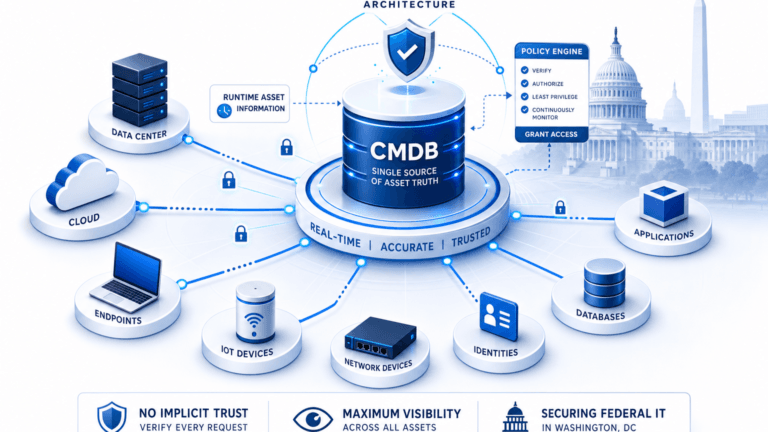
Virima uses CMDB data to map every configuration item, service, and stakeholder affected by a proposed change. When a change record targets a CI, the platform checks the relationship graph to find:
- All CIs that depend on the target CI (runs-on, depends-on, connected-to)
- All business services that include the affected CIs
- All open change records on related CIs
- All owners and stakeholders for the affected CIs and services
This check runs automatically against live CMDB data, not static docs. Because Virima fills its CMDB through regularly scheduled Discovery, the configuration data reflects the actual state of the IT estate at planning time. In other words, you plan against what exists now, not what someone documented last quarter. The right management tools make this visibility possible without manual research.
What Does ViVID Show During Change Planning?
ViVID Service Maps show a dynamic visual graph of every CI, service, and dependency in the change scope. During planning, the map displays:
- The target CI and its configuration data: state, criticality, ownership, and open risk items.
- Downstream dependencies: every CI that depends on the target, shown as a connected graph with relationship labels.
- Affected business services: containers that show which services include the affected CIs.
- Pending concurrent changes: open records on related CIs, flagged to spot scheduling conflicts.
- Stakeholder ownership: CI and service owners for every node.
As a result, change engineers and CAB reviewers get a complete vsual impact view in seconds. So they can skip manual research. This visual layer improves the change management process by showing affected services before approval.
How Does Virima Verify Configurations Before and After a Change?
Virima uses Discovery for pre-change configuration verification and post-change checks.
First, before the change window opens, Discovery runs a targeted scan of the CIs in scope. It captures current state: installed software, running services, open ports, network links, and other CI attributes, and saves the result as a baseline snapshot on the change record. The snapshot includes configuration data from the scan.
Next, after you implement the change, Discovery scans the same CIs again. Then the platform compares post-change results to the baseline. It highlights expected changes and unexpected drift.
Finally, this verification management process creates a complete, timestamped audit trail for every change. That trail supports both change governance and post-incident review. It gives auditors clear evidence of what changed and when.
Can Virima Automate Change Approval Workflows?
Yes. Virima 6.1.1 supports change approval workflow automation that pulls approver lists from CMDB data and improves the approval management tools teams rely on.
When you create a change record, Virima checks the ViVID map to find CI owners, service owners, and dependency owners in scope. Then it routes approval requests to those stakeholders in the order your rules define for that change type.
For example, you can set rules by:
- Change type (standard, normal, emergency)
- CI criticality
- Number of affected services
- Presence of risk items on affected CIs
Because approvers get the full ViVID map and risk context, they make informed decisions, not just form acknowledgments. This change management process removes manual routing delays.
How Does Virima Connect Change Records to Risk Register Items?
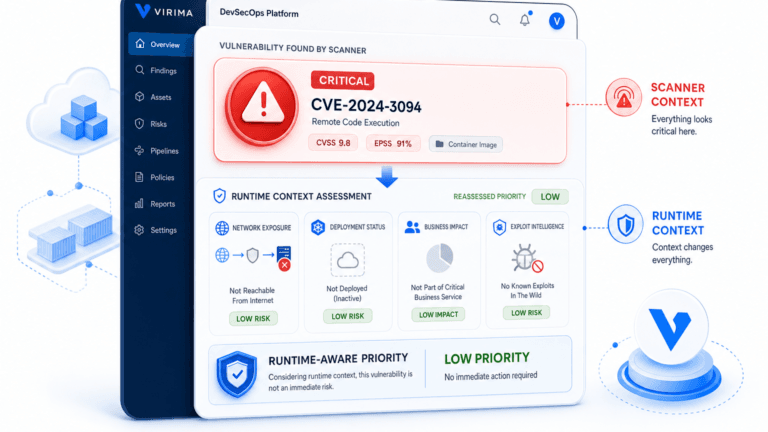
Virima 6.1.1 lets you link change records directly to CI risk items. When a CI in scope has open risk entries like known vulnerabilities, compliance obligations, past incidents, or deferred maintenance, those entries show in the change record.
As a result, approvers see a risk-weighted view: not just what the change touches, but what risks already exist on those CIs. In addition, change managers can escalate high-risk CIs to CAB review even when the change would normally use a fast path. This approach strengthens the change management process because approvers see risk context early.
For guidance on keeping configuration data accurate for risk decisions, see Virima’s CMDB best practices guide. Accurate configuration data helps teams prioritize high-risk changes correctly.
Does Virima Support Emergency Changes?
Yes. Virima 6.1.1 includes emergency change workflows that balance speed with governance.
Emergency changes use a short approval path. A small set of pre-approved emergency approvers, not the full stakeholder set for normal changes. As a result, you can authorize emergency changes fast during active incidents or outages. For a broader look at how change management processes handle all types in modern IT, see Virima’s change management guide.
At the same time, Virima keeps a full audit trail for emergency records. The workflow includes post-implementation review, so the CAB or change manager reviews the emergency change after you resolve the crisis.
Why this approach improves the change management process: Virima 6.1.1 delivers ITIL v4-compliant change management backed by live CMDB data, ViVID maps, automated workflows, and Discovery-based verification. Every capability links to the same CMDB that powers IT asset management, ITOM, and service mapping. Teams gain Trusted Runtime Truth for each change: what exists, how it connects, what will break, and who owns it. This live context helps teams use management tools more effectively and reduces failed changes.
Schedule a Demo at virima.com to see how the platform supports your change management process. This article is based on Virima 6.1.1 capabilities. Feature availability may vary by deployment configuration.
Schedule a Demo at virima.com to see Virima change management in action.
This article is based on Virima 6.1.1 capabilities. Feature availability may vary by deployment configuration.