Why CMDB Cleanup Relapses Within Weeks Without a Fresh Discovery Path

The ops team just closed a CMDB cleanup. Duplicates were merged. Stale CIs were retired. Ownership fields finally had names in them. The health dashboard looked green for the first time in months.
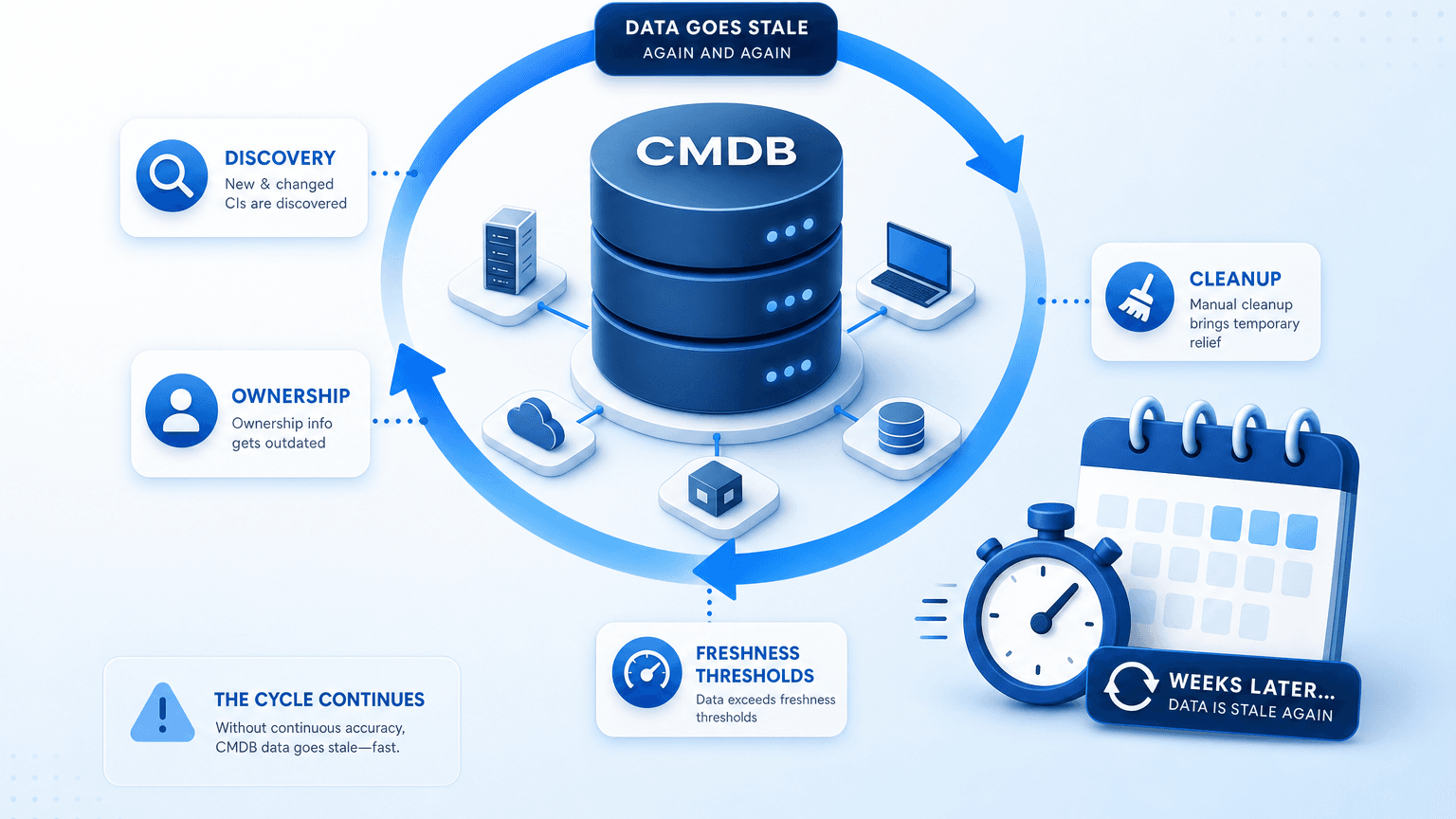
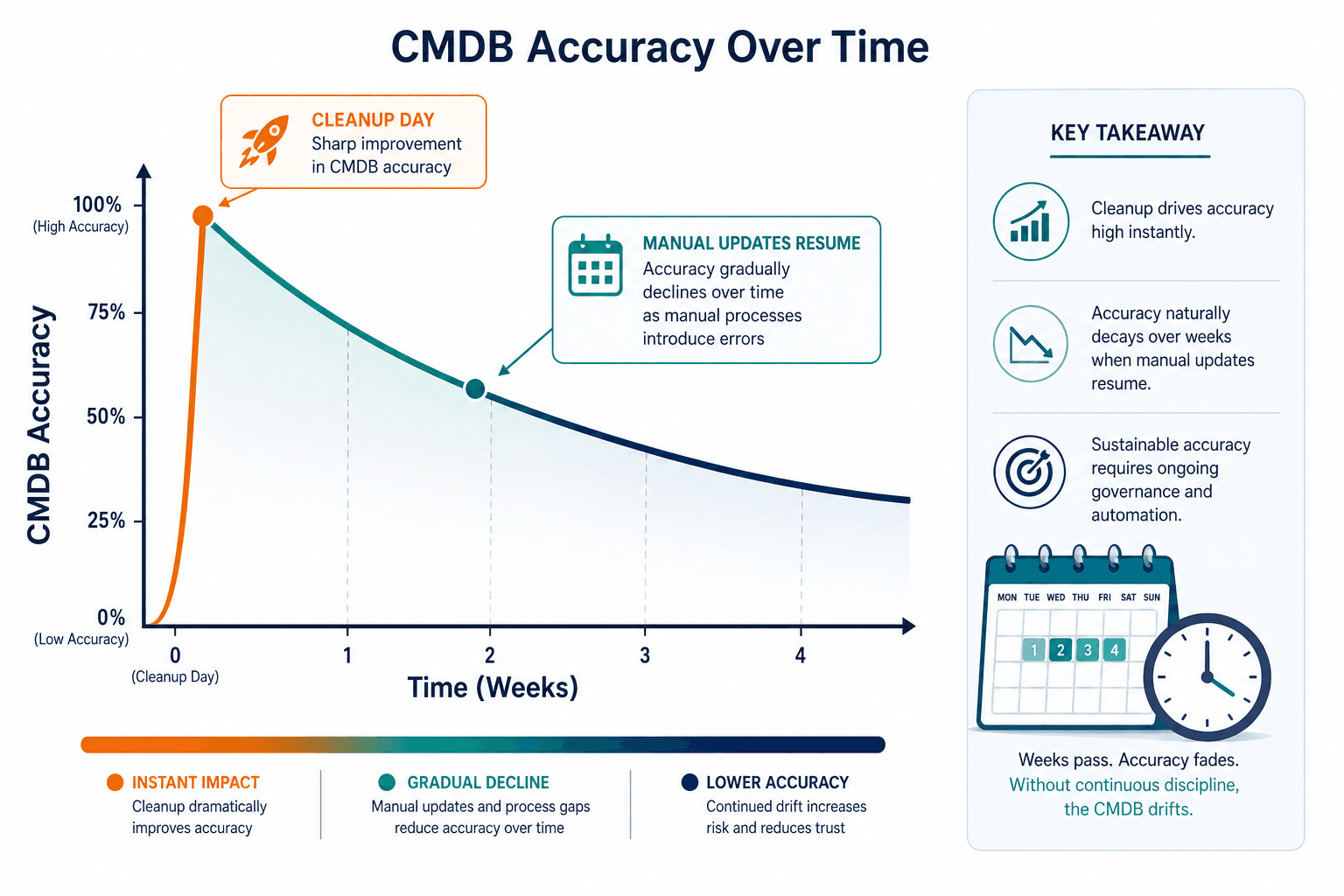
Three to four weeks later, the same categories of problems start showing up again. New duplicates appear after a device rename. Ownership drifts on a class nobody is watching. Relationships go missing after a quiet decommission. The cleanup made the CMDB accurate for a day. It did not fix what made it inaccurate in the first place. That is why CMDB data goes stale after cleanup on a weeks-long clock, not a years-long one.
Quick answer
CMDB data goes stale after cleanup within weeks because the cleanup fixed the data, not the mechanism that produces bad data. Sustainable fixes require three things running on a schedule, not once: discovery-sourced population instead of manual entry, named ownership per CI class, and a freshness threshold that flags records before they go stale rather than after.
What a cleanup actually fixes (and what it doesn’t)
A cleanup project is a point-in-time correction. It repairs the records that exist right now. It does nothing to the process that produced bad records in the first place. That is why CMDB data goes stale after cleanup on a weeks-long clock instead of a years-long one.
| What a typical cleanup fixes | What it leaves untouched |
|---|---|
| Existing duplicate CI records | The process that creates new duplicates during the next device rename or import |
| Stale ownership fields | Whether anyone is assigned to notice the next CI going stale |
| Orphaned relationships from retired assets | Whether new relationships get mapped as infrastructure changes going forward |
Think of a configuration management database as a living inventory layer, not a one-time project deliverable. For the end-to-end implementation view beyond this relapse pattern, see the fuller CMDB best-practices picture.
What does a CMDB cleanup fix versus what it leaves broken?
A cleanup corrects current duplicates, stale ownership fields, and orphaned relationships. It does not change the manual update path, the missing CI class owners, or the lack of scheduled discovery that created those bad records in the first place.
Why does CMDB data go stale again so fast after a cleanup?
When teams ask why CMDB data goes stale after cleanup, the mechanism is simple. A cleanup is a snapshot. The moment the snapshot is taken, the environment keeps changing underneath it. If the update mechanism is still manual, every change since the cleanup is already an unrecorded gap. Gaps compound the same way they did before the project started.
Industry visibility data shows the same pressure outside any single cleanup. Flexera’s State of ITAM Report series tracked complete technology visibility falling from 47% in 2024, to 43% in 2025, to 36% in 2026. That widening gap, tracked across three straight years, is the same pattern that lets a cleaned CMDB relapse when population stays manual.
ITIL 4 Service Asset and Configuration Management still treats accurate configuration information as something you maintain, not something you finish once. That practice language matches the cleanup trap: a project can cleanse records, but the practice only holds if updates and ownership stay in place after the project team leaves.
The three places decay creeps back in
- Manual entry quietly resumes as the default update path once the cleanup project team disbands. Result: every change since the cleanup is an unrecorded gap, and gaps compound the same way they did before.
- Few CI classes retain a named owner after the cleanup; most have only a project team that has moved on. Result: the first stale record after cleanup has no one whose job it is to notice.
- The cleanup ran discovery once, as a project task, not on a recurring schedule. Result: the CMDB reflects the day of the cleanup, not any day after it.
- Discovery quietly stops running when scan credentials expire, or a service account gets locked out, and nobody notices until the next audit. Result: the CMDB keeps looking current while entire subnets or CI classes silently stop refreshing.
Who feels it first when the data slips again
For the ops team that ran the cleanup
The same hundred-plus hours of manual work is now back on the calendar, on a shorter timeline than last time. The untouched process kept producing new gaps the whole time the team was fixing old ones. The team did the hard work, then watched the dashboard slide for reasons outside the cleanup scope.
For the IT manager weighing tools
A relapse this fast is usually the first real signal that the gap is architectural. Manual population is the architecture problem. A one-off hygiene lapse is not. That reframes the buying conversation from which cleanup service to buy next to which discovery approach stops the next relapse.
For whoever answers to the next audit
A CMDB that was accurate on cleanup day and inaccurate again by audit day is a worse position than one that was consistently mediocre. The inconsistency itself is what auditors flag. The CMDB maps the infrastructure an audit depends on. It does not replace the control framework or the named control owner. CI class ownership is the governance step that keeps post-cleanup records from becoming nobody’s job.
Who feels CMDB cleanup relapse first inside IT?
Ops teams feel the repeat manual hours first. IT managers see an architectural signal, not a one-off hygiene miss. Audit owners face a worse story when accuracy was high on cleanup day and low again by evidence day.
How to keep a CMDB cleanup from needing a repeat
Three mechanisms stop the weeks-long pattern where CMDB data goes stale after cleanup. Each step is independently actionable.
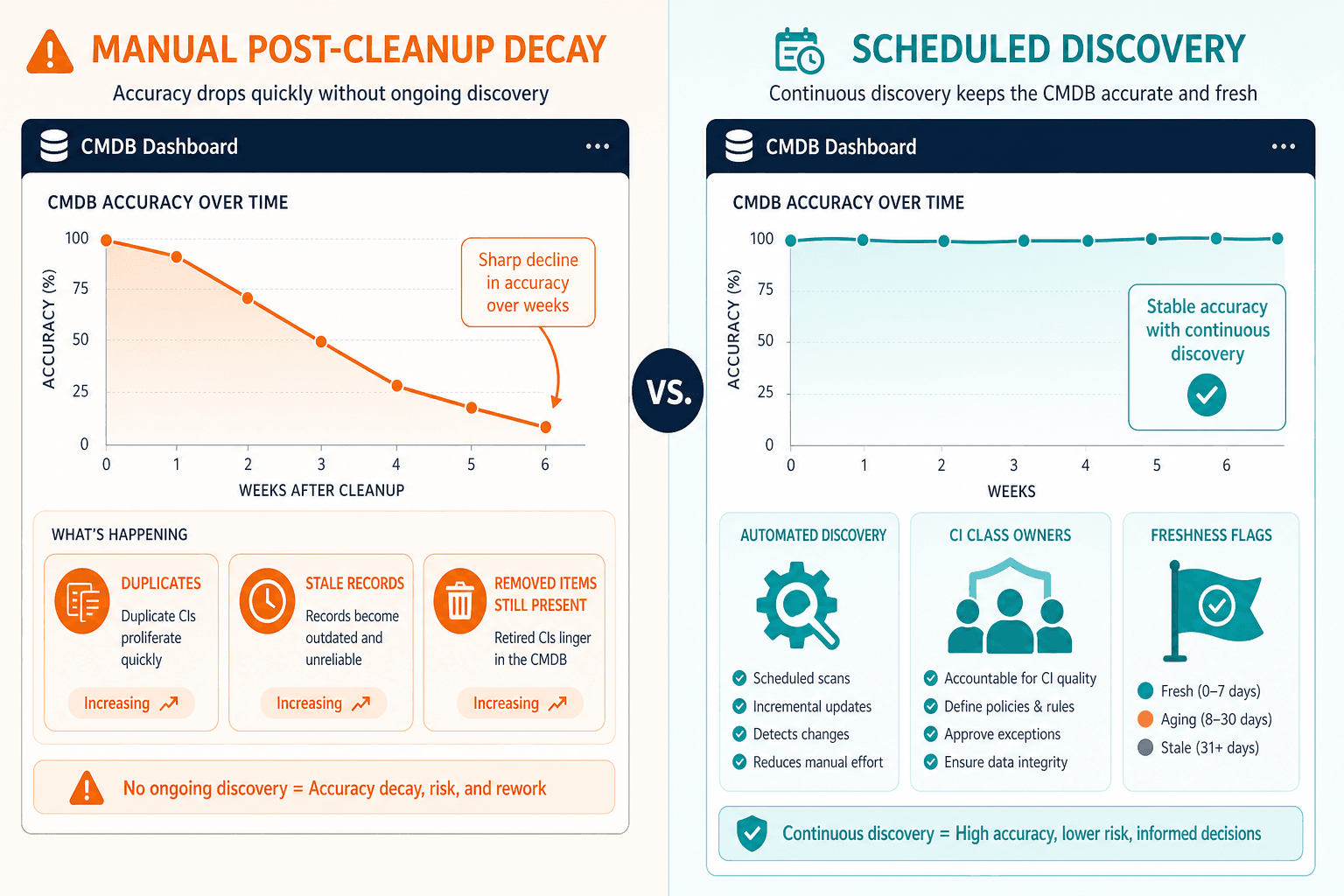
- Replace the manual update path with discovery-sourced population. Agentless, agent-based, and API-based discovery should run on a recurring schedule: daily or weekly scans paired with a monthly ownership review is a reasonable starting cadence, not as a one-time project task. Use discovery-sourced population so new CIs and changes land without waiting for the next cleanup wave.
- Assign a named owner per CI class before the cleanup team disbands. Ownership turns “someone will probably notice” into “a specific person is accountable.” Do this while project momentum still exists.
- Set a freshness threshold that flags records before they are stale, not after an incident finds them. Pair this with dependency mapping so a flagged CI’s downstream impact is visible immediately. Discovery data also needs to land inside the ITSM platform your team already uses, through ServiceNow, Jira Service Management, Ivanti, HaloITSM, Xurrent, or Hornbill, via the integrations hub, not a side system nobody opens.
| One-time cleanup | Ongoing reconciliation | |
|---|---|---|
| Update source | Manual entry, resumes after project ends | Discovery running frequently on a schedule |
| Ownership | Project team, disbands on completion | Named CI class owner, ongoing |
| Staleness detection | Found during the next incident or audit | Flagged against a freshness threshold |
| Timeline to relapse | Weeks | Not applicable when the update path stays discovery-sourced |
What this looks like once it is actually fixed
- A CMDB owner who just finished a cleanup assigns CI class owners the same week, before project momentum fades, rather than treating ownership as a follow-up task.
- An ops team switching from quarterly manual reconciliation to scheduled discovery stops re-finding the same categories of duplicates and ghost records every quarter, because records that would have gone stale get caught on a schedule instead of a project cadence.
- An IT manager comparing options after a second relapse starts asking vendors specifically how CI data gets updated day to day, not just how the initial migration or cleanup is handled. That is the right question for avoiding a third relapse.
If your team still needs the basics, start from what a CMDB is actually supposed to track, then apply the three mechanisms above to the classes you just cleaned.
Where Virima fits
Virima is a discovery-and-CMDB foundation built so the update mechanism, not just the initial data, stays correct. It does not claim a cleanup never needs human judgment. It removes the specific mechanism: manual population as the default path that causes the fastest relapses.
In the first month, discovery that runs frequently replaces the manual update path quickly, closing the exact gap that causes weeks-long relapse. A year later, scheduled discovery cycles mean less accumulation of silent drift, so the next “full cleanup project” stops being the default operating model. Inside ServiceNow, Jira, or Ivanti, CI data can land directly in the ITSM platform the team already uses, so ownership and freshness data do not live only in a separate tool nobody checks. Pair that inventory layer with IT asset management when lifecycle and license facts must sit beside configuration truth.
Once service definitions are supplied, ViVID™ builds dependency maps that show blast radius when a CI crosses a freshness threshold. Decommissioning stays a deliberate step with a named decision-maker, never a passive disappearance from the record.
Put discovery, ownership, and freshness thresholds together, and the CMDB stops being a snapshot from cleanup day. Virima calls that standing accuracy trusted runtime truth, current enough to act on months after the project team moved on, not just on launch day.
What changes once the cleanup does not have to repeat
| From | To |
|---|---|
| A cleanup project on the calendar every year | No recurring full cleanup project as the default operating model |
| Decay found during an incident | Decay flagged against a freshness threshold before it is operational risk |
With no repeat cleanup budget line as the default plan, hours shift from re-cleansing the same classes to owning exceptions. Fewer incidents trace back to a stale or duplicate CI, because change and incident work starts from current inventory instead of last project’s spreadsheet. Audit prep becomes a reporting exercise instead of a scramble, since evidence comes from current discovery timestamps and named owners, not a last-minute rebuild.
Getting started
- Before closing out the current cleanup, assign a named owner to every CI class touched.
- Turn on scheduled discovery for those same CI classes immediately, not as a “phase two.”
- Set a freshness threshold and confirm who gets notified when a CI crosses it.
- Connect discovery data to the ITSM platform already in use.
- Calendar a 30-day check to confirm the relapse pattern has not restarted.
For related reading on quiet decay patterns over time, see why CMDBs decay quietly, not all at once.
A cleanup only holds when the decay path is gone
A cleanup only holds if the mechanism that caused the decay is gone, not just the bad data. CMDB data goes stale after cleanup when manual entry, missing owners, and one-shot discovery stay in place. See what a discovery-sourced CMDB looks like a month after go-live, not just on launch day, and request a demo to walk one CI class through discovery, ownership, and freshness together.
Frequently Asked Questions
Why does CMDB data go stale again so quickly after a cleanup project?
Because the cleanup fixed current records, not the update path. When manual entry resumes, ownership is unclear, and discovery ran once, new gaps appear within weeks and compound the same way they did before the project.
How long should a CMDB stay accurate after a cleanup before it needs another one?
There is no healthy “next cleanup” interval if population stays manual. Accuracy holds when scheduled discovery, named CI class owners, and freshness thresholds run after the project ends, so drift is caught before another full cleanse is required.
What’s the difference between cleaning a CMDB and governing one?
Cleaning corrects the records you have today. Governing keeps ownership, update source, and freshness rules in force after the project team leaves. Without governance, cleanup accuracy is a temporary window, not an operating state.
How does Virima replace manual CMDB updates with scheduled discovery?
Virima runs agentless, agent-based, and API-based discovery on a recurring schedule so new CIs and changes populate automatically, replacing the manual entry that causes post-cleanup relapse. Named CI class owners and freshness thresholds flag records before they go stale.
Does Virima’s CMDB integrate with ServiceNow, Jira Service Management, or Ivanti?
Yes. Discovery data lands inside the ITSM platform your team already uses, including ServiceNow, Jira Service Management, Ivanti, HaloITSM, Xurrent, and Hornbill, so ownership and freshness data don’t live only in a separate tool nobody checks.