Enterprise Asset Management Best Practices for 2026

Enterprise asset management (EAM) is the discipline of tracking, maintaining, and optimizing every asset an organization owns, from physical hardware and software licenses to cloud instances and network devices. For IT teams, EAM is the operational foundation that determines whether decisions during incidents, audits, and change windows are made on reliable data. Most organizations have some form of asset tracking. What they often lack is accuracy, and that gap becomes visible at the worst possible moments. This guide covers seven enterprise asset management best practices that high-performing IT teams use to keep asset data current, reduce wasted spend, and stay audit-ready without relying on manual updates.
1. Build your asset inventory from discovery, not spreadsheets
Asset inventories built from manual entry or imported spreadsheets start decaying immediately. Devices get added to the network, software gets installed, and cloud instances spin up. None of which appears in a manually maintained list until someone updates it, which rarely happens on time.
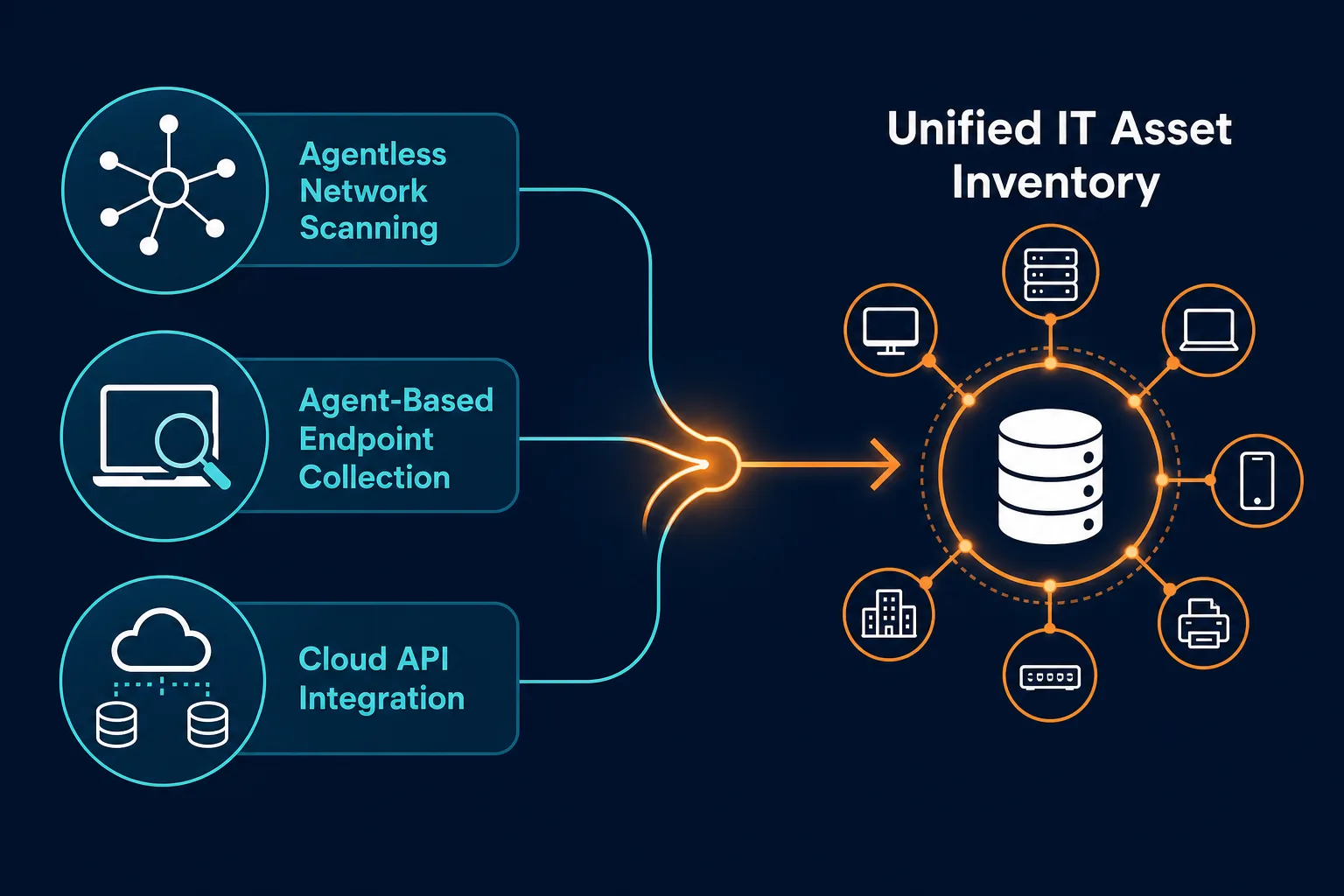
A reliable starting point is automated discovery. Agentless scanning using protocols like WMI, SSH, and SNMP captures what is actually present on your network. Agent-based discovery on Windows, macOS, and Linux endpoints captures installed software, running processes, and hardware configuration details. API-based discovery pulls cloud assets from AWS and Azure directly.
Enterprise asset management best practices require combining all three methods, and running them on a defined cadence rather than an occasional audit. No single approach covers every asset class, and no single scan captures a moving environment. On-premises hardware is best captured through agentless and agent-based scanning. Cloud and virtual environments need API integration. Endpoints that travel off-network require agents to report back reliably. As a baseline, discovery scans should run continuously where possible, or at minimum weekly for critical assets, so the inventory never drifts more than a few days behind reality. Virima runs all three discovery methods against a single hybrid discovery engine, so a laptop picked up by an agent-based scan and later seen again on the network through agentless scanning resolves to one asset record instead of a duplicate.
The scale of the problem is significant. According to the Flexera 2025 State of ITAM Report, complete visibility across the technology stack has dropped to just 43%, meaning more than half of IT organizations still cannot accurately account for what they own, where it is, or who is using it. Manual inventory methods are a primary driver of that gap.
2. Keep CMDB data accurate through continuous updates
A CMDB (Configuration Management Database) stores configuration items (CIs) and the relationships between them. It records that a particular server hosts three applications, that one application depends on a database cluster in Azure, and that the entire stack is owned by a specific team.
The challenge is that CMDB data goes stale quickly. Hardware gets decommissioned. Software upgrades change configurations. Cloud instances get reassigned. When the CMDB does not reflect these changes, teams stop trusting it and start making decisions without it. For a deeper look at the habits that keep a CMDB trustworthy day to day, see CMDB Audit Essentials: Ensuring Data Accuracy and Compliance and How to create and maintain a reliable CMDB.
That decline shows up in the data. The same Flexera 2025 State of ITAM Report found complete technology-stack visibility fell from 47% to 43% year over year, evidence that CMDB confidence is eroding even as cloud and container footprints expand.
CMDB accuracy is the single most important factor in whether your EAM program generates operational value or becomes shelf-ware. A CMDB that is three months out of date during a major incident is worse than no CMDB, because teams may rely on incorrect relationship data to triage the wrong systems.
The best practice is connecting your CMDB to automated discovery so that CI records update whenever the environment changes. Virima uses agentless, agent-based, and API-based discovery to populate and maintain CI data without manual updates. When a device leaves the network, the CMDB reflects it. When a new cloud instance appears, it gets captured and classified.
3. Manage the full asset lifecycle, not just acquisition
Most EAM programs handle procurement well. The gaps appear later: mid-lifecycle changes such as upgrades, reassignments, and configuration changes, and end-of-life events like decommissions, disposal, and license reclamation.
Each stage has operational and financial consequences. An asset still listed as active after decommission inflates software license counts. A device recorded under the wrong owner creates accountability gaps during audits. Hardware approaching end-of-support becomes a security risk if nobody flags it for replacement.
Poor lifecycle tracking is a direct driver of wasted IT spend. The Flexera 2024 State of ITAM Report found that even advanced ITAM practitioners estimate 30% of desktop software spend is wasted, alongside 22% on data center software and 21% on cloud infrastructure. Much of that waste traces back to the same root cause: licenses and assets that were never properly tracked through decommission or reallocation.
Effective lifecycle tracking means recording the full journey of every asset: procurement date, location and ownership history, changes and incidents associated with the asset, software installed, support contract status, and scheduled decommission date. Automating this tracking keeps records accurate without adding work for your team. Virima links each CI to its physical asset at the serial-number level, so when a device is marked decommissioned in one workflow, the license and CMDB records tied to it update instead of quietly staying active. For a closer look at how that auto-linking works through every stage, see CMDB vs ITAM: Auto-Link CIs to Hardware Assets.
4. Reconcile software licenses before audits do it for you
Software license management is one of the highest-risk areas in enterprise asset management. Undercount licenses and you face vendor audit penalties. Overcount and you pay for entitlements nobody uses.
The risk is real and growing. The Flexera 2025 State of ITAM Report found that 23% of organizations spent more than $5 million on software audits over the past three years, and 45% spent over $1 million. Microsoft, IBM, SAP, and ServiceNow are the most active auditors, and audit activity from major vendors is intensifying, not slowing down. Vendor audit findings typically don’t stop at back-billing for the shortfall either — most major publishers add penalty pricing on top of full list cost for software found running without a valid license, which is what turns a modest licensing gap into a seven-figure settlement.
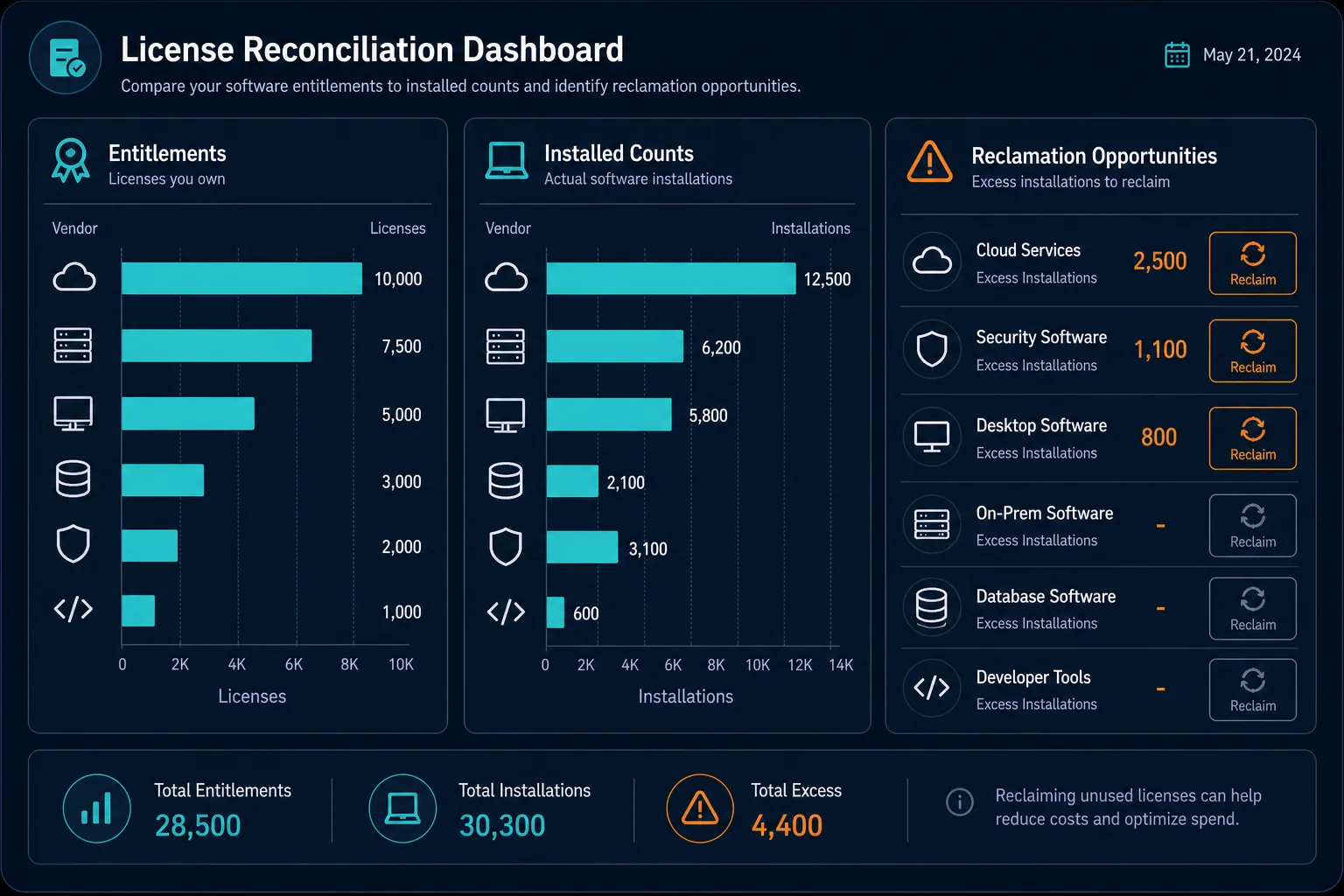
The best-practice approach is to reconcile actual software usage against entitlements continuously, not just when an audit notice arrives. This requires accurate discovery of what is installed and running on every endpoint, mapped against your license agreements. Where usage exceeds entitlements, you can purchase additional licenses proactively. Where software is installed but unused, you can reclaim licenses and reduce costs before the renewal date.
Automating this reconciliation as part of your software asset management program turns license compliance from an annual scramble into a continuous operational process.
See how Virima flags reclaimable licenses before your next renewal. Explore Virima’s ITAM features to see how discovery-based reconciliation compares entitlements to actual usage automatically.
5. Map asset dependencies before making changes
Knowing you have an asset is necessary. Knowing what that asset connects to, and what breaks if it changes, is where most EAM programs fall short.
Before a change is approved, IT teams need to understand the downstream impact. If a server gets patched, which applications could be affected? If a network device gets replaced, which services depend on it? Without this context, change advisory board approvals rely on guesswork.
The cost of guessing is rising. EMA’s 2025 ServiceOps research found that 32% of IT leaders are experiencing longer and more expensive outages, with change velocity and configuration drift among the leading causes. Without accurate dependency maps at change time, teams cannot assess which systems a change could affect, and the result shows up in incident queues after the fact.
Service dependency mapping addresses this directly. Virima’s ViVID™ service maps visualize relationships between assets, applications, and services. Teams can see the potential blast radius of a change before it is made, helping change advisory board members make faster and better-informed decisions.
6. Structure asset data for continuous compliance visibility
IT audits, whether for SOX, HIPAA, PCI-DSS, or ISO 27001, require accurate, current asset data. Auditors ask what systems process regulated data, who owns them, whether they are patched, and how access is controlled.
The Flexera 2025 State of ITAM Report found that 45% of organizations spent over $1 million on software audits over the past three years. For most, the root cause is the same: compliance attributes scattered across disconnected systems, requiring manual assembly before auditors arrive. When asset data is accurate and relationship-mapped from the start, pulling an audit report takes hours instead of weeks.
The core practice is to structure your CMDB so that compliance-relevant attributes, including data classification, regulatory scope, patch status, ownership, and support contract status, are part of every asset record. Virima’s CMDB stores these attributes directly on the CI record rather than in a separate compliance tracker, so a regulatory scope or ownership field updates the moment the underlying asset record does. This makes compliance visibility continuous rather than a pre-audit scramble, and it means that when a new compliance requirement is introduced, you can assess your exposure against live asset data rather than attempting a manual inventory. For an example of this working in a regulated environment, see Virima blog – PCI DSS compliance and CMDB-based asset scope management.
7. Connect asset management to your ITSM workflows
Enterprise asset management generates its most direct operational value when it connects to the tools teams use every day: their ITSM platform.
When your EAM system and ITSM platform share live asset data, incident responders do not need to switch between tools to check asset status. The affected CI, its dependencies, recent changes, and open vulnerabilities appear directly in the incident ticket. This context cuts triage time and reduces the risk of resolving symptoms without addressing the actual asset causing the problem. That integration pays off in resolution speed: organizations that connect CMDB data directly into ITSM incident workflows report an average 35% reduction in MTTR for critical incidents, according to itsm.tools.
Virima integrates directly with ServiceNow, Jira Service Management, Ivanti, HaloITSM, Xurrent, and Hornbill to push discovery-sourced, explainable, and governed asset data into the ITSM tools your teams use. Change management benefits as well: when a change request references a CI, the ITSM platform can surface the current asset state and dependency map from Virima, so change reviewers work from live data, not the last snapshot someone manually entered.
The operational outcome is that EAM stops being a separate discipline and becomes part of how incidents get resolved and changes get approved.
Score your own EAM program against these seven practices
Use this checklist to see where your program stands today:
- Inventory source: Is your asset list built from discovery scans, or from spreadsheets and self-reported data?
- CMDB update cycle: Does your CMDB update automatically when the environment changes, or does someone have to remember to edit it?
- Lifecycle coverage: Do you track assets through decommission and license reclamation, or does tracking stop at procurement?
- License reconciliation cadence: Do you compare entitlements against actual usage continuously, or only when an audit notice arrives?
- Dependency visibility: Can you see what a change will affect before you approve it, or only after an incident?
- Compliance attributes: Are regulatory scope, ownership, and patch status part of every CI record, or assembled manually before audits?
- ITSM connection: Does your incident and change tooling see live asset data, or a snapshot from the last manual sync?
A “spreadsheet or manual” answer to three or more of these is a reliable signal that your EAM program is exposed at the next incident, audit, or major change — not a reason to rebuild everything at once, but a prioritized list of where automated discovery will pay off first.