Hybrid IT Inventory for Lean IT Teams Starts With a Question Hostnames Can’t Answer

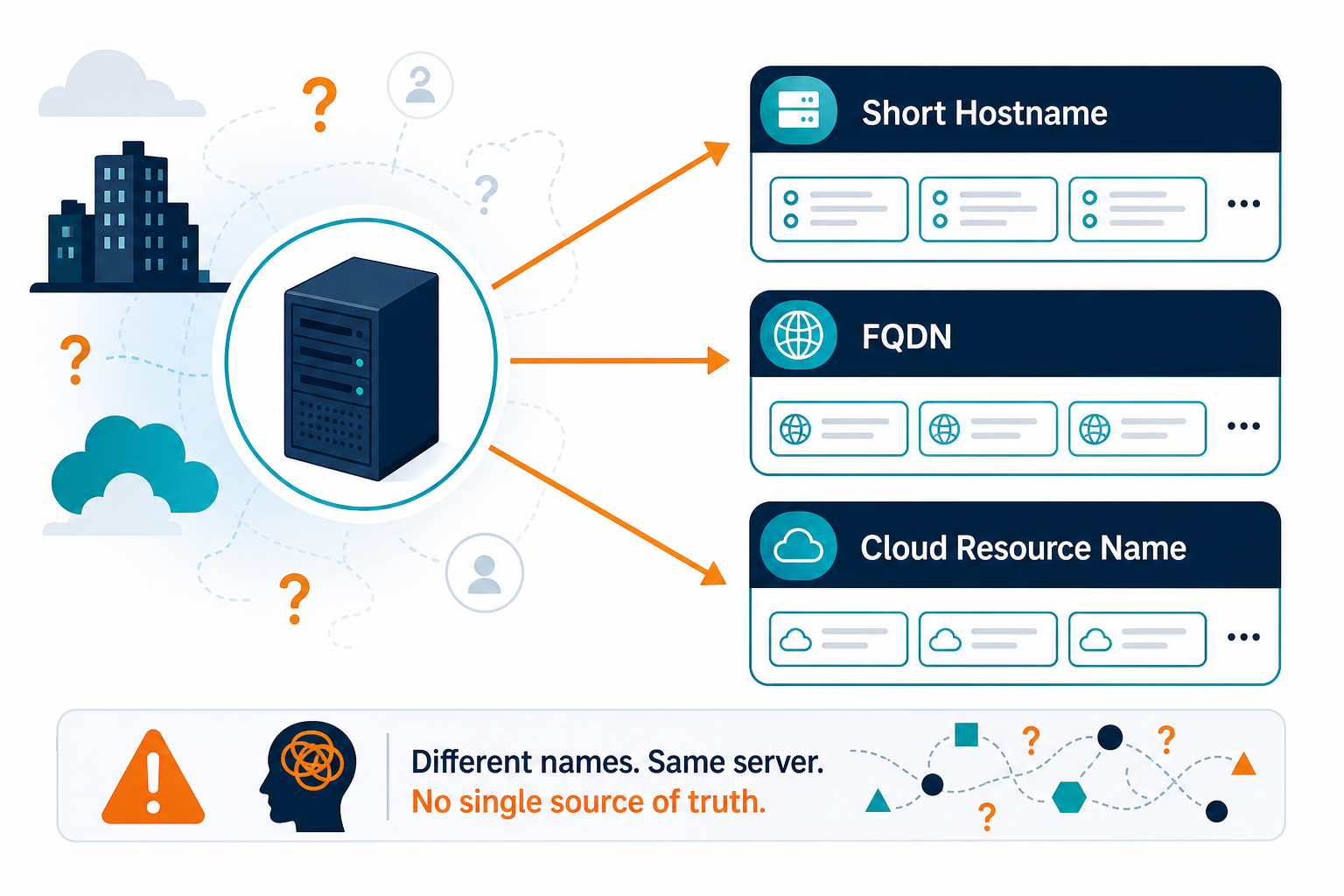
One file server shows up three times in the same week. The monitoring tool lists the short domain name, the backup report lists the full DNS name, and a cloud report lists a generated name from a migration test. A ticket raised against the short name gets worked at the other site under the same name, while the actual server waits for attention. The question behind the mess is direct: is this the same device already recorded in inventory? A hostname cannot answer that question because names get reused, renamed, and repeated across sites. This guide covers hybrid IT inventory for lean IT teams through identity: which keys survive change, where joins break, and which policy holds multi-site records together. Teams still building a first computer list can start with computer inventory for growing teams, then return here once hostnames collide across sites.
Why one device shows up under three names
Every source labels a device with whatever information it holds at scan time. DNS or an installed agent reports a hostname or a fully qualified domain name. The hypervisor reports a virtual machine name set by an administrator. The cloud API reports a resource name or an auto-generated name assigned at launch.
The endpoint manager and asset register add their own labels too , whatever the last technician typed, or whatever was applied at receiving. Most of those values are chosen or changed by people, so they drift across tools and across months.
Hybrid estates multiply that drift because each inherited environment brings its own naming habits. 73% of organizations run hybrid estates, up three points year over year, mostly through mergers, siloed teams, or inherited setups rather than clean design. A lean team feels this as coverage pressure: a few people, several sites, several discovery paths; one site shortens names, another keeps full domains, a third lets cloud defaults through untouched.
Cloud defaults deserve attention because they collide by design. An AWS IP-based hostname embeds the private IPv4 address of the instance, so two instances with the same private address in different networks receive the same style of name. Overlapping private ranges are common enough that AWS blocks peering for VPCs with matching or overlapping CIDR blocks, so a name-based match can treat two different machines as one. Network gear spreadsheets hit the same wall when sites share switch names; that path is covered in network inventory for lean teams.
Why does one device appear under three names in hybrid inventory?
Each source labels the device with a hostname, resource name, or asset label it already knows. People choose or change most of those values, so names drift across tools, sites, and months until nothing links the three records to one machine.
Which keys survive a rename, a move, and a rebuild
Match each device on the strongest intrinsic key its class offers, and treat every other value as supporting evidence. These device identity keys, not hostnames, are what the rest of this guide builds on. Hostname stays a label for people. Hardware serial, hypervisor UUID, and cloud instance ID carry the join.
| Key | Where it comes from | Survives | Breaks or misleads when |
|---|---|---|---|
| Hardware serial number | Firmware, read through the operating system | Rename, re-image, site move | Some systems report a placeholder value, and virtual machines carry no meaningful hardware serial |
| Hypervisor UUID for virtual machines | Hypervisor and BIOS UUID | Moves between hosts | A rebuilt or copied virtual machine may represent a new identity under the hypervisor |
| Cloud instance ID or provider equivalent | The provider metadata for that instance | Reboot, stop and start, rename | A relaunched instance or a restore-as-new copy receives a new ID by design |
| Asset tag | A label applied during receiving or deployment | Lasts while the label stays attached | Covers only equipment that received a tag |
| MAC address | Network adapter hardware | Remains stable on fixed adapters | Multi-adapter servers report several, and some environments share or reassign them |
| Hostname and IP address | DNS, DHCP, and local naming habits | Seldom survives change reliably | Renames, reuse across sites, and overlapping private ranges |
What independent vendors and CMDB platforms confirm
Microsoft documents a useful cloud example. An Azure virtual machine carries a 128-bit unique ID in SMBIOS that stays stable across reboots and deallocation. That ID changes only when a snapshot creates a new virtual machine; it identifies the instance, not whatever workload later runs on a restored copy.
Independent vendor documentation confirms that weaker keys collide in production. Axonius’ field-normalization documentation flags shared hostnames as overlaps, treats a MAC address seen on several devices as non-unique, and flags serial numbers mapped to multiple identifiers, the same pattern lean teams hit in CMDB identification work.
The largest CMDB platform follows the same ranking. ServiceNow’s Identification and Reconciliation Engine (IRE) checks serial number first in ranked entries, and creates a new configuration item only when nothing matches. Store cloud IDs with provider, account, and region so the same numeric pattern in two accounts stays distinct. When you compare discovery products later, use the IT discovery tools checklist against these same key rules.
Which keys survive a rename, a move, and a rebuild?
Hardware serial numbers, hypervisor UUIDs for virtual machines, and cloud instance IDs survive ordinary renames and moves. Hostname, IP, and often MAC stay supporting evidence because they get reused, reassigned, or repeated across sites.
Where joins break: split records and false merges
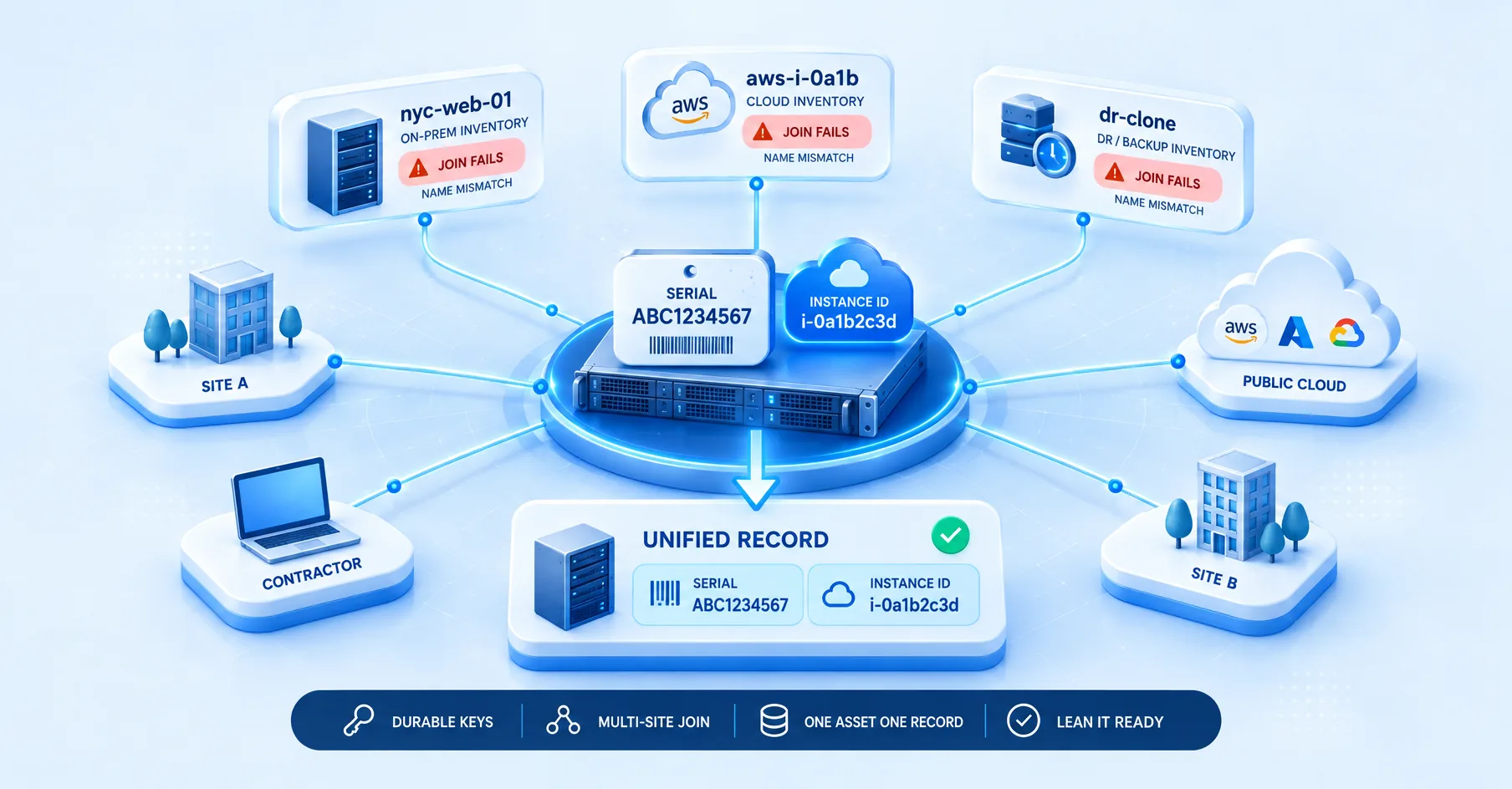
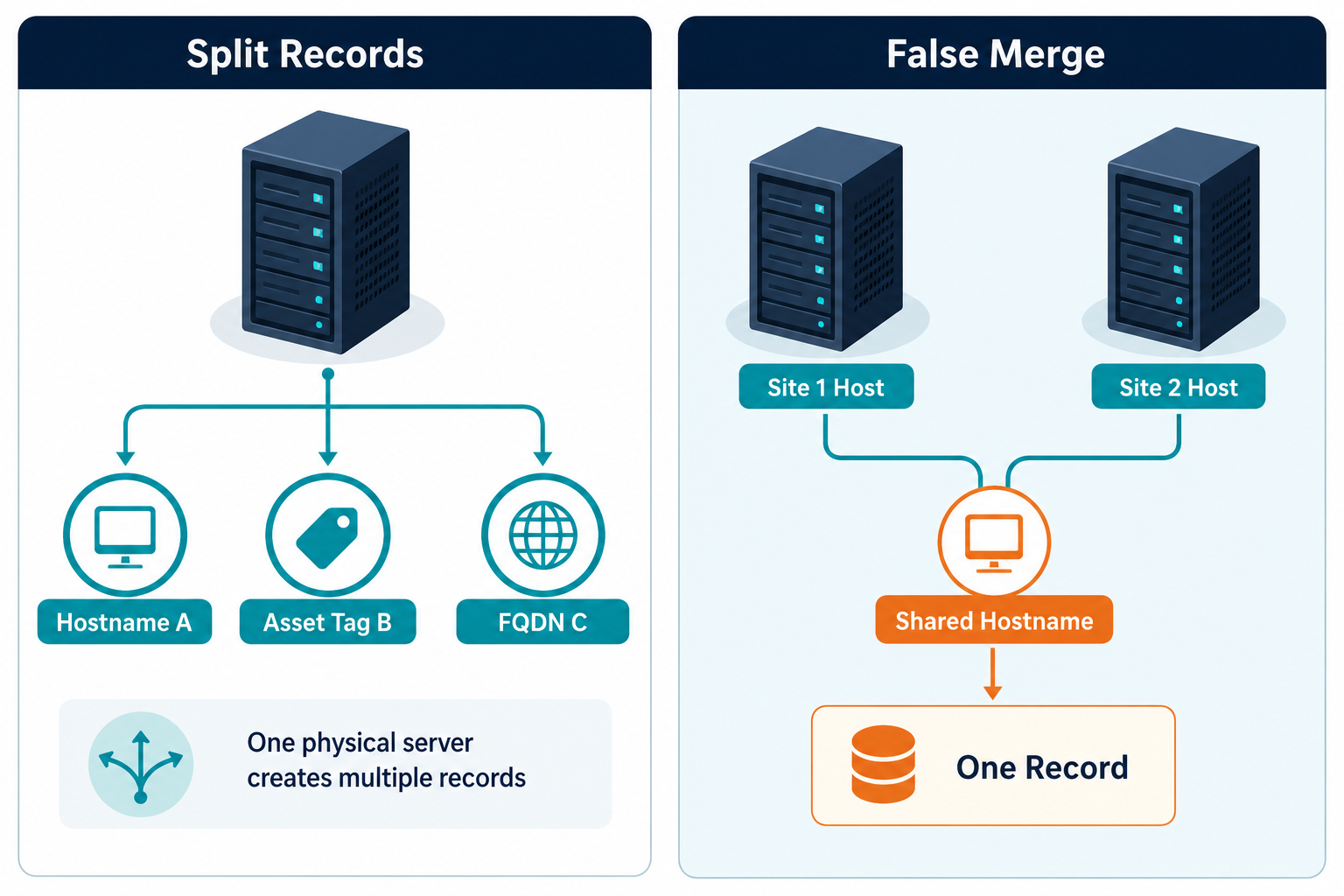
Joins fail in two directions, and each direction creates different cleanup work. A split turns one device into several records, which inflates counts and license totals and scatters ticket history across fragments. A merge turns two devices into one record. This happens when a name or address collision overwrites one machine with another, and the lost device disappears quietly. Merges carry higher risk for a small team because the error stays silent while decisions proceed from the surviving record.
Four joins cause most of the hybrid inventory duplicates a lean team deals with:
- Discovery to register breaks when the register keys on asset tag while scans return hostnames, so every discovered device looks new, and duplicates pile up.
- CMDB to tickets breaks when a ticket stores a name string, so a rename orphans its history and a reused name attaches new work to the wrong device.
- Cloud to on-premises breaks when no shared key links the cloud instance with the physical host that replaced it, so retirement looks like two unrelated records.
- Site-to-site breaks when the same hostname at two locations merges into one configuration item, so one site loses visibility, the kind of false merge authority rules catch by scoring which source wins.
The default that limits damage is direct: merge only on an intrinsic key, and send name-only matches to review. Endpoint tools that answer agent health still need this layer underneath; see RMM vs CMDB discovery for that boundary without replaying the full comparison table here.
Identity rules, duplicate review, and source attribution belong in small shops too
Many teams assume dependable identity resolution needs an enterprise CMDB with an identification engine, a data architect, and a services engagement. ServiceNow’s rules are the reference design; the mechanics below show the same discipline running inside a platform sized for lean teams, keeping multi-site IT inventory records current across sites and clouds.
How Virima runs this inside one instance
Virima discovery inventory keeps one record per host, with correlation factors configured under Admin and Correlation. For VMware virtual machines, the BIOS UUID works as the primary identifier rather than hostname or IP. De-duplication compares across multiple identifiers, including MAC, serial, and BIOS UUID, and Duplicates Remediation lets the team choose comparison properties, view duplicate groups with counts and asset IDs, then merge or retain and delete. Authority rules settle conflicts between sources, reconciliation history stays available for audit, and each configuration item carries a source tag with a last-verified timestamp.
Multi-site collection follows the same single-instance logic. Each Discovery App runs on a Windows server the team owns and sends scan data to the same Virima instance, so identity resolution happens once centrally instead of once per site. These CMDB capabilities work the same on Business Pro and Enterprise, while licensing, asset limits, discovery app installations, and support level differ between the plans. Identity resolution stays bounded by input quality: a placeholder serial, a blank field, or a missing credential weakens the match, and review remains part of the process. That governed, explainable record of what exists and how it joins is the same foundation described under Trusted Runtime Truth.
Business Pro brings enterprise identity discipline to lean teams
Lean multi-site teams need that full identity stack without waiting on a multi-year CMDB program. Business Pro includes the same correlation, Duplicates Remediation, authority rules, and Discovery Apps described above, sized for lean operating models while keeping enterprise-grade join discipline across hybrid paths.
Explore Business Pro for multi-site identity resolution, duplicate review, and source-attributed CMDB records in one place.
A five-rule identity policy a small team can keep
1. Write a key hierarchy per device class. Physical servers match on hardware serial first, then asset tag. Virtual machines match on hypervisor UUID. Cloud instances match on provider instance ID plus account and region. Network gear matches on serial or chassis ID. Hostname, IP, and MAC stay supporting in every class.
2. Normalize before matching. Standardize case, trim whitespace, strip domain suffixes consistently, and maintain a deny-list of placeholder serials such as blanks and manufacturer fill-in values. Normalization keeps the same device from splitting over formatting differences.
3. Scope names and treat them as labels. A site code in the hostname helps technicians route work faster. The code never promotes the name into a key. Record site, account, or subscription beside every name so equal strings from different scopes stay separate.
4. Merge on intrinsic keys only. Name-only matches go to a review queue with an owner and a weekly slot. Run Duplicates Remediation on the key properties to surface existing groups, then merge with history carried forward or retain and delete with a recorded reason.
5. Write lifecycle rules before the next rebuild. Decide in advance whether a rebuilt virtual machine, a relaunched instance, or a repaired device keeps its record or receives a new one. Record which history carries forward, including tickets, warranties, and ownership, so technicians act the same way under pressure.
Verifying the policy holds up
Check the policy with a comparison the team can repeat. CIS Control 1 inventory comparison looks both directions: assets in the approved inventory that discovery missed, and assets discovery found that the inventory never recorded. Run it per site and per cloud account after every discovery cycle, and track three measures: duplicate groups found, discovered-but-unmatched assets, and tickets linked to a name instead of a key.
How should a lean IT team set identity rules across sites?
Write a key hierarchy per device class, normalize values before matching, treat hostnames as labels, merge only on intrinsic keys, and write lifecycle rules for rebuilds and relaunches before the next change window.
Bring identity under control before the next cycle adds more records
Hybrid IT inventory for lean IT teams fails at identity first, and the fix stays within reach for a small team. A short written policy plus keys that survive renames and moves keeps splits visible and merges rare across sites and clouds. When you want that policy backed by discovery-sourced records your team can explain, schedule a demo and walk a multi-site join scenario with the product team.
Frequently asked questions
Why does the same device appear more than once in my inventory?
Each source describes the device with a different name or address, and nothing links those values to one identity. Matching on serial, hypervisor UUID, or cloud instance ID connects the fragments across sites.
Is hostname a reliable key for matching devices across sites?
Hostname works poorly as a key because names change, get reassigned, and show up at more than one site. Keep hostnames as labels for people, and match records on serial or cloud instance ID instead.
What should I use to identify a cloud virtual machine?
Use the provider instance ID, such as the Azure virtual machine unique ID, stored with the account, subscription, and region. The combination stays stable across reboots and renames.
Does Virima match virtual machines across hosts automatically?
Virima’s correlation settings use hypervisor BIOS UUID as the primary identifier for VMware virtual machines rather than hostname or IP, so a VM keeps its identity when it moves between hosts.
What does Virima do with duplicate records once they’re found?
Duplicate Remediation lets a team compare records on chosen properties, review each duplicate group with asset IDs and counts, then merge with history carried forward or retain-and-delete with a recorded reason.