IT Discovery Tools for Small and Mid-Size IT Teams: What to Check Before You Pick One

A database latency ticket arrives at nine in the morning, and a lean operations team of four people starts the troubleshooting clock. Before anyone can identify what application relies on that database host, the team has to check three separate places. They log into an RMM portal for workstation status, inspect a shared spreadsheet for server addresses, and search a departed engineer’s Slack history to verify network credentials.
That scenario happens every week in small and mid-size IT environments. Lean estates frequently run the same hybrid mix of on-premises servers, cloud instances, network switches, and SaaS applications as Fortune 500 enterprises. The difference lies entirely in team capacity. Small IT teams cannot dedicate a full-time administrator to write custom discovery scripts, maintain complex probe credentials, or manually reconcile conflicting spreadsheets.
Selecting the right IT discovery tools for small and mid-size IT teams requires evaluating how much operational overhead a small team can absorb. This guide outlines six practical criteria to check before comparing vendors, followed by an evaluation of seven popular discovery tools built for small and mid-size IT teams.
What to Check Before You Compare Tools
When small IT teams evaluate discovery platforms, feature lists can easily obscure operational reality. A tool that boasts thousands of protocol probes may turn out to require dedicated maintenance staff, while a lightweight scanner might leave critical database layers unmapped.
Before testing individual platforms, establish a baseline checklist tailored to lean team operations:
- Breadth of coverage across asset classes: Ensure the tool reaches servers, network infrastructure, databases, and cloud resources rather than limiting scans to local desktop endpoints.
- Flexible collection methods: Look for a balanced mix of agent-based, agentless, and API discovery that functions across hybrid networks without demanding complex firewall reconfigurations.
- Setup and maintenance effort: Evaluate how quickly the platform delivers initial asset visibility without requiring months of professional services or custom script development.
- CMDB integration and data structure: Confirm whether scan results populate a structured configuration management database or simply export static flat files that age immediately.
- Dependency and service mapping availability: Check whether application relationship mapping is included natively or gated behind expensive top-tier enterprise licensing.
- License and compliance tracking: Determine if the discovery engine captures installed software details necessary for internal audits and software asset management.
According to Flexera’s 2026 State of ITAM Report, complete IT visibility fell to 36% in 2026, down from 43% the previous year. For growing organizations, this visibility gap creates immediate operational risk during security incidents, platform migrations, and compliance audits.
Small IT teams need automated discovery that captures complete infrastructure detail while remaining simple enough for a small staff to deploy and operate.
Why do small and mid-size IT teams need specialized IT discovery tools?
Small IT teams manage complex hybrid infrastructure with limited staff. Specialized discovery tools automate asset inventory, eliminate manual spreadsheet tracking, and map service dependencies across on-premises and cloud resources without requiring dedicated administrative overhead.
7 IT Discovery Tools Worth Evaluating for Small and Mid-Size IT Teams
The following seven platforms represent the most common discovery options evaluated by small and mid-size IT organizations. Each platform approaches infrastructure inventory through a different operational lens, ranging from free standalone network scanners to unified IT discovery and CMDB solutions.
1. Virima
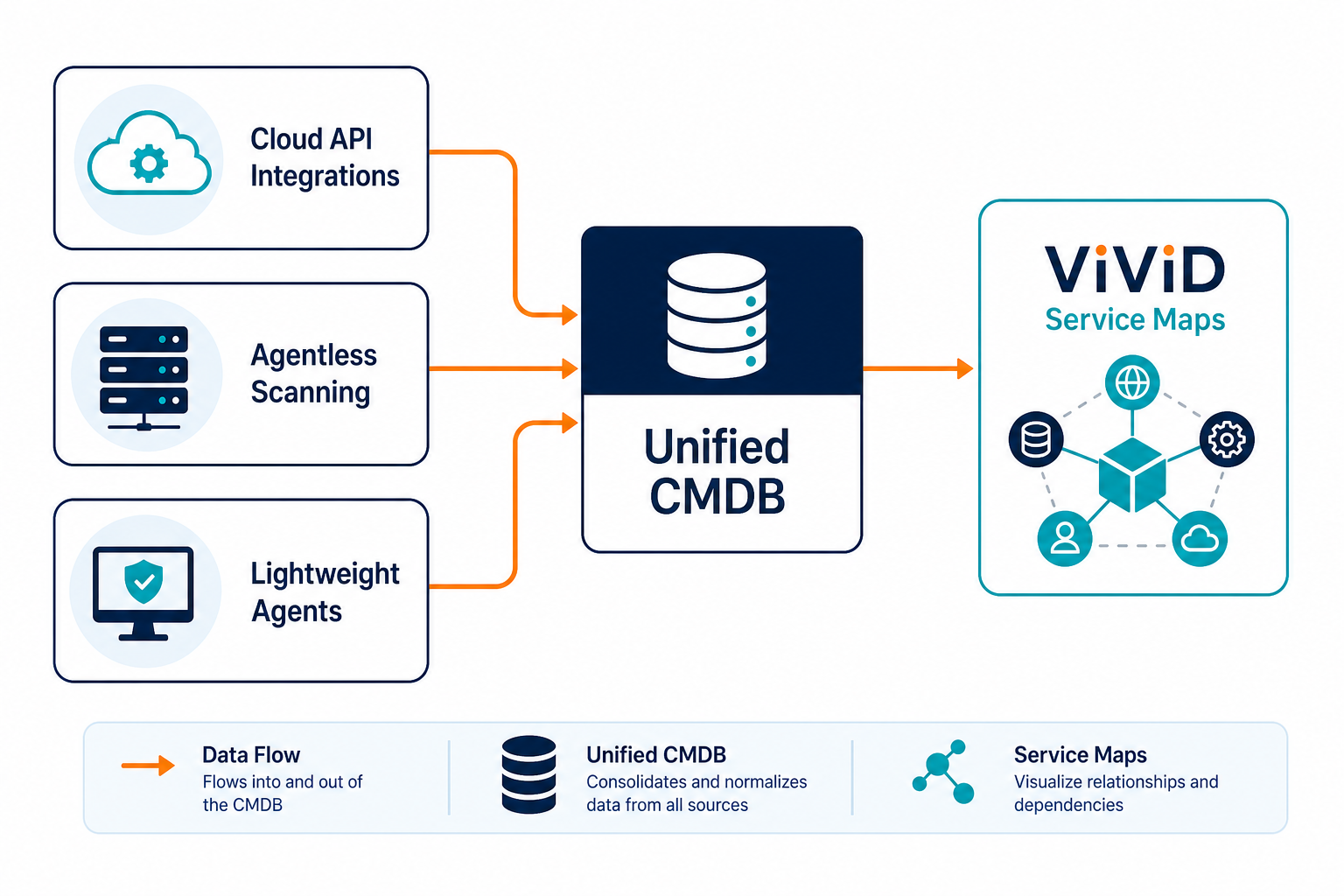
Virima provides automated IT discovery combined natively with an enterprise-grade CMDB and ViVID™ service maps in a single platform. Built to support growing IT environments without administrative complexity, Virima uses agentless scanning, lightweight agents, and cloud API integrations to maintain a complete inventory across on-premises, cloud, and virtualized assets.
Collaborating with Virima allows small and mid-size IT teams to use full-scale discovery, database configuration management, and dynamic service maps without needing dedicated administrative staff. Instead of requiring separate point tools for IP scanning, server inventory, and application mapping, Virima captures infrastructure attributes and visualizes service dependencies automatically within the CMDB.
- Best for: Small and mid-size IT teams outgrowing basic point tools that require unified discovery, CMDB, and ViVID™ service maps without adding administrative overhead.
- Key criteria fit: Delivers broad multi-protocol discovery, native CMDB architecture, and dynamic ViVID™ service maps without requiring dedicated implementation engineers.
How does Virima help small and mid-size IT teams manage IT discovery?
Virima unites multi-protocol discovery, CMDB asset management, and ViVID™ service maps in a single platform, giving small and mid-size IT teams complete infrastructure visibility and service dependency mapping without requiring dedicated administrative staff.
2. Spiceworks
Spiceworks offers a free, ad-supported network inventory tool that scans local IP ranges to discover connected Windows, Mac, and network devices. It combines basic asset discovery with a built-in helpdesk ticketer, making it a common starting point for single-person IT departments and very small businesses.
While Spiceworks provides immediate value for basic hardware tracking, its scanning depth is limited. It lacks advanced server configuration discovery, automated software license reconciliation, and service dependency mapping. As IT environments expand into hybrid cloud workloads and complex database tiers, teams often seek a more capable Spiceworks alternative to handle structured configuration management.
- Best for: Single-person IT shops and micro-businesses needing basic desktop and printer tracking at zero license cost.
- Key criteria fit: Quick setup and zero license cost, but lacks dependency mapping, cloud API discovery, and structured CMDB depth.
3. Snipe-IT
Snipe-IT is an open-source asset management platform focused primarily on physical hardware tracking, lifecycle state management, and user check-in or check-out workflows. It provides strong administrative controls for assigning laptops, accessories, and office hardware to specific employees.
Because Snipe-IT functions primarily as an asset register rather than an automated network probe, it relies heavily on manual data entry, CSV imports, or external agent integrations to populate device details. Organizations looking for automated network sweeping and live dependency mapping often pair Snipe-IT with dedicated network discovery engines or evaluate broader asset tracking software for small business.
- Best for: IT teams prioritizing physical hardware custody, asset assignment, and employee check-in or check-out workflows.
- Key criteria fit: Excellent physical asset lifecycle tracking, but offers minimal native automated discovery and no application service mapping.
4. PDQ Connect
PDQ Connect is a cloud-based agent solution designed for inventory management and patch deployment across distributed Windows endpoints. It allows system administrators to query software installations, hardware specifications, and OS build versions across remote laptops and desktop systems.
PDQ Connect excels at agent-based Windows device management for remote workforces. However, its coverage is narrower for non-Windows environments, SNMP network devices, Linux database servers, and multi-cloud infrastructure. Small IT teams with diverse hybrid estates may find its scope limited to endpoint administration.
- Best for: Distributed, Windows-heavy teams focused specifically on endpoint inventory and remote software patching.
- Key criteria fit: Fast agent deployment for remote Windows devices, but lacks native SNMP network scanning, cloud infrastructure discovery, and CMDB service mapping.
5. Atera
Atera is an all-in-one Remote Monitoring and Management (RMM) platform built for IT service providers and internal IT departments. It combines automated network scanning, ticketing, remote access, and patch management into a per-technician subscription model.
Atera provides solid operational discovery for daily helpdesk troubleshooting and device health monitoring. However, its inventory engine focuses primarily on endpoint health metrics rather than structural CMDB relationship modeling. Teams needing deep application dependency visualization often explore an Atera alternative to support complex change management and compliance audits.
- Best for: Managed service providers and lean IT teams seeking consolidated ticketing, remote monitoring, and helpdesk operations.
- Key criteria fit: Low administrative friction for daily endpoint support, but limited in advanced database discovery and service relationship mapping.
6. Freshservice
Freshservice is a cloud-native IT service management (ITSM) platform that includes built-in discovery probes and agents to track IT hardware and software assets. It connects asset records directly to helpdesk tickets, change requests, and service catalog items within the Freshservice ecosystem.
Freshservice provides a smooth user experience for organizations standardizing on its service desk. For basic asset management, the built-in discovery probes handle desktop and office hardware well. However, organizations with complex hybrid cloud setups or deep database tiers may find its native relationship mapping lighter than dedicated CMDB discovery platforms.
- Best for: IT departments standardizing on Freshservice for service desk workflows that want native asset context attached to tickets.
- Key criteria fit: Seamless ticket-to-asset context within Freshservice, but dependency mapping and advanced infrastructure probing require higher subscription tiers.
7. Lansweeper
Lansweeper is an agentless-heavy discovery platform capable of scanning deep hardware, software, and user attributes across IT, OT, and IoT environments. Its deep credentialed scanning engine discovers extensive detail on network switches, printers, hypervisors, and connected endpoints.
Lansweeper provides exceptional raw discovery depth across diverse physical networks. However, its primary focus is asset discovery and inventory reporting rather than native CMDB relationship management or ITSM workflow orchestration. Teams evaluating Lansweeper often compare its discovery focus against platforms that combine discovery, CMDB, and service mapping natively, as documented in this Lansweeper comparison.
- Best for: Network administrators seeking deep, agentless hardware and software attribute audits across physical and virtual networks.
- Key criteria fit: Exceptional agentless discovery breadth, but requires external integrations for structured CMDB management and service mapping workflows.
What is the difference between agent-based and agentless IT discovery?
Agentless discovery uses standard network protocols like SNMP, WMI, SSH, and cloud APIs to scan devices without installing software. Agent-based discovery installs a lightweight local service on endpoints to collect hardware, software, and configuration details, providing visibility for off-network or heavily firewalled devices.
Matching the List to Your Own Checklist
Selecting the right IT discovery platform requires matching vendor capabilities directly against your team’s operational constraints. Rather than choosing a platform based on raw feature count, evaluate how each tool aligns with your specific infrastructure mix and administrative bandwidth.
If your team primarily manages remote Windows laptops and needs automated patching, an endpoint-focused agent tool like PDQ Connect provides a straightforward path. If your focus centers on assigning physical monitors, laptops, and peripheral hardware to office employees, an open-source asset register like Snipe-IT delivers dedicated lifecycle controls.
However, if your IT estate spans physical servers, network switches, database clusters, and cloud instances, point solutions can create fragmented data silos. When small teams must maintain operational clarity across complex hybrid environments, a unified platform that combines automated discovery, a structured CMDB, and dynamic service mapping eliminates the burden of stitching separate tools together.
Virima packages these advanced discovery, CMDB, and ViVID™ service maps capabilities into a lean operating model designed specifically for growing IT estates. Review plan tiers and options on the pricing plans page to see how packaging aligns with your environment without enterprise complexity.
See how Virima maps your discovery data into a working CMDB in under 48 hours
If you are evaluating discovery tools for a growing IT estate and want full CMDB and service mapping without enterprise complexity, explore how Business Pro fits your environment.
Frequently Asked Questions
What is an IT discovery tool?
An IT discovery tool automatically scans networks and cloud environments to identify connected hardware, installed software, operating systems, and network configurations. It eliminates manual asset tracking and maintains accurate inventory records for IT management.
Can a free tool like Spiceworks cover discovery for a small IT team?
Free discovery tools cover basic IP scanning and office endpoint inventory effectively. However, growing IT teams often outgrow free tools when they require cloud discovery, automated software license tracking, or service dependency mapping.
Does Virima’s discovery tool work for a small or mid-size IT team?
Yes, Virima is designed to support growing IT environments without administrative complexity. It provides agentless scanning, lightweight agents, and cloud API integrations to maintain a complete inventory and dynamic service maps without requiring dedicated implementation staff.
Do small IT teams need dependency or service mapping?
Yes, service mapping helps small IT teams understand how servers, databases, and applications connect. Visualizing dependencies allows lean teams to perform change risk assessments, troubleshoot outages faster, and prevent unexpected downtime during maintenance windows.
How do I choose between a specialist discovery tool and a unified CMDB platform?
Choose a specialist discovery tool if you only need standalone network scanning or physical asset tracking. Select a unified CMDB platform if you need discovery data connected directly to service maps, change management, and ITSM workflows.