Application Portfolio Management Practices That Survive Audit and Change

Application portfolio management (APM) is the practice of inventorying, assessing, and optimizing every software application an organization runs. It scores each application for business value, technical health, cost, and risk to decide what to keep, modernize, consolidate, or retire. For most IT teams, the challenge is not knowing that APM matters. The challenge is that their application inventory is never complete. Shadow IT, SaaS sprawl, and constantly shifting cloud workloads mean the portfolio they think they have rarely matches the portfolio they actually have. These application portfolio management best practices give IT teams a reliable starting framework for 2026.
1. Build your IT application inventory from discovery, not self-reporting
Every APM program starts with an inventory. The problem is that most inventories start wrong. Teams send out a spreadsheet, ask department heads to list the tools they use, and assume the responses are complete. They rarely are.
The Zylo 2026 SaaS Management Index found that organizations now carry an average portfolio of 305 applications, with average annual SaaS spend of $55.7 million. A significant portion of that spend sits outside IT’s direct oversight. Business units purchase tools independently, employees expense subscriptions, and AI-native applications get adopted through product-led growth before anyone in IT knows they exist.
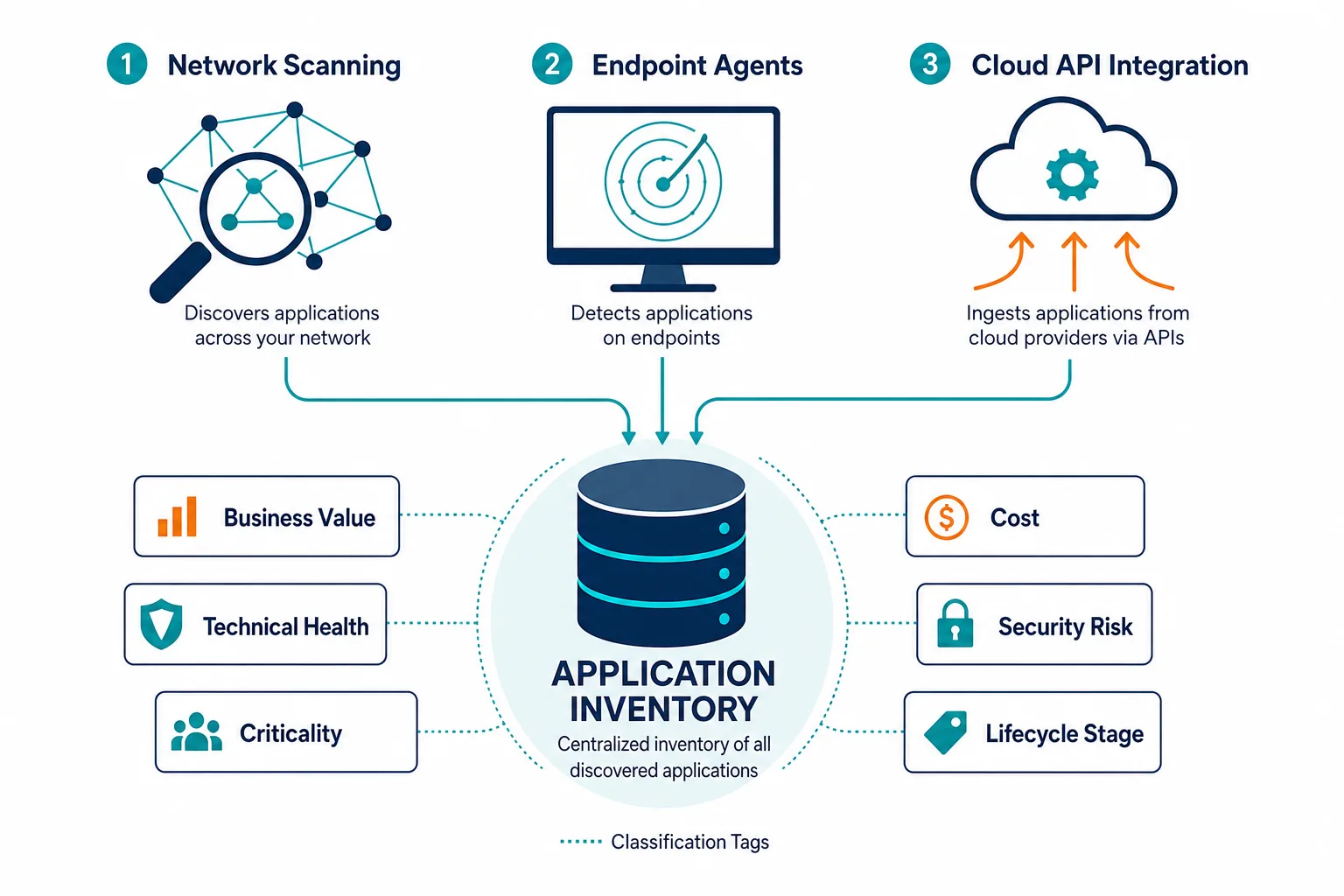
Self-reported inventories miss this activity by design. Automated discovery, by contrast, surfaces applications that are actually installed, actively running, and generating network traffic. Agentless scanning on your network, agent-based discovery on endpoints, and API-based discovery across cloud environments together give you a starting inventory that reflects reality.
A complete, discovery-sourced application inventory is the prerequisite for every other APM practice. You cannot rationalize, classify, or govern applications you do not know exist.
2. Classify every application by business value and technical health
An inventory without classification is only a list. To make APM decisions, each application needs two scores: one for the business value it delivers and one for its technical health.
Business value assessment typically looks at:
- How many users actively use the application
- Which business processes depend on it
- Whether it supports revenue-generating functions
- What would break if it were removed today
Technical health assessment typically looks at:
- Vendor support status
- Integration complexity
- Maintenance cost
- Security posture
- Whether the application is still receiving updates
That technical health axis carries real weight. CAST Software’s 2025 global code analysis reviewed 10 billion lines of code across 47,000 applications and found that 45% of enterprise code is fragile and 32% is bloated, the kind of unmanaged technical debt a technical health score is built to catch before it causes an outage or stalls a migration.
The combination of these two scores sorts your portfolio into four categories: applications to keep and invest in, applications to migrate or modernize, applications to consolidate into a better alternative, and applications to retire. Call this the Keep/Modernize/Consolidate/Retire framework — a repeatable model you can run against any application without re-litigating the criteria each time. Without this classification, every rationalization conversation becomes a debate rather than a data-driven decision.
3. Build application dependency mapping before you rationalize anything
This is the step most APM programs skip, and it is the one that causes the most damage.
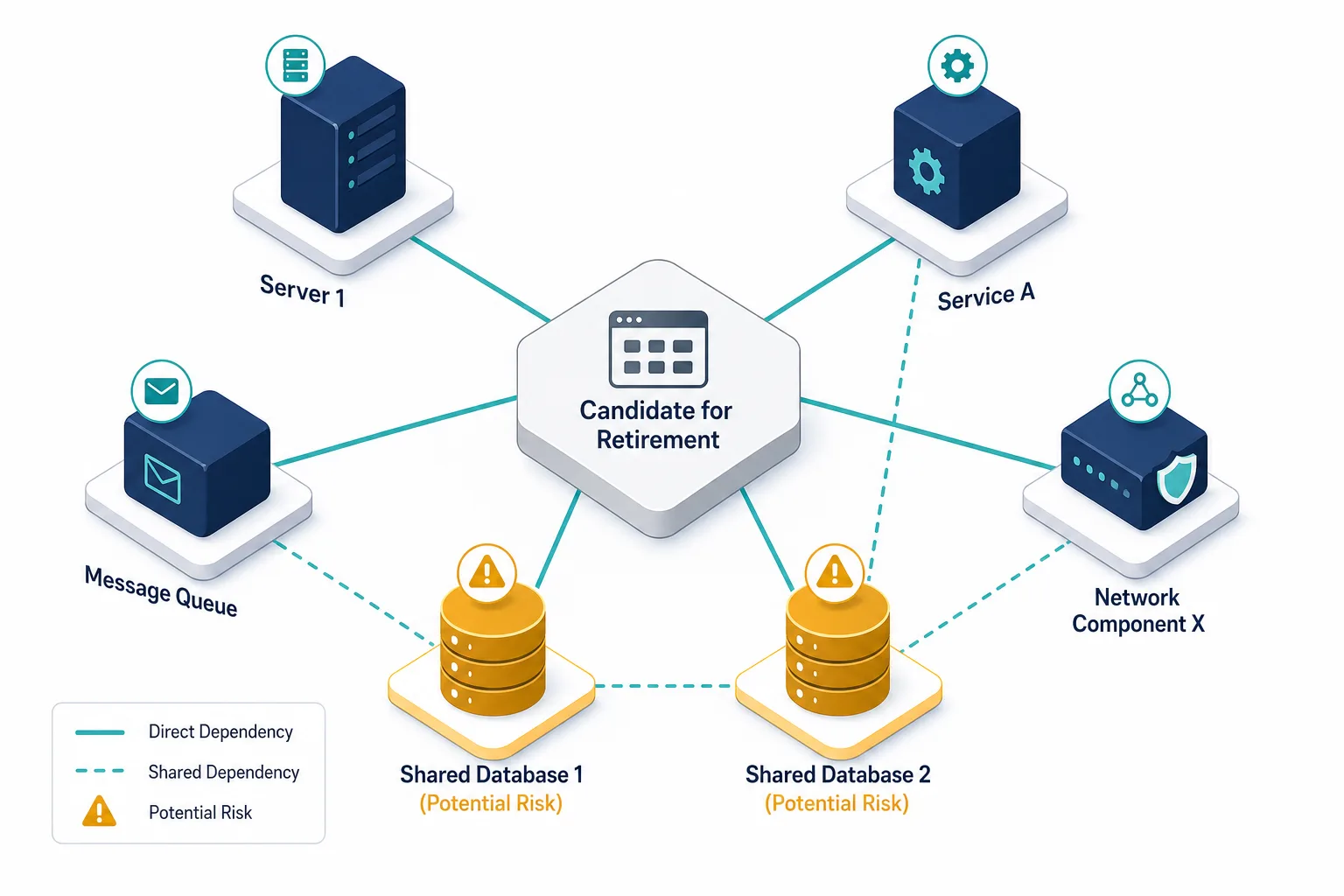
Retiring an application looks straightforward on paper. Usage is low, the vendor is charging more, a replacement exists. But if that application shares a database tier with two other production systems, or if a middleware layer used by four other tools routes through it, the risk is real. Retiring it without understanding those dependencies causes downstream failures that nobody anticipated.
EMA’s 2025 ServiceOps research found that 32% of IT leaders are experiencing longer and more expensive outages, with change velocity and configuration drift among the top causes. Rationalization decisions made without dependency data fall into this same category: they look like planned changes, but they produce unplanned outages.
Virima’s ViVID™ service maps visualize the relationships between applications, infrastructure components, and services in a live, discovery-sourced view. Before any rationalization decision is finalized, teams can see exactly which systems share dependencies with the application under review, which services would be affected by its removal, and where the blast radius extends.
Retiring an application without dependency mapping risks unplanned outages: EMA’s 2025 research found 32% of IT leaders already report longer, costlier outages tied to change velocity and configuration drift — the same failure mode that hits unmapped application retirements.
4. Track actual usage data, not only license counts
License counts tell you what you paid for. Usage data tells you what people actually use. The gap between the two is where most application waste lives.
According to BetterCloud’s 2026 SaaS statistics report, 63% of IT teams say too many unused or underutilized applications and license budget pressure are the primary drivers of SaaS consolidation. The consolidation pressure is real, but acting on it without usage data leads to removing the wrong applications.
Usage tracking needs to go beyond login counts. An application can show daily active users while its core features remain unused, because users have learned to work around it. Effective usage analysis looks at feature engagement, session depth, and whether the tasks the application was purchased to solve are actually being completed inside it. Usage tracking is the foundation of SaaS portfolio management, not just a cost-cutting exercise.
The Flexera 2025 State of ITAM Report found that 59% of IT teams are now actively tracking SaaS usage, up from prior years, and 35% report that SaaS waste increased in the past year. Closing that gap requires usage data that is specific enough to distinguish active adoption from passive presence.
5. Bring shadow IT into your governance framework
Shadow IT does not disappear when you ignore it. It grows.
BetterCloud’s 2026 SaaS statistics cite Gartner research finding that 30 to 40% of IT spending in large organizations is attributable to Shadow IT. By 2027, 75% of employees are expected to acquire, modify, or create technology without IT oversight, up from 41% in 2022. The rise of AI-native tools has accelerated this trend, as individual contributors now spin up capable AI applications with a credit card and a browser.
But locking everything down backfires — excessive controls push teams further into shadow behavior. The more effective approach is to build a governed intake process that makes it easier to request, evaluate, and approve applications than to bypass the process.
A sanctioned application catalog, paired with automated discovery that surfaces unsanctioned tools as they appear, gives IT visibility without creating bottlenecks. When a business unit adopts a new SaaS tool, it surfaces in discovery within days. IT can then evaluate it for security, compliance, and redundancy before it gets embedded in critical workflows. For a closer look at how discovery-based governance catches unsanctioned tools without slowing teams down, see Strengthen IT Governance with Virima and Ivanti.
6. Align application lifecycle management with ITSM processes
Application portfolio management and IT service management are often run as separate disciplines, which creates operational blind spots on both sides.
When a major incident occurs, service desk teams need to know which applications are involved, who owns them, and what their current status is. When a change is planned for a shared infrastructure component, application owners need to know their apps could be affected. Neither team can serve the other well when application data lives in a siloed APM spreadsheet and ITSM data lives in a separate platform.
Connecting your application portfolio data to your ITSM workflows addresses this directly. Virima integrates with ServiceNow, Jira Service Management, Ivanti, HaloITSM, Xurrent, and Hornbill to push discovery-sourced application and configuration data into the tools your teams use daily. When an incident is raised against a service, the responder sees which applications underpin that service, their dependency relationships, and any recent changes, without switching systems.
The EMA ServiceOps research cited above found that change velocity and configuration drift are already top causes of longer, costlier outages. An APM-ITSM silo makes that worse: when a service desk cannot see which applications sit behind an affected service, root-cause work takes even longer.
This connection also improves change management. Change requests that touch shared infrastructure components automatically surface which applications could be affected, giving change advisory boards the context to approve or defer with confidence.
7. Establish a recurring rationalization cadence
Application portfolio management is not a one-time project. It is an ongoing practice, and application rationalization is never a one-and-done event. Portfolios that are rationalized once and then left alone start accumulating redundancy and technical debt within months.
The Zylo 2026 SaaS Management Index found that 78% of IT leaders reported unexpected charges tied to AI features or consumption-based pricing, and 61% cut projects due to unplanned SaaS cost increases. Both findings point to the same root cause: portfolios that are not reviewed regularly absorb cost increases that compound before anyone notices them.
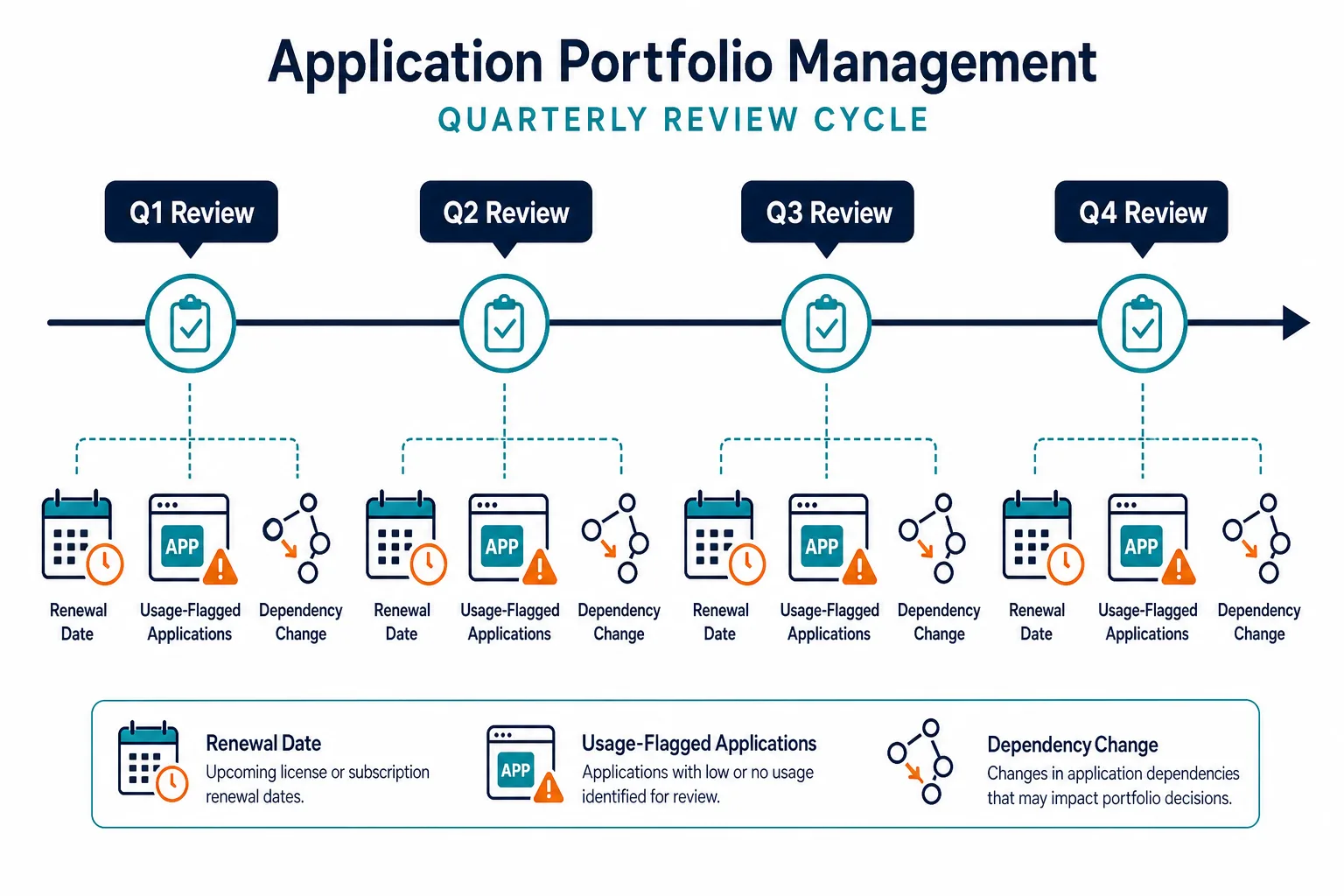
A quarterly rationalization review, focused on applications approaching renewal, applications flagged for low usage, and applications with new alternatives available, prevents this drift. The review process should be lightweight: pull the usage data, check the dependency map for any new shared relationships, and run each candidate through the business value and technical health framework from step two. Teams that build this cadence find that each quarterly review gets faster as the baseline data improves.
A quarterly rationalization review — covering upcoming renewals, low-usage applications, and new dependency changes — prevents the cost drift Zylo’s 2026 index found in 61% of IT teams that cut projects due to unplanned SaaS cost increases.
What to Look for in Application Portfolio Management Software
APM practices are only as strong as the data they run on. The difference between a rationalization decision that prevents an outage and one that causes one often comes down to whether the underlying application and dependency data is real-time and accurate. That makes the choice of APM software foundation critical.
The best application portfolio management tools share a few defining capabilities that separate them from general IT asset management solutions.
Complete Application Discovery Across All Environments
Most APM programs, despite having correct methodology, fail because the inventory is incomplete. IT typically is aware of only a third of applications used due to decentralized ownership and sourcing.
A complete inventory requires multiple discovery methods working in parallel:
- Agentless network scanning: Finds applications running in data centers without an agent footprint
- Agent-based endpoint discovery: Catches installed software and SaaS logins on devices
- Cloud API integration: Maps workloads in AWS, Azure, and other public clouds
Why this matters:
- BetterCloud research shows SaaS applications running on corporate networks are roughly three times the number IT departments are aware of.
- Gartner estimates that as many as 25–50% of licenses are not regularly used, meaning blind spots directly drive waste.
- The Application Discovery and Dependency Mapping (ADDM) Solutions Market is projected to grow from USD 3.81 billion in 2024 to USD 9.62 billion by 2035, driven by rising demand for real-time visibility.
Virima IT Discovery surfaces applications across networks, endpoints, and cloud, including shadow IT that self-reported inventories miss.
Dependency Mapping That Shows Business Impact, Not Just Technical Relationships
Applications share databases, middleware layers, and infrastructure. Before rationalization, you need to see:
- Which systems depend on the application under review
- Which services end-users would lose if it’s removed
- Where the blast radius extends across the estate
Key capability: As service mapping solutions develop, they increasingly place equal emphasis on technical dependencies as well as business impact and value.
Why this matters:
- EMA ServiceOps 2025 research confirmed that CMDB maturity, including service mapping depth, is one of the strongest predictors of ServiceOps performance, with organizations experiencing fewer change-related outages when service maps are accurate.
- Retiring an app without dependency visibility is how unplanned outages happen.
Virima ViVID™ Service Mapping visualizes relationships between applications, infrastructure, and business services in a live, discovery-sourced view; so blast radius is visible before decisions are finalized.
Rationalization Scoring That Combines Data Sources
A defensible rationalization decision requires:
- Usage data: Shows whether the application is actively used
- License & cost data: Reveals what it consumes annually
- Technical health assessment: Identifies maintenance burden and technical debt
- Business criticality: Clarifies what breaks if it disappears
Combined into a single score, these inputs replace subjective debates with data-driven decisions.
Why this matters:
- Gartner estimates 25–50% of licenses go unused, which means most organizations carry significant waste without visibility.
- Without a consistent framework, every rationalization conversation restarts from scratch.
Virima ITAM tracks software applications across their full lifecycle, combining usage, license, cost, and dependency data into actionable portfolio insights.
Integration With CMDB and ITSM Platforms
APM data loses its value if it lives in a silo. The best APM software feeds directly into the platforms teams use daily:
- Incident response: Responders see which applications underpin an affected service without switching systems
- Change management: Change advisory boards automatically see which applications could be impacted by infrastructure changes
- Service mapping: Application data flows into CMDB and service hierarchies used by ITSM
Why this matters:
- Organizations with accurate, integrated service maps resolve major incidents faster and experience fewer change-related outages.
- When APM and ITSM live separately, root-cause analysis takes longer, and rationalization decisions happen in isolation
Virima integrates with ServiceNow, Jira Service Management, Ivanti, Hornbill, Xurrent, and HaloITSM, pushing discovery-sourced application and dependency data directly into incident and change workflows.
Bringing It Together: The APM Data Foundation
Virima’s approach to APM data starts with IT discovery that runs across networks, endpoints, and cloud environments, surfacing the applications that actually exist, including shadow IT and orphaned workloads. ViVID™ Service Mapping then maps their dependencies with business impact. ITAM tracks each application’s lifecycle, licenses, and costs. Together, these capabilities form the discovery and data layer that APM decisions depend on.
The ITSM integrations bring that data into the workflows where incident responders and change managers actually work so that application context is always visible, dependencies are always current, and rationalization decisions are defensible and safe.
What a mature APM program looks like in practice
Organizations with mature application portfolio management practices share a few defining characteristics. Their inventories are built from discovery, not spreadsheets. Their rationalization decisions are informed by dependency maps, not assumptions. Usage data informs every license renewal. Shadow IT surfaces in automated discovery rather than showing up in an unexpected vendor audit.
None of this requires rebuilding your entire IT governance structure. It requires a reliable data foundation: an accurate, continuously updated picture of what applications exist, what they depend on, and how they are actually being used. That foundation is what makes every downstream APM decision defensible. For more on building that kind of defensible, discovery-sourced data foundation, see CMDB Audit Essentials: Ensuring Data Accuracy and Compliance.