What Is Network Scanning? Types & Techniques Explained

Network scanning is the process of probing a network to identify active devices, open ports, running services, and operating system versions. That gap between what IT teams assume exists and what is actually there is bigger than most teams realize: a November 2025 Forescout Research report found that 65% of connected assets across enterprise networks now fall outside traditional IT visibility, based on an analysis of more than 10 million devices across 700 organizations (itsecurityguru.org). IT Ops Managers running ServiceNow or Jira Service Management inherit this gap the moment a scan and a CMDB stop talking to each other. Most teams scan infrequently, environments keep changing, new devices appear, old ones stay in records long after decommission, and cloud services spin up outside any formal intake process. A scan from last quarter tells you what existed last quarter, and that is not the same as knowing what exists right now.
What network scanning returns
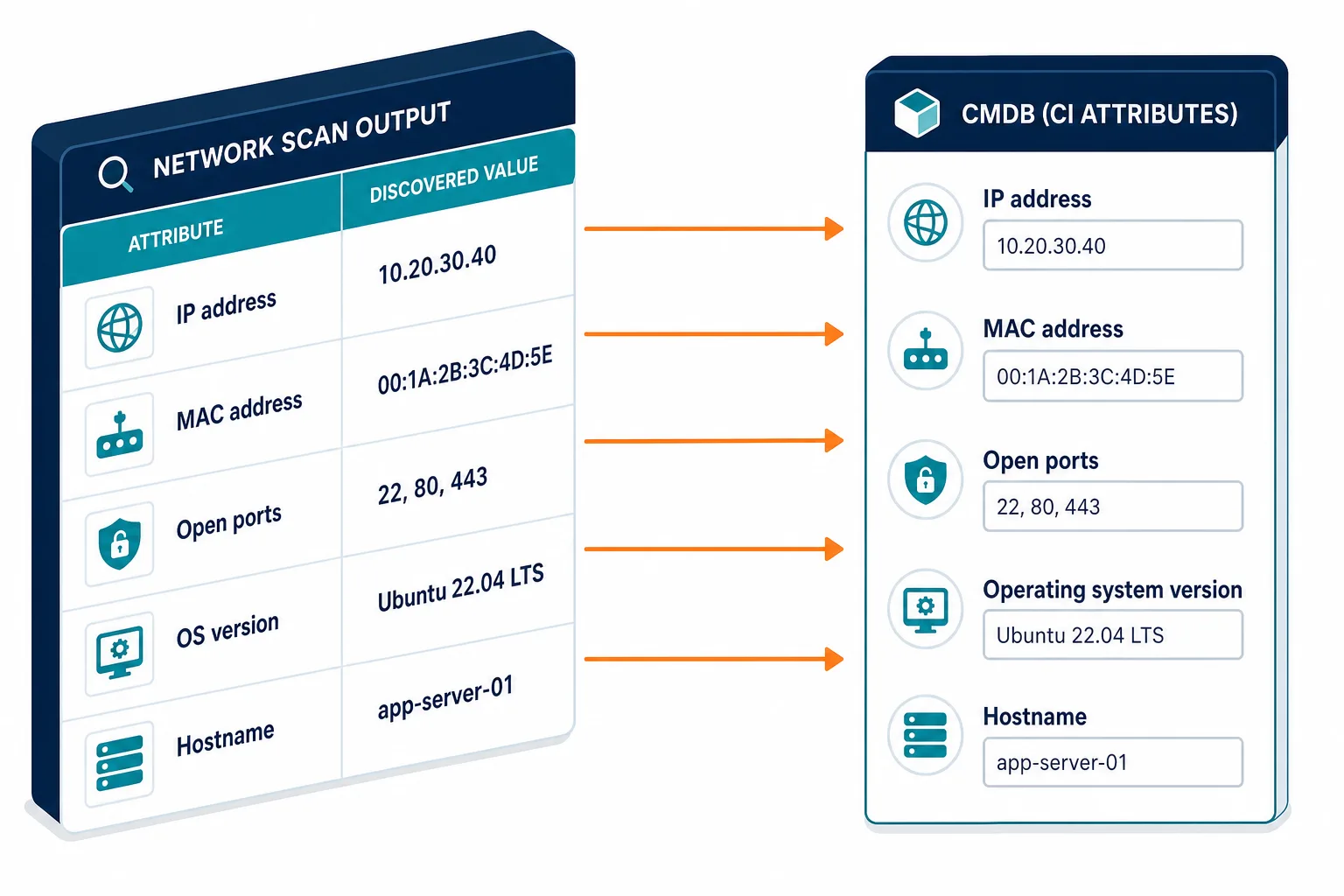
Network scanning produces structured output for each discovered host. That output typically includes the IP address, MAC address, open ports, the protocol running on each port, the operating system version where detectable, and the hostname if DNS resolves it.
That output is the raw material for IT asset management. Each discovered host is a candidate configuration item, a record that should exist in the CMDB with an owner, a service association, and a maintenance record. Without scanning, the only way to know what exists is manual registration or agent deployment, and neither method scales across dynamic, multi-location environments. That output maps directly to the attributes of a configuration item in a CMDB: what the device is, what it runs, and where it sits in the network topology.
Types of network scanning
There are five main scan types. Each answers a different question about your network.
Ping sweep (host discovery). A ping sweep sends ICMP echo requests to a range of IP addresses. It identifies which addresses respond. A ping sweep tells you which hosts are active, nothing more. This is usually the first step before a more detailed scan.
Port scanning. Port scanning probes each active host to find which TCP and UDP ports are open. An open port means a service is listening. Knowing which ports are open tells you what applications and protocols run on a device.
OS fingerprinting. OS fingerprinting analyzes network stack responses from a host to determine the operating system type and version. This matters for patch management, since a device running an end-of-life OS is a risk regardless of what other controls are in place.
Service and version detection. This scan type probes open ports to identify not only which protocol is running but which software and which version. Port 443 might indicate a web server, but version detection tells you whether that server runs a patched build or a vulnerable one.
Vulnerability scanning. Vulnerability scanning tests discovered services against a database of known CVEs. It is the only scan type that actively assesses risk rather than mapping what exists. Vulnerability scanning is typically run separately from asset discovery scans, since it is more intrusive and produces much larger output.
| Scan type | What it identifies | Primary use |
|---|---|---|
| Ping sweep | Which hosts are active | Host discovery, scope definition |
| Port scan | Open TCP/UDP ports per host | Service enumeration |
| OS fingerprinting | Operating system type and version | Patch management, risk tiering |
| Service/version detection | Software name and build on each port | Vulnerability context, CI attributes |
| Vulnerability scan | Known CVEs against discovered services | Risk assessment, compliance reporting |
For a side-by-side look at tools that support these scan types, see the best network scanning tools in 2026.
Network scanning techniques
How a scan probes a host determines what it can detect, how much network noise it generates, and whether a firewall or security monitor will block it.
TCP SYN scan (half-open scan). This is the most common technique. It sends a SYN packet to each target port but does not complete the TCP handshake. If the port is open, the host responds with SYN-ACK, but the scanner does not send the final ACK, so no full connection is established. TCP SYN scans are fast, generate a lower footprint, and are harder to detect in application logs than a full connect scan.
TCP connect scan. This technique completes the full three-way TCP handshake. It is slower than SYN scanning and more likely to appear in logs. It does not require elevated privileges on the scanning host, and it is more reliable across restrictive firewall configurations.
UDP scan. UDP scanning probes UDP ports. It is slower than TCP scanning because UDP is connectionless, so the scanner must wait for a timeout to confirm a port is closed. Devices with open UDP services, such as DNS, DHCP, SNMP, and TFTP, are commonly discovered this way, and these devices are frequently underdocumented in CMDB records.
ICMP scan. ICMP scanning uses echo request packets and echo reply analysis to confirm host reachability and measure round-trip time. Some environments block ICMP at the firewall, so active hosts can appear offline in a sweep when that happens. TCP-based host discovery complements ping sweeps in thorough network scanning for this reason.
How network scan data feeds your CMDB
Raw scan output is not a CMDB. A scan tells you what is on the network. A CMDB tells you what owns it, what it supports, what changed on it, and what depends on it.
The gap between a scan result and a governed CI is where most IT teams lose control. Flexera’s 2025 State of ITAM report found that only 43% of organizations report complete visibility across their technology stack. That gap is not a scanning frequency problem alone; it is a reconciliation problem. Scans run. Results are not correlated against existing CI records. Newly discovered devices never make it to the CMDB, and decommissioned devices stay in as phantom records. That same gap between a one-time scan and a living inventory is covered in more depth in closing the network inventory visibility gap.
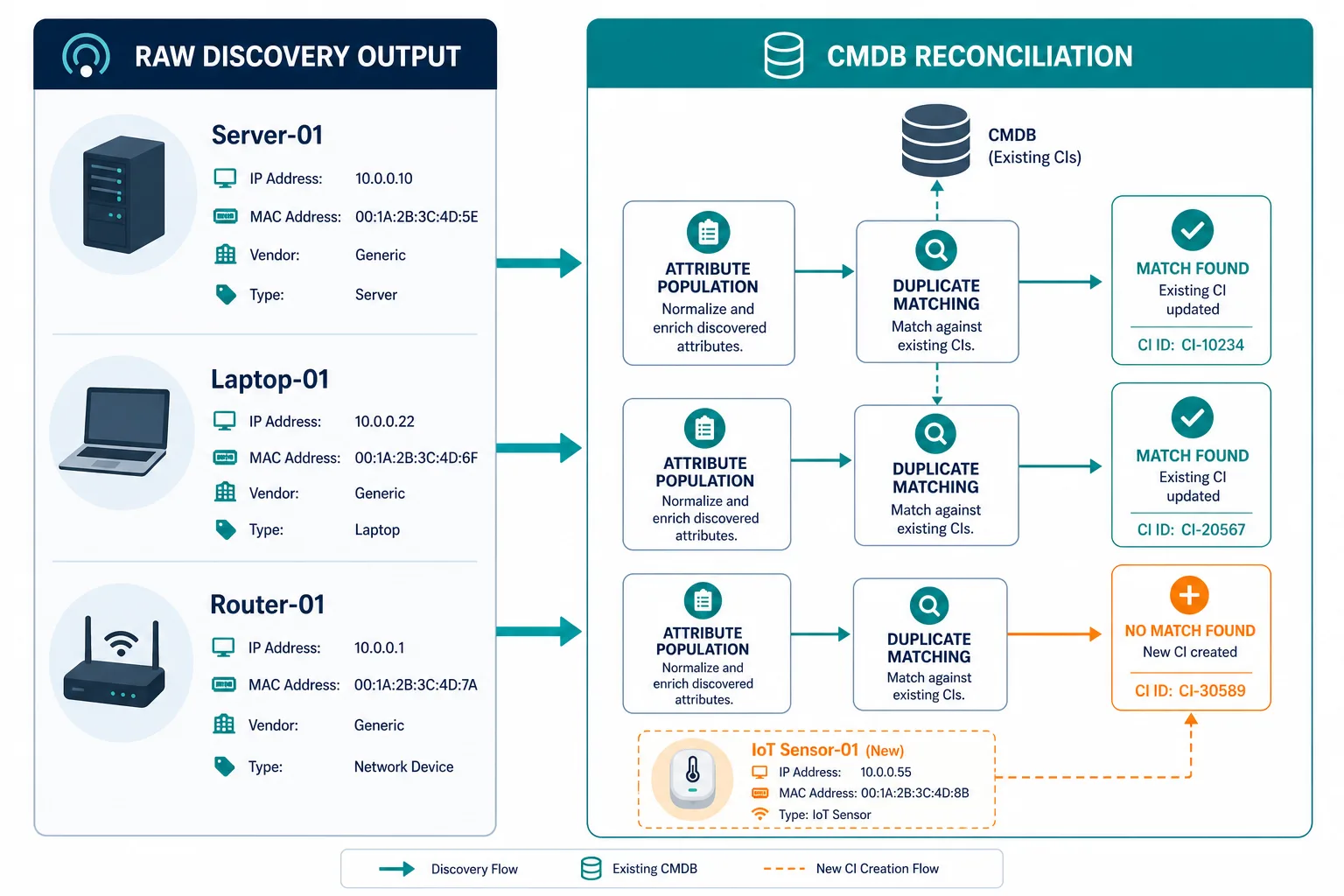
The solution is to connect network scanning output directly to CMDB population. Every discovered device should either match an existing CI and update it, or create a new one — the reconciliation step that turns rogue and unmanaged device detection into a routine part of the scan, rather than a separate investigation. Virima’s IT discovery capability uses agentless network scanning across on-premises environments and reconciles results against your CMDB automatically. Discovered devices become CI records with attributes, service associations, and relationship maps, without manual data entry.
That is what turns network scanning from a point-in-time audit into an actively maintained asset inventory. To see how discovery-sourced data powers governed IT operations, explore Virima’s Trusted Runtime Truth approach.
Network scan results are reconciled against existing CI records: a discovered device that matches an existing CI updates its attributes, and a device with no matching record creates a new CI. This reconciliation process keeps the CMDB current without relying on manual entry or agent deployment on every managed host.
For a detailed look at how active and passive scanning methods work in this workflow, see active vs. passive scanning in IT environments.
Network scanning best practices
Define scope before every scan. Scanning without a defined scope generates noise and wastes time. Start with the IP ranges, VLANs, or subnets you own. Include cloud VPCs for AWS and Azure environments in scope, and exclude ranges that belong to tenants, vendors, or production systems where scan traffic could disrupt operations.
Schedule scans on a defined cycle. A single scan is a snapshot. Environments change continuously. Weekly scans for active production networks and monthly scans for stable infrastructure segments give IT teams a regular basis for reconciling discoveries against what is recorded in the CMDB.
Reconcile results against your existing CI records. A scan run without reconciliation produces a file, not an asset inventory. Matching discovered devices to existing CIs and flagging new discoveries is what makes scan data operationally useful. This step breaks down at scale when done manually, and the drift that accumulates between unreconciled scans often runs larger than IT teams expect (see CI drift between discovery scans).
Tag every discovered device with owner and environment. A discovered device with no owner is a device with no accountability. That gap carries real risk: Verizon’s 2025 Data Breach Investigations Report found that 46% of systems compromised through stolen credentials were non-managed devices, meaning devices without a defined owner or a monitoring agent (verizon.com). Owner tagging at the point of discovery closes that gap by ensuring every CI has a responsible team from day one. Environments that skip this step commonly rediscover the same untagged devices scan after scan, with no record of who owns them. For a field-tested tagging workflow, get the Network Discovery to CMDB Reconciliation Checklist.
Integrate scans into your change management workflow. Devices that appear between scheduled scans often result from unauthorized changes. A scanning workflow connected to your ITSM platform lets service desk and change management teams see newly discovered devices as part of regular operations, not as a separate IT security exercise.
Scan everything. Know what you own.
A scan that runs but never connects to your CMDB produces a report, not an asset inventory. The value of network scanning is not in the output file. It is in what happens when that output is reconciled, attributed, and governed, and every discovered device becomes a CI with an owner, a service context, and a change history.
Frequently Asked Questions
Is network scanning the same as a port scan?
How do TCP SYN scans differ from TCP connect scans?
How often should IT teams run network scans?
Can network scanning discover cloud resources?
What is the difference between network scanning and vulnerability scanning?
Does Virima use network scanning for CMDB discovery?
How does Virima reconcile network scan results with existing CI records?
Virima matches each discovered device against attributes already in the CMDB — IP, MAC, hostname, and service context. A match updates the existing CI with current scan data; no match creates a new CI with an owner and environment tag pending assignment. That reconciliation logic is what separates a raw scan file from an asset inventory a change or incident team can actually rely on.
Get the Network Discovery to CMDB Reconciliation Checklist — a step-by-step framework for turning scan output into governed, owner-tagged CI records, free to download.