Out-of-Band Management Card Discovery for IT Teams

A missing management address can delay server recovery during an outage. Your hardware inventory may identify the server while leaving its remote controller unrecorded. A network scan can find responsive addresses, but it cannot establish ownership or confirm every server relationship.
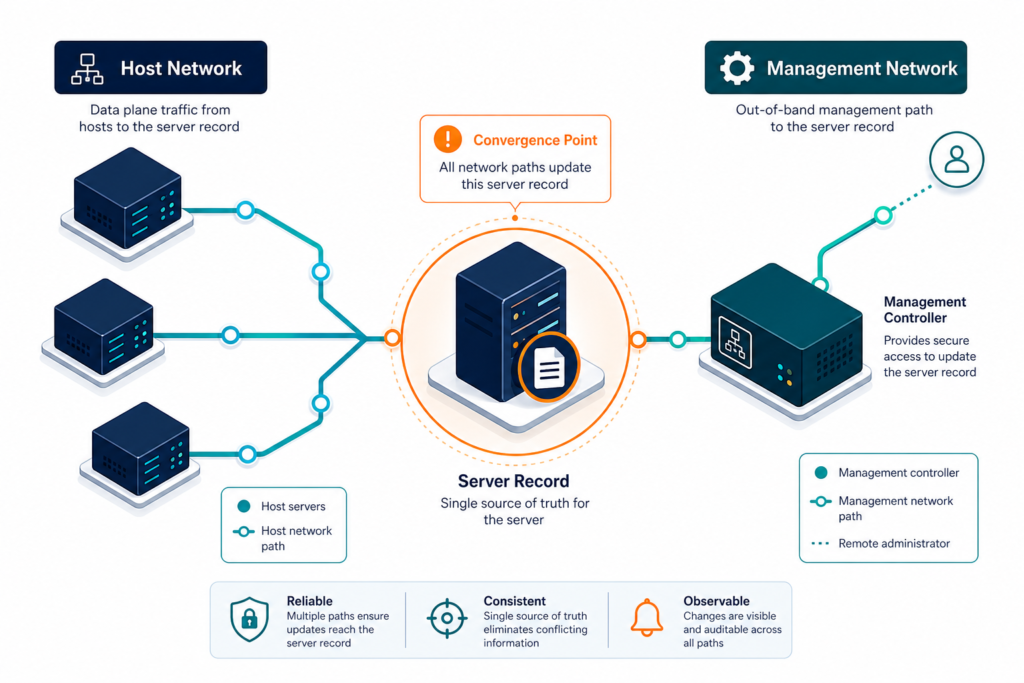
Out-of-band management card discovery gives infrastructure teams a way to investigate that gap: locating a server’s management controller — a baseboard management controller (BMC) such as Dell’s iDRAC — and verifying which physical server it controls. The process combines authorized network checks, management-console records, and verified hardware identifiers, because a responsive network address alone cannot confirm ownership.
What out-of-band management interfaces do
Out-of-band management provides access to server hardware outside the host operating system, letting administrators inspect status, access a console, or perform recovery tasks depending on the hardware and configuration.
A baseboard management controller (BMC) typically provides that interface, either integrated into the server or added as a separate management module or card.
Dell’s Integrated Dell Remote Access Controller (iDRAC) is one example, described by the Dell security configuration guide as a management component for PowerEdge servers; other manufacturers offer their own implementations.
A management interface may use a dedicated port or share one with the host, and its address, credentials, and access rules can differ from the operating system’s.
The inventory requirement: Record the management interface separately, then verify which physical server it controls.
Can a management controller remain available when the server operating system is down?
A management controller can stay reachable when the host operating system is down, as long as it has power, network access, and hardware that supports it. A management network outage or controller failure can still remove that recovery path.
Define the scope for out-of-band management card discovery
Begin with the servers your organization owns and the networks intended for hardware management. Ask infrastructure and network owners to confirm which locations and address ranges are authorized for inspection.
Include recovery sites, development systems, and colocated equipment your team manages, and document equipment managed by another provider, since access and inventory responsibilities may differ.
Collect the records already available to your team:
- Physical server inventories and hardware asset registers.
- Management network ranges and address-management records.
- Vendor management-console exports and enrollment lists.
- Rack, enclosure, and data center location records.
- Configuration management database (CMDB) records and ownership assignments.
These sources may contain stale records or reused addresses, so record the source and observation date for each one so reviewers can investigate conflicts.
Before probing, agree on permitted methods, access windows, request rates, and escalation contacts. Test a representative group first and follow vendor guidance for the controllers in scope.
For broader infrastructure context, explore Virima’s Trusted Runtime Truth approach — the same discipline that keeps a server’s record aligned with reality when its controller is reassigned or replaced.
Choose a discovery method for each environment
Review existing management consoles
A vendor console may already list controller addresses and server identifiers. Export its inventory alongside the collection time and the console’s documented scope.
Compare that list with address-management records and the physical server inventory. A server might be absent because it was never enrolled, while a retired device may remain in the export.
Record those differences as exceptions for the hardware owner — the export’s scope must be verified before teams rely on it.
Inspect approved management networks
Authorized network discovery can identify addresses that respond to expected management services, and address allocations and switch records can narrow the candidate list before deeper inspection.
A responsive address alone does not confirm a controller. Other devices can expose similar services, so validate identity through a supported interface or trusted vendor inventory.
Keep nonresponsive addresses in a separate queue — a blocked route, disabled service, or temporary outage can prevent discovery without proving the controller is absent.
Check supported management protocols
Redfish and IPMI are the two protocol families most out-of-band controllers support. Redfish is newer, uses HTTPS and structured resources, and is described by the Distributed Management Task Force introduction to Redfish; IPMI is the older specification many controllers still expose alongside it. Which protocol a management controller discovery effort can use depends on firmware version, enabled services, and account permissions.
Where a controller supports Redfish and access is approved, Virima’s IT discovery can read available system information and reconcile it against the CMDB’s existing record, though returned fields still depend on firmware and permissions. Vendor consoles may offer another collection path for controllers that don’t yet support Redfish.
How should a team investigate a failed controller check?
A failed controller check should enter an exception queue with the attempted method and observation time. Assign the network or platform owner to test the approved route and account. Preserve the expected server relationship while that investigation remains open, rather than treating the failed check as evidence of retirement.
Match each controller to the correct server
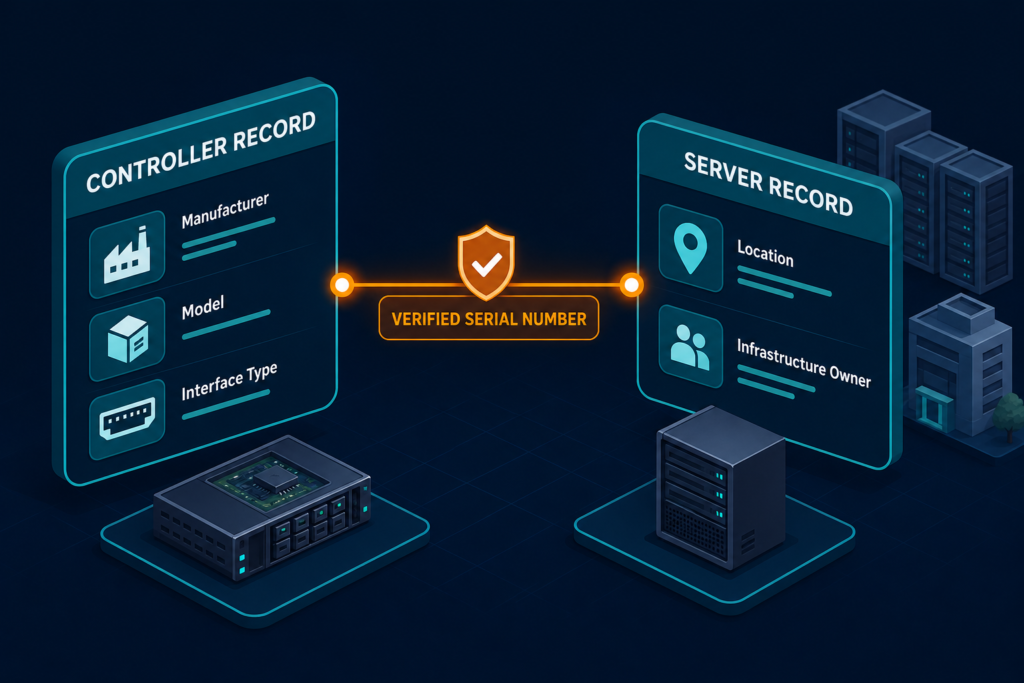
A controller-to-server relationship helps an operator identify which hardware an interface controls. Establish that relationship with verified hardware identifiers rather than an address alone.
Use a verified serial number or vendor service tag as the primary match where available. Hostnames can change or be reused, so they provide supporting context rather than a durable join key. Established discovery platforms handle this the same way, matching controller records to host records by serial number rather than network address — a widely followed industry practice, not a Virima-specific requirement.
If a controller is replaced or its address changes, the team can update the relationship without creating a duplicate server — the same discipline behind keeping CI relationships accurate without a dedicated data steward.
Chassis-based hardware needs particular care: a chassis management module, a server controller, and a compute node can be separate objects, so review the hardware documentation before assigning a module to an individual node.
Use the following sequence during reconciliation:
- Compare the reported hardware identifier with the server inventory.
- Check the server’s location and assigned infrastructure owner.
- Confirm that the management address belongs to an approved range.
- Send missing or conflicting identifiers for manual review.
- Record the source and observation time for the verified relationship.
If two server records claim the same identifier, investigate before merging them. A stale replacement record or incorrect export can produce a misleading match.
Decide which fields belong in the inventory
A server management interface inventory needs enough information to let an operator locate the interface, identify its owner, and see how the team verified its relationship to the server.
Capture fields that your sources can provide reliably:
- Controller identity: Manufacturer, model, and interface type.
- Network details: Management address, segment, and approved access path.
- Host relationship: Verified serial number or service tag and linked server record.
- Ownership: Infrastructure owner and responsible security contact.
- Lifecycle: Location, operational status, and retirement date when applicable.
- Evidence: Source, last successful observation, and unresolved conflicts.
- Firmware: Reported version and observation date, where available.
Store credentials and session tokens in an approved secrets system, not in the inventory. Keep access instructions separate from the secrets themselves.
A reported firmware version helps the security team prioritize a review. Vendor advisories and configuration evidence remain necessary to assess the device.
Secure controller discovery and access
Management interfaces can provide powerful hardware access, so discovery needs an agreed security boundary even when the intended task only collects inventory.
Work with the security team to approve source networks and destinations, restrict access to authorized management segments, and avoid exposing controllers to the public internet — the same scoping discipline behind authoritative asset inventory without unsafe discovery practices.
This isn’t theoretical. In June 2025, CISA added an authentication-bypass vulnerability in a widely deployed BMC firmware stack to its Known Exploited Vulnerabilities catalog after confirming active exploitation.
Where supported, create a dedicated identity for discovery, grant only the permissions required to collect the agreed fields, and rotate credentials under the organization’s existing policy.
For HTTPS interfaces, validate certificates through the approved trust process. Route expired or invalid certificates to an owner rather than disabling validation indefinitely.
Separate inventory collection from power, firmware, account, and configuration changes, which require their own authorization and change controls.
Test the selected collection method against representative hardware first, confirming it performs no management actions beyond inventory collection.
Why should a controller discovery account have limited permissions?
Limited controller permissions reduce the actions available if a discovery credential is misused. The required permissions vary by device and by the fields collected. Test the account on representative hardware, then document and approve any additional access needed for a specific inventory field.
Turn discovery gaps into an operating queue
A discovery report helps when each exception has an owner and a next action, and separating coverage gaps from confirmed hardware problems lets teams investigate them appropriately.
Start with these categories:
- Expected server, no controller evidence: verify whether the model has an enabled management interface.
- Address responds, identity unconfirmed: compare the response with vendor console and network records.
- Controller found, server match missing: request hardware identifier verification from the server owner.
- Credential or certificate failure: route the access issue to the platform or security team.
- Controller outside an approved range: confirm ownership and investigate the network assignment.
- Retired server still reported: verify decommissioning before changing the inventory record. See how 14 servers survived a completed migration despite being marked for retirement.
Prioritize exceptions by service impact and recovery requirements: a controller for a critical recovery host may need attention before an unverified lab device.
Track verified controller relationships as a share of expected servers, and report unmatched controllers and failed checks separately — a higher response count alone doesn’t prove accuracy.
Schedule repeat checks around hardware and network changes, reconcile records after deployment, relocation, and retirement, and retain enough history to explain changes to an established relationship.
Connect server evidence to the wider CMDB
Controller records are one source of evidence about physical infrastructure — OS discovery, network inventory, and asset registers contribute the rest to the same server record.
Virima supports scheduled discovery across supported infrastructure and maintains configuration item data and relationships in its CMDB. Teams can review server records alongside the information available from those discovery sources.
Other CMDB platforms handle this same reconciliation challenge, syncing discovery findings on a scheduled basis so hardware, network, and controller evidence resolve against one record.
Before combining sources, agree which system supplies each field — for example, serial number from the hardware inventory, network assignment from address management — and assign an owner to resolve conflicts.
When a team provides service definitions, Virima’s ViVID™ service maps can model the dependencies from that input and help teams examine related infrastructure before a change, though usefulness depends on the service inputs and relationships available.
Build a dependable recovery inventory
A useful out-of-band management card discovery program connects a server to its controller, owner, and approved access path. Begin with a representative group, validate the identifiers, and resolve exceptions before expanding the scope.
Check the relationship again after hardware replacement or reassignment. A previously accurate management address can otherwise remain attached to an outdated server record.
The stakes are concrete: just over half of organizations surveyed in a recent outage analysis said their most recent significant outage cost more than $100,000 (Uptime Institute data cited in Downtime Cost Statistics). A verified inventory is what lets a recovery team reach the right interface instead of losing time to a records search.
Frequently Asked Questions
How can I find out-of-band management interfaces?
Start with approved management network ranges and existing vendor console exports. Compare identified interfaces with server records using verified hardware identifiers. Investigate failed checks and unmatched addresses before treating the inventory as complete.
Is iDRAC separate from the server operating system?
iDRAC provides a management interface that operates separately from the server operating system. Its availability still depends on power, network configuration, controller condition, and access controls.
Which identifier should connect a controller to a server?
Use a verified server serial number or vendor service tag where available. Compare it with the hardware asset record and investigate conflicts before creating the relationship. A hostname can provide supporting context, but it can change or be reused.
How can Virima support a broader server inventory?
Virima supports discovery of supported infrastructure and maintains configuration item data and relationships in its CMDB. Teams should evaluate their specific hardware, discovery methods, and access requirements during a product discussion.
Can Virima map services that depend on servers?
Virima’s ViVID™ service maps show service dependencies once the team supplies service definitions. The resulting view depends on the service inputs and available infrastructure relationships. Teams can review those relationships when assessing a proposed change.