EOL Server Discovery and CMDB Gaps: 14 Servers That Survived a Completed Migration

| How a completed migration becomes an open gap 1. The migration project was well-run by standard measures. The project tracker showed every in-scope server with a migration ticket. All tickets were closed. The project was declared complete, the team was reassigned, and reporting to the security committee showed zero Windows Server 2016 instances remaining in the production environment. 2. The CMDB that generated the in-scope server list had been accurate at the time the scope was frozen. Ticket lists are built from the CMDB that existed when scope was frozen. Any server added after that point, or never discovered to begin with, falls outside the project’s reach. It does not get migrated, and nobody notices until something forces the question. Three categories of change produced the 14 servers that the migration missed. 3. The first category was servers that were in the CMDB at scope-freeze but were replaced with new Windows Server 2016 instances after migration work had been completed on the original. The migration ticket closed when the original server was migrated. A new instance was provisioned afterward on the same OS version, and no one created a new migration ticket because the project scope had already been frozen. 4. The second category was servers that had never been in the CMDB to begin with, because IT discovery had not reached them before scope-freeze. These were servers in network segments that the prior discovery scope did not cover. 5. The third category, which accounted for 7 of the 14 servers, was development and test environments that had been promoted to production after the migration project scope was finalized. They went through the standard production promotion process, but no one checked whether the OS version was on the mandated migration list. The migration project was technically complete. These servers were technically new production instances. Nobody connected the two facts. |
Why do EOL servers survive a mandated migration project?
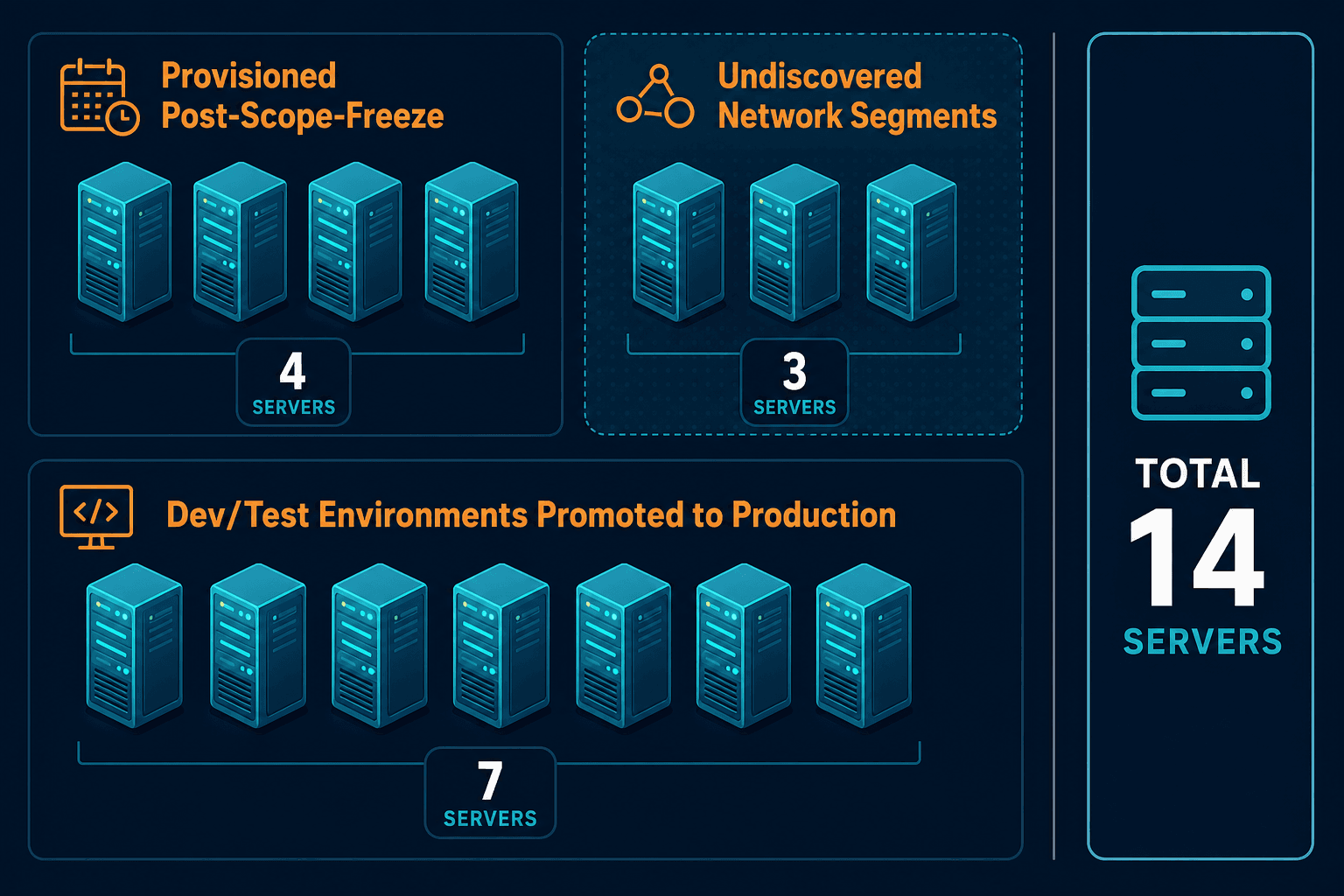
Migration scopes are built from CMDB data at a point in time. Servers provisioned after scope-freeze, environments promoted to production outside the migration queue, and servers in undiscovered network segments all produce gaps between the migration ticket list and the actual production estate. Discovery-based verification closes the gap that ticket tracking cannot.
What those 14 servers were doing
Three of the 14 servers ran core banking integrations. These were integration middleware instances that connected the bank’s core banking platform to downstream reporting and settlement systems. They had been classified as non-critical infrastructure in the original migration scope assessment because the services they ran were not customer-facing. What the scope documentation had not captured was that those servers had taken on additional integration functions after the original scope assessment, making them more operationally significant than their original risk classification suggested.
Four servers were reporting instances. They aggregated transaction data and fed scheduled reports to business operations teams. They processed financial data on a nightly basis, and their outputs fed decision-making processes that management relied on.
Seven were development and test environments that had been promoted to production. The OS version field in the production promotion checklist had been filled in as ‘Windows Server’ without the version number, and no one had flagged that as incomplete.
The PCI DSS problem hiding inside the dev/test stack
All 14 servers were in PCI DSS scope. That finding changed the nature of the problem from an operational hygiene issue to a compliance finding.
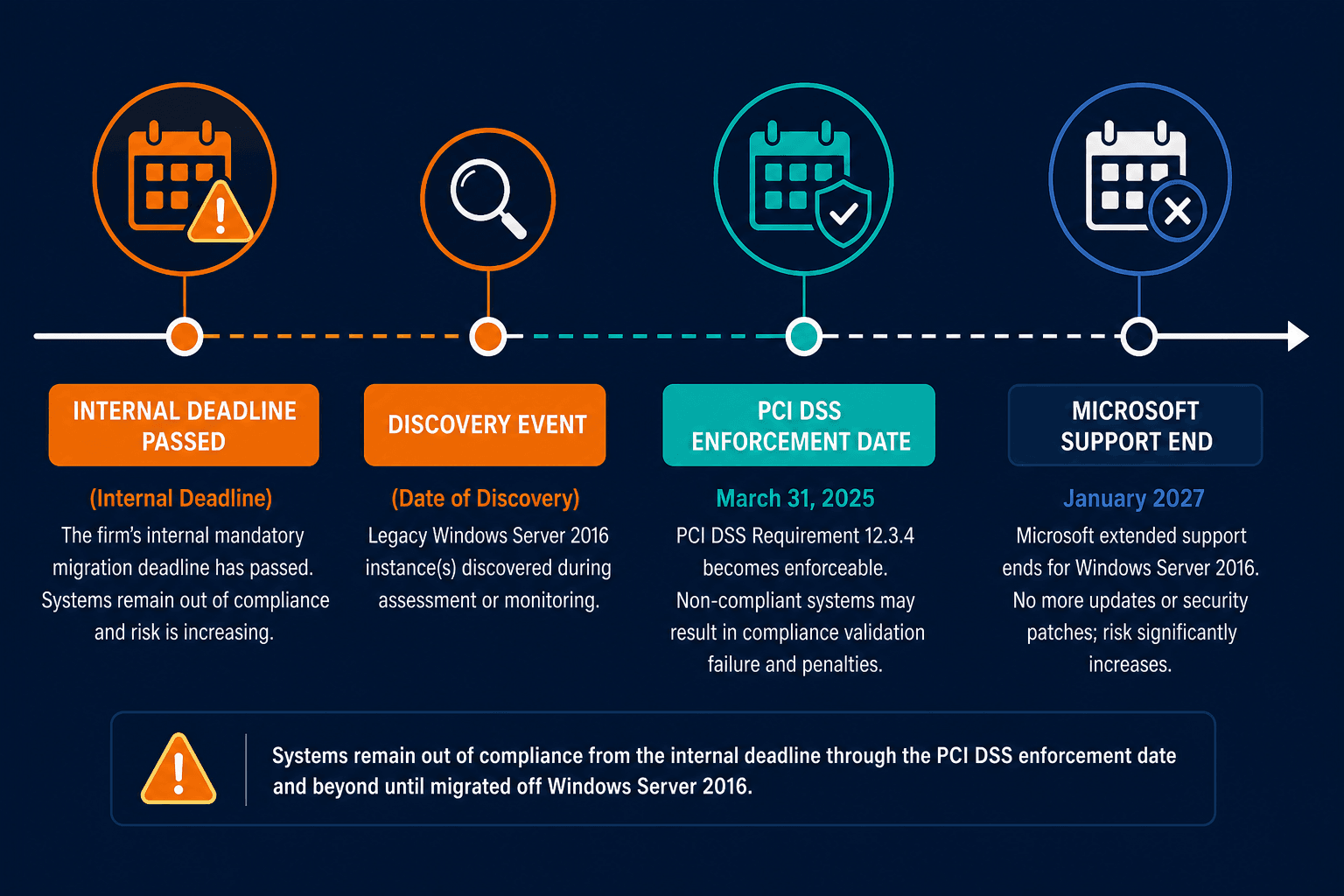
PCI DSS Requirement 6.3 mandates that all system components are protected from known vulnerabilities by installing applicable security patches. Windows Server 2016 extended support ends in January 2027, which means the servers were not yet past the Microsoft extended support date at the time of discovery. However, the firm’s internal policy had set an earlier mandatory migration deadline to ensure sufficient migration runway before vendor support ended, and the internal deadline had passed six months prior.
Under PCI DSS v4.0.1, published in May 2024 and fully enforceable as of March 31, 2025, the cardholder data environment scope is determined by the actual configuration of the environment, not by the configuration the migration project believed it had delivered. A system in the cardholder data environment running an OS version that violates the organization’s own security policy is a compliance finding regardless of when or how it ended up in that state.
What is the PCI DSS implication of EOL servers in the cardholder data environment?
PCI DSS v4.0.1 requires all system components in the cardholder data environment to be protected from known vulnerabilities. An OS version past its internal policy deadline is a Requirement 6.3 finding regardless of how it entered the environment. All 14 missed migration servers were in PCI DSS scope, requiring formal remediation tracking and QSA reporting. The March 31, 2025 enforcement deadline means EOL discovery is no longer optional.
See how Virima’s Trusted runtime truth CMDB flags PCI DSS scope violations automatically |
What is the PCI DSS implication of EOL servers in the cardholder data environment?
PCI DSS v4.0.1 requires all system components in the cardholder data environment to be protected from known vulnerabilities. An OS version past its internal policy deadline is a Requirement 6.3 finding regardless of how it ended up in the environment. All 14 missed migration servers in this case were in PCI DSS scope, requiring formal remediation tracking and QSA reporting. The March 31, 2025 enforcement deadline for Requirement 12.3.4 (annual EOL audits of all hardware and software in use) means organizations can no longer defer EOL discovery as a “nice to have.”
What it took to finally close the gap
The remediation had three tracks running in parallel. The first track was straightforward migration work: schedule migrations for the 14 servers, prioritize the three core banking integration instances, and execute. Running Virima’s OS discovery against the full environment — including the previously excluded subnet — returned OS version data for all 14 servers within the first scheduled scan. That track was complete within six weeks.
The second track required understanding why the discovery process had not caught these servers before the migration project closed. This involved reviewing the CMDB discovery scope configuration, identifying the network segments that had not been included in prior scans, and expanding the active vs passive IT asset discovery coverage to include those segments. The team found that three of the 14 servers were in a subnet that had been excluded from discovery scope because it was labeled “development” in the network documentation, and the discovery configuration had filtered it out.
The third track addressed the production promotion process. The OS version field was updated to require the specific version string. A secondary check was added that cross-referenced the version against the OS migration policy list before the promotion could be approved.
The CMDB best practices lesson from this remediation is that discovery scope is a security boundary, not just a technical configuration. Every subnet excluded from discovery is a subnet where policy violations can exist invisibly.
How does discovery scope exclusion create compliance risk?
When network segments are excluded from discovery scope, the CMDB cannot discover the systems running there. Policy-violating OS versions, unpatched servers, and systems that should have been migrated can persist in excluded segments indefinitely. Discovery scope decisions are compliance boundary decisions, and they should be reviewed with the same rigor as firewall rules and access controls.
Discovery as the verification step migration tracking cannot provide
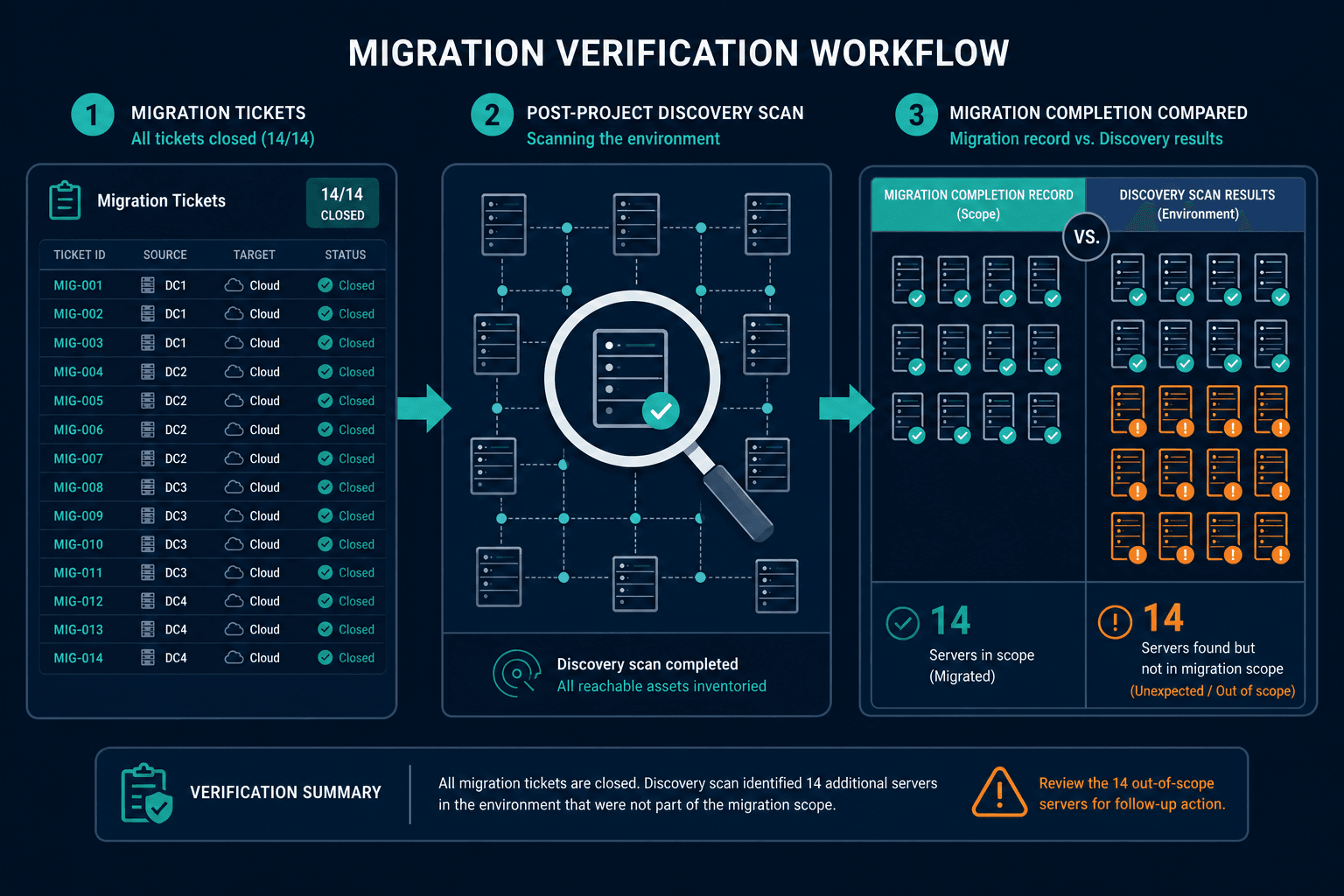
Migration tracking is a project management function. It tells you which tickets are open and which are closed. It does not tell you whether every server in the environment that needed to be migrated was captured in the ticket list at the time the scope was frozen.
| Migration ticket tracking | Discovery-based verification | |
|---|---|---|
| Scope source | CMDB snapshot at scope-freeze | Live environment scan |
| Update frequency | Static after scope-freeze | Continuous or on-demand |
| Post-migration blind spots | Servers provisioned after freeze; excluded subnets; promoted dev/test | None — scans actual environment |
| Compliance basis | Ticket closure record | Actual OS version in CMDB |
According to Gartner (2025), only 25% of organizations receive meaningful value from their CMDB investments. Industry benchmarks from Ready Works (2025) put CMDB baseline accuracy at 60% across typical implementations. This gap widens dramatically during major changes: ticket tracking against an incomplete or outdated CMDB means the project can achieve 100% ticket closure while addressing only a partial scope.
IT asset management processes that rely on CMDB data for compliance reporting have the same dependency: if the CMDB is incomplete, the compliance report reflects the subset of the environment that was discovered, not the full environment. A mandated migration that achieves 100% ticket closure against an incomplete CMDB delivers 100% of a partial scope.
EOL server discovery via CMDB is not a one-time audit activity. It is an ongoing verification function that should run after every major migration project, after every production promotion cycle, and after any change to the discovery scope configuration.
NIST SP 800-128 identifies configuration item discovery as a foundational control for maintaining accurate security baselines. The principle applies directly to OS lifecycle management: if you cannot discover what is running, you cannot govern it.
For agent-based vs agentless discovery programs, OS version accuracy depends heavily on discovery depth. Agentless approaches using WMI and SSH can retrieve OS version strings from Windows and Linux hosts without requiring an agent installation on each target.
What the migration project could not see and discovery could
The migration project closed with 100% ticket completion. It had simply never opened a ticket for 14 of the servers that needed to be on the list. Three ran core banking integrations. Four ran reporting systems. Seven came through the development-to-production path without a version check that caught the OS. All 14 were in PCI DSS scope when discovery found them.
The lesson is not that migration projects are run poorly. It is that ticket tracking cannot verify its own completeness. Only discovery can do that.
Virima’s discovery-driven verification retrieves OS version data from every server across your full infrastructure, including segments your previous scans excluded, and flags policy violations in the CMDB before they become a compliance finding.
| Schedule a demo to see it applied to your environment. |
Frequently Asked Questions
Why does a migration project close with EOL servers still running?
The most common cause is scope definition built from a CMDB that was incomplete at the time the migration scope was frozen. Servers in undiscovered segments, servers provisioned after scope-freeze, and environments promoted to production outside the migration queue are all invisible to a scope definition that relied on an incomplete CMDB. Servicenow, Ivanti, Halo, Jira service management, Xurrent.
What makes dev/test servers promoted to production a migration compliance risk?
Development environments often run OS versions that do not match production standards because they are built for convenience rather than compliance. When those environments are promoted to production, they carry the OS version into the compliance boundary. If the production promotion checklist does not verify OS version against the active migration policy, EOL OS versions can enter production through a path the migration project never tracked.
Does Virima’s EOL server discovery require agents installed on every server?
Virima retrieves OS version data without agents, using WMI for Windows hosts and SSH for Linux hosts. No agent installation is required on discovery targets. Agent-based discovery is available where agentless protocols are blocked by network policy, and OS version and patch level data are accessible through both methods, stored as CI attributes in the CMDB for compliance reporting.
What are the PCI DSS requirements for EOL servers in the cardholder data environment?
PCI DSS v4.0.1 Requirement 6.3 requires all system components in the cardholder data environment to be protected from known vulnerabilities. An OS version that violates the organization’s own internal policy is a Requirement 6.3 finding, regardless of how it entered the environment. Requirement 12.3.4 further mandates an annual hardware and software review that must identify EOL components.
How does Virima enable legacy server detection after a migration project closes?
Virima’s OS discovery retrieves the installed OS version from each discovered server via agentless protocols including WMI for Windows hosts and SSH for Linux hosts. OS version data is stored in the CMDB as a CI attribute and can be queried against a policy list of prohibited OS versions. Any server running a prohibited version appears in the CMDB regardless of whether a migration ticket was ever opened for it.