Why the First IT Discovery Scan Finds More Than Expected

A CMDB diverges from the real environment because it depends on manual, ticket-based processes to create CI records. When any step in that chain is skipped during cloud provisioning, team handoffs, or organic infrastructure growth, the CI never gets created. Over years, those skipped steps accumulate into a gap that only a discovery scan can fully measure.
Why Your CMDB Diverges from the Real Environment
Most CMDBs are built through reactive, ticket-based processes. A server gets provisioned, a change ticket opens, and someone creates the CI record. When any step in that chain is skipped, the CI never gets created. In environments that have grown through cloud migrations, team handoffs, and organic provisioning, those skipped steps accumulate over years without anyone tracking the total.
The team in this scenario maintained their CMDB manually for three years across two infrastructure teams and one cloud migration. No single decision created the 1,447-asset gap. It accumulated through every provisioning event that bypassed the formal change process, every decommissioned device whose record was closed before the hardware was confirmed removed, and every cloud resource whose engineer assumed someone else would create the CI.
That pattern holds across environments of every size. Organizations running a formal discovery exercise for the first time almost always find more assets than their existing manual records show, often by a significant margin. The scan does not generate the gap. It measures one that was already there.
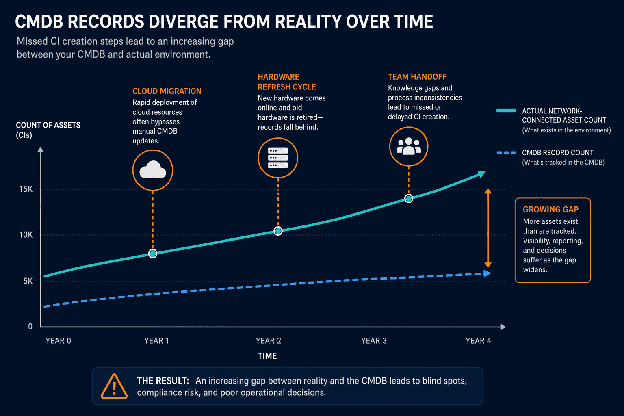
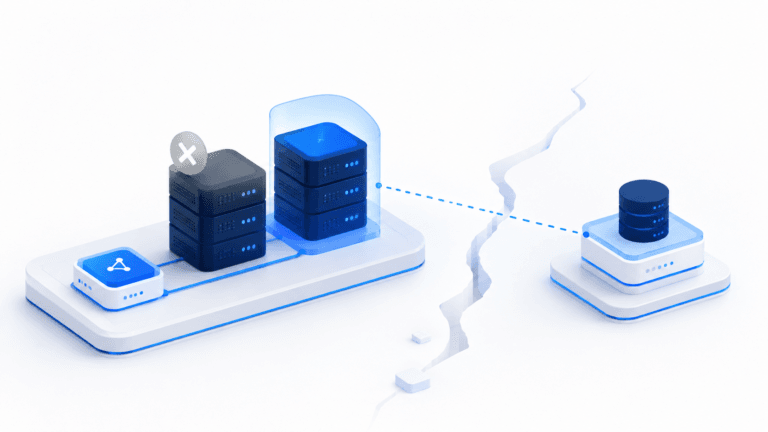
Conceptual diagram showing the divergence over time between a manually maintained CMDB record count and the actual network asset count
The Four-Category Gap Framework
Cloud Resources Provisioned Outside Change Management
The largest single category: 847 cloud resources in AWS and Azure, including virtual machines, storage buckets, load balancers, and container instances, had never entered the formal change management process.
The root cause is speed. An engineer can spin up a virtual machine in minutes. The change ticket that should follow frequently gets deferred, then forgotten. Those resources accumulate in the cloud environment with no corresponding CI record in the CMDB. Unrecorded cloud resources cannot be scoped into security reviews, assigned to a cost center, or included in software license reconciliation.
NIST SP 800-128 requires all configuration items, including cloud-hosted resources, to appear in a complete and current inventory. When 847 resources are missing from that inventory, every process that reads from it starts with an incomplete picture. The full standard is available at the NIST Computer Security Resource Center.
IT Asset Management processes that depend on the CMDB for cloud cost allocation face the same problem: you cannot optimize spend on resources you do not know exist. Cloud spend tied to assets with no CI record cannot be allocated, optimized, or included in budget forecasting.
Ghost Assets Still Broadcasting
312 assets had CMDB records marked as “decommissioned” or “retired.” Discovery found them still active on the network. Their network interfaces were responding to queries. The physical hardware had not been removed, and the formal decommissioning process had never confirmed network silence before closing the CI record.
Ghost assets appear in first IT discovery scan findings because agentless discovery reads live network traffic, independent of CMDB lifecycle status fields. If the interface responds, discovery finds the device. Virima’s agentless scan queries live interfaces regardless of CMDB lifecycle status. So a device your CMDB marks as “retired” still appears in discovery output if its network interface responds.
What are ghost assets and why do they appear in discovery scans?
Ghost assets are devices marked as retired or decommissioned in the CMDB that remain active on the network. They surface in first IT discovery scan findings because discovery reads live network interfaces, not CMDB lifecycle fields. They create three risks: unpatched devices with no active owner, unroutable incident alerts, and change records that reference retired CIs when calculating impact.
The correction is a decommissioning workflow that verifies network silence before the CI record is closed, logging the physical removal step separately from the administrative record closure. Without that step, ghost assets grow with every hardware refresh cycle. CMDB best practices recommend this verification step as a standard decommissioning gate.
Unmanaged Devices on the Corporate Network
203 devices had no CMDB record at all. Not stale or miscategorized entries, but entirely absent records. These devices connected through network access points that bypassed IT’s formal onboarding process: corporate WiFi without network access control enforcement, hardware purchased through departmental budgets outside IT procurement, and devices left behind by vendors after engagements.
Why do unmanaged devices appear in first IT discovery scan findings?
Unmanaged devices reach the corporate network through channels outside IT’s visibility: BYOD on corporate WiFi without NAC enforcement, hardware purchased outside IT procurement, and vendor equipment left on-site post-engagement. They have no CMDB records because no approved process created them. Discovery finds them by scanning network traffic directly, without requiring an existing asset record to match against.
The 203 unmanaged devices in this scan illustrate the pattern directly: assets running without IT visibility, owner assignment, or patch schedules. Shadow IT does not show up in a spreadsheet. It shows up in a scan.
Virima’s combined agentless and API-based scanning covers both corporate WiFi-connected devices and cloud-provisioned resources. That is why unmanaged devices surface even when they have bypassed IT’s formal onboarding process. Each of these 203 devices had no assigned owner, no patch schedule, and no change authority.
Software Installs with No Asset Record
The smallest category by volume, but the most common source of license audit surprises: 84 software installs found on managed machines with no corresponding software asset record. These were local installs on devices with valid CMDB records. The software inventory had never been formally captured through an active scan. The active vs. passive IT asset discovery comparison explains why: passive discovery captures what applications communicate over the network, while active discovery returns the full local install manifest from each endpoint.
| Discovery Method | What It Finds | What It Misses |
| Passive (network traffic) | Applications with active network communication | Locally installed software with no persistent network activity |
| Agentless (WMI/SSH/SNMP) | Network-visible devices, OS details, active services | Full software install manifests on managed endpoints |
| Agent-based (endpoint agent) | Full local software inventory, patch status, installed apps | Devices where the agent cannot be installed |
| API-based (cloud APIs) | Cloud-provisioned resources across AWS and Azure | On-premises assets not exposed via cloud API |
When first IT discovery scan findings return a number well above the expected inventory, the instinct is to find who got the CMDB wrong. A more accurate framing: the CMDB reflects the processes that built it. The gap precisely measures every provisioning event that bypassed a formal change ticket. Accepting that reframes the first scan from a problem into the most accurate picture of the environment your team has ever had.
The Delta Is the Baseline, Not a Failure
When first IT discovery scan findings return a number 60 percent above the expected inventory, the instinct is to find who got the CMDB wrong. That framing misses the actual cause.
The CMDB reflects the processes that built it. If those processes relied on manual ticket creation, the CMDB reflects every step in that process that was skipped. The 1,447-asset gap is not evidence of poor CMDB management. It is the expected output of an environment that grew faster than manual processes could track.
Accepting that reframes the first scan result from a problem to a measurement: the most accurate measurement of the environment the team has ever had. A CMDB accuracy baseline is the verified asset count established by the first full discovery scan, the benchmark against which all subsequent scans measure drift. The work that follows is the CMDB catching up to the environment, not the other way around.
Is a large gap between a CMDB and first IT discovery scan findings normal?
Yes. Environments that have grown through cloud provisioning, acquisitions, or organic expansion often return first scan counts 30 to 80 percent above manual inventory. The gap reflects the limits of manual CMDB processes, not IT negligence. A large gap on the first scan means discovery is working as intended: it found assets that manual processes never recorded.
Acting on first IT discovery scan findings starts with categorization, not remediation. Sorting the gap into four parallel workstreams (cloud resources, ghost assets, unmanaged devices, orphaned software) gives each category a natural owner and a clear completion criterion. The most common Day 1 mistake is waiting for the CMDB to look cleaner before starting the next scan. The environment does not pause.
What to Do with the Delta on Day 1
Acting on first IT discovery scan findings starts with categorization, not remediation. Sorting the 1,447-asset delta into four categories creates four parallel workstreams, each with a natural owner.
Triage by Category
Day 1 triage follows category, not severity:
- Cloud resources outside change management — cloud architecture team
- Ghost assets — owner of the decommissioning process
- Unmanaged devices — network security
- Orphaned software installs — software asset management
Assign Interim Ownership
Every unrecorded asset needs a named interim owner before remediation begins. Without a named owner, no one has authority to decommission a ghost asset, challenge an unmanaged device’s network access, or reconcile a software install against a license agreement.
Decommission Confirmed Ghosts First
The 312 ghost assets broadcasting with no active business purpose are the highest-priority remediation target. They inflate the attack surface, create incident routing failures, and add noise to every downstream process that reads the CMDB.
Start a 14-Day Discovery Cadence
The most common mistake after the first scan is delaying the second scan until the CMDB looks cleaner. The environment does not pause. Start a 14-day discovery cadence from Day 1. Each cycle closes the gap faster than any manual remediation effort.
Building a CMDB from a discovery-sourced baseline gives every remediation decision a verified foundation. ViVID Service Maps built from that CMDB show which remaining gap assets carry the most service dependency risk, so remediation priority is set by operational impact rather than asset count alone.
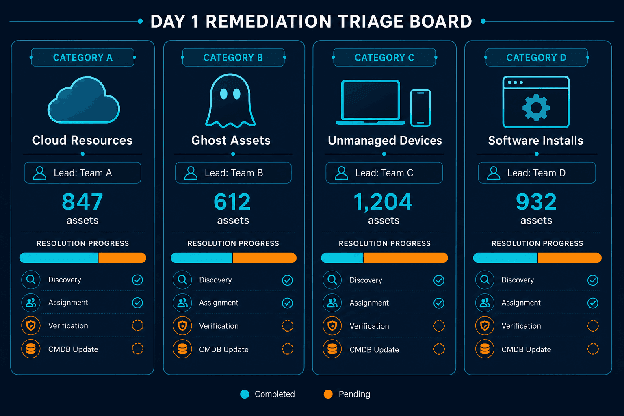
Illustrative example of a Day 1 remediation triage board showing four category columns with assigned team leads
Eight weeks after the first scan, the financial services team’s CMDB contained 3,741 assets, all verified through high-frequency discovery cycles. 106 confirmed ghost and vendor assets had been removed. The cloud resource CI gap had been closed. The unmanaged devices had onboarding tickets or had been removed. The software installs had been reconciled against active license agreements. See the audit-ready CMDB cycle methodology for the complete workflow.
The audit preparation cycle that followed took 40 percent less time than the prior year. Every CI in scope had a verified owner, a confirmed network status, and a discovery-sourced record. That is what acting on first IT discovery scan findings produces: not a bigger CMDB number, but a verified CMDB accuracy baseline every downstream process can rely on.
The gap is the truth. Build on it.
Virima builds Trusted Runtime Truth from a discovery-sourced baseline, establishing an accurate picture of what IT teams actually own. Start with the Trusted Runtime Truth overview to understand why the first scan is the most important data collection event your team will run.
Build a CMDB Baseline Your Downstream Processes Can Trust
A single discovery scan reveals the precise gap between what your CMDB says and what your environment actually contains. Acting on that gap by category builds the verified baseline that every IT process downstream depends on.
Ready to see your actual asset count? Schedule a demo and see how Virima’s discovery-sourced baseline closes the gap between what your CMDB says and what your environment actually contains.
Frequently Asked Questions
Why does the gap between a CMDB and first IT discovery scan findings tend to be so large?
Manual CMDB processes create records only when a formal provisioning or decommissioning step triggers a ticket. Every event that bypasses that process creates an asset that exists in the environment but not in the CMDB. Environments that grow faster than their update processes accumulate those gaps over time. The first discovery scan measures the total.ServiceNow, Ivanti, Halo, Jira service management, Hornbill, Xurrent.
What should we do with the ghost assets we find in the first scan?
Ghost assets with CMDB records marked as decommissioned or retired, but found active by discovery, need two actions: a confirmed network status check and a formal decommissioning record. If the device is still present with no active business use, physically remove it and update the CI record with the confirmed removal date and responsible party. If the device has been removed but its interface still responds from a stale switch port, close the CI record with a note documenting what was confirmed during network verification.
How long does it typically take to reduce the gap after the first discovery scan?
It depends on the size and composition of the gap. In the scenario described, the team reduced a 1,447-asset delta to under 200 unresolved items within six weeks by focusing on ghost asset decommissioning first and running discovery cycles every 14 days. The first two weeks of targeted remediation typically produce the largest reduction.
Does Virima’s discovery process require agents installed on every device?
Virima uses both agentless and agent-based discovery depending on environment and device type. Agentless discovery covers most devices using WMI, SSH, and SNMP without requiring software installation on target devices. Agent-based methods provide deeper software inventory data on managed endpoints. The first scan typically combines both approaches to maximize coverage across hybrid environments.
How does Virima handle cloud resources provisioned outside the change management process?
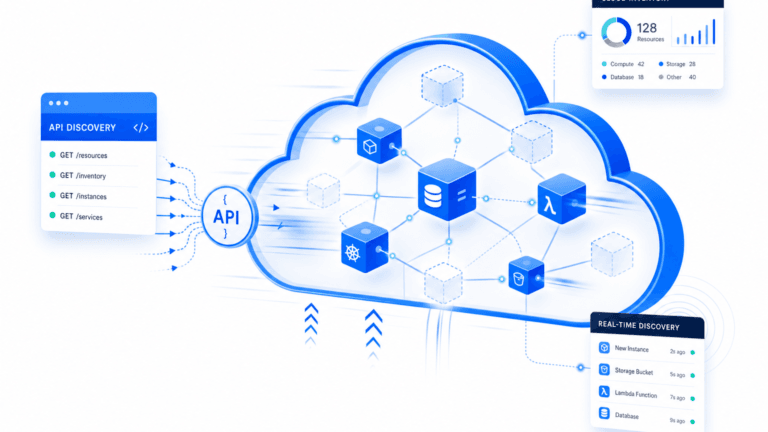
Virima’s API-based discovery connects directly to AWS and Azure to enumerate all active cloud resources, regardless of whether they have a corresponding change ticket or CMDB record. Cloud resources found in discovery but absent from the CMDB are flagged with their resource type, region, and provisioning metadata. This gives the cloud architecture team a complete list of unrecorded resources to evaluate and bring under formal asset management.
Find out how many assets your CMDB is missing. IT Asset Discovery — Virima runs an initial scan and delivers a full gap report within one week. No agent installation required on most devices.