Where Is PHP Actually Running in Your Environment?

A PHP security advisory can leave a CMDB owner searching for affected services during an urgent response. The software list may show installed packages, but application owners need to know which versions their services use.
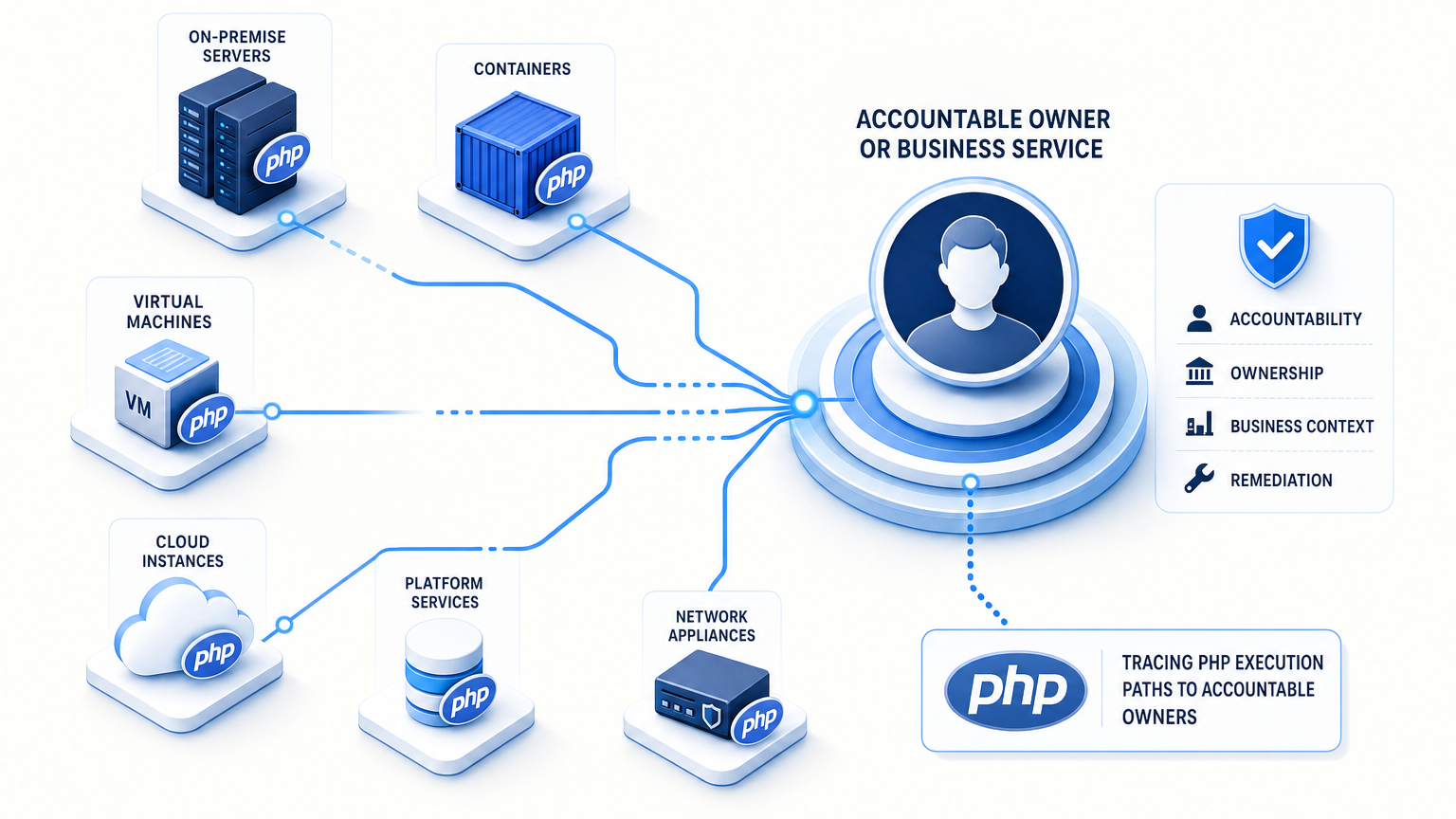
Server records, application configurations, container images, and vendor appliances each hold part of the answer. Finding where PHP is running in your environment means tracing execution evidence back to an accountable owner. A package count cannot establish which PHP executable serves a website or runs a scheduled job. The investigation needs evidence of execution, an accountable owner, and a connection to the affected business service.
How to identify where PHP is running in your environment
Start with a business service and trace the application paths that execute PHP. Those paths may include a web server, a PHP FastCGI Process Manager (PHP-FPM) pool, or a scheduled script.
Separate installed, configured, and observed evidence
Record what each source establishes before combining its findings:
| Evidence tier | What it means |
|---|---|
| Installed | A package or PHP binary exists on the host. |
| Configured | A service or job points to a PHP executable or handler. |
| Observed executing | A process or job record confirms execution at a stated time. |
| Unknown | Available evidence cannot establish whether or where PHP executes. |
An installed package narrows the search, but it does not prove that a particular application uses it. A process observation has its own time boundary, too: a scheduled job can finish before an administrator inspects the host.
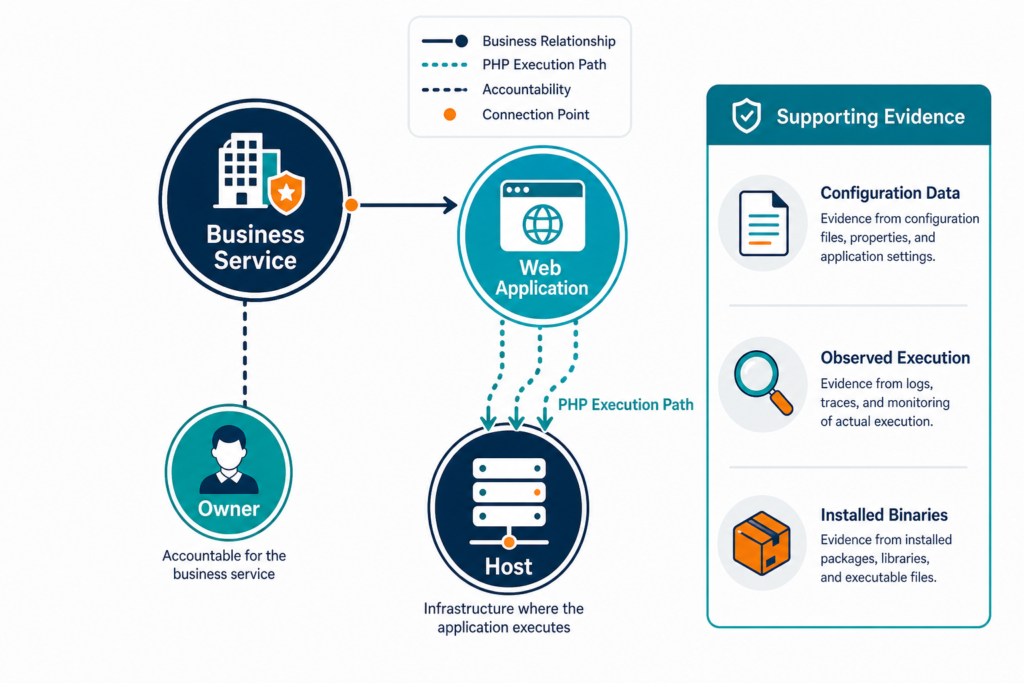
Virima calls this connected view Trusted Runtime Truth: what exists, how it connects, what changed, what could be affected, and who owns it.
Check PHP on servers and virtual machines
Begin with systems already associated with PHP applications. Review server ownership records, deployment documentation, and configuration management data. Include production, test, and staging systems within the agreed discovery scope.
Find candidate executables and processes
On a Linux host, an authorized administrator can find PHP versions across servers using read-only checks that collect initial evidence:
command -v php
php -v
ps -eo pid,args | grep -E '[p]hp-fpm|[p]hp-cgi|[l]sphp|[a]pache2|[h]ttpd'
The first command identifies the PHP executable selected by the current shell. The second reports that executable’s version. The process list identifies candidates that need further investigation.
A website may use a different binary from the shell’s default, and Apache may load PHP as a module within its own process.
Follow each candidate back to its configuration. For PHP-FPM, inspect the relevant pool and executable path. For Apache, check the loaded modules and site configuration. For scheduled work, examine the job definition and the executable it calls.
The PHP interface documentation identifies different server interfaces, including cli, apache2handler, and fpm-fcgi. An authorized application-level check can help establish which interface handles a request. Protect diagnostic output from public access, and remove temporary diagnostics after verification.
Package-manager records add another source of evidence: compare the package version with the executable path and service configuration, and record the observation time for freshness.
Can one server run more than one PHP version?
A server can host multiple PHP versions for different applications or jobs. Each application may use a separate executable or PHP FastCGI Process Manager pool. Record the application-to-handler relationship before assigning a version to a service, particularly when separate teams maintain those applications.
If the server is a virtual machine, record its cloud instance ID. Otherwise, use a stable platform identifier. Hostnames help operators recognize systems, but teams can change or reuse them.
Follow containers from image to active workload
A container host’s PHP installation may differ from the version packaged inside a container image. A repository can also specify an image that differs from the one deployed to the workload.
Check the deployed image and its execution path
Ask the platform team for the workload name, environment, deployed image reference, and image digest. Associate those details with the application and its underlying host or cloud instance. Then use approved platform tooling to inspect the workload and confirm its PHP executable and version.
An image scan can reveal software packaged in an image. A workload check establishes which image is deployed at the time of inspection. Application configuration identifies the handler or command the workload uses.
Keep those findings separate in the record: an image stored in a registry is a candidate for review, while an active deployment is what the team found running.
For short-lived jobs, review scheduler or workload history alongside the active process view. A completed job may leave no process to find. Retain its execution time and image digest with the evidence.
Does a container image tag prove which PHP version is deployed?
A container image tag can be reused or changed, so it provides limited evidence by itself. Capture the deployed image digest and inspect the PHP version in the workload or image. Compare the result with the application’s deployment configuration and execution evidence.
Container coverage depends on available data sources and permissions. Confirm the scope with the platform owner before treating a host list as a workload list.
Include appliances, hosted services, and overlooked systems
Some PHP installations belong to products rather than applications your team built. Administration interfaces and vendor-managed tools may include PHP within their distribution.
Identify the team responsible for patching
Start with the product record and its support owner to identify PHP application dependencies tied to that product. Ask the vendor which product versions contain PHP and how fixes are delivered. Record the vendor advisory or package notes that support the answer.
Access restrictions may prevent direct inspection of an appliance, so mark vendor confirmation as a separate evidence type, and record who supplied it and when.
Hosted services require the same distinction: the service owner may control application settings without host access, so request the PHP version and patch status from the provider when the agreement assigns that responsibility externally.
Review systems outside the main production application list, often surfaced when inheriting an undocumented environment:
- Acquired sites awaiting integration into standard records.
- Staging copies that remain accessible after project completion.
- Administration interfaces on separate hosts or paths.
- Scheduled jobs maintained by infrastructure teams.
- Legacy applications whose original support team has changed.
A web response can provide a lead, but missing version headers do not establish that PHP is absent. Reverse proxies and hosting configurations may hide the underlying technology.
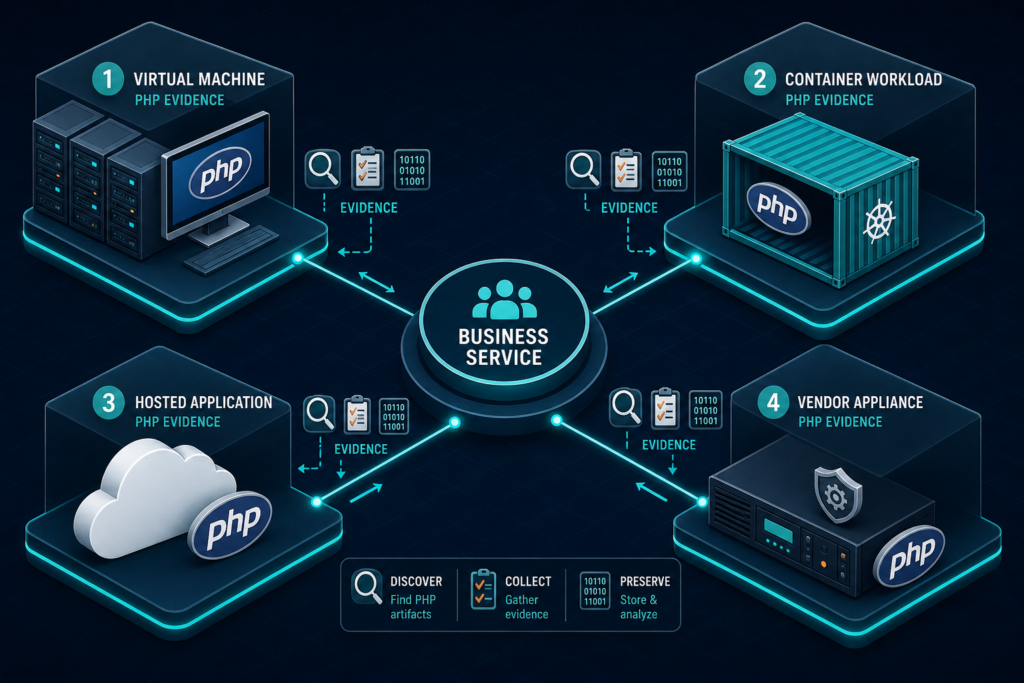
Record the evidence needed for a useful answer
The answer to where PHP is running in your environment should help another team reproduce each finding and show who can investigate a conflict or approve a change.
Connect the version to the service and owner
Use the following fields as a starting point for each record:
| Field | What to record |
|---|---|
| Service and application | The business service, application, environment, accountable owner, and the technical team responsible for the PHP configuration. |
| Location | The server or workload identifier, cloud account or data center, and relevant network address. |
| PHP evidence | The version and its source — distinguish an installed package from a configured handler or an observed process — plus the executable path or pool identifier where available. |
| Freshness and coverage | The observation time, discovery scope, and access limitations. Leave an unreachable host marked as unknown until the team obtains reliable evidence. |
| Change and support | The relevant change, vendor advisory, remediation owner, and next review date. |
Use stable identifiers when combining records: a hardware serial number can identify a physical device where appropriate, but treat a hostname as a useful label rather than a durable join key.
Suppose a package record shows a new version while the application owner reports an older process. Retain both findings and their timestamps. The owner can then inspect the active process and resolve the difference.
Assess support and vulnerability exposure separately
Once the team identifies a PHP branch and package, it can check its support status. The PHP supported versions page lists the upstream support dates for each branch.
Compare upstream dates with vendor package guidance
As of November 17, 2026, PHP lists security support for branch 8.2 through December 31, 2026, and branch 8.3 through December 31, 2027. Branch 8.1 has already passed its own support window on the same schedule. Check the current source before making a support decision.
Stitcher.io’s July 2026 survey of Composer package installs found PHP 8.1 at 5% and 8.2 at 14% of active installs, well behind that support calendar.
An upstream version number is one input to a vulnerability assessment, since operating system vendors and hosting providers may backport fixes into their packages — check the applicable vendor advisory and package changelog before classifying an installation.
Exposure depends on the affected component and configuration: record whether the application is internet-facing, internally accessible, or restricted to an administrative network, so security teams can compare the observed deployment with the advisory’s conditions and the relevant CVE details in the NIST National Vulnerability Database.
Does an older PHP version string always mean a system is vulnerable?
An older PHP version string requires investigation against the applicable security advisory. A vendor may backport a fix without adopting the newest upstream version number. Check the vendor’s package advisory, build details, and deployed configuration before recording the vulnerability status.
Connect PHP findings to change and incident decisions
An application owner needs more than a version number before approving an upgrade — the owner also needs to identify PHP application dependencies that share the execution path and know who will test them.
Verify the running service after a change
Add the relevant configuration item to the change record. Document the current handler, target version, test owner, rollback approach, and maintenance window. Include each affected application when several applications share a PHP-FPM pool or host.
After a package update, verify the running service through approved checks. A package can change on disk while an existing process uses an earlier executable or library, a gap that also complicates license audits after a device is reimaged. The application owner should confirm the normal service path after the change.
For containers, connect the remediation record to the rebuilt image and deployed digest, confirm that the active workload uses the intended image, and retain the verification evidence with the change record.
If a vendor manages the appliance or hosted platform, capture its fix reference and add the local verification available to your team, noting who checked the result and when.
Use discovery and service maps to organize the work
Virima’s IT discovery capabilities use agentless, agent-based, and API-based methods for PHP discovery across environments spanning servers, cloud instances, and containers — the combination that makes a reliable answer to where PHP is running in your environment possible at scale, not one host at a time. Scheduled discovery cycles provide observations that teams can reconcile with other records.
Review coverage before drawing conclusions
A configuration management database (CMDB) can connect discovered infrastructure to application ownership and change records. Coverage depends on credentials, network access, supported discovery methods, and available data sources.
For service impact, teams provide service definitions to ViVID™. Virima then builds dependency maps from those definitions and available relationship data. An owner can review infrastructure associated with a service before coordinating a PHP change.
Use the discovery record to identify candidates for investigation, then confirm the PHP handler and version through the technical sources available for that environment — container inspection, vendor patch verification, or vulnerability assessment.
The application owner should review missing or uncertain relationships before a change, and record any unresolved gap with an owner and follow-up date.
Prepare an answer before the next advisory
Choose one business service and trace its PHP execution path. Record the source, observation time, and team responsible for each finding. Resolve access and ownership gaps before expanding the same approach to other services. That discipline, repeated, is what keeps the answer to where PHP is running in your environment reliable through the next advisory.
Frequently asked questions
How can I find the PHP version used by a website?
Start with the website’s web server and application configuration. Identify the PHP handler or executable used for requests. Verify its version through an authorized host or workload check, because the command-line version may refer to a different executable.
Can PHP run without a web server?
PHP can execute command-line scripts without a web server. Scheduled jobs and application tasks may use a PHP executable for this purpose. Review job definitions and execution history when checking those paths.
How can Virima help identify systems that may use PHP?
Virima can collect infrastructure and installed software information through configured discovery methods. Teams can use those records as candidates for investigation and connect them to configuration items. PHP execution and patch status require appropriate technical verification.
How do service dependency maps help with a PHP patch decision?
Service dependency maps show which applications and business services sit behind a given host or workload before a PHP patch goes out. Teams provide service definitions to ViVID™, and Virima builds the maps from those definitions and available relationship data, so an operator can review what’s connected before approving a change.