
IT asset inventory management: A complete guide

Picture this: It’s the end of the quarter, and your finance team needs a report on software licenses. You rush through old spreadsheets, scattered emails, and receipts. Then you realize—no one updated the asset list after the last upgrades.
Sound familiar?
Or maybe a new hire arrives, and IT is unprepared. No laptop. No software. Plus, no access. Why? Because no one knew what inventory was available.
These small problems may seem harmless at first.
But over time, they lead to bigger issues, like overspending, security risks, or compliance failures.
Managing IT assets is more than just keeping a list. Also, you need to know where assets are, who’s using them, and if they’re secure. That sounds simple, but it’s not, especially when your business is growing and teams are spread out.
That’s where IT asset inventory management makes a difference. It helps bring structure to the mess. Further, with the right tool, you can track devices, check usage, and avoid buying what you don’t need.
As a result, you spend smarter, reduce surprises, and make faster, more confident decisions.
In this guide, we’ll show you how it works. You’ll learn what IT asset inventory management means, why it matters, and how it helps you stay in control, without the stress.
What is IT asset inventory management?
IT asset inventory management means keeping track of all your company’s hardware and software. It helps you to make sure each item is used properly from the day you get it to the day you retire it.
This inventory includes servers, laptops, phones, printers, network tools, and software license management. When you keep an updated list, it’s easier to manage everything. You can also spot unused assets, reduce waste, and plan better for future needs.
Plus, having this list supports smarter decisions. It gives you a clear picture of your IT environment. Altogether, you stay in control and avoid surprises.
IT asset inventory management vs. IT asset management system
You’ll see the difference mainly in their scope, goals, and the tools they use. Let’s break it down to help you understand clearly.
Factors | IT asset inventory management | IT asset management |
Scope | Focuses on tracking and listing all IT assets. | Covers the entire lifecycle of IT assets, from acquisition to retirement. |
Primary purpose | To maintain accurate data on asset location, ownership, and status. | To manage assets strategically for cost optimization, compliance, and value. |
Key activities | Identification, categorization, and location tracking of assets. | Acquisition, maintenance, optimization, and disposal of IT assets. |
Focus | Operational management and inventory control. | Strategic and financial management of assets. |
Compliance & risk Management | Basic tracking to ensure inventory availability and compliance. | Ensures compliance with contracts, licensing, and regulatory requirements. |
Lifecycle management | Primarily focuses on current IT inventory tracking. | Manages assets throughout their entire lifecycle, asset including depreciation. |
Tools used | Inventory tracking tools (e.g., spreadsheets, basic asset management ITAM software). | Comprehensive ITAM solutions with integration capabilities. |
Why IT asset inventory management is crucial in 2025
According to the 2025 Software Spend Report by Cledara, nearly half of unnecessary expenses came from unused tools. This applied to companies with more than 200 employees.
The root cause?
Many teams don’t have clear visibility into their IT assets. As a result, they spend money on tools no one actually uses.
Here, you’ll learn how asset inventory management system can help fix that. It also reduces waste, boosts efficiency, and supports smarter tech decisions. Overall, with the right approach, you’ll gain better control over your assets and your budget.
1. Improves visibility
You get a clear view of all IT assets across your company. This further helps you avoid confusion about what equipment you own. It also makes tracking easier when devices move between teams or locations.
2. Enhances cost management
It keeps a close watch on how you use your inventory. Consequently, you avoid buying extra tools you don’t need. You also use your resources better, which saves money.
3. Ensures compliance
You can easily meet software and regulatory rules by keeping accurate records. With proper tracking, you avoid fines or legal trouble. It also shows auditors that your systems are in order.
4. Reduces security risks
It quickly spots outdated or unknown devices on your network. These devices often have weak protection and pose risks. You can also remove or update them before problems occur.
5. Boosts productivity
Your IT team spends less time hunting down missing devices. They can also quickly find, fix, or update what they need. Subsequently, this means fewer delays and faster support for everyone.
6. Optimizes inventory use
You’ll know which assets are sitting idle and which are overworked. Real-time updates help you act fast. That way, you get the most out of your tech.
7. Simplifies audits
When your asset data is clean and current, audits become much easier. Both internal and external teams can find what they need quickly. This saves time and reduces stress.
Key components of IT asset inventory management software
To manage your IT assets well, you need a few key components. These help you stay accurate, efficient, and in control. Let’s break down the components of IT asset inventory management software.
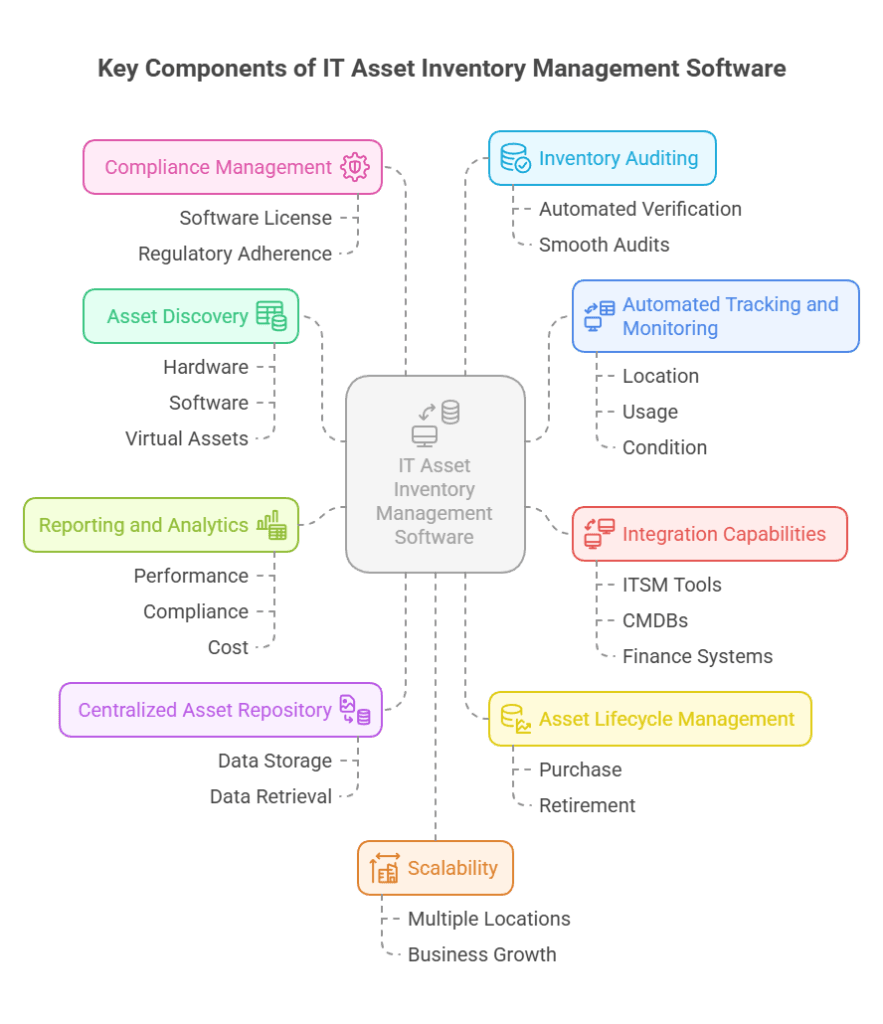
- Asset discovery is the first step. It also automatically finds and lists all your hardware, software, and virtual assets. This further saves time and ensures nothing is missed.
- Next, a centralized asset repository keeps all your asset details in one place. You can often access everything quickly without jumping between systems.
- With asset lifecycle management, you can track assets from purchase to retirement. Plus, this helps you get the most out of every asset.
- Automated tracking and maintaining give you live updates. You always know where your assets are, their condition, and how they’re used. This also reduces the risk of loss.
- Integration capabilities are also important. They let you connect with ITSM processes, CMDBs, and finance platforms. Moreover, this keeps your data flowing smoothly across teams.
- Reporting and analytics show how your assets perform. You also get insights into compliance and costs. These reports help you make smarter decisions.
- Compliance management keeps you on the right side of software licenses, security rules, and regulations. This also lowers the risk of penalties.
- When it’s time for a check, inventory auditing makes the process easy. It uses automation to verify and match your assets without the hassle.
- Finally, good tools offer scalability. You can manage assets in different locations and grow without extra stress.
How to build an IT asset inventory: Step by step best practices
Many companies are still use a mix of disconnected systems to track their IT assets. On average, they rely on eight different tools. Most of these involve manual steps. Because of that, it can take over two weeks just to create a full inventory report.
This scattered method makes IT asset management processes harder than they should be. Without a unified system, you may lose track of assets, waste time, or miss important updates.
That’s why having a well-organized IT asset inventory really matters. Moreover, it helps you keep control of your infrastructure. It also makes IT service delivery smoother and ensures you follow compliance rules.
Whether you run a startup or a large business, the right tools can make a big difference. With a smart system in place, you can boost accuracy, save time, and gain full visibility into your assets.
Step 1: Define the scope and standards
Start by figuring out what you need to track. This includes physical devices like servers, laptops, and printers. You should also list software, such as licenses and apps, along with network gear, cloud assets, mobile devices, and IoT endpoints. By knowing what’s in scope, you can build a complete and useful inventory.
Next, decide what information to collect for each asset. Keep it consistent. You should record:
- Asset type and category
- Purchase and warranty dates
- Assigned user or department
- Current status (in use, under repair, or retired)
- Location and key configuration details
This simple framework helps you keep everything clear and organized. It also gets your inventory ready for easy integration with your CMDB.
Step 2: Use automated discovery tools
Manual tracking just doesn’t work as your IT environment grows. It’s slow, error-prone, and often misses key details. That’s why using automated asset discovery tools is a better choice.
These tools scan your systems and find every connected device and application. As a result, you get real-time updates and fewer mistakes.
Even better, they help you find hidden or shadow assets that manual efforts often overlook. This means you always know what’s running in your network. So, you can make smarter decisions and avoid unexpected issues.
Top recommended tools include:
- Virima gives you unmatched visibility into your IT assets. It also uses automated discovery, dependency mapping, and live service maps. As a result, you can easily track how assets connect and affect each other.
This also helps you plan changes, avoid IT downtime, and respond faster to issues. In addition to this, it works best for enterprises with complex environments.
- Asset Panda is easy to use and budget-friendly. It’s great if you run a small or mid-sized business. You can track assets without needing a lot of setup. It also keeps things simple but effective.
- ManageEngine AssetExplorer offers a strong mix of features at a fair price. It suits growing IT teams that want more control. You get tracking, reporting, and management tools all in one place.
- Ivanti is built for large companies. Further, it offers strong security features and scales easily with your organization. You can also manage assets and keep everything secure as you grow.
- SolarWinds focuses more on network performance. It also includes basic asset tracking systems, which can work well for some teams. If your main concern is the health of your network, then this tool fits.
- ServiceNow is a full ITSM suite with asset tracking built in. It’s powerful and connects well with other systems. Large enterprises often choose it for its wide range of tools.
Basic asset management software fits different needs. Some offer simple tracking, while others, like Virima, go much deeper.
Virima doesn’t just show you what assets you have—it shows how they work together. Overall, this insight makes your IT environment easier to manage and far more reliable.
👉 Explore Virima’s capabilities by scheduling a demo today!
Step 3: Catalog and classify your assets
After you discover your assets, bring them into your inventory management system. Start by sorting them by type, location, owner, or how important they are. This step makes everything easier to manage.
Also, use tags—like marking production servers as “mission-critical”—to help you focus on what matters most.
Key fields to capture include:
- Asset lifecycle data (acquisition, warranty, and disposal dates)
- License and contract information
- Cost and depreciation details
- Department or user ownership
Platforms like Virima, ManageEngine, and Ivanti can add this data automatically. They also create visuals to help you understand your environment quickly.
If you run a small business, tools like Asset Panda and Lansweeper offer simpler dashboards. However, they still help you track everything without feeling overwhelmed.
Step 4: Select a scalable ITAM platform
Your asset inventory system should grow as your business grows. So, choose a tool that fits your current needs but also works well with future systems. This way, you won’t need to switch tools later or struggle with compatibility.
Here are some top tools, based on what you might need:
- Virima – Best for complex IT environments. It helps you find your assets, track software licenses, and map services.
- ServiceNow IT Asset Management – Great for large enterprises. It also works well with CMDB and ITIL workflows.
- Atlassian Jira Service Management (Assets) – A lighter tool that’s easy to plug into DevOps workflows.
- SolarWinds Service Desk – Combines IT discovery and ITSM in one platform.
- ManageEngine AssetExplorer – A budget-friendly option packed with features for mid-sized teams.
- Device42 IT Asset Management system– Works well if you need strong dependency mapping.
Each of these tools brings something different to the table. Virima, for example, does more than track assets. It also connects them to IT services, shows how they depend on each other using ViVID, and helps you avoid risks in daily operations.
Step 5: Integrate with ITSM and CMDB systems
Building a complete IT asset inventory software isn’t easy. A study by ESG found that only 28% of organizations believe their inventory is more than 75% complete. That means most companies may not see everything they own. Shadow IT and unmanaged cloud tools often go unnoticed.
To fix this, you need tools that can find hidden assets. Look for solutions that scan your network and discover all hardware, software, and virtual tools. This also helps you uncover that missing 25% and more. Once found, you can track and manage them properly.
But simply keeping a list of assets isn’t enough. A separate inventory makes it hard to see how everything connects. When you link your asset inventory with a Configuration Management Database (CMDB) and an IT Service Management (ITSM) platform, things change.
Now, updates happen automatically, and your workflows become faster and more accurate.
Virima helps with this by mapping assets to incidents, changes, and business services. Other platforms like ServiceNow, ManageEngine, and Ivanti also offer strong CMDB and ITSM integrations. These tools work together to keep your inventory up to date and easy to manage.
When your systems are connected, you gain big benefits:
- Assets update automatically when service requests are made.
- Teams respond faster because they know who owns each asset and its current status.
- You can also predict how changes affect services, so you avoid disruptions.
- Everyone—IT, security, and finance—sees the same clear picture.
By connecting your asset inventory to your ITSM system, you go beyond just tracking. Further, you build a smarter setup that saves time, improves service, and reduces risks.
Step 6: Maintain and audit continuously
According to Gartner, “Clients who successfully execute IT Asset Management as a discipline typically achieve 30% cost effectiveness in the first year of their initiative, and at least 5% cost savings in each of the subsequent 5 years.”
To reach those savings, you need to treat IT asset management as a continuous effort—not a one-time job. That means keeping your inventory updated and accurate at all times.
Begin by running regular discovery scans. These help you find new devices, software, or any changes in configuration. They also point out unauthorized or unmanaged assets that could create risks.
Then, add manual audits to the mix. These help confirm the accuracy of your data and show how assets move across your company.
Also, set up automatic alerts for key issues like:
- Manages software licensing and warranties
- Risky or unapproved software installs
- Assets that are missing, retired, or non-compliant
These alerts save time and help you act fast when problems arise.
Tools like Virima, Lansweeper, and ManageEngine make this easier. They support automated scans, detailed reports, and audit planning.
Virima stands out with real-time visual maps that show changes in your IT setup. This makes it simple to catch issues early and keep your data reliable.
Common challenges in IT asset inventory management
Managing IT inventory software comes with a few common challenges. These issues can slow you down, reduce accuracy, and even put security at risk.
- Lack of centralized data: When inventory information is spread across different teams or systems, it’s hard to keep track. This often leads to outdated or duplicate records.
- Manual tracking: Manual tracking creates more problems. It’s easy to make mistakes or miss updates when using spreadsheets or paper logs. Consequently, this quickly leads to delays and confusion.
- Inconsistent asset tagging: Without a standard way to label devices, you may find it hard to locate or track them. This also causes trouble during audits and increases the risk of errors.
- Obsolete assets: Obsolete assets also pose a challenge. You might not know which devices are still in use or which are just collecting dust. As a result, you spend more money and face higher security risks from outdated hardware.
- Compliance and security risks: If you don’t track inventory properly, you could miss critical updates or fail to follow rules. Old devices can hold sensitive data, leaving your organization exposed.
Thankfully, automated tools like Virima help solve these problems. It goes beyond basic tracking and brings powerful features that save time and improve accuracy.
Benefits of using advanced IT asset inventory tools like Virima
Virima is a powerful IT asset management tool that helps you stay in control of your IT setup. It gives you a simple way to track, manage, and make the most of your IT assets. This means you spend less time on manual work and more time on what matters.
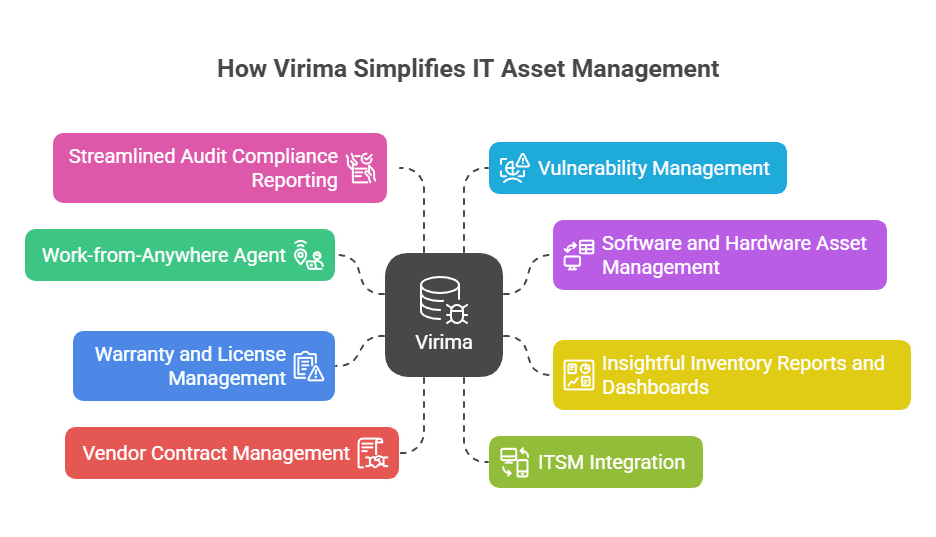
Let’s look at how Virima helps you simplify and strengthen your IT operations.
Key features of Virima’s ITAM software:
1. Work-from-anywhere agent
According to Stanford’s 2024 remote work survey, 42% of the U.S. workforce now works remotely. This change means IT teams must track devices across home offices, shared workspaces, and office buildings.
Manual methods often fail in such complex environments. Virima solves this by offering near real-time tracking of assets, even for remote employees. Its Windows discovery agent gives you full visibility into every device, no matter where it’s located.
2. Software and hardware asset management
Managing software and hardware can get messy. Virima makes it simple. It tracks asset usage, updates, and lifecycle stages for you. As a result, you avoid waste and make better use of your resources.
Overall, you stay in control without extra effort.
3. Insightful inventory reports and dashboards
Virima gives you easy-to-understand asset management reports and dashboards. These tools show performance, usage, and asset status in one place. You don’t need to dig through data to get answers.
Instead, you can spot trends quickly and take action right away. This helps you make smarter informed decisions faster.
4. Warranty and license management
Keeping up with warranties and licenses can be overwhelming. Virima handles it automatically. It also tracks expiration dates, renewals, and usage for you.
This prevents missed renewals and keeps you compliant. You save time and avoid costly surprises.
5. Vendor contract management
Managing vendor contracts shouldn’t slow you down. Virima helps you stay organized. It also tracks contract terms, renewal dates, and associated costs. This means fewer missed deadlines and better vendor relationships.
Altogether, you get more done without digging through paperwork.
6. ITSM integration
Virima connects smoothly with popular tools like ServiceNow, Jira Service Management, Ivanti, and HaloITSM. These integrations give you a unified view of your IT environment.
Later, you avoid silos and improve collaboration. Everything works together, which makes your job easier.
7. Streamlined audit compliance reporting
Audit time doesn’t have to be stressful. Virima helps you get ready with automated reports and accurate records. It further ensures you meet ITIL compliance standards without extra work.
That means fewer errors and faster approvals. You stay prepared year-round.
8. Vulnerability management
Keeping your network safe is critical. Virima helps you detect and fix security risks quickly. Moreover, you stay ahead of cyber security threats with less manual effort. This protects your data and keeps your systems running smoothly.
Tracking IT assets was chaos—until Virima changed the game
Managing IT assets used to be chaotic. But with Virima, you get a smarter, simpler way to track and manage digital assets—no matter your organization’s size. It not only streamlines discovery and inventory but also boosts efficiency, reduces costs, and enhances compliance.
With Virima, automated discovery methods—both agent-based and agentless—eliminate manual tracking. This frees your team to focus on critical tasks. Its software usage metering helps cut waste by identifying unused licenses while ensuring compliance across your environment, including remote endpoints.
Virima’s ViVID (Virima Visual Impact Display) brings your IT environment to life. It maps connections between devices, applications, and services, making it easier to spot weaknesses and act quickly. ViVID overlays add another layer of insight, showing vulnerabilities, incidents, and change requests in near real-time.
Beyond basic asset tracking, Virima gives you full IT visibility into your IT landscape. Whether you’re preparing for audits, managing risk, or planning changes, Virima makes it easier—and smarter.
Ready to take control of your IT assets? Discover how Virima can simplify your IT asset management today.
FAQs: Your questions answered!
How often should IT asset inventories be updated?
IT asset inventories should be updated continuously using automated discovery tools and reviewed manually at least quarterly. Frequent updates help track asset changes, prevent data gaps, and ensure compliance with audits and internal policies.
How does IT asset inventory management impact cost savings?
It reduces unnecessary purchases, uncovers underused physical assets, and supports better lifecycle planning. These insights help lower costs and optimize IT spending.
What compliance standards mandate IT asset inventory management?
Standards like ISO/IEC 27001, NIST, HIPAA, PCI-DSS, and SOX require proper asset tracking to ensure data security, risk management, and regulatory compliance.
What’s the difference between IT asset inventory and ITSM integration?
IT asset inventory gives you visibility into your hardware and software. In contrast, IT Asset Inventory and Service Management unifies inventory with ticketing, change and incident workflows—ensuring asset data informs and streamlines your service delivery.





