Must-have features for effective IT inventory software

As organizations grow and their IT environment becomes more complex, the need for the IT inventory system becomes significantly essential. Enter IT inventory software—a powerful solution designed to keep track of your hardware, software, and everything in between. But with so many options available, how do you choose the best IT inventory software for your needs?
In this blog, we’ll explore the top features to look for in IT inventory software. Moreover, we’ll help you find a solution that not only meets your current requirements but also scales with your business.
Feature checklists alone still leave lean and growing IT teams short when discovery lacks authority, when identity is not durable across cloud and on-prem records, and when inventory never joins ITSM cleanly. Teams that need that foundation can start with Trusted Runtime Truth: what exists, how it is connected, what changed, what will break, and who owns it.
What is an IT inventory software?
IT inventory software is a specialized tool designed to track and manage an organization’s IT assets. These assets include hardware like computers and servers, as well as software applications and licenses. The IT inventory tracking software helps organizations keep an accurate record of their IT resources, monitor their usage, and manage their lifecycle as well.
Why is IT inventory software important?
IT inventory tracking software is important because it helps in:
- Accurate tracking: Ensures current visibility from scheduled discovery and prevents asset loss.
- Efficient management: Automates tasks, saving time meanwhile educing errors.
- Cost control: Avoids over-purchasing as well as identifies underutilized resources.
- Compliance and security: Ensures adherence to licensing agreements and particularly reduces security risks.
- Improved decision-making: Provides data for informed decisions on upgrades as well as investments.
- Enhanced productivity: Streamlines processes, simultaneously allowing IT teams to focus on strategic tasks.
8 essential features to look for in an IT inventory software
Managing your IT inventory system effectively is crucial for any organization. Here are the key features your IT asset software should have:
1. Asset tracking
This feature allows you to trace all your assets and their locations. With scheduled IT asset tracking, you get a precise overview of your IT inventory software levels. As a result, you always know where everything is.
2. IT asset monitoring
IT asset monitoring as well as alert systems keep you informed of inventory and configuration changes to your network asset management software. This helps in promptly addressing any issues in your network.
3. Scheduled updates on inventory adjustments
IT inventory software should automate inventory updates on a defined discovery schedule so levels adjust as assets are deployed or removed. That cadence reduces discrepancies between the live estate and the recorded inventory without claiming event-by-event streaming.
4. Software asset management
Eventually, managing all software licenses and ensuring their IT regulatory compliance are crucial. This feature helps you keep track of license expiration and compliance status.
5. Monitoring alerts and health rules
Health rules allow you to define when and how alerts should trigger. In addition, customizable health tags help you stay compliant with your company’s standards and ensure the smooth functioning of your assets.
6. Software metering
This feature lets you track asset inventory software usage within your organization. By understanding how software is used, you can optimize costs and ensure efficient usage.
7. Analytics & reports
The ability to quickly generate reports and analytics about your IT inventory system is essential. Further, this helps you understand usage patterns and optimize your asset utilization.
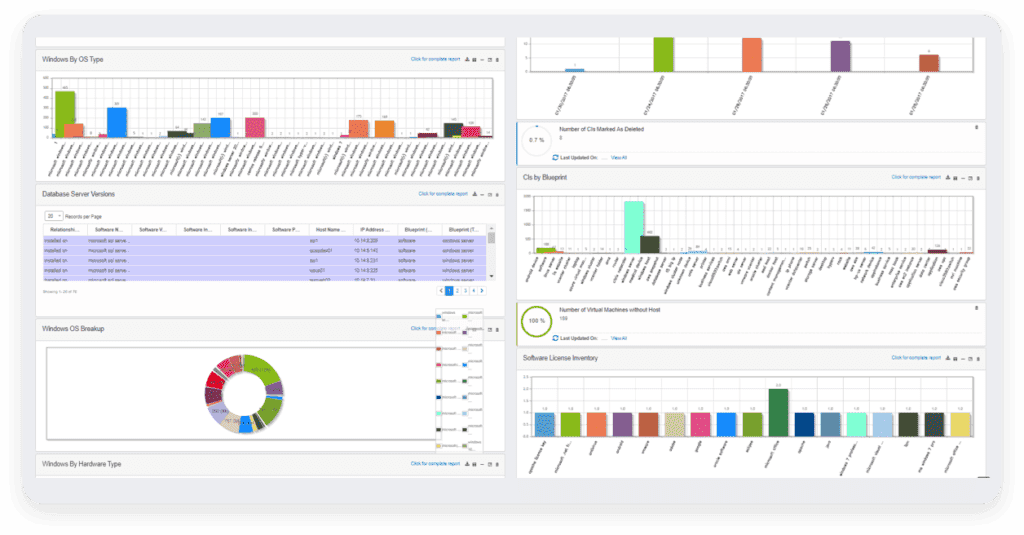
Access detailed reports through Virima’s Reporting dashboard.
8. Integrations
An ideal IT inventory software should integrate your current tools, like CRM and ERP systems. Further, this integrated approach enables you to access data from various sources, such as accounting, manufacturing, shipping, etc. It also helps you manage inventory across multiple locations.
Overall, by ensuring these features, your IT inventory tracking software will be more effective and efficient.
IT inventory software for growing and lean IT teams: features that still matter
Growing and lean IT teams still need the same eight capabilities, but the bar is different when headcount is tight. A feature checklist fails when discovery cannot speak with authority, when two systems cannot agree on the same device, or when inventory never reaches the ticket and change tools the team already runs.
Discovery authority over spreadsheet catch-up. Small teams cannot spare cycles to re-key every laptop, server, and cloud instance. Prefer platforms that discover hardware, software, and cloud resources on a scheduled cycle, write first-seen and last-seen dates, and surface gaps against the prior run. Agentless reach for network devices and servers, plus agents where laptops leave the office, should feed one inventory record rather than two competing lists.
Durable identity, not hostname as the only key. Hostnames rename, clones appear, and cloud instances recycle. Lean operations stay accurate when records join on serial numbers, cloud instance IDs, or other durable identifiers so the same CI is not double-counted after a rebuild. That join is what keeps license counts, warranty status, and owner fields trustworthy when the estate grows faster than the team.
ITSM join on lean headcount. Inventory that stops in a standalone console forces manual copy into service desk and change work. Look for handoff into the ITSM tools you already use so discovered assets, owners, and relationships travel with the ticket. One integrations path is enough for evaluation; the test is whether a newly discovered server can open or enrich a change without a side spreadsheet.
How the eight features apply when the team is small. Asset tracking and monitoring matter most when they reduce fire drills, not when they add another dashboard. Scheduled inventory updates beat stale quarterly audits. Software asset management and metering protect budget when renewals land without a dedicated SAM analyst. Analytics should answer owner, location, and last-seen questions in one export. Integrations should prefer ITSM and cloud sources over a long wish list the team will never wire.
For teams that want full discovery, CMDB, service mapping, and ITAM capability without an enterprise-only path, Business Pro is the right-sized Virima option to evaluate alongside a demo of the broader platform.
How to choose the right IT inventory software
Selecting the best IT inventory software is crucial for an effective IT inventory system. Here are some key factors to consider:
1. Identify your needs
- Assess current inventory: Understand what assets you have despite their management requirements.
- Determine scope: Decide if you need to manage only IT assets or include non-IT assets as well.
2. Evaluate features
- Automated IT discovery: Look for IT inventory software that discovers and tracks assets on a defined schedule and keeps first-seen and last-seen dates current.
- Dependency mapping: Ensure the IT asset software can significantly map dependencies between assets.
- Lifecycle management: Check if the IT inventory tracking software manages the entire asset lifecycle management.
3. Ensure usability
- User-friendly interface: Choose IT inventory software with an intuitive interface to simplify training as well as usage.
- Integration capabilities: Ensure it integrates seamlessly with your existing systems and tools.
4. Check for security
- Role-based access control: Verify that the IT inventory software provides secure access control.
- Compliance management: Make sure IT inventory tracking software helps you stay compliant with relevant regulations and standards.
5. Consider cost and scalability
- Budget: Align the IT inventory software cost with your budget.
- Scalability: Finally, choose the IT inventory tracking software that can grow with your business needs.
By carefully considering these factors, you can choose the right IT inventory software to meet your business needs and enhance your IT asset management process.
Why choose Virima ITAM for IT inventory software?
Managing physical inventory analogous to IT infrastructure can be daunting in today’s business world. Traditional IT asset software focuses on equipment and tools. However, Virima IT Asset Management (ITAM) offers a comprehensive solution. It seamlessly integrates physical and digital inventory management.
Virima ITAM does more than basic asset tracking. Especially it unifies IT and non-IT assets on a single platform. Here are some benefits of choosing Virima ITAM for IT inventory software.
Automated discovery and dependency mapping
Virima discovery finds IT assets across network and cloud sources on scheduled cycles. After service definitions are provided, ViVID™ Service Mapping builds dependency maps so inventory is more than a flat list. That path reduces manual data entry and keeps the asset record tied to service context.
Complete asset visibility
Gain a 360-degree view of all inventory, including hardware, software licenses, furniture, and machinery. Additionally, Virima ITAM’s asset discovery tool ensures all inventory is tracked and accounted for.
Simplified asset management
Virima ITAM streamlines managing IT and non-IT assets. You can also enhance the asset lifecycle management process, track maintenance schedules, and ensure regulatory compliance from a centralized platform.
Enhanced security and control
Role-based access control ensures that only authorized personnel access sensitive inventory information. Further, you can track inventory usage and identify potential IT security gaps with ease.
Improved decision-making
Virima ITAM provides valuable data and analytics for informed decisions about inventory acquisition, deployment, and retirement as well. You can effectively optimize resource allocation and make smarter investment choices.
Reduced costs
By implementing Virima ITAM, you can explicitly minimize asset loss, theft, and misplacement. Moreover, you can also optimize asset utilization and maintenance schedules to extend inventory lifespan and promote IT cost optimization.
Go beyond basic IT inventory software with Virima ITAM
An effective IT inventory system is essential in today’s competitive business landscape. Traditional IT inventory software offers valuable functions, but Virima ITAM takes it to the next level. It integrates physical and digital inventory management within a single platform.
Moreover, Virima ITAM offers robust features like automated asset discovery, compliance management, and detailed reporting. These features also empower you to make data-driven decisions and optimize your inventory lifecycle.
Lean and growing teams can also review Business Pro for a full-platform path sized to their estate, then request a free demo of Virima ITAM to see discovery, inventory, and service context on their own shortlist criteria.
Frequently asked questions
What features matter most in IT inventory software for a small IT team?
Prioritize authoritative discovery on a schedule, durable asset identity (serial or cloud instance ID), software license visibility, and a clean handoff into your ITSM tool. Dashboards help only after those four stay accurate without daily manual cleanup.
How is IT inventory software different from a CMDB?
IT inventory software focuses on what you own and where it is. A CMDB adds relationships, owners, and change context so teams can see blast radius before they act. Many organizations run inventory first, then extend into CMDB and service maps as dependency questions grow.
How often should IT inventory discovery run?
Run discovery on a defined schedule that matches how fast your estate changes, and keep first-seen and last-seen timestamps on every record. High-change segments such as cloud accounts often need more frequent cycles than stable network gear. Avoid relying on a one-time import that ages out within weeks.
Does Virima replace my ITSM tool for inventory work?
No. Virima supplies discovery-sourced inventory, CMDB depth, and service maps, then joins that data to the ITSM platforms teams already use. The inventory layer feeds tickets, changes, and audits with current asset truth.
What is Virima Business Pro for IT inventory needs?
Business Pro is Virima’s right-sized path for teams that need full discovery, CMDB, service mapping, and ITAM capability without an enterprise-only buying motion. Use it when lean headcount still requires authoritative inventory and ITSM join, then validate fit in a demo.