IIS SSL/TLS Certificate Discovery: Closing the CMDB Blind Spot Before the 47-Day Mandate

IIS SSL certificate discovery — the process of finding and recording certificates bound to IIS sites as CMDB configuration items — is the foundation any certificate renewal workflow depends on. Without it, every IIS web server in your environment that binds SSL/TLS certificates to specific sites and ports is an expiry risk your CMDB can’t see. When those certificates expire unnoticed, services go down, browsers reject connections, and security controls silently break.
The recurring cause isn’t negligence — it’s that most IT teams have no authoritative inventory of which certificates are bound to which IIS servers, what domains they cover, and when they expire. With TLS certificate validity already reduced to 200 days as of March 2026 — and on a mandatory path to 47 days by 2029 — that gap is getting significantly more expensive to ignore.
IIS SSL/TLS Certificate Discovery: Closing the CMDB Blind Spot Before the 47-Day Mandate
Why IIS SSL/TLS Certificates Are an IT Visibility Gap
Windows certificate stores and IIS site bindings sit outside the standard discovery scope most teams configure. A typical IT discovery scan captures server hardware specs, operating systems, installed software, and network interfaces. It does not, by default, enumerate the certificates bound to IIS sites on those servers or record their expiry dates as configuration item (CI) attributes in the CMDB.
The result is a class of configuration data that matters enormously to security and operations teams but lives in no authoritative system. Engineers check certificates manually when an incident forces the issue, or rely on spreadsheets that drift out of sync within weeks. NIST SP 1800-16 (NCCoE) identifies the inability to locate all TLS server certificates across enterprise environments as the foundational gap in certificate lifecycle management — one that falls disproportionately on internal IIS servers running applications, staging environments, and middleware services that face no external monitoring pressure.
The scale of the problem compounds as renewal cycles shrink. A 2025 analysis by CyberArk found that managing 1,000 certificates manually runs approximately 4,000 hours per year at current validity periods. As lifetimes drop, those same 1,000 certificates will generate a 12x increase in renewal events — roughly 48,000 hours annually by 2029. Manual processes break long before 47-day certificates arrive. Discovery has to come first.
Want to see which IIS certificates are missing from your CMDB right now? Book a 30-minute IIS certificate discovery walkthrough →
What is IIS SSL/TLS certificate discovery?
IIS SSL/TLS certificate discovery is the process of automatically identifying and recording SSL/TLS certificates bound to IIS websites on Windows servers. It captures the certificate’s common name, subject alternative names, thumbprint, expiry date, issuer, and site binding details — hostname, port, and protocol. These attributes are stored as configuration items in a CMDB for ongoing visibility and governance.
Why Certificate Monitoring Tools Don’t Close the CMDB Gap
SSL certificate monitoring tools — SolarWinds Server & Application Monitor, ManageEngine Key Manager Plus, Site24x7 — track certificate expiry on external-facing HTTPS endpoints. So they’re useful for public services. They don’t solve the IIS visibility problem for IT operations teams, because the gap isn’t in monitoring — it’s in the CMDB.
External scanning tools miss certificates on internal applications, staging servers, and middleware services that aren’t exposed outside the perimeter. These are precisely the certificates that expire unnoticed. They also don’t build configuration relationship context: a certificate expiry alert tells you a cert is expiring, but a certificate CI in a CMDB tells you which IIS site it secures, which server that IIS instance runs on, which network segment it sits in, and which business service depends on it. That chain is the difference between a security alert and a change impact analysis.
Device42 does include some certificate discovery in its autodiscovery scope. But the relationship-aware service mapping that connects certificate CIs to live service dependency context — including blast radius and change risk — requires the relationship context that ViVID™ service maps provide. Certificate data in a standalone monitoring tool also has a separate owner, a separate update cadence, and no connection to the change management or incident records running through your ITSM.
What Changes Now That TLS Lifetimes Are Shrinking
The CA/Browser Forum’s Ballot SC-081v3 (April 2025) phases down TLS certificate validity in steps. The 200-day maximum took effect March 15, 2026 — so if your team renewed certificates in late 2025 at the 398-day limit, those renewals won’t carry you as far as expected. The next milestones: 100 days by March 2027, and 47 days by March 2029.
The harder operational problem isn’t issuance. Certificate authorities and ACME tooling handle issuance reasonably well for public-facing services. The real challenge is visibility. If your CMDB doesn’t know which certificates exist, which IIS sites they’re bound to, and when they expire, you can’t build a reliable renewal workflow around them — automated or otherwise. Discovery precedes automation.
Why do IIS SSL certificates expire unnoticed in enterprise environments?
IIS SSL certificates bound to internal applications and staging services fall outside external monitoring tools, which focus on public HTTPS endpoints. They also fall outside standard CMDB discovery scopes, which capture server hardware and software but not certificate bindings. Without a discovery process that explicitly enumerates IIS site bindings and Windows certificate stores, these certificates have no expiry tracking in any authoritative system — making unnoticed expiry a structural problem, not a human one.
What Virima Discovers in IIS Certificate Discovery
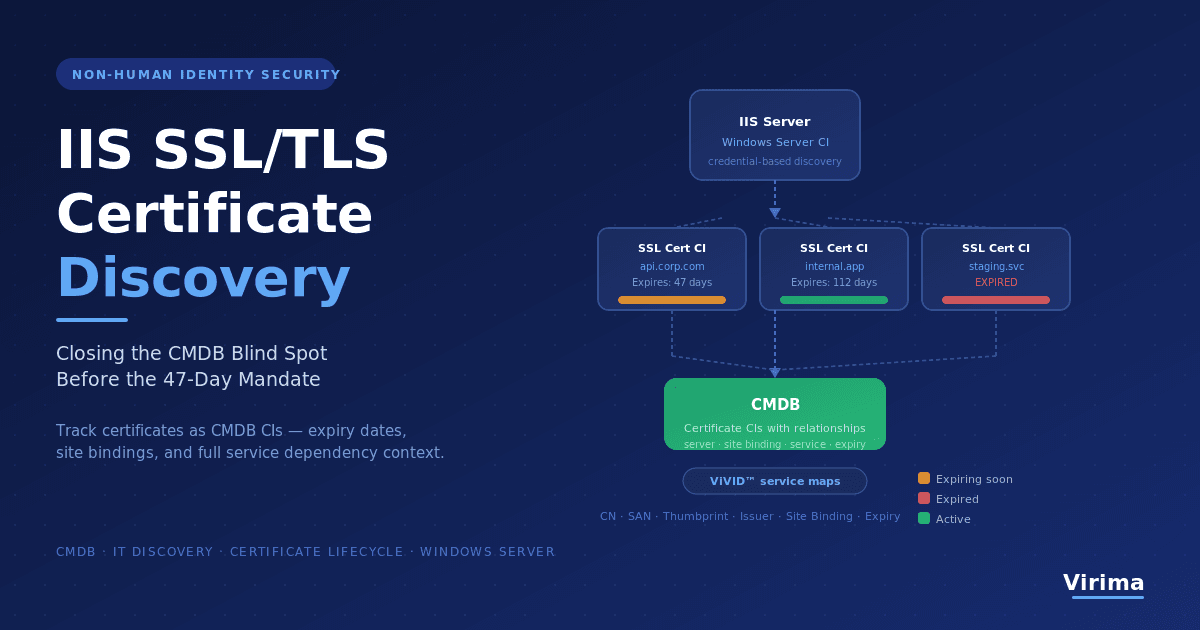
Virima v6.1.2 adds IIS SSL/TLS certificate discovery as part of its Windows server IT discovery coverage. During scheduled discovery cycles, Virima enumerates the certificates bound to IIS sites on each discovered Windows server and creates or updates certificate CIs in the CMDB. Each CI captures the attributes security engineers and configuration managers need to manage certificate risk without a separate scanning tool:
- Common Name (CN) — the primary domain or hostname the certificate was issued for
- Subject Alternative Names (SANs) — all additional hostnames and domains covered by the certificate
- Thumbprint — the certificate’s unique fingerprint for deduplication and tracking
- Issuer — the certificate authority or internal CA that issued the certificate
- Validity window — not-before and not-after dates, with expiry prominently recorded
- Site binding details — the IIS website name, port, and protocol the certificate is bound to
- Host server — the Windows server CI the IIS instance runs on, establishing a CI relationship in the CMDB
These certificate CIs aren’t standalone records. They carry relationships to the server CI and the IIS site binding — so your CMDB reflects not just that a certificate exists, but where it’s deployed, what it secures, and what the hosting infrastructure looks like. Discovery runs on the same credential-based scanning model Virima uses for its broader agentless and agent-based Windows server coverage. No dedicated certificate-scanning tool is required.
How does Virima discover SSL/TLS certificates on IIS servers?
Virima uses its Windows server discovery process to enumerate IIS site bindings and the certificates assigned to each binding. During discovery cycles, it reads the Windows certificate store and IIS configuration on each in-scope server, extracts certificate attributes (CN, SANs, thumbprint, issuer, expiry dates, and binding details), and creates or updates certificate CIs in the CMDB. Each certificate CI is linked to the server CI and the IIS site binding, establishing a full configuration relationship.
How Certificate CIs Connect to Your CMDB and Service Maps
Tracking certificates as configuration items in the CMDB gives security engineers and configuration managers something no standalone certificate scanner provides: relationship context. A certificate CI in Virima doesn’t exist in isolation. It connects upward to the IIS service it secures, and from there to the server, network segment, and business service it supports.
That relationship chain answers questions monitoring tools can’t: which business services are at risk if this certificate expires? Which teams own the servers that host expiring certificates? Is this certificate protecting a service that’s also linked to an open change request?
When service definitions are configured in ViVID™ service maps, certificate CIs become part of the dependency picture for those services. A service map that includes certificate bindings gives operations teams accurate blast radius context before a certificate-related outage propagates — and gives security teams the configuration evidence they need for audit readiness. For a broader view, the certificate lifecycle management best practices guide covers how relationship-to-service context makes renewals traceable through change management.
Should SSL/TLS certificates be tracked as CIs in a CMDB?
Yes. An SSL/TLS certificate bound to an IIS site is a configuration item with a defined lifecycle, an expiry date, an issuer, and a direct relationship to the services it enables. Tracking certificates as CIs in a CMDB means their expiry dates, binding context, and ownership are visible alongside the server and service CIs they support. This makes certificate renewals traceable through change management and ensures expiry risk surfaces in operational dashboards rather than through outage alerts.
Why Configuration Managers Need Certificate Data in the CMDB
Configuration managers working to build an accurate CMDB face a consistent challenge: configuration data that matters for change impact analysis and audit readiness doesn’t make it in because no discovery process captures it. Certificates are a textbook example.
An upcoming change to an IIS server carries more risk if that server hosts certificates expiring within 30 days — but only if the CMDB knows that. A compliance audit asking for certificate lifecycle evidence can’t be satisfied by a spreadsheet last refreshed six months ago. Configuration managers applying CMDB best practices for application servers need certificate data in the same authoritative system as the rest of the configuration estate, not a separate tool with a separate owner and separate update cadence.
Virima keeps certificate discovery inside the same high-frequency discovery process that populates the rest of the CMDB. Certificate CIs update on the same schedule as the server CIs they’re bound to — so data stays current without a separate certificate-specific scan or manual reconciliation step.
Certificates as Trusted Runtime Truth for Security and Operations
Your security teams and IT agents can only make trustworthy decisions from data that is live, traceable, and sourced directly from your infrastructure. Certificate data is no different. When a certificate CI carries source attribution back to a specific IIS server discovery scan, the security engineer reviewing an expiry dashboard knows exactly where that data came from and when it was last verified.
For organizations managing non-human identities alongside machine identities — service accounts, API keys, certificates — the cybersecurity asset management foundation Virima builds means certificates aren’t a separate visibility problem. They’re part of the same discovery-sourced ground truth as every other CI in your environment. That level of trust in the data separates a CMDB that operations teams use from one that gets bypassed in favor of tribal knowledge and spreadsheets.
Explore how Virima delivers discovery-sourced ground truth across your configuration estate — from servers and software to certificates and service dependencies: Trusted Runtime Truth for agentic IT
Frequently Asked Questions
Why do SSL certificate expirations still cause outages even in well-managed IT environments?
Most certificate monitoring tools track public-facing HTTPS endpoints. They miss certificates bound to internal IIS applications, staging servers, and middleware services that aren’t externally accessible. These certificates expire without triggering any external alert, and because they’re not tracked as CIs in the CMDB, there’s no internal expiry dashboard to catch them. The gap is structural: the monitoring perimeter and the discovery perimeter don’t match.
What makes IIS certificate discovery harder than general endpoint discovery?
IIS certificate discovery requires inspecting two separate data sources on each Windows server: the IIS configuration (to identify site bindings) and the Windows certificate store (to read certificate attributes). Standard endpoint discovery captures OS and hardware data but doesn’t inspect application configuration or certificate stores by default. That’s why IIS certificate data is absent from most CMDBs even when those environments have mature discovery in place.
How does the 47-day TLS certificate mandate affect IT operations teams?
The CA/Browser Forum’s Ballot SC-081v3 reduces maximum TLS certificate validity in phases — 200 days as of March 2026, 100 days by March 2027, 47 days by March 2029. For IT operations teams, this collapses the renewal window. A CyberArk analysis found the same 1,000 certificates that require 4,000 hours to manage annually today will require roughly 48,000 hours per year by 2029 — a 12x increase driven entirely by renewal frequency. Discovery tooling that keeps certificate expiry data current in the CMDB is the foundation any renewal workflow depends on.
How does Virima discover SSL/TLS certificates bound to IIS servers?
Virima uses its existing Windows server IT discovery to enumerate IIS site bindings and associated certificates during each discovery cycle. It extracts the certificate’s common name, SANs, thumbprint, issuer, expiry dates, and site binding details, then creates or updates certificate CIs in the CMDB with relationships to the host server CI. No dedicated certificate-scanning tool is required.
What certificate attributes does Virima capture in the CMDB?
Virima captures the certificate common name (CN), subject alternative names (SANs), thumbprint, issuer, not-before and not-after validity dates, the IIS site binding (website name, hostname, port, protocol), and the host Windows server. Each certificate CI carries a relationship to the server CI and the IIS site it secures, placing certificate data in full CMDB context alongside the rest of the configuration estate.
Get Full Certificate Visibility Across Your IIS Estate
IIS SSL/TLS certificate discovery is one component of Virima’s entity-first approach to CMDB coverage: every configuration entity that carries operational risk should appear in your CMDB as a CI with relationships, ownership, and lifecycle data. Certificates bound to your IIS servers meet that definition. The CMDB auto-discovery foundation is already in place. IIS certificate discovery extends it to cover the blind spot that causes preventable outages.
See how Virima brings certificate discovery, server inventory, and service mapping together in a single platform. Schedule a demo