
![ServiceNow CMDB Workspace: Complete Setup & Best Practices Guide [2026]](https://virima.com/wp-content/uploads/2026/03/CMDB-WITH-AUTOMATED-DISCOVERY-30.png)
ServiceNow CMDB Workspace: Complete Setup & Best Practices Guide [2026]

If you are setting up the ServiceNow CMDB Workspace for the first time, trying to get more out of it, or troubleshooting why your CMDB keeps drifting, this guide covers all three.
It walks through what the workspace does, how to access it, what changed in 2025 and 2026, how to set it up for sustainable accuracy, and where the gaps are that third-party tools like Virima fill.
One thing upfront: the workspace is only as valuable as the CI data feeding into it. Getting the interface right is the easy part. Keeping the data accurate is where most CMDB deployments run into trouble and where the real work starts.
Why CMDB matters for modern IT service management
A well-maintained configuration management database is the operational foundation of ITSM. Without accurate CI data, incident response slows down, change approvals become educated guesses, and audits turn into manual scrambles.
Four reasons it deserves serious attention:
- Faster incident resolution. Knowing the relationships between configuration items helps you find root causes fast. Without accurate CI data, troubleshooting is guesswork — expensive, time-consuming guesswork that compounds with every incident.
- Better change management. Changes to one CI often ripple across others. A healthy CMDB surfaces those dependencies before a change causes unplanned downtime. Change management without this visibility is a controlled gamble.
- Stronger compliance. Auditors need accurate records of what exists in your environment, who owns it, and what changed. A well-populated CMDB answers those questions without a last-minute scramble.
- Smarter IT asset management. Knowing what you have — including full lifecycle status — feeds directly into procurement decisions, license compliance, and cost control. The CMDB tracks CI relationships and dependencies;
Virima’s IT Asset Management layer tracks ownership, financials, and lifecycle data tied to the same assets. Together, they give you a complete picture of your environment.
What happens when you don’t maintain your CMDB?
An outdated CMDB is often worse than no CMDB at all. Teams make decisions based on stale data. Incidents take longer to resolve because dependency maps no longer reflect reality. Change risk gets underestimated.
The CMDB health dashboard surfaces data quality issues, but one of the most damaging problems it reveals is record duplication. A focused approach to preventing ServiceNow CMDB duplicate CIs addresses the root causes of duplication during discovery sync, reconciliation rules, and import set configuration rather than treating duplicates as cleanup tasks after the fact.
Gartner estimates that 75% of CMDB deployments fail to deliver on their intended goals due to quality and completeness issues — a number that quietly drives up MTTR and failed change rates across the organization. Keeping the CMDB current is not optional. It is what makes every downstream IT process more reliable.
The CMDB workspace provides the visibility foundation for day-to-day CI management, but organizations looking to move from reactive to predictive operations should explore how ServiceNow AIOps leverages workspace data for intelligent alert grouping, noise reduction, and anomaly detection that accelerate incident response beyond what manual CMDB lookups can achieve.
What is the ServiceNow CMDB workspace?
The CMDB workspace in ServiceNow is the central platform for managing configuration items (CIs) and their relationships. It gives IT teams a unified view of the IT environment through dashboards, search tools, and health metrics without jumping across multiple modules.
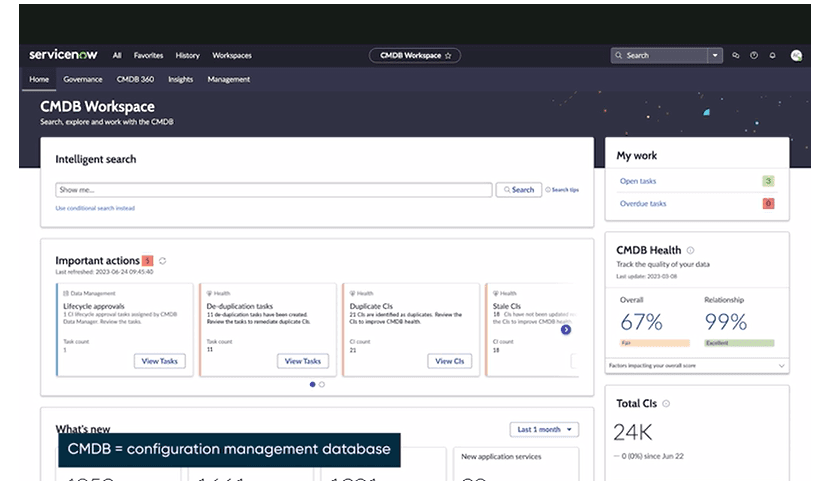
The workspace delivers six core capabilities:
- Centralized CI management: one view of all assets and configurations, no data silos
- Near real-time visibility: current insights into asset health, CI relationships, and recent changes
- Streamlined change management: visualize how a change affects the broader ecosystem before it happens
- Enhanced data quality: CMDB Health Score dashboards monitor correctness, compliance, and completeness
- CI class manager: manage CI types and classes for consistent data categorization
- CMDB health dashboard: visual metrics to detect anomalies and outdated records
What is the ServiceNow CMDB workspace used for?
The ServiceNow CMDB workspace is the central interface for managing configuration items and their relationships across the IT environment. It consolidates CI search, health scoring, activity tracking, and task management into one view — supporting incident response, change management, and compliance.
How to access the ServiceNow CMDB workspace
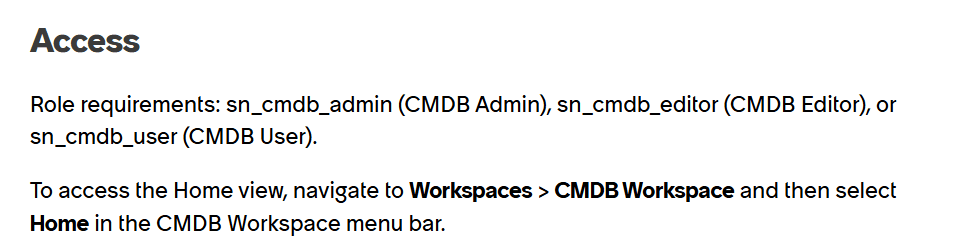
Navigate to Configuration > CMDB Workspace from the main navigation menu in your ServiceNow instance. The workspace is part of the Now Platform and is activated by default in most enterprise deployments.
Role-based access controls what each user can see and manage. Admin users see all CI classes and tasks; standard users see only the CIs assigned to their groups or managed by them. If the workspace is not visible in your navigation, check activation status with your ServiceNow admin — availability depends on your license tier and which modules are active.
Key features and components of the ServiceNow CMDB workspace
CI search
Search for CIs using up to five criteria based on the chosen class. Click any result to see full details, including a timeline, health overview, and all attributes. The Zurich release added focused IP address search, letting you enter an IP directly to find all associated CIs — a significant time-saver during incident triage.
CMDB health
The health dashboard displays metrics for CIs and their relationships. The overall health percentage reflects three factors: correctness, compliance, and completeness. The Relationship Health percentage covers orphan, duplicate, and stale relationships. Click any percentage to drill into the underlying CMDB Health or Relationship Health dashboards.
ServiceNow Support — CMDB Health KPIs: What they mean, how scores are calculated.
CI overview dashboard
A snapshot of all CIs grouped by category: Applications, Databases, Servers, and more. Select a category to explore its classes. You can also build custom class groups to match your team’s view of the environment.
Recent activity
Charts show activities from the last seven days across Application Services, CIs, Discovery, and Service Mapping. This gives team leads a quick read on what changed and where — without digging through logs.
My CIs
A list of the CIs you personally manage, organized by class. You also see CIs where your group is assigned to the CIs Managed by Group attribute, useful for distributed teams with shared ownership.
Open and overdue tasks
Lists all CMDB Data Manager tasks assigned to you. Overdue tasks are flagged separately so nothing slips through without visibility.
CMDB 360
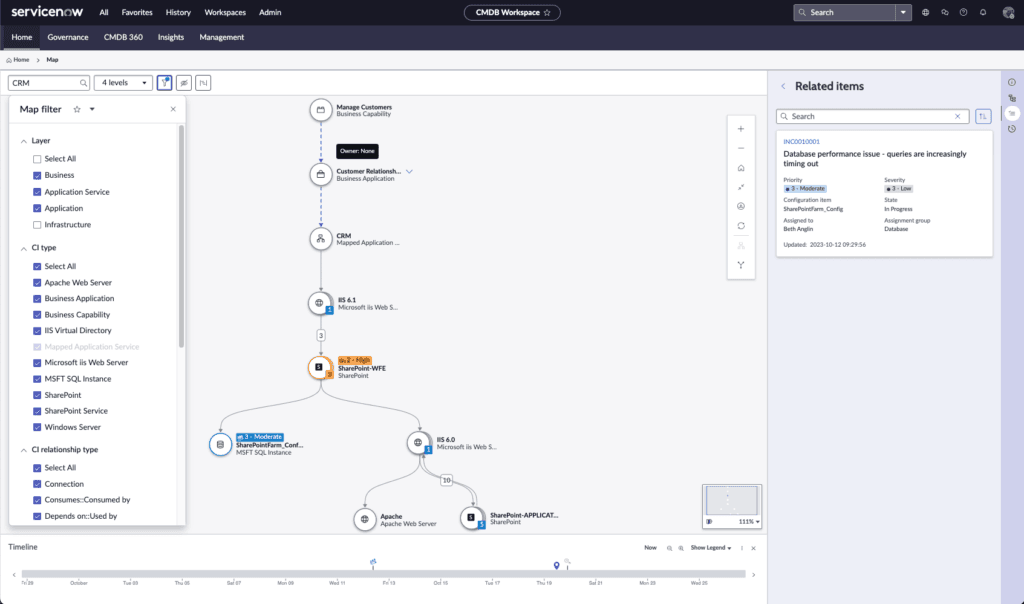
Added in recent releases, CMDB 360 provides a full history of all discovery sources that have updated a given CI. This is particularly useful when conflicting data appears you can identify which source is most reliable and trace exactly when discrepancies were introduced.
What’s new: 2025/2026 ServiceNow CMDB Workspace enhancements
ServiceNow shipped meaningful updates across the Yokohama and Zurich releases. If your workspace configuration has not been reviewed since 2023, several of these warrant immediate attention.
Service Graph Workspace
The most significant structural change is the Service Graph Workspace —a redesigned, persona-driven interface that runs alongside the existing CMDB Workspace. It is available to users with the sn_cmdb_admin role and can coexist with your current setup without disruption.
Service Graph Workspace is organized around three areas:
Data Owner Home. Manage the CMDB data you own or oversee. View related data sources, health metrics, pending tasks, and recent activity in one place — without needing to navigate across multiple modules.
Explore & Search. Browse CMDB data without needing deep knowledge of the underlying data model. AI-driven search lets users describe what they are looking for in natural language; the system interprets intent, navigates CI relationships, and surfaces results.
Tasks. Centralized access to Certification, Attestation, and Lifecycle approval tasks from CMDB Data Manager.
The workspace lowers the barrier for CMDB management particularly for data owners who are not daily CMDB admins.
Now Assist for CMDB
Now Assist for CMDB brings generative AI to configuration management. Three capabilities stand out:
Natural language CMDB search. Describe what you are looking for in plain language. The AI interprets your intent, navigates CI relationships, and returns insights that would typically require deep CMDB expertise to surface manually.
Automated data remediation. AI-driven recommendations for resolving data quality issues — incomplete attributes, stale records, duplicate CIs — with suggested fixes rather than just flags.
Real-time intelligence. Proactive alerts for data anomalies before they affect downstream ITSM processes.
Now Assist for CMDB is available as a separate store application and requires appropriate licensing. Verify availability with your ServiceNow admin before planning a rollout.
Zurich release: CMDB Workspace V7.6
The Zurich release (December 2025) delivered CMDB Workspace V7.6 with several targeted improvements:
- CMDB Advisor for HAM (Hardware Asset Management) integration
- Data Foundations Mainline Certification for CMDB and CSDM alignment
- Enhancements to CI Class Models for more accurate classification
- Focused IP address search in CI keyword lookup
These updates are available through the ServiceNow Store app for instances that have not yet been upgraded to Zurich directly.
Improved Relationship Health scoring
The health scoring model has been refined to surface relationship quality issues more precisely specifically orphaned CIs and stale dependencies that accumulate in rapidly changing environments. Relationship Health now decomposes into sub-scores, giving configuration managers a cleaner view of where cleanup effort should go first.
CMDB Workspace setup: best practices for 2026
Getting the workspace running is straightforward. Keeping it accurate is not. These practices apply whether you are setting up from scratch or recovering from data quality decay.
For a comprehensive breakdown of data governance and reconciliation rules, see ServiceNow CMDB best practices.
Start scoped, then expand. Do not try to onboard every CI class at once. Start with one critical service or application, something with clear incident and change history and build your CMDB around it first. Prove the value before you expand.
Establish CI ownership before you build. The most common cause of CMDB failure is unclear ownership. Assign specific individuals or roles to each CI class. Create documented policies for adding, updating, and retiring CIs. Without this, data quality degrades regardless of tooling.
Follow the Common Service Data Model (CSDM). ServiceNow’s CSDM provides a consistent framework for structuring CI relationships. Deviating from it early creates technical debt that compounds as you scale.
Use IRE for all external data sources. ServiceNow’s Identification and Reconciliation Engine (IRE) should be the entry point for all third-party discovery data — including Virima’s. It prevents conflicting records from compounding over time and ensures external data integrates cleanly into existing CI records.
Set a discovery schedule and stick to it. Configuration drift is inevitable in any environment that changes regularly. A fixed cadence — daily for cloud infrastructure, weekly for on-premises is the only reliable way to keep CI data current. Manual audits supplement automation; they do not replace it.
Monitor health scores continuously. The CMDB Health dashboard is not a one-time setup check. Schedule regular reviews weekly for active environments, monthly at minimum and address score drops before they cascade into operational failures.
The CMDB workspace provides operational views for day-to-day CI management, but governance teams and leadership need aggregated metrics beyond individual CI records. Pairing workspace usage with structured ServiceNow reporting ensures that CMDB health scores, stale CI counts, and compliance posture reach the audiences who make budget and staffing decisions through custom dashboards and scheduled report deliveries.
Assign data stewards per CI class. Ownership at the class level ensures accountability. When a CI goes stale, there is a named person responsible for resolving it. Without stewardship, abandoned records accumulate quietly until they surface during an incident.
Key benefits of the ServiceNow CMDB workspace
Centralized management. A single hub for all CI management activity removes data silos and puts configuration information in one place, a genuine source of truth the whole IT organization can rely on, rather than a reference document that teams quietly stop trusting.
Enhanced visibility and control. IT leaders get near real-time visibility into asset performance, CI relationships, and CMDB health. That visibility makes proactive management possible. You track changes as they happen rather than discovering problems after incidents occur.
Streamlined incident and change management. The CMDB workspace surfaces CI connections so IT teams can assess impact before acting. This lowers downtime during incidents and reduces the risk of failed changes both measurable improvements in service reliability.
How Virima enhances the ServiceNow CMDB workspace
The ServiceNow CMDB workspace is a well-designed management interface that supports business services, business processes, and day-to-day business operations. However, maintaining accurate asset data and a true single source of truth within the configuration management database (CMDB) requires separate ITOM licensing, MID Server deployment, and continuous upkeep. This added complexity can impact service level agreements (SLAs), slow down service requests, and place extra burden on team members managing ITSM practices through the service desk.
In contrast, Virima’s discovery capabilities enable organizations to streamline asset data collection, support software licensing visibility, and align IT infrastructure with business objectives—all while continually improving data accuracy and enhancing the overall customer experience. By reducing overhead, it helps teams make more informed decisions without the operational complexity.
Automated IT discovery and mapping
Virima automates IT discovery across your entire infrastructure hardware, software, cloud, and virtual assets with no manual input required. The discovery engine runs on a configurable schedule, keeping the ServiceNow CMDB current with CI data and relationship maps. When a new device comes online or a dependency changes, Virima captures it automatically. This level of automation is a key reason many teams migrate away from Device42 ServiceNow setups, which often require more manual synchronization to achieve similar CMDB accuracy.
Virima’s agentless discovery covers on-premises, AWS, Azure, and hybrid environments. It detects hardware configurations, OS versions, installed software, and network devices. No MID Server required. All discovered data flows directly into the ServiceNow CMDB through IRE.
Dynamic CI updates and completeness
Virima updates the CMDB automatically when configuration items change. New deployments, asset removals, and software updates are reflected in near real-time. This matters most in environments that change constantly cloud-native teams, rapid deployment pipelines, or large distributed infrastructure where manual tracking simply cannot keep pace.
Virima’s Autonomic Social Discovery goes one step further. Where automated scans find assets, ASD checks whether the human intelligence behind each CI is complete. It flags missing attributes, outdated ownership records, and quality gaps that pure automation cannot catch keeping your CMDB accurate at the data quality level, not just the asset inventory level.
ViVID™: visual dependency intelligence
ViVID™ Virima’s Visual Impact Display goes beyond standard service mapping. It overlays vulnerability data, incident context, and change history onto visual dependency maps. When an incident hits, IT teams see exactly which CIs are affected, what depends on them, and what the blast radius looks like without switching tools.
ViVID integrates directly with ServiceNow ITSM data. The visual maps stay current with active incidents, open change requests, and known vulnerabilities. MTTR drops because the picture is already there when you need it.
IT Asset Management integration
Virima’s IT Asset Management layer extends what the ServiceNow CMDB stores. The CMDB tracks CI relationships and dependencies; Virima ITAM tracks the lifecycle, financial, and contractual data tied to those same assets. Lifecycle tracking, financial data, contract information, and ownership records all connected to the CIs already in ServiceNow.
This is what turns a populated CMDB into a useful tool for procurement optimization, license management, and audit readiness.
Multi-ITSM integration
Virima integrates bidirectionally with ServiceNow, Jira Service Management, Ivanti, and HaloITSM. If your organization runs ServiceNow alongside other ITSM platforms, Virima keeps CI data synchronized across all of them not just the primary instance.
Virima vs. ServiceNow native discovery
| Capability | ServiceNow native | Virima |
| Agentless discovery | Partial (requires MID Server) | Yes, fully agentless |
| Multi-cloud support | Via Service Graph Connectors, some requiring additional licensing | AWS, Azure included |
| Visual dependency maps | Basic service maps | ViVID™ with vulnerability overlay |
| ITAM integration | Separate HAM/SAM modules | Built-in |
| Cost | Separate ITOM licensing | Included in Virima subscription |
Looking for a broader comparison? See how Virima stacks up against Device42 and ServiceNow across discovery, CMDB accuracy, and total cost.
Real-world results
Manufacturing: 35% MTTR reduction through CMDB overhaul
A global manufacturing leader struggled with delayed incident triaging. Their ServiceNow CMDB had a broken discovery mechanism and incomplete CI correlation slowing root cause analysis and producing poor ticket routing.
After re-implementing with automated discovery and governance protocols:
- 85% reduction in manual CMDB maintenance
- 76% of incidents auto-routed
- 35% drop in MTTR
Where Virima adds more: Virima’s automated discovery and ViVID™ service mapping accelerate incident triage by surfacing real-time dependency views and eliminating blind spots. Automated CI lifecycle management reduces ongoing maintenance overhead lowering both cost and complexity.
(Source: Birlasoft Case Study)
Healthcare: Fewer change-related incidents through better visibility
A healthcare provider’s legacy CMDB held outdated CI records with no visibility into EHR system dependencies. The result was repeated outages during change windows.
After modernizing with ServiceNow and introducing CI tagging, ownership policies, and automated discovery:
- 42% fewer change-related incidents
- Risk-based change approvals enabled through accurate service mapping
- Improved audit readiness across compliance reviews
Where Virima adds more: Virima’s near real-time service maps provide continuous visibility into EHR system dependencies. Configurable discovery policies reduce noise while ensuring critical changes are captured —making change planning more proactive and audit trails cleaner.
Banking: 25% SLA improvement with service relationship insights
A multinational bank faced SLA violations driven by slow resolution and limited visibility into service dependencies. Using ServiceNow’s CI relationship mapping and CMDB health dashboards with automated discovery:
- 30% faster root cause identification
- 25% improvement in SLA compliance
- Escalations triaged using visual service maps
Where Virima adds more: ViVID™ integration gives teams richer, more interactive service maps that clarify impact immediately. Virima’s auto-updating discovery engine ensures CI data stays current, reducing SLA violations caused by configuration drift.
Your CMDB Workspace is only as accurate as the data behind it
Service Graph Workspace and Now Assist for CMDB make the interface smarter — but neither fixes configuration drift. Virima feeds your ServiceNow CMDB with continuously updated CI data via IRE, agentless discovery across hybrid environments, and ViVID™ service maps that visualize blast radius before changes go live. First dependency map in under 60 minutes. See how Virima’s Trusted Runtime Truth keeps your ServiceNow CMDB accurate —Request aFree Trial!
Common patterns across CMDB implementations
Three challenges come up repeatedly:
Configuration drift. IT environments change faster than manual processes can track. Automated discovery on a regular schedule is the only reliable fix. This is not a tooling problem it is a process discipline problem that tooling makes sustainable.
Governance gaps. Without clear CI ownership and defined update policies, accuracy degrades regardless of tooling. Establishing governance frameworks including using ServiceNow’s IRE for data integration — prevents conflicting records from compounding over time.
Integration complexity. Connecting the CMDB to multiple ITSM tools requires careful planning. Standardized integration methods like the IRE help manage conflicting data sources. ServiceNow’s CMDB health dashboards — checking accuracy, compliance, and completeness are a useful ongoing monitoring layer once integrations are in place.
Your CMDB workspace is only as good as the data behind it
The ServiceNow CMDB workspace gives IT teams a centralized, structured way to manage configuration data. The 2025/2026 enhancements Service Graph Workspace, Now Assist for CMDB, improved health scoring, and IP address search make the interface more capable than it has ever been. But the workspace is only as useful as the data feeding into it.
Virima’s automated discovery, dynamic CI updates, ViVID™ visualization, and ITAM integration turn a good CMDB workspace into an accurate, continuously updated view of your IT environment.
If you run ServiceNow and want your CMDB to actually reflect reality, book a demo to see how Virima keeps it accurate. Or see the full comparison: Virima vs. Device42 vs. ServiceNow.
Frequently asked questions
What is the ServiceNow CMDB workspace used for?
The ServiceNow CMDB workspace is the central interface for managing configuration items (CIs) and their relationships. It brings CI search, health dashboards, activity tracking, and task management into one place, giving IT teams a single view of the environment for incident, change, and asset management.
What’s new in ServiceNow CMDB Workspace in 2025/2026?
The most significant additions are Service Graph Workspace (a redesigned, persona-driven interface), Now Assist for CMDB (AI-powered natural language search and automated data remediation), and the Zurich release CMDB Workspace V7.6 which includes CMDB Advisor for HAM, Data Foundations Mainline Certification, and focused IP address search.
How do I access the ServiceNow CMDB workspace?
Navigate to Configuration > CMDB Workspace from the main navigation menu in your ServiceNow instance. Access depends on your role and license tier. Admin users see all CI classes and tasks; standard users see the CIs assigned to their groups. If the workspace is not visible, check activation status with your ServiceNow admin.
How does Virima improve the ServiceNow CMDB workspace?
Virima adds automated IT discovery, scheduled CI updates, ViVID™ visual dependency mapping, and IT Asset Management integration on top of the ServiceNow CMDB. This keeps the workspace populated with accurate data without manual entry or additional ITOM licensing.
What is the difference between CMDB Workspace and Service Graph Workspace?
CMDB Workspace is the established interface for managing CIs, health scores, and tasks. Service Graph Workspace is a redesigned version introduced in 2025, built for a simplified, persona-driven experience. Both can coexist in the servicenow cmdb data manager same ServiceNow instance. Service Graph Workspace currently requires the sn_cmdb_admin role.
Is the ServiceNow CMDB workspace available in all ServiceNow plans?
The CMDB workspace is part of ServiceNow’s Now Platform and available in most enterprise instances. Availability depends on your license tier and incident management which modules are activated. Check with your ServiceNow admin to confirm workspace access for your specific instance.
What is Now Assist for CMDB?
Now Assist for CMDB is a generative AI capability from ServiceNow that enables natural language search of CMDB data, automated data remediation recommendations, and real-time intelligence for configuration anomalies. It is available as a separate store application and requires appropriate licensing.





