CI Lifecycle Management: How Ghost Servers Corrupt Your CMDB Data

Consider a scenario representative of what Virima commonly finds during baseline discovery scans: an IT director at a 6,200-asset manufacturing company ran a patch compliance report and saw 87% — a number that, while imperfect, seemed workable. A Virima discovery scan changed that picture. It found 300 server CIs marked active that had been physically decommissioned up to 18 months earlier. Corrected for that, actual compliance was 94% — a seven-point gap produced not by patching failures but by broken CI lifecycle management. Those 300 ghost servers weren’t sitting quietly in the CMDB. They were actively skewing patch reports, flagging false software license violations, and appearing as live dependencies in 14 service maps, including one for order processing.
What CI lifecycle management actually means
CI lifecycle management governs configuration item records through every stage of a CI’s existence — what practitioners call the configuration item lifecycle: ideation, procurement, deployment, active operation, and retirement. The retirement stage is where most CMDB decay originates. When hardware or virtual machines are physically decommissioned without a corresponding CMDB record update, the result is a ghost CI — a record that appears active but represents infrastructure that no longer exists. Only 17% of IT leaders report their CMDB is fully accurate and regularly used (ITToolkit, 2025).
Most IT teams invest in the first four stages. Procurement workflows create CIs when hardware is ordered. Deployment runbooks update CI status when servers go live. Operations teams track incidents and changes against active CIs. But the fifth stage — retirement — is where CI lifecycle management consistently breaks down.
When a server is physically decommissioned, that action touches multiple teams. Facilities removes power and rack space. Networking reclaims VLANs and ports. Security rotates certificates and revokes access. The CMDB record, though, often stays marked active because no single team owns the retirement step and no workflow enforces it. Over months and years, these omissions compound into a ghost CI population large enough to corrupt the operational reports IT teams use for daily decisions.
To understand how this lifecycle gap connects to broader CI data hygiene, Virima’s guide to CMDB data management covers how each stage of the configuration item lifecycle should be governed end-to-end.

Four ways ghost CIs corrupt your CMDB accuracy
Ghost servers don’t sit quietly in your CMDB. They actively participate in operational reports, calculations, and change risk assessments — corrupting data precisely when decisions depend on it.
Patch compliance numbers become unreliable
Ghost CIs inflate the denominator in patch compliance calculations. When decommissioned servers remain in scope as active CIs, the managed population is overstated and compliance percentages are understated. In the manufacturing scenario above, 300 ghost server records dropped reported patch compliance from 94% to 87% — a seven-point gap that triggered remediation escalations and security reviews based on a patching deficit that didn’t exist in the actual infrastructure.
Patch compliance numbers drive resource allocation, risk prioritization, and audit responses. When ghost CIs remain in scope — still marked active — the denominator is artificially inflated. Security teams generate remediation tickets and escalate to leadership based on a compliance gap that doesn’t exist. When those numbers draw from ghost data, every downstream decision inherits the error.
Software license calculations flag false violations
License management tools read CI records and deployment data to calculate whether your organization is within software entitlements. Ghost CIs with software deployment records still attached create phantom usage. Those phantom installs count toward license consumption totals, and when the count exceeds entitlements, the tool flags a compliance violation.
In the manufacturing example, three phantom software installs on ghost server CIs triggered a false over-deployment review. The actual deployment count was within license entitlements — but the CMDB data said otherwise. That kind of false positive can drive unnecessary license purchases to cover a deficit that doesn’t exist, or trigger a vendor audit response when no real audit risk is present. Ghost CIs turn a license position that’s clean into one that looks dangerously out of compliance.
Service dependency maps show paths to nowhere
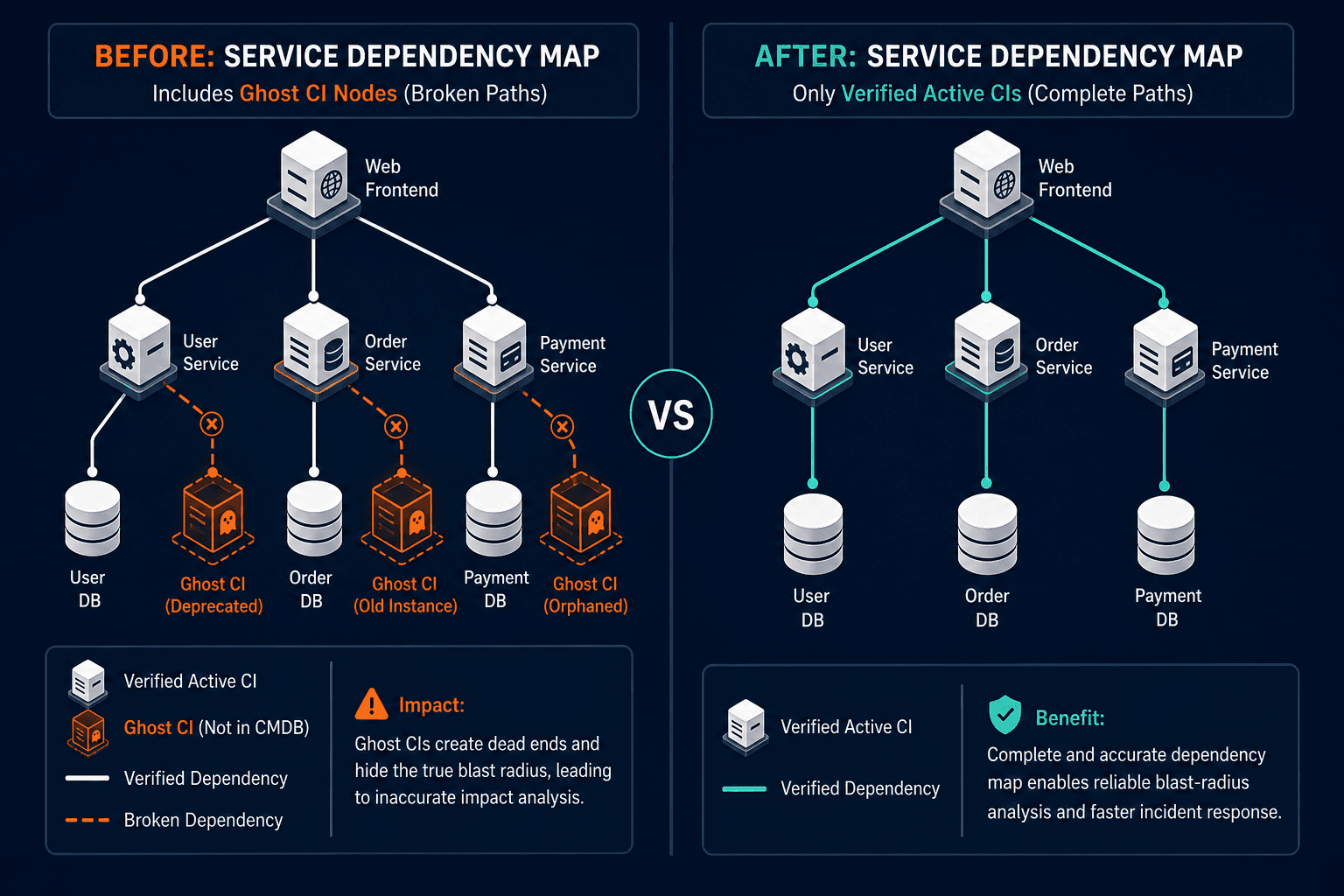
Service maps are only as reliable as the CI relationship data underneath them. When a ghost CI is still listed as a dependency in a service map, that map shows a path to a server that no longer exists. Anyone using that map for blast-radius analysis before a change, or for root cause mapping during an incident, is working with bad information.
Virima’s ViVID™ service maps show live dependency chains sourced directly from discovery data — when a ghost CI enters that view, the path it anchors is a dead end. Fourteen service dependency maps in the manufacturing CMDB referenced the 300 ghost servers as active dependencies — including the map for an order processing service, a tier-1 business system. When incident teams use those maps to identify root cause, ghost dependencies send them toward servers that haven’t existed for over a year. Service maps built on ghost CIs mislead the people who depend on them most — under incident pressure, when there’s no time to second-guess a dependency.
Change risk assessments inflate scope and approvals
Infrastructure teams rely on CI relationship data to scope change risk. A proposed change to a network segment should trigger an impact assessment of all CIs in that segment. Ghost CIs that were never removed from their relationship chains show up as affected parties in that assessment. That inflates the apparent risk, can elevate the change’s approval tier, and sometimes triggers escalation to the change advisory board — all based on phantom impact. Teams spend approval cycles on changes that look riskier than they are because the CMDB is accounting for infrastructure that no longer exists.
Why ghost CIs accumulate — the decommissioning gap
Ghost servers are CI records in a CMDB that remain marked active after the underlying hardware or virtual machine has been physically removed, decommissioned, or migrated. Sunbird DCIM estimates that up to 30% of servers in a data center environment may be ghost servers at any given time. Ghost servers distort patch compliance reports, inflate software license counts, and appear as live dependencies in service maps — all three simultaneously, from a single broken lifecycle step.
That’s not a fringe problem — it reflects a structural gap in how most IT organizations handle the end-of-life stage of CI lifecycle management. Ghost CIs accumulate from several predictable sources:
- Hardware refresh cycles where old equipment is removed but decommissioned CI records are never retired from the CMDB
- Cloud migrations where on-premises server CIs aren’t cleaned up after workloads migrate to new infrastructure
- M&A activity where acquired infrastructure is rationalized physically but not systematically removed from inherited CMDBs
- VM sprawl where virtual machines are shut down informally but never formally decommissioned in the CMDB
- Rapid deployment environments where servers are provisioned quickly and the decommissioning step is never built into the delivery workflow
Virima’s own analysis of ghost machines illustrates the pace of accumulation: devices that appear active in CMDB records but produce zero signal against the live network. You can explore that pattern in detail at Virima’s analysis of ghost machines and open ports.
83% of enterprises cannot accurately see at least one-fifth of their IT assets (Gartner, 2024). Ghost CIs are a leading cause of degraded CMDB accuracy and a major contributor to that gap. Without automated discovery running regularly, there’s no reliable way to distinguish real CIs from artifacts of incomplete lifecycle governance.
How automated discovery surfaces ghost CIs at scale
Automated discovery detects ghost CIs by comparing live environment scan results against what the CMDB records as active. Virima’s agentless, agent-based, and API-based IT discovery probes networks, queries endpoints, and pulls cloud infrastructure records continuously. Any CI not confirmed within a defined threshold — commonly 90 days — surfaces automatically as a retirement candidate. No manual effort. No waiting for a scheduled audit.
Manual audits don’t scale to CI populations measured in thousands. Reviewing 6,200 CI records by hand, quarterly, is not sustainable — and human reviewers depend on the same stale CMDB data they’re trying to validate.
This comparison is the core mechanism of CI lifecycle management done at scale. It doesn’t require teams to remember to update CMDB records when decommissioning hardware. It doesn’t depend on coordinated cross-team handoffs completing perfectly every time. Discovery runs continuously. Ghost CI identification is a natural output of the same process that keeps your active CI records accurate and current.
Organizations running automated, discovery-based CMDB maintenance see significantly faster incident resolution than teams relying on manually maintained records, according to Virima’s 2025 customer implementation data. That improvement is directly tied to the reliability of CI and dependency data available to incident responders.
See how Virima discovery compares active CI counts against your CMDB in real time — explore the discovery feature.
Building a CI lifecycle management process
An effective CI retirement workflow requires three elements: a defined trigger that flags CIs for retirement review, an automated comparison between active CMDB records and live discovery output, and a relationship chain cleanup step that removes the retiring CI from every service map and dependency chain. Without all three, retiring a CI record still leaves ghost dependencies in service maps — shifting the data accuracy problem from one dataset to another.
- Define retirement triggers — Set concrete conditions that automatically move a CI into retirement review: a last-discovered timestamp older than 90 days, a change record marking hardware as removed, or a project milestone tied to a hardware refresh cycle. Retirement review should fire on a verifiable signal, not on someone remembering to update a record.
- Automate the comparison — CI records should be cross-referenced against discovery output continuously. Active CIs that discovery can’t confirm within your defined threshold should be flagged for human review — not silently allowed to accumulate in the active population. The review decision (retire, investigate, or confirm as expected) should be logged against the CI record.
- Clean relationship chains at retirement — Retiring a CI without updating its relationship records leaves phantom dependencies in service maps. Every CI retirement workflow should include a relationship audit step: remove the retiring CI from every service map, change group, and dependency chain where it appears. This step is the difference between a clean retirement and a ghost CI that causes problems in a different dataset.
- Archive rather than delete — Retired CIs should move to an archived state — preserving historical data for audit trails while removing them from active patch scopes, license calculations, and operational reports. Gartner puts the average annual cost of poor data quality at $12.9 million per organization (Gartner, 2024). For the teams that own CI data, that cost shows up in remediation hours, audit prep cycles, and change rework.
- Track CI freshness as a KPI — Stale rate — the percentage of active CIs not confirmed by a recent discovery cycle — should appear on your weekly CMDB quality dashboard alongside orphan rate and relationship accuracy. If that number is climbing, ghost CIs are accumulating faster than your retirement process is catching them.
Frequently Asked Questions
What are ghost servers in a CMDB?
How do ghost CIs distort patch compliance reports?
What is a CI retirement workflow and what should it include?
How does Virima detect ghost CIs in an existing CMDB?
Does Virima automatically update CI records when infrastructure is decommissioned?
If your patch reports, license calculations, or service dependency maps are drawing on CI records your discovery tool can’t confirm, you’re making decisions on ghost data. Virima’s automated discovery surfaces every active device in your environment and compares it against your CMDB — giving you a CI lifecycle management baseline built on what’s actually live, not what was last manually entered. How Virima’s change management tools can transform your change processes to understand how continuous discovery keeps your CMDB data accurate.