CMDB Beside Help Desk for Mid-Size IT Works When Both Systems Know Their Job

The help desk works. Agents open tickets there every morning, approvers clear changes there every week, and auditors recognize the reports that come out of it. Then change day arrives with a ticket that cites twelve configuration items, and nobody in the room can answer when each item was last seen or which team owns it today.
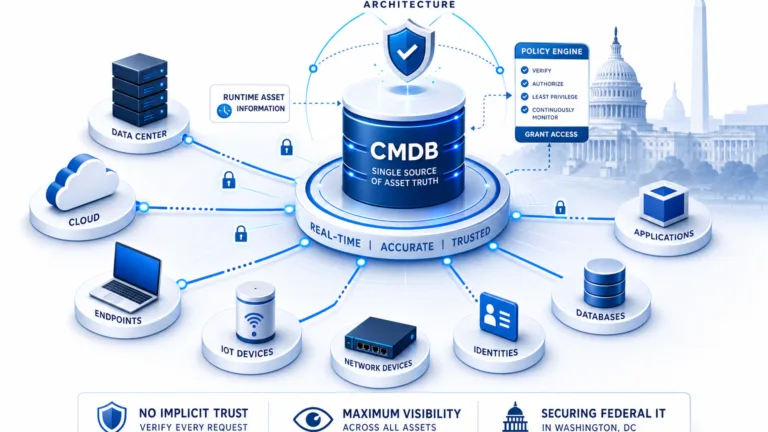
The instinct at that moment is to blame the desk and start shopping for another one. Mid-size IT teams gain more by keeping the working desk and placing a trustworthy estate record beside it. Estate truth means a clear record of what exists, how each item connects, when each source last saw it, and which team owns it.
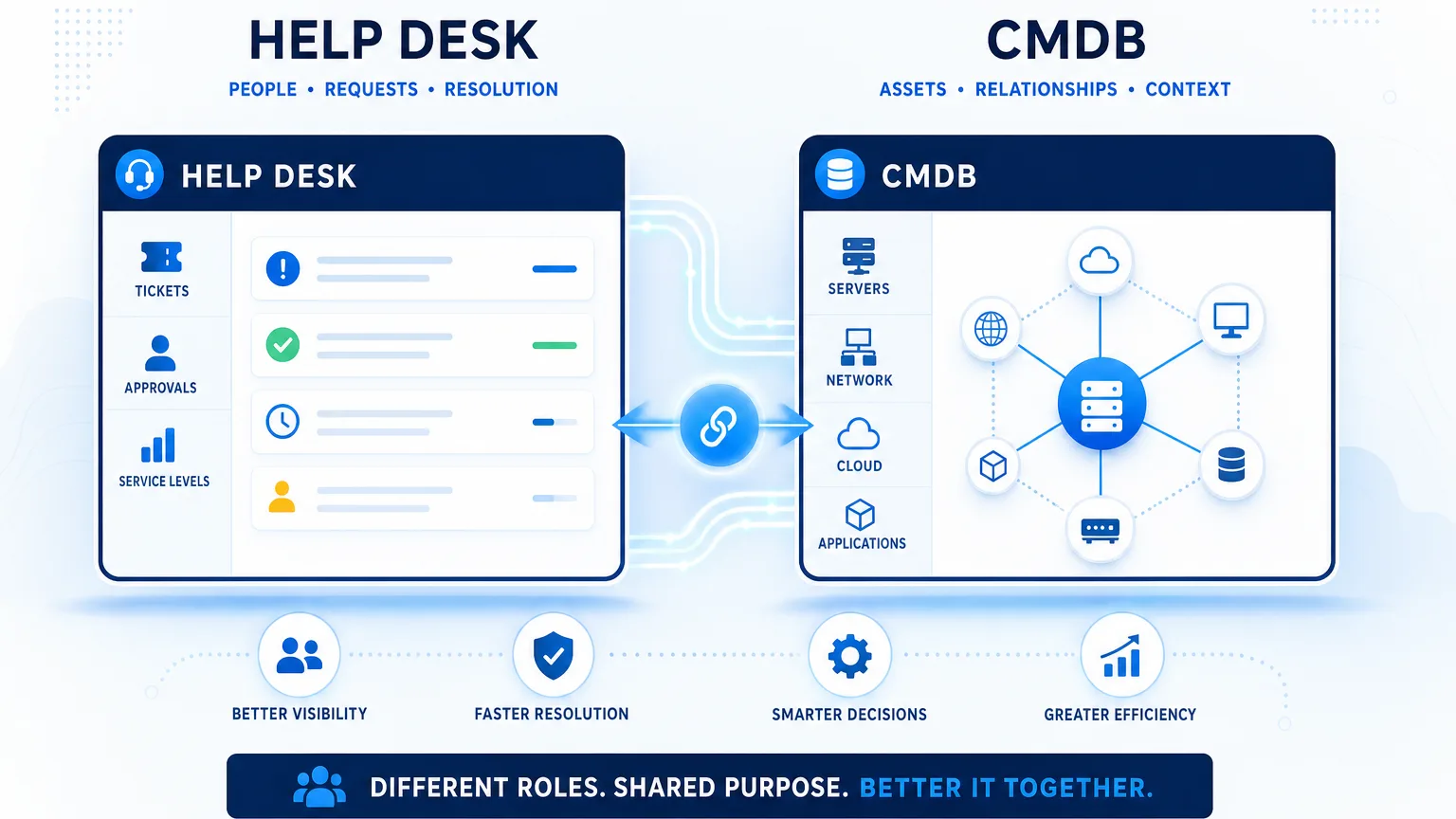
Knowing their job means the desk owns the work and the configuration management database beside it owns the estate record, so every fact has one clear owner. This guide covers the pairing only: who owns which fact, when pairing fits, what flows between systems, and how a pilot proves value. If the desk decision is still open, start with that comparison first.
What Each System Owns When the Help Desk Stays
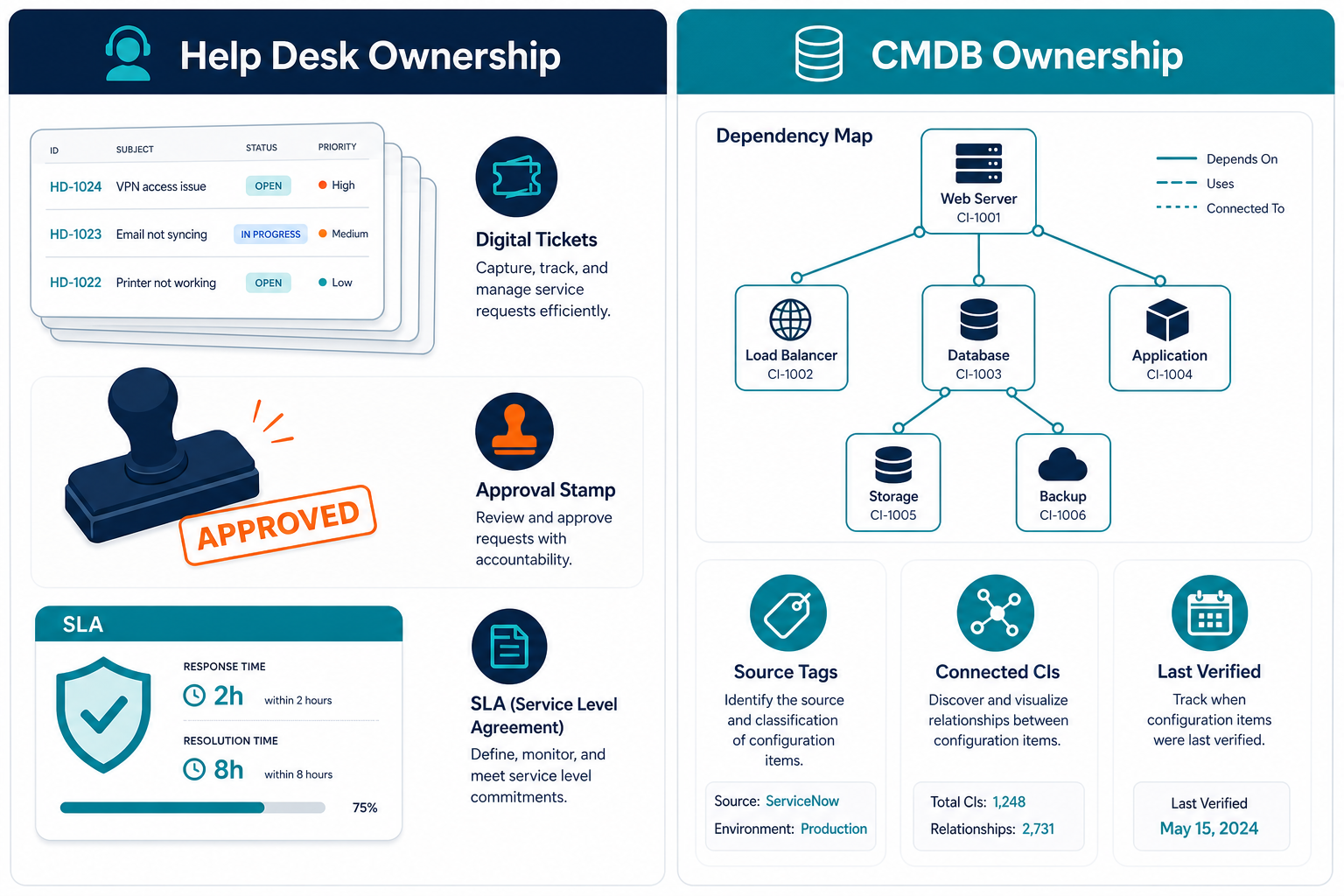
The desk owns work from request through resolution. Requests, incidents, changes, approvals, assignment records, service level tracking, and agent experience all live inside the desk where teams already operate. That work record stays authoritative because agents update it all day and approvers depend on it.
The configuration management database beside the desk owns the estate record. It records what exists across servers, endpoints, network gear, and cloud accounts, plus how each item connects to services and dependencies. Each attribute carries its source and its last-verified date, so the change board sees evidence instead of assumptions.
People own facts that discovery cannot observe directly. Business criticality, lifecycle status, ownership assignments, policy tags, and service level expectations come from the teams that run each service. Those entries sync alongside discovered attributes and carry the same ownership tags.
Pairing a system of record beside a system of engagement reflects a normal enterprise design pattern. ServiceNow documents identification and reconciliation for records that arrive from several sources into one configuration management database. The Flexera 2026 State of ITAM report found complete visibility into IT assets fell to 36%, down from 43% one year earlier. The rule for the rest of this page stays simple: assign one owner to every fact.
What does a CMDB beside the help desk own that the desk does not?
The beside-desk configuration management database owns the estate record: what exists, how items connect, which source supplied each value, and when each value was last verified. The help desk owns work records such as requests, incidents, changes, approvals, assignment, and service levels.
Keep the Desk’s CMDB, Pair a Second One, or Choose the Desk First
Keep the desk’s CMDB
Keep the current setup when the desk configuration management database already meets the change-day test. Discovery feeds it across the layers each change touches, a named owner maintains it, and the board can answer which items each change touches plus when each was last seen. ServiceNow provides identification and reconciliation that reconciles and de-duplicates records when several sources feed one database. Atlassian describes Assets Discovery as a network scanner, with or without an agent, that imports results into Assets in Jira Service Management. No second system adds value when those conditions already hold.
Pair a second one
Pair a configuration management database beside the desk when specific gaps keep showing up on change day. Off-network endpoints and cloud accounts sit outside desk discovery coverage. Several sources disagree about the same item and nobody resolves the conflict. A project-loaded database drifted after go-live because scheduled updates never followed. Service maps are missing when the board asks for impact context. Listed owners do not match the current on-call roster anymore. For the deeper decision on when a bundled desk database is enough and when a discovery-led estate record belongs beside it, see the ITSM-bundled versus discovery-authority guide. ServiceNow teams can also review when you need both before deciding.
Choose the desk first
Choose the desk first when workflow fit is the actual blocker. Slow approvals, missing assignment rules, weak self-service, or reporting gaps point to desk selection rather than estate data. Settle that decision before adding another data store. A configuration management database beside the desk keeps the estate record outside any single ticketing tool, so a later desk change leaves the estate record intact. Confirm the target desk appears on the supported list on the integrations hub before you scope the pilot.
Pairing carries real operating cost worth naming directly. The team runs a second system, governs an integration between two stores, and enforces ownership rules every week. When the keep test passes, that added cost buys nothing useful.
When should mid-size IT keep the desk CMDB instead of pairing a second one?
Keep the desk database when discovery already feeds the layers each change touches, a named owner maintains it, and the change board can answer which configuration items a change touches plus when each was last seen. Pairing adds cost only when those conditions fail.
What Flows Beside the Desk and What Stays Inside It
| Data | Lives in | Direction |
|---|---|---|
| Requests, incidents, changes, approvals, assignment, service levels | The desk | Stays in the desk |
| Discovered attributes selected for sync | The beside-desk database | Into the desk |
| Source and last-verified tag per attribute | The beside-desk database | Traceable from the desk |
| Ownership changes, approvals, enrichment notes made in ServiceNow | The desk | Back into the beside-desk database |
| Service definitions supplied by the team | Provided by the team | Into the beside-desk database |
| Dependency maps with open incidents and changes overlaid | The beside-desk database | Opened from the desk record |
| Rescan request from a desk record | The desk record | Into the beside-desk database |
The ServiceNow sync follows a governed mapping model. Teams map each blueprint to ServiceNow tables, including custom objects, then choose which properties sync into each table. Asset-specific correlators prevent duplicate records during each sync cycle. Business rules automate the flow without an admin agent or custom code. Ownership changes, approvals, and enrichment notes made in ServiceNow pull back into the central record so the desk and the estate store stay aligned.
The Jira Service Management path is code-free for service teams. Discovery-sourced items populate the Jira configuration store, then ViVID™ overlays open incidents and recent or planned changes on each service map. Agents see impact context without leaving familiar queues. Pull-back of ownership and enrichment notes is documented for ServiceNow; treat Jira Service Management as populate-and-overlay unless your implementation confirms the reverse path.
Items and relationships arrive through integration on a schedule the team configures, so agents keep working in the desk without retyping configuration data. People define each service once and confirm ownership once, then scheduled cycles carry the updates. Teams running other supported help desks follow the same pattern of defining once and syncing on schedule through the integrations hub.
The Pairing Mechanics Mid-Size Teams Can Run Without an Enterprise Program
Many mid-size teams assume trustworthy configuration data requires an enterprise integration program with specialists on staff. The mechanics below run inside the beside-desk database through configuration rather than custom development. ServiceNow identification and reconciliation provides the reference design for multi-source handling, and the same concepts apply here at mid-size scale.
Multi-source discovery collects infrastructure and cloud data through agent-based, agentless, and API-based methods on high-frequency scheduled cycles. Every value keeps source and last-verified tagging at the attribute level, so each field shows where it came from and when it was confirmed. Reconciliation and de-duplication run before anything syncs outward. Each item keeps ownership tags and change history for audit review.
The sync itself stays governed by four choices the owner controls. Pick the blueprint that matches the change scope, pick the properties worth syncing, set correlators that match incoming records to existing ones, and automate the schedule with business rules. Agents trigger a rescan or open a service map directly from the ServiceNow item record. ViVID™ service maps show open incidents and pending changes overlaid on dependencies for the board.
Those same mechanics, multi-source discovery with attribute-level source tracking, governed sync, bidirectional desk updates where supported, and map overlays, sit behind Trusted Runtime Truth for teams that need explainable estate evidence on change day. The configuration management database, ViVID™ mapping, IT asset functions, integrations, bidirectional sync where the desk supports it, and API run across Business Pro and Enterprise editions. Licensing terms, asset scope, discovery installation count, and support level differ between editions.
Limits still apply and deserve plain wording. Overlays require a supported ITSM platform. Services come from definitions the team supplies through manual entry, spreadsheet import, or integration feeds. Discovery refreshes on scheduled cycles, so edits between cycles appear at the next cycle. Off-network devices need an agent installed. Pairing adds a system the team governs every week.
A Pilot That Proves the Pairing Before You Commit
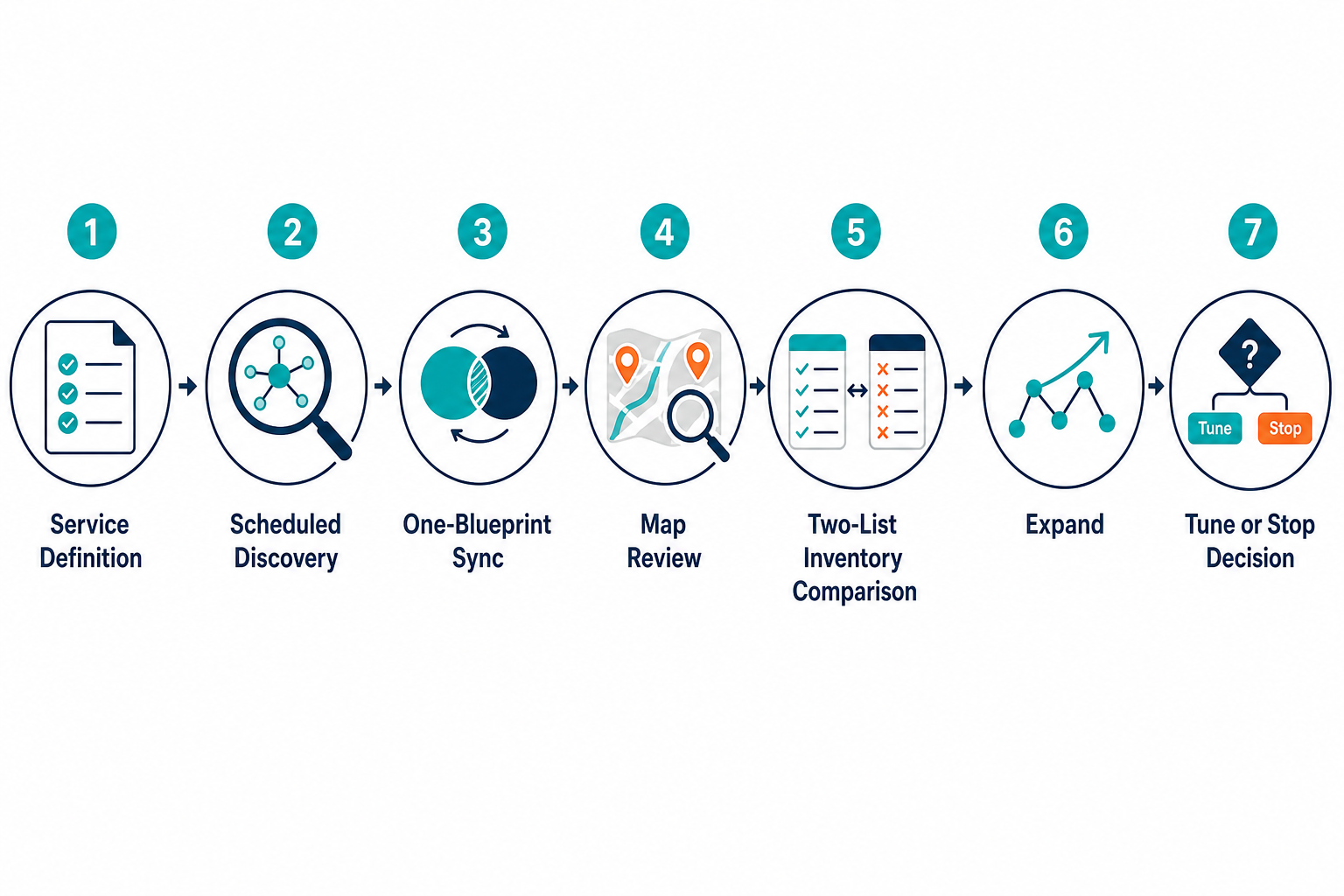
- Pick one service the change board cares about plus one desk workflow for change approval, because narrow scope keeps results readable.
- Define that service once through manual entry or spreadsheet import, so the map starts from an agreed boundary.
- Run scheduled discovery across the network segments and cloud accounts it touches, then review items the scan found beyond the desk list.
- Sync one blueprint such as servers into the desk, choosing properties and confirming correlators for ServiceNow or mapping for Jira Service Management.
- Open the service map during the next change review for that service, so the board sees dependencies with open ticket context.
- Compare the two lists using CIS Control 1’s inventory comparison method, meaning desk records missing from discovery results plus discovered assets missing from desk records.
- Decide whether to expand, tune mappings, or stop entirely, since stopping after a clean match confirms the current setup.
Three measures keep the pilot grounded without inventing targets. Count change items carrying a last-seen date from scheduled discovery. Check listed owners against the current on-call roster for that service. Repeat the two-list comparison above after the second change window. Teams wanting a scoring model can use this completeness formula for ongoing tracking. Run the pilot across two change windows at most, then make the call.
Keep What Works and Prove the Rest
Keep the desk the team already runs. Keep the desk database too when it passes the change-day test with discovery coverage and clear ownership. Pair a beside-desk record when gaps, drift, or missing maps keep slowing approvals. The estate record beside the desk gives the board evidence it can check.
Want to see what could sit beside your desk? See what Business Pro includes.
Frequently Asked Questions
Do I need a CMDB beside my help desk for mid-size IT?
Add one when off-network devices, cloud accounts, or drift leave gaps the desk cannot explain. Keep the current setup when discovery coverage and ownership already answer change-day questions.
Will a second CMDB mean double entry for agents?
Agents keep working in the desk without retyping item data. Items arrive by integration, while the team defines each service once and confirms ownership once.
Which help desks can a CMDB sit beside?
A beside-desk configuration management database sits next to platforms on the integrations hub, including ServiceNow and Jira Service Management. Check the hub for the current supported list before scoping.
Does pairing mean I will replace my help desk later?
Pairing keeps tickets and approvals in the current desk. The estate record sits outside it, so a future desk change leaves the estate database intact.
How do I test the pairing before committing?
Run a pilot on one service across two change windows. Compare discovery results against desk records, then expand, tune mappings, or stop based on evidence.