ITSM Bundled CMDB vs Discovery-Authority CMDB for Mid-Market IT

An eight-person IT team runs its help desk and CMDB in one platform. Tickets link to configuration items, and the CMDB view looks complete. Then a change on a database server goes wrong. The linked records list two applications, but five depend on that server. The CMDB only held what had been entered or scanned inside the desk platform’s reach.
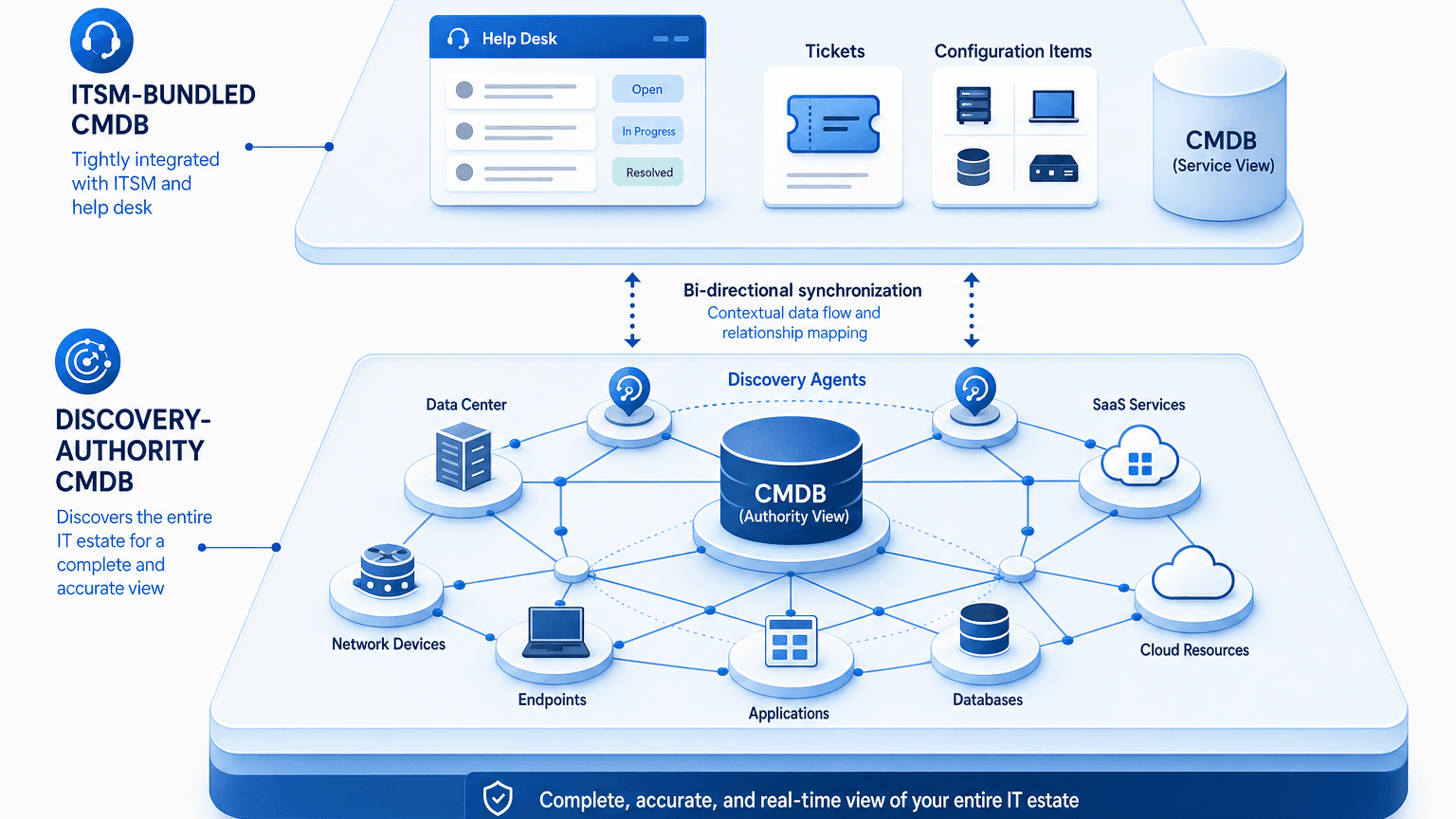
Two CMDB models explain the gap. An ITSM-bundled CMDB links configuration items to tickets inside the help desk platform, while a discovery-authority CMDB builds its records from discovery across the whole estate and feeds that data to the desk. This comparison covers what each model is hired to do and when a mid-market team needs both.
The jobs each CMDB is hired to do
A bundled CMDB exists so the desk can work faster. It links configuration items to incidents, changes, and requests. It shows agents which asset a user owns, and it supports the service catalog. One login and one data model mean no integration to maintain. For ticket-level work, that proximity is the strength.
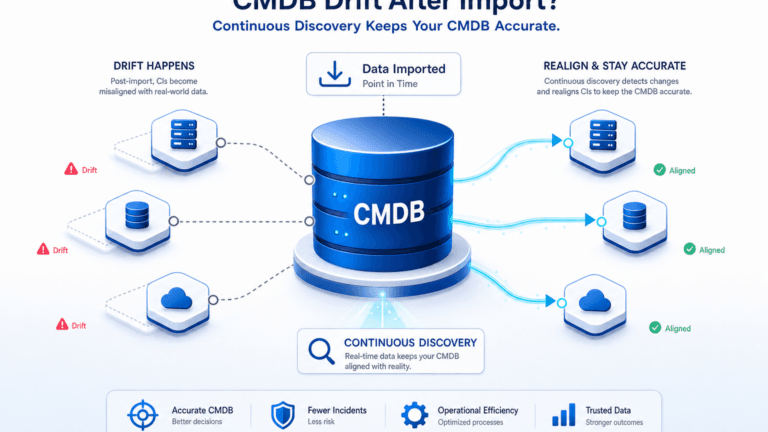
A discovery-authority CMDB exists to be the record of what exists and how it connects. Atlassian’s CMDB guide describes a configuration management database as configuration items plus their relationships, used for impact analysis, change, and incident work. It names discovery that runs too infrequently as a common cause of an inaccurate CMDB. The discovery-authority model puts discovery first and treats the desk as a consumer of the records.
The jobs differ in how much of the estate they must cover. The desk needs the configuration item attached to a ticket. Change approvers need every dependent service and its owner. Auditors need a population with last-seen dates. Those last three jobs depend on coverage beyond the desk’s own tooling.
Mid-market teams without a dedicated configuration manager often feel the accuracy gap sooner, since the CMDB must stay current without constant manual review. Virima’s discovery-authority CMDB builds what it calls Trusted Runtime Truth: what exists, how it connects, what changed, what will break, and who owns it.
What is the difference between an ITSM CMDB and a discovery-based CMDB?
An ITSM CMDB sits inside the help desk platform and links configuration items to tickets, changes, and requests. A discovery-based CMDB fills itself from scans of the whole estate, reconciles records from several sources, and feeds the help desk. The first optimizes ticket work, and the second optimizes estate accuracy for change, audit, and incident decisions.
Where bundled discovery stops, using Freshservice as the example
Freshservice documents a broad bundled discovery feature set, so it makes a fair test. Freshservice’s own Discovery Hub documentation describes a Discovery Agent for Windows, Mac, and Linux computers. It also describes a Discovery Probe, a Windows application that scans a domain or IP range on a schedule. The Probe integrates with Microsoft SCCM and syncs Active Directory users. Cloud management discovers resources from AWS, VMware, and Azure. Freshworks also markets multi-protocol agentless discovery and dependency maps. Freshworks acquired Device42 in June 2024 to expand its discovery capabilities; the five evaluation questions below still apply regardless of which engine powers that discovery going forward.
That is real discovery inside a help desk. The questions that remain apply to any bundled CMDB, and they are worth putting to the vendor on your own estate.
- Plan and module scope: the documentation notes that some capabilities, such as Cloud Management, depend on the enabled plan and modules, so confirm what yours includes.
- Reach: a Probe scans what the Probe can reach. List the network segments, servers, and cloud accounts it does not cover.
- Reconciliation: ask how the desk reconciles records against a cloud console, a security scanner, and a spreadsheet, and which identifiers join them.
- Ownership: ask where the owner of each configuration item is stored and who keeps it current.
- Service context: ask how a service is defined, and whether the dependency view shows the business service above the hosts.
Mid-market estates mix owned laptops, on-premises servers, network gear, and cloud accounts, and they change faster than any single scan scope. A run that covers the managed fleet well can still miss a shared database server or a cloud instance a developer created last week. Those are the records that change approvals and incident triage need most.
Teams evaluating Freshservice specifically can read Virima’s Freshservice CMDB features and limits. ServiceNow, Jira Service Management, and other desks bundle CMDBs too, and the same five questions apply. For a broader look at how discovery coverage varies across help desk platforms, see 7 asset discovery challenges that Virima can help you solve.
ITSM-bundled CMDB and discovery-authority CMDB compared
| Job | ITSM-bundled CMDB | Discovery-authority CMDB feeding the desk |
|---|---|---|
| Primary purpose | Link configuration items to tickets, changes, and requests | Hold the record of what exists, how it connects, and who owns it |
| Where records come from | Discovery and imports configured inside the desk platform, plus manual entry | Agent, agentless, and API discovery reconciled across sources |
| Identity | Depends on the platform’s matching rules | Reconciles on serial number, cloud instance ID, and owner |
| Relationships | Dependency views scoped to what the platform discovered | Typed links such as runs on, uses, and exchanges data with |
| Service maps | Varies by platform and plan | ViVID™ service maps after service definitions exist |
| Change and audit evidence | Strong for records the desk holds | Population with owners and last-seen dates across the estate |
| Operating load | One platform to run | A second system, offset by feeding the desk automatically |
| Best when | Ticket linking is the main CMDB job | Change approval, audit, and incident triage need estate truth |
The bundled column describes tendencies that vary by vendor. Test each cell against the platform you run.
Five tests to run on your current CMDB
Run these on one service before deciding anything.
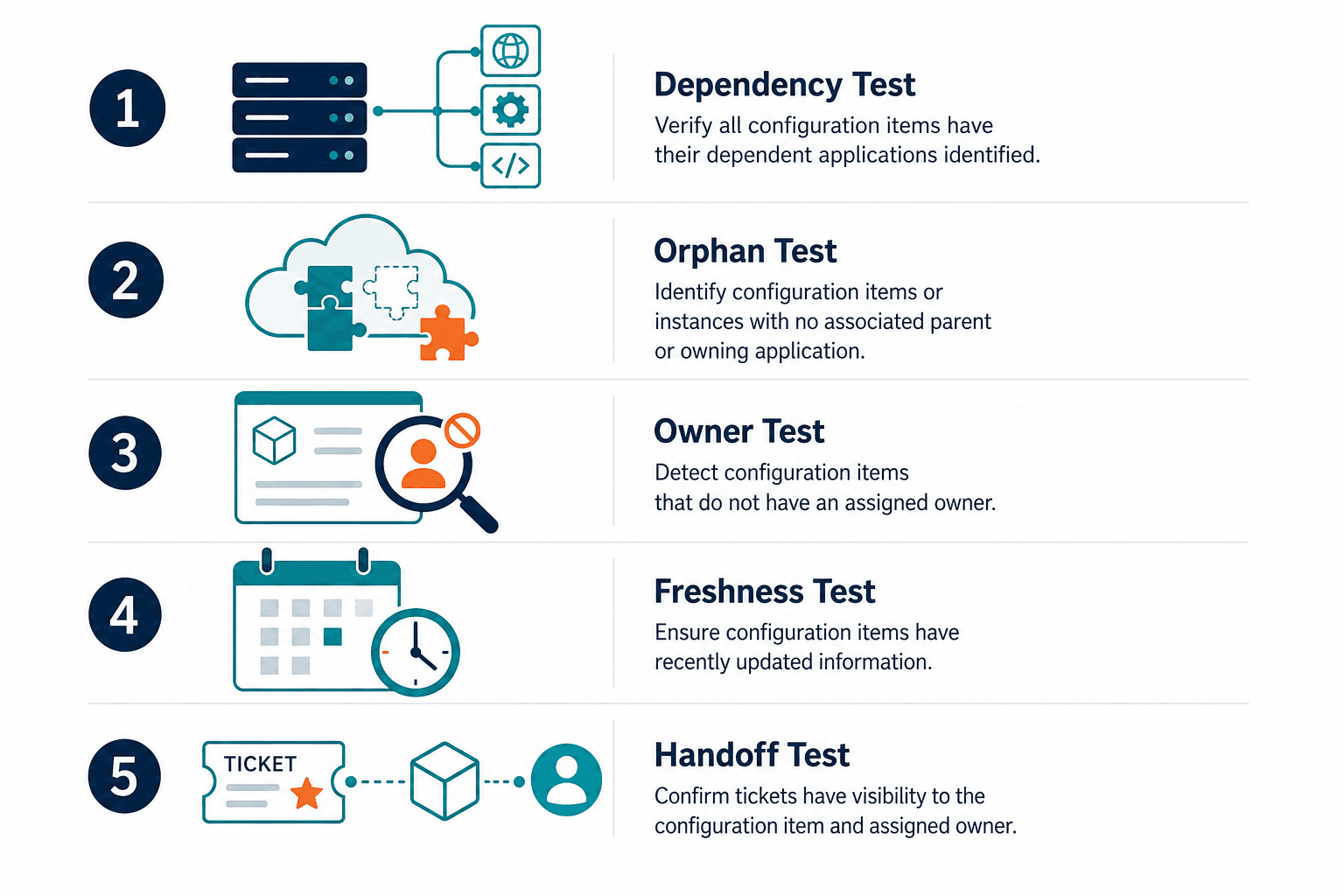
- Dependency test: pick a server and list every application and service that depends on it. Compare the CMDB list with what the application owners say.
- Orphan test: export running instances from the cloud console and check how many are missing from the CMDB.
- Owner test: count the configuration items for one service that have no named owner.
- Freshness test: read the last-seen date on ten records chosen at random. Note any records where the last-seen date is older than your discovery scan interval (for example, a record older than 7 days if discovery runs weekly).
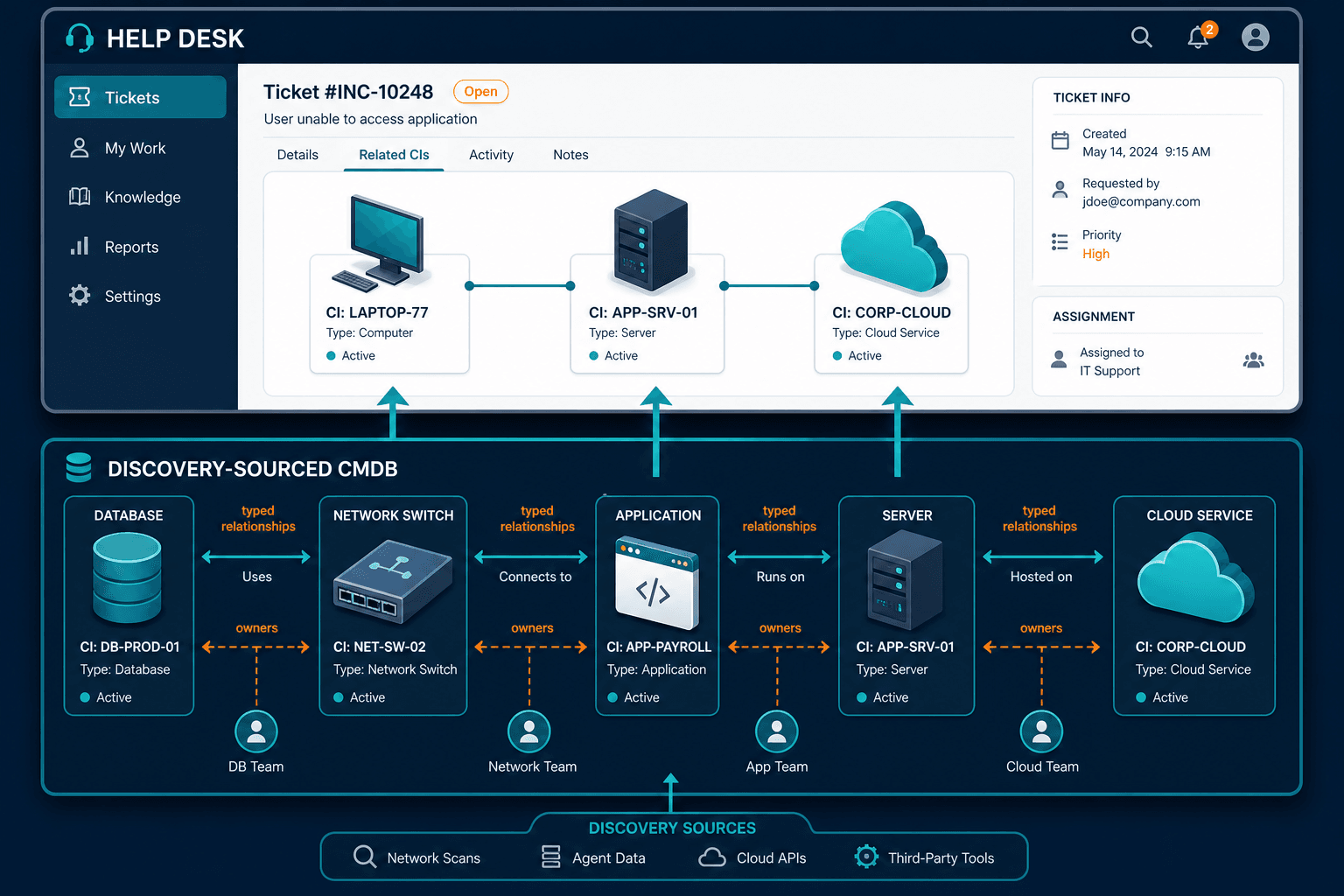
- Handoff test: open a ticket for the service and check whether the analyst sees the configuration item, its dependencies, and its owner.
These five tests mirror metrics Virima’s CMDB Health Score already tracks: the orphan test approximates Orphan Relationship Ratio, the freshness test approximates Stale CI Ratio, and the owner test approximates Mandatory Attribute Rate.
A CMDB that passes all five is doing its jobs, whatever model it follows; failures reveal which one is missing.
Three paths for a mid-market team
Keep the bundled CMDB only
Stay when the estate is mostly endpoints and cloud resources that the desk’s discovery covers, changes rarely touch shared servers, and the five tests pass. The bundled CMDB then does its job with the least operating load. Re-run the five tests every quarter, because estates drift. A failing result later shows the estate has outgrown the desk’s discovery.
Keep the desk and add Virima
Choose this path when the tests fail on dependencies, owners, or coverage. Virima is the discovery-sourced truth layer beside the desk. It discovers with agent, agentless, and API methods on high-frequency scheduled cycles. It reconciles records on serial number and cloud instance ID. It feeds ServiceNow, Jira Service Management, Ivanti, HaloITSM, Xurrent, and Hornbill through its ITSM integrations. Teams on a different desk should ask Virima in a demo how CMDB data reaches it. The desk stays the system of engagement.
Go deeper over time
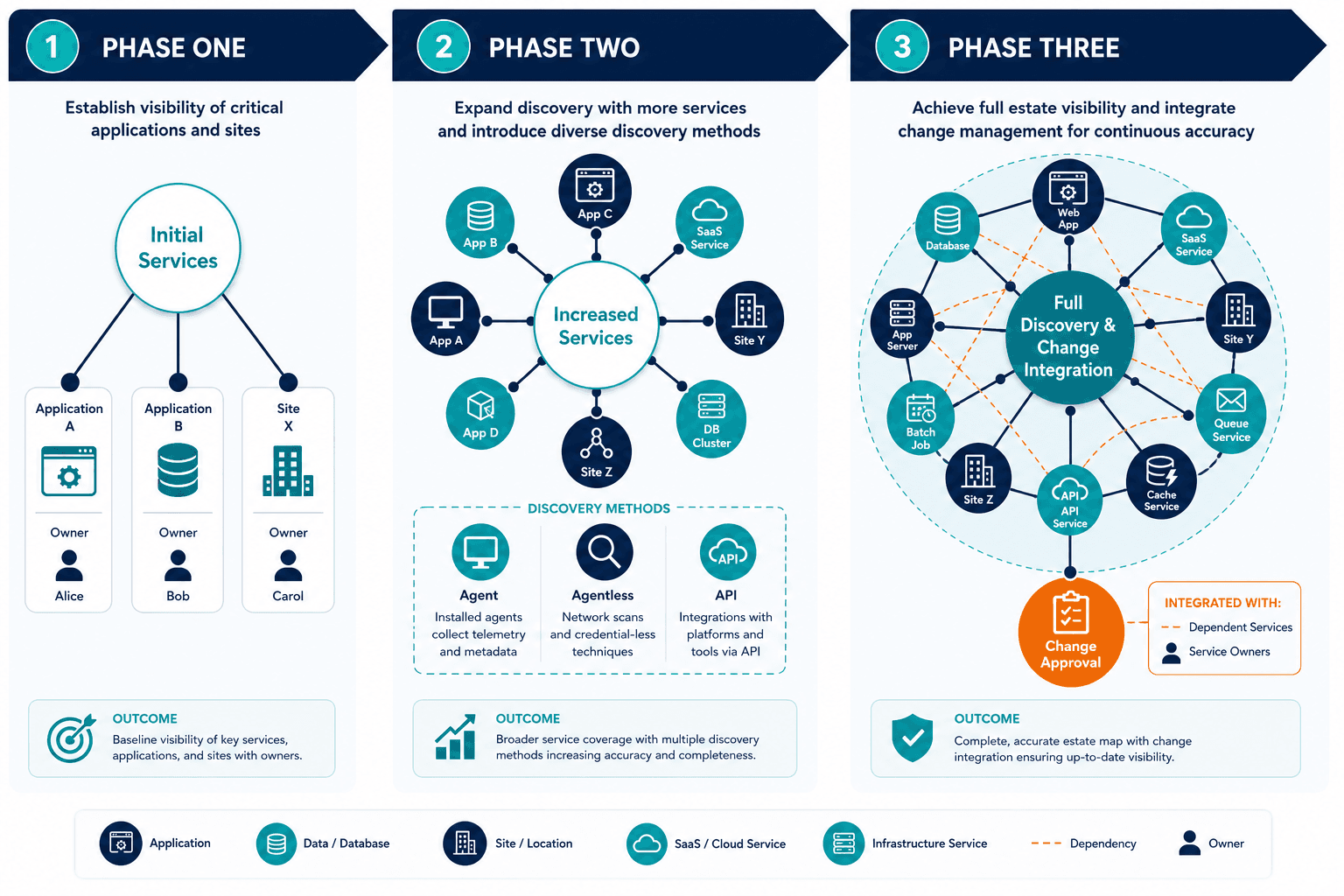
Phase one covers the three services that hurt most when wrong. Write down which applications and sites make up each service and who owns them, then run discovery against them. ViVID™ service maps build from those definitions.
Phase two adds the next services and the remaining discovery methods, with an owner assigned to every record. Phase three connects the CMDB to change approval, so approvers see dependent services and owners on the change record. Each phase ends with the five tests above, repeated on the newly covered services. For a worked example of this rollout order, see Elevate your IT operations: Transforming the future with Virima CMDB.
Full discovery, CMDB, and service mapping can be scoped to a mid-market team’s estate without a platform program — each phase proves value before you commit to the next.
Check this post on CMDB Accuracy Scorecard to score your CMDB against the five tests above and log your own results.
Match the CMDB to the job
In practice, the dependency test is the one that most often forces the decision: a single missed dependency surfaces during a change in a way the other four tests don’t, and that’s usually the moment a team adds a discovery-authority CMDB. Mid-market teams often need the bundled CMDB everywhere tickets get worked, and a discovery-authority CMDB wherever a missed dependency would do the most damage — customer-facing services and audit scope. The desk stays in place in every path, and the CMDB behind it earns its role by passing the same five tests.
Run the dependency test for one server, the orphan test for one cloud account, and the owner count for one service. Compare what you find against three outputs: records discovery found that the desk lacks, desk records with no owner, and dependencies the application owners listed that neither system held.
Log those three results in the CMDB Audit Essentials: Ensuring Data Accuracy and Compliance to score your CMDB against all five tests in one place. A mismatch between the application owners’ list and the CMDB list is the clearest evidence of which job is missing.
Frequently Asked Questions
Does Freshservice have asset discovery?
Yes. Freshservice documents a Discovery Agent for Windows, Mac, and Linux computers, a Discovery Probe that scans a domain or IP range, and cloud discovery for AWS, VMware, and Azure. Which capabilities you get depends on your plan and enabled modules, so confirm the scope with Freshworks.
What is the difference between an ITSM CMDB and a standalone CMDB?
An ITSM CMDB lives in the help desk platform and links configuration items to tickets and changes. A standalone CMDB is built around discovery and reconciliation across the estate, then shares records with the desk. The standalone model suits teams whose change and audit work needs coverage beyond the desk’s own discovery.
Can you use a separate CMDB alongside your help desk?
Yes. Many teams keep the help desk for tickets and changes and feed it configuration data from a separate CMDB through an integration. Test that a real ticket shows the configuration item, its dependencies, and its owner before relying on it.
Does Virima replace my ITSM tool?
No. Virima sits beside the help desk as the discovery-sourced CMDB and service-mapping layer. The desk stays the place where tickets, changes, and requests are handled.
Which ITSM tools does Virima integrate with?
Virima integrates with ServiceNow, Jira Service Management, Ivanti, HaloITSM, Xurrent, and Hornbill. For another help desk, ask during a demo how CMDB data reaches it.