Azure Subscription Hierarchy in Your CMDB: Subscription → Resource Group → CI

| An Azure resource hierarchy CMDB structure connects every Azure resource to the Resource Group and Subscription that own it. Most CMDBs import the virtual machine but drop that context. This article shows how Virima rebuilds the full Subscription, Resource Group, and resource chain during each Azure import. You will see how that structure strengthens change governance, cost attribution, and ViVID service mapping. |
A complete Azure resource hierarchy CMDB should show more than your Azure virtual machines.
Most CMDBs record the VM name, the OS, and the IP address. What they miss sits above the VM in Azure’s structure. They drop the Resource Group it belongs to. They also drop the Subscription above it, and the team or cost center that owns it.
Azure adoption makes this gap costly. Flexera’s 2026 State of the Cloud Report found that roughly 8 in 10 enterprises run Azure workloads. Yet cloud ownership and organizational context remain among the most incomplete layers in enterprise CMDBs. Virima closes that gap during every Azure import.
The Azure Resource Hierarchy CMDB Gap Most Tools Leave Behind
Azure organizes resources in a nested hierarchy. At the top sits the Azure Subscription. It maps to a billing boundary and an administrative scope. Inside each Subscription, Resource Groups act as logical containers for related resources. Individual resources live at the bottom of that chain. These include virtual machines, storage accounts, and databases.
When a typical CMDB connector imports Azure resources, it pulls the individual resource CIs. It grabs the virtual machine, the network interface, and the disk. The Subscription and Resource Group context rarely follows. So the VM lands in the CMDB as an isolated CI. It carries an Azure region and a resource ID, but no link to its Resource Group or Subscription.
That missing layer has real operational consequences. A configuration manager cannot answer “which Resource Group does this VM belong to?” from the CMDB alone. Instead, they open the Azure portal. An IT Director cannot see every CI under a Subscription without a separate query. Cost attribution, change impact scoping, and compliance reporting all depend on that missing layer.

The Azure resource hierarchy CMDB problem is not a data volume problem. The Subscription and Resource Group information already exists in Azure. What is missing is the step where a connector reads it. That step should create the matching CIs and relationships.
How Virima Maps Azure Subscription Hierarchy During Import
When Virima imports Azure resources, it does not stop at the individual resource level. The IT discovery engine reads the Azure Subscription and Resource Group structure. Then it creates CIs for each level of the hierarchy.
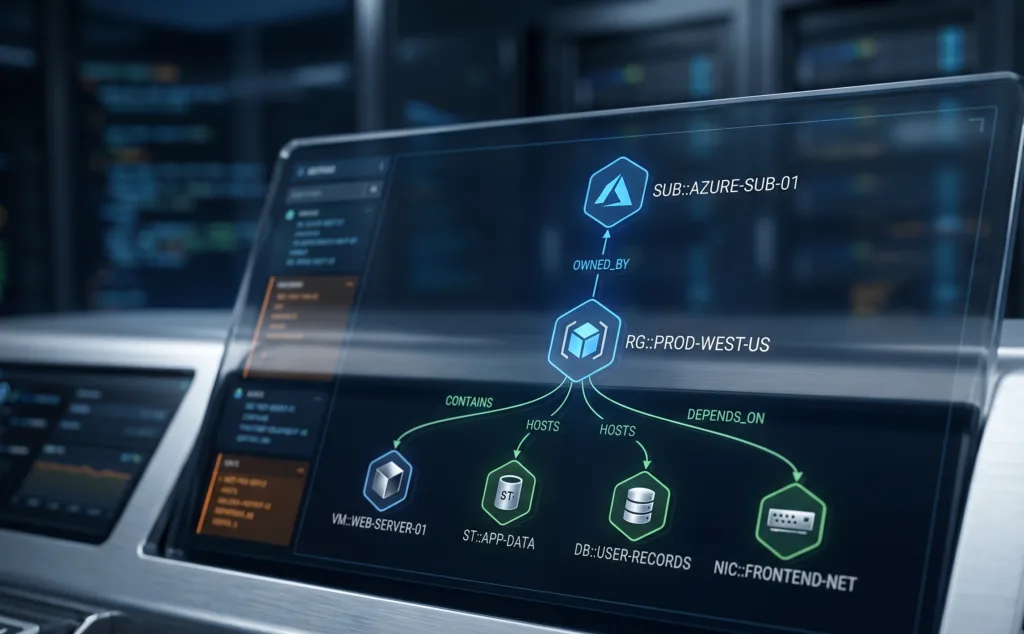
After the import completes, your CMDB holds a full chain:
- An Azure Subscription CI exists for each Subscription in scope
- Azure Resource Group CIs are created for each Resource Group within those Subscriptions
- Individual resource CIs link to their parent Resource Group CIs
- Resource Group CIs link to their parent Subscription CIs
The result is a three-level azure resource hierarchy CMDB structure. It mirrors your actual Azure organizational model. Every CI in your cloud inventory has a chain of relationships that connects it upward through its Resource Group and Subscription. That chain persists across discovery cycles. New Resource Groups, new resources, and organizational changes in Azure all update the hierarchy on the next import.
Trusted Runtime Truth for cloud environments needs exactly this. It needs a CMDB that reflects not just what resources exist, but where they sit in the structure that governs them.
Azure Subscription hierarchy mapping was introduced in Virima v6.1.2. It runs as part of every Azure import cycle.
| How does Virima map Azure subscription hierarchy in the CMDB? During Azure imports, Virima automatically creates Subscription CIs and Resource Group CIs, then links individual resource CIs to their parent Resource Group CIs and Resource Groups to their parent Subscription CIs. The result is a navigable three-level Azure resource hierarchy in the CMDB that reflects the actual Azure organizational model, updated on every discovery cycle. |
What the Relationships Tab Shows for Azure CIs
Inside the CMDB, each CI carries a Relationships tab. It shows that CI’s connections to other CIs. For Azure resources discovered by Virima, the picture is clear:
- A Virtual Machine CI shows its parent Resource Group CI
- A Resource Group CI shows its Subscription, plus every resource CI it contains
- A Subscription CI shows every Resource Group under it
This gives infrastructure engineers a CMDB-native way to answer questions that once required the Azure portal. For example: “What is in this Resource Group?” Or “which Subscription does this VM belong to?” Or “show me all CIs under the development Subscription.” The answer now lives in the CMDB, not in a separate cloud console.
IT Directors working on cost attribution can open a Subscription CI and see every resource tied to it. Change management gains too, because each resource now carries an organizational boundary for its impact. Scoping impact to a Resource Group, rather than a flat list of CIs, makes change review faster. It also makes the approval decision clearer.
Azure Hierarchy Reflected in ViVID Service Maps
| What Azure relationship CIs does Virima automatically create in the CMDB? Virima creates Azure Subscription CIs and Azure Resource Group CIs, then builds parent-child relationships linking resource CIs to their Resource Groups and Resource Groups to their Subscriptions. Each CI is populated from discovery data during the Azure import, not from manual entry, and stays current across subsequent discovery cycles. |
Once the Azure resource hierarchy CMDB structure is populated, ViVID service maps can reflect the same organizational boundaries. Your team provides service definitions to Virima. These specify which applications and websites belong to each service. Virima then maps them against the discovery-sourced CIs that carry full Subscription and Resource Group context.
Consider a service team running workloads across three Resource Groups in one Subscription. They can see their service map segmented by those boundaries. The ViVID map shows which CIs relate to the service. It also shows which Resource Group each CI lives in. When a dependency crosses a Resource Group or Subscription boundary, the map makes that visible rather than implied.
This matters in multi-team environments. Sometimes one Azure Subscription hosts resources for several applications owned by different teams. Here, the ViVID map with Azure resource hierarchy data makes those team boundaries visible inside the map. No manual annotation required.
Change Governance and Cost Attribution with Subscription Context
The organizational context from Azure resource hierarchy CMDB mapping has direct value in change governance. When a change touches an Azure resource, the change record now carries its Resource Group and Subscription context. Approvers can see whether the resource sits in the production or the development Subscription. They can also see whether it shares a Resource Group with resources other teams depend on.
IT asset management benefits from Subscription context too. Cost center allocation for cloud resources depends on knowing which Subscription a resource belongs to. With Azure resource hierarchy CMDB data in place, that attribution lives in the CMDB. You do not need a separate FinOps tool query.
| Why does Azure subscription context matter in a CMDB? Azure Subscriptions define billing boundaries, administrative scopes, and environment separations (production vs. development). Without Subscription context in the CMDB, change managers cannot scope impact by environment, cost teams cannot attribute spend by billing unit, and compliance audits lack the organizational layer that proves which resources belong to which governed scope. |
Teams already following CMDB best practices know that a CMDB without organizational context leaves change managers and asset owners with incomplete information. The azure resource hierarchy CMDB approach solves the cloud-specific version of that problem.
See how high-frequency discovery cycles keep cloud hierarchy data current across every import. For a wider view, our guide to cloud API discovery techniques covers how AWS and Azure data reaches your CMDB. And because discovery and mapping work together, this breakdown of how discovery and service mapping pair up shows why both layers matter.
| Trusted Runtime Truth for cloud environments extends this further. It brings full Azure Subscription and Resource Group hierarchy mapping into the same operational view. Schedule a demo to see the hierarchy built from your own Azure data. |
Give Your Azure Hierarchy a Home in the CMDB
A CMDB that shows Azure VMs without their organizational context is missing the layer that makes the data useful. An azure resource hierarchy CMDB in Virima turns every imported Azure CI into a node in a navigable structure. That structure runs from Subscription to Resource Group to resource, built from live discovery data. It supports change governance, cost attribution, and ViVID service mapping from day one. You get all of that without manual configuration or separate Azure portal queries.
| Schedule a demo to see how Virima maps your Azure subscription hierarchy automatically. |
FAQs
Why does my CMDB show Azure VMs but not which Resource Group they belong to?
Most CMDB connectors import individual resource CIs from Azure without traversing the Subscription and Resource Group structure above them. They pull the VM record but drop the organizational context. Virima’s Azure import reads the full hierarchy and creates CIs at each level, linking resources to their Resource Groups and Resource Groups to their Subscriptions.
How do I see all Azure resources under a specific Subscription in my CMDB?
In Virima, open the Subscription CI and check the Relationships tab. It shows every Resource Group under that Subscription, and each Resource Group CI shows the resource CIs it contains. No Azure portal query or manual cross-referencing needed.
What is the correct way to model Azure organizational hierarchy in a CMDB?
The Azure hierarchy (Subscription, Resource Group, individual resource) belongs in the CMDB as a relationship chain between CIs, not as flat attributes on individual records. Attributes are hard to traverse and easy to let drift. A relationship chain stays navigable from any point. Virima builds that chain automatically during Azure import.
Does Virima support multiple Azure Subscriptions in one CMDB?
Yes. Virima creates a Subscription CI for each Azure Subscription in scope. It links all Resource Groups and resources under each Subscription accordingly. Multi-subscription environments, including multi-tenant setups, fit within the same discovery scope.
How does Azure subscription hierarchy connect to ViVID service maps in Virima?
Once Subscription and Resource Group CIs exist, ViVID service maps reflect the organizational boundaries your team defines. Services mapped against discovery-sourced Azure CIs show which Resource Group each dependency lives in. That makes it visible when a service crosses organizational or billing boundaries in Azure.