CMDB with Automated Discovery for Hybrid and Cloud Environments

Monday, 9:07 a.m.
Your CEO messages: “Is that finance server still under warranty? And why is payroll so slow?”
You pull up the CMDB, the configuration management database that should have every answer.
It shows the server healthy, patched, and sitting in Rack 3.
But when your team checks the floor… Rack 3 is empty.
That server moved months ago during a “quick upgrade.” No ticket. No update.
At the same time, payroll is choking because another machine that nobody remembered has a nearly full disk. It isn’t in the configuration management database either.
Neither are the new SaaS tools a department bought last quarter. And this is common: enterprises run 270 to 364 SaaS applications on average, with 52% being unsanctioned, so a CMDB without discovery will miss a huge chunk of reality. Or the old app, a forgotten software asset, is still consuming licenses in the background.
That’s the quiet danger of stale CMDBs: without an accurate CMDB, your “single source of truth” fades, unnoticed, until something fails.
A CMDB software should serve as your live map of all hardware, software, and connections. But maps only help when they match reality. When data is missing or outdated, outages last longer, costs climb, and risks hide in plain sight.
Uptime Institute reports that 70% of outages cost organizations more than $100,000, so every missing CI can stretch impact and spending.
Automated discovery fixes that. It continuously scans your environment and updates the configuration management database, ensuring it reflects what’s running right now.
This guide explains configuration management, discovery types, and key features to reduce outages, costs, and risk.
What is configuration management?
Configuration management (CM) helps you track and control your IT setups. In other words, you keep a clear list of everything you use. This list includes servers, apps, networks, and their settings—your core configuration data. It also shows how these parts connect.
When you change something, you record it right away. For example, you note a new software version or a server update. Then you follow simple CM steps to approve and guide that change.
This way, you keep your systems steady and safe. You also stop risky or unwanted changes before they cause trouble.
Many organizations use ITIL to make configuration management more organized. To do this well, you often use a CMDB. A CMDB is the main store of information for your IT setup. It keeps everything in one place.
In the CMDB, you list all configuration items, or CIs. These are your IT assets, like servers and apps. You also record how they connect to each other. So, you can see your whole IT environment clearly.
Because you have this big picture, you can work faster and safer, using impact analysis to see what a change might affect before it goes live.
For example, you can check what a change might affect. You can also fix problems and plan updates with fewer surprises. In short, a CMDB helps you keep your IT steady, trusted, and well-recorded.
Automated discovery for hybrid and cloud environments must extend beyond VMs and cloud instances to cover containerized workloads. A focused approach to Kubernetes CMDB discovery ensures that EKS, ECS, and AKS clusters, along with their pods, services, and config maps, are tracked as CIs in the CMDB with the same rigor as traditional server and cloud instance assets.
Why is configuration management important in IT?
If your business relies on technology as almost all do keeping configurations under control is essential for several reasons:
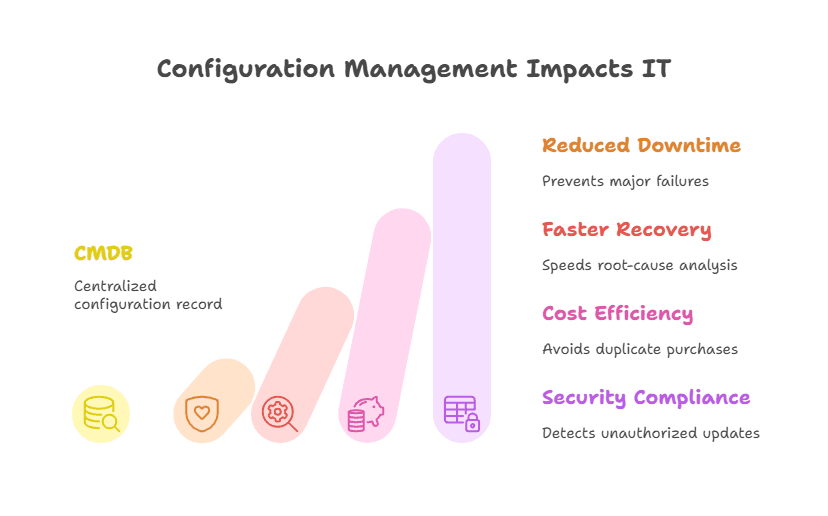
1. Preventing outages and downtime
When you track configurations well, you stop small errors from becoming big failures. Wrong settings often cause outages, so this step matters. One study showed that configuration mistakes caused about 70% of server downtime. Because of that, you should watch every change closely.
Next, you can set clear rules for how people make changes. Then you check that each change follows those rules before it goes live. As a result, your systems stay steady and recover faster when something goes wrong. Finally, your users get the reliable uptime they expect.
2. Faster troubleshooting and recovery
When incidents happen, a central record of settings helps you find the cause faster, and the CMDB provides an audit trail of what changed and when.
You can quickly see what changed and which parts it touched. So you cut repair time and fix issues before they grow. This makes your service stronger for everyone who uses it.
Also, your whole team can use the CMDB as a shared guide. Service desk staff and engineers can look at the same facts. Then they can spot the real problem and bring systems back online fast. In the end, you give users better and more steady support.
3. Cost efficiency and avoiding waste
Configuration management can also save you money. When you know every asset and its setup through reliable asset inventories, you avoid buying the same thing twice.
You also spot tools or servers that no one uses. Because of that, you cut waste and spend smarter. Zylo’s SaaS Management Index found companies wasted an average of $18M unused SaaS licenses in 2023 – a cost that accurate discovery helps stop.
Next, you can use this clear view to share licenses and place hardware where it helps most. Research shows that detailed setup data stops costly duplicate purchases.
It also speeds up projects since you stop hunting for missing details. As a result, you reduce rework and save both time and money.
4. Security and compliance
When you keep settings the same and write them down, you make your systems safer. You follow approved baselines, so weak setups do not slip through. Also, when you track every change, you can spot updates that no one allowed. That way, you stop new security gaps early.
For example, you can see when a server misses a critical patch. Your system flags it, so you fix it fast. As a result, you lower the risk of a breach.
Plus, a single record helps you ensure compliance and prove it during audits. Auditors can clearly see who changed what and when, backed by accurate information.
In summary, good configuration management helps you keep systems stable and easy to manage. It also makes people accountable for every change.
Because of that, your services stay reliable, and your IT work runs smoothly. So, you build a strong base for everything you support.
Now the big question is how you do this for many systems at once. Doing it by hand is slow and risky. That is why you need a CMDB with automated discovery. It finds and updates details for you, so you always have the right information.
What is a CMDB, and how does it support configuration management?
A configuration management database (CMDB) is a specialized database that stores information about your IT assets, called configuration items (CIs), and the relationships between them.
Think of it as the brain of your IT environment: it tracks every server, application, database, and network device, and shows how they work together. This gives you a clear, connected view of what you have, where it lives, and what depends on what.
Each CI record includes key details such as name, type, location, settings, version, ownership, support contacts, and links to related items. For example, a CMDB can show a database server, the applications that use it, and the host or cloud platform where it runs.
Mapping dependencies helps teams ask, “If this server fails, what services will it impact?”
| In daily operations, the configuration management database supports: Change management: checking dependencies to predict what a change might affect. Incident response: tracing failures through relationships and reviewing recent changes. Asset and budget planning: seeing what exists, how it’s configured, and what is truly needed. |
A CMDB is only valuable if it stays accurate and current—yet that’s difficult in fast-changing IT environments. Teams frequently add, move, retire, or update assets, and they often miss manual updates.
As a result, many CMDBs become incomplete or outdated, reducing trust and usage. Some studies estimate real-world accuracy around 60%, and Gartner suggests only about 25% of organizations get strong value from CMDB efforts.
Automated discovery solves this problem. Modern CMDBs use discovery tools that continuously scan the environment, detect new or changed assets, and update CI records automatically.
This keeps the configuration management database reliable, up to date, and useful as a true source of truth.
The challenge: Keeping your CMDB accurate and up-to-date
Keeping a CMDB accurate in real time is hard because IT changes all the time. Servers come and go, and virtual machines start and stop often. Apps update quickly, and settings slowly drift. So your CMDB can age fast if you do not watch it closely.
If you update data only during manual checks or tickets, it can go stale in hours. Then your CMDB no longer matches what you really have. This creates a risky gap between reality and records. As a result, you may make decisions using wrong data.
Some common challenges include:
1. Manual data entry is error-prone
Relying on people to record every change does not work at scale. You have too many updates happening each day. So mistakes and delays will happen. As a result, some changes never reach the CMDB.
Even one missed update can cause big trouble later. For example, you might forget that a server IP changed. Then, during an incident, you chase the wrong path. This can slow your fix and make the outage worse.
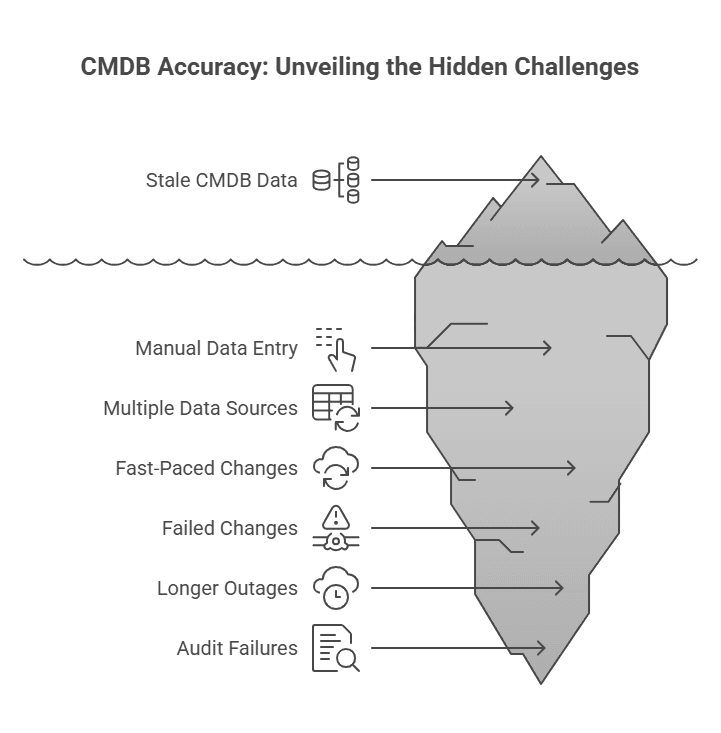
2. Multiple data sources
Large organizations often use many tools to track assets. You may have monitoring tools, spreadsheets, and cloud dashboards. Each one holds only part of the data. So pulling all of it into one CMDB is hard.
Because of this, you can end up with many “sources of truth.” One tool may say one thing, and another may say something else.
Sometimes the same asset shows up twice with different details. So the CMDB can look messy and unsafe to trust. Unless you clean it often, it will stay unreliable.
3. Fast-paced changes, especially in the cloud
In cloud and DevOps setups, things change very fast. Containers and VMs may live for only a short time. So, manual CMDB updates cannot keep up. You will always be behind if you try to do it by hand.
Without strong automation, your CMDB becomes old and incomplete. Then it stops helping you in real work. Experts call this gap configuration drift.
It happens when your records slowly move away from what is real. Because of that, you may trust data that is no longer true.
When your CMDB is wrong, it can hurt you in many ways. First, a change may fail because you judged its impact badly. Next, outages can last longer because you look at old links between systems. Also, audits can fail when your records are missing or incomplete.
So, you need automated discovery in a modern CMDB. It fixes these problems by updating data all the time. It feeds fresh details into the CMDB as changes happen. As a result, your CMDB matches your real setup and stays a true source of truth.
How does CMDB automated discovery work?
CMDB automated discovery is a set of tools and steps that find your IT items for you. It looks for all your configuration items and updates the CMDB management with fresh details. So you do not need to enter asset data by hand.
Instead, the discovery tool scans your network and systems. It spots assets, reads their settings, and records what it finds. Then it also maps how these items connect to each other. As a result, you see a clear and current picture of your IT environment.
Here’s how a typical CMDB auto-discovery solution functions:
1. Network and infrastructure scanning
The discovery tool scans your network and cloud ranges to find what is running. It starts with IP ranges, so you cover every corner. Then it checks which hosts are alive. So you get a live list of devices and services.
Next, it uses simple methods to learn more about each item. For example, it can use ping to find active hosts. It can use SNMP to read network devices. It can also use WMI or SSH to check servers, and cloud APIs to list cloud items.
Because of this, the tool finds many kinds of assets. It detects servers, VMs, routers, printers, containers, apps, and databases. It works across on-prem data centers and public clouds. As a result, you miss fewer items and keep your CMDB complete.
2. Identification and classification
Once the tool finds a device or service, it figures out what it is. It checks the device type and the OS or app it runs. To do this, it looks for clear signs, like open ports or running processes. It may also read special responses that reveal the system.
For example, it can spot a Linux server running MySQL. It sees the MySQL service in the process list. Then it labels the item correctly in the CMDB.
Also, it makes sure the item is unique. So it updates the right record instead of making a duplicate.
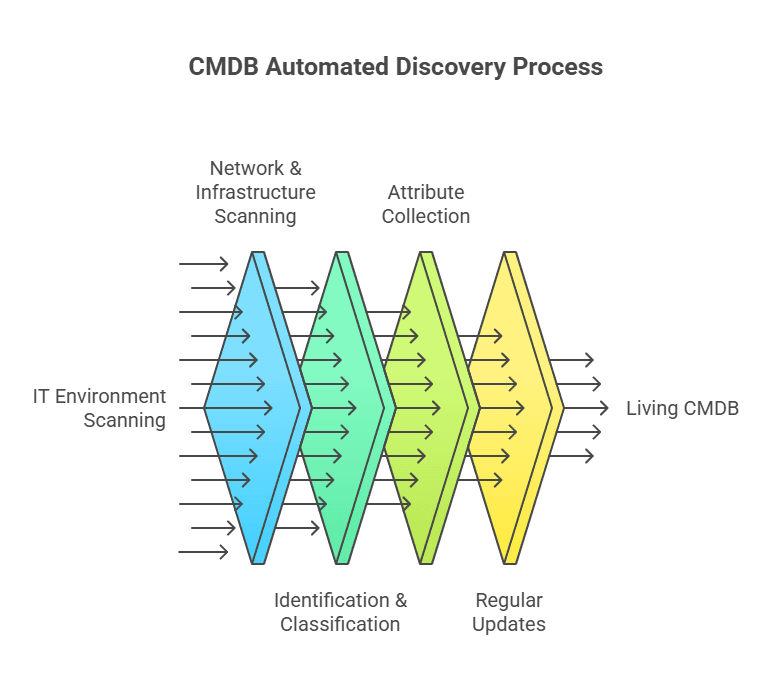
3. Attribute collection
Then the tool collects detailed settings from each item. It can pull hardware details like CPU, RAM, and network cards. It also reads software names, versions, IP addresses, and DNS names. In addition, it checks patches and running services.
So, it gathers the same facts you want inside your CMDB. For a database, it may record the database version and its host. For a server, it may capture the OS version and hostname. As a result, you get full and current records without extra manual work.
4. Regular updates (continuous or scheduled)
Unlike a one-time list, automated discovery runs on a set schedule. You can plan nightly scans or run them even more often. Also, the tool can listen for events, like when cloud systems start new instances. So it keeps watching without you doing extra work.
Because of this, the CMDB updates almost in real time. It catches new VMs, removes servers, and setting changes as they happen. You can adjust how often it scans to fit your needs. But most of all, automation stops long gaps where your CMDB goes out of date.
All these features help you trust the CMDB as a living record. It stays current, not frozen in time. When new assets appear or settings change, the tool updates them for you. So you do not chase people for manual edits.
Because of this, your CMDB matches the real world. It reflects the true state of your environment. As a result, you can use it as one clear source of truth. Then you make faster and safer decisions every day.
What problems does CMDB auto-discovery solve?
Implementing automated discovery for your CMDB yields tangible improvements across IT operations. Here’s an overview of the key problems it addresses and the benefits it provides:
1. Eliminating data gaps and inaccuracies
Auto-discovery mainly fixes data accuracy. It finds items you did not know about and fills in missing details. Also, it refreshes old records on a regular schedule. So you remove blind spots from your asset list.
For example, an admin may create a new cloud server and not record it. Discovery will still find it and add it to the CMDB. As a result, your CMDB stays complete and easy to trust. In short, you get clear, current data that helps you make better decisions.
2. Improved uptime and faster issue resolution
When you keep an updated view of your systems and their links, you cut downtime. If an incident hits, you can see which systems are affected right away. You also see what changed recently because Discovery updated the CMDB. So you troubleshoot faster with real-time facts.
Also, you can prevent issues before they start. With clear dependency maps, you spot weak points and risky setups early. Automated discovery shows hidden links and wrong settings, then helps you fix them first. As a result, your systems stay stable, and your services stay available.
3. Reduced operational effort and costs
Automation saves your team from boring manual inventory work. So you spend less time updating sheets or records. Instead, you can focus on work that brings more value. Also, fewer manual steps mean fewer human mistakes.
Downtime is expensive, and you feel that cost fast. A single surprise outage can burn a lot of money each hour. Because discovery keeps config data correct, you prevent some of these outages. So the return on your effort becomes clear.
Up-to-date asset data also helps you control spending. You can see which licenses you really use and which ones sit idle. That matters because 53% of SaaS apps are underutilized or unused in typical portfolios. Then you can share, reduce, or remove extras. As a result, you cut waste and save money over time.
4. Risk reduction and compliance
By continuously tracking configurations, automated discovery helps enforce standardization and detect drift. This reduces the risk of security vulnerabilities and compliance violations. If an unapproved change occurs, discovery updates the CMDB for review and correction.
Many discovery solutions also capture more detailed data (like software installed or patches applied), which feeds into compliance audits.
For example, you can quickly answer “which systems have software X version Y?” across your network, a question that could be painful without automated discovery. Authorized, documented changes ease IT audits and strengthen security by closing asset-visibility gaps.
In summary, CMDB auto-discovery fixes the common CMDB problems. It keeps your data fresh and removes the burden of manual updates. So you finally get real value from your CMDB. When the data stays reliable, you can trust it for every decision.
That is why many experts call auto-discovery a must-have feature today. It turns your CMDB (CMDB definition) from a static list into a living tool. Then you can act on real facts, not guesses. As a result, your IT operations become faster and safer.
Agentless vs. agent-based discovery: When do you need each?
When setting up CMDB discovery, you choose how the tool will collect asset data. The two main options are agentless discovery and agent-based discovery. Both gather information about IT assets, but they work differently.
Agentless discovery remotely scans devices using standard network protocols, without installing software on targets. For example, it may use SSH to query Linux servers or SNMP to poll network devices. This approach is easy to deploy, adds little overhead, and can reach most network-accessible assets.
It also provides fast time-to-value and broad coverage, which is why it’s the default choice for many organizations. However, agentless scans can miss deep details and may fail to collect data from firewalled, unreachable, or offline devices during scan windows.
In practice, no single method fits every environment. Many teams use a hybrid model: agentless discovery covers most assets, while agents provide deeper visibility when needed.
Best-practice guidance commonly recommends this balance.
| Agent-based discovery is especially useful in a few cases: Unreliable network access: assets in restricted or unstable segments may not be reachable by central scans. Critical systems needing deep data: agents can provide real-time updates and detailed metrics that periodic scans may miss. Legacy or remote assets: older platforms or laptops may not support standard remote protocols well, so local agents capture data more effectively. |
Agents do add effort: they must be installed, updated, secured, and they consume some system resources. That’s why you should use them selectively.
A hybrid approach delivers the best of both worlds: wide coverage with minimal effort, plus deep insight where it matters most.
Ensuring comprehensive coverage (including legacy systems and cloud)
When choosing a CMDB discovery tool, make sure it covers your entire tech stack: cloud, servers, and legacy platforms. Many enterprises still rely on mainframes or older UNIX systems like HP-UX and IBM AIX for critical workloads. If your tool can’t discover these environments, you’ll miss assets and create risky CMDB gaps.
Your discovery tool also needs strong cloud and virtualization support. It should span AWS, Azure, and Google Cloud, capturing VMs, containers, and serverless service details.
Because cloud resources change fast, the tool must use APIs or events to update the CMDB immediately.
Plan for growth too: if you adopt new cloud services later, the tool should add support without forcing a platform switch.
Go beyond hardware inventory. Choose a tool that maps application dependencies, showing hosting servers and the databases or services they rely on.
Some tools build these relationships automatically by analyzing network traffic or using application monitoring data. This turns your CMDB (CMDB benefits) into a living service model, not just an asset list.
Finally, prioritize integration and openness. Your discovery and configuration management database should connect smoothly with other IT systems like virtualization platforms and service desks.
Look for strong APIs and ready-made connectors so data flows both ways. That way, the CMDB becomes a reliable hub instead of a silo.
In short: choose a discovery that supports legacy systems, multi-cloud environments, application dependency mapping, and open integrations. This keeps your CMDB complete, accurate, and trustworthy as your infrastructure evolves.
Real-world example: How automated discovery makes a difference
Consider a mid-size firm with on-prem servers, VMware, AWS workloads, and IBM AIX for core banking. Before auto-discovery, the CMDB wasn’t trustworthy.
When a critical app failed, the team couldn’t quickly find where it ran because the CMDB still showed old relationships after a recent migration. They wasted hours guessing instead of fixing, pulling people into war rooms, extending downtime, and hurting user trust.
After adding a CMDB with automated discovery and dependency mapping, things improve. The tool scans regularly, using agents on hard-to-reach AIX servers and agentless discovery for everything else. This keeps configuration and dependency data current without manual effort.
Then a network switch fails, and several servers drop off. The ops dashboard shows impacted CIs, and the dependency map flags an affected server hosting the app’s database.
Because the configuration management database relationships stay up to date, the team knows which business service is at risk
They execute failover and restore services in the right order, guided by CMDB links, reducing downtime and stress.
After recovery, leadership pulls a CMDB report that clearly traces the incident. The discovery history shows a network change from the prior week, so the root cause is obvious and trusted. The team updates processes to prevent a repeat.
The takeaway: a discovery-fed configuration management database speeds incident response and enables accurate post-incident learning.
Without it, teams operate blind and rely on guesses. With it, they act on facts and keep services resilient.
Choosing the right CMDB discovery solution (key considerations)
If you believe you need CMDB auto discovery, the next step is to pick the right tool. By now, most IT leaders agree this step is important. So you should look closely at your options before you decide. Here are a few key things you must check when you compare CMDB tools or platforms.
Agentless and agent-based flexibility
As you saw earlier, pick a tool that supports both methods. It should let you run agentless scans right away. It should also offer agents for the few cases that need them. So you stay flexible and ready for any setup.
This hybrid approach gives you full coverage. You get broad scans with little effort. At the same time, you get deep data where it matters most. As a result, you avoid being stuck with only one method.
Breadth of technology support
Make sure the tool can find every asset you use. It should cover new cloud services and old legacy systems, too. Also, check that it supports your key platforms. This step keeps your CMDB complete.
Look for support for Windows, Linux, and Unix types. It should also find network devices, storage, and virtual platforms like VMware or Hyper-V. In addition, it must work with AWS, Azure, and GCP. If you use Kubernetes or Docker, it should scan those as well.
Depth of data collected
Check how much detail the tool can collect for you. Some tools grab only names and IP addresses. Better tools also pull software versions and patch levels.
They may even list user accounts and key settings. So you should aim for rich data, not just basics.
Also, see if the tool builds links between items by itself. For example, can it show which app runs on which server? Can it connect servers to the databases they use? If it maps these ties automatically, you save a lot of manual work.
Frequency and real-time capabilities
Some discovery tools scan on a schedule, like every night. Others update almost in real time. They do this by listening for events or running small, frequent checks. So you should pick the style that fits your setup.
If your environment changes fast, you may need continuous discovery. If things change more slowly, scheduled scans may be enough. Still, the tool should let you scan often without extra effort. It should also support on-demand scans when you need a quick update.
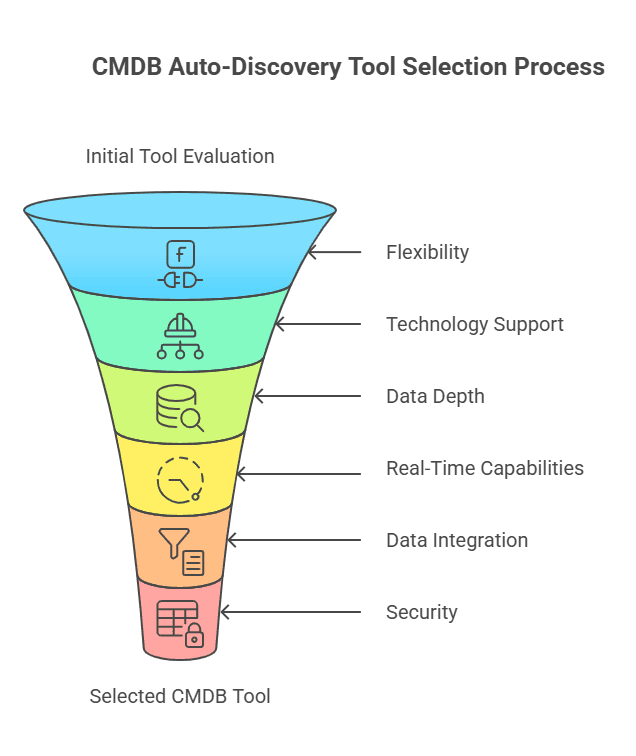
Data integration and clean-up
A good tool helps you avoid duplicate records. When it finds an item, it checks if the item is already in your CMDB. It uses a unique ID to match the right record.
Also, you may bring data from spreadsheets or other tools. In that case, your discovery tool should clean and merge that data for you. It should line up names, formats, and details so they match.
Security and access control
Discovery tools often need admin access to collect data. So security must come first for you. The tool should store passwords safely, often with a vault. It should also encrypt data while it moves.
Next, check for role-based access control. Only approved people should run scans or see sensitive settings. If the tool runs in the cloud, ask for multi-tenant isolation. This keeps data separate across teams or customers.
Finally, ask the vendor how they protect the discovery process. You do not want this tool to become a new attack path. A secure tool lets you scan with confidence.
Virima’s CMDB with automated discovery: A solution worth considering
When exploring solutions, one option to consider is Virima’s CMDB and IT Asset Discovery platform. Virima offers a purpose-built toolset for automated discovery, designed to address the very challenges we’ve discussed. Here’s a brief overview of what Virima provides:
1. Agentless discovery with optional agents
Virima Discovery mainly uses agentless scanning to find your assets. This means you can start fast without installing software on every device. It scans your network and cloud to spot most IT items. So you get wide coverage with less effort.
Sometimes you need deeper details from certain systems. In those cases, Virima also supports agent-based discovery. You can place small agents on critical or hard-to-reach machines. These agents send updates often, so your data stays fresh.
Because Virima offers both methods, you stay flexible. You get broad discovery for everything common. Then you add agents only where you need extra detail. As a result, one tool gives you both reach and depth.
2. Comprehensive asset coverage
Virima Discovery can find and record many kinds of assets for you. It covers routers, switches, physical servers, and virtual servers. It also tracks apps and databases in the same view. So you see your whole IT setup in one place.
You can scan more than one IP network at the same time. You can also connect Virima to cloud providers like AWS and Azure. Then it finds cloud servers and services automatically. Because of this, your cloud data stays current.
Virima also supports older and uncommon systems. It works with many operating systems and vendor platforms. So even legacy machines show up in your CMDB. In the end, you get a complete and up-to-date asset view from one tool.
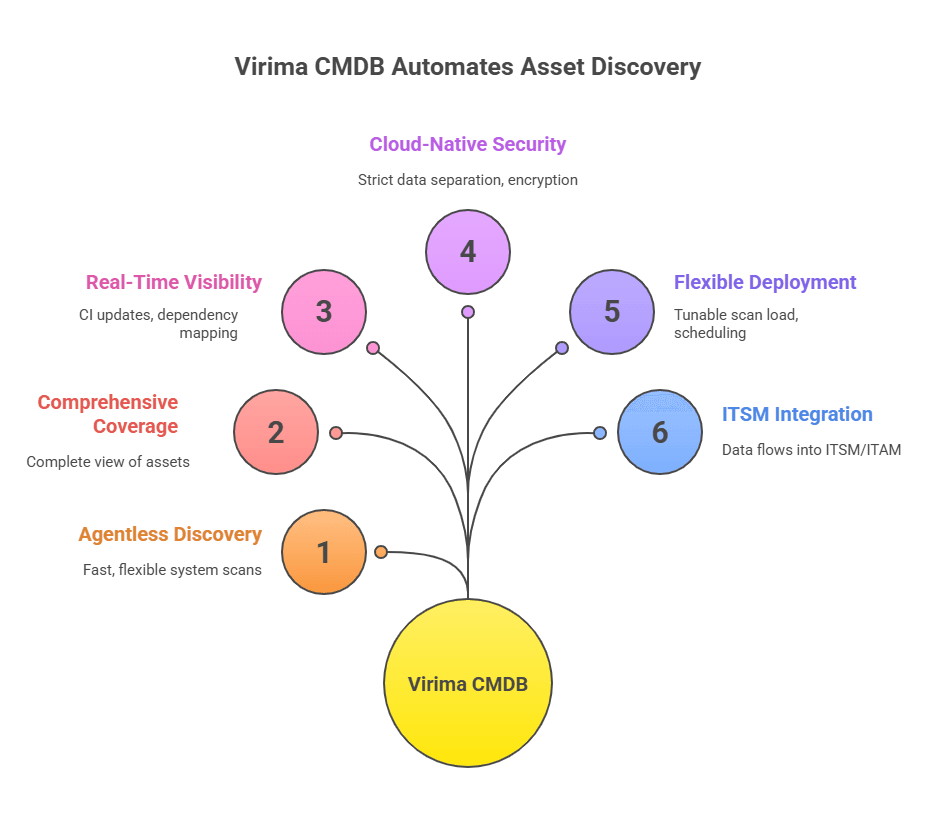
3. Real-time visibility and dependency mapping
Virima shows you, almost right away, what hosts and apps you have. It finds all your IT assets and keeps the list up to date. Then it links them, so you see which app runs on which server. It also shows how network devices connect to your systems.
Because this map is built in, you can view service links in a simple picture. So when one item changes or breaks, you quickly know what else may fail.
Virima even builds a full-service model for you without extra work. As a result, it warns you early, like when a key host goes down. Then you can protect the at-risk services before problems spread.
4. Cloud-native, secure architecture
Virima runs on AWS in the cloud. It supports multiple customers simultaneously. Still, your data stays separate from everyone else’s. So you do not need to worry about data mixing.
Because it is cloud-based, you can scale up fast. You can discover thousands of assets without setting up big servers yourself. This saves time and effort for you.
Virima also keeps security strong. It encrypts data when it moves between systems and uses role-based access, so only the right people can see the right things. It also protects your credentials, like admin passwords, so they stay hidden and safe.
5. Flexible deployment options
To scan your environment, you can place the Virima Discovery App on a Windows server. That server should reach the network areas you want to scan. You can use a jump box for a short setup, or pick a dedicated host for long-term use. Either way, you stay in control.
You do not need a big or complex server. Instead, a small and light app scans from inside your network. So setup stays simple and quick for you.
Virima lets you choose the scan type you need. You can run a normal network scan or scan web apps and databases. You can also plan scans ahead of time with schedules. Plus, you can tune scan settings to reduce network load.
6. Integration and ITSM context
Virima’s CMDB is part of a broader ITSM and ITAM platform, so discovered data feeds directly into everyday processes like incidents, changes, and asset management tools. This removes the need for manual data transfers and keeps work centralized.
For instance, when you raise a change ticket, the system automatically pulls the relevant CI details and relationships, letting you see exactly what you’re modifying and what it impacts. That makes change implementation faster and safer.
Virima also provides visual dependency mapping through tools like ViVID™, helping teams quickly understand how assets and services connect.
These views support practical work such as license tracking, migration planning, and compliance checks. In short, Virima doesn’t just collect CMDB data—it helps users interpret and apply it confidently.
A key promise of Virima’s discovery-driven approach is fixing common CMDB pain points: outdated, incomplete, or unreliable records. Automated discovery keeps the CMDB current, reduces manual cleanup, and improves trust in the data.
Virima supports hybrid discovery across diverse environments, including legacy systems, cloud assets, and remote endpoints, giving organizations broad coverage without heavy effort.
The platform is also cloud-based and multi-tenant, allowing secure separation and easy scaling of data for different business units or customers—ideal for service providers or multi-branch enterprises.
Turning CMDB accuracy into real results
If your IT team spends too much time hunting for data, you should look at automated discovery. It helps you stop chasing changes by hand. Also, it keeps your CMDB fresh and useful.
First, check how strong your configuration management is today. Ask yourself: how correct is your asset list right now? Next, notice if you get many incidents from unknown changes or hidden links. When you name these problems clearly, you can better explain why a discovery-based CMDB is worth it.
Next, you can research and test tools like Virima and others. Focus on key features we talked about, like scan types, coverage, and integration. Then, compare how each tool fits your environment.
Also, bring in people from IT ops, security, and compliance early. They can share what they need, so you can pick the right tool. Many vendors offer a free demo or assessment.
For example, you can book a Virima demo to see how it maps your setup. You can also check how it connects to your daily workflows.
When you build a strong CMDB with automated discovery, you establish Trusted Runtime Truth taking control of messy data so your team no longer fears hidden changes. As a result, you spend less time on urgent fixes. Instead, you work with clear and trusted information.
You will see quick gains because fewer surprises hit your team. Over time, you also build a faster and stronger IT setup. Since systems change every day, automation keeps your CMDB steady. So you can focus on real business value, not on chasing data.
Frequently asked questions
- Why do CMDBs become outdated?
Because IT changes happen fast, servers move, apps update, cloud resources appear and disappear, and manual updates often get missed.
- How does automated discovery help reduce outages?
It keeps the CMDB accurate, so teams can quickly see what is affected during incidents or changes, preventing delays caused by missing or wrong CI data.
- What’s the difference between agentless and agent-based discovery?
Agentless discovery scans devices remotely without installing software. Agent-based discovery uses small agents installed on devices for deeper or real-time data. Many organizations use both.
- What kinds of assets can a discovery tool detect?
It can detect physical servers, virtual machines, containers, network devices, operating systems, installed software, databases, and their dependencies.