How Do I Know Which Business Service Breaks When a Database Host Fails?

The monitoring stack lights up first. Disk, memory, or the database process on a single host goes red. The ticket names the hostname. The war room still asks a different question: which business services stop working for customers, and which can wait.
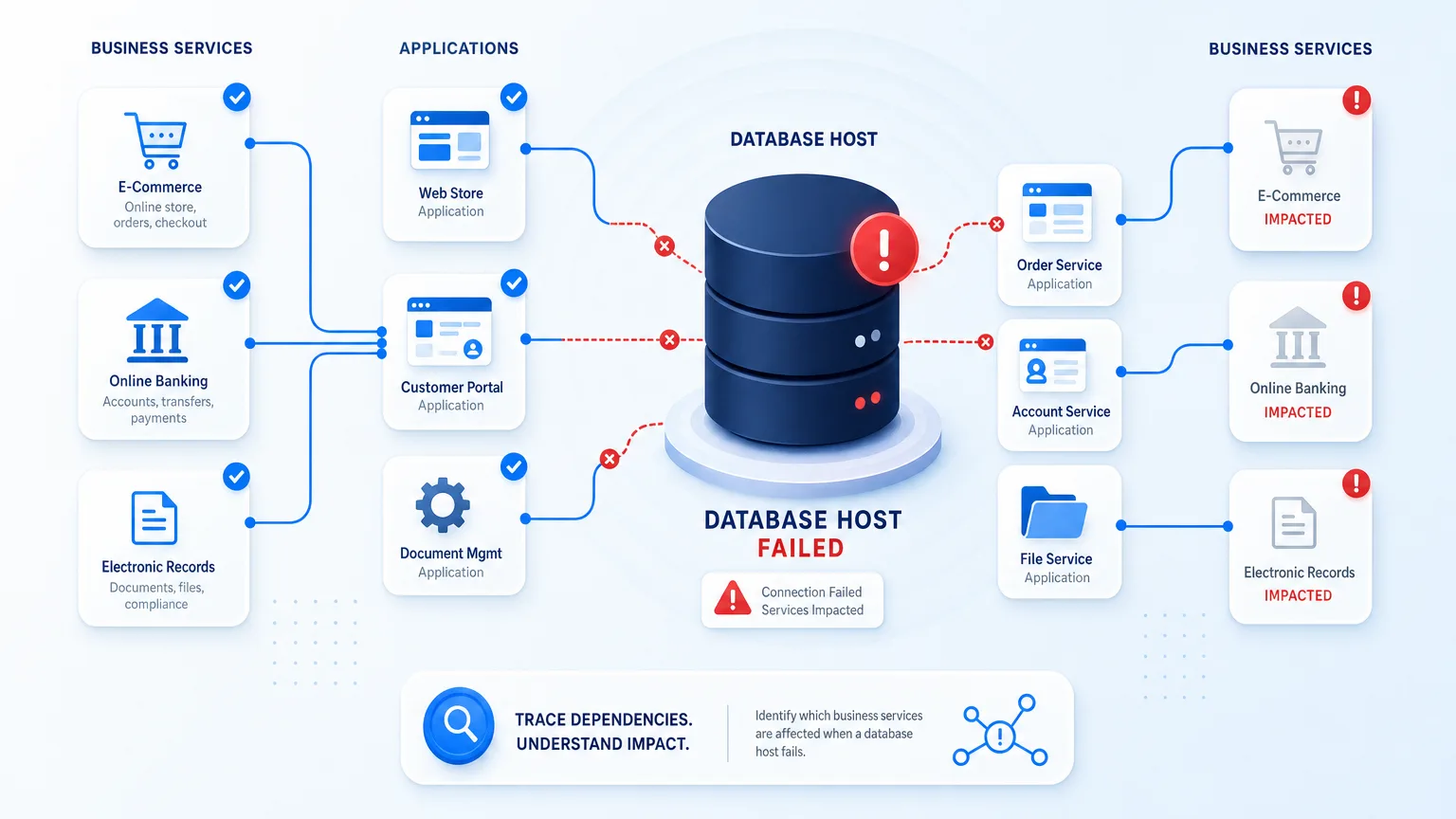
You do not answer that from the host alert alone. You answer it only when three layers are joined and current. Those layers are the failing host as a configuration item, the databases and applications that depend on it, and the named business services those applications deliver. Without that path, teams page the wrong owners, freeze the wrong change windows, and learn impact from customer tickets instead of the map.
This is the operator version of blast radius — the full set of business services affected when one component fails. It is not a theory deck about dependency management. It is the concrete join from one dead database host to the services leadership already measures.
How do I know which business service breaks when a database host fails?
Trace the failed host configuration item through its database and application dependencies to the named business services those applications support. You need discovery-fresh infrastructure relationships plus service definitions that bind apps to business services. Without that path, the alert stays a hostname and impact stays a guess until customers report it.
Why the host alert is not the impact answer
Infrastructure truth stops at the machine
IT discovery and a healthy CMDB can tell you the host is real, who owns the box, what OS and database software it runs, and when it last changed. That is necessary. It is not sufficient. A hostname is not a customer promise.
Applications share hosts in ways spreadsheets forget
One database host often backs multiple schemas, clusters, or application tiers. A failover pair can hide which node still carries production writes. Shared storage and listeners add hops the ticket never names. If relationships stop at “server runs Oracle,” the map still cannot name payroll versus reporting versus a batch job nobody staffs at 2 a.m. For a closer look at how those dependency chains get mapped in the first place, see Virima’s guide to application dependency mapping.
Business services are a separate definition layer
Business services are the products and capabilities the business funds: online banking, claims intake, e-commerce checkout, electronic health record access. Those names live in service catalogs, architecture tools, and leadership scorecards. They are not auto-inferred from a process list on a host. Until someone defines which applications compose each service, a perfect host inventory still cannot answer which service breaks.
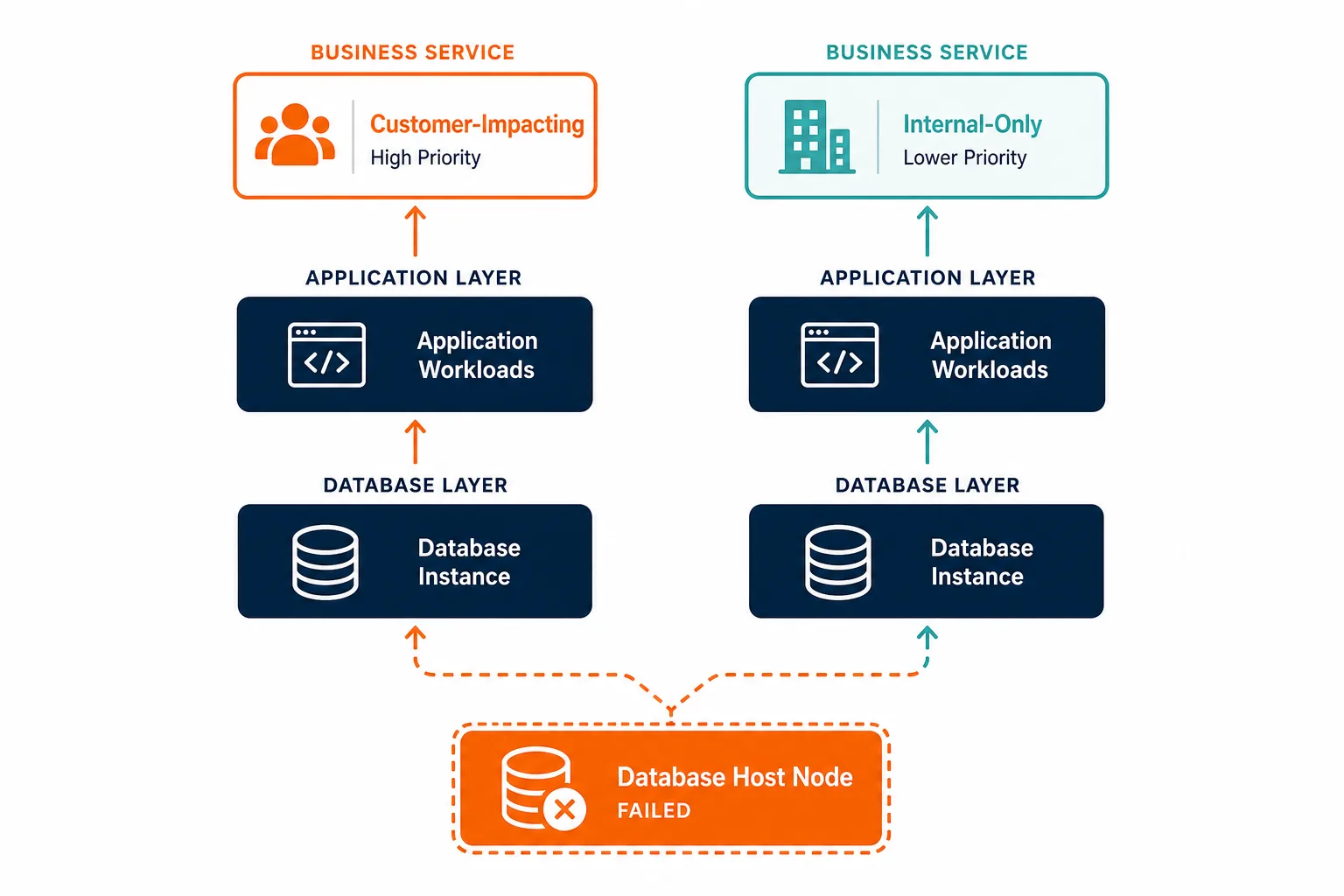
That urgency has numbers behind it. ITIC’s 2025 Hourly Cost of Downtime Survey puts the median downtime cost for enterprises with 1,000+ employees at roughly $9,000 per minute, close to $540,000 an hour. A war room that spends fifteen minutes rebuilding the service list on a whiteboard is spending real money before anyone touches a fix. Every minute spent reconstructing that service list by hand is a minute added directly to MTTR — the exact metric the four-fact checklist below is built to compress.
Uptime Institute keeps publishing annual outage analysis on IT and data center failures, including causes, costs, and consequences. The recurring operational lesson matches what incident responders report: infrastructure events become business events only when impact is known early. Guessing the service list after the page is how mean time to understand balloons before mean time to repair even starts.
The four facts you need before the next host failure
You know which business service breaks when a database host fails only if you can produce these four facts under pressure:
- The host is a trusted configuration item.
- Database and middleware relationships are recorded.
- Applications are bound to named business services.
- The map is recent enough to trust tonight.
1. The host is a trusted configuration item
The failing node must match a CI with stable identity, ownership, environment, and last discovery state. Shadow hosts and stale CMDB rows turn impact analysis into archaeology.
2. Database and middleware relationships are recorded
Host to database instance, instance to listeners and storage, database to consuming applications. Those edges come from discovery and relationship mapping, not from memory in the bridge call.
3. Applications are bound to named business services
This is the layer teams skip. Service composition must be provided: which apps and sites make up checkout, claims, or the customer portal. Once those definitions exist, dependency maps can climb from a host to a service name leadership recognizes.
4. The map is recent enough to trust tonight
A relationship drawn nine months ago is a rumor. High-frequency scheduled discovery cycles keep host and software edges current. Stale edges create false all-clears and false panics in equal measure.
| Fact | If missing | What the war room does instead |
|---|---|---|
| Host as CI | Identity and owner unclear | Debates which ticket system is right |
| DB and app edges | Consumers unknown | Pages every team near the database |
| Service definitions | No business name on the path | Waits for customer or executive reports |
| Fresh discovery | Map disagrees with production | Rebuilds impact on a whiteboard |
What data do you need to map a failed database host to business services?
You need a trusted host configuration item, recorded database and application dependency edges, and explicit business service definitions that list which applications compose each service. You also need discovery cycles recent enough that those edges still match production. Missing any one of the four leaves impact as a conference-call reconstruction.
What breaks the path in real estates
Service definitions never left the architecture slide
Architecture drew the service once, but operations never imported it into the CMDB or mapping tool. Discovery keeps adding hosts anyway, so the service layer stays empty. Host failure still ends at an application name only a few engineers use.
Shared databases without consumer edges
Platform teams know the cluster is shared. The CMDB lists the cluster CI and stops. When one node fails, nobody can prove which of twelve apps lose writes versus which only lose a reporting replica. Virima’s guide to Oracle and MySQL database CMDB discovery covers the discovery mechanics that populate those consumer edges in the first place.
Cloud and on-prem split-brain
The database host might be an Azure or AWS instance while the app tier still sits on premises. If cloud inventory and on-prem discovery never reconcile into one CI graph, impact stops at the cloud console boundary.
ITSM tickets without CI linkage
Incident tools can be excellent at workflow and still blind on topology. A priority-1 ticket that cannot attach the host CI and walk to services forces humans to rebuild the map in chat while the clock runs. NIST SP 800-61 Revision 2 frames incident handling around preparation, detection, analysis, containment, eradication, and recovery. Analysis quality collapses when the organization cannot name affected business functions from configuration data.
See how teams establish trusted runtime truth so a host failure resolves to owned services before the customer channel becomes the dependency map.
How Virima turns the host failure into a service list
Virima approaches the question as a data path, not a slide.
Discovery feeds the CMDB host to business service graph
Agent-based and agentless IT discovery, plus cloud inventory across AWS and Azure, populate hosts, databases, and related software into the CMDB. High-frequency scheduled discovery cycles refresh what exists and how infrastructure pieces relate, keeping the CMDB aligned with discovery-sourced ground truth instead of a snapshot from the last change window. That gives you the lower hops of the path when a database host fails.
Service definitions unlock the business name
Services are not invented from traffic alone. Teams provide service definitions manually, by spreadsheet import, or through architecture tools. After those definitions exist, ViVID™ builds service mapping dependency views that connect infrastructure and applications up to the named business service. In practice, one shared database host might back a dozen application instances — three of those compose the checkout service, the rest support internal reporting no customer ever touches. Impact path tracing is then a query: start at the failed host CI, walk dependencies, land on the services in scope.
Operations tools share the same CI identity
Connections such as ServiceNow, Jira, and Ivanti stay on one route through Virima’s integrations hub. The incident can carry the same host CI the map uses, so the service list is not a second spreadsheet rebuilt beside the ticket.
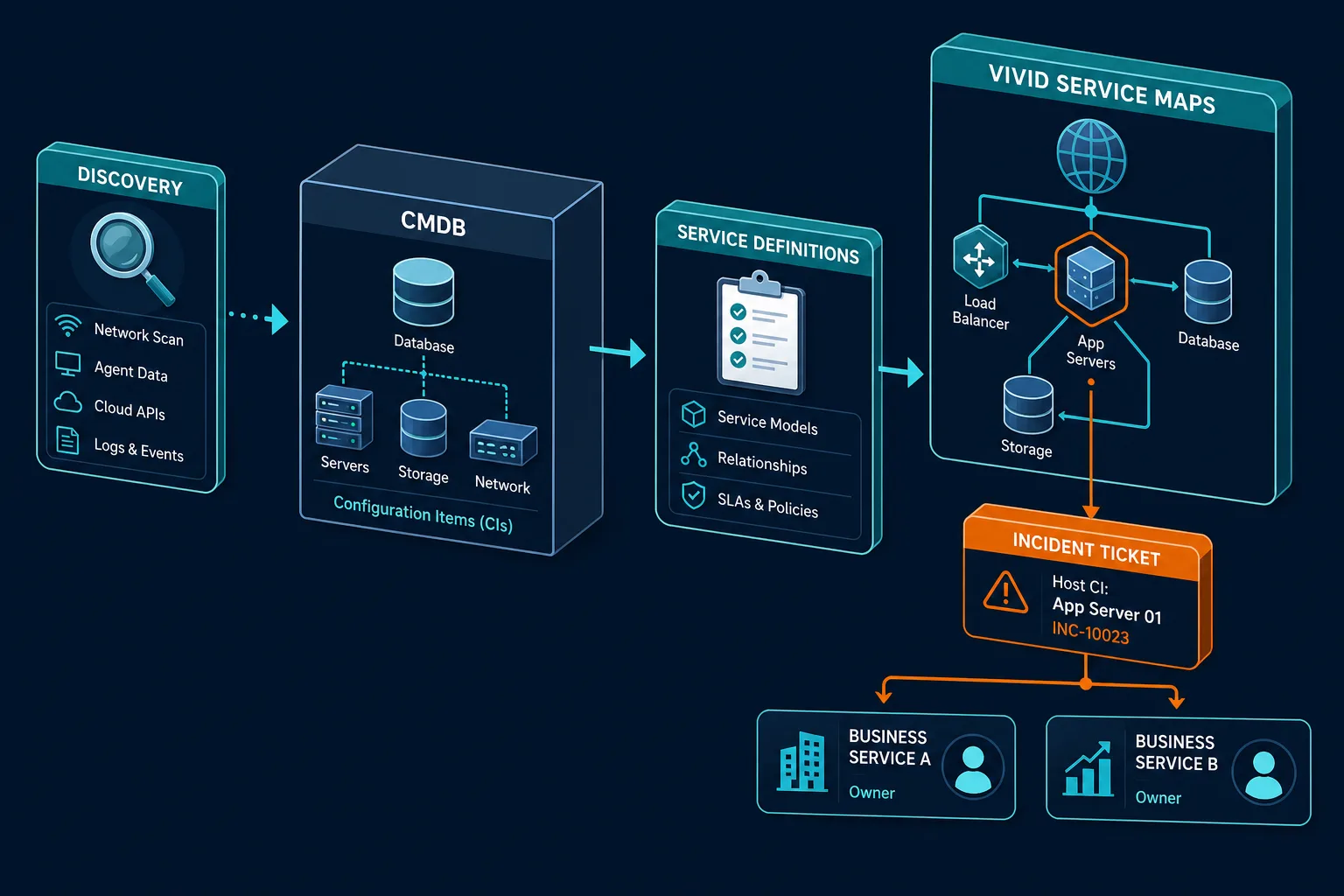
That design does not replace your monitoring tool or your incident commander. It removes the blank space between “dbprod08 is down” and “checkout and payments are in the blast radius, batch reporting is degraded, HR self-service is clear.”
See a failed database host resolve to named business services and owners on one discovery-fed map. Bring the next Priority-1 to a service list instead of a whiteboard rebuild.
Does service mapping automatically know business service names from a host alone?
No. Host and application relationships can come from discovery. Named business services require service definitions that state which applications compose each service. Once those definitions are supplied, service maps can trace a failed database host up to the business services that depend on it.
Prove it before the next Priority-1
Run a tabletop on a real shared database host
Pick a production database host that multiple apps use. Ask the on-call to list business services that fail if that host dies hard, with owners, in fifteen minutes, using only systems of record. Score whether the answer is a service list or a set of application nicknames. Virima’s approach to change risk assessment walks through the same exercise for planned changes; running it against an unplanned failure is the harder, more realistic version.
Compare the map to last quarter’s major incident
If a past database outage created customer impact you only learned from the service desk, mark every missing edge: host identity, DB consumer, or service definition. Those gaps are the backlog, not a training problem.
Put the path in the incident template
Require the host CI on the ticket. Require the service list field to be filled from the map, not free text. When the field stays empty, you have measured the gap in production language. That same field is what an auditor or board risk committee will ask for after a customer-facing outage — a filled service list from the map is a defensible answer; free text is not. See how service mapping improves incident and change management processes for the full workflow this template change supports.
From hostname to service name
You know which business service breaks when a database host fails once the organization can walk host to database to application to named service. That data has to be owned, defined, and recently discovered. Monitoring starts the clock. The map decides who else is already late.
Build that path on purpose: discovery-fed CIs, explicit service definitions, ViVID™ maps after those definitions exist, and ITSM tickets that share the same identities. That join needs to be visible before the next host failure, not reconstructed during one.
Frequently Asked Questions
How do I know which business service breaks when a database host fails?
Start from the host configuration item, follow database and application dependency edges, then land on business services defined as compositions of those applications. Without service definitions and current relationships, you only know the hostname failed, not which customer-facing services are in the blast radius.
Why is a CMDB host record not enough for business impact?
A host record answers identity, ownership, and often installed software. Business impact needs the upward path through databases and applications into named services the business funds. That path requires relationship data and service definitions, not only an accurate server CI.
Does Virima automatically generate business service names, or do I have to define them?
Virima’s discovery populates hosts, software, and technical dependencies automatically. Business service names and composition still come from service catalog or architecture input you provide — ViVID™ then builds the dependency graph on top of those definitions.
How does this differ from change blast-radius analysis?
Change analysis asks what might break before you approve a change. Host-failure analysis asks what is already breaking after an unplanned infrastructure event. Both need the same dependency and service path. The trigger and the clock differ.
How does Virima help when a database host fails?
Virima discovers hosts and related software into a CMDB, accepts business service definitions, and builds ViVID™ service maps so teams can trace a failed host CI to affected business services and owners. ITSM tools connect through one integrations hub so the ticket and the map share configuration item identity.