Sysadmin Inheriting a Fragile Environment: First 30 Days

A routine server change can interrupt a service when its dependencies exist only in someone else’s memory. A sysadmin inheriting a fragile environment may find current-looking records with missing owners, connections, and recovery details.
Inherited IT environment discovery works best as a sequence: establish what the team can verify, then close the gaps. Start with recovery access and discovery boundaries, then build an inventory that connects observations to owners, services, and evidence.
What should a sysadmin inheriting a fragile environment accomplish in 30 days?
By day 30, aim to give the team a starting point for operational decisions. The deliverables are an asset inventory, reviewed dependencies for a critical service, and a register of unresolved risks.
The first inventory will have gaps. Record those gaps alongside confirmed findings so missing data is not mistaken for proof of absence.
Your initial review should answer these questions:
- Which systems support the most important business services?
- Which networks, cloud accounts, and platforms have been reviewed?
- Which assets have confirmed owners and supporting evidence?
- Where are access or recovery procedures missing?
- Which planned changes require dependency validation?
The Cybersecurity and Infrastructure Security Agency distinguishes asset discovery from vulnerability enumeration. Discovery identifies network-addressable assets. Vulnerability enumeration examines attributes and identifies suspected weaknesses.
Under its directive, covered federal civilian agencies must perform asset discovery every seven days. They must also initiate vulnerability enumeration every 14 days across discovered assets. These requirements apply to specified federal systems, rather than every organization.
A device list shows where a server is located — not whether its backup works or which service depends on it. Those answers require additional evidence and owner review.
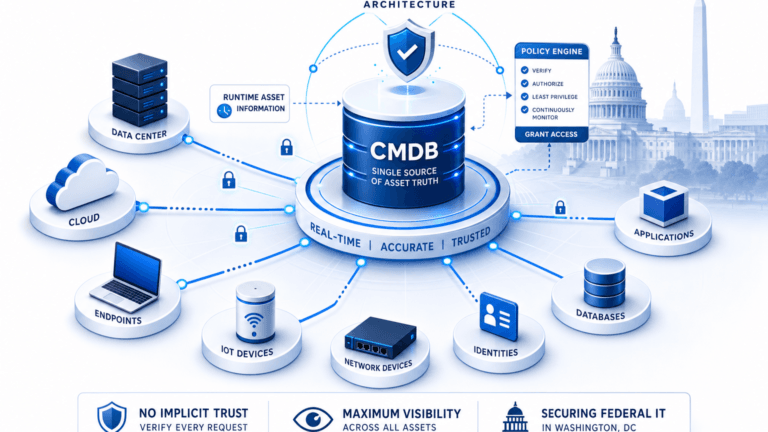
Explore Trusted Runtime Truth to see how discovery-sourced records can connect assets, relationships, changes, potential impact, and ownership.

Days 1-5: Establish access and protect recovery paths
Identify who can authorize discovery and who must be contacted if a system behaves unexpectedly. Ask operations staff about recurring incidents, restricted systems, and sensitive maintenance windows.
Obtain access through the organization’s approved process. Prioritize identity systems, administrative consoles, backup tools, network documentation, virtualization platforms, and cloud accounts. Record missing access as a risk with an owner and escalation date.
Store credentials in the approved vault rather than a spreadsheet. Document the access procedure and the person responsible for granting access.
Check recovery before changing the environment
Ask the backup owner for recent job results and restore-test evidence for critical systems. A completed backup job is useful evidence; a restore test additionally confirms the recovery procedure actually works.
If restore testing is overdue, agree on a test with the application owner. Document the recovery point, target location, approval, and result. Use an approved isolated target rather than overwriting production data.
Locate emergency contacts and the break-glass access procedure — a predefined path for temporary elevated access when standard approval isn’t available during an incident. Confirm who can use it and how the team will communicate during an incident.
What should a sysadmin do when backup ownership is unclear?
A sysadmin should identify the backup platform administrator and the business owner of the affected service. Ask both parties to confirm who owns recovery decisions. If neither accepts responsibility, escalate the gap through the service owner and record an agreed review date.
Define safe discovery boundaries
Build an approved scope that lists networks, cloud accounts, access methods, permitted windows, and exclusions. Include a contact who can stop discovery if a device or service shows unexpected behavior.
Treat legacy equipment, medical devices, and operational technology as potentially sensitive. Coordinate with their owners before any active scan. Use approved existing records or another owner-approved method where scanning is unsuitable.
Agree on a small pilot before expanding the scope. Document the target range, expected traffic, credentials, start time, and stop procedure. Review the pilot with network and security teams before proceeding.
Day 5 deliverable: An access and recovery register, approved discovery boundaries, and a list of excluded systems.
Days 6-10: Build an IT infrastructure inventory from existing evidence
Collect the records that already describe the environment. Start with directory exports, address management data, monitoring inventories, and backup reports. Add virtualization consoles, cloud inventories, and the configuration management database (CMDB).
Keep each source’s extraction date and scope. A directory export can contain retired machines. A backup report may omit a server that never entered the backup policy. Validate the records before treating either source as authoritative, and treat CMDB validation as a named step here rather than an afterthought. An unvalidated CMDB drifts from what’s actually running — exactly the gap that makes handovers like this one risky. CMDB data manager: How it simplifies managing your configuration items (CIs)
For each asset or candidate asset, record:
- Asset type and a suitable stable identifier, such as a hardware serial number or cloud instance ID.
- Hostname and IP address as supporting attributes.
- Source, observation date, and discovery method.
- Environment, location, and associated business service.
- Technical owner and business owner, when confirmed.
- Confidence status and the next validation action.
Hostnames can change or be reused. Use hardware serial numbers or cloud instance IDs where appropriate when joining records. Verify ambiguous matches before merging them.
Reconcile conflicts without erasing them
Consider a backup report listing a server absent from the virtualization inventory, so the server may be physical, retired, hosted elsewhere, or simply outside the export’s scope.
Keep conflicting evidence visible until an owner confirms the explanation. Assign a validation task and record the decision. Deleting an older record too early can remove a useful recovery clue.
When should conflicting asset records remain separate?
Conflicting asset records should remain separate when their identifiers are insufficient to establish a match. A reused hostname can belong to different machines at different times. Preserve both records until an owner checks a hardware serial number, cloud instance ID, or another suitable identifier.
By day 10, the team should have a baseline inventory, documented disputed records, and a coverage list showing which environments remain unreviewed.
Days 11-15: Run a controlled discovery pilot
Select a low-risk segment with an available owner and a known set of test systems. Compare the pilot output against existing records before expanding to additional ranges. Comparing live traffic against documented records — not just interviews or spreadsheets — surfaces dependencies nobody wrote down, including shared infrastructure one team doesn’t realize another depends on.
Configure access according to the approved scope. For credentialed discovery, use a dedicated account with the minimum permissions required. Confirm credential storage and rotation with the security team.
Review operational effects as well as findings. Check for authentication failures, slow responses, and unexpected monitoring alerts. Pause the work if an agreed stop condition is met.
Virima’s IT discovery capabilities include agentless and agent-based methods. Scheduled discovery cycles can collect inventory across approved environments. Supported environments include AWS, Azure, VMware, and Hyper-V.
Coverage depends on scope, permissions, connectivity, and whether the scan completes successfully. Record those limits with the results so other teams can interpret the inventory correctly.
Interpret absence carefully
A missing result has several possible explanations. The system may be offline, outside the range, blocked by a firewall, or excluded by design. Supplied credentials may also lack the required permissions.
Record the cause of each failed or partial attempt when known. Assign someone to confirm whether the asset exists and whether another approved method is available.
A discovery response does not establish that an application is healthy. A responsive server can still host a failed service or an undocumented dependency.

Day 15 deliverable: Pilot results, operational observations, access exceptions, and an approved plan for expanding coverage.
Days 16-22: Connect assets to services and owners
Choose one business-critical service for deeper validation. Ask its owner to identify application components, supporting infrastructure, upstream inputs, downstream consumers, and recovery contacts.
Review configuration files, monitoring data, change records, and interviews for evidence of relationships. Mark each relationship as confirmed, inferred, or unknown. Include supporting evidence and a validation owner for each inference.
For example, a scheduled integration might send payroll data to a file-transfer endpoint. The server record alone may not identify the receiving team or transfer schedule. Ask the service owner to confirm those details before planning changes.
If a relationship remains uncertain, keep it visible as an open question. An unconfirmed connection should not appear as a verified dependency in a change review.
Test one change against the dependency record
Select an upcoming change with a named owner and an approved review process. Ask the team to trace the affected asset to its service and related components.
Document which relationships the team confirmed before the change window, and which remain inferred or unknown, so the change owner can decide whether more review is needed. That blast-radius check turns a guess about impact into a reviewable decision. Also, see How Virima and ServiceNow® integration enhance change management insights
Virima’s ViVID™ service maps can visualize dependencies after service definitions are supplied. Teams can provide those definitions manually or through supported imports. Owners should review the resulting map, especially where inherited records are incomplete.
How should a change owner handle an unverified dependency?
A change owner should record the proposed change, the uncertain connection, and the service potentially affected. Ask the service owner to identify a suitable validation method. If the connection cannot be checked before the window, document the decision and any approved fallback procedure.
The result by day 22: one reviewed service dependency record, named owners, and an exception list for unconfirmed relationships.
Days 23-30: Build the sysadmin handover checklist and prioritize risk
Bring inventory and dependency findings into a short operational review. Prioritize gaps that affect critical services or prevent a recovery decision.
A practical risk register can contain these fields:
- Finding: Describe the observed condition and affected asset or service.
- Evidence: Record the source, observation date, and conflicting information.
- Impact: Describe the plausible consequence without assuming it occurred.
- Owner: Name the person responsible for the next decision.
- Next action: Specify the investigation, change, or escalation required.
- Due date: Agree on a review date with the owner.
For example, an undocumented server may need ownership validation before a patch window. An untested backup may need a restore exercise. Keep those findings separate so each has an appropriate owner and action.

Review exposure with the security team
Share the inventory with security colleagues for comparison against vulnerability and exposure data. Investigate assets that cannot be matched and document whether identifiers or coverage are incomplete.
In the 2025 Verizon breach report, vulnerability exploitation reached 20% as an initial access vector. The report’s figure concerns analyzed breaches with known initial access vectors. It does not establish incident likelihood for a particular environment.
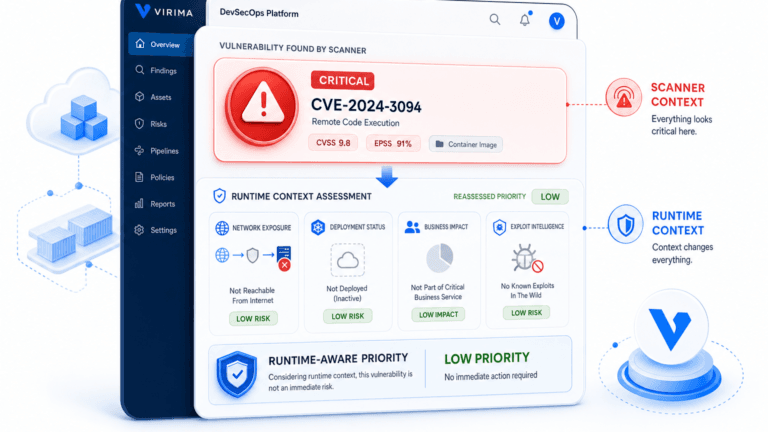
When a critical system cannot be patched immediately, involve its owner and the security team. Document the reason, temporary controls, and review date. Keep the exception open until the responsible team confirms the next decision — that review goes faster when owners are already tied to assets. Also, see Virima blog post on building an audit-ready asset inventory and license compliance program.
Set a review cadence the team can sustain
Agree on scheduled discovery cycles for approved systems and a process for reviewing failures. Set the interval according to service criticality, change frequency, system sensitivity, and available capacity.
Report coverage against the defined scope. For example, list reviewed subnets and show excluded ranges separately. Record cloud account gaps, credential failures, and inaccessible segments as distinct categories.
Choose a small set of measures that the team can verify:
- Approved ranges reviewed during the cycle.
- Assets with a confirmed technical owner.
- Critical services with reviewed dependency records.
- Discovery failures awaiting investigation.
- Recovery procedures awaiting a restore test.
Keep the denominator beside each measure. If ten of twenty approved ranges were reviewed, report ten of twenty. The scope should remain visible alongside the result.
Day 30 deliverable: A prioritized risk register, coverage report, named owners, and an agreed schedule for the next review.
Carry the baseline into routine operations
A sysadmin inheriting a fragile environment should carry this baseline into change planning, incident review, recovery exercises, and ownership handoffs. Keep unresolved questions visible until an owner can validate the evidence.
Turn the day 30 risk register above into a repeatable process: Does Virima Support Pure Storage, NetApp, Arista, and Aruba Discovery? to track findings, owners, and due dates from day one. When you’re ready to see how scheduled discovery and service mapping support that process directly, schedule a Virima demo.
Frequently Asked Questions
Where should a sysadmin start in an undocumented environment?
Start with critical services, recovery contacts, approved access, and discovery boundaries. Review existing inventories and backup records before running an authorized pilot. Record unknowns and assign owners to investigate them.
Can an asset inventory confirm that backups are recoverable?
An asset inventory can identify systems that need backup coverage review. Recovery confidence also requires backup evidence and an appropriate restore test. Backup and service owners should agree on the test scope and document its outcome.
What should a sysadmin do with an unknown server?
Record its identifiers, observed location, source, and any known connections. Ask infrastructure and application owners to confirm its purpose. Avoid shutting it down until the responsible team has reviewed its dependencies and approved the action.
How does Virima support discovery in a hybrid environment?
Virima supports agentless and agent-based discovery methods across approved environments. Teams can configure scheduled discovery cycles and use the resulting data in a CMDB. Coverage depends on scope, permissions, connectivity, and successful discovery results.
How does Virima build a service dependency map?
Teams first supply service definitions through supported inputs, including manual entry or spreadsheet import. ViVID™ then builds a dependency map from those definitions and available relationship data. Service owners should review missing or uncertain relationships.