Software License Audit Findings After Reformatting Devices

A software audit can stall when reformatted devices no longer show their earlier installations. An IT asset manager may have purchase records and a current inventory but lack evidence for the period under review. That gap can leave software license audit findings unresolved after reformatting devices. In Flexera’s 2026 State of ITAM survey, 48% of respondents reported an audit in the previous year.
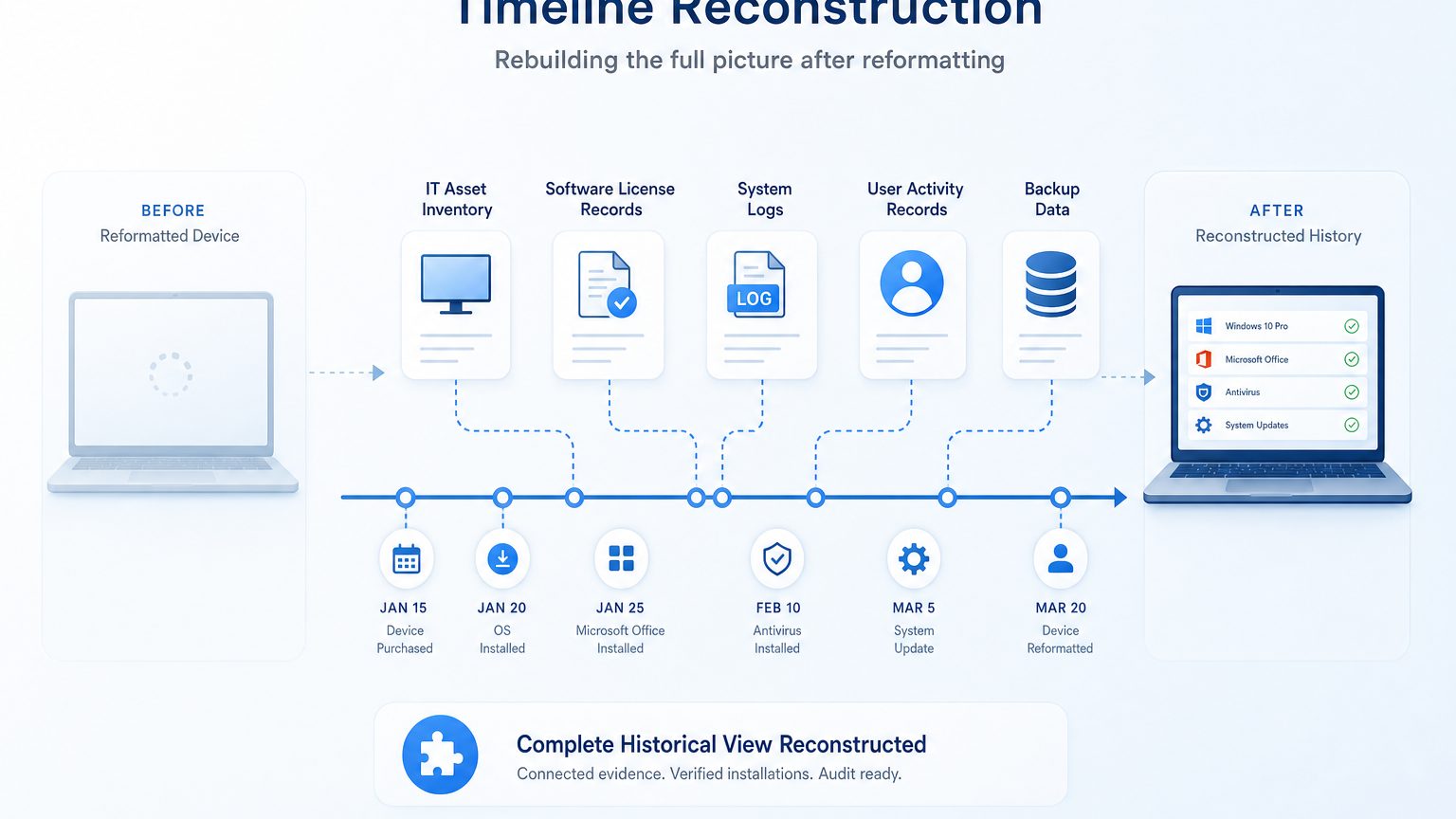
A fresh scan can show what is installed today. Earlier findings depend on records captured before the rebuild. The team must identify surviving evidence, match it to the correct devices, and explain any gaps. Resolving software license audit findings after reformatting devices means rebuilding that timeline from whatever records survived, not treating a current scan as proof of the past.
What reformatting changes in a software license audit
Reformatting can remove local application files and device-level records. A rebuilt device may also receive a new hostname or management record. The physical computer can remain in service while its software history becomes harder to follow. The same gap applies to reimaging: software installation evidence after reimaging depends on whatever records survived the rebuild, not on what the device shows today.
The audit request determines which missing facts matter. A publisher may ask for a current deployment count or evidence for an earlier date. The agreement may also require information about usage across a defined contract period.
Preserve the records that remain before changing any retention settings. Restrict access to original exports and keep working copies separate. If an audit or legal hold is underway, follow counsel’s instructions on preservation.
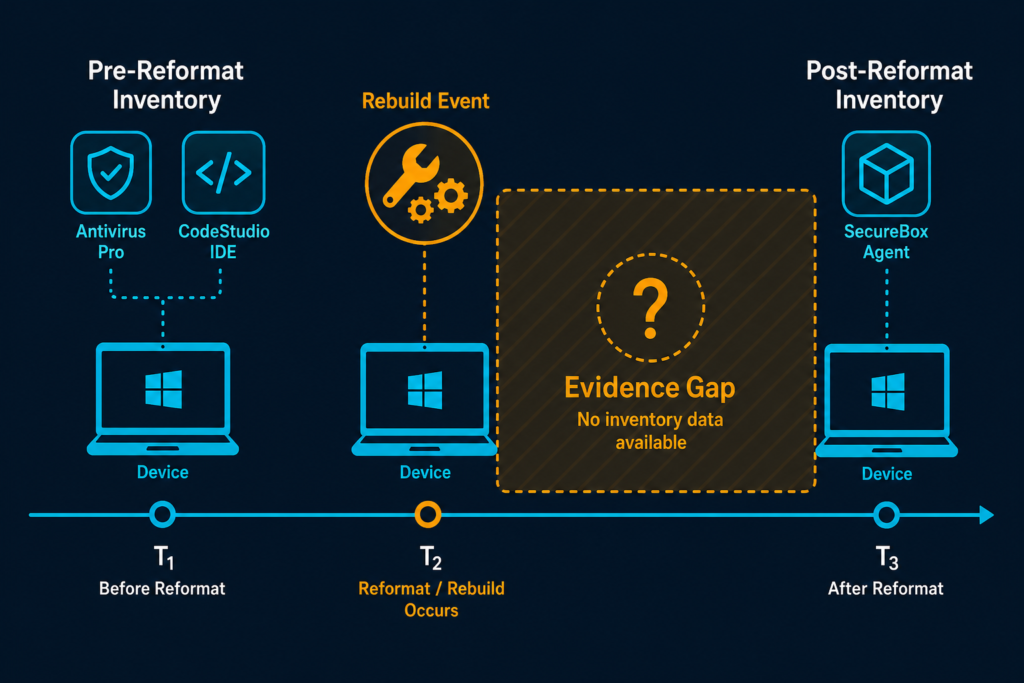
Virima’s Trusted Runtime Truth approach connects discovery-sourced asset information with ownership and changes. It can support a defensible operational record. Historical conclusions still depend on evidence retained for the period under review. Flexera identifies governance and visibility gaps as contributors to audit exposure. A reformatted device without a retained history can create an evidence gap.
A current inventory can support an assessment of current deployments. Earlier questions require historical snapshots or other records that establish what happened before the rebuild. Record the collection date for each source rather than treating an export as evidence for an entire contract period.
What should teams preserve first when an audit involves reformatted devices?
Preserve available source exports and the settings used to collect them. Record the export owner, collection date, filters, and relevant retention policy. Keep the original files separate from working copies so reviewers can trace calculations back to the material that supported them.
Establish the audit period and license metric
Read the audit notice alongside the applicable agreement before counting installations. Confirm the publisher, products, editions, entities, locations, and dates within scope. Ask the auditor to clarify ambiguous requests before exporting a broad dataset.
Identify the license metric for each product. Device-based terms may require a different population from named-user or concurrent-user terms. Processor and subscription agreements can require additional information beyond installation counts.
Record the agreement version and amendments that applied during the relevant period. Check whether reassignment, downgrade, or virtual-use rights affect the calculation. Procurement and legal teams can help interpret disputed terms.
Write down the facts needed for each audit request, separating a current installation count from a historical deployment count, then identify which sources can address each. A current scan can narrow the investigation, but it cannot fill a historical gap by itself. Keep the date of each observation visible in the working file so a post-reformat result is never presented as an earlier finding.
For a wider view of entitlement and deployment reconciliation, review how teams reconcile software records. The reformat investigation supplies evidence for that broader process.
Recover records that survived the rebuild
Search systems outside the affected device before concluding that historical evidence is unavailable. Each source can answer a different question, so retain its original context, and most answer a narrower question than it first appears, so track what each one can and cannot establish.
Recovering historical software inventory evidence
Look for dated exports from asset management, endpoint management, or discovery systems. Capture the collection time, device identifier, software name, edition, version, and source coverage, and confirm whether each export identifies individual devices or only aggregated counts.
Deployment records
Check package deployment results and service requests. A successful deployment result can support an installation event when the device and date match; a deployment instruction alone does not establish that installation succeeded or remained present.
Rebuild, retirement, and disposal records
Retrieve approved reformat tickets, imaging logs, repair records, and disposal certificates. These help establish when a device changed state, but a reformatted-and-redeployed device is a different case from one that was retired and disposed of. The first still needs a matched software record; the second may fall outside the audit population entirely. Confirm which case applies before counting the device.
License and procurement records
Collect agreements, purchase orders, invoices, renewal documents, and assignment exports. These can support entitlement and allocation decisions, but a purchase record alone does not establish where software was installed.
Backups and archived reports
Ask whether permitted backups or prior audit exports contain relevant inventory data, and confirm restoration authority and data-handling requirements before accessing them. Record the backup date separately from the original collection date.
Microsoft’s Intune documentation illustrates why collection timing matters. Its Discovered Apps report generally refreshes every seven days for each enrolled device. The documentation identifies a 24-hour collection interval for certain Windows application information gathered by the Intune Management Extension.
Those intervals apply to the specified report and collection methods. Check the device platform, enrollment type, and configuration before interpreting an absent application. A missed check-in or collection-scope limit can affect the result.
Match each device across its records
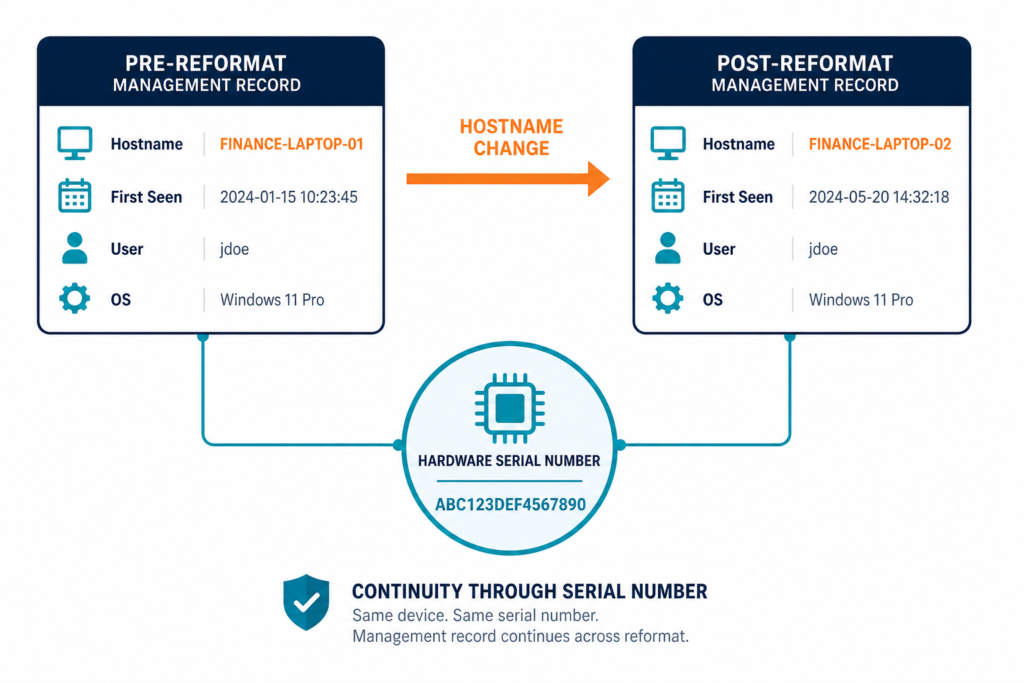
A rebuilt computer may appear twice in management systems. Hostname reuse can also make two different computers appear to be one. Use a hardware serial number as the primary join key when it is available and reliable.
Compare the serial number with asset tags, purchasing records, and rebuild tickets. Treat hostnames, usernames, and enrollment identifiers as supporting fields. Investigate conflicting serial numbers rather than forcing a match.
For virtual machines, use a cloud instance ID where appropriate and available. Instance identifiers can change during replacement or migration. Check the relevant platform records and document the relationship between the old and new instances.
Create a crosswalk connecting the pre-reformat record, rebuild event, and post-reformat record. Include the source and date for each field. Mark uncertain matches for review before adding them to an audit count. These crosswalk fields turn scattered reformatted device audit records into one reviewable file.
What the crosswalk should capture
Each field closes one gap an auditor is likely to ask about:
- Hardware serial number and asset tag.
- Previous and current management record identifiers.
- Previous and current hostnames, where available.
- Last known pre-reformat inventory collection date.
- Documented reformat date and ticket reference.
- First successful post-reformat inventory collection date.
- Match status and the reviewer’s explanation.
A discovery system may refresh a record during a scheduled collection cycle. Check collection coverage and record history before treating a changed entry as a new physical device.
What should teams do when device identifiers conflict after a reformat?
Place conflicting records in an exception queue until a reviewer can establish their relationship. Compare the serial number with purchasing documents, repair history, and the rebuild ticket. Preserve both source records in the meantime, and document the reason for accepting or rejecting the proposed match.
Reconstruct the evidence timeline
Arrange observations for each in-scope device in date order. Distinguish an observed installation, a recorded action, and an inference. Keep the original source reference beside each entry.
An inventory export may show an application before a rebuild. A change ticket may document the rebuild date. A later scan may show a different application set after the device returned to service.
Those records support observations at their stated dates. They do not establish an exact uninstall time or uninterrupted use between observations. A deployment or removal log may narrow that gap when one exists.
Label each entry using the Observed-Corroborated-Inferred-Unknown framework, so reviewers can tell direct proof from inference at a glance:
- Observed — a dated source directly reports the installation or event.
- Corroborated — independent records support the same conclusion.
- Inferred — available records support a conclusion without direct observation.
- Unknown — available records cannot establish the requested fact.
Document collection gaps for each affected device. An offline device might be absent from an export even though it remained in use. A later discovery result should carry its actual collection date.
Keep original timestamps when normalizing records from different time zones. Record who exported each file and which filters they applied. If a file is transformed for analysis, preserve the original and describe the transformation.
These practices help reviewers distinguish deployment discrepancies from duplicate records. The audit preparation workflow provides a wider framework for organizing evidence and reviewing findings.
Reconcile deployments with contractual rights
Compare the supported deployment evidence with entitlements for the requested period. Use the publisher’s contractual metric rather than a generic installation count.
A product may appear under different names or versions across sources. Create a documented mapping from raw product names to the relevant contract line, and preserve the original values so reviewers can trace it.
Check for circumstances that affect the count. A rebuild may produce two management records for one physical computer. A replacement computer may be a separate licensable device. A named-user subscription may depend on assigned users rather than device installations.
Compare entitlement dates with deployment dates. An invoice outside the audit period may need supporting agreement records before it can apply to an earlier deployment, and a renewal may change rights or quantities for a later period.
Record the calculation method, assumptions, and unresolved questions. Have procurement or legal review interpretations that materially affect the result. Where an agreement permits reassignment, document the relevant dates and supporting records.
How can license reassignment affect a post-reformat finding?
A permitted reassignment may change which device or user consumes an entitlement. Review the agreement for transfer conditions and timing restrictions. Preserve the assignment history and any approval records, then compare their dates with the deployment evidence before applying the entitlement to another device.
Present findings without overstating certainty
Prepare an evidence schedule for each material finding. Include the question asked, period examined, affected population, and records reviewed. Show the calculation and identify the person responsible for the assessment.
When records support a finding, cite the source and collection date. When sources conflict, describe the discrepancy and the steps taken to resolve it. Keep estimates separate from observed counts.
For each unresolved gap, document the following points:
- Identify the fact requested by the auditor.
- List the systems and archives reviewed.
- Describe the evidence that survived the reformat.
- Explain the limits of that evidence.
- Identify any alternative source still available.
- Name the owner of the next decision.
Avoid backdating exports or changing original files to make a timeline appear complete. If an estimate is appropriate, label its method and assumptions. Ask the auditor whether the proposed alternative evidence addresses the request.
Legal counsel should review contested findings before external disclosure. The team can then provide a consistent response that reflects the records available.
Preserve evidence before the next rebuild
Add an evidence checkpoint to the rebuild procedure. Before an authorized wipe or reimage, capture the device serial number and asset tag. Preserve relevant software inventory, its collection timestamp, and the associated change ticket.
Confirm that collection succeeded and covered the intended device. Store the export outside the device being rebuilt. Apply access controls and retention periods that reflect contractual, legal, security, and privacy requirements. Retention should follow those requirements rather than a fixed default, so confirm the minimum period with legal or procurement before discarding older exports.
After the rebuild, record the new management identifier. Compare the next scheduled discovery result with the pre-reformat crosswalk. Investigate duplicate records and missing serial numbers before closing the internal review.
Test whether archived exports remain readable. A retained file is difficult to use if the team cannot identify its source or interpret its columns. Keep the relevant contract references alongside the evidence schedule.
Virima’s IT Discovery can identify software and hardware information during scheduled cycles, and Virima’s ITAM can maintain asset records and support license tracking. Teams still need to configure collection, retain required evidence, and review exceptions. For a broader look at closing these gaps before the next rebuild, see Virima blog post on reducing shadow IT and untracked device risk.
Build an audit record that survives device changes
A reformat changes what a device can show locally. A defensible response connects retained observations to the right asset, period, and license terms. When evidence is incomplete, state the gap and the steps taken to investigate it. In Flexera’s 2026 survey, 44% of respondents reported spending more than $1 million on vendor audits over three years.
Frequently Asked Questions
What evidence can support an audit after a device is reformatted?
Consider dated inventory exports, deployment results, rebuild tickets, backup records, license assignments, and purchase documents. Each source answers a different question. Record its date, scope, and limitations before using it in a finding.
Does reformatting a computer remove its license obligation?
The applicable agreement determines license obligations and reassignment rights. A reformat can remove local software. Earlier obligations still depend on the agreement and evidence for the relevant audit period.
What should we do when historical installation records are missing?
Search independent records, including archived inventories, deployment systems, and rebuild tickets. Document the sources reviewed and their limits. Mark unresolved facts as unknown, then discuss alternative evidence with the appropriate reviewers.
Can Virima recreate software inventory erased before deployment?
Virima can collect software inventory during configured discovery cycles. An earlier installation requires retained historical evidence from Virima or another source. A later discovery result supports the period it observed.
How can Virima support evidence collection before future rebuilds?
Virima can maintain hardware and software inventory and support exportable reports. Teams can incorporate those records into a pre-rebuild evidence procedure. They should establish collection coverage, export timing, retention, and review responsibilities.