
Best Network Scanning Tools in 2026 (Free & Paid)
 Summarize with ChatGPT
 Summarize with Claude
Most reviews of network scanning software ask what a tool can find. That is the wrong starting point for enterprise IT teams in 2026. A persistent gap separates what exists on the network from what appears in the configuration record. The problem is not finding devices. It is what happens after the scan. This guide compares eight network scanning tools in 2026, free and paid, with guidance on when each fits your environment.
| What to Look for in Network Scanning Evaluating network scanning tools for enterprise use comes down to four dimensions: discovery scope, scan method, output destination, and scan frequency. Standalone scanners typically stop at a device list. Enterprise teams need tools that feed discovery data into a maintained CMDB and keep it current. |
- Network scanning tools probe IP ranges to find active hosts, identify open ports and running services, and collect asset attributes including OS version, hardware specs, and installed software. The scanner sends packets across the network and records what responds.
- Most standalone IP network scanners stop there. They produce a point-in-time snapshot: a list of devices, ports, and services. For a security audit or a one-time inventory check, that output is useful. For IT operations teams managing complex hybrid environments, or those building toward agentic workflows, that snapshot is out of date within days.
- That blind spot does not come from the absence of network scanning tools. It comes from the gap between what network scanners discover and what never makes it into an accurate, maintained CMDB.
- Four dimensions matter when evaluating network scanning software for enterprise use.
Discovery Scope
Discovery scope determines whether the tool reaches on-prem servers, cloud workloads, virtual machines, and network devices in a single pass, or only the subnets you remember to scan.
Scan Method
Scan method determines access depth. Agentless scanning (credential-based WMI, SSH, SNMP) deploys nothing to endpoints. Agent-based scanning captures richer hardware data from managed endpoints. API-based collection covers cloud workloads neither method reaches alone.
Output Destination
Output destination is where most tools fail their buyers. A flat CSV export serves a different purpose than a CMDB integration that auto-populates configuration items and maps relationships.
Scan Frequency
Scan frequency determines whether you have a current picture or a recent memory. A monthly scheduled task looks very different from a platform that supports high-frequency discovery cycles to keep asset records current between formal scan windows.
| What are network scanning tools? Network scanning tools discover active devices, open ports, running services, and asset attributes across an IP range. They map what is connected to a network and how it is configured. Enterprise-grade platforms take that discovery output further, feeding it into a CMDB or asset management system. From there, teams act on it across operations, change management, and compliance workflows. |
The 8 Best Network Scanning Tools in 2026
Below is a comparison of eight widely used network scanner tools, covering free and paid options across security, operations, and discovery use cases.
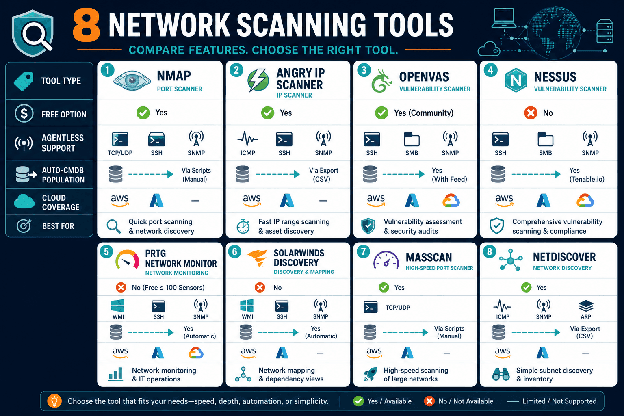
Comparison table: 8 network scanning tools rated across Type, Free Option, Agentless Support, Auto-CMDB Population, Cloud Coverage, and Best For.
| Tool | Type | Free Option | Agentless | Auto-CMDB | Cloud | Best For |
| Virima | Discovery Platform | Demo available | Yes (WMI/SSH/SNMP) | Yes — auto-built | AWS, Azure | Enterprise IT ops, CMDB, agentic IT |
| Nmap | Port Scanner | Yes — fully free | Yes (no creds) | No | Limited | Security audits, sysadmins |
| Nessus | Vulnerability Scanner | Limited (5 IPs) | Yes | No | Yes | Vulnerability management |
| OpenVAS | Vulnerability Scanner | Yes — fully free | Yes | No | Limited | Open-source security teams |
| Angry IP Scanner | IP/Port Scanner | Yes — fully free | Yes (no creds) | No | No | Quick subnet discovery |
| SolarWinds NPM | Network Monitor | 30-day trial | Yes | Partial (NPM only) | Limited | Network performance monitoring |
| Qualys VMDR | Cloud Security | No | Yes | No | Yes | Cloud vuln management |
| Wireshark | Packet Analyzer | Yes — fully free | N/A (passive) | No | N/A | Traffic analysis, troubleshooting |
Enterprise IT Discovery Platform
Virima uses agentless (credential-based WMI, SSH, SNMP), agent-based, and API-based scanning to discover assets across on-prem, cloud, and virtual environments. Where most network scanning tools end at a device list, Virima takes that data further. It auto-populates and maintains a CMDB — mapping CI relationships, tracking change history, and, for Windows Servers, overlaying CVE data from the NIST National Vulnerability Database weighted by asset criticality.
ViVID™ service maps sit on top of the discovery layer, showing which assets support which business services and what breaks downstream when a CI is affected. For IT teams managing ITAM programs, Virima also tracks hardware lifecycle, software license usage against actual installs, and contract expiration dates, all built from discovery data, without manual updates.
Virima syncs CI data bidirectionally with major ITSM platforms including ServiceNow, Jira Service Management, Ivanti, Halo, Xurrent, and Hornbill. The output is a maintained, dependency-mapped system of record that IT operations teams and AI agents can act on with confidence.
Pricing: Enterprise subscription. Contact Virima for pricing.
Best for: IT Directors, Infrastructure Engineers, Configuration Managers, and Security Engineers who need discovery to feed an accurate CMDB rather than produce a standalone scan output.
| How is an enterprise discovery platform different from a standalone network scanner? A network scanner discovers devices and ports. An enterprise discovery platform reconciles that data from multiple sources, populates a CMDB, maps service dependencies, and keeps CI records current through high-frequency discovery cycles. The difference is between a point-in-time snapshot and a live, governed system of record that operations and automation can rely on. |
Nmap (Network Mapper)
Nmap remains the most widely regarded free network scanning tool for security professionals and sysadmins. It supports host discovery, port scanning, version detection, OS fingerprinting, and scripted checks through the Nmap Scripting Engine. Output is configurable in multiple formats and integrates with other security tooling through standard XML. The command-line interface requires practice but covers more scan types than any other free option available today.
Pricing: Free and open source (nmap.org).
Best for: Security engineers, penetration testers, and network administrators running point-in-time audits.
Limitation: Produces scan output but does not populate a CMDB or feed asset lifecycle workflows.
Nessus by Tenable
Nessus is one of the most widely deployed vulnerability scanners in enterprise security programs. Named a 2025 Gartner Peer Insights Customers’ Choice for Vulnerability Assessment, Nessus identifies misconfigurations, unpatched software, and known CVEs across networked assets. Its plugin library exceeds 70,000 checks. The free Nessus Essentials tier covers up to 5 IPs for non-commercial use; Professional and Expert editions add unlimited scanning and compliance frameworks.
Pricing: Free tier available (Essentials, 5 IPs, non-commercial; tenable.com). Paid tiers are subscription-based — contact Tenable for current pricing.
Best for: Security engineers and compliance teams running structured vulnerability identification programs.
Limitation: Security-first output. No CMDB population or service dependency context.
OpenVAS (Open Vulnerability Assessment System)
OpenVAS, maintained by Greenbone, is a free open-source vulnerability scanning framework used widely in security research. It uses a regularly updated feed of more than 50,000 Network Vulnerability Tests and supports both unauthenticated and authenticated scanning modes. Setup requires technical configuration, and scan speed on large environments can trail commercial alternatives.
Pricing: Free and open source (greenbone.net). Commercial support requires a Greenbone subscription.
Best for: Security-focused teams with the technical capacity to manage their own scanning infrastructure.
Limitation: No CMDB integration. No commercial support without additional Greenbone licensing.
Angry IP Scanner
Angry IP Scanner is a lightweight, cross-platform free IP network scanner. It pings IP ranges, identifies live hosts, resolves hostnames, and reports open ports. Results export to CSV, XML, and other formats. Setup takes minutes and requires no credentials, which also means discovery depth is limited to what is visible without authentication.
Pricing: Free and open source (angryip.org).
Best for: Sysadmins running quick subnet checks or verifying a specific IP range before change windows.
Limitation: No authentication, no service fingerprinting, no integration with ITSM or asset management systems.
SolarWinds Network Performance Monitor (NPM)
SolarWinds NPM monitors network performance and automatically discovers devices as they join the network. It excels at bandwidth usage tracking, device health visibility, and network capacity planning. Discovery is a secondary capability built to support monitoring, not to populate a CMDB or feed downstream IT operations workflows.
Pricing: Subscription-based; the network device scanner component starts at $2,995 (as of 2025). Contact SolarWinds for current pricing. 30-day trial available.
Best for: Network engineers managing large distributed infrastructure who need performance data alongside inventory.
Limitation: Discovery data stays within NPM. No direct CMDB population or asset lifecycle tracking.
Qualys VMDR
Qualys VMDR combines asset discovery, vulnerability assessment, and prioritized remediation in a cloud-native platform. Its architecture removes the need for on-prem scanner appliances. Qualys uses both agent-based and agentless scanning with a maintained vulnerability knowledge base.
Pricing: Enterprise subscription. Contact Qualys for current pricing.
Best for: Security teams that need cloud-scale vulnerability management with built-in prioritization and remediation tracking.
Limitation: Security and vulnerability focus. Does not populate a CMDB or provide service dependency context for IT operations.
Wireshark
Wireshark is a free, open-source packet analyzer that captures and inspects network traffic flowing through a network interface. It decodes protocols down to the packet level and is widely used for network troubleshooting, performance diagnostics, and forensic traffic analysis. Wireshark does not probe IP ranges for hosts or ports. It observes traffic passively and cannot produce an asset inventory.
Pricing: Free and open source (wireshark.org).
Best for: Network engineers and security analysts diagnosing connectivity issues, latency, and suspicious traffic patterns.
Limitation: Passive capture only. Not a substitute for active scanning. Produces no asset inventory or CMDB output.
Free vs. Paid Network Scanning Tools: When to Upgrade
- The gap shows up most clearly when IT operations teams evaluate their options. Most free and paid network scanner tools produce output, a report or a file, but do not integrate with the CMDB, ITSM, or IT asset management systems where that data needs to live. Teams end up importing CSVs manually, which creates the data accuracy problems that make CMDBs untrustworthy within months of initial deployment.
- Stale discovery data is a common reason CMDBs lose the trust of operations teams. A successful CMDB implementation depends on discovery data that stays current, not on scans imported once and forgotten.
What is the best free network scanning tool for enterprise environments?
Nmap is the most capable free network scanner available and suits security audits and point-in-time port checks. For enterprises that need scan data to populate a CMDB or feed IT operations workflows, a standalone free scanner is not sufficient. The discovery output needs to flow into an asset management platform to remain operationally useful.
Enterprise teams should evaluate total cost, not license cost alone. The labor required to manually maintain a CMDB after running free scans typically exceeds the cost of a discovery platform that handles that work through high-frequency discovery cycles.
The Scan-to-CMDB Gap Most Network Scanning Tools Leave Open
| Network scanning and IT discovery address related problems but serve different functions. A scanner tells you what is on the network at a point in time. A discovery platform tells you what is on the network, how it is configured, what it connects to, who owns it, and what changed since the last scan. |
Scanner output becomes useful to operations only after it is reconciled with CI records, owners, and relationships.
What Scanners Produce vs. What Operations Teams Need
When a new device appears on the network, or an existing asset changes configuration, that event needs to reach your CMDB quickly. Change risk intelligence depends on knowing not just that something changed, but what depends on it and who is accountable. Standalone network scanning tools do not provide that layer.
When CMDB Data Becomes Unreliable
Incident management improves when root cause analysis runs against live CI data, not stale manual entries. The same principle applies to change management, compliance, and service reliability planning.
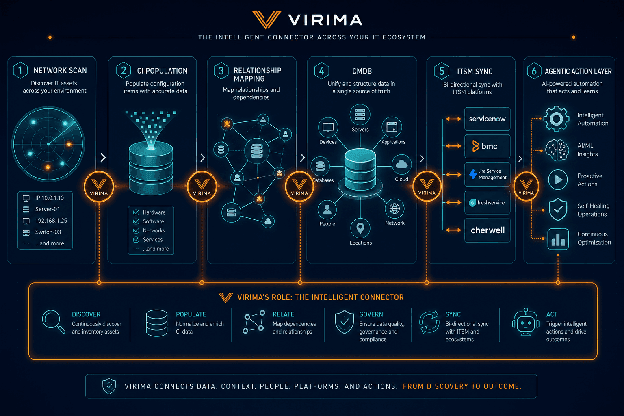
Discovery-to-CMDB workflow: how scan data flows from network discovery into CI records, dependency maps, and ITSM integrations.
Virima closes this gap by treating network scanning as an input to a governed CI lifecycle, not an end product. Bidirectional ITSM sync ensures that discovery data reaches the teams and tools that act on it.
For IT teams managing governance at scale, that connection matters. IT governance at scale depends on accurate, governed CI data, not periodic scan exports sitting in shared drives.
Choose Network Scanning Tools That Feed Your CMDB, Not Just Your Reports
The right network scanning tool depends on what you need after the scan. Here is how the eight options map to the teams that use them.
- Quick subnet checks: Angry IP Scanner and Nmap give sysadmins fast, free host and port visibility.
- Security audits: Nmap and OpenVAS suit teams that want free tooling and can manage their own setup.
- Vulnerability programs: Nessus and Qualys VMDR fit security teams running structured, compliance-driven vulnerability management.
- Network performance: SolarWinds NPM serves network engineers who need monitoring and device health alongside inventory.
- Traffic troubleshooting: Wireshark helps engineers diagnose latency and suspicious traffic, though it produces no asset inventory.
- CMDB and ITSM operations: Teams that need discovery data to populate a maintained CMDB need a discovery platform such as Virima, which can run next to any scanner above.
Many teams run a security scanner next to a discovery platform, since each answers a different question.
Virima connects discovery output to the workflows that act on it, from change risk analysis to incident root cause to service dependency mapping. A short demo shows how that data reaches your CI records and ITSM tools.
| See how Virima turns network scanning into a maintained, discovery-sourced CMDB. Schedule a demo. |
Frequently Asked Questions
What is the difference between a network scanner and an IT discovery platform?
A network scanner identifies active hosts, open ports, and services across an IP range. An IT discovery platform takes that output further, reconciling data from multiple sources, populating a CMDB, and keeping CI records current through high-frequency discovery cycles. Scanners produce a list; discovery platforms produce a governed system of record.
Which free network scanning tool is best for security audits?
Nmap is the most widely used free network scanning tool for security work. It supports host discovery, port scanning, version detection, and OS fingerprinting. For vulnerability-specific audits, OpenVAS adds a maintained feed of Network Vulnerability Tests at no license cost.
Can network scanning tools automatically update a CMDB?
Most standalone network scanning tools cannot auto-populate a CMDB. Enterprise discovery platforms like Virima are built specifically for this, using agentless, agent-based, and API-based scanning to feed CI records automatically and keep them current.
How often should network scanning run in an enterprise environment?
Point-in-time scans run monthly or quarterly for compliance purposes. For operational CMDB accuracy, high-frequency discovery cycles running on a defined schedule catch configuration changes, new assets, and departures faster than periodic scans alone.
Do network scanning tools cover cloud environments?
Most traditional network scanners were built for on-prem IP ranges and have limited cloud coverage. Enterprise discovery platforms use API-based collection for AWS and Azure, covering cloud workloads that agentless and agent-based methods cannot reach on their own.