What Is ConnectWise Control? Features, Limitations & Alternatives

ConnectWise Control (originally ScreenConnect) is a remote desktop and support platform used by MSPs and IT teams to access and manage endpoints remotely. Specifically, it supports attended sessions, unattended device access, file transfers, session recording, and granular user permissions, making it one of the most widely deployed MSP remote access tools in the market. However, it does not include a network discovery engine, CMDB, or application-to-infrastructure service dependency maps.
For the job it was built to do, connecting technicians to endpoints fast, it does it well. But as IT environments grow more complex, many teams reach a clear ceiling. ConnectWise Control gives you access to a machine. Yet it cannot tell you what services depend on that machine, what changed on it last week, or which software version is running across your estate. If you are evaluating whether ConnectWise Control fits your needs, or looking for what it does not cover, this guide walks through both.
| ConnectWise Control, originally called Screen Connect, is a remote desktop and support platform used by MSPs and IT teams to access and manage endpoints. It supports attended sessions, unattended device access, file transfers, session recording, and granular user permissions. It does not include a CMDB, application-to-infrastructure service maps, or a network discovery engine. |
What ConnectWise Control is
Technicians use ConnectWise Control to connect to attended or unattended endpoints, transfer files, run scripted commands, and record sessions. Importantly, none of these capabilities require the end user to be on the same network.
A single product within a broader suite
The platform is one product within the broader ConnectWise suite, which includes ConnectWise Manage (PSA and ticketing), ConnectWise RMM (monitoring and patch management), and ConnectWise SIEM. Each product addresses a different layer of MSP operations. In other words, ConnectWise Control handles remote access only. It is not an ITSM platform, a CMDB, or a discovery engine.
This distinction matters when IT teams plan for scale. According to Future Market Insights, the global remote desktop software market was valued at $4.49 billion in 2025 and is projected to grow at a 12.9% CAGR through 2032. That growth is driven by demand for richer visibility, not just faster endpoint access. For example, ConnectWise RMM tells you an endpoint is unhealthy. Meanwhile, Control lets you log into it. Yet neither answers the next tier of questions: which services depend on this device, which change opened the incident, and what else breaks if the device goes offline for patching.
Key ConnectWise Control features
ConnectWise Control covers the access and session management layer well. Specifically, core capabilities at most subscription tiers include:
- Attended and unattended remote access. Connect to endpoints with or without user presence. Most plans support an unlimited number of unattended machines.
- ConnectWise View. Available on Premium plans, this livestream video feature lets technicians see hardware problems through the end user’s mobile camera during a support session.
- Session toolbox. Technicians build a personal toolkit of scripts, utilities, and executables to deploy during any session.
- Granular permissions. Admins set access rules by user, group, role, and session type, giving precise control over who can access which systems.
- Session recording. All remote sessions can be logged for audit and compliance purposes.
- Custom branding. MSPs can white-label the interface with their own colors and logos.
- 100+ extensions. The ConnectWise extensions marketplace includes integrations with documentation tools, security products, authentication providers, and PSA platforms.
ConnectWise Control pricing and ratings
Pricing tiers run from $27 per technician per month (One plan, annual billing, 10 unattended machines) to $52 per month (Premium, up to 10 concurrent connections, advanced reporting, and ConnectWise View). Monthly billing is also available at a higher cost. Overall, ConnectWise Control holds a 4.7/5 rating across nearly 1,900 reviews on Capterra. That said, 49% of negative reviews cite licensing complexity as the primary complaint.
| ConnectWise RMM handles monitoring, alerting, patch management, and endpoint automation for managed devices. ConnectWise Control handles remote access and support sessions. They are separate products that integrate with each other. Neither includes a CMDB, discovery-driven asset inventory, or application-to-infrastructure service dependency maps. |
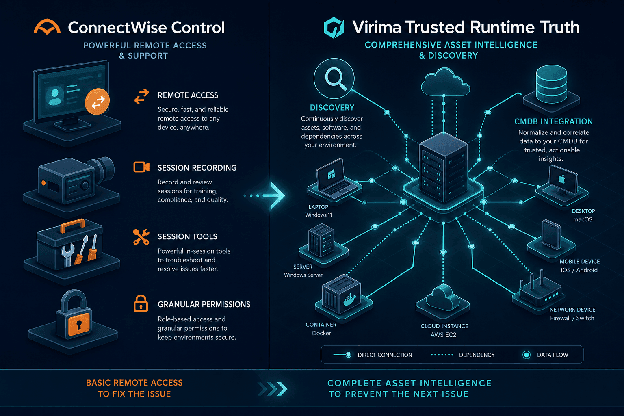
Two-column feature comparison table: ConnectWise Control capabilities vs. what it does not include
ConnectWise integrations: strengths and limits
ConnectWise integrations are strongest within the MSP operational stack. For instance, native connections include ConnectWise Manage (PSA and ticketing), IT documentation tools such as IT Glue, EDR and antivirus products, billing platforms, and authentication providers including SSO and MFA options.
ConnectWise RMM vs. ConnectWise Control
ConnectWise RMM and ConnectWise Control are distinct products. RMM handles device monitoring, alerting, and patch management. Control, by contrast, handles the remote session. Teams running both get health visibility and endpoint access. However, they do not get a CMDB, service dependency maps, or discovery-driven CI data.
For enterprise IT teams running ServiceNow, Jira Service Management, or Ivanti as their ITSM platform, ConnectWise integrations require API middleware or third-party connectors. As a result, the ConnectWise ITSM story is built for MSP service delivery, not enterprise change governance or configuration management workflows.
There is also no native CMDB connector. In practice, if you want the configuration history, service relationships, and ownership record for an endpoint you just remote-accessed, you pull that data from a separate system. That step is manual, which means it only happens when someone remembers to do it.
| CVE-2024-1709 was a critical authentication bypass (CVSS 10.0) in ConnectWise Screen Connect 23.9.7 and earlier, disclosed in February 2024. CISA added it to its Known Exploited Vulnerabilities catalog within days. Consequently, IT teams without a maintained software asset inventory faced a slow, manual audit to identify affected endpoints across their estate. |
The ConnectWise ScreenConnect vulnerability
The February 2024 security disclosures are part of any honest ConnectWise Control evaluation. Specifically, two critical vulnerabilities in ScreenConnect were disclosed and actively exploited.
CVE-2024-1709: Critical authentication bypass
CVE-2024-1709 was an authentication bypass in Screen Connect versions 23.9.7 and earlier, rated CVSS 10.0 (critical) by the National Vulnerability Database at NIST. In practice, attackers could bypass login entirely using an alternate authentication path to the setup wizard, enabling remote code execution on any endpoint managed through the platform. CISA added CVE-2024-1709 to its Known Exploited Vulnerabilities catalog within days of disclosure. At the time, Unit 42 researchers identified 18,188 unique IP addresses hosting Screen Connect globally, with nearly three-quarters of them in the United States.
CVE-2024-1708 was a path traversal vulnerability in the same versions, enabling limited access to restricted files on affected servers. Together, the two flaws represented one of the most severe exposure events in MSP tooling in recent years.
Identifying exposed endpoints at scale
ConnectWise released patches in version 23.9.8. However, the ConnectWise ScreenConnect vulnerability affected all instances running 23.9.7 and earlier. As a result, identifying which endpoints still ran that version across a managed environment required a software asset inventory most teams did not have. In turn, IT teams without a discovery-driven CMDB had to audit site by site, manually, a process that can take days across hundreds of managed endpoints.
By contrast, a maintained software asset inventory answers that question in seconds: query every managed device for ScreenConnect 23.9.7 or earlier and get a full exposure list without opening a single remote session. That question, knowing which endpoints run which software version across every managed site, is an IT asset management and IT discovery problem. Ultimately, ConnectWise Control does not solve it.
| CVE-2024-1709 was a critical authentication bypass in ConnectWise Screen Connect (CVSS 10.0), disclosed February 2024. Attackers bypassed authentication via an alternate path to the setup wizard, enabling remote code execution. CISA added it to its Known Exploited Vulnerabilities catalog. ConnectWise patched it in version 23.9.8. IT teams without accurate software asset inventories could not quickly identify which endpoints still ran the vulnerable version across their estate. |
Where ConnectWise Control falls short for enterprise IT
ConnectWise Control does its core job well. However, it does not build the asset intelligence layer that enterprise IT operations require. Understanding this gap is therefore important before your team invests in scaling around a remote access tool.
No asset discovery or CMDB
ConnectWise Control sees the endpoints it connects to. In practice, it does not scan your environment to find every asset, map relationships between configuration items (CIs), or maintain a discovery-driven asset inventory. You initiate sessions. The platform does not discover.
According to the Flexera 2025 State of ITAM Report, complete IT asset visibility has declined to just 43% of organizations surveyed, down from 47% the prior year. That gap grows wider when remote access tools are used without a discovery-driven CMDB underneath them.
Virima’s agentless discovery capability addresses exactly this problem, scanning hybrid environments without requiring credentials on every device. For environments with roaming or remote endpoints, agent-based discovery extends coverage to devices that agentless scans may not reach consistently.
No service dependency mapping
The dependency gap has real incident consequences. When a server goes down, enterprise IT needs to know which applications run on it, which other CIs depend on it, and what the impact is for any change or outage. ConnectWise Control provides endpoint access. It does not, however, answer those dependency questions.
No change impact analysis
Change impact analysis is also absent from ConnectWise Control. Specifically, there is no pre-change impact visualization, no CI relationship history feeding into approval workflows, and no governed action layer for IT teams running agentic automation. ConnectWise asset management capabilities across the product suite remain lightweight compared to what enterprise environments need.
Furthermore, the platform’s data model and permission structure were built for MSP multi-tenant service delivery. Enterprise IT teams managing a single, deep hybrid environment often find the operational structure does not map cleanly to their workflows.
For more on what a discovery-driven CMDB requires to remain accurate without manual effort, see understanding what accurate CMDB automation requires from the Virima resource library.
| If your team runs ConnectWise Control for remote access but lacks the asset intelligence layer underneath it, Virima’s Trusted Runtime Truth fills that gap. Explore Virima’s Trusted Runtime Truth |
ConnectWise Control alternatives
Teams searching for ConnectWise Control alternatives are typically solving one of two distinct problems: they want a better or lower-cost remote support tool, or they want the asset intelligence that ConnectWise does not provide. In either case, these require different answers.
For remote access and RMM alternatives
Pricing frustration is a real driver. Some ConnectWise ScreenConnect tiers saw price increases of up to 275% between 2023 and 2024, widely reported across MSP community forums. As a result, many MSPs have evaluated the following alternatives:
- NinjaOne. Ranked #1 RMM on G2 for 17 consecutive quarters, NinjaOne combines RMM and remote access with a cleaner interface and per-device pricing. It includes basic asset inventory but not CMDB-class data or service dependency mapping.
- Atera. An all-in-one RMM, PSA, and remote access platform with per-technician pricing. Strong for smaller MSPs, though limited in CMDB functionality.
- TeamViewer / Splashtop. Enterprise-grade remote access with broad OS support. Neither includes network discovery or a CMDB.
For the CMDB and asset intelligence gap
If the goal is a built-from-live-discovery asset intelligence layer rather than a faster remote session, the comparison changes entirely. In this case, Virima does not compete with ConnectWise Control for remote access. Instead, it fills what ConnectWise leaves open: the discovery engine, the CMDB, and the service dependency map.
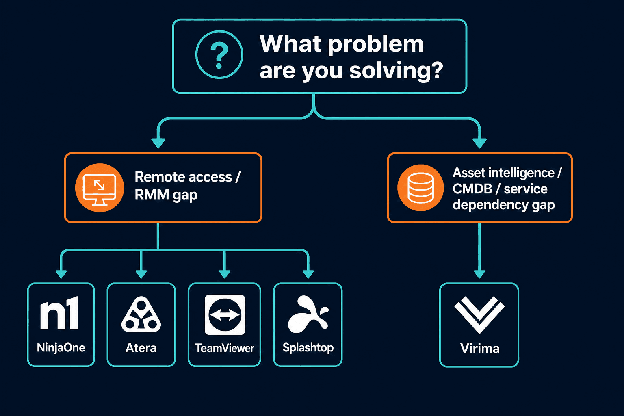
Decision flow diagram: What problem are you solving? → Remote access gap → NinjaOne / Atera / TeamViewer / Splashtop | Asset intelligence gap → Virima
Here is how the main alternatives compare across the dimensions that matter most:
| Tool | Type | Pricing model | CMDB | Service dep. maps | Best for |
|---|---|---|---|---|---|
| NinjaOne | RMM + remote access | Per device | No | No | MSPs wanting unified RMM + remote access |
| Atera | RMM + PSA + remote access | Per technician | No | No | Small-to-mid MSPs |
| TeamViewer | Remote access | Per user/device | No | No | Enterprise remote support |
| Splashtop | Remote access | Per user | No | No | Cost-sensitive remote access |
| Virima | CMDB + discovery + service mapping | Contact sales | Yes | Yes (ViVID™) | Enterprise IT: asset intelligence |
| For remote access, Ninja One, Atera, TeamViewer, and Splash top are common ConnectWise Control alternatives. For IT teams that need CMDB accuracy, network discovery, and service dependency maps (capabilities ConnectWise Control does not include), Virima provides the discovery-driven asset intelligence layer that addresses the visibility gap ConnectWise leaves open. |
How Virima fills the asset intelligence gap
Discovery that covers your whole estate
Virima’s discovery engine scans hybrid environments using agentless, agent-based, and API-based methods, finding every asset across on-premises infrastructure, AWS, and Azure. Importantly, it does this whether or not a remote session has ever been opened on a given device. In turn, it builds and maintains a CMDB built from live discovery data without manual data entry. Additionally, ViVID™ service maps show which CIs back each business service, what each CI depends on, and which services are at risk when something changes.
Virima alongside ConnectWise Control
For MSPs and IT teams already running ConnectWise Control, Virima works alongside it. ConnectWise handles the remote session. Virima, in turn, answers the questions that come before and after: what are we touching, what depends on it, who owns it, and what changed last time.
The CVE-2024-1709 incident illustrates where this distinction matters. IT teams with a built-from-live-discovery software asset inventory could query every managed endpoint for a specific ScreenConnect version across all sites without logging into each one manually. That is the operational difference between remote endpoint access and asset intelligence.
ITSM integration and the service mapping layer
Virima also integrates directly with enterprise ITSM platforms including ServiceNow, Halo, Xurrent, Jira Service Management, and Ivanti, feeding CI data directly into the change and incident workflows your teams use every day. These integrations enrich, rather than replace, your existing ITSM platform with discovery-sourced ground truth.
For teams managing software asset lifecycle and compliance alongside remote access tools, Virima’s ITAM capabilities provide the inventory foundation that remote desktop tools like ConnectWise Control cannot.
Move faster. Act safely.
Remote access tools like ConnectWise Control solve the connection problem. They do not, however, solve the visibility problem. As IT environments grow more complex and agentic automation takes hold, the asset intelligence layer underneath those sessions becomes the difference between confident action and costly guesswork.
As a result, Virima gives your team live, explainable runtime truth across your entire estate, without platform lock-in. Whether you run ConnectWise Control, a different remote access tool, or a combination of both, Virima answers the questions that come before and after every session.
| Get live, explainable runtime truth across your entire estate. Schedule a demo and see how Virima works alongside your existing remote support stack. |
Frequently Asked Questions about ConnectWise Control
Is ConnectWise Control the same as ScreenConnect?
Yes. Specifically, ConnectWise rebranded ScreenConnect as ConnectWise Control. Many users and third-party documentation still reference the original name, and some official ConnectWise materials use both names.
Does ConnectWise Control include a CMDB?
No. ConnectWise Control has no CMDB. It connects technicians to endpoints but does not maintain a database of configuration items, relationships, or service dependencies. As a result, a separate platform is required for CMDB capabilities.
What was the ConnectWise ScreenConnect vulnerability?
In February 2024, ConnectWise disclosed CVE-2024-1709, a critical authentication bypass flaw (CVSS 10.0) in ScreenConnect 23.9.7 and earlier. Attackers could bypass login via an alternate authentication path to the setup wizard, enabling remote code execution. CISA listed it in its Known Exploited Vulnerabilities catalog. ConnectWise patched it in version 23.9.8.
Can ConnectWise Control integrate with enterprise ITSM platforms like ServiceNow or Jira?
Not natively. ConnectWise integrations with enterprise ITSM platforms require API middleware or third-party connectors. Specifically, the native integration ecosystem is built around MSP PSA tools, primarily ConnectWise Manage.
What is missing from ConnectWise Control for enterprise IT teams?
ConnectWise Control lacks network discovery, a CMDB, application-to-infrastructure service dependency maps, and change impact analysis. Consequently, enterprise IT teams managing complex hybrid environments need all four to make informed change decisions, accelerate incident response, and maintain audit-ready asset records.
How much does ConnectWise Control cost?
Pricing starts at $27 per technician per month (One plan, annual billing, 10 unattended machines) and goes up to $52 per month for the Premium tier. Monthly billing is available at a higher rate. Of note, licensing complexity is the most common complaint in negative user reviews.
Is ConnectWise Control safe to use after the 2024 vulnerability?
Yes, provided you have patched to version 23.9.8 or later. ConnectWise released the patch shortly after the CVE-2024-1709 disclosure in February 2024. That said, organizations running older versions remain at risk. Additionally, a maintained software asset inventory helps you identify unpatched instances quickly across your estate.
What is the difference between ConnectWise Control and ConnectWise RMM?
ConnectWise Control handles remote desktop access and support sessions. ConnectWise RMM, by contrast, covers device monitoring, alerting, and patch management. However, they are separate products that integrate with each other. Neither includes a CMDB or discovery-driven asset inventory.
Can Virima work alongside ConnectWise Control without replacing it?
Yes, absolutely. Rather than replacing ConnectWise Control, Virima runs alongside it. ConnectWise handles the remote session layer. Virima, in turn, provides the discovery engine, CMDB, and service dependency maps that ConnectWise does not include. Together, they give MSPs and enterprise IT teams both endpoint access and the asset intelligence needed to act on it confidently.
Does Virima integrate with ConnectWise Control?
Rather than replacing ConnectWise Control, Virima runs in parallel, providing the discovery engine, CMDB, and ViVID™ service maps that ConnectWise does not include. For MSPs and enterprise IT teams using ConnectWise Control for endpoint access, Virima answers the questions that come before and after each session: which assets are affected, what depends on this device, and which software versions are running across the estate.