What Is Lansweeper? Features, Use Cases and Alternatives

| Lansweeper is a network discovery and IT asset inventory platform used by IT teams to scan physical, virtual, cloud, OT, and IoT environments. It captures hardware specs, installed software, vulnerability data, and user assignments. This guide covers how Lansweeper works, its primary use cases, key limitations, and how it compares to alternatives like Virima. |
Evaluating Lansweeper starts with one question teams often ask too late: what does it actually scan, and what do you still have to build on top of that data? However, IT teams that add Lansweeper expecting a full operational picture often end up bridging the gap themselves. Yet raw asset data is not CMDB context, service dependencies, or change risk analysis, and day-to-day IT operations depend on all three. According to Flexera’s 2025 State of ITAM Report, only 43% of IT teams report complete visibility across their asset estate, and that figure has declined year over year. In short, this guide covers what Lansweeper is, how its discovery engine works, its primary use cases, and where it typically runs out of road.
What is Lansweeper?
Lansweeper is a network discovery and IT asset inventory platform that scans hardware, software, and many hybrid environments into a searchable asset database. It is strongest for broad inventory, license counts, and cyber-asset visibility. Teams look past it when they need a discovery-populated CMDB, CI relationships, and dependency maps after service definitions for change and incident work.
What is Lansweeper?
| Lansweeper is a network discovery and IT asset inventory platform. It scans physical, virtual, cloud, OT, and IoT devices to build a centralized asset database. Founded in Belgium in 2004, it now positions itself under the “Cyber Asset Intelligence” category, supporting CAASM, OT/IoT visibility, and AI usage tracking across endpoints. |
Lansweeper is a network discovery and IT asset inventory platform that scans physical, virtual, cloud, and operational technology environments to build a centralized database of every connected device. It captures hardware specifications, installed software, OS versions, user assignments, and vulnerability exposure data. The platform then makes that inventory searchable, reportable, and exportable to ITSM and security tools.
Platform evolution and market positioning
Originally founded in Belgium in 2004 as an on-premises scanning tool for Windows networks, Lansweeper has since moved to a cloud-native architecture. Today, it positions itself under the “Cyber Asset Intelligence” category, expanding beyond classic IT inventory into security-adjacent use cases: CAASM, OT and IoT device visibility, and AI usage tracking across endpoints.
As a result, Lansweeper reports being trusted by more than 30,000 IT environments worldwide. On Gartner Peer Insights, reviewers in the CAASM market commonly note inventory depth across enterprise environments (check current Peer Insights for live scores). Reviewers consistently note the depth of its agentless inventory across enterprise environments.
On the commercial side, Lansweeper uses SaaS-based pricing scaled by asset count, with tiered plans for environments of different sizes and a free trial option for evaluation.
| What is Lansweeper? Lansweeper is a network discovery and IT asset inventory platform. It scans physical, virtual, cloud, OT, and IoT devices to build a centralized asset database. IT teams use it to maintain accurate hardware and software inventories, detect unmanaged devices, track software license compliance, and feed asset data into ITSM and CMDB platforms. |
How Lansweeper network discovery works
| Lansweeper uses four discovery methods: active agentless scanning via credentials, LsAgent for off-network endpoints, a passive traffic sensor for unmanaged devices, and cloud API connectors for AWS, Azure, and Google Cloud. Teams typically combine all four for broad coverage across on-premises, remote, and cloud environments. |
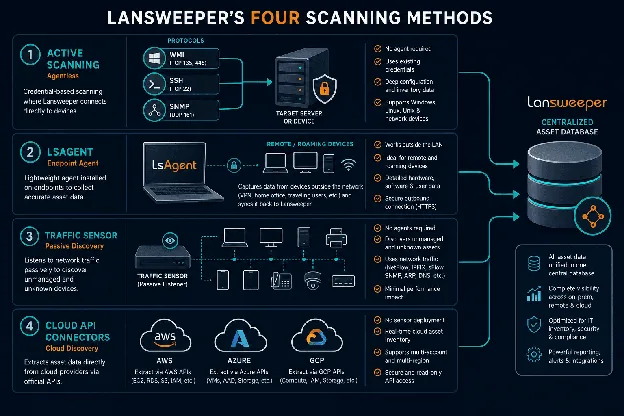
Diagram showing Lansweeper’s four scanning methods: active scanning (agentless, credential-based), LsAgent (endpoint agent), traffic sensor (passive), and cloud API connectors.
Specifically, Lansweeper’s discovery engine supports four scanning approaches, each suited to different parts of a hybrid environment. For a deeper breakdown of the trade-offs, see agent-based vs. agentless discovery and active vs. passive IT asset discovery.
Active scanning (agentless): First, credential-based scans using WMI, SSH, and SNMP protocols run against defined IP ranges. This approach works well for managed, network-accessible on-premises and data center assets.
LsAgent (agent-based): Second, a lightweight endpoint agent for Windows, macOS, and Linux captures inventory for remote devices. Once deployed, LsAgent runs on a configurable schedule (once per day by default) and covers roaming and off-network endpoints that credential-based scanning cannot reach.
Traffic sensor (passive): Third, the traffic sensor monitors network traffic to detect every device communicating on the network. This includes unmanaged assets, shadow IT, and rogue endpoints that active scanning misses because they fall outside defined IP ranges.
Cloud API connectors: Finally, cloud API connectors pull asset data from AWS, Azure, and Google Cloud using native APIs. No sensor deployment is required inside cloud environments.
Beyond discovery, Lansweeper builds a detailed record for each device: hardware specs, installed software, OS version, patch status, user assignments, and vulnerability exposure data sourced from the NIST National Vulnerability Database (NVD). Additionally, Lansweeper’s reporting engine supports built-in report templates and custom queries via LQL (Lansweeper Query Language) and SQL. A basic Lansweeper helpdesk module is included in select license tiers, covering asset-linked ticket creation and request tracking.
How does Lansweeper reporting work?
Specifically, Lansweeper’s reporting engine includes built-in templates for common inventory scenarios, covering hardware inventory, software counts, and end-of-life assets. It also supports custom queries via LQL and SQL. However, custom Lansweeper reports require technical knowledge to build. Out-of-the-box templates cover most standard use cases without query writing.
Additionally, recent platform additions include OT and IoT device classification, AI usage tracking across endpoints, and IP range coverage scoring to show where network visibility is complete and where gaps remain.
| How does Lansweeper network discovery work? Lansweeper combines four scanning methods: agentless credential-based scans, the LsAgent endpoint agent, a passive traffic sensor for unmanaged devices, and cloud API connectors for AWS, Azure, and Google Cloud. Together, these methods give IT teams broad asset coverage across on-premises, remote, and cloud environments. |
What Lansweeper is used for
| Lansweeper’s four primary use cases are IT inventory management, software license compliance tracking, security and CAASM, and ITSM or CMDB population. Its OT and IoT scanning extends its reach into environments where corporate IT and operational technology networks overlap. |
| What are the primary Lansweeper use cases? Lansweeper is used for IT asset inventory management, software license compliance tracking, unmanaged device detection, vulnerability exposure reporting, and feeding discovered asset data into ITSM and CMDB platforms. Its OT and IoT scanning also makes it useful in environments bridging corporate IT and operational technology networks. |
In practice, four use cases drive most Lansweeper deployments.
IT inventory and hardware lifecycle tracking
Building and maintaining a current record of all hardware is the most common starting point for Lansweeper deployments. Teams use it to track end-of-life dates, warranty status, and asset locations. As a result, they can plan refresh cycles, track decommissions, and support capacity planning without manual spreadsheet maintenance.
Software license compliance
Software license compliance is one of Lansweeper’s strongest native use cases. Specifically, it compares installed software across the estate against purchased counts, giving license managers a defensible baseline before a vendor audit lands. However, teams with serious software license management requirements (contracts, depreciation schedules, and financial data) typically reach for dedicated ITAM tooling to fill the gaps Lansweeper leaves in that area.
Security and CAASM
Security is a growing use case for Lansweeper. Specifically, teams use it to identify unmanaged devices before they become threat vectors, flag software with known CVEs from NVD lookups, and track AI tool proliferation across endpoints. This is an increasingly common requirement as unsanctioned AI services grow inside enterprise environments. As a result, teams that need deeper cybersecurity asset management capabilities often evaluate dedicated solutions alongside Lansweeper.
ITSM and CMDB population
Finally, many teams use Lansweeper to push discovered asset data into ITSM platforms as a foundation for incident and change workflows. However, Lansweeper is not a CMDB. It feeds asset data into platforms that are. For smaller organizations, the Lansweeper helpdesk module provides basic ticketing in the same tool. Enterprise IT teams, however, typically continue using their primary ITSM for service management and treat Lansweeper purely as an inventory and data source layer.
Lansweeper integrations
| Lansweeper integrates with ServiceNow via a Service Graph Connector, with Jira through a native connector, and with Microsoft SCCM and Intune. Cloud connectors handle AWS, Azure, and GCP. These integrations primarily push asset data from Lansweeper outward, rather than syncing bidirectionally. |
| How does Lansweeper integrate with ITSM platforms? Lansweeper connects to ServiceNow via a Service Graph Connector available through the ServiceNow Store, and to Jira through a native integration. It also imports data from Microsoft SCCM and Intune. These Lansweeper integrations primarily push discovered asset data outward from Lansweeper into the destination system, not bidirectionally. |
Lansweeper’s integration ecosystem spans ITSM, endpoint management, cloud, and security platforms. On the ITSM side, a Service Graph Connector for ServiceNow (available through the ServiceNow Store) pushes Lansweeper-discovered assets into ServiceNow’s CMDB as configuration items. Similarly, a Jira Service Management integration connects assets to issues and projects for teams in the Atlassian ecosystem.
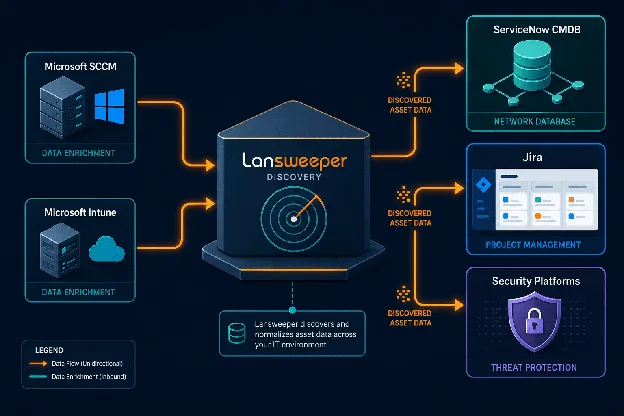
Integration flow diagram showing data moving from Lansweeper discovery to ServiceNow CMDB, Jira, and security platforms.
Additionally, Lansweeper accepts inbound data from Microsoft SCCM and Intune, which fills coverage gaps for assets managed through those platforms. Cloud connectors handle AWS, Azure, and GCP without sensor deployment.
Bidirectional sync limitations
However, one practical constraint is worth flagging: Lansweeper’s ITSM integrations are largely one-directional. Specifically, discovered asset data flows from Lansweeper outward into connected platforms. Updates made to CI records inside a connected ITSM (ownership changes, relationship data, lifecycle events) do not automatically reflect back into Lansweeper. As a result, teams managing CI relationships or change history inside their ITSM need to maintain those records separately from Lansweeper’s asset database.
Where does Lansweeper still win?
Lansweeper still wins when broad network inventory, software license counts, OT and IoT device visibility, and cyber-asset attack surface context are the primary jobs. Those strengths matter most for teams that need a deep asset list and can run CMDB or service maps in another system.
Where Lansweeper falls short
In practice, asset discovery gives you a list. However, what teams need to act confidently during incidents, change windows, and audits is a map of how those assets relate to each other and to the services that depend on them. That is where Lansweeper’s architecture shows its limits.
| Lansweeper’s key limitations include no service dependency mapping, scan-cycle data lag on remote devices, limited CI relationship modeling, shallow ITAM features beyond license counting, and a reporting engine that requires SQL or LQL knowledge for custom queries. |
| What are Lansweeper’s key limitations? Lansweeper is a discovery and inventory tool, not a CMDB platform. It records asset attributes but does not map service dependencies, calculate change impact, or maintain bidirectional ITSM sync. Teams that need CI relationship modeling or change impact analysis require a separate CMDB layer built on top of Lansweeper’s data. |
Specifically, several limitations come up consistently among teams running Lansweeper in production.
No service dependency mapping
Lansweeper shows which assets exist and their attributes. However, it does not show which services depend on which infrastructure components, or which CIs would break if a shared database server, a network device, or a cloud instance went offline. For change managers and incident responders, the absence of that dependency context is a real operational gap.
Discovery data reflects the last scan cycle, not the current state
As a result, that visibility gap gets wider as time passes between scans. LsAgent scans once per day by default, so Lansweeper’s asset data reflects the last completed scan cycle. In environments where assets spin up, are reconfigured, or go offline frequently, the inventory picture can lag behind reality.
Limited CI relationship modeling
Lansweeper stores asset attributes but does not model CI relationships the way a purpose-built CMDB does. Specifically, there is no CI lifecycle management, no change history at the CI level, and no CMDB health scoring. For teams building toward sound CMDB best practices, Lansweeper’s data quality tools stop well short of what a dedicated CMDB provides. Teams planning a successful CMDB implementation typically need a platform that goes beyond asset inventory.
Shallow ITAM beyond license counting
Lansweeper covers software license counts and hardware inventory well. However, it does not track contracts, warranties, asset depreciation, or financial data. Teams with serious IT asset management requirements typically need dedicated ITAM tooling beyond what Lansweeper includes. Therefore, understanding CMDB and ITAM at scale can help teams determine where Lansweeper fits and where it falls short.
Reporting demands SQL or LQL knowledge
The LQL and SQL-based reporting engine is flexible. However, it is not accessible without technical knowledge. Built-in reports cover common scenarios, but anything custom requires hands-on query writing that non-technical stakeholders cannot self-serve.
| When teams start looking for discovery-sourced ground truth that goes beyond the asset list, that is the right time to evaluate alternatives. See how Virima extends discovery into Trusted Runtime Truth for IT and agentic environments. |
When do teams need more than Lansweeper?
Teams need more than Lansweeper when change and incident work require CI relationships, discovery-populated CMDB structure, and dependency maps after service definitions on the same operational foundation. Virima fits that path. Stay on Lansweeper when inventory and CAASM-style visibility already solve the urgent job.
Lansweeper alternatives worth evaluating
| The main Lansweeper alternatives are Virima, Device42, and ServiceNow Discovery. Virima adds a discovery-populated CMDB, ViVID™ service dependency maps, full ITAM lifecycle tracking, and bidirectional ITSM sync. Device42 suits data center-heavy environments. ServiceNow Discovery fits teams already committed to the ServiceNow platform. |
Specifically, the table below compares Lansweeper and Virima across the capabilities teams most commonly evaluate when deciding whether an inventory tool is enough or whether a full CMDB layer is needed.
| Capability | Lansweeper | Virima |
| Network discovery (agentless) | Yes | Yes |
| Agent-based discovery | Yes (LsAgent) | Yes |
| Cloud asset discovery | Yes (AWS, Azure, GCP) | Yes (AWS, Azure) |
| OT / IoT discovery | Yes | No |
| Purpose-built CMDB | No | Yes |
| CI relationship modeling | No | Yes |
| Service dependency mapping | No | Yes (ViVID™ service maps) |
| Change impact/blast radius | No | Yes |
| Bidirectional ITSM sync | No | Yes |
| ITAM (contracts, lifecycle, financials) | Limited | Yes |
See the full Virima vs. Lansweeper comparison.
Virima
Virima combines IT discovery with a discovery-populated CMDB, ViVID™ service maps for application-to-infrastructure dependency context. Once service definitions are provided manually, by spreadsheet import, or through an enterprise architecture integration, ViVID™ builds dependency maps from that input and does not invent which applications form a service. Virima also includes full ITAM lifecycle tracking and bidirectional sync with ServiceNow, Jira Service Management, Ivanti, Halo, Xurrent, and Hornbill. See the integrations hub for the full partner list. Where Lansweeper delivers an asset inventory, Virima delivers discovery-sourced ground truth: the relational, context-rich operational data that ITSM workflows, change management, and AI-ready IT environments depend on.
Virima also integrates with ServiceNow in a complementary way. Rather than replacing ServiceNow’s own discovery, Virima enriches the ServiceNow CMDB with discovery-sourced data, reducing duplicates and noise while adding the dependency context ServiceNow’s native tooling does not surface.
Device42
Device42 covers discovery and CMDB for data center and hybrid environments. Specifically, it has strong DCIM capabilities for teams managing physical infrastructure at scale. However, it is most relevant to organizations with significant on-premises data center footprints.
ServiceNow Discovery
ServiceNow Discovery suits organizations already running ServiceNow across their ITSM operations. It fits teams already committed to the ServiceNow platform for ITSM operations, where Discovery is evaluated as part of that platform path rather than as a standalone inventory tool.
Why teams typically outgrow Lansweeper
If your team is moving toward more AI-driven IT operations or needs accurate operational data for autonomous change workflows, discovery-only tooling becomes a limiting factor. Teams evaluating their options for AI in IT service management should factor in whether their data layer can support safe, governed automation.
In practice, teams that start with Lansweeper typically do not outgrow it because the discovery is poor. The discovery is genuinely strong. Instead, they outgrow it because their operations demand more than a list. For instance, service management, change risk analysis, audit readiness, and AI-enabled workflows all require accurate CI relationships and service context that sit above the asset layer. Virima provides that layer, built from discovery data, without replacing the ITSM tools you already run.
Stay on Lansweeper if: broad inventory, software license counts, OT and IoT visibility, or CAASM-style asset intelligence are the primary jobs, and CMDB relationships plus dependency maps already live in another system of record.
Dual-run Lansweeper and Virima if: Lansweeper remains the scan and inventory plane, while ops and change teams need a discovery-populated CMDB and ViVID™ maps after service definitions for blast-radius and ITSM join work.
Move IT inventory operations onto Virima if: one system must own multi-method discovery, CI relationships, ITAM depth beyond license counts, and service impact context on the same CIs.
Discover What Comes After the Asset List
| Get live, explainable runtime truth across your entire estate, without platform lock-in. Trusted Runtime Truth. |
See how multi-method discovery, a discovery-populated CMDB, and ViVID™ maps after service definitions turn an asset list into operational runtime truth for change and incident work.
Frequently Asked Questions
What is the difference between an IT asset inventory tool and a CMDB?
An IT asset inventory tool records what exists: hardware, software, and device attributes. A CMDB adds CI relationships, ownership, and service context so change and incident teams can see what breaks when a component fails. Lansweeper is strongest as inventory. CMDB structure is the next layer many teams add.
Can Lansweeper replace a CMDB?
Usually no. Lansweeper is a discovery and inventory platform, not a purpose-built CMDB with CI lifecycle, relationship modeling, and change impact maps. Many teams keep Lansweeper for scanning and add a CMDB layer for operational decisions.
Does Virima replace Lansweeper?
Not always. Dual-run is common: Lansweeper for deep inventory and cyber-asset visibility, Virima for discovery-populated CMDB records and ViVID™ maps after service definitions. Full replacement makes sense when one system must own inventory and operational dependency context together.
What does Virima offer that Lansweeper does not?
Virima adds a discovery-populated CMDB, CI relationship modeling, ITAM depth beyond license counting, and ViVID™ maps after service definitions are provided. Lansweeper remains strong for broad scanning, OT and IoT visibility, and inventory-led use cases.
How does Lansweeper network discovery work?
Lansweeper combines agentless credential-based scans, the LsAgent endpoint agent, a passive traffic sensor for unmanaged devices, and cloud API connectors for environments such as AWS, Azure, and Google Cloud. Teams typically mix methods for on-premises, remote, and cloud coverage.