Technology Debt & EOL Exposure: Tracking Lifecycle Risk

Enterprise technology debt builds up quietly across data centers and cloud tenants. Hardware crosses End of Support (EOS) and software passes End of Life (EOL) milestones while the applications running on top of them still look stable. Infrastructure teams leave them in production rather than force a migration. That stability is deceptive. Once vendor support ends, any vulnerability discovered on that asset afterward never gets patched, and it stays exploitable for as long as the asset stays connected. Teams without continuous lifecycle tracking tend to find this out the hard way — scrambling to replace legacy systems in the middle of an audit finding or right after an exploit notice lands. Closing that gap means treating technology debt and EOL exposure management as a continuous, discovery-driven practice instead of a once-a-year spreadsheet exercise, and it starts with correlating what is actually running against vendor lifecycle data.
IT Directors and infrastructure leaders are constantly balancing digital transformation initiatives against the operational risk of aging infrastructure. Proactive EOL exposure management is a core piece of IT asset lifecycle management — it keeps unmaintained software and obsolete hardware from becoming the next major security liability, but only if the underlying asset data can be trusted.
The operational stakes of unmanaged EOL and EOS assets
Legacy systems are one of the largest unmanaged risk vectors in enterprise IT operations today. When vendors declare End of Life for software or End of Support for hardware, they stop shipping security updates, bug fixes, and technical assistance for that product, permanently.
Operating unsupported assets creates several compounding operational risks:
- Unpatchable security vulnerabilities: newly discovered CVEs on EOL software stay unpatched indefinitely, exposing environments to automated exploit kits built specifically to target known, unfixable weaknesses.
- Cascading system failures: aging hardware components fail more often, and replacement parts become scarce or expensive right when a team needs them fastest.
- Compliance audit non-conformity: regulatory frameworks including PCI DSS, HIPAA, and ISO 27001 flag organizations running unmaintained infrastructure as a control failure, not a technical one.
- Inflated maintenance overhead: IT staff spend hours building custom workarounds and babysitting legacy host environments that a supported platform would not require.
TuxCare’s research on end-of-life software notes that vulnerability disclosures keep accumulating against unsupported versions long after a vendor stops issuing patches, since the underlying code stays in production regardless of its support status (TuxCare, 2025).
Manual tracking mechanisms fail here because asset states change faster than a spreadsheet gets updated. Inventories miss temporary virtual instances, unrecorded server upgrades, and shadow SaaS deployments almost by design. Evaluating EOL risk at enterprise scale requires continuous operational visibility across every asset layer, not a quarterly snapshot. Left unmonitored, that decay gradually erodes both infrastructure resilience and audit posture at the same time.
What is EOL and EOS exposure in enterprise IT?
EOL (End of Life) and EOS (End of Support) exposure refers to the operational and security risk incurred by running software or hardware past vendor support boundaries. Unsupported assets no longer receive security patches, creating unpatchable vulnerability entry points across infrastructure networks — and the exposure only becomes actionable once it’s mapped to the specific business services each unsupported asset supports.
Linking asset lifecycle data to service dependency maps
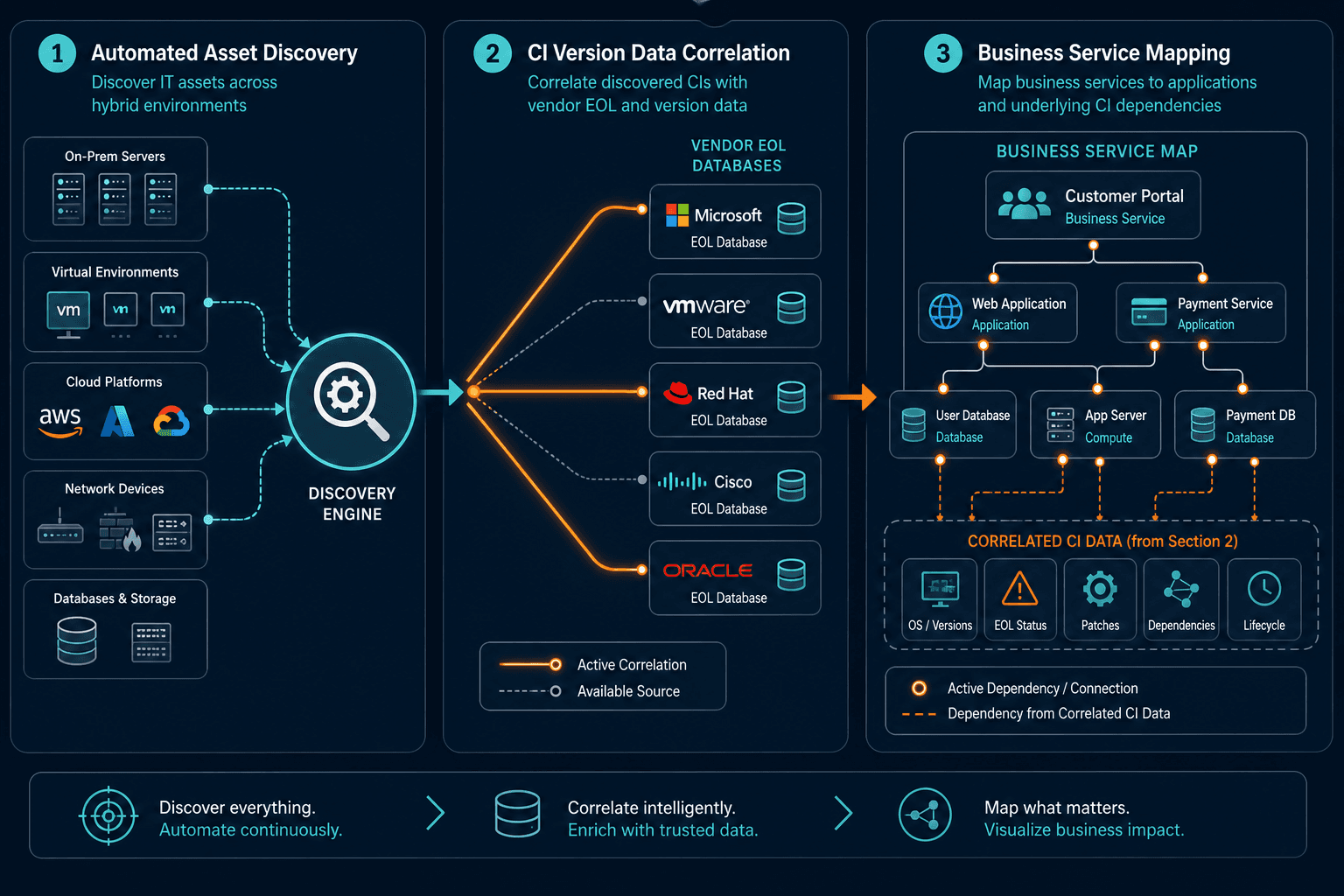
Knowing that an operating system or server model is EOL only tells half the story. Infrastructure leaders still need to know which business applications depend on that specific asset before they can prioritize remediation with any confidence.
Pairing continuous asset discovery with service dependency mapping closes that gap:
- Automated version discovery: Discovery engines collect exact OS build numbers, firmware revisions, database patch levels, and hardware model IDs directly from the live environment, not from a manually maintained sheet.
- Lifecycle database correlation: Asset version attributes get checked against vendor lifecycle databases to calculate remaining support days for every CI.
- Service impact mapping: Dependency data links individual CIs up to the business services that actually run on top of them.
- Blast radius assessment: IT teams can see which critical business processes are at risk if a specific EOL component fails or gets compromised.
- Prioritized remediation: Upgrade budgets go first to unsupported assets that sit underneath mission-critical business applications, not whichever ticket was filed first.
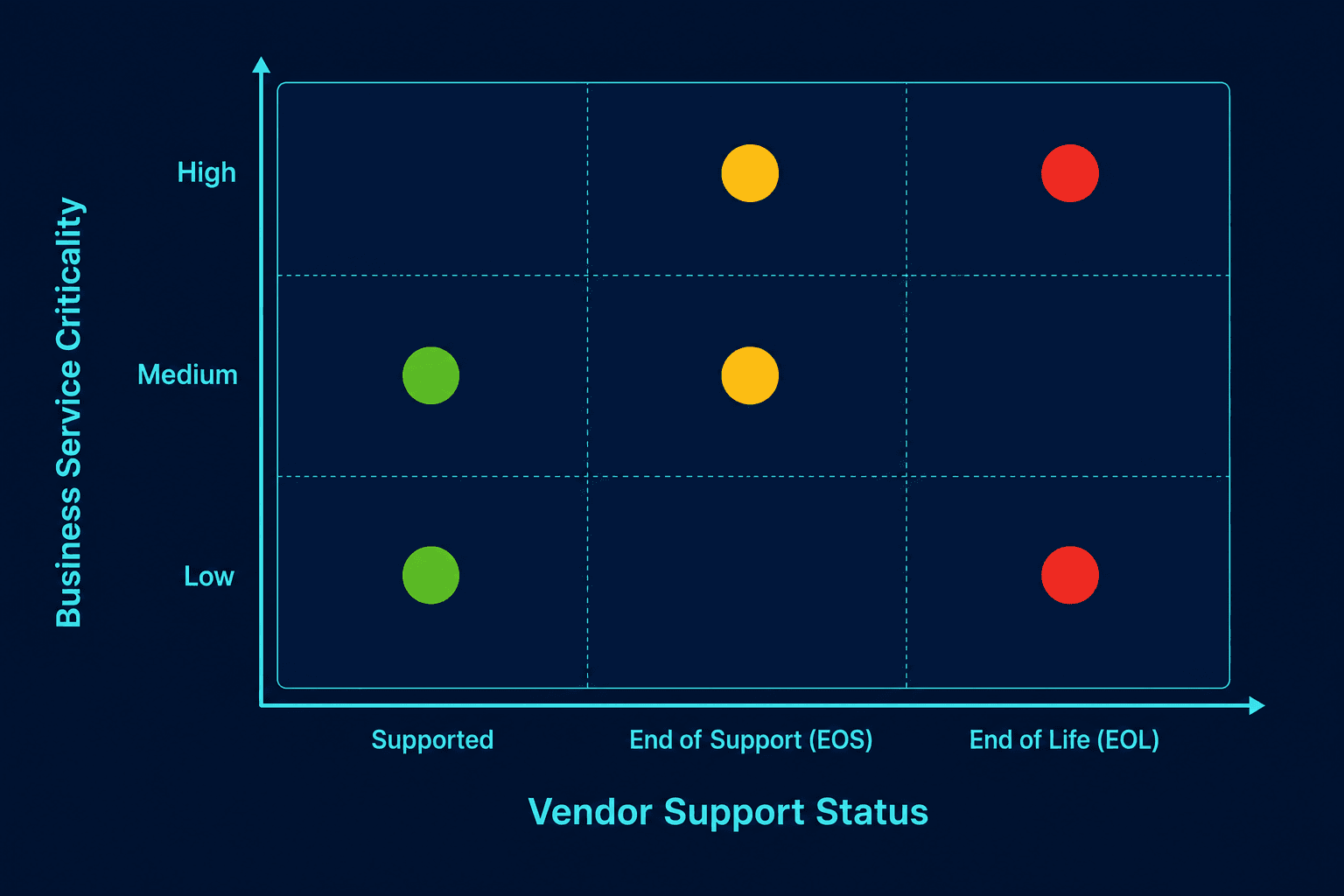
That prioritization matters because the risk is not evenly distributed. EOL and EOS systems accumulate more unpatched, disclosed vulnerabilities the longer they stay in service, so an unsupported asset sitting behind a revenue-generating application carries far more exposure than an identical one running an internal test workload. Mapping which services sit behind each unsupported asset turns a flat inventory into a ranked, fundable remediation list instead of an undifferentiated backlog.
Virima’s ViVID™ service maps turn that correlation into a visual view IT teams can act on directly, and IT teams looking to close visibility gaps can explore Virima’s trusted runtime truth approach to link lifecycle data straight into those maps. Virima’s own comparison of CMDB asset management and ITAM covers where lifecycle tracking responsibilities split between the two disciplines in more detail.
Core criteria for EOL exposure governance
Building an effective EOL governance model means tracking a consistent set of technical attributes across both hardware and software lifecycles — including End of Service Life (EOSL), the point at which a vendor stops all support obligations entirely — not only the attributes that are easiest to pull from a vendor portal.
| Lifecycle Dimension | Software EOL Management | Hardware EOS Management | Integrated Risk Governance |
|---|---|---|---|
| Primary Data Source | Vendor release notes, API feeds | OEM end-of-service notifications | Automated CMDB discovery correlation |
| Critical Milestones | End of General Support, End of Extended Support | End of Life, End of Service Life (EOSL) | Target retirement date, grace period thresholds |
| Security Impact | Unpatched OS and application CVEs | Unsupported firmware vulnerabilities | Blast radius calculation via service maps |
| Remediation Path | Version upgrades, platform migration | Hardware refresh, cloud migration | Budget allocation based on service tier |
Balancing these factors is what lets IT organizations allocate capital effectively. Replacing an isolated EOL test server reduces less risk than replacing an unsupported core database sitting behind a customer-facing application, even though both show up identically on a raw asset count.
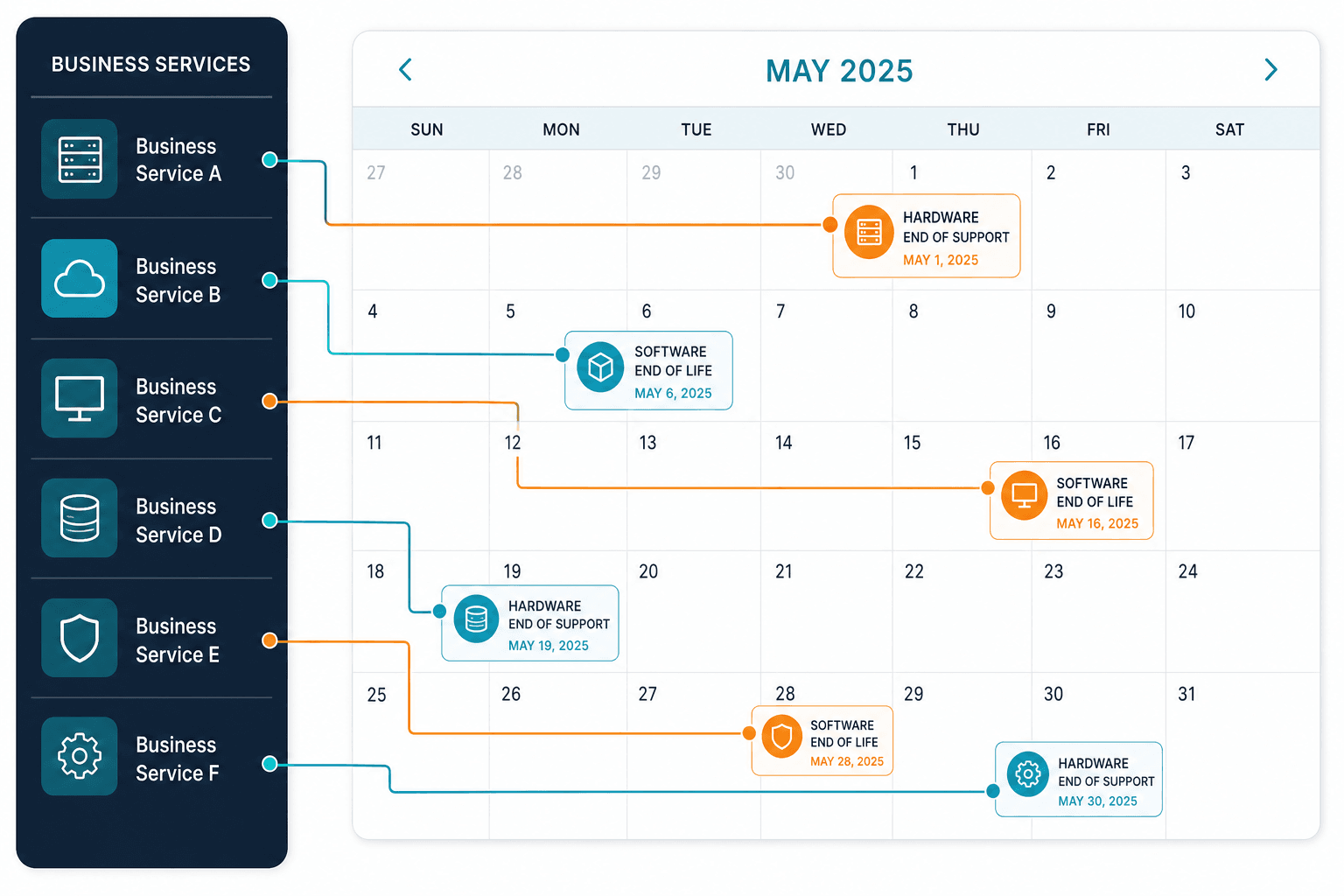
Grouping dependent infrastructure components into a visual topology prevents the kind of surprise outage that shows up during a legacy hardware retirement nobody realized was load-bearing.
Why is dependency mapping critical for software EOL management?
Dependency mapping connects software CIs to the business applications above them and the database dependencies below them. Understanding those connections helps IT teams weigh service impact and plan legacy software migrations without disrupting business operations.
Best practices for proactive EOL tech debt elimination
Managing EOL exposure well means embedding lifecycle tracking into routine IT governance, not treating it as a once-a-year cleanup project.
1. Automate multi-cloud and on-premises discovery
Manual asset inventories cannot keep pace with how fast modern environments change. Automated discovery engines capture configuration details across physical servers, hypervisors, public cloud tenants, and container clusters, so version changes get picked up as they happen instead of at the next scheduled audit.
2. Establish centralized lifecycle attribute tracking
Standardized EOL, EOS, and EOSL dates belong inside CMDB records, not scattered across procurement spreadsheets and vendor emails. Centralizing that metadata means asset managers, security analysts, and procurement teams are all working from the same numbers.
3. Integrate EOL data into change management workflows
Lifecycle risk checks belong in formal change advisory board evaluations. Change managers should ask whether a proposed modification quietly extends the life of an already-unsupported asset or introduces a new EOL risk that was not there before.
4. Connect CMDB data to ITSM platforms
Bi-directional sync helps incident responders spot when an outage traces back to aging EOL hardware instead of a code defect. That matters at the point of triage: teams that can see related CIs and lifecycle status the moment an incident opens resolve it without a separate detour to check a spreadsheet first. Native integration with ITSM platforms including ServiceNow, Jira Service Management, Ivanti, HaloITSM, Xurrent, and Hornbill keeps that lifecycle context inside the tools teams already use, alongside existing workflows rather than replacing them.
5. Align upgrade budgets with business service risk
Service dependency maps make it possible to present a clear, risk-adjusted business case to financial executives. Showing how hardware end-of-support risk threatens a specific revenue-generating service secures procurement funding faster than a raw count of aging assets ever will. Virima’s guide to CMDB capabilities ITSM teams need covers what that CMDB foundation needs to look like before this kind of prioritization is possible at all.
How does CMDB integration improve EOL tech debt management?
CMDB integration links asset lifecycle dates directly to incident and change records. Linking EOL metadata to CI profiles helps IT teams track recurring legacy issues, so they can prioritize hardware refreshes based on operational risk instead of asset age alone.
Ready to see where your own EOL exposure sits against business risk? Download the CMDB Alone Is Not AI Governance to map hardware and software lifecycle data against service criticality in your own environment.