SOC 2 Readiness for a 200-Person Company: How an Asset Inventory Supports Evidence

A missing production server can undermine an otherwise organized security review. The access review may look complete, while a separate cloud account holds systems outside the list. A 200-person company can face that gap when IT, security, and engineering maintain separate records.
A SOC 2 asset inventory helps establish which systems support the service being examined. The team can compare that population with access, change, and monitoring evidence. The inventory also gives reviewers a way to investigate gaps before they select samples.
A System and Organization Controls 2 (SOC 2) examination evaluates controls for a defined system and applicable Trust Services Criteria. The AICPA SOC services overview describes the assurance reports available for service organizations. Agree on the system boundary, report type, and evidence expectations with the independent auditor. The inventory supports that work alongside other control records.
Agree on the system boundary before collecting evidence
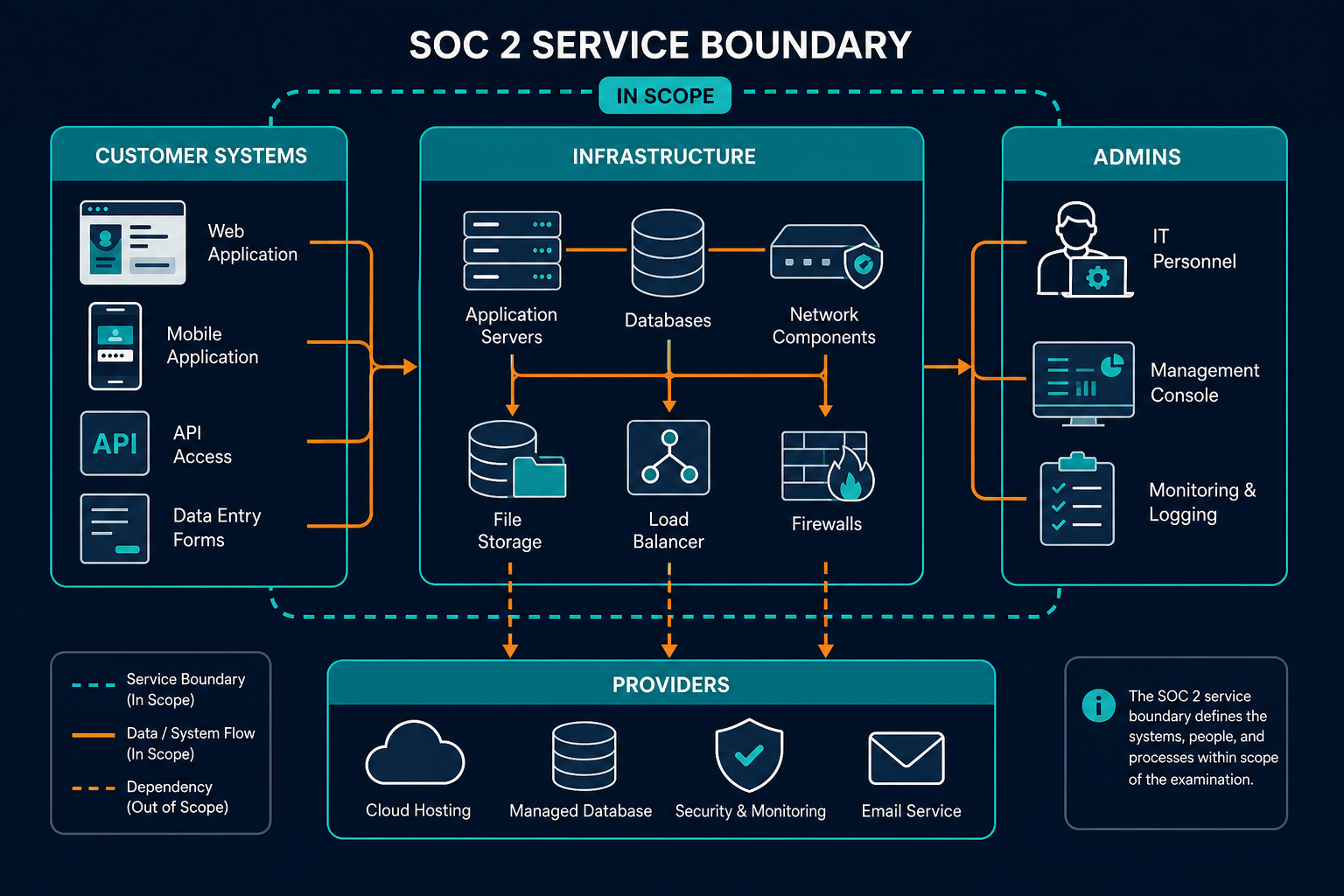
Begin with the service described in the planned examination. Ask the service owner to identify the applications, infrastructure, locations, and providers that support it. Document how customer information enters the service and where it is processed or stored.
The boundary may include production cloud workloads, administrative endpoints, and supporting services. It may also include development or staging systems when their access or connections affect the service.
Create an initial scope register with the service name, system owner, environment, and relevant provider. Record whether each component is included, excluded, or awaiting a decision. Include the reason and the person who approved each boundary decision.
A supplier’s system may support the service even when the company cannot inspect its assets directly. Record the supplier relationship and the available assurance material. Discuss subservice organization treatment and any customer responsibilities with the auditor before finalizing the system description.
A company of this size may have one person responsible for several functions. Assign an executive sponsor, a coordinator, and a named technical owner for each major system. One person can hold multiple roles when the engagement’s independence requirements permit it.
Does every company device belong in a SOC 2 system boundary?
A SOC 2 system boundary depends on the service, commitments, and control design being examined. Devices that administer or access an in-scope service may require review even when they sit outside production infrastructure. Document inclusion decisions with system owners and confirm the proposed boundary with the auditor.
Build a SOC 2 asset inventory that can support sampling
Start with the asset classes that support the agreed service boundary. Depending on the environment, those may include physical servers, virtual machines, network devices, cloud workloads, and administrator endpoints. Include software and service records where they are relevant to the control population.
Collect available records from discovery, endpoint management, cloud consoles, procurement, and existing asset registers. Each source represents a different view of the estate. Record its coverage and collection date before using it to determine whether a system belongs in scope.
For each asset, record enough detail to identify it and route questions to an owner:
- A verified serial number or source-scoped cloud instance ID.
- Asset type, operating environment, and lifecycle status.
- System or service supported by the asset.
- Technical owner and business owner where available.
- Source of the record and last successful observation.
- Scope decision, review date, and open exception.
Use serial numbers or cloud instance IDs for reconciliation where available. Hostnames and IP addresses provide useful context, but they can change or be reused. Keep source scope with cloud identifiers so records from different accounts are not joined incorrectly.
Avoid filling unknown fields with assumed values. A server without a confirmed owner should remain visible as an exception. Assign someone to investigate its purpose, operating state, and relationship to the service. One published discovery run found 12% of 4,200 devices had no assigned owner at audit time, a gap large enough to change how an auditor samples the population.
Explore Trusted Runtime Truth to see how discovery-sourced records provide context about what exists, how it connects, what changed, what could break, and who owns it. That context can help a team investigate the population behind an evidence request. A continuously updated CMDB gives the inventory a single place to reconcile those details instead of rebuilding the view from scratch for each engagement.
Reconcile source differences before freezing a population
Compare the cloud account list with the workloads returned by discovery. Then compare the endpoint management list with the assets assigned to administrators. A mismatch could indicate an unregistered device, a collection gap, or a stale record.
Investigate each mismatch before changing its status. A device absent from one scan may be offline, inaccessible, or outside the configured scope. Record the attempted collection method and the next action rather than marking it retired.
Keep the agreed population and its collection date alongside the scope register. When an auditor requests a sample, the team can explain where the population came from. The reviewer can also see unresolved gaps instead of assuming the list covers every system.
What happens if an asset has no confirmed owner?
An unowned asset should remain in the System and Organization Controls 2 (SOC 2) scope review until its purpose and access are understood. Assign an investigation owner and preserve the source record. The reviewer can then decide whether the asset belongs in the examination population or requires an approved exclusion.
Connect inventory records to control evidence
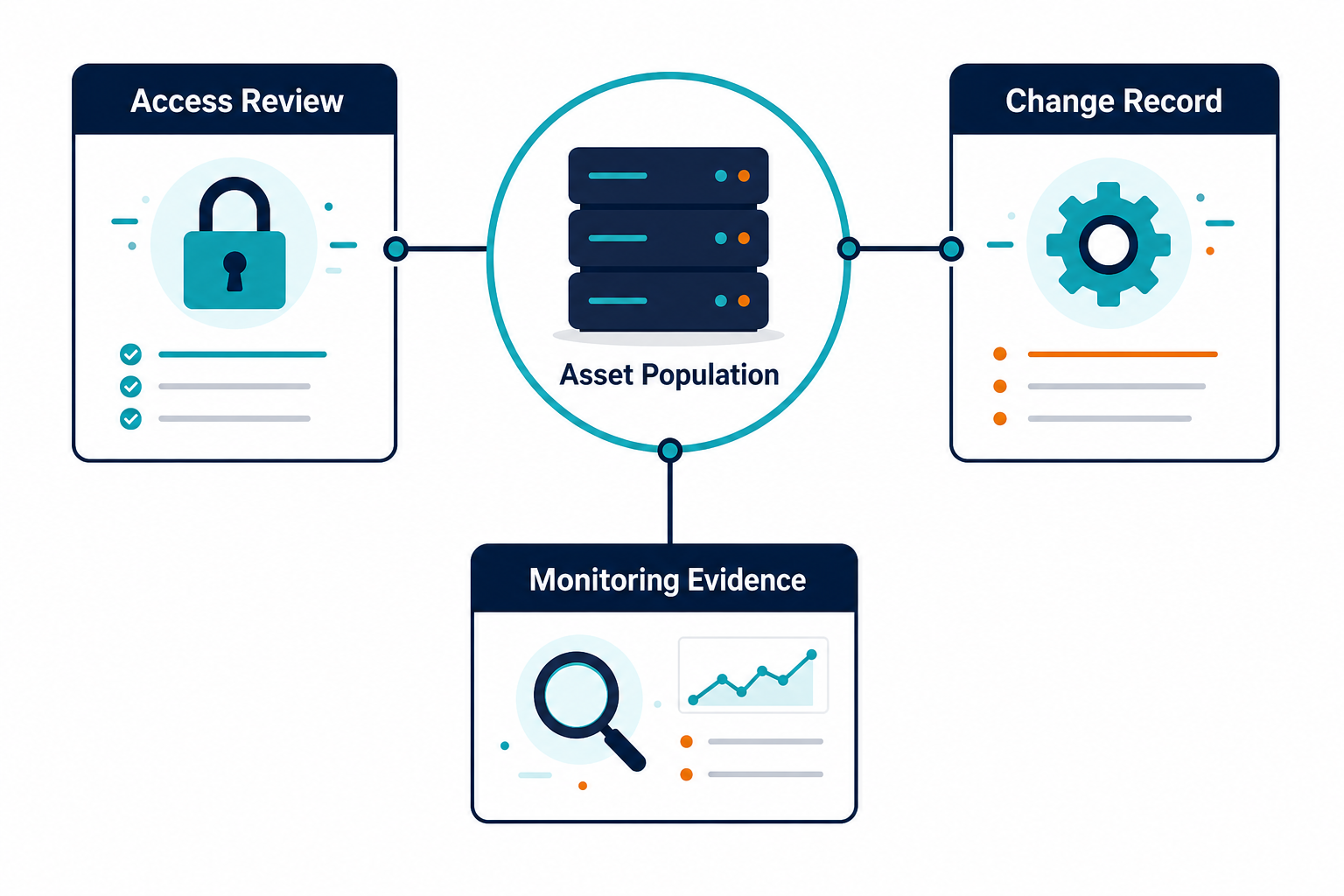
An inventory provides a population for SOC 2 evidence collection, but it doesn’t by itself prove a control operated — other systems record that. The compliance coordinator should map each control to its responsible owner, population, evidence source, and review period. A 2026 benchmark from Lazarus Alliance found that 71% of 75 SOC 2 examinations surveyed had at least one exception. Most often, the evidence population and the control records it was supposed to connect to did not agree.
Access reviews
Identify the systems and administrative interfaces included in the access control. Then compare the inventory with the identity provider, application access lists, and privileged account records, and investigate any systems that appear in the inventory but have no corresponding access review.
For each review, retain the population examined, the review date, the owner’s decisions, and follow-up actions. An asset record can identify the system under review. It cannot establish that an access decision was completed.
Change management
Use the service and infrastructure records to identify production components covered by the change process. Compare those components with the systems represented in change tickets and deployment records. Ask the system owner to investigate untracked components or disputed ownership.
For a selected change, the auditor may request the approval, implementation record, testing evidence, and any required follow-up. The exact sample and evidence will depend on the control design and examination. A configuration record gives the team a way to relate the change to the affected system.
Monitoring and system operations
Compare the in-scope infrastructure population with the systems covered by the monitoring and security tools. Document assets that lack coverage, along with the reason and an owner. A system may be excluded for a valid reason, but the decision should be recorded and approved.
Retain the monitoring configuration and relevant investigation records in their source systems. An inventory listing a server does not confirm that its alerts were configured or investigated. The security owner should provide the operating evidence for the control being examined.
Preserve evidence across the examination period
A Type I report addresses a point in time, including the suitability of control design. A Type II report also addresses operating effectiveness over a specified period. Confirm the report type, period, and evidence expectations with the auditor before collecting records.
For a Type II engagement, a final inventory export alone cannot explain earlier changes. An annual control, such as a yearly asset review, may need only one dated snapshot inside the examination window; a monthly or continuous control needs evidence from every period, not just the most recent one. Preserve dated snapshots or reports as agreed with the auditor. Keep records of assets entering scope, owner changes, and approved retirements during the examination period. In the same Lazarus Alliance report, 88% of the examinations reviewed needed at least one added round of evidence. The gaps were often tied to details a single end-of-period export could not resolve.
Record the date of each discovery cycle and any known collection failures. Compare changes with provisioning, change, and retirement records. An asset observed for the first time should trigger an investigation into when it entered the environment and whether it belonged in scope earlier.
Consider a production workload removed during the examination period. The last inventory may no longer show it as active. Preserve its identifier, owner, dates, and retirement decision so the team can trace relevant controls during the time it was in scope.
Protect evidence exports against unauthorized changes under the organization’s policies. Record the source, export date, responsible owner, and storage location. Follow the retention period agreed for the engagement and any applicable contractual requirements.
Can one inventory snapshot support a Type II SOC 2 examination?
One snapshot can show a System and Organization Controls 2 (SOC 2) population at a particular time. A Type II engagement also examines control operation over a period. Discuss dated records, changes to the population, and supporting control evidence with the auditor before relying on a single export.
Give a lean team a workable review process
The compliance coordinator can maintain the evidence calendar and follow up on missing records. The infrastructure owner confirms server and cloud populations. Endpoint and identity owners provide their own source records. Security reviews the coverage and escalates control exceptions. SOC 2 audit readiness depends on named ownership, not department size: when the company has no dedicated compliance team, these roles still need a named owner each, even if one person holds more than one of them.
Agree on a review cadence appropriate to the controls and engagement, and confirm it with the auditor and control owners rather than adopting a universal timetable.
Use an exception queue to track issues that could affect the evidence population:
- Missing source coverage: Identify the account, network, or device group that was not assessed.
- Conflicting identity: Compare serial numbers or instance IDs before merging records.
- Unknown owner: Assign an investigator and document the decision.
- Unmatched control coverage: Ask the control owner why the asset is absent from the relevant tool.
- Unverified retirement: Retain the record until the owner confirms the lifecycle decision.
- Overdue evidence: Record the responsible person, due date, and escalation path.
Review unresolved exceptions with the executive sponsor. The sponsor can assign resources or approve an appropriate response within their authority. The auditor may still request details about the exception and its handling.
A small number of well-defined responsibilities makes evidence easier to retrieve, as long as each owner has a documented backup so an absence doesn’t leave a gap.
Use Virima to organize the infrastructure record
Virima supports scheduled discovery across supported physical, virtual, and cloud infrastructure. It maintains asset and configuration item records in its configuration management database (CMDB). Teams can review available ownership, lifecycle, and relationship data alongside the discovered records.
A discovery-sourced inventory can help the IT owner compare the declared population with the systems found in configured scopes. Exported records can support an evidence package when they include the fields and dates the team needs. Coverage depends on access, discovery configuration, and the sources available in the environment. Teams managing both hardware and software populations for this kind of review can also use Virima’s ITAM capabilities to keep lifecycle and ownership detail attached to the same record.
Explore how Virima Business Pro can help your team organize asset records for SOC 2 evidence reviews. Compare the available options on the Virima pricing page.
When the team supplies service definitions, Virima’s ViVID™ can build dependency maps from those inputs. The available relationships can help owners discuss which infrastructure supports an in-scope service. The service owner and auditor still determine the examination boundary.
Access approvals, change tickets, monitoring results, and other control records remain important evidence sources. Connect each request to the responsible owner and the appropriate system. Review any gaps between those records and the asset population before handing the package to the auditor.
Prepare an evidence package for the auditor
Start with the agreed system description and a dated SOC 2 asset inventory population. Include the scope decisions, source coverage, and unresolved exceptions. Then provide the separate records requested for access, changes, monitoring, and other controls.
Ask a reviewer outside the collection task to trace a sample from an inventory record to its supporting evidence. Check that identifiers, dates, and owners match. If the source systems disagree, document the investigation and keep the original evidence available.
SOC 2 evidence reconciliation checklist landing page — download the same exception-queue categories used in this guide, formatted to track missing coverage, conflicting identities, and unowned assets before your auditor samples the population.
Frequently Asked Questions
Does a 200-person company need an asset inventory for SOC 2?
An inventory can help identify systems within the agreed SOC 2 boundary and support control populations. The required evidence depends on the service, control design, and examination. Confirm the population and supporting records with the auditor.
Is an asset inventory enough to pass a SOC 2 examination?
An asset inventory supports the identification of systems in scope. The examination also considers the relevant controls and their supporting evidence. Access reviews, change records, monitoring records, and other artifacts may be needed for the controls examined.
How should teams handle assets missing from a security report?
Assign the mismatch to the relevant infrastructure or security owner. Check the asset identifier, the report’s coverage, and the collection dates. Record any approved exception and retain the investigation evidence for the auditor.
How can Virima support SOC 2 readiness?
Virima supports scheduled infrastructure discovery and maintains asset and configuration records. Teams can use those records to investigate the population associated with their service. Control owners and the auditor determine the additional evidence required for the examination.
Can Virima show which assets support a service?
Virima’s ViVID™ can build dependency maps after the team supplies service definitions. The resulting view depends on the provided definitions and available infrastructure relationships. Owners should confirm whether those assets fall inside the agreed examination boundary.