Discovery Found That 12% of Devices Had No Owner Assigned. Here’s What That Means at Audit Time.

Unowned IT assets are CMDB records with no assigned individual, team, or business unit in the ownership fields — a data quality gap that becomes four separate compliance problems depending on which audit framework is in scope. SOC 2 auditors require a named owner to certify access reviews. PCI DSS auditors require an owner to confirm cardholder data environment scope. Change management processes require an owner to authorize configuration changes. Incident response teams require an owner to route alerts. In environments relying on manual CMDB maintenance, discovery scans routinely surface unowned rates of 10–15 percent of the total asset count.
We ran IT discovery across a 4,200-device environment for a mid-market financial services firm three weeks before their annual SOC 2 audit. The CMDB had owner fields, but after the discovery scan reconciled its output against the existing records, 504 devices had no owner assigned. That is 12 percent of the network. Not decommissioned devices. Not ghost assets. Active, managed devices sitting in the CMDB with no person, team, or business unit listed as the responsible owner.
Each audit framework hits a different gap, and each requires a different answer. This article maps what “no owner” means across four scenarios, then walks through the four-step ownership assignment workflow that reduced the unowned count from 504 to 17 in six weeks.
Before reviewing the scenarios: see how Virima builds building Trusted Runtime Truth from discovery data from discovery data, including the ownership and accountability layer that turns a raw asset list into a governable inventory.
What “no owner” actually means in the CMDB
“Owner” in a CMDB context means different things to different teams. For this exercise, we used a single working definition: the owner is the individual or team with the authority to make decisions about the device, authorize access changes, approve configuration changes, accept a patch deployment, or be contacted in an incident.
In the 4,200-device environment, 504 devices had no entry in any of the three owner-equivalent fields: CI Owner, Business Owner, and Technical Owner. The gap was not distributed randomly. The highest concentration of unowned assets appeared in three areas: legacy infrastructure running for several years without a formal owner review, devices acquired through departmental refresh cycles that had not completed CMDB onboarding, and a set of 87 devices whose assigned owners had left the organization and whose CI records had never been reassigned.
Discovery surfaced the unowned count by cross-referencing CI records against active directory, HR system data, and scan results. Assets that appeared on the network but had no live user or team mapped to their owner fields were flagged immediately.
The four audit scenarios and what “no owner” means in each
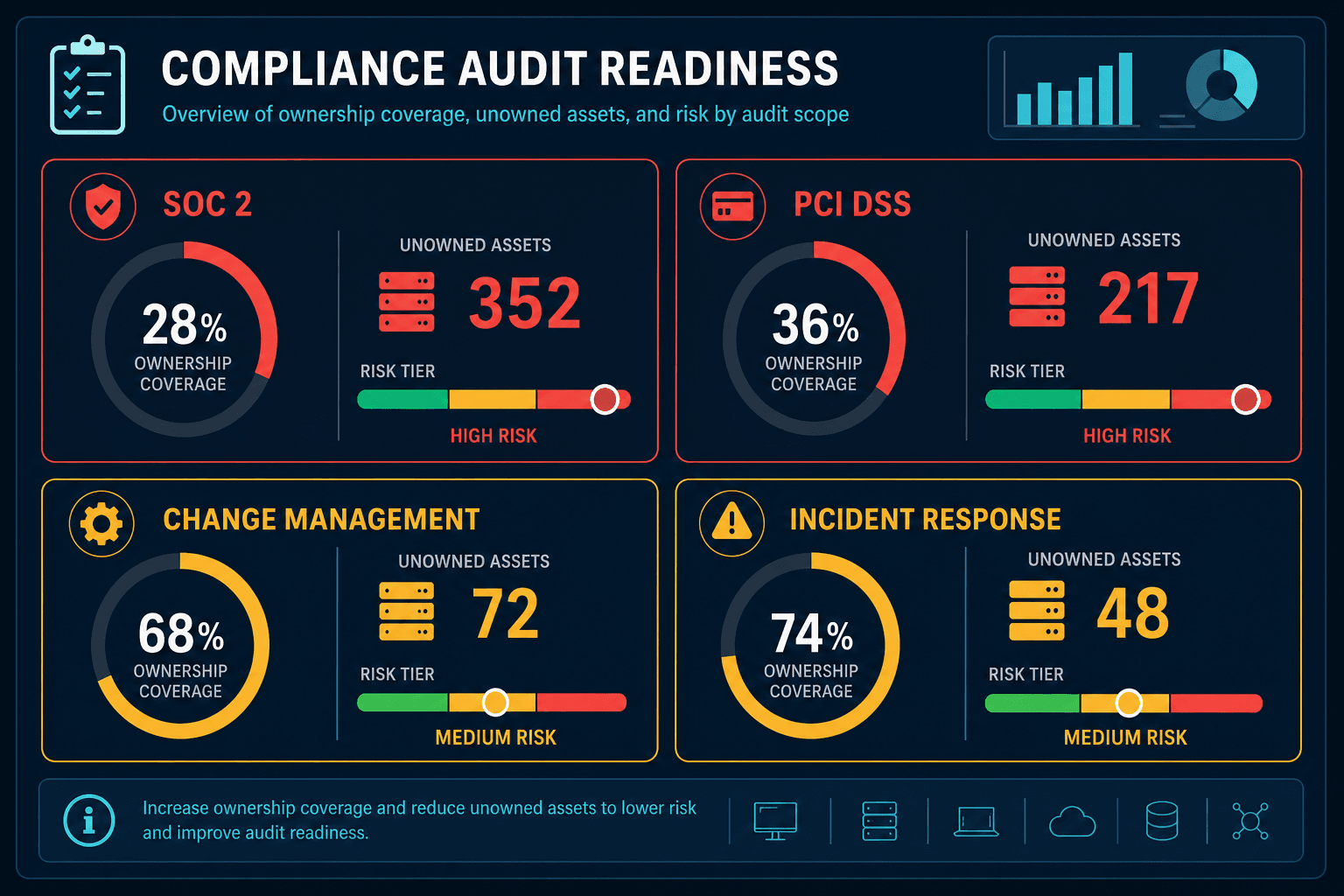
| Audit type | Control at risk | What “no owner” blocks | Severity |
|---|---|---|---|
| SOC 2 | CC6 — logical and physical access controls | Access review certification | High — direct control deficiency finding |
| PCI DSS | Req 12.5.1 — system component inventory | Cardholder data scope determination | High — expands audit surface if device defaults to in-scope |
| Change management | Change approval authority | Authorized configuration changes | Medium — historical changes require retroactive documentation |
| Incident response | Alert routing and triage | Timely escalation to accountable team | Medium — delays compound across hundreds of alerts |
SOC 2 — Who is responsible for access review?
SOC 2 Type II audits evaluate whether the organization performs periodic access reviews on systems in scope for the Trust Service Criteria. Access reviews require someone with authority over each system to confirm current user access is appropriate.
For the 504 unowned assets, the access review question had no answer. There was no named individual with the authority to certify access for those devices. The SOC 2 auditor’s follow-up question was not whether access reviews were performed. It was whether the organization could demonstrate that someone was responsible for performing them.
Audit Insight: What is the SOC 2 audit risk of unowned IT assets?
SOC 2 Trust Service Criteria CC6 (AICPA CC6.1 — logical and physical access controls) requires that access to systems is authorized and periodically reviewed by individuals with designated authority. Unowned IT assets have no such individual. When a material percentage of in-scope systems carry no CMDB owner, an auditor will identify this as a control deficiency and require a documented remediation plan with retroactive access review evidence for each newly assigned system.
The response for SOC 2 compliance is not just assigning an owner. It is documenting the ownership assignment as a control activity, so there is an audit trail showing when the owner was assigned and who made the decision. This turns a remediation task into an auditable control.
PCI DSS — Is this device in cardholder data scope?
PCI DSS v4.0 requires an accurate inventory of all system components in the cardholder data environment. That includes any system that can connect to the CDE, not just systems inside it. Auditors explicitly checkpoint scope determination.
The specific PCI DSS problem is scope determination. If a device has no owner, there is no responsible party to answer whether it falls inside or outside CDE scope. The auditor’s question — “is this device in scope for PCI DSS?” — requires someone with knowledge of the device’s function and network position to answer it.
Of the 504 unowned devices, 63 were on network segments that had connectivity to systems in the CDE. Their scope status was indeterminate because no one with knowledge of their function could assert whether they fell inside or outside cardholder data environment scope.
Audit Insight: How do unowned IT assets affect PCI DSS scope determination?
PCI DSS v4.0 Requirement 12.5.1 requires an accurate inventory of all system components in or connected to the cardholder data environment. When devices have no assigned owner, scope determination — the process of confirming whether a device falls inside or outside CDE scope — has no responsible party. Unowned devices on segments with CDE connectivity default to “potentially in scope” under a conservative interpretation, which expands the audit surface and increases the remediation work required before the assessment can close.
IT Asset Management records that include owner, network segment, and data handling classification are the foundation of defensible PCI DSS scope determination. Without ownership data, scope is a guess.
Change Management — Who approves changes to an unowned asset?
The change management scenario is operationally the most immediate. When a change request touches an unowned device — a patch deployment, a configuration update, a network segment migration — the change management process requires a change authority. For standard changes on managed assets, that authority is the technical owner. For unowned assets, there is no change authority.
In practice, changes to unowned assets had been approved by a default “IT Operations” queue, meaning the change management board was approving changes to devices with no verified owner input on the business impact. The blast radius assessment for those devices was also incomplete. Without an owner, the service dependency context that would normally accompany a change request had never been built.
The approval authority gap is only part of the risk. The harder problem is the accumulated changes to those devices that went through without proper authorization — which the audit may now need to account for retroactively.
Audit Insight: What is the change management risk of unowned IT assets?
Change management processes require a named authority to approve changes to any system. When IT assets have no CMDB owner, changes to those devices pass through default approval queues with no input from a party who understands the device’s function, dependencies, or business impact. Over time, these unauthorized approvals accumulate into an audit trail that shows changes were made without verified authority — a finding that requires retroactive documentation before a change management audit can close.
Incident Response — Who gets paged when an unowned device generates an alert?
The fourth scenario is incident response. When an unowned device generates a security alert, triggers an anomaly detection rule, or becomes the source of an incident, the ITSM platform needs a contact. If the CI has no owner, the alert either routes to a default queue where it sits until someone investigates, or triggers an escalation path that should not be necessary for a routine device alert.
Audit Insight: Why do unowned IT assets slow down incident response?
Incident response depends on routing alerts to the team accountable for the affected device. Without a CMDB owner, alerts go to a default queue and wait for investigation. In environments with hundreds of unowned devices, median alert response time on unowned assets can run 6x longer than on owned assets — 4.2 hours versus 38 minutes — creating a backlog that masks real security events behind administrative noise.
In this environment, 22 of the 504 unowned devices had generated security alerts in the 30 days before the discovery scan. All 22 had routed to the default IT queue. Median response time for alerts on unowned devices was 4.2 hours, compared to 38 minutes for alerts on devices with assigned owners. That 6.6x difference in response time compounds across hundreds of incidents.
The four-step ownership assignment workflow
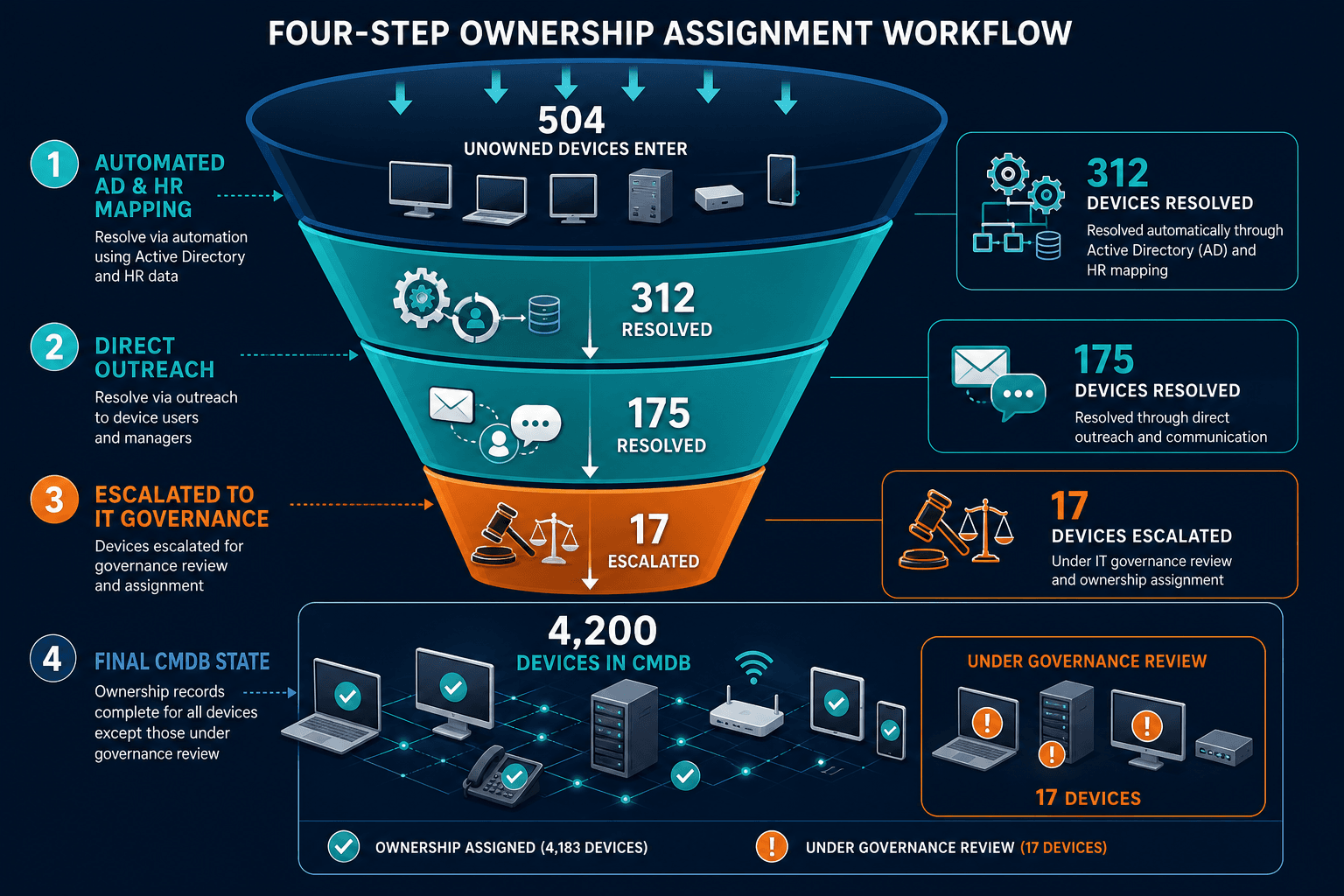
Reducing the unowned count from 504 to 17 in six weeks required a structured process, not a sprint. The workflow had four steps:
Step 1 — Classify by discovery data
For each of the 504 unowned devices, the discovery scan had returned: device type, operating system, network segment, installed software, and last-seen timestamp. That data was enough to generate a provisional classification and a probable business unit assignment based on network segment and software profile.
Virima’s agentless discovery returns this classification data automatically for every device on the network — no agent installation required, no manual scan setup per subnet. Device type, OS, network segment, and software profile are available as structured CI attributes in the CMDB immediately after the scan completes, ready for the active directory cross-reference in Step 2.
That automated classification reduced manual review work in later steps by providing a data-backed starting hypothesis.
Step 2 — Map to active directory and HR
The next step was cross-referencing the device list against active directory groups and HR department data to identify the most likely owning team for each device based on network access patterns and organizational unit membership. This step resolved ownership for 312 of the 504 devices without requiring manual outreach. The discovery data itself acted as a bridge between the CMDB and existing directory sources.
Step 3 — Direct outreach for the remaining 192
For devices where the automated mapping was ambiguous, the team sent a structured ownership confirmation request to the probable owning team. Response rate was 91 percent within five business days. This human-in-the-loop step caught edge cases that pure automated matching would have missed — shadow IT, shared devices, and cross-functional assets.
Step 4 — Escalate the residual 17 to IT Governance
After three steps, 17 devices remained unresolved. These were devices with no clear organizational unit mapping, no active directory association, and no response from any outreach. They were escalated to the IT governance team for a disposition decision: confirm ownership, schedule decommissioning, or quarantine from network access pending investigation.
See how CMDB with ownership as a first-class attribute prevents this gap from accumulating in the first place. ITOM governance with automated discovery tools that include ownership as a required field for all CI records enforce that standard at the point of provisioning rather than during audit remediation.
What the audit record showed
Six weeks after the discovery scan, the SOC 2 audit proceeded with 4,183 devices carrying a documented owner, a documented ownership assignment date, and a discovery-sourced record that could be traced back to the scan that produced it. The auditor received the 17 remaining unowned devices, each with a documented disposition plan and escalation record.
The auditor’s observation: the ownership gap was a finding, but the documented remediation workflow — the four steps, the timeline, the 504-to-17 reduction, and the active governance review for the residual 17 — was accepted as a satisfactory management response. The audit closed without a qualified opinion on the access review control.
Unowned IT assets create a different gap in every audit type. The common thread is that all four scenarios — SOC 2 access review, PCI DSS scope determination, change management authority, and incident response routing — require the same input: a named person or team with the authority and context to make decisions about the device. Discovery finds the gap. Discovery-sourced ownership data is the foundation of a Trusted Runtime Truth layer that audit systems can rely on. Without it, ownership is a guess the next auditor will surface.
Frequently Asked Questions
What is an unowned IT asset in the context of a CMDB?
An unowned IT asset is a CI record in the CMDB with no assigned individual or team in the ownership fields. In functional terms, it is a device for which no one has the authority to approve changes, certify access, determine audit scope, or receive incident alerts. Unowned IT assets are not necessarily unmanaged. They may receive patches and monitoring. But they have no accountable party in the governance record.
How does a large number of unowned IT assets affect a SOC 2 audit?
SOC 2 Trust Service Criteria CC6 requires that access to systems is authorized and periodically reviewed by individuals with appropriate authority. When a material number of in-scope systems have no assigned owner, the access review process has no responsible party for those systems. An auditor will identify this as a control deficiency. The remediation expected is documented ownership assignment with a retroactive access review for each newly owned system.
Is 12% a typical rate of unowned assets in a mid-market environment?
A 10–15% unowned rate is consistent with environments that have grown through organic provisioning without a formal CI ownership enforcement policy. The rate tends to be higher in environments that have undergone acquisitions, in environments where staff turnover has not triggered CI owner reassignment workflows, and in environments that rely on manual CMDB maintenance rather than discovery-sourced updates. Environments running high-frequency discovery with automated owner mapping typically see unowned rates below three percent.
How does Virima help assign owners to unowned IT assets?
Virima’s discovery output includes network segment data, active directory association, installed software profiles, and last-active timestamps for each discovered device. Cross-referencing that data against HR and active directory records allows the ownership assignment process to resolve the majority of unowned assets programmatically, without manual outreach for every device. The workflow described in this article reduced 504 unowned assets to 17 in six weeks using this approach.
Does Virima’s discovery output include enough data to automate CMDB ownership assignment?
Yes. Virima’s discovery returns network segment, active directory group membership, installed software profile, and last-active timestamp for each discovered device. Cross-referencing those fields against HR and active directory records allows the ownership assignment process to resolve the majority of unowned assets programmatically — without manual outreach for every CI. In the environment described in this article, automated matching resolved 312 of 504 unowned devices before any direct outreach was required.
See how many unowned assets Virima discovery would find in your environment — and how fast the ownership workflow closes the gap. Schedule a demo to run a discovery scan against a sample of your infrastructure before your next audit cycle.